Introduction
Welcome to ThrillTech's technology and integration documentation!
This document is structured as a searchable online book and aims to provide you, our partner, with all the technical information you need to build successful integrations, understand our platform and most importantly, have a readily available reference in the future.
To search from anywhere within the documentation, press s and enter your search term in the search box.
ThrillPots
Welcome to the ThrillPots Integration Guide!
To help you navigate documentation, we have divided the information by releases.
Current Integration/Beta
This section contains the current beta releases of the ThrillPots platform and is updated quite frequently. This allows you to stay up to date with upcoming changes that will be appearing in future final (stable) releases of the ThrillPots platform.
Stable Releases
This section contains the current and historical final releases of the ThrillPots platform. We maintain the historical documentation for reference purposes and to provide you with as much transparency on changes as and when they occurred.
ThrillPots Overview
Welcome to the ThrillPots Integration Guide.
ThrillPots is an advanced standalone Jackpot Platform that allows casinos to offer their players jackpots over "everything". Be it offering a sitewide jackpot across games from various providers, to a seasonal Raffle jackpot for the 12 days of Christmas or even a Bad Beat jackpot for your poker players, ThrillPots can do it all (and more).
The goal of this guide is to make integrating with ThrillPots as painless as possible by providing you, the technical reader, with all the information you need and taking you step by step through a standard integration process.
ThrillPots Release Notes
| Release Name | Release Month | Release State |
|---|---|---|
| ANTICIPATION | January 2026 | Final |
IMPORTANT: As with most of our releases, the intent is that all packages are deployed to their latest versions (stipulated in Docker Images).
General
This release is not mandatory
POTENTIALLY BREAKING CHANGES
- ThrillPots Gateway service now only sends JackpotUpdate events when the ticker values have changed.
- ThrillConnect service now only sends JackpotUpdate events when the ticker values have changed.
- New env vars:
TCS_OPTIMIZED_TICKER_UPDATES, default: true; Enables optimized jackpot update eventsTCS_WEB_MAX_BODY_BYTES, default 102400; Controls the maximum body size for http requests
- New indexes on
thrillpots.log_contributions- for clients with high volumes we recommend creating the indexes prior to the upgrade. Instructions here
INFRA + DATABASE CHANGES
-
Removed unused indexes on the
thrillgate.player_bonusescollection:instance_id- [
player_id,instance_id]
-
Added extra indexes on
thrillpots.log_contributionscollection:player_idsource_gameround_idwallet_tx_credit_id
New Features
ThrillPots
-
Exclusion Rules for contributions and jackpot visibility
- Exclusion rules make it possible to restrict access to jackpots based on:
- Game Code(s) -- you can now prevent certain game codes from participating in the jackpot
- Game Category(s) -- you can now prevent certain game categories from participating in the jackpot
- Player ID(s) -- you can now prevent certain players from participating in the jackpot
- Player Segment(s) -- you can now prevent certain player segments from participating in the jackpot
- Vertical ID(s) -- you can prevent certain verticals from participating in the jackpot (eg "sports")
- The "Get Jackpot For Source" APIs now support an additional query parameter (
game_code) which can be passed as context for exclusion rule checks. This will allow you to determine whether a jackpot should be shown to a player in the context of a specific game or not.
- Exclusion rules make it possible to restrict access to jackpots based on:
-
ThrillPots now stores the wallet-level credit transaction ID in the documents stored in
log_contributionsandlog_winnerscollections. This new field (credit_tx_id) can be used to easily reference the credit transaction that the operator wallet would have received.
ThrillPots Gateway
-
Websocket Connection metrics added:
- A new prometheus metric (
websocket_connections) has been added to the metrics accessible on the/metricsendpoint - The metric is categorised by source IP, for example:
# HELP websocket_connections Open Websocket Connections by Source TID Account. # TYPE websocket_connections gauge websocket_connections{ip="127.0.0.1"} 1- For load balanced environments, the
X-Forwarded-Forheader is respected. Support for other platform headers can be added on request.
- A new prometheus metric (
-
WebHook HMAC signing is now available. When configured, webhook payload will be signed with the computed HMAC included in
X-Server-Authorizationheader.- A new admin API for setting HMAC secret for webhook signature. More details
ThrillGate
- New Admin API exposes endpoints to allow purging of REDIS cached objects:
DELETE /admin/cache/clear/:model_idmodel_idcan be one of the following values:WalletProvider
ThrillConnect
- Token preflight validation via Regex or JWKS. More details
- Exposed APIs to provide Latest Winners functionality to frontend clients. More details
ThrillOffice
- New ThrillPots Template Management admin view
- New ThrillPots Source Management admin view
- New ThrillPots Exclusion Rules Management admin view
- New Jackpot Model Switching admin interface
- Reconciliation view now features multiple view modes. The supported modes are:
- Delta mode: only shows the monthly movement per jackpot
- Groupped mode: group all instances into one consolidated row per month
- Jackpot state management - admin users can now pause and unpause the jackpot instance
Changes/Improvements
ThrillPots
- Improvements to Community Payout Strategy: Random Active Players
- Improvements have been made to the random selection mechanism for players that fall under the Active Players Payout Strategy.
- Always Fair Multicurrency minimum bet constraints are now configurable for Percentage Based Jackpots.
- Model Switching is now currency aware. Migrating to a model with a different currency can happen by explicitly passing
convert_currency: truein the request parameters. The API handles the currency conversion based on the current rate definitions and stores the exchange rate used in the audit log. - Empty string idempotency keys in contribution requests are now treated as nil
- Added support for payload signature on contribution outcome webhook callback
ThrillGate
- Improved transaction handling on retry exhaustion
- Improved pending transaciton monitoring
- Added the ability to settle witheld transactions via batch transaction api
ThrillConnect
- Optimized jackpot update events - updates are broadcasted only if the pot values had changed; Can be disabled via env
TCS_OPTIMIZED_TICKER_UPDATES=false - Improved handling for failed tokens during WS authentication. The new system holds a cache of failed tokens and ignores re-attempts of authentication using failed tokens. This is expected to prevent unintended flooding of failed token authentication requests from flooding deeper into the system.
- New admin APIs for token validations
- Administration APIs are now audited
- Get Jackpot For Source now accepts
game_codequery parameter to enforce exclusion rules - Deduped
allowed_sourceson jackpot update events - HTTP request body size limited to 100kb; Can be overwritten via env var
TCS_WEB_MAX_BODY_BYTES - Added support for custom CORS headers
ThrillOffice
- Dashboard: top players cards now display the brand
- New optimized reporting APIs for dashboard use:
- API audit now enabled in limited proxy mode
- Improved organisation scoped filtering
Bug Fixes
ThrillOffice
- File export - filename length limited to fit OSs constraints
- User modal - fixing incorrect default state being org bound
ThrillGate
- If the operator platform exchanges the
tokenpassed in SWAuthRequest with another token to be used, the new token is now honoured and used.
Docker Images
ThrillPots Terminology
Before you start integrating, it would helpful to understand the terminology that is used in the context of ThrillPots.
| Term | Definition |
|---|---|
| Source | A 'source' refers to any user interaction that can occur on your site. For example, a 'source' may be a game, a sports bet, a successful deposit and so forth. It is common to think of sources as games (and more specifically, their corresponding game codes) but there is no reason that the definition needs to be limited to games. |
| Bearer Token | A Bearer token is a security token that is sent using the Authorization header of an HTTP request. Typically, a Bearer token looks as follows: Authorization: Bearer token_goes_here |
| Jackpot Template | A 'jackpot template' contains the ruleset that is used to create one or more Jackpot Instances |
| Jackpot Instance | A 'jackpot instance' refers to a live jackpot that can be in one of many Jackpot States |
| Jackpot State | A jackpot instance can be in one of the following Jackpot States: Pending A pending jackpot is a scheduled jackpot that has not started to accept contributions or opt-ins from players Active An active jackpot is a jackpot that is accepting contributions and opt-ins, and can be won Paused A paused jackpot does not accept contributions but can be "unpaused" by setting its state back to Active Terminated A terminated jackpot is one that has ended due to either operator decision and manual intervention, or a scheduled jackpot that has reached the end of its lifetime. Terminated jackpots do not accept contributions or opt-ins and can not be re-activated. |
| Contribution | A jackpot bet made on behalf of a player |
| Owner ID | An owner_id specifies the organisation or organisational unit that created and owns the resource. The structure of an owner ID is: operator_id:brand_id, where the brand_id portion is optional. For example, it is valid to have an owner id only be the operator_id on its own, which means that the resource is owned by the organisation, and not a specific brand. |
| Operator ID | An operator ID defines the identifier for a specific operator within the system. An operator can be considered an 'organisation' which has one or more brands |
| Brand ID | A brand ID defines the identifier for a specific brand that an operator owns |
System Architecture
The ThrillPots system has 3 primary integration points:
- Betting integration: Event-Processor >> ThrillPots Gateway
- Wallet integration: ThrillGate >> Wallet
- Frontend integration: Frontend << >> ThrillConnect
At a high level, the diagram below provides a visual representation of the ThrillPots System Architecture:
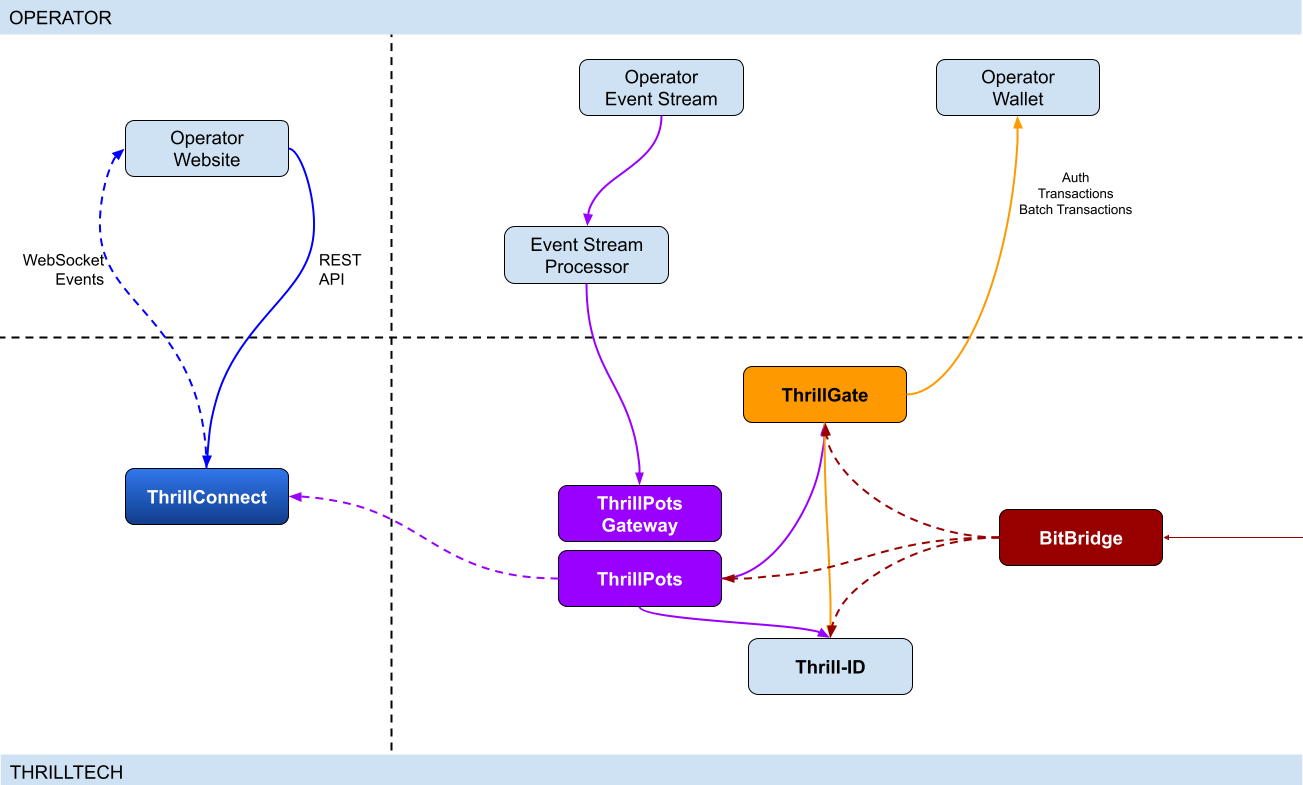
Integration points
ThrillPots has 3 primary integration points. This section will discuss each integration point and explain the purpose for each.
Betting integration
When it comes to Jackpot contributions, unlike normal games, player's do not make direct bets to jackpots. Rather, bets (contributions) are made on behalf of players via the operator's backend system.
Let's imagine a hypothetical casino where the operator has deployed a sitewide jackpot which is available to all players and is active across all casino content available on the site. The jackpot will receive a contribution bet each time a player makes a bet on any of the games on the site.
In order for these contributions to be made on behalf of the player, a simple event processor needs to be deployed that receives player game play / bet events and for each event makes a contribution request to the ThrillPots system.
In most platforms, this can be achieved by building a Kafka, RabbitMQ (or similar) event/stream processor which subscribes to the relevant topic/channel and makes REST API calls for each relevant event received. For platforms that do not have a message or event bus available, these events could be dispatched to the event processor via an alternative RPC mechanism such as REST, gRPC etc. This decision is all up to you, the integrating platform.
To learn more about this part of the integration, go to Event Stream Integration
Wallet Integration
When it comes to the wallet integration for ThrillPots, this integration is almost the same as any game provider integration. The wallet integration covers the following flows:
- Player token authentication
- Single Transactions (Debit & Credit)
- Batch Credit transaction (Multi-player payouts)
- Transaction cancellation
Integration is done against the ThrillGate service and can be performed in either direction (operator-to-provider or provider-to-operator).
To learn more about this part of the integration, go to Wallet Integration
Operator-to-Provider
If you decide to do an operator-to-provider integration, you will need to expose the endpoints required by the ThrillGate Standard Wallet Interface. All documentation can be found in the ThrillGate Standard Wallet Integration API documentation.
If you prefer for ThrillTech to integrate to your wallet API (provider-to-operator integration), you will need to provide the APIs and an integration environment for ThrillTech to develop the integration.
Frontend Integration
The ThrillConnect service is designed to support all frontend integrations. It exposes both a REST API (for end-user functionality like opt-in) as well as a WebSocket event stream for ad-hoc messaging and event broadcasts.
It is suggested to make use of the ThrillConnect JS API middleware layer which can easily be included in your site's code, freeing you up from the integration details and allowing you to focus on the visual and UX of the presentation layer.
To learn more about this part of the integration, go to Frontend Integration
Integrating ThrillPots Overview
The ThrillPots integration is best described as a 3-step process which is comprised of:
We suggest that before you dig into any of the three sections above, that you take the time to read this overview as it contains important information and pre-requisites that are needed for a smooth integration process.
PRE-REQUISITES
The rest of this guide assumes the following:
- You have the ThrillPots AIO Development container running and available. See this section for information on how to do this.
- You have a way to communicate with the services in the AIO Container (for example
curlorPostmanor similar tool)
Authentication and Authorization
Prior to making any calls to the ThrillPots service APIs, you need to authenticate with the ThrillTech platform using credentials that have been provisioned for you.
The ThrillTech platform uses a centralised authentication technology called Thrill-ID which provides governance over both User and Service accounts.
For integration purposes, you will need to provision a Service account (if one has not been provisioned for you yet). To learn more about provisioning accounts, please refer to the Thrill-ID documentation.
For an example of a Service account that would be suitable for the event stream integration service, see here
Setting up the AIO Container
The ThrillPots AIO Container is comprised of all the services necessary to run the ThrillPots platform from a single docker container.
The services made available are:
- ThrillPots Gateway (integrate your event/stream processor here)
- ThrillPots Service (the heart of the jackpot platform)
- ThrillGate (used to integrate with or to wallet APIs)
- ThrillConnect (integrate your frontend with this service)
- BitBridge (used for external data source integrations like exchange rates providers)
- ThrillTech Backoffice
- MongoDB
- Redis
The AIO container was designed to enable developers to deploy the entire ThrillPots stack on their local development machines on in a development environment quickly and easily.
In-Service Swagger UI
Each service provides access to a Swagger-UI for its API. Apart from ThrillConnect, which is an edge service, Swagger-UI support is compiled in to all the services and accessible via the /swagger-ui path.
ThrillConnect Swagger UI
Since ThrillConnect is an edge service and generally made available to the public internet, swagger-ui needs to be enabled via an environment variable.
In order to enable the /swagger-ui endpoint for the ThrillConnect service, you must set the TCS_ENABLE_SWAGGER environment variable to true.
Setting up the AIO Container: Pre-requisites
This short section explains the pre-requisites you will need in order to be able to setup the AIO container.
Pre-requisites
You will need the following software on your development machine:
Mandatory:
- Docker (or alternatively Docker Desktop)
- Postman
Optional:
Some type of MongoDB UI. We recommend you use MongoDB Compass
GitHub Access
You will need to have a GitHub account that has been granted access to the ThrillTech GitHub Organisation. This step is usually done as part of the initial technical kick off. As part of this access, you are granted access to repositories and packages that are needed.
Once you have provided ThrillTech with your Github account and we have added you as a collaborator, you need to have a Github Personal Access Token (classic) with permissions to read packages.
Go to your account's Settings -> Developer Settings -> Personal Access Tokens -> Tokens (classic) and create one.
(Click your avatar circle on the top right part of Github, click "Settings" and then "Developer Settings" is located at the bottom on the right of the menu of your account)
The only right it needs to have is to read packages.
Log in to our package repo and give your github username and the token your just created as password when prompted
docker login ghcr.io/thrilltech-io
Setting up the AIO Container: Initial Setup
Setting Up
Once you have provided ThrillTech with your Github account and we have added you as a collaborator, you need to have a Github Personal Access Token (classic) with permissions to read packages.
Go to your account's Settings -> Developer Settings -> Personal Access Tokens -> Tokens (classic)nd create one.
(Click your avatar circle on the top right part of Github, click "Settings" and then "Developer Settings" is located at the bottom on the right of the menu of your account)
The only right it needs to have is to read packages.
Log in to our package repo and give your github username and the token your just created as password when prompted:
docker login ghcr.io/thrilltech-io
Once you have successfully authenticated with the repository, you are ready to continue with the steps to getting the ThrillPots Dev Container running:
- Clone the https://github.com/thrilltech-io/dev-containers repository
- Go to the
/thrillpotsfolder in the repository and execute:docker compose up -d
NOTE: If you are running on MacOS on Apple Silicon, you may need to enable x86_64/amd64 emulation. Do this by going to Docker Desktop's settings -> General and finding the option called "Use Rosetta for x86_64/amd64 emulation on Apple Silicon" and enable it.
This will download all the necessary packages and run them via
Docker Compose. This process may take a few minutes to complete
- Import the provided Postman collection (
ThrillPots AIO Setup.postman_collection.json) which can be found in the repository into your Postman application - You will notice that it contains a number of endpoints, all numbered. The numbering indicates the sequence in which you must execute the calls.

- Execute all the steps in order
Once complete, you will have a ThrillPots system running and configured in 'standalone mode'. This means that you can make contributions and interact with the system, but there will be no external wallet calls made for player authentication or transactions.
In this mode, valid player IDs are in a range:
[player_00000 ... player_00999]
As part of the steps, you will also have created a Jackpot Template, and from this template you created a Jackpot instance. Jackpot Instances are the "running jackpots" that players contribute to. You also made a contribution directly to the jackpot.
You would also have created a Source and mapped the Jackpot Instance to the source and successfully made a contribution to the jackpot via the Source
The final step in the setup was the creation of an Internal mock wallet in ThrillGate. In a later section, where wallet integration is discussed, you will change this configuration to allow connectivity to your own wallet service, but for now, this mock wallet implementation is enough to get started with.
ThrillPots Wallet Configuration
IMPORTANT
Please note that when you change the wallet configuration for the ThrillPots service, you MUST restart the ThrillPots service for the changes to take effect.
Setting up the AIO Container: Admin Accounts
By default, the system is configured with an admin account called admin@thrilltech.io. This account has the ability to control all resources for the thrilltech oorganisation. You will have noticed that in all of the setup steps above, the owner_id or brand_id values were either thrilltech or thrilltech:brand1.
The ThrillPots system implements a "resource ownership" model which ensures that jackpot objects are not modifiable by unauthorized accounts.
Have a look at thrilltech:brand1. The first part before the : is the "organisation" or "operator id". The second part after the : is the "organisational unit" or "brand".
Creating a new ThrillPots admin account for a different organisation
If you want to create and manage ThrillPots resources for a different organisation/operator, you will first need to create a new orgnisation and admin account for that organisation. All of these actions are done through Thrill-ID.
The next steps assume that you are authenticated as
admin@thrilltech.io(as per Step 0 in the setup steps)
1. Create a new organisation
We first need to register a new organisation in Thrill-ID. For the purposes of this example, lets create a new organisation called "new-operator" which has 2 casino brands: new-mega-casino and new-mega-sportsbook.
To do this, make the following call to Thrill-ID:
POST http://localhost:9000/admin/organisations
Header: Authorization Value: Bearer AUTH_TOKEN_FOR_ADMIN@THRILLTECH.IO
Body:
{
    "id": "new-operator",
    "units": [
        "new-mega-casino",
        "new-mega-sportsbook"
    ],
    "enabled": true,
}
You should receive a 200 OK.
Now we can create the new admin account for the new organisation
2. Create a new admin account
To create a new administrator account for the new-operator organisation we just created, we need to make another call to Thrill-ID, this time to create the actual account:
POST http://localhost:9000/admin/accounts
- Header:
Authorization - Value:
Bearer AUTH_TOKEN_FOR_ADMIN@THRILLTECH.IO
Body:
{
    "account_type": "User",
    "username": "admin@new-operator.com",
    "password": "password",
    "org_unit": {
        "org_id": "new-operator"
    },
    "permissions": [
        {
            "system_id": "thrillpots",
            "permissions": [{
                "resource_id": "*",
                "permission": "Admin"
            }]
        }

    ]
}
You should receive a 200 OK along with a response body showing you the newly created account.
3. Test the new admin account
Go back to Step 0 in the setup instructions and change the username and password to the new accounts username and password and try to authenticate. If everything went right, you should receive a new token for the account and can now proceed with managing ThrillPots resources for the new-operator organisation.
Once you are authenticated with the admin account for the new-operator organisation, you will be able to create Jackpot templates, instances, sources etc for the new-operator organisation.
NOTE: In previous versions of the platform, you also needed to configure the operator and brand separately in ThrillPots and ThrillGate. This is no longer needed since all services synchronise themselves with the Organisational structures defined in Thrill-ID
Event Processor Integration
In this section, we will discuss the Event Processor integration component that is required in order to enable the ability to make contributions to jackpots.
In general, this integration component needs to be able to receive the events that will drive jackpot contributions on behalf of users/players.
In a standard ThrillPots-powered system, it is usually gameplay that causes jackpot contributions to be made on behalf of players, but you are not limited to just this single use case.
From a simplistic perspective, the general logic should look something like this:
Authenticate your integration service with ThrillPots Gateway
Subscribe to gameplay/bet events from your event stream
When an event is received from your event stream:
    - Read the properties of the event for game code, player ID and bet amount
    - Make a contribution call to ThrillPots using these (and other values)
From here, it is relatively easy to see how you could expand the use case to create a Deposit jackpot. Lets imagine that the deposit flow was identified by source DEPOSIT. Lets also assume that when a successful deposit has been made by a player, that an event is published by the operator's platform. For argument's sake, lets call this event DEPOSIT_SUCCESS.
If we wanted to create a deposit jackpot, the logic could look as follows:
Subscribe to DEPOSIT_SUCCESS event
When an event is received:
    - Read the properties of the event for the player ID and deposit amount
    - Make a contribution call to ThrillPots using the DEPOSIT source_id and other properties
Sequence Diagram for the Event Processor integration

Authenticating via ThrillPots Gateway
The ThrillPots Gateway service exposes a REST endpoint which your event stream process can authenticate itself with Thrill-ID.
The endpoint is POST /authenticate/service and accepts a payload which contains the connecting service's username and password.
If authentication is successful, you will receive a response which contains token which must be used as a Bearer token in subsequent API requests to the ThrillPots Gateway service. Service tokens do not expire and therefore you do not need to be concerned with refreshing your token once it has been received.
See here for a Service account that you can provision for your Event Processor integration service.
Additional Information
If your event processor service is processing gameplay bet events, you should remember to filter out any and all events related to Jackpot Contributions as this could create loop of contributions on behalf of players
NOTE: For new integrations, we highly recommend that you integrate using the v2 Contribution API
Contributing to Jackpots
Now that you are processing events from your platform, you want to be able to make Contributions on behalf of players to the jackpot. The process of contributing is quite straight forward and does not require your service to be aware of player opt-in status. You will however need to decide which jackpot to contribute to and this can be done in one of two ways:
- Contribute by source
- Contribute direct to jackpot
Sources
A Source can be thought of as an operator-defined identifier for a user journey, a group of games, or even a single game. You can read more about Sources here,
Example: Sitewide Jackpot
If you wanted to create a site-wide jackpot for your casino vertical, you could create a Source named casino-sitewide, map a jackpot to the source and then send all contributions to that specific Source.
{
    "token": "token_00001",
    "brand_id": "thrilltech:brand1",
    "player_id": "player_00001",
    "player_country": "UK",
    "source_id": "casino-sitewide",
    "gameround_id": "1",
    "currency": "EUR",
    "base_wager": 1
}
Example: Deposit Jackpot
If you wanted to create a deposit jackpot, you can create a source called deposit, map the relevant jackpot to the source and then send all deposit-based contributions ot that source
{
    "token": "token_00001",
    "brand_id": "thrilltech:brand1",
    "player_id": "player_00001",
    "player_country": "UK",
    "source_id": "deposit",
    "gameround_id": "DEPOSIT_TX_ID",
    "currency": "EUR",
    "base_wager": 1
}
Example: Game Group Jackpot
If you wanted to create a jackpot for a specific set of games, for example, a jackpot for all egyptian themed games, you can create a source called egyptian-games and use that for contributions each time a player bets into a game that is egyption themed. This would naturally require your integration service to know which games are matched to which Game Group source.
{
    "token": "token_00001",
    "brand_id": "thrilltech:brand1",
    "player_id": "player_00001",
    "player_country": "UK",
    "source_id": "egyptian-games",
    "gameround_id": "1",
    "currency": "EUR",
    "base_wager": 1
}
Example: Game Specific Jackpots
If you want to split your liquidity by game title, you can create sources that correspond to the game codes of games in your system. Each source would need a jackpot mapped to it, but once that is done, you are able to make contributions to the source based on the game code of the base game bet.
{
    "token": "token_00001",
    "brand_id": "thrilltech:brand1",
    "player_id": "player_00001",
    "player_country": "UK",
    "source_id": "provider-game-code",
    "gameround_id": "1",
    "currency": "EUR",
    "base_wager": 1
}
Direct to Jackpot Contribution
An alternative to using sources is to make contributions directly to Jackpot Instances by their ID. For example, if you have created a Jackpot instance, you will have its ID available to you. This ID will not change over the lifetime of the jackpot. Making contributions directly to a Jackpot ID incurs less processing cost, but may also reduce the flexibility you may have in changing which jackpot players contribute to based on the content or user flows.
The only difference in the contribution payload is that the source_id is replaced with an instance_id field as seen below:
{
    "instance_id": "0a1cfeea-5b07-4f2b-b2f1-2e4cd2aa991d",
    "token": "token_00001",
    "brand_id": "thrilltech:brand1",
    "player_id": "player_00001",
    "player_country": "MT",
    "gameround_id": "1000",
    "base_wager": 2,
    "currency": "EUR"
}
Idempotent Contributions
If you require the ThrillPots system to prevent duplicate contributions being processed, then you can include the optional idempotency_key on your Contribution Request. The value of the idempotency_key must be a unique value generated by your system (for example a random UUID).
    {
      "token": "token_00001",
      "brand_id": "thrilltech:brand1",
      "player_id": "player_00001",
      "player_country": "UK",
      "source_id": "casino-sitewide",
      "gameround_id": "1",
      "currency": "EUR",
      "base_wager": 1,
      "idempotency_key": "unique_value_generated_by_your_system"
    }
Synchronous vs Asynchronous contribution
The default contribution mechanism is synchronous. However, depending on your system architecture (and system load), you may prefer to make use of asynchronous contribution mechanics. In order to make asynchronous contributions, you need to provide a webhook that the ThrillPots system can call once the result of a contribution has been determined.
In order to make a contribution asynchronously, you simple need to add a callback property to either of the contribution payloads above to specify the webhook to call and which results you are interested in receiving.
The structure of the callback property is as follows:
{
    "web_hook": "https://your.host/webhook",
    "win_result_only": false
}
The web_hook field indicates the fully qualified HTTP path to your webhook and the win_result_only property indicates whether the webhook should only receive win results or all contribution results.
Therefore, an asynchronous contribution for a sitewide casino jackpot would look like this:
{
    "token": "token_00001",
    "brand_id": "thrilltech:brand1",
    "player_id": "player_00001",
    "player_country": "UK",
    "source_id": "casino-sitewide",
    "gameround_id": "1",
    "currency": "EUR",
    "base_wager": 1,
    "callback": {
        "web_hook": "https://your.host/webhook",
        "win_result_only": false
    }
}
When making an asynchronous contribution, the ThrillPots system will either return 200 OK with a JSON payload that contains a trace_id for the request when it has successfully accepted the contribution request for processing, or you will receive an error due to the request being malformed.
Any contribution request errors will be send to the webhook. The structure of the webhook payload is defined as follows:
Successful contribution result
{
    "type": "data",
    "contribution_amount": Number,
    "contribution_currency": String,
    "gameround_id": String,
    "instance_id": String,
    "metadata": null | Object,
    "tickets_awarded": null | Number,
    "timestamp": Number,
    "win_amount": Number,
    "win_pot_id": null | String,
    "win_withheld": Boolean
}
Error result
{
    "type": "error",
    "status_code": Number,
    "code": String,
    "message": String,
}
The data portion will either be a ContributionResult structure or an Error structure. You can find more information on these structures in the API documentation.
Examples of payloads sent to the web hook
Contribution Result
{
    "type": "data",
    "contribution_amount": 0.1,
    "contribution_currency": "EUR",
    "gameround_id": "cc83c1cc-6260-44fc-822b-d3c03acf2d89",
    "instance_id": "a49ff35f-6ecd-491f-b373-85e6caabacf1",
    "metadata": null,
    "tickets_awarded": null,
    "timestamp": 1715714218408,
    "win_amount": 0,
    "win_pot_id": null,
    "win_withheld": false
}
Error Result
{
    "type": "error",
    "status_code": 404,
    "code": "GAME_NOT_FOUND",
    "message": "sitewide-casino2",
}
Contribution Request Errors
A contribution request may result in a direct or a downstream error. A direct error is an error that is the result of the ThrillPots system return an error to the contribution request itself. A downstream error is an error that is propogated to the contribution request caller from a downstream system, such as ThrillGate or the operator wallet itself.
List of Direct Errors
For Direct Errors, you can expect:
| Error Code | Description |
|---|---|
CONTRIBUTION_REJECTED | The contribution was rejected due to a contribution rule failing, The rule in question will be contained within the CONTRIBUTION_REJECTED message |
GAME_NOT_FOUND | this occurs when making a contribution to source and the source does not exist |
CURRENCY_MULTIPLIERS_NOT_FOUND | self explanatory |
SYSTEM_ERROR | This is what you get with 500 http responses from ThrillPots |
OPTIN_ERROR | This occurs if the player;s optin record could not be updated |
SOURCE_JACKPOT_NOT_FOUND | This occurs if the jackpot mapped to the source could not be found |
SOURCE_JACKPOTS_NOT_ALLOWED | This occurs if the jackpot mapped to the source does not allow a contribution from this player (either country or brand not allowed) |
DB_ERROR | An internal DB ERROR |
UNSUPPORTED_BRAND | This is returned when the brand of the player (specified in contribution) is not supported by the jackpot or system |
Passing Metadata
If you need to pass contextual metadata from your event processor to your wallet, you can do so by adding a metadata field to the Contribution Request. This data will be passed through the system and attached to transaction requests to your wallet.
The metadata field can be any valid JSON value, for example:
Metadata containing an Object:
{
    "token": "token_00001",
    "brand_id": "thrilltech:brand1",
    "player_id": "player_00001",
    "player_country": "UK",
    "source_id": "casino-sitewide",
    "gameround_id": "1",
    "currency": "EUR",
    "base_wager": 1,
    "metadata": {
        "value1": "some value",
        "value2": 1234
    }
}
Metadata containing a String:
{
    "token": "token_00001",
    "brand_id": "thrilltech:brand1",
    "player_id": "player_00001",
    "player_country": "UK",
    "source_id": "casino-sitewide",
    "gameround_id": "1",
    "currency": "EUR",
    "base_wager": 1,
    "metadata": "This is an arbitrary string value"
}
Event metadata
If you need to attach contextual metadata from your event processor to any subsequent JackpotWinEvent , you can do so by adding a event_metadata field to the Contribution Request. This data will be passed through the system and attached any resulting JackpotWinEvent under metadata.
The event_metadata field can be any valid JSON value, for example:
{
  	"instance_id": "ac2aad1d-16b6-4e9b-9e9a-d94f705a38f7",
  	"token": "token_00001",
  	"brand_id": "thrilltech:brand1",
  	"player_id": "player_00001",
  	"player_country": "MT",
  	"gameround_id": "1",
  	"base_wager": 1,
  	"currency": "EUR",
  	"event_metadata": {
			"some": "data"
  	}
}
Will result in a JackpotWinEvent with metadata.
  {
    "event_type": "JackpotWinEvent",
    "event_id": "8b4025fa-b4e7-4bd3-9e8c-3e95a1a2611d",
    "data": {
        "brand_id": "thrilltech:brand1",
        "player_id": "player_00001",
        "source_id": null,
        "instance_id": "ac2aad1d-16b6-4e9b-9e9a-d94f705a38f7",
        "jackpot_name": "QuickHit Instance",
        "jackpot_currency": "EUR",
        "timestamp": 1732010393528,
        "win_pot_id": "major",
        "win_amount": 100.05624999999992,
        "currency_multipliers": {
            "brand_id": "default",
            "base_currency": "EUR",
            "multipliers": {
                "AMD": 430.0904,
        },
        "win_withheld": false,
        "seed_deficit": 99.68125,
        "community_winners": null,
        "games_in_jackpot": [],
        "seed": 100.0,
        "metadata": {
            "some": "data"
        }
    }
  }
Contributing to Jackpots v2
The v2 Contribution API introduces a structured way to submit both source contributions and direct jackpot contributions within a single endpoint. It also enables advanced features such as linked jackpots and bet contexts.
- More information on linked jackpot instances can be found here
Key Enhancements Over V1
- Unified Contribution Model: Supports both source contributions and direct to instance contributions in the same request.
- Linked Jackpot Support: Contributions automatically propagate to all directly linked instances.
- Structured Data Format: Requests follow a more structured schema, ensuring consistency and extendability.
- Expanded Response Structure:
- Synchronous contributions return an array of results for all contributions made.
- Asynchronous contributions trigger multiple webhook events, one per contribution.
Propagation Rules
A contribution applies to the target instance (or instance behind source) as well as all instances directly linked to it . Only the links defined for the target instance are honored.
Failure Handling
- If the contribution to the main instance fails, contributions to linked instances will not be attempted.
- If a linked instance contribution fails (e.g., due to missing opt-in or validation failure), other linked instances will still be processed normally.
Opt-in Requirement
Opt-ins do not propagate automatically. If a linked instance requires explicit opt-in and the user has not opted in, the contribution fails for that instance.
API Request structure
{
    // Contribution target
    "target": {
        // Contribution target type, can be either "source" or "instance"
        "type": "source",
        // Contribution target identifier
        // eg. "sitewide-casino" in case of source contribution
        // eg "bdfa6295-d5a5-4c54-98bf-046355ce0252" in case of direct contribution to jackpot
        "id": "sitewide-casino"
    },
    // Jackpot instance owner identifier (operator id)
    "owner_id": "thrilltech",
    // Details of the contributing player
    "player": {
        // Player identifier
        "id": "player_00001",
        // Player authentication token
        "token": "token_00001",
        // Player country
        "country": "UK",
        // Player brand identifier
        "brand_id": "brand1",
        // Any segments that the player might be part of
        "segments": ["vip-1", "regular"],
    },
    // Base game wager
    "base_wager": {
        // Base wager currency
        "currency": "EUR",
        // Base wager value
        "value": 1
    },
    // The contribution source that caused the contribution to happen.
    // For example, if a player made a bet on a game, this would be the game's gameround ID.
    // If a player made a successful deposit, this would be the deposit's identifier.
    // This field is stored by ThrillPots and is used a back-reference to the original user action
    // that caused the contribution to happen.
    "source": {
        // Type of the contribution source. Defaults to `gameround` but can be any value you choose
        "type": "gameround",
        // Identifier of the contribution source
        "id": "gameround_id_1"
    },
    // Opaque data object that contains pass-through data for the caller.
    // The content of this property will be sent back on the JackpotContributionResponse to this request.
    "metadata": {},
    // Opaque data object that contains pass-through data for the caller.
    // The content of this property will be attached to any resulting events. ( win events at that stage )
    "event_metadata": {},
    // Optional contribution request parameters. Each field in this field is optional as well.
    "options": {
        // Optional identifier of the vertical from which the contribution request originated
        "vertical_id": "slots",
        // Optional boolean specifying whether linked jackpots should be honored
        "allow_linked_contributions": true,
        // If you would like ThrillPots to not process duplicate contributions, then specify a unique
        // `idempotency_key` here
        "idempotency_key": "random_uuid_value",
        // Specify the webhook to call and which results you are interested in receiving
        "callback": {
            "web_hook": "https://your.host/webhook",
            "win_result_only": false
        }
    },
}
Synchronous Contribution
If you do not specify a callback in the options.callback field, your contribution request will be processed synchronously.
In this case, the response will be an array of JackpotContributionResponse structures. Normally, the array will only contain 1 result, however when the initial jackpot is linked to other jackpots, the array will contain more than one element, one for each jackpot that was linked.
- Returns results for the target jackpot instance and all of its linked instances.
- Result structure remains the same with the only difference it being an array.
[
    {
        "instance_id": "bdfa6295-d5a5-4c54-98bf-046355ce0252",
        "timestamp": 1739972162307,
        "gameround_id": "bb2a5277-1f00-47cf-b62c-9f639ddff146",
        "win_amount": 0.0,
        "win_pot_id": null,
        "tickets_awarded": null,
        "win_withheld": false,
        "contribution_currency": "EUR",
        "contribution_amount": 0.0775,
        "metadata": null
    },
    {
        "instance_id": "3c90cb1e-a594-437e-a695-e76acb0e6809",
        "timestamp": 1739972162394,
        "gameround_id": "7eab0af4-1477-44d9-88f0-a9b7763a6d30",
        "win_amount": 0.0,
        "win_pot_id": null,
        "tickets_awarded": null,
        "win_withheld": false,
        "contribution_currency": "EUR",
        "contribution_amount": 0.1,
        "metadata": null
    }
]
- If contribution to a linked instance fails (e.g., due to missing opt-in or regulatory restrictions), the response details which instances succeeded and which failed.
[
    {
        "instance_id": "bdfa6295-d5a5-4c54-98bf-046355ce0252",
        "timestamp": 1739972093142,
        "gameround_id": "0860e92b-6d75-45ab-a520-39ab511e18c1",
        "win_amount": 0.0,
        "win_pot_id": null,
        "tickets_awarded": null,
        "win_withheld": false,
        "contribution_currency": "EUR",
        "contribution_amount": 0.0775,
        "metadata": null
    },
    {
        "status_code": 400,
        "code": "CONTRIBUTION_REJECTED",
        "message": "PlayerNotOptedIn"
    }
]
Asynchronous Contributions & Webhooks
For asynchronous contributions, the API does not return immediate results. Instead, a webhook event is triggered for each contribution, providing its final outcome.
win_result_onlyOption- If
win_result_onlyis enabled, the webhook will only be triggered for contributions that result in a win. - If disabled (default behavior), a webhook is sent for every contribution, regardless of the outcome.
- The webhook payload structure remains unchanged from v1 contributions.
- If
{
    "type": "data",
    "instance_id": "bdfa6295-d5a5-4c54-98bf-046355ce0252",
    "timestamp": 1739972634263,
    "gameround_id": "0174c60b-f827-4e9c-8f66-8d5444732071",
    "win_amount": 0.0,
    "win_pot_id": null,
    "tickets_awarded": null,
    "win_withheld": false,
    "contribution_currency": "EUR",
    "contribution_amount": 0.0775,
    "metadata": null
}
OAS and Swagger documentation
For more details on using this functionality, refer to ThrillPots Service and ThrillPots Gateway API documentation
Contribution Sources
Contribution Sources are a concept in ThrillPots that allow operators create well-known identifiers for one or more Jackpot Instances. A contribution source is bound to an operator and brand ID.
Contribution Sources are valid targets/identifiers for jackpot contribution bets (as described in the Contributing to Jackpots section).
Why use sources instead of Jackpot Instance IDs
Sources provide a mechanism of indirection to Jackpot Instances. Since a Source will usually have a well-known and human-defined identifier, and can represent one or more Jackpot Instances at any point in time, they provide a very convenient way for Integrating services and frontends to work with Jackpot Instances.
For example, instead of hard coding a specific Jackpot Instance ID into your frontend or backend services, you can simply configure the more human-readable source_id and use the Source to determine at runtime which Jackpot Instance ID is being used. This is especially useful when Jackpot models are changed over time since your integrated product will not need to be modified unless there is a fundamental structural change to the jackpot itself (which is rarely the case).
Example
An early, but very common use-case Contribution Source can be seen below, where a Source has been created for Operator thrilltech, Brand brand1 and is the source for the "site wide casino jackpot".
In this case, the contribution flow would look like this:
┌──────────────────────────────┐
│Contribution to Source Request│   (POST https://thrillpots_gateway_host/jackpots/contribute/source)
└──────────────┬───────────────┘
               │
               │
               │
               ▼
           ┌────────┐
           │ Source │
           └────────┘
               │
               │
               │
               ▼
      ┌──────────────────┐
      │ Jackpot Instance │
      └──────────────────┘
Under the covers (in the data), this Contribution Source will most probably look something like this:
{
  "owner_id": "thrilltech:brand1",
  "source_name": "Casino Sitewide Source",
  "source_id": "sitewide-casino",
  "jackpots": [
    {
      "priority": {
        "$numberLong": "0"
      },
      "owner_id": "thrilltech:brand1",
      "instance_id": "12231b6a-a774-4a93-8f16-f8af9aee2076"
    }
  ]
}
The jackpots array in this Contribution contains a single Jackpot Instance ID because in this case, there is only one Jackpot Instance required. We will discuss use cases where having multiple Jackpot Instances in this array can be useful.
Creating a Contribution Source
To create a Contribution Source, we follow a 2 step process:
- Create the new source
- Assign the desired Jackpot Instance to the Source
1. Create the new source
To create a source, we use the POST /config/sources endpoint on ThrillPots Service (link to API).
An example to create a "Site-wide Jackpot" source for the thrilltech:brand1 operator-casino would look like this:
POST http://<thrillpots-service-host>/config/sources
Payload
[
    {
        "owner_id": "thrilltech:brand1",
        "source_name": "Casino Sitewide Source",
        "source_id": "sitewide-casino"
    }
]
FYI: If you have downloaded the ThrillPots AIO Setup Postman collection, an example of this step will be in the
Basic Setup > Create a Sourceendpoint.
2. Assign the desired Jackpot Instance to the Source
Once you have created a source, you can now assign a pre-existing Jackpot Instance to the source. This can be done using the POST /config/sources/assignjackpot endpoint on the ThrillPots Service (link to API).
POST http://<thrillpots-service-host>/config/sources/assignjackpot
Payload
{
    "owner_id": "thrilltech:brand1",
    "source_id": ["sitewide-casino"],
    "instance_id": "{{instance_id}}"
}
Retrieving the Jackpot Instance from a source
To retrieve that relevant Jackpot Instance for a specific source, you can use the following methods:
ThrillPots Gateway
GET /jackpots/instances/source/:source_id/brand/:brand_id?player_id=:player_id
The parameters in the url above are:
| Parameter | Description |
|---|---|
source_id | The Source ID (for example, sitewide-casino from the example above) |
brand_id | This is the identifier for the brand in question, which is comprised of the operator_id:brand_id pairing |
player_id | [OPTIONAL] If a player_id is specified, the returned Jackpot Instance will also contain the opt-in details for the specified player |
ThrillConnect (used by the Frontend)
GET /v1/thrillpots/instances/source/:source_id/brand/:brand_id?player_id=:player_id
The parameters in the url above are the same as for ThrillPots Gateway:
| Parameter | Description |
|---|---|
source_id | The Source ID (for example, sitewide-casino from the example above) |
brand_id | This is the identifier for the brand in question, which is comprised of the operator_id:brand_id pairing |
player_id | [OPTIONAL] If a player_id is specified, the returned Jackpot Instance will also contain the opt-in details for the specified player |
Retrieving all sources in the System
To retrieve a list of sources for a specific operator brand, you can use one of the following methods:
ThrillPots Gateway
GET /sources?owner_id=:brand_id
The brand_id parameter in the URL is once again comprised of the operator_id:brand_id pair which identifies a specific brand. If any sources have been configured for the operator_id:brand_id specified, they will be returned in a response which contains a list of Source JSON objects and will look similar to this example:
[
    {
        "owner_id": "thrilltech:brand1",
        "source_name": "Casino Sitewide Source",
        "source_id": "sitewide-casino",
        "jackpots": [
            {
                "priority": 0,
                "owner_id": "thrilltech:brand1",
                "instance_id": "12231b6a-a774-4a93-8f16-f8af9aee2076"
            }
        ]
    }
]
ThrillConnect (used by the Frontend)
GET /v1/thrillpots/sources?owner_id=:brand_id
As in the ThrillPots Gateway example above, the brand_id parameter in the URL is once again comprised of the operator_id:brand_id pair which identifies a specific brand. The response payload will look exactly the same as the response from the ThrillPots Gateway service above.
ThrillPots Events
ThrillPots publishes a number of events which your integration service can subscribe to. There are a number of reasons you may want to consume these events, for example:
- Synthesizing related Kafka/RabbitMQ events
- Storing the events for BI / Analysis purposes
The following events are currently published by ThrillPots Gateway:
JackpotUpdateEvent- contains the latest jackpot values for the specified Jackpot Instance- Reference
{
    "event_type": "JackpotUpdateEvent",
    "event_id": "d6f05820-1da2-4152-bcba-6c0186f6cd77"
    "data": {
        "id": "jackpot instance ID",
        "status": String,
        "jackpot_type": "Jackpot" | "Raffle",
        "currency": String,
        "allowed_brands": [String],
        "allowed_sources": [String],
        "pots": [
            {
                "id": String,
                "is_progressive": Boolean,
                "current_value": Number
            }
        ],
        "timestamp_start": Number | null,
        "timestamp_end": Number | null
        "last_updated": Number
    }
}
JackpotWinEvent- contains the details of a jackpot win- Reference
{
    "event_type": "JackpotWinEvent",
    "event_id": "3fe809f4-c94f-4950-9b86-5f2d0b8f604f"
    "data": {
        "brand_id": String,
        "player_id": String,
        "source_id": String | null,
        "instance_id": String,
        "jackpot_name": String,
        "timestamp": Number,
        "win_pot_id": String,
        "win_amount": Number,
        "currency_multipliers": {
            "brand_id": String,
            "base_currency": String,
            "multipliers": {
                "EUR": Number,
                "GBP": Number,
                "ZAR": Number,
                ...
                "NZD": Number,
                "SEK": Number
            }
        }
        "games_in_jackpot": [String],
        "seed": Number,
        "win_withheld": Boolean,
        "seed_deficit": Number,
        "community_winners": null | [{
            "player_id": String,
            "brand_id": String,
            "currency": String,
            "win_amount": Number
        }],
		"metadata": null | Object,
    }
}
RaffleWinEvent- contains the details of a Raffle Win- Reference
{
    "brand_id": String,
    "instance_id": String,
    "jackpot_name": String,
    "jackpot_currency": String,
    "currency_multipliers": {
        "brand_id": String,
        "base_currency": String,
        "multipliers": {
            "EUR": Number,
            "GBP": Number,
            "ZAR": Number,
            ...
            "NZD": Number,
            "SEK": Number
        }
    }
    "timestamp": Number,
    "winners": [
        {
            "player_id": String,
            "brand_id": String,
            "currency": String,
            "win_amount": Number
        }
    ],
    "win_withheld": bool
}
OptInEvent- contains the details of a player opt-in or opt-out into a Jackpot Instance Reference
{
    "event_type": "OptInEvent",
    "event_id": "27045bf8-78d2-4f99-97f1-e7d2e3aa434d"
    "data": {
        "instance_id": String,
        "player_id": String,
        "player_brand_id": String,
        "preferred_contribution_value": Number,
        "preferred_contribution_currency": String.
        "opted_in": Boolean,
        "requested_optin": Boolean,
        "contribution_preferences: {
            "EUR": Number | null,
            "USD": Number | null
            ..
        },
        "last_updated": Integer
    }
}
CommunityPayoutErrorEvent- sent in case of an error that is encountered when processing community payouts Reference
{
    "event_type": "CommunityPayoutErrorEvent",
    "event_id": "c034a751-cf91-4722-bc89-a2f8af472805"
    "data": {
        "instance_id": String,
        "gameround_id": String,
        "tx_credit_id": String,
        "failed_payouts": [
            {
                "player_id": String,
                "brand_id": String,
                "currency": String,
                "win_amount": Number
            }
        ]
    }
}
RafflePayoutErrorEvent- sent in case of an error that is encountered when processing raffle payouts Reference
{
    "event_type": "RafflePayoutErrorEvent",
    "event_id": "e981296b-199f-4454-b4ec-b3f36910c2cc"
    "data": {
        "instance_id": String,
        "failed_payouts": [
            {
                "player_id": String,
                "brand_id": String,
                "currency": String,
                "win_amount": Number
            }
        ]
    }
}
The ThrillPots events are published via the WebSocket endpoint /events.
Authenticating the Websocket connection to receive events
Once you have established a WebSocket connection from your event processor service to ThrillPots Gateway, you will need to send an Authenticate message which contains your Thrill-ID JWT token to authenticate your service to receive events.
{
    "action": {
        "Authenticate": {
            "auth_token": "{{thrill-id-jwt}}"
        }
    }
}
If the authentication fails, the connection will be closed. Once you have authenticated, you should start receiving the events from the ThrillPots service.
Wallet Integration
Introduction
When integrating ThrillPots to your wallet, you will need to implement what is known as the "Standard Wallet API". This API has been defined by ThrillTech and is what our ThrillGate services uses to communicate with your backend to process:
- Player Authentication
- Transactions
- Transaction cancellations
- Batch transactions# Wallet Integration
ThrillPots Wallet Configuration
IMPORTANT
Please note that when you change the wallet configuration for the ThrillPots service, you MUST restart the ThrillPots service for the changes to take effect. In this section, we will discuss how ThrillPots performs player authentication and jackpot contribution transactions.
When running in a non-development environment (such as staging or production), ThrillPots uses the ThrillGate Service as an integration layer to an operator's wallet API.
NOTE:
ThrillPots also supports an internal, in-memory wallet for development or isolated testing purposes. This wallet is enabled by default in the AIO development container
Types of Wallet Integrations
There are two types of wallet integrations that can be developed:
- Provider-to-Operator integration
- Operator-to-Provider integration (Standard Wallet Integration)
This section is been written for operators that have chosen to do an Operator-to-Provider integration. For a Provider-to-Operator integration, ThrillTech are responsible for implementing the integration to your wallet API and that topic is out of scope for this book.
- Batch transaction cancellations
All communications from ThrillGate are conducted over secure SSL REST calls to your system.
As part of all calls to your system, ThrillGate sends an HMAC in the X-Server-Authorization header which is calculated from the body of the request only. You can use this HMAC value to verify that the request is coming from the expected ThrillGate server.
NOTE: During integration you will receive the secret key that you can use to verify the HMAC value with.
Enabling Wallet Integration Mode in the AIO Container
In order to configure the container to support external wallet integration mode, some additional API calls need to be made.
In the provided Postman collection, you will find a folder called Wallet Integration Mode. In this folder you will find additional API calls that you need to make in order to configure the container to run in this mode.

The first API call (1. Create Wallet Configuration) makes a call to the ThrillGate service and sets up the "Standard Wallet API" connnector.
It is very important that you do NOT change the details in Step 2a or 2b as these are specific for the AIO container.
PLEASE NOTE:
When building your wallet integration, the ThrillGate service will attempt to connect to your wallet service on your localhost:8201. This is configured via Docker networking as:
Host: "host.docker.internal"
Port: 8201You can change the port, but we would recommend not changing the host unless you are absolutely sure you know what you are doing.
Once you have executed step 1, you can Enable or Disable the external wallet mode using steps 2a or 2b respectively.
Once you have completed the configuration, you will need to restart the ThrillPots service in the AIO container.
IMPORTANT
Each time you change the wallet configuration of ThrillPots, you must restart the ThrillPots Service for the configuration changes to take effect
Standard Wallet Integration
What is the Standard Wallet?
The Standard Wallet is a REST API definition (designed by ThrillTech) which an operator needs to implement support for. The ThrillGate service uses the Standard Wallet API (as a client) to communicate with the operator's wallet to perform the following actions:
- Player token authentication
- Debit / Credit transactions (single)
- Credit transaction batches
- Transaction cancellation
Standard Wallet Sequence flows
Below is a sequence diagram of the expected data flow between ThrillGate and the operator wallet API:
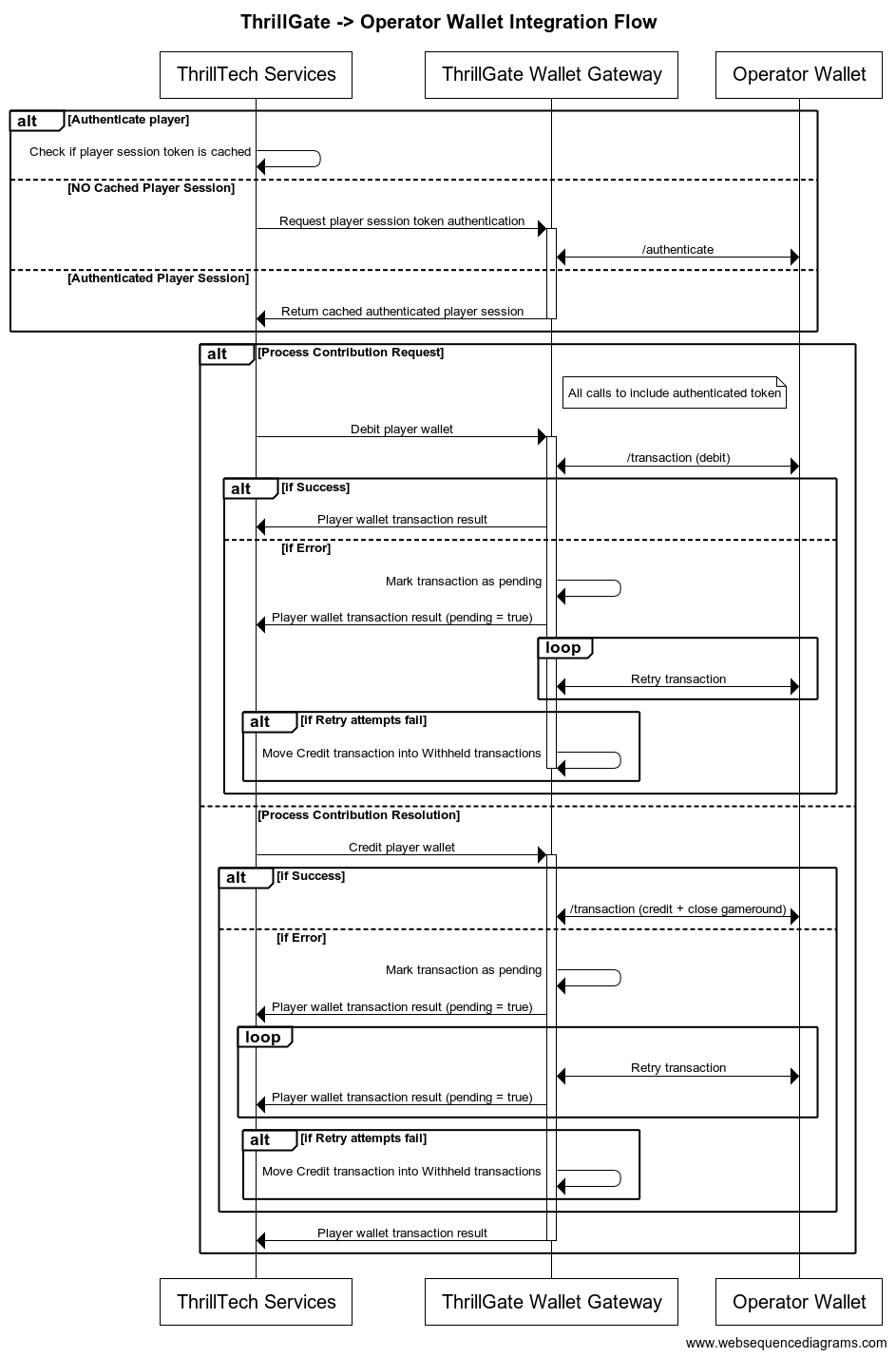
Configuring a Standard Wallet Integration in ThrillGate
To configure the ThrillGate Service to connect to your Standard Wallet API compliant service, you need to configure a Wallet resource.
To configure a wallet:
- URL:
POST http://localhost:8100/admin/wallets - Headers:
Authorization: Thrill ID Bearer token
- Body:
{
    "id": "Brand1Wallet",
    "operator_id": "thrilltech",
    "brand_id": "brand1",
    "wallet_type": "StandardWallet",
    "connection_details": {
        "protocol": "http",
        "host": "host.docker.internal",
        "port": 8201
    },
    "endpoints": {
        "auth": {
            "POST": "/wallet/authenticate"
        },
        "balance": {
            "GET": "/wallet/balance"
        },
        "cancel_bet": {
            "DELETE": "/wallet/cancel"
        },
        "transaction": {
            "POST": "/wallet/transaction"
        },
        "transaction_batch": {
            "POST": "/wallet/transaction/batch"
        },
        "cancel_batch": {
            "DELETE": "/wallet/transaction/batch"
        }
    },
    "config": {
        "secret_key": "12345",
        "options": {
            "accept_zero_value_credits": true,
            "must_close_gamerounds": false
        }
    }
}
| Property | Description |
|---|---|
id | The ID you want to assign to the wallet. This is a unique identifier |
operator_id | The operator ID that this wallet is for |
brand_id | The brand ID that this wallet is for |
wallet_type | This must be set to StandardWallet |
connection_details.protocol | The protocol of the url. Usually http or https depending on your setup |
connection_details.host | The hostname for your server. While using the AIO container, it is recommended you keep this set to host.docker.internal |
connection_details.port | The port that your server is listening on |
endpoints | This is an object that describes the required endpoints for the Standard Wallet API |
endpoints.auth | This describes the endpoint that ThrillGate will make player authentication calls to |
endpoints.balance | This describes the endpoint that ThrillGate will make player balance requests to |
endpoints.transaction | This describes the endpoint that ThrillGate will call to perform transactions |
endpoints.cancel_bet | This describes the endpoint that ThrillGate will make to cancel transactions |
endpoints.transaction_batch | This describes the endpoint that ThrillGate will make for transaction batch calls |
endpoints.cancel_batch | This describes the endpoint that ThrillGate will make to cancel transaction batches |
config | An object that contains specific configuration elements for the Standard Wallet |
config.secret_key | This is the key that will be used to generate the HMAC value that is sent on each wallet request in the x-server-authorization header |
config.options.accept_zero_value_credits | This defines whether the external wallet supports Credit transactions which have a value of zero (0) |
config.options.must_close_gamerounds | This defines whether the external wallet requires gamerounds to be closed |
config.options.must_send_gameround_on_cancellation | Sets the system to send gameround identifiers on transaction cancel requests |
config.options.settle_using_batch | Sets the system to settle witheld transactions via batch api |
config.options.release_zero_credit | Sets the system to process zero credit transactions asyncronously |
config.options.send_metadata_on_auth | Sets the system to send metadata on authentication requests |
config.options.send_metadata_on_transaction | Sets the system to send metadata on transaction requests (default: true) |
config.options.send_metadata_on_cancel | Sets the system to send metadata on transaction cancellation requests |
config.options.send_metadata_on_balance | Sets the system to send metadata on transaction requests |
config.options.send_playerid_on_cancel | Sets the system to send player identifier on transaction cancellation requests |
NOTE: If you need to change the definition of the endpoints, feel free to do so. Make sure that you use the correct HTTP verb and specify the endpoints as needed by your system.
Next Steps
Once you have understood the purpose of each of the Standard Wallet API calls as well as the flows around transaction and transaction batch handling, you are ready to start integrating the Standard Wallet API into your system. Refer to the provided API reference documentation and OpenAPI specs that have been provided to you.
Standard Wallet API: Player Authentication
In order for the ThrillPots system to take wagers (debit the player's wallet) and payout winnings (credit the player's wallet), it needs to be able to authenticate the player with the operator wallet.
This is done by calling the Standard Wallet's auth endpoint, passing in the provided player token and game code to the operator wallet and receiving the required player details (including the token that should be used for transaction calls)
This is done by ThrillGate calling the endpoint defined in endpoints.auth of the Standard Wallet's configuration. An example call's payload would look as follows:
{
    "operator_id": "your_operator_id",
    "brand_id": "your_brand_id",
    "player_token": "token_00001",
    "source_id": "AwesomeJackpotGameCode",
    "currency": "EUR"
}
If successful, the operator wallet must respond with a valid session token and player details that can be used for future transaction calls for this player.
Response example:
{
    "id": "player_00001",
    "token": "session_token_00001",
    "currency": "EUR",
    "balance": 100001927.79,
    "operator_id": "thrilltech",
    "brand_id": "brand1",
    "nickname": null,
    "gender": "?",
    "country": "MT",
    "jurisdiction": null,
    "segments": null
}
Standard Wallet API: Transactions
Transactions
Once the player token has been authenticated, the ThrillPots system can start making transaction calls through ThrillGate.
In standard operation, the first transaction call will be a Debit transaction request to fetch funds from a player's wallet for the Jackpot Contribution bet. This call is also intended to open the game round for the jackpot contribution.
If successful, ThrillPots will process the jackpot contribution and determine if a win occurred.
The next transaction call that will be made will be a Credit transaction request. This call is intended to pay any winnings to the player account and to close the game round that was opened with the Debit transaction.
Transaction Errors
If an error occurs while executing transactions with the operator wallet, ThrillGate and ThrillPots cooperate to ensure that the transaction error is handled correctly.
When an error occurs, ThrillGate will attempt to retry the transaction request a set number of times. If all retries fail, the error will be sent to ThrillPots for further handling.
If there are certain wallet errors that you do not wish ThrillGate to perform its retry logic, you can configure that as part of the wallet configuration in ThrillGate.
Once an error has been sent back to ThrillPots, ThrillPots will decide whether a transaction needs to be cancelled or not. Transaction cancellation is discussed next.
Transaction Failure Handling
In certain situations (as described in the errors section above), it is necessary for transactions to be cancelled or put into a Pending state.
NOTE: ThrillPots will only cancel
Debittransaction
Debit transactions
In the case of a failed Debit transaction, ThrillPots will send a cancellation request for the Debit transaction using the Debit transaction ID.
Credit transactions
A credit transaction will never be cancelled. If it fails after a certain number of retries, ThrillGate will make the transaction as pending and will continue to retry sending the transaction to the operator's wallet. This will continue for a fairly long period of time (configurable). If the transaction fails after all the configured attempts, it will be marked as Withheld and will require manual reconciliation by the operator via the Backoffice.
Batch Transactions (Credit only)
ThrillPots uses Batch Transaction requests to communicate payouts to multiple players.
These types of payouts are only relevant to jackpots that are either:
- Multi-player payouts (community payouts)
- Raffle jackpot payouts
In both situations, since multiple players are considered winners from a single jackpot win, ThrillPots needs a way to credit wins to multiple players. Since these players are not guaranteed to be online at the time of the win, ThrillPots will not have access to any session token information for all the winners.
Batch Transactions are used in these special situations to communicate a set of credit operations that need to be applied to multiple players accounts.
Although unlikely, it is possible that not all the specified player accounts will be able to be credited with the winnings. Such a situation may arise if, for example, the player account has been banned/blocked or is self-excluded at the time of the jackpot win.
In these cases, the operator wallet is expected to flag the player account as an exception and continue to pay the remaining players in the transaction batch.
It is not considered an error if a player account in a transaction batch cannot be paid. The operator wallet should simply indicate this exception in the response and attempt to pay all other players.

Batch Transaction Failures
Since Batch Transactiona are only applicable to Credit transactions, the same retry -> pending failure flow as described above is applied.
There is another limited set of errors that require Batch Transactions to be retried as Pending transactions.
These errors are typically (but not limited to) errors such as network errors and timeouts. When an error occurs that leads ThrillGate to not be sure whether the operator's wallet has handled the transaction batch request, the request will first be retried, but after failing a specific number of times, the batch transaction will be marked as pending and continue to be retried in the background.
Frontend Integration
The final piece of the ThrillPots integration puzzle is the frontend integration. The frontend is responsible for displaying the Jackpot Ticker widget, showing players what the value of the various pots within the Jackpot are, the opt-in widget, allowing players to opt-in or opt-out of participation in the jackpot and so on.
The ThrillConnect Service has been specifically developed to provide an API and event stream over WebSockets to frontend clients to be able to interact with the ThrillPots system.
Integration Options
When integrating the frontend, there are two options that you can take:
- Use the existing libraries/components that ThrillTech has built to ease the effort of frontend integration:
- Develop your own integration with ThrillConnect and your own animation layer for the win animations
The sections below will detail the low level integration approach to help you understand how things work. You can then decide which of the options mentioned above you wish to take.
Sequence Diagram for the frontend to ThrillConnect integration
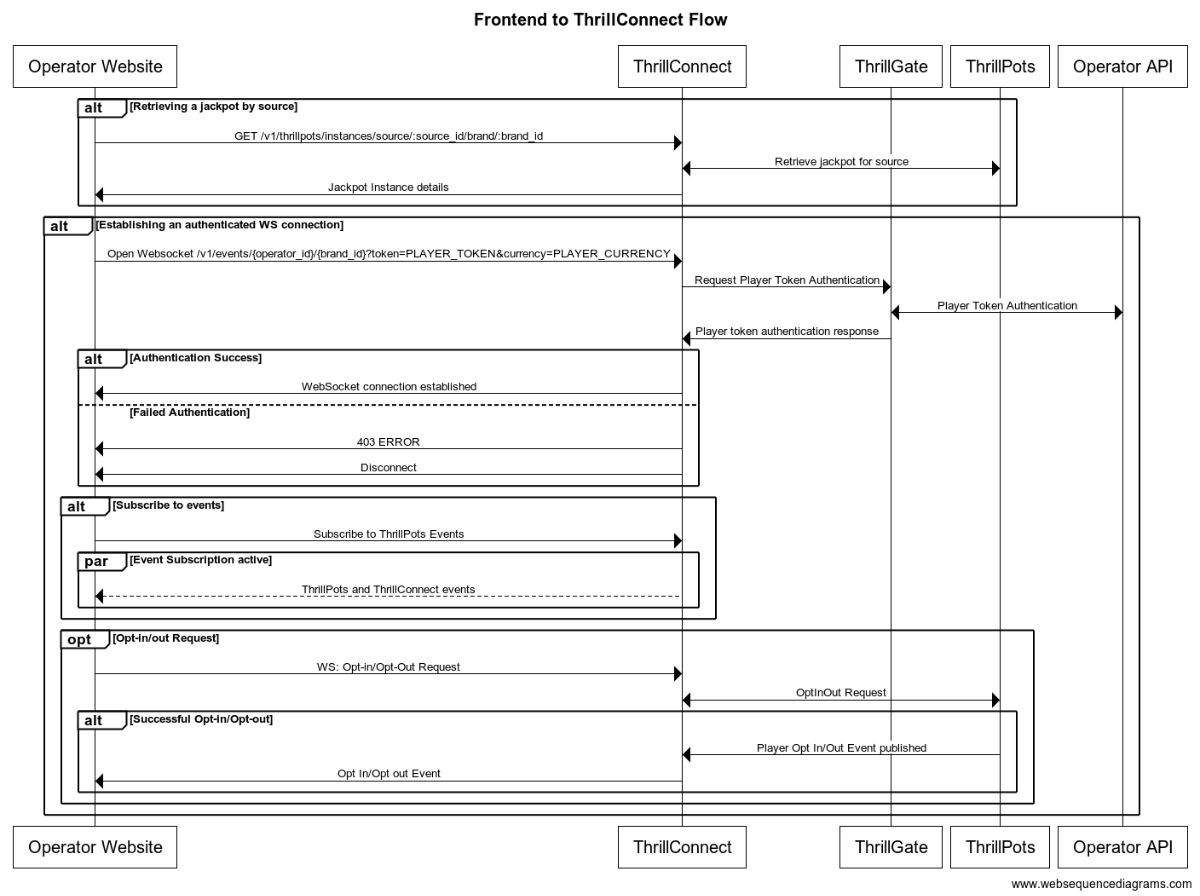
Integration Flow in detail
Fetching a Jackpot's details
One of the first things your frontend will most likely need to do is to retrieve jackpot details for your jackpot widget to display.
If you have followed the section on settings up the AIO container, you would have created a
Sourcecalledsitewide-casino.If you haven't gone through the process of setting up a source, we suggest that you review and understand sources and how they are used before continuing
To retrieve the jackpot for the sitewide-casino source, you will need to call:
GET /v1/thrillpots/instances/source/:source_id/brand/:brand_id?player_id=:player_id
replacing the :source_id and :brand_id values with the appropriate values that have been configured. If you used the default values from the Postman collection, you can use sitewide-casino for the source_id and thrilltech:brand1 for the brand_id.
If the player is already logged in, you can also pass the ID of the player via the query parameter player_id. Doing so will ensure that the player's opt-in status is returned in the jackpot instance information.
Establishing a WebSocket connection
In order to receive ThrillPots events and be able to opt players in or out of the jackpot, you will need to establish a websocket connection.
Once a player is logged into an operator's site, you can establish a WebSocket connection with ThrillConnect, passing in the player's session token.
NOTE
WebSocket connections are protected and can only be established by logged in players to prevent unauthorized and potentially dangerous abuse by attackers. Requiring a player a valid player session token in order to establish a WebSocket connection is a security-driven decision
To establish a WebSocket connection with ThrillConnect, open a WebSocket to:
/v1/events/{operator_id}/{brand_id}?token=PLAYER_TOKEN¤cy=PLAYER_CURRENCY
ThrillConnect will authenticate the token (the Player session token) from the query parameters with the operator's platform via ThrillGate. If the token is valid, the websocket connection will be established. If the token is invalid, the connection will receive a 403 FORBIDDEN error.
Subscribing to ThrillPots events
Once you have successfully established a WebSocket connection, you can now subscribe to ThrillPots events. This is done by sending a subscription request via the WebSocket to ThrillConnect. See below for the SubscribeRequest message that should be sent to subscribe to all ThrillPots events:
{
	"SubscribeRequest": {
		"events": [{
			"source": "thrillpots",
			"event_type": "*"
		}]
	}
}
If you would like to subscribe to only certain events, you can do so by explicitly specifying the events by source one-by-one.
ThrillPots currently publishes the folliowing event types:
- JackpotUpdateEvent
- WinEvent
- RaffleWinEvent
- OptInEvent
For more information about the structure of each of these events, see ThrillPots Event Structures
Player Opt-in / Opt-out
To opt a player in or out of a jackpot, you must send a PlayerOptInRequest message via the WebSocket connection.
Below are a few examples of opting a player in and out of a jackpot instance (please note, you will need to have the jackpot instance ID):
Opting in
{
	"PlayerOptInRequest": {
		"instance_id": "8dcc9f5a-f1c5-466f-83e9-928277d8bfb7",
		"player_country": "MT",
		"opt_in": true
	}
}
Opting in with a preferred contribution value of 0.20
{
	"PlayerOptInRequest": {
		"instance_id": "8dcc9f5a-f1c5-466f-83e9-928277d8bfb7",
		"player_country": "MT",
		"opt_in": true,
		"contribution_value": 0.2
	}
}
Opting out of a Jackpot
{
	"PlayerOptInRequest": {
		"instance_id": "8dcc9f5a-f1c5-466f-83e9-928277d8bfb7",
		"player_country": "MT",
		"opt_in": false
	}
}
Opting in with a preferred contribution value and preferred contribution currency
{
	"PlayerOptInRequest": {
		"instance_id": "8dcc9f5a-f1c5-466f-83e9-928277d8bfb7",
		"player_country": "MT",
		"opt_in": true,
		"contribution_value": 0.2
		"contribution_currency": "USD"
	}
}
Opting out from a preferred contribution currency
{
	"PlayerOptInRequest": {
		"instance_id": "8dcc9f5a-f1c5-466f-83e9-928277d8bfb7",
		"player_country": "MT",
		"opt_in": false,
		"contribution_currency": "USD"
	}
}
Retrieving Exchange Rates
You may need to convert the values of a jackpot instance from the Jackpot currency to a player's currency. To help facilitate this, ThrillConnect exposes a currency endpoint which allows you to fetch the exchange rates used by ThrillPots.
To retrieve the 202408-1 exchange rates, you can call:
GET /v1/currencies
Retrieving a player's raffle ticket count
If player's are contributing to a Raffle jackpot, you may want to show the player how many tickets they have earned so far in the raffle. You can retrieve the player's current ticket count by requesting it via the WebSocket connection:
To retrieve a player's ticket count, send a PlayerRaffleTicketsRequest message:
{
	"player_id": String,
	"instance_id": String,
	"brand_id": String
}
The instance_id is the instance ID of the Raffle jackpot, and the brand_id is in the format operator_id:brand_id.
If the request can be serviced, you should received a PlayerRaffleTicketsResponse message back:
{
	"msg_type": "Message",
	"source": "thrillpots",
	"msg_name": "PlayerRaffleTicketResponse",
	"operator_id": "OPERATOR_ID",
	"brand_id": "BRAND_ID",
	"player_id": "PLAYER_ID",
	"data": {
		"ticket_count": 4
	},
	"timestamp": 1711452762485
}
If there was an error processing the request, you will receive an Error message in response which will contain the message name that errored, as well as any relevant error details. For example:
{
	"msg_type": "Error",
	"source": "thrillpots",
	"msg_name": "PlayerRaffleTicketRequest",
	"operator_id": "OPERATOR_ID",
	"brand_id": "BRAND_ID",
	"player_id": "PLAYER_ID",
	"data": {
		"status_code": 404,
		"code": "",
		"message": "Error 404 Not Found from http://localhost:8084/instances/raffle/e0dee1ae-6231-458a-ad6d-4dc0c941e5c3/tickets/player_00001/brand/thrilltech:brand1"
	},
	"timestamp": 1711452757807
}
In this case, the request Jackpot instance ID could not be found.
ThrillConnect JS Client
ThrillConnect Client is the glue that connects your Portal and ThrillTech systems to provide seamless experience for your players. It is designed with minimialistic, yet powerful API, that can be easily consumed and covers all the narrow and tricky edgecases of the frontend integration. It's purpose is to make your frontend development trivial and expose the full API surface with minimum effort.
On this page you can find all the relevant details on how to use the Client, as well as examples and use cases.
Client version will be aligned with service version and just like that you'll be subscribed to all the latest and greatest features of our platform.
Source
Source code is avaiable for review & fork for all ThrilTech customers. You can find the client at https://github.com/thrilltech-io/connect-client.
Initialization
Client constructor needs the host address and BrandContext. Player context can optionally be passed on initialization or later on via authenticate method.
Additionally one can specify dev options, like the use of unsecure http/ws and client internal logs for dev convenience.
All the events of interest must be passed on to the constructor in the events array so that client can subscribe to relevant systems on the WS channel.
Player context
Player context type provides all necessary player details for establishing the WSS connection and interacting with the Jackpots from player perspective.
type PlayerContext = {
    id: string,
    token: string,
    currency: string,
    country: string,
}
Initialization without player context
Prior to having a valid player session and auth token, one can initialize the client without PlayerContext. In this limited mode the WS events will not be available and only public REST endpoints can be used to make requests. ( see API section for what is available )
import { ThrillConnect, ConnectEvents } from "./thrillconnect.js"

const client = new ThrillConnect({
    host: "localhost:11000",
    brand: {
        operator_id: "thrilltech",
        brand_id: "brand1",
    },
    dev: {
        secure: false
    },
    events: [
        ConnectEvents.JackpotUpdateEvent,
        ConnectEvents.RaffleWinEvent,
        ConnectEvents.JackpotWinEvent,
        ConnectEvents.OptInEvent,
    ]
})
Later on, once we have player details, we can authenticate and subscribe to full functionality of the client.
client.authenticate({
    id: "player_id_token_00001",
    token: "token_00001",
    country: "USA",
    currency: "USD",
})
Initialization with player context
Alternatively, if player details are known from the start, those can be passed directly to the client constructor.
const client = new ThrillConnect({
    host: "localhost:11000",
    player: {
        id: "player_00001",
        token: "token_00001",
        country: "USA",
        currency: "USD",
    },
    brand: {
        operator_id: "thrilltech",
        brand_id: "brand1",
    },
    dev: {
        secure: false
    },
    events: [
        ConnectEvents.JackpotUpdateEvent,
        ConnectEvents.RaffleWinEvent,
        ConnectEvents.JackpotWinEvent,
        ConnectEvents.OptInEvent,
    ]
})
API
Following is a list of all the available methods on connect client.
Adding an event listener
client.on(ConnectEvent, handler)
Adding an once off event listener
client.once(ConnectEvent, handler)
Removing an event listener
client.off(ConnectEvent, handler)
Passing player context
client.authenticate(PlayerContext)
Fetching the currency multipliers
const multipliers = await client.request().getCurrencies()
Fetching the list of defined sources for the provided BrandContext
const sources = await client.request().getSources()
Getting the Jackpot instance that maps to a source
	const sourceId = "sitewide-jackpot"
	const instance = await client.request().getJackpotForSource(sourceId)
Getting the player OptIn status for a source
Note: PlayerContext is required for this request.
	const sourceId = "sitewide-jackpot"
	const status = await client.request().getOptInStatusForSource(sourceId)
Opting in/out from a source
Note: PlayerContext is required for this request. This request uses the authenticated WS channel. When jackpot allows for variable contribution, preferred contribution value can be passed as 3 parameter.
	const sourceId = "sitewide-jackpot"
	const optIn = true
	const preferredContributionValue = undefined

	client.request().optIntoSource(sourceId, optIn, preferredContributionValue)
Opting in/out from an instance
Note: PlayerContext is required for this request. This request uses the authenticated WS channel. When jackpot allows for variable contribution, preferred contribution value can be passed as 3 parameter.
	const instanceId = "dd7243ea-9992-47ae-a2a6-531b3f0e2197"
	const optIn = true
	const preferredContributionValue = undefined

	client.request().optIntoInstance(instanceId, optIn, preferredContributionValue)
Events
Client receives events via the WS connection. In order to receive an event, it needs to explicitly be listed in the list of events in the Client constructor.
All the available events are listed in ConnectEvents.
import { ConnectEvents } from "./thrillconnect.js"

function updateTickers(e:JackpotUpdateEvent) {
    console.log(e.status)
}
// subscribe to Jackpot updates
client.on(ConnectEvents.JackpotUpdateEvent, updateTickers)
// unsubscribe from Jackpot updates
client.off(ConnectEvents.JackpotUpdateEvent, updateTickers)
withSource helper
Jackpot source serves as alias for the instance, however properly handling the events, as well as parts of the API requires frontend to keep a reference to the instance identifier. To address this inconvinience, connect-client now supports internal caching of instance ID. Source bound client internally filters events and only fires those matching the jackpot instance id corresponding to the source.
const sourceBoundClient = await client.withSource("put-source-id-here")

await sourceBoundClient?.getJackpot()
await sourceBoundClient?.getTickers()
await sourceBoundClient?.getOptInStatus()
await sourceBoundClient?.optIn(true, 50)

sourceBoundClient?.on(ConnectEvents.JackpotUpdateEvent, handleUpdate)
SharedWorker usage and disposal guide
This guide explains how the ThrillConnect SharedWorker mode behaves, how consumers should use it, and how to dispose clients safely.
How SharedWorker mode is selected
ThrillConnect uses SharedWorker when both conditions are met:
window.SharedWorkerexists in the runtime.disable_workeris not set totrueinConnectSettings.
Otherwise, the client falls back to the local per-tab implementation.
Correct consumer usage patterns
1) Instantiate once per tab/window
Create one ThrillConnect instance per page context and reuse it across your UI code.
const client = new ThrillConnect({
  host: "localhost:11000",
  brand: { operator_id: "thrilltech", brand_id: "brand1" },
  events: [ConnectEvents.JackpotUpdateEvent, ConnectEvents.OptInEvent],
})
2) Authenticate explicitly when credentials become available or rotate
In SharedWorker mode, authenticate updates credentials in the shared client state and is used on reconnection attempts.
client.authenticate({
  id: "player_00001",
  token: "token_00001",
  country: "USA",
  currency: "USD",
})
Use this whenever a tab refreshes user context (SSO refresh, OTT rotation, relogin).
3) Subscribe and unsubscribe intentionally
- Register only the events you actually need in
settings.events. - Keep handler references if you want to remove a specific listener later.
- Use
off(event)to clear all handlers for one event type.
4) Prefer SharedWorker only for single-session multi-tab use cases
SharedWorker is ideal when all tabs/windows represent the same player session.
If your app supports different logged-in users across tabs, disable shared worker:
const client = new ThrillConnect({
  // ...settings
  disable_worker: true,
})
Disposal guide
Why disposal matters
A client instance keeps event subscriptions and an open port to the shared worker. Disposing on page teardown prevents stale listeners and releases the port early.
Recommended disposal pattern
Always call destroy() when the page/app is unloading:
const cleanup = () => client.destroy()
window.addEventListener("beforeunload", cleanup)
In SPA frameworks, call destroy() in component/app unmount lifecycle hooks too.
Disposal semantics in SharedWorker mode
When destroy() is called from a consumer:
- The tab posts
closeto the shared worker. - The tab closes its local worker port.
- The tab should no longer use that client instance.
Inside the worker, once all ports are gone, the underlying shared ThrillConnectLocal is destroyed.
Quick checklist
- One client instance per tab/window context.
-
Call
authenticatewhenever credentials update. - Subscribe only to required events.
- Unsubscribe handlers you no longer need.
-
Call
destroy()on unload/unmount. -
Set
disable_worker: truefor multi-user-per-browser scenarios.
Animation Driver
ThrillTech supplies a default set of Jackpot win animations to enrich the player experience during a Jackpot win. The animations driver is a JS library that takes care of win animations loading and playback. Animations are easily customizable and the driver allows for flexible cusomizations of the playback.
Source
Source code is avaiable for review & fork for all ThrilTech customers. You can find the driver at https://github.com/thrilltech-io/animations-driver.
Overview
The JS driver exposes two functions:
preload(config, tier, muted)- loads the required assets per pased configuration object. When muted, sounds will not be loaded.run(config, tier, amount, muted)- starts the animation sequence defined in the configuration. Run will do load if assets are not already loaded.
The preload function is intended to provide separation of the loading phase, so that in case of unreasonably slow connection, stale loading can be detected and acted upon (for example using a fallback alert / win message if assets load didnt complete in a certain period).
Mute state cannot be controlled after the animation is run. The current sound preference should be passed to the run ( and optionally preload ) and based on that the defined in configuration sfx are either loaded or not.
Usage
import { preload, run } from "./main.js"

const config = "/configs/example.json"
const tier = "super"
const amount = 10000
const muted = false

preload(config, tier, muted).then(()=>{
    run(config, tier, amount, muted)
})
Configuration
See example configurations in ./public/configs in the driver repository.
Following is a full possible configuration with all settings commented inline.
{
    "dom": {
        // optional - skip "top" section if no header is required
        "top": {
            // id of top container
            "id": "top-container",
            // messages to display during presentation phase
            "message": {
                "id":"top-message",
                // message during wheel spin
                "wheel": "Stop the wheel and win BIG! BIG!",
                // message during tickup
                "tickup": "Congratulations!"
            }
        },
        // optional - skip "bottom" section if no footer is required
        "bottom": {
            // id of bottom container
            "id": "bottom-container",
            // action button
            "button": {
                // id of the action button
                "id": "action-button",
                // actions during wheel phase
                "wheel": {
                    "stop": "STOP THE WHEEL",
                    "skip": "SKIP THE WHEEL"
                },
                // actions during tickup phase
                "tickup": {
                    "skip": "SKIP TICKUP"
                },
                // actions after tickup
                "end": {
                    "close": "CLOSE"
                }
            }
        },
        // enable touch controls during phase
        "touch": {
            // touch during wheel acts as stop / skip
            "wheel": {
                "stop": true,
                "skip": true
            },
            // touch during tickup acts as skip
            "tickup": true
        }
    },
    // ticker skin and font settings -
    // skin provided and customised by thrilltech
    "ticker": {
        "skin": "/ticker/Win_BG.skel",
        "font": "/fonts/rubik.woff",
        "fontFamily": "rubik",
        // maximum font size for the tickup
        "maxFontSize": 80,

        // https://developer.mozilla.org/en-US/docs/Web/JavaScript/Reference/Global_Objects/Intl/NumberFormat
        // the currency for the win amount as per ISO 4217 currency codes
        // optional, leave empty for no currency or monetary amount format
        "currency":"JPY",
        // A string with a BCP 47 language tag, optional
        "currencyFormat":"en-US"
    },
    // wheel skin and segments settings -
    // skin provided and customised by thrilltech
    "wheel": {
        "rotate": 0,
        "base": "/wheel/Wheel_of_Fortune.skel",
        // wheel has 8 segments, following is the order of tiers per segments
        "segments": [
            "mini",
            "super",
            "mini",
            "epic",
            "mini",
            "super",
            "epic",
            "super"
        ],
        // map of segment textures
        "skins": {
            "mini": "/skins/demo/mini.png",
            "super": "/skins/demo/super.png",
            "epic": "/skins/demo/epic.png"
        }
    },
    // jackpot animation skin -
    // skin provided and customised by thrilltech
    "pots": {
        "mini": {
            // path of the spine export containing the mini tier animation
            "source": "/pots/mini/Thrillpot.skel",
            // prefix of the animation for this tier
            "prefix": "",
            // sound clips for all animation phases
            "sfx": {
                "intro": ["/sfx/base/mini/intro.mp3"],
                "particles": ["/sfx/base/mini/confetti.mp3"],
                "tickup_start": ["/sfx/base/mini/tickup-start.mp3"],
                "tickup_loop": ["/sfx/base/mini/tickup-loop.mp3"],
                "outro": ["/sfx/base/mini/outro.mp3]"
            }
        },
        "super": {
            // path of the spine export containing the mini tier animation
            "source": "/pots/super/Thrillpot.skel",
            // prefix of the animation for this tier
            "prefix": "",
            // sound clips for all animation phases
            "sfx": {
                "intro": ["/sfx/base/super/intro.mp3"],
                "particles": ["/sfx/base/super/confetti.mp3"],
                "tickup_start": ["/sfx/base/super/tickup-start.mp3"],
                "tickup_loop": ["/sfx/base/super/tickup-loop.mp3"],
                "outro": ["/sfx/base/super/outro.mp3]"
            }
        },
        "epic": {
            // path of the spine export containing the mini tier animation
            "source": "/pots/epic/Thrillpot.skel",
            // prefix of the animation for this tier
            "prefix": "",
            // sound clips for all animation phases
            "sfx": {
                "intro": ["/sfx/base/epic/intro.mp3"],
                "particles": ["/sfx/base/epic/confetti.mp3"],
                "tickup_start": ["/sfx/base/epic/tickup-start.mp3"],
                "tickup_loop": ["/sfx/base/epic/tickup-loop.mp3"],
                "outro": ["/sfx/base/epic/outro.mp3]"
            }
        },
    },
    // particles animation skin -
    // skin provided and customised by thrilltech
    "particles": {
        "mini": {
            "source": "/particles/confetti/Thrillpot.skel",
            "prefix": ""
        },
        "super": {
            "source": "/particles/confetti/Thrillpot.skel",
            "prefix": ""
        },
        "epic": {
            "source": "/particles/confetti/Thrillpot.skel",
            "prefix": ""
        }
    }
}
SFX
Config contains sound definitions for various phases of the animation. All sounds are optional.
Sounds per animation phase are defined as an array. All elements of the phase array refer to the same sound effect. The intention is to provide multiple sfx formats and the runtime will automatically pick the one supported on the client system. Recommended formats to use are webm, wav and mp3. wav has the widest support accross devices, but is not as optimal as webm and mp3 in terms of filesize.
"sfx": {
    "intro": ["/sfx/base/epic/intro.webm", "/sfx/base/epic/intro.wav"],
    "particles": ["/sfx/base/epic/confetti.webm", "/sfx/base/epic/confetti.wav"],
    "tickup_start": ["/sfx/base/epic/tickup-start.webm", "/sfx/base/epic/tickup-start.wav"],
    "tickup_loop": ["/sfx/base/epic/tickup-loop.webm", "/sfx/base/epic/tickup-loop.wav"],
    "outro": ["/sfx/base/epic/outro.webm", "/sfx/base/epic/outro.wav"]
}
Metrics
The ThrillPots system exposes Prometheus metrics per service via the /metrics endpoint.
Below is the list of metrics exposed per service:
ThrillPots Gateway
| Metric name | Metric Type | Description |
|---|---|---|
| contrib_req_sync_recv | Counter | Syncronous Contribution Requests Received |
| contrib_req_async_recv | Counter | Asyncronous Contribution Requests Received |
| contrib_req_queued | Gauge | Contribution Requests currently queued |
| contrib_req_processed | Counter | Contribution requests processed |
| contrib_avg_queue_time | Counter | Average Contribution Request Queue Time |
| contribution_webhook_calls | Counter | Contribution Webhook calls made |
| http_requests_avg_time | Family: Counter | HTTP Request Average Time |
ThrillPots Service
| Metric name | Metric Type | Description |
|---|---|---|
| contrib_req_recv | Counter | Contribution Requests Received |
| contrib_req_processed | Counter | Contribution requests processed |
| contrib_req_rejected | Counter | Contribution Requests rejected |
| http_requests_avg_time | Family: Counter | HTTP Request Average Time |
| preflight_avg_time | Counter | Average time spent validating contribution requests |
| jackpot_opts | Family: Counter | Opt-In/Out related metrics |
Thrillpots Gateway
ThrillPots Service
ThrillGate Bonus API
ThrillGate (Standard Wallet API)
ThrillConnect
Thrill-ID
BitBridge
ThrillOffice
Multi-Currency Support
The ThrillPots Platform provides advanced multi-currency support. It uses bespoke a bespoke system of algorithms known as the Always Fair Multi-Currency system to provide operators with fine grained control over the multi-currency configuration aspects of their jackpots.
The Basics
At a basic level, every Jackpot has a base currency. This is the currency that the jackpot operates in at the lowest level.
In order to process contributions for players that may be using wallet currencies that are different from the jackpot's base currency, the platform uses exchange rates that are updated frequently by the system.
In this basic scenario, all contributions are based on the jackpot's base currency.
Example
A Jackpot is configured to have a base currency of EUR and accept a minimum contribution of €0.10.
An opted-in player is using GBP as their wallet currency.
We know that EUR:GBP is not 1:1. For the purposes of this example, we will assume an exchange rate of 1:0.85.
Therefore, the GBP account player will be contributing a minimum of €0.10 to the jackpot, but in their transaction history, they will correctly see £0.085 being deducted from their account.
In this simple example, although the GBP player does not see an aesthetically pleasing bet amount for each contribution, they are wagering the correct amount into the jackpot. There are a few downsides with this approach, one of which is that the contribution amount in GBP may fluctuate over time depending on the prevailing exchange rate.
Always Fair Multi-currency Support
The Always Fair Multi-currency system allowed operators to define both minimum and maximum contributions on a per supported currency basis without compromising on the fairness and integrity of their jackpot maths.
With the system, the operator can specify more appealing and intuitive minimum (and maximum) contribution values as follows:
| Currency | Minimum Bet Balue |
|---|---|
| EUR (base) | 0.10 |
| GBP | 0.10 |
| USD | 0.10 |
| SEK | 1 |
| NOK | 1 |
| JPY | 10 |
| ZAR | 1 |
While this table of Jackpot Contribution sizes may look much better than if we simply used exchange rates to calculate the contribution value, a question of fairness does need to be raised.
What is the problem?
Lets imagine a EUR player is wagering €0.10 into a jackpot while a JPY player is wagering 10 JPY. Based on the above configuration, this will be accepted by the system. But what about fairness. If we simply "accepted" bets of different sizes into the jackpot, the JPY player would have an unfair advantage over the EUR player since the real world value of 10 JPY is not equal to €0.10 (based on the exchange rate at the time of writing, 10 JPY = ~€0.06).
This would mean that there would be greater value to be contributing in JPY than in EUR.
This is where the Always Fair technology comes into play.
What does Always Fair actually do?
The Always Fair Multi-Currency system ensures that the maths of the jackpot is scaled proportionally to the currency being used for contributions. Therefore, in the example above, the Always Fair algorithms ensures that the JPY player has their probabilities of hitting the jackpot scaled based on the value of their contribution in relation to the base currency of the jackpot. (Yes, we know thats a lot!)
While the detailed workings of the algorithm are beyond the scope of this document, here are the important take aways about what the Always Fair Multi-currency system enables:
- Allowed minimum and maximum contribution values to bet set per currency
- Ensuring that regardless of currency, contributions are always processed fairly - no player will receive an unfair advantage
Multi-Currency Opt-ins
The system supports two distinct modes of operation when it comes to player opt-ins.
1. Simple Opt-in/Opt-out
In this mode (which is default), if a player opts-in with Currency A, they are opted in. If they are able to change their currency to Currency B, they will still be opted in. If the Jackpot has a minimum contribution size defined for the player's currency (Currency B), then the contribution will be based on that configured minimum. If the jackpot does not have a minimum contribution defined for Currency B, the players contribution will be the value of minimum contribution of the jackpot's base currency.
If the jackpot does support Currency B as an alternate currency and the player opts out while using Currency B, they will also be opted out for Currency A.
2. Per-Currency Opt-In/Opt-out
In this mode, players are required to opt-in on a per currency basis. For example, if Player A opts in while using Currency A, but later on changes to using Currency B, they will not be considered opted in while using Currency B. In this mode, the player will need to explicitly opt-in for Currency B as well.
This logic extends to opting out as well. If a player has opted in for Currency A and separately for Currency B and then layer opts out for Currency B, they are still considered opted in (but only for Currency A). This is an important factor when it comes to community payout jackpots where only opted-in players are considered when picking the community winners.
Jackpot Freebets
The Jackpot Freebets feature provides operators with a way to promote their jackpot product by way of awarding players with free jackpot contributions.
Jackpot Freebets can be configured in two ways:
- Either entirely in the ThrillTech system using ThrillGate FreeBets
- In the operator's reward system, with a single additional integration point to award the freebets to a player
Example Use Cases
Jackpot Freebets can be used to:
-
introduce newplayers to your player-funded jackpot to "try it out". For example, players who were never opted in could accept an introductory offer which grants them 10 Jackpot Freebets (valued at €0.10 each) if they opt-in.
-
incentivise players that used to be opted in but no longer are to re-optin.
-
as rewards to valued players
Jackpot Freebets > Types of Freebets
There are two types of freebets available:
- Fixed Freebets
- Variable Freebets
Fixed Freebets
Fixed Freebets are configured to have a set number of "bets" at a specific value for each bet. For example:
10 contributions @ €0.10 per contribution
15 contributions @ €0.20 per contribution
When using Fixed Freebets, the ThrillPots system will lock the player's contribution (regardless of their selected opt-in amount) to the value of the freebets for the duration of the awarded freebets. Once the freebets is consumed, any further contributions will be made using the player's opted-in contribution value
Variable Freebets
Variable Freebets are configured as a single monetary value which the player can choose to use as they want. For example:
€0.50 worth of freebets
€2.00 worth of freebets
€5.00 worth of freebets
When using Variable Freebets, the system will use the smaller value of the player's opt-in amount and the remaining value in the freebet.
For example, if a player is opted in for €0.20 and has been awarded for €1.50 worth of Variable Freebets, the player will be able to make 7 contribution at €0.20 and then a final contribution of €0.10 to consume the remaining freebet.
This dynamic adjustment of the contribution value for the freebet is done automatically by the system.
Jackpot Freebets > Freebet Mechanics
In this section, you will find an explanation of how Freebets work.
Configuring Freebets
Freebets can be configured using the built-in functionality in the ThrillOffice platform or, if you already have a 3rd party or internal reward system, by using the Create Player Bonus API.
Configuring using ThrillOffice
Freebets are configured using the ThrillGate section of the ThrillOffice. When you hover over the ThrillGate icon on the left of the screen, you will see 3 options: Bonus Templates, Bonus Instances and Player Bonuses
1. Create a Freebet Template
- Click on
Bonus Templates
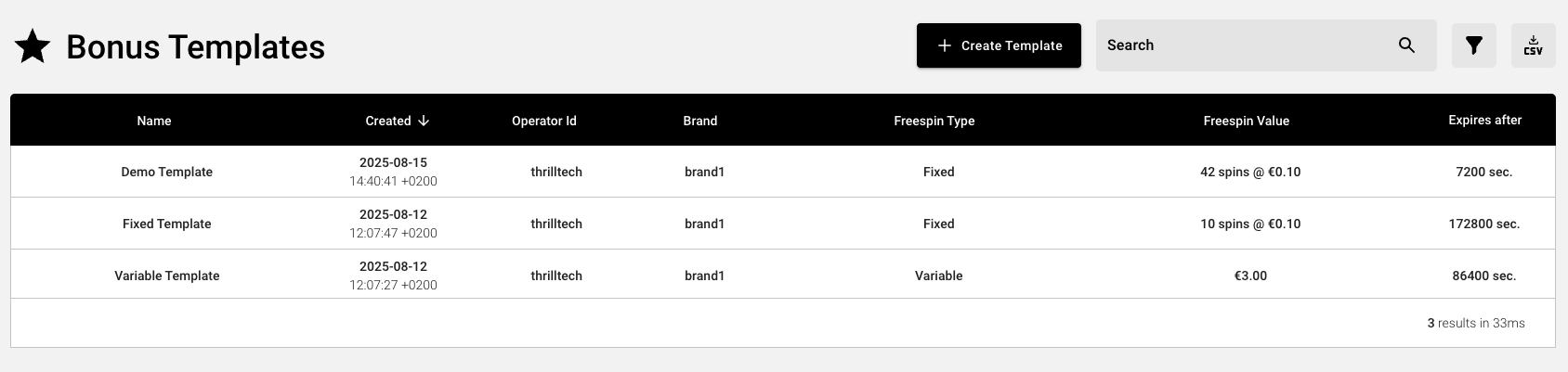
- Click the
Create Templatebutton near the top right of the screen
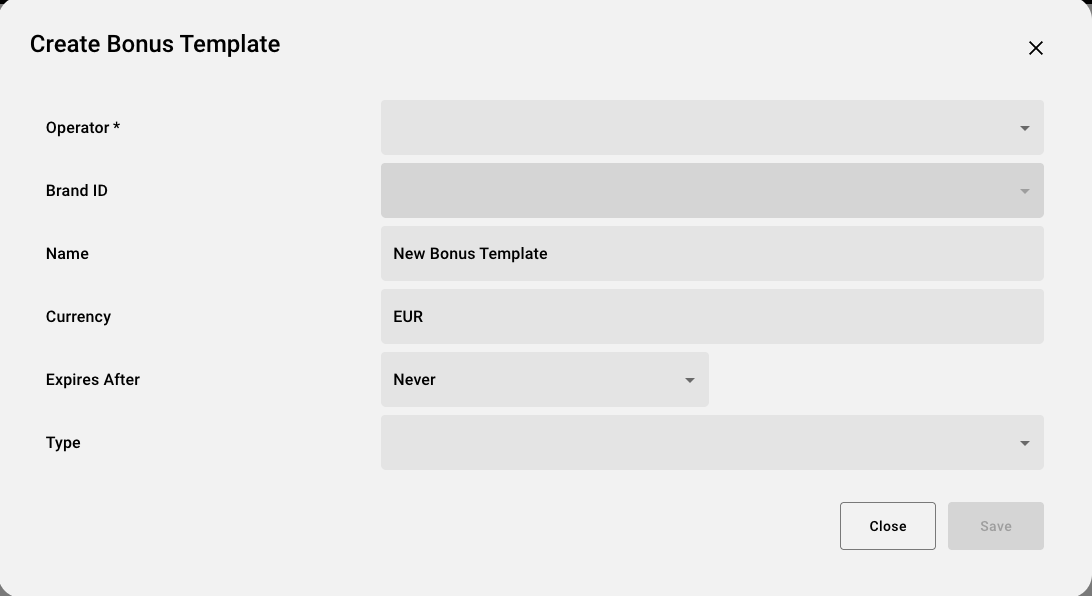
- Populate the form with the required details.
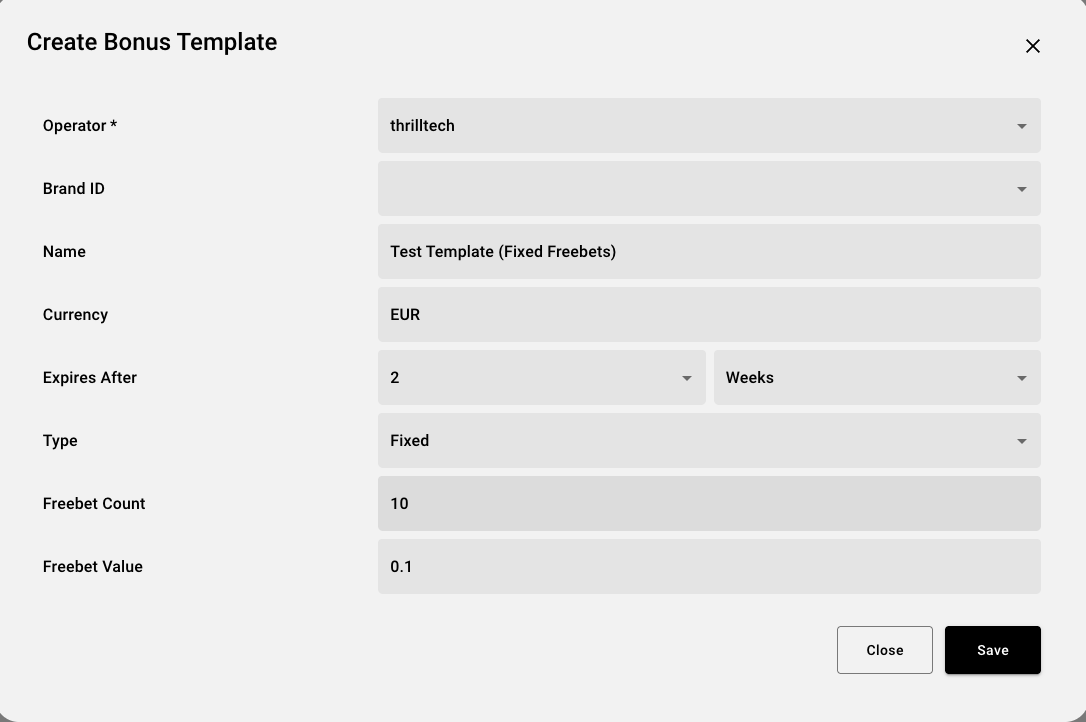
- Click
Save
Your new template should now be visible in the list of Bonus Templates
2. Instantiate the Template
- Hover over the ThrillGate icon again and select
Bonus Instances

- Click the
New Instancebutton near the top right of the screen - Populate the form, selecting the Bonus Template you created in the previous step
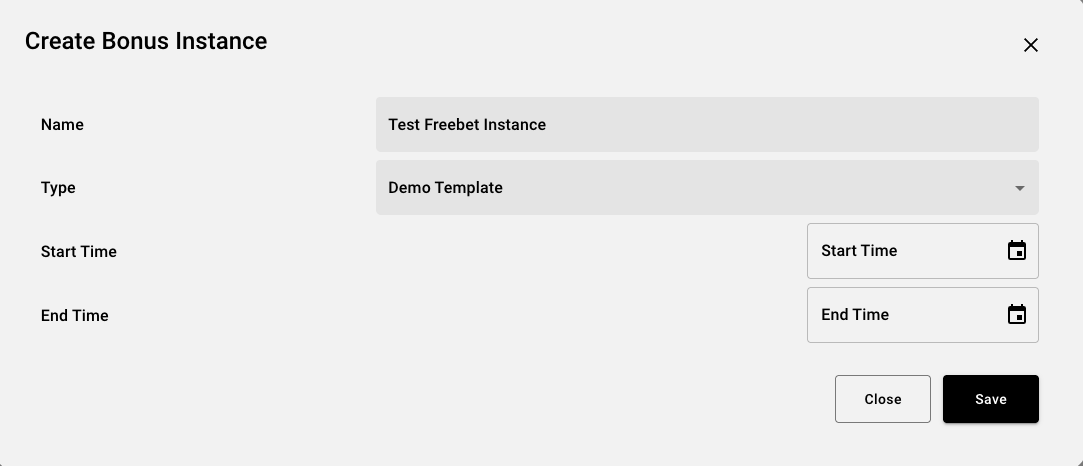
- Click
Save
3. Assign the Freebet Instance to Players
Now that we have a Bonus Template and a Bonus Instance Created, you can now assign Freebets to players. You can reuse the Bonus Instnace created in Step 2 above multiple times.
- Hover over the ThrillGate icon one more time and click on the
Player Bonusesmenu item
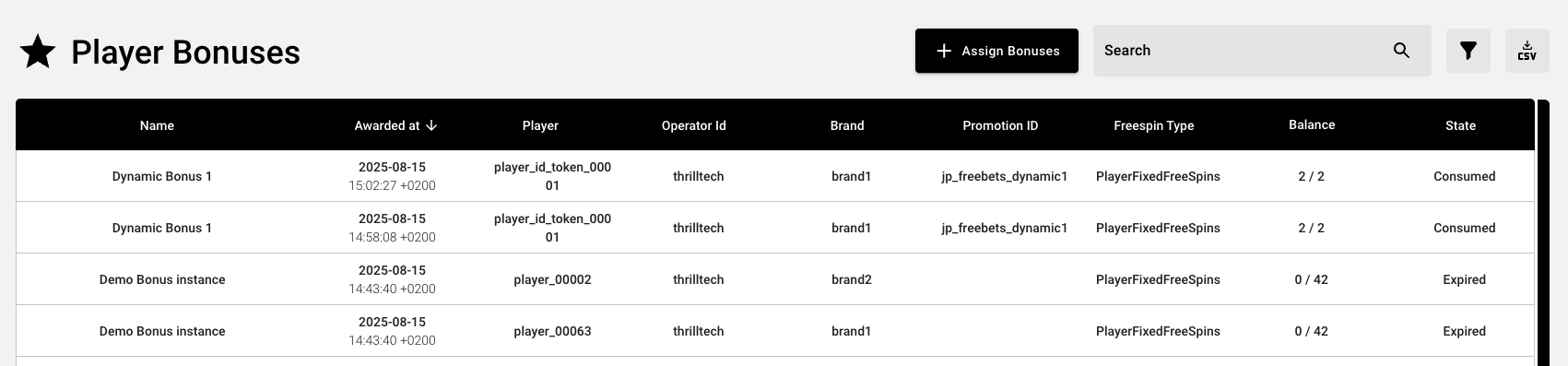
- Click the
Assign Bonusbutton near the top right of the screen - Select the bonus instance you wish to use
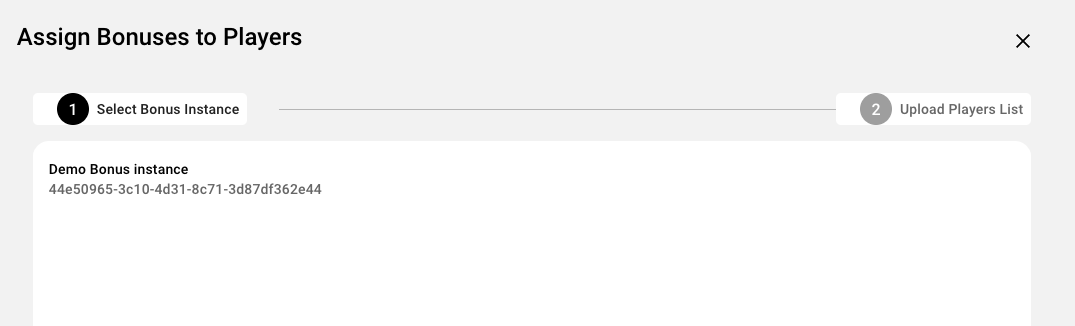
- Click the
Nextbutton
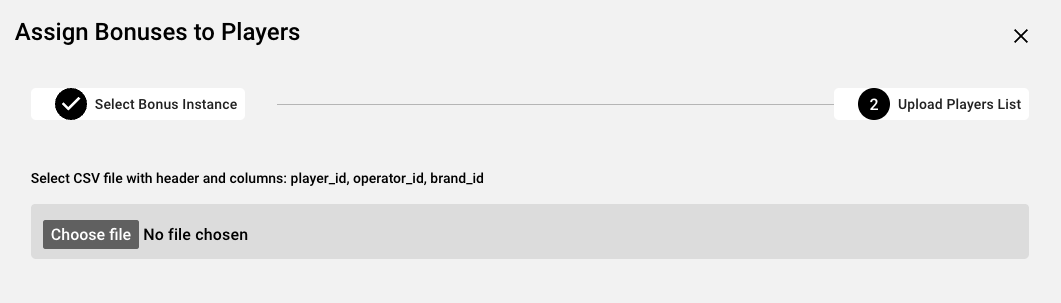
- Click the
Choose filebutton and select the CSV which contains the players you wish to assign bonuses to
NOTE: The format of the CSV file is detailed below here
- If the file is successfully imported, you will see an overview of the total cost
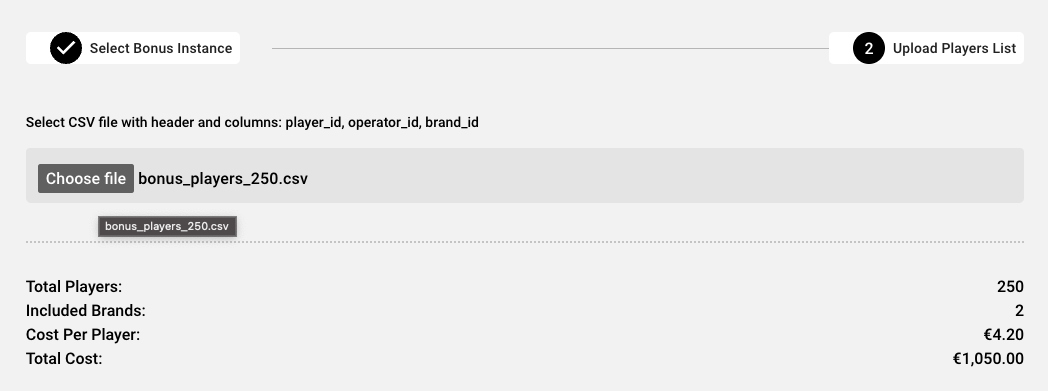
- Review the costs and once you are ready to proceed, click the
Assign Bonusesbutton at the bottom right of the form.- This will assign bonuses to the players in the CSV file you uploaded and the bonuses will be instantly available to these players
** You're done! You've successfully created a Bonus Template which can be used to create one or more Bonus Instances, which in turn can be used multiple times to assign bonuses to specific players **
Player CSV File Format
In order to specify which players should receive freebet bonuses, you need to upload a CSV file which contains the following information:
- The player's ID
- The player's Operator ID
- The player's Brand ID
The CSV file can contain other fields as well, but they will be ignored.
A correctly structured CSV contains a header row with the following headers (in any order):
- player_id
- operator_id
- brand_id
An example CSV file is available for download here
Jackpot Freebets > Configuring Freebets
This section will discuss 2 ways of configuring Freebets using the API.
You will use this if you wish to manage all freebet configurations via the ThrillTech system. The only downside to this approach is that the system does not support the flow of offering a freebet offer to a player and only awarding it if a player accepts.
IMPORTANT When creating Bonus Templates and Instances, if you support multiple player wallet currencies, you will need to create a Template (and instance) for each supported currency. If a player that uses EUR is awarded a NOK bonus, they will be unable to use the bonus unless they can change their account currency to NOK.
Freebets for external reward systems
Use this approach if you wish to make use of your existing rewards or bonusing system to creating freebets for players.
Jackpot Freebets > Configuring Freebets > ThrillGate
ThrillGate provides all the necessary functionality to configure Freebet templates, instances and finally, award freebets to players. This is useful for operators that do not have their own rewards management system or would prefer not to use their current bonusing system for Jackpot Freebets.
This section will discuss the process of configuring Jackpot Freebets at a more technical level. It is worth noting that the ThrillOffice system provides all this configuration in the user interface.
Process of configuring Jackpot Freebets
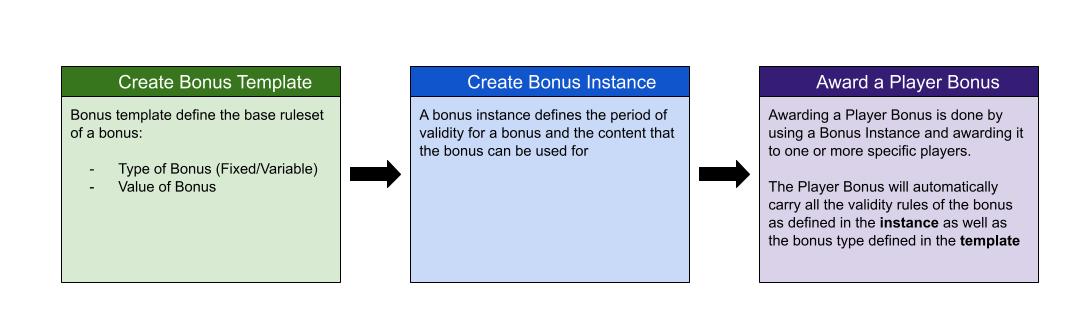
1. Create a FreeBets Iemplate
The first step of creating a template allows you to create re-usable rulesets for freebets in the system. Below is an example of creating both a Fixed Freebet template as well as a Variable Freebet template.
Fixed Freebets Template
- Endpoint: POST thrillgate/bonus/templates
- Payload: JSON
{
    "name": "10 Freebets @ €0.10",
    "operator_id": "thrilltech",
    "brand_id": "brand1",
    "freespin_type": {
        "type": "FixedFreeSpins",
        "count": 10,
        "currency": "EUR",
        "value": 0.1
    },
    "expires_after_ms": 0
}
Variable Freebets Template
{
    "name": "€1.00 Freebets bonus",
    "operator_id": "thrilltech",
    "brand_id": "brand1",
    "freespin_type": {
        "type": "VariableFreeSpins",
        "currency": "EUR",
        "amount": 1.0
    },
    "expires_after_ms": 86400000 // awarded bonuses will expire after a day
}
The response from these calls will look something like this:
{
    "id": "2ee990d6-84fd-43d4-909e-859312291135",
    "name": "10 Freebets @ €0.10",
    "operator_id": "thrilltech",
    "brand_id": "brand1",
    "freespin_type": {
        "type": "FixedFreeSpins",
        "count": 10,
        "currency": "EUR",
        "value": 0.1
    },
    "expires_after_ms": 0,
    "created_by": null,
    "timestamp_created": 1753795763112
}
Once the template is created, you can create one or more Freebet instances. Take note of the id value as we will use it in the next step.
2. Create a Freebets Instance
Now that we have a valid template available, we can create one or more instances, adding constraints (if needed) on which jackpots or games the freebet can be used for. You can also specify the validity of this instance by setting the timestamp_start and timestamp_end fields. If a Jackpot instance expires, it can no longer be used to award freebets to players.
- Endpoint: POST thrillgate/bonus/templates
- Payload: JSON
{
    "template_id": "2ee990d6-84fd-43d4-909e-859312291135",
    "instance_name": "Fixed Freebets: 10 bets @ €0.10 per bet for instance",
    "available_for": [
        {
            // limit the bonus to a specific provider
            "provider_id": "thrilltech",
            "game_ids": []

            // limit the bonus to specific game codes/source ids
            // "provider_id": "thrilltech",
            // "game_ids": [
            //     "903b26eb-3393-4784-a524-baacbba3a8ed"
            // ]
        }
    ],
    "timestamp_start": 0,
    "timestamp_end": 0
}
If successful, the response will look something like this:
{
    "id": "9a1a696c-4011-473f-b950-49f7a39f3b0c",
    "name": "Fixed Freebets: 10 bets @ €0.10 per bet for instance",
    "operator_id": "thrilltech",
    "brand_id": null,
    "freespin_type": {
        "type": "FixedFreeSpins",
        "count": 10,
        "currency": "EUR",
        "value": 0.1
    },
    "template_id": "2ee990d6-84fd-43d4-909e-859312291135",
    "available_for": [
        {
            "provider_id": "thrilltech",
            "game_ids": []
        }
    ],
    "expires_after_ms": 0,
    "timestamp_start": 0,
    "timestamp_end": 0
}
Once again, remember to take note of the id value as we will use it in the 3rd and final step to award freebets to players.
3 Awarding Freebets to Players
In this step, we can now award Freebets to one or more players based on a specific Freebets Instance.
It is worth noting that the request_id field is the value that will be used for idempotency purposes. Ensure that each unique request uses a different value for the request_id.
- Endpoint: POST thrillgate/bonus/playerbonus/assign-instance
- Payload: JSON
{
    "request_id": "1",
    "instance_id": "9a1a696c-4011-473f-b950-49f7a39f3b0c",
    "operator_id": "thrilltech",
    "brand_id": "brand1",
    "players": [
        "player_id_token_00001",
        "player_id_token_00002",
        "player_id_token_00003",
        "player_id_token_00004",
        "player_id_token_00005",
        "player_id_token_00006",
        "player_id_token_00007",
        "player_id_token_00008"
    ],
    "promo_id": "jp_freebets_promo1"
}
Here we are awarding freebets to 8 players in the system. The players array contains the IDs of the players as they are in the operator's platform.
If successful, the response will look similar to this:
[
    {
        "id": "331f781e-e0a3-4d15-92e5-078d9d38c894",
        "player_id": "player_id_token_00001",
        "operator_id": "thrilltech",
        "brand_id": "brand1",
        "promo_id": "jp_freebets_promo1",
        "bonus_instance_id": "9a1a696c-4011-473f-b950-49f7a39f3b0c",
        "available_for": [
            {
                "provider_id": "thrilltech",
                "game_ids": []
            }
        ],
        "bonus_data": {
            "Freespins": {
                "id": "9a1a696c-4011-473f-b950-49f7a39f3b0c",
                "name": "Fixed Freebets: 10 bets @ €0.10 per bet for instance",
                "freespin_type": {
                    "type": "PlayerFixedFreeSpins",
                    "count": 10,
                    "used": 0,
                    "currency": "EUR",
                    "value": 0.1
                }
            }
        },
        "state": "Available",
        "timestamp_bonus_awarded": 1753796209614,
        "timestamp_bonus_expires": 0,
        "timestamp_bonus_consumed": null
    }
	// ..additional entries for each of the players
	// ..
]
At this point, you have successfully awarded jackpot freebets to 8 players and they will take effect on the next contributions that the players make.
Jackpot Freebets > Configuring Freebets > External Reward System
If you would like to use your own Reward System to manage the offering and awarding of Jackpot Freebets, you are able to do so if you implement an integration with a new endpoint to award freebets directly to players.
Using this mechanism, you are able to create freebets with dynamic values, based on your internal system calculations (for example) without needing to use the Freebet Templates and Freebet Instances that were discussed in the Thrillgate section.
To create a Freebet for one or more players directly (without using Freebet instances), you can use the following mechanism.
Please note that the
request_idfield is used for idempotency purposes and should always be unique for each distinct call to the endpoint.
- Endpoint: POST thrillgate/bonus/playerbonus/create
- Payload:
{
    "request_id": "2",
    "operator_id": "thrilltech",
    "brand_id": "brand1",
    "players": [
        "player_id_token_00001",
        "player_id_token_00002",
        "player_id_token_00003",
        "player_id_token_00004",
        "player_id_token_00005",
        "player_id_token_00006",
        "player_id_token_00007",
        "player_id_token_00008",
        "player_id_token_00009",
        "player_id_token_00010"
    ],
    "bonus_name": "Dynamic Freebets 1",
    "bonus": {
        "type": "FixedFreeSpins",
        "count": 15,
        "currency": "EUR",
        "value": 0.25
    },
    // "available_for": [
    //     {
    //         "provider_id": "thrilltech",
    //         "game_ids": []
    //     }
    // ],
    // "timestamp_bonus_expires": 0,
    "promo_id": "jp_freebets_dynamic1"
}
In the above example, we are awarding the Dynamic Freebets 1 to 10 players. Each player will receive 15 freebets, with each freebet valued at €0.25.
If you wanted to put an expiry time for the bonus, you could do so by using the timestamp_bonus_expires field and set the timestamp (unix epoch in milliseconds) for the absolute time for when the bonus will expire.
If the request was successful, you will receive a response similar to the following:
[
    {
        "id": "61668185-d21f-4db1-9217-5181514b97a4",
        "player_id": "player_id_token_00001",
        "operator_id": "thrilltech",
        "brand_id": "brand1",
        "promo_id": "jp_freebets_dynamic1",
        "bonus_instance_id": "DYNAMICALLY_CREATED_1753802620622",
        "available_for": [],
        "bonus_data": {
            "Freespins": {
                "id": "DYNAMICALLY_CREATED_1753802620622",
                "name": "Dynamic Freebets 1",
                "freespin_type": {
                    "type": "PlayerFixedFreeSpins",
                    "count": 15,
                    "used": 0,
                    "currency": "EUR",
                    "value": 0.25
                }
            }
        },
        "state": "Available",
        "timestamp_bonus_awarded": 1753802620622,
        "timestamp_bonus_expires": 0,
        "timestamp_bonus_consumed": null
    },
	// ... additional eleemnts for every other player will follow here
]
Jackpot Freebets > Freebet Events
The following events have been added to the system to support the Freebets feature:
| Event Name | Description |
|---|---|
| PlayerBonusAdded | Sent when freebets are awarded to a player |
| PlayerBonusRemoved | Sent when freebets are removed from a player |
| PlayerBonusUpdated | Sent when a player's freebet state changes (for example when a player uses part of the freebet) |
| PlayerBonusConsumed | Sent when a player's awarded freebets are completely consumed |
| PlayerBonusExpired | Sent when a player's awarded freebets expire |
Each of these events carries the exact same payload, which has the following structure:
{
    "msg_type": "Event",
    "source": "thrillgate",
    "msg_name": "PlayerBonusAdded" | "PlayerBonusRemoved" | "PlayerBonusUpdated" | "PlayerBonusConsumed" | "PlayerBonusExpired",
    "operator_id": String,
    "brand_id": String,
    "player_id": String,
    "data": {
        "id": String,
        "promo_id": String | null,
        "bonus_instance_id": String,
		"available_for": [
			{
				"provider_id": String,
				"game_ids": [String]
			}
		],
        "bonus_data": {
            "Freespins": {
                "id": String,
                "name": String,
                "freespin_type": FreeSpinType, // see below for structure details
            }
        },
		"state": "Available" | "Consumed" | "Expired",
		"timestamp_bonus_awarded": Integer,
		"timestamp_bonus_expires": Integer,
		"timestamp_bonus_consumed": Integer | null
    },
    "timestamp": Integer
}
The FreeSpinType structure is an enumerated structure and can contain one of the following structures:
Fixed Freebets
{
	"type": "PlayerFixedFreeSpins",
	"count": Integer,
	"used": Integer,
	"currency": String,
	"value": Number
}
Variable Freebets
{
	"type": "PlayerVariableFreeSpins",
	"amount": Decimal,
	"amount_used": Decimal,
	"currency": String,
}
Your frontend widgets can use the payload of these events along with the event context to decide what to display to the user.
Environment Variables
Each service has a list of environment variables which define its configuration for runtime. Use this reference to understand what each environment variable does, what it is used for and the possible values it can contain.
Quick Links
- ThrillPots Gateway
- ThrillPots Service
- ThrillGate Service
- ThrillConnect Service
- Thrill-ID Service
- BitBridge Service
- ThrillOffice Service
ThrillPots Gateway
| Variable Name | Default Value | Description |
|---|---|---|
| GW_LOG_LEVEL | info | The log level at which logs will be written. Possible values are info, debug, warn, trace |
| GW_WEB_HOST | 0.0.0.0 | The hostname to bind the web service to |
| GW_WEB_PORT | 80 | The port to bind the web service to |
| GW_MONGO_HOST | mongodb://localhost | The connection URI for the MongoDB server |
| GW_MONGO_DB_NAME | test | The DB name for the Service (should usually be set to thrillpots-gateway) |
| GW_MONGO_USERNAME | None | [Optional] The username to use to authenticate with MongoDB |
| GW_MONGO_PASSWORD | None | [Optional] The password to use to authenticate with MongoDB |
| GW_MONGO_RETRY_WRITES | true | Flag to set whether writes are retries when they fail |
| GW_REDIS_HOST | redis://localhost | The connection URI for REDIS. Possible schemas are: - Standalone: redis://hostname:port- Cluster: redis://hostname:port,redis://hostname2:port,..- Sentinel: sentinel://hostname:port/master/replica or sentinel+tls://hostname:port/master/replica |
| GW_REDIS_DB | 0 | The Redis DB number to use |
| GW_REDIS_USERNAME | None | [Optional] The REDIS username to use for authentication |
| GW_REDIS_PASSWORD | None | [Optional] The REDIS password to use for authentication |
| GW_REDIS_SECURE | false | [Optional] Defines if the REDIS connection is secure or not |
| GW_REDIS_CLUSTER | false | [Optional] Defines if the REDIS connection is secure or not. For a standard Sentinel deployment, this variable should be set to false |
| GW_JPSERVER_HOST | http://localhost:8084 | The URL for the ThrillPots Service. For clustered environments, this should point to the DNS entry for the ThrillPots Service on your internal load balancer |
| GW_THRILLID_HOST | http://localhost:9000 | The URL for the Thrill-ID Service. For clustered environments, this should point to the DNS entry for the Thrill-ID Service on your internal load balancer |
| GW_THRILLID_USERNAME | None | The username the service should use to authenticate with Thrill-ID. In a standard deployment, this should be set to thrillpots.gateway |
| GW_THRILLID_PASSWORD | None | The password the service should use to authenticate with Thrill-ID. In a default deployment, this will start off as password and can be changed via Thrill-ID directly |
| GW_THRILLGATE_HOST | None | The URL for the ThrillGate Service. For clustered environments, this should point to the DNS entery for the ThrillGate Service on your internal load balancer |
ThrillPots Service
| Variable Name | Default Value | Description |
|---|---|---|
| JP_LOG_LEVEL | info | The log level at which logs will be written. Possible values are info, debug, warn, trace |
| JP_WEB_HOST | 0.0.0.0 | The hostname to bind the web service to |
| JP_WEB_PORT | 80 | The port to bind the web service to |
| JP_MONGO_HOST | mongodb://localhost | The connection URI for the MongoDB server |
| JP_MONGO_DB_NAME | thrillpots | The DB name for the Service (should usually be set to thrillpots) |
| JP_MONGO_USERNAME | None | [Optional] The username to use to authenticate with MongoDB |
| JP_MONGO_PASSWORD | None | [Optional] The password to use to authenticate with MongoDB |
| JP_MONGO_RETRY_WRITES | true | Flag to set whether writes are retries when they fail |
| JP_REDIS_HOST | redis://localhost | The connection URI for REDIS. Possible schemas are: - Standalone: redis://hostname:port- Cluster: redis://hostname:port,redis://hostname2:port,..- Sentinel: sentinel://hostname:port/master/replica or sentinel+tls://hostname:port/master/replica |
| JP_REDIS_DB | 0 | The Redis DB number to use |
| JP_REDIS_USERNAME | None | [Optional] The REDIS username to use for authentication |
| JP_REDIS_PASSWORD | None | [Optional] The REDIS password to use for authentication |
| JP_REDIS_SECURE | false | [Optional] Defines if the REDIS connection is secure or not |
| JP_REDIS_CLUSTER | false | [Optional] Defines if the REDIS connection is secure or not. For a standard Sentinel deployment, this variable should be set to false |
| JP_THRILLID_HOST | http://localhost:9000 | The URL for the Thrill-ID Service. For clustered environments, this should point to the DNS entry for the Thrill-ID Service on your internal load balancer |
| JP_THRILLID_USERNAME | thrillpots | The username the service should use to authenticate with Thrill-ID. In a standard deployment, this should be set to thrillpots |
| JP_THRILLID_PASSWORD | password | The password the service should use to authenticate with Thrill-ID. In a default deployment, this will start off as password and can be changed via Thrill-ID directly |
| JP_SERVICE_CURRENCY_REFRESH | 86400000 | The amount of time between ThrillPots attempting to refresh its currency multipliers. The default is set to 24 hours (86400000 milliseconds) |
| JP_SERVICE_UPDATE_EVENT_FREQUENCY | 10000 | The amount of time (in milliseconds) between jackpot update events being sent out. The default is set to 10 seconds, but we recommend reducing this to a value between 2000 and 5000 (2s - 5s) |
| JP_SERVICE_AUTH_CACHE_TTL | 300 | The number of seconds to cache a player's authentication token. Change this to reflect the TTL on your system's player session token lifetimes |
| JP_RNG_BACKGROUND_CYCLING | false | If set to true, the RNG will automatically perform background cycling of its values in periods defined by JP_RNG_BACKGROUND_CYCL_DELAY_MIN_SECS and JP_RNG_BACKGROUND_CYCLE_DELAY_MAX_SECS |
| JP_RNG_BACKGROUND_CYCLE_DELAY_MIN_SECS | 0 | [Optional] The minimum amount of delay between background cycles. We recommend a value of 60 |
| JP_RNG_BACKGROUND_CYCLE_DELAY_MAX_SECS | 0 | [Optional] The maximum amount of delay between background cycles. We recommend a value of 180 |
| JP_RNG_MONITOR_PERIOD_SECS | 0 | [Optional] The maximum period between the randomness monitoring test running. We recommend a value of 600 |
| JP_RNG_FAILURES_TO_ALERT | None | [Optional] If RNG Monitoring is enabled, this variable defines the number of consecutive failures that are needed to generate an alert. We recommend setting this to a value of 5 or higher |
| JP_CC_URL | None | The URL of the ThrillTech CC Service which must be defined for all operator environments. For STAGING environments, this value should be set to https://cc-stg.thrillpots.io and for PRODUCTION environments, it should be set to: https://cc.thrilltechapi.com |
| JP_CC_OPERATOR_ID | None | This value identifies you as an operator and will be provided to you by ThrillTech |
| JP_CC_SERVICE_ID | None | This identifies the product and should be set to thrillpots |
ThrillGate Service
| Variable Name | Default Value | Description |
|---|---|---|
| TG_LOG_LEVEL | info | The log level at which logs will be written. Possible values are info, debug, warn, trace |
| TG_WEB_HOST | 0.0.0.0 | The hostname to bind the web service to |
| TG_WEB_PORT | 80 | The port to bind the web service to |
| TG_MONGO_HOST | mongodb://localhost | The connection URI for the MongoDB server |
| TG_MONGO_DB_NAME | test | The DB name for the Service (should usually be set to thrillgate) |
| TG_MONGO_USERNAME | None | [Optional] The username to use to authenticate with MongoDB |
| TG_MONGO_PASSWORD | None | [Optional] The password to use to authenticate with MongoDB |
| TG_MONGO_RETRY_WRITES | true | Flag to set whether writes are retries when they fail |
| TG_REDIS_HOST | redis://localhost | The connection URI for REDIS. Possible schemas are: - Standalone: redis://hostname:port- Cluster: redis://hostname:port,redis://hostname2:port,..- Sentinel: sentinel://hostname:port/master/replica or sentinel+tls://hostname:port/master/replica |
| TG_REDIS_DB | 0 | The Redis DB number to use |
| TG_REDIS_USERNAME | None | [Optional] The REDIS username to use for authentication |
| TG_REDIS_PASSWORD | None | [Optional] The REDIS password to use for authentication |
| TG_REDIS_SECURE | false | [Optional] Defines if the REDIS connection is secure or not |
| TG_REDIS_CLUSTER | false | [Optional] Defines if the REDIS connection is secure or not. For a standard Sentinel deployment, this variable should be set to false |
| TG_THRILLID_HOST | http://localhost:9000 | The URL for the Thrill-ID Service. For clustered environments, this should point to the DNS entry for the Thrill-ID Service on your internal load balancer |
| TG_THRILLID_USERNAME | None | The username the service should use to authenticate with Thrill-ID. In a standard deployment, this should be set to thrillgate |
| TG_THRILLID_PASSWORD | None | The password the service should use to authenticate with Thrill-ID. In a default deployment, this will start off as password and can be changed via Thrill-ID directly |
ThrillConnect Service
| Variable Name | Default Value | Description |
|---|---|---|
| TCS_LOG_LEVEL | info | The log level at which logs will be written. Possible values are info, debug, warn, trace |
| TCS_WEB_HOST | 0.0.0.0 | The hostname to bind the web service to |
| TCS_WEB_PORT | 80 | The port to bind the web service to |
| TCS_MONGO_HOST | mongodb://localhost | The connection URI for the MongoDB server |
| TCS_MONGO_DB_NAME | test | The DB name for the Service (should usually be set to thrillconnect) |
| TCS_MONGO_USERNAME | None | [Optional] The username to use to authenticate with MongoDB |
| TCS_MONGO_PASSWORD | None | [Optional] The password to use to authenticate with MongoDB |
| TCS_MONGO_RETRY_WRITES | true | Flag to set whether writes are retries when they fail |
| TCS_REDIS_HOST | redis://localhost | The connection URI for REDIS. Possible schemas are: - Standalone: redis://hostname:port- Cluster: redis://hostname:port,redis://hostname2:port,..- Sentinel: sentinel://hostname:port/master/replica or sentinel+tls://hostname:port/master/replica |
| TCS_REDIS_DB | 0 | The Redis DB number to use |
| TCS_REDIS_USERNAME | None | [Optional] The REDIS username to use for authentication |
| TCS_REDIS_PASSWORD | None | [Optional] The REDIS password to use for authentication |
| TCS_REDIS_SECURE | false | [Optional] Defines if the REDIS connection is secure or not |
| TCS_REDIS_CLUSTER | false | [Optional] Defines if the REDIS connection is secure or not. For a standard Sentinel deployment, this variable should be set to false |
| TCS_THRILLID_HOST | http://localhost:9000 | The URL for the Thrill-ID Service. For clustered environments, this should point to the DNS entry for the Thrill-ID Service on your internal load balancer |
| TCS_THRILLID_USERNAME | None | The username the service should use to authenticate with Thrill-ID. In a standard deployment, this should be set to thrillconnect |
| TCS_THRILLID_PASSWORD | None | The password the service should use to authenticate with Thrill-ID. In a default deployment, this will start off as password and can be changed via Thrill-ID directly |
| TCS_ENABLE_FAILED_TOKEN_CACHE | false | [Optional] Enable caching of tokens that failed authentication. When enabled, tokens that failed authentication with 401 will be automatically rejected for a rolling period of 120s. |
| TCS_ENABLE_PREFLIGHT | false | [Optional] Enable token pre-flight validation. |
| TCS_MUST_PREFLIGHT | false | [Optional] Enforce token pre-flight validation. |
| TCS_OPTIMIZED_TICKER_UPDATES | true | [Optional] Enables optimized jackpot update events. |
Thrill-ID Service
| Variable Name | Default Value | Description |
|---|---|---|
| TID_LOG_LEVEL | info | The log level at which logs will be written. Possible values are info, debug, warn, trace |
| TID_WEB_HOST | 0.0.0.0 | The hostname to bind the web service to |
| TID_WEB_PORT | 80 | The port to bind the web service to |
| TID_MONGO_HOST | mongodb://localhost | The connection URI for the MongoDB server |
| TID_MONGO_DB_NAME | test | The DB name for the Service (should usually be set to thrillid) |
| TID_MONGO_USERNAME | None | [Optional] The username to use to authenticate with MongoDB |
| TID_MONGO_PASSWORD | None | [Optional] The password to use to authenticate with MongoDB |
| TID_MONGO_RETRY_WRITES | true | Flag to set whether writes are retries when they fail |
| TID_REDIS_HOST | redis://localhost | The connection URI for REDIS. Possible schemas are: - Standalone: redis://hostname:port- Cluster: redis://hostname:port,redis://hostname2:port,..- Sentinel: sentinel://hostname:port/master/replica or sentinel+tls://hostname:port/master/replica |
| TID_REDIS_DB | 0 | The Redis DB number to use |
| TID_REDIS_USERNAME | None | [Optional] The REDIS username to use for authentication |
| TID_REDIS_PASSWORD | None | [Optional] The REDIS password to use for authentication |
| TID_REDIS_SECURE | false | [Optional] Defines if the REDIS connection is secure or not |
| TID_REDIS_CLUSTER | false | [Optional] Defines if the REDIS connection is secure or not. For a standard Sentinel deployment, this variable should be set to false |
| TID_JWT_SECRET | default-secret-for-this-service | The secret used when generating JWT tokens during account authentication |
| TID_JWT_STRICT_IP_CHECK | true | Enforce strict IP checking when refreshing tokens |
| TID_JWT_LIFETIME_SECS | 1800 | The lifetime of a JWT token |
| TID_JWT_REFRESH_LIFETIME_SECS | 300 | The amount of grace period allowed for a refresh token |
BitBridge Service
| Variable Name | Default Value | Description |
|---|---|---|
| TT_LOG_LEVEL | info | The log level at which logs will be written. Possible values are info, debug, warn, trace |
| TT_WEB_HOST | 0.0.0.0 | The hostname to bind the web service to |
| TT_WEB_PORT | 80 | The port to bind the web service to |
| TT_MONGO_HOST | mongodb://localhost | The connection URI for the MongoDB server |
| TT_MONGO_DB_NAME | test | The DB name for the Service (should usually be set to bitbridge) |
| TT_MONGO_USERNAME | None | [Optional] The username to use to authenticate with MongoDB |
| TT_MONGO_PASSWORD | None | [Optional] The password to use to authenticate with MongoDB |
| TT_MONGO_RETRY_WRITES | true | Flag to set whether writes are retries when they fail |
| TT_REDIS_HOST | redis://localhost | The connection URI for REDIS. Possible schemas are: - Standalone: redis://hostname:port- Cluster: redis://hostname:port,redis://hostname2:port,..- Sentinel: sentinel://hostname:port/master/replica or sentinel+tls://hostname:port/master/replica |
| TT_REDIS_DB | 0 | The Redis DB number to use |
| TT_REDIS_USERNAME | None | [Optional] The REDIS username to use for authentication |
| TT_REDIS_PASSWORD | None | [Optional] The REDIS password to use for authentication |
| TT_REDIS_SECURE | false | [Optional] Defines if the REDIS connection is secure or not |
| TT_REDIS_CLUSTER | false | [Optional] Defines if the REDIS connection is secure or not. For a standard Sentinel deployment, this variable should be set to false |
| TT_THRILLID_HOST | http://localhost:9000 | The URL for the Thrill-ID Service. For clustered environments, this should point to the DNS entry for the Thrill-ID Service on your internal load balancer |
| TT_THRILLID_USERNAME | None | The username the service should use to authenticate with Thrill-ID. In a standard deployment, this should be set to bitbridge |
| TT_THRILLID_PASSWORD | None | The password the service should use to authenticate with Thrill-ID. In a default deployment, this will start off as password and can be changed via Thrill-ID directly |
| TT_MICRO_CURRENCIES | None | The list of currencies that should have "micro currency" alternatives generated for them. For example, if the list is BTC,ETH, then the system will also generate mBTC and mETH exchange rates |
ThrillOffice Service
| Variable Name | Default Value | Description |
|---|---|---|
| TO_LOG_LEVEL | info | The log level at which logs will be written. Possible values are info, debug, warn, trace |
| TO_WEB_HOST | 0.0.0.0 | The hostname to bind the web service to |
| TO_WEB_PORT | 80 | The port to bind the web service to |
| TO_MONGO_HOST | mongodb://localhost | The connection URI for the MongoDB server |
| TO_MONGO_DB_NAME | test | The DB name for the Service (should usually be set to thrilloffice) |
| TO_MONGO_USERNAME | None | [Optional] The username to use to authenticate with MongoDB |
| TO_MONGO_PASSWORD | None | [Optional] The password to use to authenticate with MongoDB |
| TO_MONGO_RETRY_WRITES | true | Flag to set whether writes are retries when they fail |
| TO_REDIS_HOST | redis://localhost | The connection URI for REDIS. Possible schemas are: - Standalone: redis://hostname:port- Cluster: redis://hostname:port,redis://hostname2:port,..- Sentinel: sentinel://hostname:port/master/replica or sentinel+tls://hostname:port/master/replica |
| TO_REDIS_DB | 0 | The Redis DB number to use |
| TO_REDIS_USERNAME | None | [Optional] The REDIS username to use for authentication |
| TO_REDIS_PASSWORD | None | [Optional] The REDIS password to use for authentication |
| TO_REDIS_SECURE | false | [Optional] Defines if the REDIS connection is secure or not |
| TO_REDIS_CLUSTER | false | [Optional] Defines if the REDIS connection is secure or not. For a standard Sentinel deployment, this variable should be set to false |
| TO_POTS_MONGO_HOST | mongodb://localhost | The connection URI for the MongoDB server for ThrillPots. Preferrably the connection string should indicate use of seconday instance for read purposes (?readPreference=secondary). |
| TO_POTS_MONGO_DB_NAME | test | The DB name for ThrillPots Service (should usually be set to thrillpots) |
| TO_POTS_MONGO_USERNAME | None | [Optional] The username to use to authenticate with MongoDB. A dedicated read-only user is recommended for this DB connection. |
| TO_POTS_MONGO_PASSWORD | None | [Optional] The password to use to authenticate with MongoDB |
| TO_THRILLGATE_MONGO_HOST | mongodb://localhost | The connection URI for the MongoDB server for ThrillGate. Preferrably the connection string should indicate use of seconday instance for read purposes (?readPreference=secondary). |
| TO_THRILLGATE_MONGO_DB_NAME | test | The DB name for ThrillGate Service (should usually be set to thrillgate) |
| TO_THRILLGATE_MONGO_USERNAME | None | [Optional] The username to use to authenticate with MongoDB. A dedicated read-only user is recommended for this DB connection. |
| TO_THRILLGATE_MONGO_PASSWORD | None | [Optional] The password to use to authenticate with MongoDB |
| TO_THRILLID_HOST | http://localhost:9000 | The URL for the Thrill-ID Service. For clustered environments, this should point to the DNS entry for the Thrill-ID Service on your internal load balancer |
| TO_THRILLID_USERNAME | None | The username the service should use to authenticate with Thrill-ID. In a standard deployment, this should be set to thrilloffice |
| TO_THRILLID_PASSWORD | None | The password the service should use to authenticate with Thrill-ID. In a default deployment, this will start off as password and can be changed via Thrill-ID directly |
ThrillPots Event Structures
This section provides the data definitions (in JSON) for each of the ThrillPots events.
Event: JackpotUpdateEvent
{
    "id": String,
    "jackpot_type": "Jackpot" | "Raffle",
    "currency": String,
    "pots": [PotTicker],
    "allowed_brands": [String],
    "allowed_sources": [String],
    "status": String,
    "timestamp_start": Number | null,
    "timestamp_end": Number | null,
    "last_updated": Number
}
References:
Event: WinEvent
{
    "brand_id": String,
    "player_id": String,
    "source_id": String,
    "instance_id": String,
    "jackpot_name": String,
    "jackpot_currency": String,
    "timestamp": Number,
    "win_pot_id": String,
        "currency_multipliers": {
            "brand_id": String,
            "base_currency": String,
            "multipliers": {
                "EUR": Number,
                "GBP": Number,
                "ZAR": Number,
                ...
                "NZD": Number,
                "SEK": Number
            }
        }
    "win_withheld": bool,
    "community_winners": [PayoutRecord],
    "games_in_jackpot": [String],
    "seed": Number,
	"metadata": null | Object,
}
References:
Event: RaffleWinEvent
{
    "brand_id": String,
    "instance_id": String,
    "jackpot_name": String,
    "jackpot_currency": String,
    "currency_multipliers": {
        "brand_id": String,
        "base_currency": String,
        "multipliers": {
            "EUR": Number,
            "GBP": Number,
            "ZAR": Number,
            ...
            "NZD": Number,
            "SEK": Number
        }
    }
    "timestamp": Number,
    "winners": [
        {
            "player_id": String,
            "brand_id": String,
            "currency": String,
            "win_amount": Number
        }
    ],
    "win_withheld": bool
}
References:
The winners field contains an array of tuples. The structure of each tuples is (String, CurrencyValue).
The first element in the tuple contains the ID of a winning player and the second element contains the amount that the player won.
Event: OptInEvent
{
    "instance_id": String,
    "player_id": String,
    "ext_player_id": String,
    "player_brand_id": String,
    "preferred_contribution_value": Number,
    "contribution_count": Number,
    "contribution_value": Number,
    "opted_in": Boolean,
    "last_updated": Number,
}
Event: CommunityPayoutErrorEvent
{
    "instance_id": String,
    "gameround_id": String,
    "tx_credit_id": String,
    "failed_payouts": [
        {
            "player_id": String,
            "brand_id": String,
            "currency": String,
            "win_amount": Number
        }
    ]
}
Event: RafflePayoutErrorEvent
{
    "instance_id": String,
    "failed_payouts": [
        {
            "player_id": String,
            "brand_id": String,
            "currency": String,
            "win_amount": Number
        }
    ]
}
Structure References
PotTicker
{
    "id": String,
    "is_progressive": Boolean,
    "current_value": Number,
    "community_split": Number | null
}
CurrencyValue
{
    "currency": String,
    "value": Number
}
PayoutRecord
{
    "player_id": String,
    "brand_id": String,
    "currency": String,
    "win_amount": Number,
    "reason": String,
}
Linked Jackpots
This feature allows jackpot instances to be linked together so that a contribution to one instance automatically results in a contribution to all linked instances. It is particularly useful in scenarios where multiple jackpots exist within a single game, for example Daily, Weekly, and Monthly raffles.
Previously, contributions had to be submitted individually for each jackpot instance. With this feature, links can be predefined, allowing a single request to result in a contribution to all associated instances.
API Version Compatability
Linked instances are supported only by the v2 contribution APIs, as this feature introduces a breaking change in the synchronous contribution response structure.
Automatic Contribution Propagation
A contribution to an instance is automatically applied to all directly linked jackpots. Only the links defined for the target instance (the instance being contributed to) are honored.
Failure Handling
- If the contribution to the main instance fails, contributions to linked instances will not be attempted.
- If a linked instance contribution fails (e.g., due to missing opt-in or validation failure), other linked instances will still be processed normally.
Opt-in Requirement
Opt-ins are not automatically propagated to linked instances. If a linked instance requires explicit opt-in, and the opt-in has not occurred, the contribution to that instance will fail with an error.
Example Scenarios
- Scenario 1: Weekly and Monthly raffles are linked to Daily raffle.
- A contribution to Daily raffle propagates to Daily, Weekly, and Monthly.
- Scenario 2: Weekly is linked to Daily, and Monthly is linked to Weekly.
- A contribution to Daily applies to Daily and Weekly, but not Monthly, since Monthly is not directly linked to Daily.
- Scenario 3: Weekly requires explicit opt-in, and the user has not opted in.
- A contribution to Daily would result in an error for Weekly, but other linked instances (e.g., Monthly) would still process normally.
Managing Instance Links
Instance links are defined in linked_instances collection in thrillpots service database and can be managed via the following CRUD APIs:
- Retrieve links for an instance
- Returns all linked jackpots defined for a given instance
- Set links for an instance
- Updates an instance's links based on the provided input.
- Delete links for an instance
- Removes all existing links for a given instance.
OAS and Swagger documentation
For more details on using this functionality, refer to the API documentation
NOTE: This is early documentation for the scheduling system and the documentation will be further extended over time with additional examples and more details
Advanced Scheduling
The ThrillPots system provides a relatively sophisticated sub-system which allows you to create schedules for your jackpot products.
It is important to understand what a schedule is in the context of ThrillPots.
At its core, a schedule is always bound to a Jackpot Instance. A schedule can be as simple as defining the date and time that a jackpot starts at, or defining an end date and time for jackpot.
Here are some interesting use cases that can be solved with schedules as well:
- Happy Hour Jackpot: Creating a jackpot that only accepts contributions during 17:00 and 18:00
- Promotional Jackpots: Creating a jackpot that only accepts contributions at peak times of site activity or to encourage players during low activity times
- Weekend Jackpots: Creating a jackpot that is only available on weekends
Schedules become even more powerful when used together with Raffle Jackpots. Raffle Jackpots are jackpots that resolve at the end of a predefined period of time. While players participate in the Raffle Jackpot by way of contribution (as with any other jackpot), raffle jackpots issue tickets to players based on either their Contribution or the base wager that they make into games.
Recurrence Rulesets
All the rules for the scheduling system revolve around "recurrence rules". Currently, recurrence rules are implemented for "Daily" and "Weekly" rulesets.
Daily rules
Daily rules define a set of hours within which the jackpot is available in. Traditionally, jackpot contributions are allowed during all hours of the day, but lets imagine that you wanted to create a jackpot that was only available during your site's "Happy Hour" which was between the hours of 7pm to 9pm UTC.
For such a rule to exist, you would only need to define a Daily recurrence rule which stipulated that the hours of 19:00 to 21:00 UTC were valid.
Weekly rules
Taking the example from above, lets imagine that we wanted to further constrain the available days of the raffle to be from Monday to Friday (no weekend contributions allowed!). In this case, we would create a "Weekly" ruleset which define the following days as being valid: Monday through to Friday.
As a last minute change, business might want to allow contributions to happen on a Saturday, but only between 08:00 UTC to 20:00 UTC. To allow this specificity of ruleset, we can apply an additional override for Saturday for those specific hours at the Weekly schedule level.
Technical Example
For a technical example of what a complete schedule as described above would look like, the following JSON structure accurately describes the ruleset. For arguments sake, we will define the schedule to start on the 1st of January 2024 UTC, with no end to the schedule.
To summarise, we will be creating a schedule that:
- Allows contributions to occur Monday, Tuesday, Wednesday, Thursday, Friday and Saturday
- From Monday to Friday, contributions will be allowed between 19:00:00 UTC and 21:00:00 UTC
- On Saturdays, contributions will be allowed between 08:00:00 UTC and 20:00:00 UTC
{
	"timestamp_start": 1704067200000,
	// No `timestamp_end` is specified since the schedule has no end
	"recurrence_rules": [
		{
			"frequency": {
				"Daily": {
					"hours": [
						[
							{ "hour": 19, "minute": 0, "sec": 0 }.
							{ "hour": 21, "minute": 0, "sec": 0 }
						]
					]
				}
			},
			"interval": 1, // 1 means "every day". 2 would mean "every second day"
		},
		{
			"frequency": {
				"Weekly": {
					"days": [
						["Mon", null].
						["Tue", null],
						["Wed", null],
						["Thu", null],
						["Fri", null],
						["Sat", {
							"Daily": {
								"hours": [
									[
										{ "hour": 8, "minute": 0, "sec": 0 },
										{ "hour": 20, "minute": 0, "sec": 0 }
									]
								]
							}
						}]
					]
				}
			}
		}
	]
}
As can be seen from this example, when defining the Weekly rule, each day of validity needs to be specified, along with any overrides to the underlying Daily rules that may exist.
Order of Precendence
It is important to note that any hourly overrides present in the Weekly ruleset will take precedence over those specified in the Daily rules.
How Scheduled Jackpots work
When a schedule is applied to a normal Jackpot Instance, the system performs some rudimentary initial checks (making sure that when the jackpot is created with a schedule in the future, that the status is correctly set to Pending).
Once the Jackpot Instance is Active, the applied schedule defines the periods of time during which contributions will be accepted by the Jackpot Instance. When the schedule is not accepting contributions, the Jackpot Instance will continue to be Active (this behaviour may change in the future).
How Scheduled Raffles work
When instantiating Raffle Jackpots, a schedule must be provided during instantiation time
The reason for this is due to the fact that raffles are fundamentally time-based entities with at least a start time and duration-per-raffle.
Raffles have an explicit duration which is defined as part of the Raffle Rules. Durations can be defined in units of Seconds, Minutes, Hours, Days or Weeks.
Raffles that have a schedule that is longer than a raffles duration are considered "recurring raffles" while raffles that have a schedule equal to their duration are considered "once-off raffles".
Lets examime a few examples to explore this concept:
Once off Raffles
Lets imagine a scenario where an operator wants to run a once-off raffle for the Festive season (Xmas) period which start from 00:00:00 UTC on the 1st of December 2024 and the raffle resolves (pays out) at 09:00:00 UTC on the 25th of December 2024.
Additional requirements for the raffle are that the raffle should only accept contributions between the hours of 8am CET until the end of each day.
In order to create a schedule for this type of raffle, we need to create rules that specify the hourly restrictions as well as the start and end of the raffle.
Example
{
	// Sunday, 1 December 2024 00:00:00
	"timestamp_start": 1733011200000,
	// Wednesday, 25 December 2024 09:00:00
	"timestamp_end": 1735117200000
	"recurrence_rules": [
		{
			"frequency": {
				"Daily": {
					"hours": [
						[
							{ "hour": 8, "minute": 0, "sec": 0 }.
							{ "hour": 23, "minute": 59, "sec": 59 }
						]
					]
				}
			},
			"interval": 1,
		}
	]
}
As can be seen in the example, the timestamp_start and timestamp_end have been set to the period of the Festive Season (December 1st, 2024 to December 25th 2024 respectively) and the hours of availability are set from 08:00:00 UTC to 23:59:59 UTC.
Since the jackpot is available on all days through the period, there is no need to define the Weekly ruleset.
In addition to the schedule, the raffle will also need to be configured to run for the duration of the schedule. In this case, the duration will be 24 days and 9 hours.
NOTE In general, you as an operator do not need to worry about the duration configuration as this is configured as part of the Jackpot template by the ThrillTech Jackpot Model design team and not something you as an operator need to worry about.
Daily Raffles
In this example, we will be configuring a Raffle jackpot that is available on all days of the week and will resolve (pay prizes to players) at 10pm UTC (22:00:00 UTC) each day. The raffle will start at 00:00:00 of each day and end when it resolves daily.
Example:
In this example, the raffle started on August 1st, 2024 at 00:00:00 UTC:
{
	// Thursday, 1 August 2024 00:00:00
	"timestamp_start": 1722470400000,
	"recurrence_rules": [
		{
			"frequency": {
				"Daily": {
					"hours": [
						[
							{ "hour": 0, "minute": 0, "sec": 0 }.
							{ "hour": 22, "minute": 0, "sec": 0 }
						]
					]
				}
			},
			"interval": 1,
		}
	]
}
In addition to the schedule, the raffle's duration will be defined to last 22 hours.
ThrillPots: Common Tasks / SOPs
** IMPORTANT NOTE **
This section only applies to Self-Hosted clients. SaaS customers will need to speak to their technical point-of-contact or customer success representative to request configuration changes to their service
This section will provide some Standard Operator Procedures for how to achieving various common tasks (both basic and advanced) within the ThrillPots system.
Basic Tasks
This section outlines various basic tasks that will be useful to you during the operation of the ThrillPots System.
Add a brand to the System
This process requires you to have a valid Thrill-ID token which can retrieved by authenticating with Thrill-ID. For more information, see the Thrill-ID section.
Overview
- Add the new brand to the relevant organisation in Thrill-ID
- Authenticate to retrieve a new token
- Add the new brand to the relevant jackpot instance(s)
Example Data
- New brand ID:
my-new-brand - Existing brand IDs:
["brand1", "brand2"] - Organisation ID:
my-organisation - Existing Jackpot Instance ID:
321e9e1b-8e7f-4329-bace-b8ec20b7543a
Steps
We need to add the brand to the relevant Organisation in Thrill-ID so that accounts associated with that organisation become aware of the new brand.
1. Add the new brand to the relevant organisation in Thrill-ID
- Service:
Thrill-ID - Method:
PUT - Path:
/admin/organisations/my-organisation - Content-Type:
application/json - Body:
{
	"units": [
		"brand1",
		"brand2",
		"my-new-brand"
	]
}
2. Authenticate to retrieve a new token
- Service:
Thrill-ID - Method:
POST - Path:
https://thrillid.yourorg.com/accounts/auth - Content-Type:
application/json - Body:
{
	"username": "example-account@yourorg.com",
	"password": "some_really_random_password"
}
Upon successful authentication, the response will look as follows (although the value of the tokens and access entities will be probably be different) and will contain the new brand that you added:
{
    "token": "eyJhbGciOiJIUzI1NiJ9...KydTfNYUSZFDEVNrQnWtKXNX_QYJ46RHn9tLu9qu5n",
    "refresh_token": "eyJhbGciOiJUzI1NiJ9...4lsmg2MWa3TGh6J_g51Q",
    "access_to": {
        "org_id": "my-organisation",
        "unit_ids": [
            "brand1",
            "brand2",
			"my-new-brand"
        ]
    }
}
4. Add the new brand to the relevant jackpot instance(s)
- Service:
ThrillPots Service - Method:
POST - Path:
/instances/allowed_brand - Content-Type:
application/json - Body:
{
    "instance_id": "321e9e1b-8e7f-4329-bace-b8ec20b7543a",
    "brand_id": "my-organisation:my-new-brand"
}
Create a new Jackpot Template and Jackpot Instance
This process requires you to have a valid Thrill-ID token which can retrieved by authenticating with Thrill-ID. For more information, see the Thrill-ID section.
Overview
- Create a new Jackpot Template
- Publish the Jackpot Template
- Instantiate a Jackpot Instance from the Jackpot Template
Example Data
- Operator ID:
my-operator - Brand ID:
my-brand
Steps
NOTE: The Operator and Brand must already exist in the system
1. Create a new Jackpot Template
- Service:
ThrillPots Service - Method:
POST - Path:
/templates - Content-Type:
application/json - Body:
{
    "name": "Quick Hit Template for Developers",
    "owner_id": "my-operator:my-brand",
    "currency": "EUR",
    "contribution_rules": {
        "opt_in_required": true,
        "contribution_type": {
            "Fixed": 0.1
        },
        "operator_contribution_percentage": 0
    },
    "house_hold_contribution": {
        "Percentage": 0.3
    },
    "win_selector_strategy": "Highest",
    "pots": [
        {
            "id": "minor",
            "contribution": {
                "Percentage": 0.25
            },
            "seed_contribution": {
                "Percentage": 0.85
            },
            "seed_strategy": {
                "initial_seed_value": 10,
                "min_reseed_value": 10,
                "fund_strategy": "CollectToMinReseed",
                "reseed_strategy": "Full"
            },
            "max_instantiation_count": null,
            "is_progressive": true,
            "supports_external_trigger": false,
            "pot_types": [{
                "HitRate": {
                    "max_magic_number": 5,
                    "cost_per_attempt": 0.1
                }
            }],
            "criteria": null,
            "max_pot_value": null
        },
        {
            "id": "major",
            "contribution": {
                "Percentage": 0.25
            },
            "seed_contribution": {
                "Percentage": 0.85
            },
            "seed_strategy": {
                "initial_seed_value": 100,
                "min_reseed_value": 100,
                "fund_strategy": "CollectToMinReseed",
                "reseed_strategy": "Full"
            },
            "max_instantiation_count": null,
            "is_progressive": true,
            "supports_external_trigger": false,
            "pot_types": [{
                "HitRate": {
                    "max_magic_number": 25,
                    "cost_per_attempt": 0.1
                }
            }],
            "criteria": null,
            "max_pot_value": null
        },
        {
            "id": "mega",
            "contribution": {
                "Percentage": 0.2
            },
            "seed_contribution": {
                "Percentage": 0.85
            },
            "seed_strategy": {
                "initial_seed_value": 1000,
                "min_reseed_value": 1000,
                "fund_strategy": "CollectToMinReseed",
                "reseed_strategy": "Full"
            },
            "max_instantiation_count": null,
            "reseed_amount": null,
            "is_progressive": true,
            "supports_external_trigger": false,
            "pot_types": [{
                "HitRate": {
                    "max_magic_number": 50,
                    "cost_per_attempt": 0.1
                }
            }],
            "criteria": null,
            "max_pot_value": null
        }
    ]
}
The response to this request, if successful, will contain the newly created template. Take a note of the id field for the next steps (We will refer to this as template-id)
NOTE If you want to control the ID assigned to the Jackpot Template, you can specify it by adding an
idfield to the root of the JSON object and giving it a custom identifier.
2. Publish the Jackpot Template
- Service:
ThrillPots Service - Method:
POST - Path:
/templates/publish - Content-Type:
application/json - Body:
{
    "owner_id": "my-operator",
    "template_id": "template-id",
    "publish": true
}
3. Instantiate a Jackpot Instance from the Jackpot Template
- Service:
ThrillPots Service - Method:
POST - Path:
/templates/instantiate - Content-Type:
application/json - Body:
{
    "template_owner_id": "my-operator",
    "template_id":  "template-id",
    "instance_owner_id": "my-operator",
    "instance_name": "New Jackpot Instance"
}
The response to this call will contain the details of the newly created Jackpot Instance. Take a note of the id field as this is the Jackpot Instance ID and is used in other calls like Adding a new Contribution Source
Add a new Contribution Source
This process requires you to have a valid Thrill-ID token which can retrieved by authenticating with Thrill-ID. For more information, see the Thrill-ID section.
Overview
- Create a
Contribution Source - Assign a
Jackpot Instanceto theContribution Source
Example Data
- Operator ID:
my-operator - Brand ID:
my-brand - New source ID:
my-new-source - Existing Jackpot Instance ID:
321e9e1b-8e7f-4329-bace-b8ec20b7543a
Steps
NOTE: The Jackpot Instance, Operator and Brand must already exist in the system
1. Create a Contribution Source
- Service:
ThrillPots Service - Method:
POST - Path:
/config/sources - Content-Type:
application/json - Body:
[
    {
        "owner_id": "my-operator:my-brand",
        "source_name": "My New Source",
        "source_id": "my-new-source"
    }
]
2. Assign a Jackpot Instance to the Contribution Source
- Service:
ThrillPots Service - Method:
POST - Path:
/config/sources/assignjackpot - Content-Type:
application/json - Body:
{
    "owner_id": "my-operator:my-brand",
    "source_id": ["my-new-source"],
    "instance_id": "321e9e1b-8e7f-4329-bace-b8ec20b7543a"
}
Switching Jackpot Models
Jackpot model switching API handles the creation of new jackpot instances from a template combined with the process of transfering pot values, optins, sources, etc. from an existing one, while doing a number of validations on whether the result of the switch is appropriate.
This process requires you to have a valid Thrill-ID token which can retrieved by authenticating with Thrill-ID. For more information, see the Thrill-ID section.
Overview
- Create a new Jackpot Template
- Publish the Jackpot Template
- Switch existing jackpot to the new model
Example Data
- Operator ID:
my-operator - Brand ID:
my-brand - Existing Jackpot Instance ID:
321e9e1b-8e7f-4329-bace-b8ec20b7543a - New Jackpot Template ID:
d4b6b464-79a7-4c2e-8982-b5781fc49020
Steps
NOTE: The Operator and Brand must already exist in the system
1. Create a new Jackpot Template
NOTE: Make sure to have the initial seed values for pots you are transfering money to set to zero. If not, an error will occur when attempting to switch models
2. Publish the Jackpot Template
3. Switch existing jackpot to the new model
- Service:
ThrillPots Service - Method:
POST - Path:
/instances/switchmodel - Content-Type:
application/json - Body:
{
    "source_instance_id": "321e9e1b-8e7f-4329-bace-b8ec20b7543a",
    "template_id": "d4b6b464-79a7-4c2e-8982-b5781fc49020",
    "template_owner_id": "my-operator:my-brand",
    "target_instance_owner_id": "my-operator:my-brand",
    "target_instance_name": "Example Instance 2",
    "pot_rules": [{
        "source_pot": "minor",
        "target_pot": {
            "minor": 1
        }
    }, {
        "source_pot": "major",
        "target_pot": {
            "minor": 0.05
            "major": 0.95
        }
    }, {
        "source_pot": "mega",
        "target_pot": {
            "minor": 0.2,
            "major": 0.1,
            "mega": 0.7
        }
    }],
    "transfer_optins": true,
    "reason": "Redistributing pot values",
    "dry_run": true
}
NOTES:
- Model switching does not support Raffle type jackpots;
- Transfer to pots with non zero initial seed is not allowed and will result in an error;
- All source pots must have a target and the whole pot amount value must be transferred;
- Transfer of opt-ins can only happen if the jackpot shape is not changed (number of pots, pot names, etc.);
- No changes will be persisted if the dry_run flag is set;
General Services
Thrill-ID
Thrill-ID is a centralised authentication and authorization rights used by the entire ThrillTech technology ecosystem. It manages authentication and authorisation for both User and Service accounts.
There are 3 main sub-systems within the Thrill-ID service:
- Systems
- Organisations
- Accounts
Systems describe the ThrillTech systems which comprise the ThrillTech technology platform (for example ThrillPots, Thrill-ID, ThrillPots Gateway, ThrillGate are all "systems"). Each system exposes its own unique set of Resources which are defined as part of the system.
Organisations define the organisations and units to which Accounts are related. Within the iGaming realm, an Organisation describes the operator and its underlying brands. Accounts can then be bound to either the Organisation as a whole, or a brand/organisational unit.
For example, lets take an example of an Operator called MegaBet which has 2 brands, namely MegaSportsBet and MegaCasinoBet. This organisation structure is defined as follows:
{
    "id": "megabet",
    "units": [
        "megasportsbet",
        "megacasinobet"
    ],
    "enabled": true
}
Finally, an Account describes either a User or Service account which can access and interact with the ThrillTech platform. Accounts can be restricted to specific System interactions, or have broad permissions across a number of System types. Accounts can be restricted not only to specific systems, but also to a subset of each system's exposed Resources.
IMPORTANT For the next sections, assume that all calls need to be authenticated. Authentication is done by passing your issued JWT token as a
Bearertoken in theAuthorizationheader.
Creating a new Organisation in Thrill-ID
To create a new organisation in Thrill-ID, we use the POST /admin/organisations endpoint on Thrill-ID.
Example:
Request: POST http://localhost:9000/admin/organisations
Body:
{
    "id": "new_org_id",
    "enabled": true,
    "units": [
        "org_unit1",
        "org_unit2"
    ]
}
Once your new organisation is created, you are able to create user accounts for that organisation. It is important to note that if the organisation does not exist, attempts at creating accounts for the organisation will fail
Example: Backoffice User Account
A backoffice user account for user jackpot-manager@megabet.com which has access to both brands would most like have Write access to the ThrillPots system.
An example of such an account could look as follows:
Request: POST http://localhost:9000/admin/accounts
Body:
{
    "account_type": "User",
    "username": "jackpot-manager@megabet.com",
    "password": "password of your choosing",
    "org_unit": {
        "org_id": "megabet"
    },
    "permissions": [
        {
            "system_id": "thrillpots",
            "permissions": [
                {
                    "resource_id": "Instances",
                    "permission": "Write"
                },
                {
                    "resource_id": "Reports",
                    "permission": "Read"
                }
            ]
        }
    ],
    "enabled": true
}
Example: ThrillPots Integration Service Account
Now lets have a look at what a service account would look like if the service was intended to integrate with the ThrillPots Gateway service. This account will need Write access to jackpot Instances as well as Config access for the defined sources.
Request: POST http://localhost:9000/admin/accounts
Body:
{
    "account_type": "Service",
    "username": "thrillpots-integration-service@megabet.com",
    "password": "password of your choosing",
    "org_unit": {
        "org_id": "megabet"
    },
    "permissions": [
        {
            "system_id": "thrillpots",
            "permissions": [
                {
                    "resource_id": "Instances",
                    "permission": "Write"
                },
                {
                    "resource_id": "Config",
                    "permission": "Read"
                }
            ]
        }
    ],
    "enabled": true
}
Thrill-ID: Authenticating
In order to communicate with most APIs within the ThrillTech system you will need an authenticated token issued by Thrill-ID.
This section assumes that you have either been provided an account or have created an account as shown in the previous section.
Once you have the username and password for a valid account created in Thrill-ID, you will need the authenticate that account with Thrill-ID to retrieve a Bearer token for future use.
Example: Authenticating
In this example, we will assume that you have created an account with the following credentials:
username: "example-account@yourorg.com"
password: "some_really_random_password"
In order to authenticate with Thrill-ID and retrieve the account's token for use with other APIs, you need to make a call to POST /accounts/auth. For example, if the Thrill-ID service is hosted at https://thrillid.yourorg.com, the call would look like this:
- Request:
POST https://thrillid.yourorg.com/accounts/auth - Content-Type:
application/json - Body:
{
	"username": "example-account@yourorg.com",
	"password": "some_really_random_password"
}
Upon successful authentication, the response will look as follows (although the value of the tokens and access entities will be probably be different):
{
    "token": "eyJhbGciOiJIUzI1NiJ9...KydTfNYUSZFDEVNrQnWtKXNX_QYJ46RHn9tLu9qu5n",
    "refresh_token": "eyJhbGciOiJUzI1NiJ9...4lsmg2MWa3TGh6J_g51Q",
    "access_to": {
        "org_id": "thrilltech",
        "unit_ids": [
            "brand1",
            "brand2",
        ]
    }
}
Response Details
| Field name | Description |
|---|---|
| token | The Bearer token that should be used on all API calls. This must be passed in the Authorization header |
| refresh_token | Each token for a User account has a default lifetime of 1800s (30 minutes). If the token expires, you can refresh it using this refresh_token |
| access_to.org_id | The organisation that this account has access to |
| access_to.unit_ids | The organisational units (or brands) that this account has access to |
Using the Bearer Token
Once you have authenticated with Thrill-ID, you can pass the received token to future API calls within the ThrillTech system by setting the Authorization header to contain the token as a Bearer token, for example:
Authorization: Bearer eyJhbGciOiJIUzI1NiJ9...KydTfNYUSZFDEVNrQnWtKXNX_QYJ46RHn9tLu9qu5n
Refreshing tokens
To refresh a token for a User account, you can use the POST /accounts/refresh endpoint. Simply pass in the current token and refresh_token that you received from the initial authentication call and you will receive updated, valid tokens:
Example
- Request:
POST https://thrillid.yourorg.com/accounts/refresh - Content-Type:
application/json - Body:
{
	"token": "eyJhbGciOiJIUzI1NiJ9...KydTfNYUSZFDEVNrQnWtKXNX_QYJ46RHn9tLu9qu5n",
	"refresh_token": "eyJhbGciOiJUzI1NiJ9...4lsmg2MWa3TGh6J_g51Q"
}
If successful, the response will be the same as when you authenticated (just with new tokens):
{
    "token": "eyJhbGciOiJIUzI1NiJ9...KydTfNYUSZFDEVNrQnWtKXNX_QYJ46RHn9tLu9qu5n",
    "refresh_token": "eyJhbGciOiJUzI1NiJ9...4lsmg2MWa3TGh6J_g51Q",
    "access_to": {
        "org_id": "thrilltech",
        "unit_ids": [
            "brand1",
            "brand2",
        ]
    }
}
ThrillConnect Service
The ThrillConnect Service is designed to be an "edge" service, meaning that it can be deployed to the edge of your hosting environment and service requests from your frontend(s) as well as other services (both internal or 3rd party).
ThrillConnect provides the following API interfaces for your frontend to use:
- REST API (for information retrieval purposes)
- Authenticate WebSocket interface (for authenticated requests and ad-hoc event delivery)
ThrillConnect: ThrillPots REST API
ThrillConnect provides a REST API for your applications (frontend or otherwise) to safely retrieve information about jackpots that are running in the environment.
Retrieving a Jackpot for a particular Source
If you want to retrieve a jackpot for a specific source_id, you can call the following endpoint:
GET /v1/thrillpots/instances/source/:source_id/brand/:brand_id
| Parameter | Type | Required | Description |
|---|---|---|---|
source_id | Path | Yes | The source ID for the request |
brand_id | Path | Yes | The brand ID for the request |
player_id | Query | No | The player ID that the request should be specific for |
country_code | Query | No | The country code for the request |
This request will use the provided parameters to retrieve the most appropriate jackpot for the source_id, brand_id, player_id and country_code combination.
If you specific the player_id, you will also receive the opt-in status for that player in the response.
HINT: Once you have retrieved the Jackpot for a source, you can use the
idof the Jackpot instance for when you need to opt a player in or out
Retrieving Currency Exchange Rates
If you need to retrieve the active exchange rates in use by the ThrillPots system, you can call the currencies endpoint:
GET /v1/currencies
This will retrieve the current exchange rates from the base currency of the system, for example:
{
    "last_updated": 1715126401000,
    "base_currency": "EUR",
    "multipliers": {
        "EUR": 1.0,
        "USD": 1.0762,
        "GBP": 0.8592,
        "CAD": 1.4753,
        "PLN": 4.311,
        ...
        "NZD": 1.7921,
        "AUD": 1.6303,
        "RON": 4.9753,
        "SGD": 1.4567,
        "SEK": 11.6761,
    }
}
Retrieving ThrillPots Sources
You can retrieve all configured sources for a specific brand by using:
GET /v1/thrillpots/sources?owner_id=XXX
The response to this query, if any sources have been configured for the owner_id will look something like this:
[
    {
        "owner_id": "thrilltech:brand1",
        "source_name": "site-wide",
        "source_id": "site-wide-source",
        "jackpots": [
            {
                "priority": 0,
                "owner_id": "thrilltech",
                "instance_id": "209cc142-ccb2-4e28-a763-0a031b560d74"
            }
        ]
    },
    {
        "owner_id": "thrilltech:brand1",
        "source_name": "Deposit jackpot",
        "source_id": "deposit-source",
        "jackpots": [
            {
                "priority": 0,
                "owner_id": "thrilltech",
                "instance_id": "0a031b56-4e28-a763-ccb2-2090d74cc142"
            }
        ]
    }
]
ThrillConnect: WebSocket API
ThrillConnect exposes an authenticated WebSocket API for use by your frontend or service applications.
Connecting to the WebSocket endpoint
In order to connect to the ThrillConnect WebSocket endpoint, create a WebSocket client and connect to:
ws://thrillconnect_service_host/v1/events/:operator_id/:brand_id
| Parameter | Type | Required | Description |
|---|---|---|---|
operator_id | Path | Yes | The operator ID of the casino |
brand_id | Path | Yes | The brand ID of the casino |
token | Query | Yes | The session token for the player that is connecting |
currency | Query | Yes | The currency of the player that connecting |
Example
ws://thrillconnect_service_host/v1/events/casino-group/awesome-brand?token=session_token_00001¤cy=USD
Once a connection is established, ThrillConnect will attempt to authenticate the player using the token provided with your wallet/account system. This authentication will take place using the Authentication endpoint via ThrillGate.
If authentication is successful, the connection will remain open. If authentication fails, the connection will be closed with a 401 error.
WS Message Structure
All messages that you receive from the ThrillConnect WebSocket connection have the following structure:
{
    "msg_type": String, ("Event" | "Message" | "Error"),
    "source": String,
    "msg_name": String,
    "operator_id": String,
    "brand_id": String,
    "player_id": String,
    "data": Object,
    "timestamp: Number
}
| Field | Description |
|---|---|
msg_type | This can contain one of the following values: - Event - Message - Error |
source | This indicates the source system that sent the message. In the case of ThrillPots, the value will be thrillpots |
msg_name | The name of the message. Refer to the events and requests sections for more information |
operator_id | The operator ID that this message is targetted for |
brand_id | The brand ID that this message is targetted for |
player_id | If not null, the player_id that the message is targetted for |
data | The message payload (structure is dependent on the msg_type) |
timestamp | The timestamp (UNIX epoch) that the message was sent at |
ThrillConnect: Event Subscription
Subscribing for events
Once you have a connection established, you will usually want to subscribe for events. The ThrillTech event system allows you to specify which systems, and which events from those systems, you wish to subscribe to.
To subscribe for events from the ThrillPots system, you must send a SubscribeRequest message via the websocket connection. For example, to subscribe to all events from the thrillpots system, you can send the following message:
{
    "SubscribeRequest": {
        "events": [{
            "source": "thrillpots",
            "event_type": "*"
        }]
    }
}
If you want to subscribe to specific events only, for example if you only want to subscribe to JackpotUpdateEvents, you could send the following request:
{
    "SubscribeRequest": {
        "events": [{
            "source": "thrillpots",
            "event_type": "JackpotUpdate"
        }]
    }
}
Subscribing for Freebet Events
Freebet events are sent by the ThrillGate service, and you will need to specifically subscribe to those events. You can do this by adding the thrillgate source to the subscription:
{
    "SubscribeRequest": {
        "events": [{
            "source": "thrillpots",
            "event_type": "*"
        },
        {
            "source": "thrillgate",
            "event_type": "*"
        }]
    }
}
Basic Event Structure
All events have the following base structure:
{
    "msg_type": String,
    "source": String,
    "msg_name": String,
    "operator_id": String,
    "brand_id": String,
    "player_id": String,
    "data": Object // This is where the pertinent event data resides (described below)
}
ThrillPots Event Types
The following events are available to be subscribe to for ThrillPots:
| Event | Description |
|---|---|
| JackpotUpdate | These events provide periodic updates for all active jackpots |
| OptInEvent | These events provide updates on the connected player's opt-in status |
| WinEvent | These events provide win notifications (not specifically for the connected player) |
| RaffleWinEvent | These events provide win notifications for raffle jackpot wins |
JackpotUpdate
JackpotUpdate events are sent periodically to keep your application informed of the latest jackpot values.
An example JackpotUpdate event could look like this:
{
    "msg_type": "Event",
    "source": "thrillpots",
    "msg_name": "JackpotUpdate",
    "operator_id": "thrilltech",
    "brand_id": "brand1",
    "player_id": null,
    "data": {
        "id": "f689317d-81c8-4395-b689-10ce6f88089e",
        "currency": "EUR",
        "pots": [
            {
                "id": "minor",
                "is_progressive": true,
                "current_value": 10.0,
                "community_split": null
            },
            {
                "id": "major",
                "is_progressive": true,
                "current_value": 100.21749999999994,
                "community_split": null
            },
            {
                "id": "mega",
                "is_progressive": true,
                "current_value": 1000.045,
                "community_split": 0.5
            }
        ],
        "allowed_brands": [
            "thrilltech:brand1",
            "thrilltech:brand2",
        ],
        "allowed_sources": [],
        "status": "Active",
        "last_updated": 1715154276442
    },
    "timestamp": 1715191298453
}
OptInEvent
When a player opts-in or opts-out of a jackpot, an event will be sent to that player's WebSocket connection. An structure of the data for an OptInEvent looks like this:
{
    "instance_id": String,
    "player_id": String,
    "player_brand_id": String,
    "preferred_contribution_value": Number,
    "preferred_contriubtion_currency": String,
    "opted_in": Boolean,
    "requested_optin": Boolean,
    "last_updated": Number,
}
WinEvent
When a Jackpot is won, the ThrillPots system publishes a WinEvent which contains the details of the win. This message is sent to all connections that are subscribed to the receive the event. The structure of the data portion of the Event message looks like this:
{
    "brand_id": String,
    "player_id": String,
    "source_id": Option<String>,
    "instance_id": String,
    "jackpot_name": String,
    "jackpot_currency": String,
    "timestamp": u64,
    "win_pot_id": String,
    "win_amount": Number,
    "currency_multipliers": {
        "brand_id": String,
        "base_currency": String,
        "multipliers": {
            "EUR": Number,
            "GBP": Number,
            "ZAR": Number,
            ...
            "NZD": Number,
            "SEK": Number
        }
    }
    "win_withheld": bool,
    "community_winners": null | [
        {
            "player_id": String,
            "brand_id": String,
            "currency": String,
            "win_amount": Number,
            "reason": String,
        }
    ],
    "games_in_jackpot": Vec<String>,
    "seed": Decimal
}
RaffleWinEvent
When a Raffle Jackpot resolves and winners are determines, a RaffleWinEvent which contains the details of the wins will be sent. The message is sent to all connections that are subscribed to receive the event. The structure of the data portion of the Event message looks like this:
{
    "brand_id": String,
    "instance_id": String,
    "jackpot_name": String,
    "jackpot_currency": String,
    "currency_multipliers": {
        "brand_id": String,
        "base_currency": String,
        "multipliers": {
            "EUR": Number,
            "GBP": Number,
            "ZAR": Number,
            ...
            "NZD": Number,
            "SEK": Number
        }
    }
    "timestamp": Number,
    "winners": [
        {
            "player_id": String,
            "brand_id": String,
            "currency": String,
            "win_amount": Number
        }
    ],
    "win_withheld": bool
}
ThrillGate Event Types
The following Freebet/Bonus events are available to be subscribe to for ThrillGate:
| Event | Description |
|---|---|
| PlayerBonusAdded | Sent when a player is awarded a freebet bonus |
| PlayerBonusRemoved | Sent when a player has a freebet bonus removed |
| PlayerBonusUpdated | Sent when a player's freebet bonus is changed |
| PlayerBonusConsumed | Sent when a player has consumed their active freebet bonus |
| PlayerBonusExpired | Sent when a player's freebet bonus has expired |
Freebet/Bonus events
All the PlayerBonusXXX events carry the same payload (defined below).
PlayerBonusUpdateData
{
    "bonus_data": {
        "id": String,
        "player_id": String,
        "operator_id": String,
        "brand_id": String,
        "promo_id": String | null,
        "bonus_instance_id": String,
        "available_for": [GameBonusDetails],
        "bonus_data": {
            "Freespins": {
                "id": String,
                "name": String,
                "freespin_type": PlayerFixedFreeSpins | PlayerVariableFreeSpins
            }
        }
        "state": "Available" | "Consumed" | "Expired",
        "timestamp_bonus_awarded": Integer,
        "timestamp_bonus_expires": Integer,
        "timestamp_bonus_consumed": Integer | null
    }
}
GameBonusDetails
{
    "provider_id": String,
    "game_ids": [String]
}
PlayerFixedFreeSpins
{
    "type": "PlayerFixedFreeSpins",
    "currency": String,
    "count": Integer,
    "used": Integer,
    "value": Number
}
PlayerVariableFreeSpins
{
    "type": "PlayerFixedFreeSpins",
    "currency": String,
    "amount": Number,
    "amount_used": Number
}
ThrillConnect: ThrillPots Requests
You can use the authenticated WebSocket connection to send requests that are relevant to the authenticated player.
Opt-In/Out Request
In order to opt a player into or out of a jackpot, you use the PlayerOptInRequest message. This allows you to send not only standard opt-in / opt-out requests, but also to specify the contribution value that the player wishes to opt-in with.
Example: Opting a player in with the default contribution value
{
    "PlayerOptInRequest": {
        "instance_id": "209cc142-ccb2-4e28-a763-0a031b560d74",
        "brand_id": "thrilltech:brand1",
        "player_country": "MT",
        "opt_in": true
    }
}
Example: Opting a player in with a specific contribution value (0.30)
{
    "PlayerOptInRequest": {
        "instance_id": "209cc142-ccb2-4e28-a763-0a031b560d74",
        "brand_id": "thrilltech:brand1",
        "player_country": "MT",
        "opt_in": true,
        "contribution_value": 0.3
    }
}
Example: Opting a player out of a jackpot
{
    "PlayerOptInRequest": {
        "instance_id": "209cc142-ccb2-4e28-a763-0a031b560d74",
        "brand_id": "thrilltech:brand1",
        "player_country": "MT",
        "opt_in": false
    }
}
If the opt-in or opt-out request was successful, you will receive an OptInEvent
Opt-In/Out Request V2
V2 api allows to opt in via either source or instance identifier. Additionaly, opt_linked can be passed to opt in/out to any jackpot linked instances.
Example: Opting a player in with the default contribution value using source identifier
{
    "PlayerOptInRequestV2": {
        "target": {
            "type": "source",
            "id": "sitewide-casino"
        },
        "country": "MT",
        "segments": ["vip-1", "regular"]
        "opt_in": true
    }
}
Example: Opting a player in with a specific contribution value (0.30) using instance identifier
{
    "PlayerOptInRequestV2": {
        "target": {
            "type": "instance",
            "id": "209cc142-ccb2-4e28-a763-0a031b560d74"
        },
        "country": "MT",
        "contribution_preference": {
            "value": 0.3
        },
        "opt_in": true,
    }
}
Example: Opting a player in with a preferred contribution value and currency
{
    "PlayerOptInRequestV2": {
        "target": {
            "type": "instance",
            "id": "209cc142-ccb2-4e28-a763-0a031b560d74"
        },
        "country": "MT",
        "contribution_preference": {
            "value": 0.3
            "currency": "EUR"
        },
        "opt_in": true,
    }
}
Example: Opting a player in to all linked instances
{
    "PlayerOptInRequestV2": {
        "target": {
            "type": "instance",
            "id": "209cc142-ccb2-4e28-a763-0a031b560d74"
        },
        "country": "MT",
        "opt_in": true,
        "opt_linked": true
    }
}
You will receive an OptInEvent for each instance the opt-in/out was successful
Retrieving a player's raffle tickets for a specific instance
To retrieve a player's raffle ticket count for a specific Raffle Jackpot, send the PlayerRaffleTicketsRequest message:
{
    "PlayerRaffleTicketsRequest": {
        "player_id": "player_00001",
        "instance_id": "f0dee1ae-6231-458a-ad6d-4dc0c941e5c3",
        "brand_id": "thrilltech:brand1"
    }
}
If the request was valid, you will receive a PlayerRaffleTicketResponse message:
{
    "msg_type": "Message",
    "source": "thrillpots",
    "msg_name": "PlayerRaffleTicketResponse",
    "operator_id": "thrilltech",
    "brand_id": "brand1",
    "player_id": "player_00001",
    "data": {
        "instance_id": "f0dee1ae-6231-458a-ad6d-4dc0c941e5c3",
        "ticket_count": 8
        "timestamp_start": 134857982371,
        "timestamp_end": 14384723487,
    },
    "timestamp": 1715191298453
}
Retrieving all of a player's raffle tickets for active raffles
To retrieve all the raffle tickets for all active raffles for a player (in other words, not specific to a particular raffle), you can use a modified version of the above PlayerRaffleTicketsRequest request (omitting the instance_id on the request):
{
    "PlayerRaffleTicketsRequest": {
        "player_id": "player_00001",
        "brand_id": "thrilltech:brand1"
    }
}
If the player has earned any raffle tickets on any active raffles, the response will be a PlayerRaffleTicketListResponse and will look something like this:
{
    "msg_type": "Message",
    "source": "thrillpots",
    "msg_name": "PlayerRaffleTicketListResponse",
    "operator_id": "thrilltech",
    "brand_id": "brand1",
    "player_id": "player_00001",
    "data": {
        "instance_tickets": [
            {
                "instance_id": "raffle_instance_a_id",
                "ticket_count": 8
                "timestamp_start": 134857982371,
                "timestamp_end": 14384723487,
            },
            {
                "instance_id": "raffle_instance_b_id",
                "ticket_count": 3
                "timestamp_start": 134857982371,
                "timestamp_end": 14384723487,
            },

        ]
    },
    "timestamp": 1715191298453
}
In the case that a player has not earned any raffle tickets for active raffles, the list will be empty. For example:
{
    "msg_type": "Message",
    "source": "thrillpots",
    "msg_name": "PlayerRaffleTicketListResponse",
    "operator_id": "thrilltech",
    "brand_id": "brand1",
    "player_id": "player_01010",
    "data": {
        "instance_tickets": []
    },
    "timestamp": 1715191298453
}
Service Configuration
By default, ThrillConnect will create default configurations for its dependencies and you will usually need to change these.
NOTE You will need to have an authenticated
Bearertoken in order to use the APIs described in this section
Authenticating
Authenticate using an administrative account via Thrill-ID. You can refer to the Thrill-ID documentation for more information, but below is an example:
- Request:
POST https://thrill-id.hostname/accounts/auth - Body (JSON):
{
    "username": "admin@thrilltech.io",
    "password": "password"
}
Once you have your token, you can proceed with updating the service configuration.
Updating Service Configuration
There are currently 2 service dependencies that can be configured for ThrillConnect:
- ThrillPots
- BitBridge
Updating the configuration for either of these services follows the same process as outlined below.
Example: Updating ThrillPots service host
In this example, we will update the host for the ThrillPots service which allows ThrillConnect to successfully communicate with ThrillPots. Let us imagine that we wish to change the host to host.docker.internal:8084, we would send the following message to ThrillConnect:
- Request:
POST https://thrillconnect.host-name/v1/admin/service - Headers:
Authorization: Bearer [TOKEN]
- Body (JSON):
{
    "id": "thrillpots",
    "host": "http://host.docker.internal:8084",
}
ThrillConnect
ThrillConnect allows for reducing the load on the Wallet Auth endpoint using the following strategies.
Failed tokens cache
ThrillConnect service can now be configured to keep track of tokens that failed authentication and directly reject subsequent requests with known invalid tokens, skipping the wallet auth call. Token that failed auth is only cached when the wallet responds with 401 to the auth request.
The default TTL of the cache is 120s.
The feature is activated with the following env config.
TCS_ENABLE_FAILED_TOKEN_CACHE=true
Token Preflight Validation
ThrillConnect service can now be configured to pre-validate the player token. Validations are bound to operator:brand. Validations are configured via the ThrillConnect admin API.
We support the following validations:
- Regex: token must match a regex to be considered valid
- JWT: JWT token signature validation via JWKS
Two new env variables control the behavior:
TCS_ENABLE_PREFLIGHT=true
TCS_MUST_PREFLIGHT=false
The feature is activated with TCS_ENABLE_PREFLIGHT=true.
TCS_MUST_PREFLIGHT enables a more strict mode where a token is only considered valid if a preflight is available and successful.
Example: Configuring a Regex Preflight for operator:brand1
In this example we will setup a token preflight validation for operator:brand1, enforcing that a valid token needs to have exactly 7 digits.
- Request:
POST https://thrillconnect.host-name/v1/admin/validations/operator/brand1 - Headers:
Authorization: Bearer [TOKEN]
- Body (JSON):
{
	"Regex": "^\\d{7}$"
}
ThrillGate Service
ThrillGate is the service used to integrate with an operator's wallet and bonus APIs. It supports both Provider-to-Operator and Operator-to-Provider integration models, meaning that either ThrillTech can integrate to an operator's APIs or the operator can integrate to ThrillTech's "Standard" integration API.
At its core, ThrillGate provides a standard approach to authenticating player session tokens, performing transactions (both single and batches of transaction) as well as transaction cancellation mechanics.
Standard Wallet API
When doing an Operator-to-Provider integration, ThrillGate provides a definition of an API that should be exposed by the operator wallet. This definition is called the "Standard Wallet API" and supports all the functionality that ThrillTech services require from an integration with the operator platform.
Security
The Standard Wallet API uses HMAC to secure its payloads and allow the operator system to verify that the request has been sent from the expected ThrillGate source service.
Integrating
Refer to the product specific section(s) on integrating ThrillGate's Standard Wallet API with your platform.
Configuring Wallet Connectivity
Self-hosted operators have the ability to customize certain aspects of how ThrillGate integrates and operates when integrated with one or more operator wallet systems. This section describes the general configuration options available.
Customizing ThrillGate integration behaviour
NOTE: For all the API calls below, you will need to have a valid authenticated token issued by Thrill-ID and attach it as a
Bearertoken on theAuthorizationheader
Each brand must have a wallet definition created in ThrillGate. These wallet configurations are made via the POST thrillgate_server/admin/wallets Admin API.
Example
{
    "id": "CasinoWallet",
    "operator_id": "thrilltech",
    "brand_id": "casino1",
    "connection_details": {
        "protocol": "https",
        "host": "your_wallet_server_host",
        "port": 443
    },
    "endpoints": {
        "auth": "/auth",
        "balance": "/balance",
        "debit": "/debit",
        "credit": "/credit",
        "cancel_bet": "/cancel"
    },
    "config": {
        "secret_key": "this_is_the_hmac_secret"
    }
}
The ThrillGate wallet configuration supports customization of behaviour via the config field which is an object that supports the following properties:
| Property | Definition | Notes |
|---|---|---|
secret_key | HMAC key | If you use HMAC validation on your wallet to validate the messages that ThrillGate sends, this key must match the key that is configured on your wallet |
request_timeout | Base timeout in seconds for a Standard Wallet API call | Default is 10 seconds |
request_retry_limit | Maximum number of time to retry an API call | Default is 3 |
request_retry_backoff | Request retry backoff factor. The factor by which the timeout is increased on each retry | Default is 2 |
retry_backoff_sleep | Should the retry mechanism sleep (timeout * backoff * count) between attempts | Default is false |
error_response_rules | Definition of custom error response rules | More information can be found here |
Configuring Wallet Error Behaviour
NOTE: Self-Hosted customers have the ability to define these conditions themselves within ThrillGate. If you are a SaaS customer, you will need to request any specific rules that you wish you to have via your Account Manager
It is possible to configure the way ThrillGate reacts to specific wallet errors.
The standard wallet error structure is defined as:
{
    "code": String,
    "message": String
}
Therefore, if your wallet need to respond with a 403 error (for example), the response would be:
HTTP Error Code: 403
Body:
{
    "code": "FORBIDDEN",
    "message": "",
}
Now, if you wanted to configure ThrillGate to never retry when your wallet returns a 403 error, you could add the following sub-document to your wallet's config field:
{
    ...
    "config": {
        "error_response_rules": {
            "403:FORBIDDEN": {
                "must_retry": false
            }
        }
    }
}
From this example, you can see that you can also specialise specific errors based on their code value in the error response.
In other words, you could create different rules for handling a 400 error with code set to INVALID_STRUCTURE and separate rules for 400 with code set to INVALID_PROPERTY_VALUE.
This type of control can be useful if your wallet has specific requirements for retry or cancellation handling from ThrillGate.
The error_response_rules object structure is defined as:
{
    "HTTP_ERROR_CODE:ERROR_CODE_VALUE": {
        "must_retry": Boolean,
        "must_cancel": Boolean,
    }
}
Both must_retry and must_cancel are optional values and default to true if not set.
BitBridge
BitBridge is a service that connects external data sources to the ThrillTech platform. Currently, it is primarily used for fetching (or receiving) updated exchange rates from either an operator's platform or an external feed provider and synchronising all services with these rates.
The default external provide we use as www.exchangerate-api.com. In order to make use of this exchange rate feed, you will need to create an API key with the provider and with that, BitBridge can be configured to use the provider.
If BitBridge is configured to retrieve exchange rates, it will do so hourly.
Configuring BitBridge for ExchangeRate-API.com
You will need to visit www.exchangerate-api.com and create a new API key for your organisation or environment. Once you have the key, go through these steps to configure BitBridge correctly. In this example, we are using MongoDB Compass:
- Connect to your MongoDB database and open the
bitbridge.configcollection - Click the ADD DATA button (assuming that you're using Compass)
- Select Insert Document
- Paste the following document into the dialog that opens up:
{
  "doc_type": "job-config",
  "job_type": "ExchangeRateAPI",
  "config": {
    "host": "https://v6.exchangerate-api.com",
    "path": {
      "GET": "/v6/:key/latest/:base_currency"
    },
    "response": "exchange",
    "parameters": [
      {
        "location": "Path",
        "key": "key",
        "value": "YOUR_API_KEY_GOES_HERE"
      },
      {
        "location": "Path",
        "key": "base_currency",
        "value": "EUR"
      }
    ]
  },
  "active": true
}
- In the first element of
parameters, change thevaluefield to be your API KEY that you created on exchangerate-api.com - Save the document and restart bitbridge
Other Exchange Rate Providers
If you need BitBridge to be integrated with another internal or 3rd party exchange rate provider, please speak to your ThrillTech contact person or account manager about doing the integration.
Pushing Exchange Rates
If you would like to push exchange rates periodically to BitBridge from your own source of exchange rates, this is possible using the POST /currencies API endpoint available on BitBridge.
Each time you push new exchange rates to BitBridge, the rest of the ThrillTech services will be synchronised with the new exchange rates.
Example
In this example, we will be pushing currency exchange rates for the EUR base currency:
POST /currencies
{
  "base_currency": "EUR",
  "rates": {
    "HNL": 26.6701,
    "DJF": 192.0955,
    "SCR": 15.3367,
    "KHR": 4372.5658,
    "GMD": 72.8486,
    "BWP": 14.8547,
    "GBP": 0.8578,
    "BYN": 3.5272
  }
}
As soon as the call is successfully complete, BitBridge will ensure that all other ThrillTech services are updated with the new exchange rates.
Retrieving latest exchange rates
If you would like to retrieve the latest exchange rates that BitBridge has, you can do so by calling the following endpoint:
GET /currencies/:base_currency
base_currency defines the base currency of the exchnage rate table that you want to retrieve. In a typical setup, BitBridge is only configured to fetch exchange rates for one base currency (eg base currency EUR). In this case, to retrieve the exchange rates for the EUR base currency, you would make the following call:
GET /currencies/EUR
If the exchange rates for the EUR base currency exist, you should receive a response that looks like this:
{
    "last_updated": 1711396353136000,
    "base_currency": "EUR",
    "multipliers": {
        "GYD": 226.0646,
        "SBD": 8.9604,
        "XAF": 655.957,
        "MAD": 10.9099,
        ...
        "KID": 1.6587,
        "SLE": 24.4312,
        "ARS": 923.8843,
        "SAR": 4.0533,
        "AFN": 77.2238
    }
}
BitBridge messaging setup
BitBridge can be configured to use ThrillTech system events in order to dispatch messages to various channels. In order to do so, there are two required elements of configuration - dispatchers and templates.
NOTE: We provide a Postman collection which contains complete examples of payloads for the concepts described in this document here. We suggest reviewing the relevant payloads for complete examples of structures while working through this documentation
Dispatchers
Dispatchers are the entities that define the transport layer.
Currently, we support two types of transport - SMTP and Telegram.
Dispatchers explicitly list the events that they can handle.
- If an event matches more than one dispatcher, the highest priority one is selected.
- If multiple dispatchers have the same priority, they all attempt to handle the event.
operator_idandbrand_idcan be used to further narrow the list of available dispatchers for events carrying brand dimension.
This is what a SMTP dispatcher configuration looks like in the DB:
{
  "id": "gmail.smtp.thrilltech",
  "dispatcher_type": "Smtp",
  "operator_id": "thrilltech",
  "brand_id": "brand1",
  "event_types": [
    "ForgotPasswordStarted"
  ],
  "enabled": true,
  "config": {
    "host": "smtp.gmail.com",
    "user": "username",
    "pass": "password"
  },
  "priority": 0,
  "created": {
    "$date": "2025-06-27T13:21:26.727Z"
  },
  "updated": {
    "$date": "2025-06-27T13:21:26.727Z"
  },
  "owner_id": "thrilltech"
}
Dispatchers filtering
Dispatchers can optionally be bound to operator_id and brand_id allowing the use of different dispatchers ( email address, telegram bot ) per operator / operator:brand.
Dispatchers config
Config (defined in the .config field) is specific to the dispatcher type. Following are the examples of the two currently supported types.
SMTP:
"config": {
    "host": "smtp.host.com",
    "user": "username",
    "pass": "password"
  }
Telegram:
"config": {
    "token": "xx-xx-xx"
  }
Templates
Once an event matches a dispatcher, we need a suitable template to render the event. If an event matches more than one template, the highest priority one is selected. If multiple templates have the same priority, they all attempt to render the event and this results in multiple messages being sent.
Templates filtering
A template can optionally be bound to a single dispatcher, making it exclusive for that dispatcher.
A template can optionally define additional filtering rules, matching on the event data - e.g. matching a list of brands on the WinEvent.
Template filters can contain multiple nested And/Or conditions. Below you'll find common examples of such filters. When you have a use-case not covered by the examples, please contact us for assistance.
Example - filter matching only withheld wins.
	"event_filter": {
    "items": [
      {
        "Rule": {
          "input_key": "data.win_withheld",
          "target_value": true,
          "match_mode": "BoolMatch"
        }
      }
    ],
    "mode": "And"
  },
Example - filter matching only wins greater than 100.
	"event_filter": {
    "items": [
      {
        "Rule": {
          "input_key": "data.win_amount",
          "target_value": 100,
          "match_mode": "Gt"
        }
      }
    ],
    "mode": "And"
  },
Example - filter matching only wins that caused seed deficit.
	"event_filter": {
    "items": [
      {
        "Rule": {
          "input_key": "data.seed_deficit",
          "target_value": 0,
          "match_mode": "Gt"
        }
      }
    ],
    "mode": "And"
  },
Example - filter matching only wins from brand A.
	"event_filter": {
    "items": [
      {
        "Rule": {
          "input_key": "data.brand_id",
          "target_value": "A",
          "match_mode": "Exact"
        }
      }
    ],
    "mode": "And"
  },
Template subscribers
A template can explicitly list the message recipients. Depending on the template type those are:
- Telegram: chat / room identifiers
- e-mail: e-mail addresses
Template context
In some scenarios a template needs extra context, e.g. when the user triggers the Forgot Password flow and needs to receive the message on their user contact. A recipient context is then used. That context then provides the destination of the message.
Example recipient context, based on the Forgot Password event:
"context": {
    "recipient": {
      "Relative": "data.ForgotPasswordStarted.contacts.email"
    }
  },
Context can be either Relative or Absolute. Relative context uses data from the event payload. Absolute context provides its value as it is.
Template config
SMTP Template config
SMTP Template config consists of 3 values, the HTML content, plaintext content and e-mail subject. All the values do interpolation with the event payload.
"config": {
    "template_html": "<html>A win was withheld! player: {{ data.player_id }}, amount: {{ data.win_amount }}, brand:{{ data.brand_id }}, withheld: {{ data.win_withheld }}</html>",
    "template_plain": "Withheld win plaintext",
    "template_subject": "Player {{ data.player_id }} had their win withheld!"
  },
Telegram Template config
Telegram template config defines a list of messages. All messages will be sent, in the defined order. Possible message types and their corresponding data:
- Image: image url
- Video: video url
- Plaintext: text without any formatting
- Markdown: markdown formatted text, as per Telegram Markdown v2 spec
- Html: html formatted text, as per Telegram HTML rendering capabilities
All message types interpolate their data. You can use this to generate dynamic URLs for the Image / Video message types.
"config": {
    "messages": [
      {
        "message_type": "Plaintext",
        "message_data": " Player {{ data.player_id }} won the Jackpot!"
      },
      {
        "message_type": "Video",
        "message_data": "https://host.com./storage/jp_win_animation.gif"
      },
      {
        "message_type": "Image",
        "message_data": "https://host.com/storage/jp_win_{{ data.win_pot_id }}.png"
      }
    ]
  },
Template interpolation
Custom helpers functions are available in any template and can be used to transform values before they are inserted:
mask– masks sensitive strings with*charactersformat_decimal– formats numeric values with a desired precision
mask
{{mask value mask_length=4 show_first=0 show_last=0}}
mask_length- number of*characters inserted (default4)show_first- number of characters to keep from the start of the original string (default0)show_last- number of characters to keep from the end of the original string (default0)
Examples:
{{mask data.username}}                          => ****
{{mask data.username mask_length=6}}            => ******
{{mask data.username show_first=2}}             => my****
{{mask data.username show_last=2}}              => ****er
{{mask data.username show_first=2 show_last=2}} => my****er
format_decimal
{{format_decimal value precision=0}}
value may be a number or a numeric string. The helper converts it to a floating point number and formats it with the desired precision.
Examples:
{{format_decimal data.amount}}             => 10
{{format_decimal data.amount precision=3}} => 10.000
Past Releases
Here is a reference to past releases of the ThrillPots platform.
-
2025
-
2024
ThrillPots Overview
Welcome to the ThrillPots Integration Guide.
ThrillPots is an advanced standalone Jackpot Platform that allows casinos to offer their players jackpots over "everything". Be it offering a sitewide jackpot across games from various providers, to a seasonal Raffle jackpot for the 12 days of Christmas or even a Bad Beat jackpot for your poker players, ThrillPots can do it all (and more).
The goal of this guide is to make integrating with ThrillPots as painless as possible by providing you, the technical reader, with all the information you need and taking you step by step through a standard integration process.
Release Notes - September 2025
IMPORTANT: As with most of our releases, the intent is that all packages are deployed to their latest versions (stipulated in Docker Images (beta images)).
General
This release is not mandatory
BREAKING CHANGES
The following updates may represent breaking changes in your existing integration. Please review the release notes carefully and if you have any doubts, feel free to reach out to your technical point of contact.
-
ThrillPots:
-
New indexes on large collections. Namely
log_contributionscollection was upgraded with new indexes that might slow down the booting time of the service. We recommend applying those indexes off-band prior to upgrading to September release. Script for index creation here -
Previously, contributions where the
base_wagerwas zero would be rejected. This constraint has been relaxed to only reject contributions where thebase_wageris less than zero. This has been done to support more intuitive semantics for jackpot contributions that are not driven by wagering or financial activities.
-
-
ThrillConnect:
- When retrieving instances by source, for jackpots that have specific support for alternate currency minimum bets will now have an additional field
contribution_values_altin the response which contains the minimum bet per alternate currency.
- When retrieving instances by source, for jackpots that have specific support for alternate currency minimum bets will now have an additional field
-
ThrillGate:
- Transaction requests have 2 additional fields added to them:
bonus_amountandbonus_id:bonus_amountindicates how much of the total bet was funded by bonus moneybonus_idindicates the bonus ID that was applied for the transaction. If not bonus was applied,bonus_idwill be null.
- [BETA2]
metadata(optional) field added toAuthRequest,AuthResponseandCancelBetRequest.
- Transaction requests have 2 additional fields added to them:
INFRA + DATABASE CHANGES
- ThrillOffice: New set of ENV variables required to define a secondary, read-only connection to ThrillGate DB. Full list here.
- [BETA2]
thrilloffice.top_playerscollection has had a new index added ("metadata.instance_id", "_id") - [BETA2]
thrillpots.log_contributionscollection has had a new index added ("data.brand_id", "timestamp") - [BETA2]
thrillpots.optinoutcollection has had a new index added ("data.brand_id", "timestamp", "data.player_id") - [BETA2]
thrillgate.player_bonusescollection has had an index change:- ("player_id", "operator_id", "brand_id") -> ("operator_id", "brand_id", "player_id")
New Features
ThrillPots
- Added the ability to have all brands in organisation hierarchy beneath the instance's
ownerasallowed_brands. This is achieved by using the newinstance_org_boundflag on the Instantiate Template API and setting it tofalse(the default istrue). - Added per route request count metrics on thrillpots gateway;
- Jackpots that support multi-currency contain minimum contribution amounts per currency when fetched;
- New V2 API added: [Batch Add/Remove Allowed Brands for Jackpot Instances]
- [BETA2] Advanced Diversion Pools
- Diversion pools now support targetting multiple targets for funds diversion (before only one target was possible)
- When diverting funds to another Jackpot Instance, the new system respects the seed and pot funding rulesets
- Non-progressive and capped-value jackpots are correctly supported
ThrillGate
-
Jackpot Freebets
- It is now possible to award Jackpot Freebets to players. These act similar to promotional free spins in a normal game and can be configured in different ways. For more information on the new free bets system, follow this link
- Transaction requests have 2 additional fields added to them:
bonus_amountandbonus_id:bonus_amountindicates how much of the total bet was funded by bonus moneybonus_idindicates the bonus ID that was applied for the transaction. If not bonus was applied,bonus_idwill be null.
- The
amountfield on the Transaction Requests should be treated as usual - it indicates how much money should be debited from the player's wallet.- To calculate the total value of the contribution, you must now use:
- When
bonus_idis populated:amount+bonus_amount - When no
bonus_idis populated:amount
- When
- To calculate the total value of the contribution, you must now use:
-
Raffle Leaderboard-based Payouts
- Previously raffles would resolve using a standard random ticket selector. This would theoretically improve the chances of players that had high numbers of tickets but the wins would not be guaranteed
- Raffles now support Leaderboard-style payout mechanics which pay players based on how many tickets they have earned
-
[BETA2] Added support for asynchronous credit flows when processing zero-value credit transactions
ThrillOffice
-
Support for delegated OAuth based authentication
- It is now possible to provision accounts to make use of a configured OAuth Provider. Check the API docs for setting up OAuth Provider.
- Supported providers:
- KeyCloak
- Providers not tested but expected to work:
- Microsoft
- Auth0
-
Wallet Integration Tester (beta)
- An automated wallet integration tester has been added to
ThrillOffice > ThrillGateto allow technical team to perform wallet-integration specific testing. - To access it, hover over the ThrillGate icon on the left of the screen, and click on the
Wallet Configurationmenu item - You should see a list of configured wallets
- Click the three dot button on the right of the wallet you wish to test and select the
Test Wallet Integrationoption - Fill in the form, providing a valid player token, an invalid player token and a usable wallet currency and then click
Run Test - You should see the results of the tests shown, giving you an indication of compliance on the integration
- An automated wallet integration tester has been added to
-
Added Player Country as a filter for Winners, Transactions and Optin reports
-
Added Instance and Brand filters for Dashboard view
-
Brand filters for reporting views have been completely reworked. Brand selection is now done via the Filters slide and allows multi-select
-
Bets distribution widget in Dashboard now features a shortcut to Transactions view
-
Reconciliation View now exposes per brand data for all periods via the
Download Contribution Dataaction -
[BETA2] Support for bonus information in the ThrillPots > Transactions reports
-
[BETA2] Support for retrieving additional information (including metadata and wallet transaction IDs) for Jackpot Contributions
Changes/Improvements
ThrillPots
- Added validation for empty
instance_idon latest winners APIs; - Added the ability to copy
allowed_brandsof a jackpot instance when doing model switches; - Diversion pools now support diverting funds between jackpots and systems of differing currencies
- Percentage-based Jackpots have received some improvements:
- It is now possible to ensure that a minimum contribution amount is contributed regardless of how low the player's base wager is
- The variable contribution system now fully supports percentage based jackpots using the exact same approach as the fixed contribution jackpots.
- [BETA3] Improved seed-deficit tracking on a per-pot basis.
- [BETA3] Seed deficits are now part of the RTP calculation
ThrillPots Gateway
- Added additional metrics for the webhook callbacks when using async contributions:
contribution_webhook_errorscontribution_webhook_time
ThrillGate
- Improved ability for age-restricted bet limits to be specified. In previous versions it was required to send a player's date of birth, which is not ideal when it comes to PII data.
- In this release, the platform has the capability of specifying what the max bet limit is for any player as part of the
SWAuthResponsepayload using the newly added (and optional)max_betfield.
- In this release, the platform has the capability of specifying what the max bet limit is for any player as part of the
- [BETA2] Improved caching strategy for certain "hot objects"
- [BETA2]
metadata(optional) field added toAuthRequest,AuthResponseandCancelBetRequest.
ThrillConnect
- If jackpots are configured to support "alternate currencies" to enable the Always Fair Multicurrency system, when retrieving instance details you will now receive the instance with a new field,
contribution_values_altwhich contains the configured minimum bets per alternate currency.- An example may look like this:
{
    "id": "664c8e3c-055b-4c5d-8645-8e4704ca1176",
    "currency": "EUR",
    "opt_in_required": true,
    "opt_in_per_currency": true,
    "contribution_type": {
        "Fixed": 0.1
    },
    "contribution_values_alt": [
        {
            "currency": "GBP",
            "value": 0.1
        },
        {
            "currency": "USD",
            "value": 0.1
        },
        {
            "currency": "JPY",
            "value": 15.0
        },
        {
            "currency": "SEK",
            "value": 1.0
        }
    ],
    ...
    "timestamp_start": null,
    "timestamp_end": null,
    "status": "Active"
}
ThrillOffice
- Introduced organization tree filter to replace brand tabs in views
- [BETA3] Improved memory usage and performance for Top Player reports
- [BETA3] Smoother main and submenu navigation.
- [BETA3] Link to Contributors reports added to ThrillPots submenu.
- [BETA3] Player IDs in Dashboard top player widgets are now clickable and lead to Contributors reports, filtered by the player ID.
- [BETA3] Auto refresh button added to Contributors reports.
BitBridge
- Addressed the issue of error log spamming as false negatives from the
bitbridge.message_logcollection - [BETA3] Improved support for micro-currency configuration (eg mETH, mBTC, mSOL etc)
Bug Fixes
ThrillPots
- Added validation for empty
instance IDswhen retrieving latest winners
Docker Images
ThrillPots Terminology
Before you start integrating, it would helpful to understand the terminology that is used in the context of ThrillPots.
| Term | Definition |
|---|---|
| Source | A 'source' refers to any user interaction that can occur on your site. For example, a 'source' may be a game, a sports bet, a successful deposit and so forth. It is common to think of sources as games (and more specifically, their corresponding game codes) but there is no reason that the definition needs to be limited to games. |
| Bearer Token | A Bearer token is a security token that is sent using the Authorization header of an HTTP request. Typically, a Bearer token looks as follows: Authorization: Bearer token_goes_here |
| Jackpot Template | A 'jackpot template' contains the ruleset that is used to create one or more Jackpot Instances |
| Jackpot Instance | A 'jackpot instance' refers to a live jackpot that can be in one of many Jackpot States |
| Jackpot State | A jackpot instance can be in one of the following Jackpot States: Pending A pending jackpot is a scheduled jackpot that has not started to accept contributions or opt-ins from players Active An active jackpot is a jackpot that is accepting contributions and opt-ins, and can be won Paused A paused jackpot does not accept contributions but can be "unpaused" by setting its state back to Active Terminated A terminated jackpot is one that has ended due to either operator decision and manual intervention, or a scheduled jackpot that has reached the end of its lifetime. Terminated jackpots do not accept contributions or opt-ins and can not be re-activated. |
| Contribution | A jackpot bet made on behalf of a player |
| Owner ID | An owner_id specifies the organisation or organisational unit that created and owns the resource. The structure of an owner ID is: operator_id:brand_id, where the brand_id portion is optional. For example, it is valid to have an owner id only be the operator_id on its own, which means that the resource is owned by the organisation, and not a specific brand. |
| Operator ID | An operator ID defines the identifier for a specific operator within the system. An operator can be considered an 'organisation' which has one or more brands |
| Brand ID | A brand ID defines the identifier for a specific brand that an operator owns |
System Architecture
The ThrillPots system has 3 primary integration points:
- Betting integration: Event-Processor >> ThrillPots Gateway
- Wallet integration: ThrillGate >> Wallet
- Frontend integration: Frontend << >> ThrillConnect
At a high level, the diagram below provides a visual representation of the ThrillPots System Architecture:
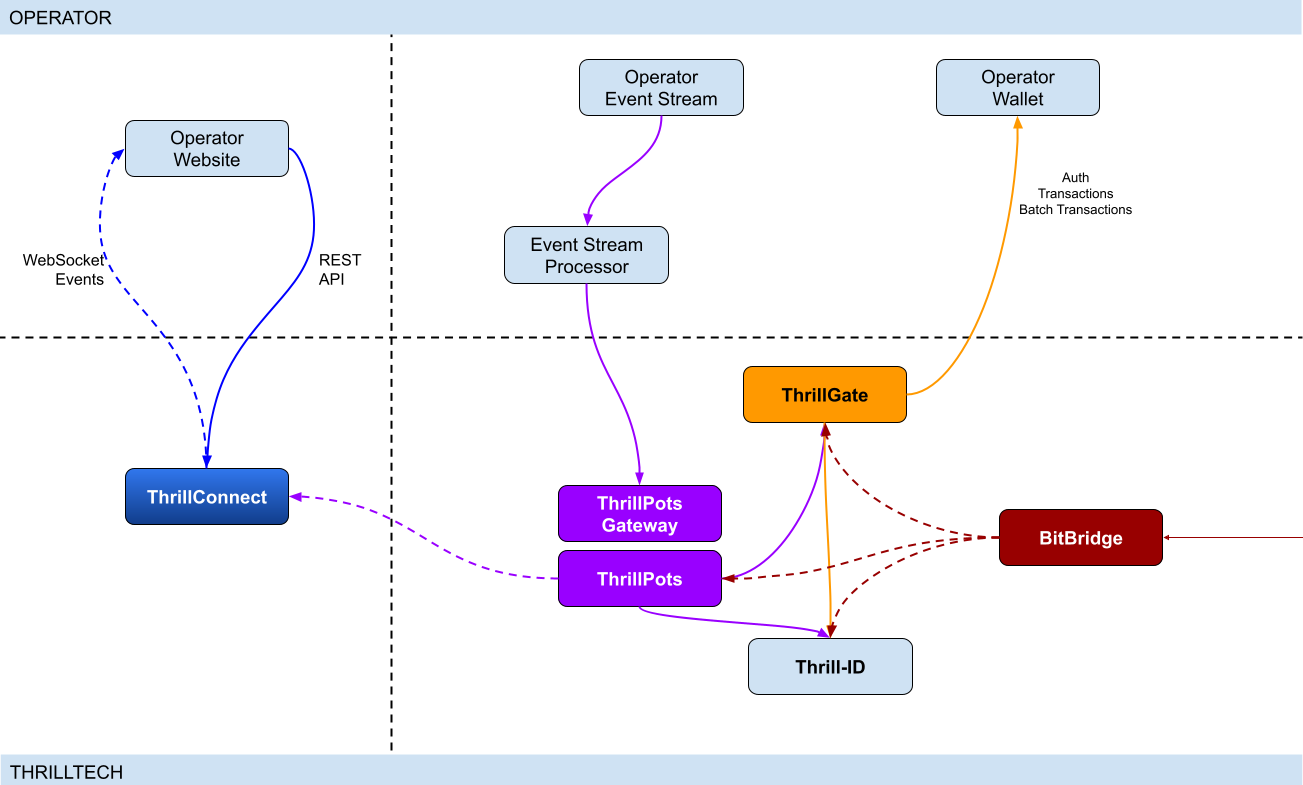
Integration points
ThrillPots has 3 primary integration points. This section will discuss each integration point and explain the purpose for each.
Betting integration
When it comes to Jackpot contributions, unlike normal games, player's do not make direct bets to jackpots. Rather, bets (contributions) are made on behalf of players via the operator's backend system.
Let's imagine a hypothetical casino where the operator has deployed a sitewide jackpot which is available to all players and is active across all casino content available on the site. The jackpot will receive a contribution bet each time a player makes a bet on any of the games on the site.
In order for these contributions to be made on behalf of the player, a simple event processor needs to be deployed that receives player game play / bet events and for each event makes a contribution request to the ThrillPots system.
In most platforms, this can be achieved by building a Kafka, RabbitMQ (or similar) event/stream processor which subscribes to the relevant topic/channel and makes REST API calls for each relevant event received. For platforms that do not have a message or event bus available, these events could be dispatched to the event processor via an alternative RPC mechanism such as REST, gRPC etc. This decision is all up to you, the integrating platform.
To learn more about this part of the integration, go to Event Stream Integration
Wallet Integration
When it comes to the wallet integration for ThrillPots, this integration is almost the same as any game provider integration. The wallet integration covers the following flows:
- Player token authentication
- Single Transactions (Debit & Credit)
- Batch Credit transaction (Multi-player payouts)
- Transaction cancellation
Integration is done against the ThrillGate service and can be performed in either direction (operator-to-provider or provider-to-operator).
To learn more about this part of the integration, go to Wallet Integration
Operator-to-Provider
If you decide to do an operator-to-provider integration, you will need to expose the endpoints required by the ThrillGate Standard Wallet Interface. All documentation can be found in the ThrillGate Standard Wallet Integration API documentation.
If you prefer for ThrillTech to integrate to your wallet API (provider-to-operator integration), you will need to provide the APIs and an integration environment for ThrillTech to develop the integration.
Frontend Integration
The ThrillConnect service is designed to support all frontend integrations. It exposes both a REST API (for end-user functionality like opt-in) as well as a WebSocket event stream for ad-hoc messaging and event broadcasts.
It is suggested to make use of the ThrillConnect JS API middleware layer which can easily be included in your site's code, freeing you up from the integration details and allowing you to focus on the visual and UX of the presentation layer.
To learn more about this part of the integration, go to Frontend Integration
Integrating ThrillPots Overview
The ThrillPots integration is best described as a 3-step process which is comprised of:
We suggest that before you dig into any of the three sections above, that you take the time to read this overview as it contains important information and pre-requisites that are needed for a smooth integration process.
PRE-REQUISITES
The rest of this guide assumes the following:
- You have the ThrillPots AIO Development container running and available. See this section for information on how to do this.
- You have a way to communicate with the services in the AIO Container (for example
curlorPostmanor similar tool)
Authentication and Authorization
Prior to making any calls to the ThrillPots service APIs, you need to authenticate with the ThrillTech platform using credentials that have been provisioned for you.
The ThrillTech platform uses a centralised authentication technology called Thrill-ID which provides governance over both User and Service accounts.
For integration purposes, you will need to provision a Service account (if one has not been provisioned for you yet). To learn more about provisioning accounts, please refer to the Thrill-ID documentation.
For an example of a Service account that would be suitable for the event stream integration service, see here
Setting up the AIO Container
The ThrillPots AIO Container is comprised of all the services necessary to run the ThrillPots platform from a single docker container.
The services made available are:
- ThrillPots Gateway (integrate your event/stream processor here)
- ThrillPots Service (the heart of the jackpot platform)
- ThrillGate (used to integrate with or to wallet APIs)
- ThrillConnect (integrate your frontend with this service)
- BitBridge (used for external data source integrations like exchange rates providers)
- ThrillTech Backoffice
- MongoDB
- Redis
The AIO container was designed to enable developers to deploy the entire ThrillPots stack on their local development machines on in a development environment quickly and easily.
In-Service Swagger UI
Each service provides access to a Swagger-UI for its API. Apart from ThrillConnect, which is an edge service, Swagger-UI support is compiled in to all the services and accessible via the /swagger-ui path.
ThrillConnect Swagger UI
Since ThrillConnect is an edge service and generally made available to the public internet, swagger-ui needs to be enabled via an environment variable.
In order to enable the /swagger-ui endpoint for the ThrillConnect service, you must set the TCS_ENABLE_SWAGGER environment variable to true.
Setting up the AIO Container: Pre-requisites
This short section explains the pre-requisites you will need in order to be able to setup the AIO container.
Pre-requisites
You will need the following software on your development machine:
Mandatory:
- Docker (or alternatively Docker Desktop)
- Postman
Optional:
Some type of MongoDB UI. We recommend you use MongoDB Compass
GitHub Access
You will need to have a GitHub account that has been granted access to the ThrillTech GitHub Organisation. This step is usually done as part of the initial technical kick off. As part of this access, you are granted access to repositories and packages that are needed.
Once you have provided ThrillTech with your Github account and we have added you as a collaborator, you need to have a Github Personal Access Token (classic) with permissions to read packages.
Go to your account's Settings -> Developer Settings -> Personal Access Tokens -> Tokens (classic) and create one.
(Click your avatar circle on the top right part of Github, click "Settings" and then "Developer Settings" is located at the bottom on the right of the menu of your account)
The only right it needs to have is to read packages.
Log in to our package repo and give your github username and the token your just created as password when prompted
docker login ghcr.io/thrilltech-io
Setting up the AIO Container: Initial Setup
Setting Up
Once you have provided ThrillTech with your Github account and we have added you as a collaborator, you need to have a Github Personal Access Token (classic) with permissions to read packages.
Go to your account's Settings -> Developer Settings -> Personal Access Tokens -> Tokens (classic)nd create one.
(Click your avatar circle on the top right part of Github, click "Settings" and then "Developer Settings" is located at the bottom on the right of the menu of your account)
The only right it needs to have is to read packages.
Log in to our package repo and give your github username and the token your just created as password when prompted:
docker login ghcr.io/thrilltech-io
Once you have successfully authenticated with the repository, you are ready to continue with the steps to getting the ThrillPots Dev Container running:
- Clone the https://github.com/thrilltech-io/dev-containers repository
- Go to the
/thrillpotsfolder in the repository and execute:docker compose up -d
NOTE: If you are running on MacOS on Apple Silicon, you may need to enable x86_64/amd64 emulation. Do this by going to Docker Desktop's settings -> General and finding the option called "Use Rosetta for x86_64/amd64 emulation on Apple Silicon" and enable it.
This will download all the necessary packages and run them via
Docker Compose. This process may take a few minutes to complete
- Import the provided Postman collection (
ThrillPots AIO Setup.postman_collection.json) which can be found in the repository into your Postman application - You will notice that it contains a number of endpoints, all numbered. The numbering indicates the sequence in which you must execute the calls.

- Execute all the steps in order
Once complete, you will have a ThrillPots system running and configured in 'standalone mode'. This means that you can make contributions and interact with the system, but there will be no external wallet calls made for player authentication or transactions.
In this mode, valid player IDs are in a range:
[player_00000 ... player_00999]
As part of the steps, you will also have created a Jackpot Template, and from this template you created a Jackpot instance. Jackpot Instances are the "running jackpots" that players contribute to. You also made a contribution directly to the jackpot.
You would also have created a Source and mapped the Jackpot Instance to the source and successfully made a contribution to the jackpot via the Source
The final step in the setup was the creation of an Internal mock wallet in ThrillGate. In a later section, where wallet integration is discussed, you will change this configuration to allow connectivity to your own wallet service, but for now, this mock wallet implementation is enough to get started with.
ThrillPots Wallet Configuration
IMPORTANT
Please note that when you change the wallet configuration for the ThrillPots service, you MUST restart the ThrillPots service for the changes to take effect.
Setting up the AIO Container: Admin Accounts
By default, the system is configured with an admin account called admin@thrilltech.io. This account has the ability to control all resources for the thrilltech oorganisation. You will have noticed that in all of the setup steps above, the owner_id or brand_id values were either thrilltech or thrilltech:brand1.
The ThrillPots system implements a "resource ownership" model which ensures that jackpot objects are not modifiable by unauthorized accounts.
Have a look at thrilltech:brand1. The first part before the : is the "organisation" or "operator id". The second part after the : is the "organisational unit" or "brand".
Creating a new ThrillPots admin account for a different organisation
If you want to create and manage ThrillPots resources for a different organisation/operator, you will first need to create a new orgnisation and admin account for that organisation. All of these actions are done through Thrill-ID.
The next steps assume that you are authenticated as
admin@thrilltech.io(as per Step 0 in the setup steps)
1. Create a new organisation
We first need to register a new organisation in Thrill-ID. For the purposes of this example, lets create a new organisation called "new-operator" which has 2 casino brands: new-mega-casino and new-mega-sportsbook.
To do this, make the following call to Thrill-ID:
POST http://localhost:9000/admin/organisations
Header: Authorization Value: Bearer AUTH_TOKEN_FOR_ADMIN@THRILLTECH.IO
Body:
{
    "id": "new-operator",
    "units": [
        "new-mega-casino",
        "new-mega-sportsbook"
    ],
    "enabled": true,
}
You should receive a 200 OK.
Now we can create the new admin account for the new organisation
2. Create a new admin account
To create a new administrator account for the new-operator organisation we just created, we need to make another call to Thrill-ID, this time to create the actual account:
POST http://localhost:9000/admin/accounts
- Header:
Authorization - Value:
Bearer AUTH_TOKEN_FOR_ADMIN@THRILLTECH.IO
Body:
{
    "account_type": "User",
    "username": "admin@new-operator.com",
    "password": "password",
    "org_unit": {
        "org_id": "new-operator"
    },
    "permissions": [
        {
            "system_id": "thrillpots",
            "permissions": [{
                "resource_id": "*",
                "permission": "Admin"
            }]
        }

    ]
}
You should receive a 200 OK along with a response body showing you the newly created account.
3. Test the new admin account
Go back to Step 0 in the setup instructions and change the username and password to the new accounts username and password and try to authenticate. If everything went right, you should receive a new token for the account and can now proceed with managing ThrillPots resources for the new-operator organisation.
Once you are authenticated with the admin account for the new-operator organisation, you will be able to create Jackpot templates, instances, sources etc for the new-operator organisation.
NOTE: In previous versions of the platform, you also needed to configure the operator and brand separately in ThrillPots and ThrillGate. This is no longer needed since all services synchronise themselves with the Organisational structures defined in Thrill-ID
Event Processor Integration
In this section, we will discuss the Event Processor integration component that is required in order to enable the ability to make contributions to jackpots.
In general, this integration component needs to be able to receive the events that will drive jackpot contributions on behalf of users/players.
In a standard ThrillPots-powered system, it is usually gameplay that causes jackpot contributions to be made on behalf of players, but you are not limited to just this single use case.
From a simplistic perspective, the general logic should look something like this:
Authenticate your integration service with ThrillPots Gateway
Subscribe to gameplay/bet events from your event stream
When an event is received from your event stream:
    - Read the properties of the event for game code, player ID and bet amount
    - Make a contribution call to ThrillPots using these (and other values)
From here, it is relatively easy to see how you could expand the use case to create a Deposit jackpot. Lets imagine that the deposit flow was identified by source DEPOSIT. Lets also assume that when a successful deposit has been made by a player, that an event is published by the operator's platform. For argument's sake, lets call this event DEPOSIT_SUCCESS.
If we wanted to create a deposit jackpot, the logic could look as follows:
Subscribe to DEPOSIT_SUCCESS event
When an event is received:
    - Read the properties of the event for the player ID and deposit amount
    - Make a contribution call to ThrillPots using the DEPOSIT source_id and other properties
Sequence Diagram for the Event Processor integration

Authenticating via ThrillPots Gateway
The ThrillPots Gateway service exposes a REST endpoint which your event stream process can authenticate itself with Thrill-ID.
The endpoint is POST /authenticate/service and accepts a payload which contains the connecting service's username and password.
If authentication is successful, you will receive a response which contains token which must be used as a Bearer token in subsequent API requests to the ThrillPots Gateway service. Service tokens do not expire and therefore you do not need to be concerned with refreshing your token once it has been received.
See here for a Service account that you can provision for your Event Processor integration service.
Additional Information
If your event processor service is processing gameplay bet events, you should remember to filter out any and all events related to Jackpot Contributions as this could create loop of contributions on behalf of players
NOTE: For new integrations, we highly recommend that you integrate using the v2 Contribution API
Contributing to Jackpots
Now that you are processing events from your platform, you want to be able to make Contributions on behalf of players to the jackpot. The process of contributing is quite straight forward and does not require your service to be aware of player opt-in status. You will however need to decide which jackpot to contribute to and this can be done in one of two ways:
- Contribute by source
- Contribute direct to jackpot
Sources
A Source can be thought of as an operator-defined identifier for a user journey, a group of games, or even a single game. You can read more about Sources here,
Example: Sitewide Jackpot
If you wanted to create a site-wide jackpot for your casino vertical, you could create a Source named casino-sitewide, map a jackpot to the source and then send all contributions to that specific Source.
{
    "token": "token_00001",
    "brand_id": "thrilltech:brand1",
    "player_id": "player_00001",
    "player_country": "UK",
    "source_id": "casino-sitewide",
    "gameround_id": "1",
    "currency": "EUR",
    "base_wager": 1
}
Example: Deposit Jackpot
If you wanted to create a deposit jackpot, you can create a source called deposit, map the relevant jackpot to the source and then send all deposit-based contributions ot that source
{
    "token": "token_00001",
    "brand_id": "thrilltech:brand1",
    "player_id": "player_00001",
    "player_country": "UK",
    "source_id": "deposit",
    "gameround_id": "DEPOSIT_TX_ID",
    "currency": "EUR",
    "base_wager": 1
}
Example: Game Group Jackpot
If you wanted to create a jackpot for a specific set of games, for example, a jackpot for all egyptian themed games, you can create a source called egyptian-games and use that for contributions each time a player bets into a game that is egyption themed. This would naturally require your integration service to know which games are matched to which Game Group source.
{
    "token": "token_00001",
    "brand_id": "thrilltech:brand1",
    "player_id": "player_00001",
    "player_country": "UK",
    "source_id": "egyptian-games",
    "gameround_id": "1",
    "currency": "EUR",
    "base_wager": 1
}
Example: Game Specific Jackpots
If you want to split your liquidity by game title, you can create sources that correspond to the game codes of games in your system. Each source would need a jackpot mapped to it, but once that is done, you are able to make contributions to the source based on the game code of the base game bet.
{
    "token": "token_00001",
    "brand_id": "thrilltech:brand1",
    "player_id": "player_00001",
    "player_country": "UK",
    "source_id": "provider-game-code",
    "gameround_id": "1",
    "currency": "EUR",
    "base_wager": 1
}
Direct to Jackpot Contribution
An alternative to using sources is to make contributions directly to Jackpot Instances by their ID. For example, if you have created a Jackpot instance, you will have its ID available to you. This ID will not change over the lifetime of the jackpot. Making contributions directly to a Jackpot ID incurs less processing cost, but may also reduce the flexibility you may have in changing which jackpot players contribute to based on the content or user flows.
The only difference in the contribution payload is that the source_id is replaced with an instance_id field as seen below:
{
    "instance_id": "0a1cfeea-5b07-4f2b-b2f1-2e4cd2aa991d",
    "token": "token_00001",
    "brand_id": "thrilltech:brand1",
    "player_id": "player_00001",
    "player_country": "MT",
    "gameround_id": "1000",
    "base_wager": 2,
    "currency": "EUR"
}
Idempotent Contributions
If you require the ThrillPots system to prevent duplicate contributions being processed, then you can include the optional idempotency_key on your Contribution Request. The value of the idempotency_key must be a unique value generated by your system (for example a random UUID).
    {
      "token": "token_00001",
      "brand_id": "thrilltech:brand1",
      "player_id": "player_00001",
      "player_country": "UK",
      "source_id": "casino-sitewide",
      "gameround_id": "1",
      "currency": "EUR",
      "base_wager": 1,
      "idempotency_key": "unique_value_generated_by_your_system"
    }
Synchronous vs Asynchronous contribution
The default contribution mechanism is synchronous. However, depending on your system architecture (and system load), you may prefer to make use of asynchronous contribution mechanics. In order to make asynchronous contributions, you need to provide a webhook that the ThrillPots system can call once the result of a contribution has been determined.
In order to make a contribution asynchronously, you simple need to add a callback property to either of the contribution payloads above to specify the webhook to call and which results you are interested in receiving.
The structure of the callback property is as follows:
{
    "web_hook": "https://your.host/webhook",
    "win_result_only": false
}
The web_hook field indicates the fully qualified HTTP path to your webhook and the win_result_only property indicates whether the webhook should only receive win results or all contribution results.
Therefore, an asynchronous contribution for a sitewide casino jackpot would look like this:
{
    "token": "token_00001",
    "brand_id": "thrilltech:brand1",
    "player_id": "player_00001",
    "player_country": "UK",
    "source_id": "casino-sitewide",
    "gameround_id": "1",
    "currency": "EUR",
    "base_wager": 1,
    "callback": {
        "web_hook": "https://your.host/webhook",
        "win_result_only": false
    }
}
When making an asynchronous contribution, the ThrillPots system will either return 200 OK with a JSON payload that contains a trace_id for the request when it has successfully accepted the contribution request for processing, or you will receive an error due to the request being malformed.
Any contribution request errors will be send to the webhook. The structure of the webhook payload is defined as follows:
Successful contribution result
{
    "type": "data",
    "contribution_amount": Number,
    "contribution_currency": String,
    "gameround_id": String,
    "instance_id": String,
    "metadata": null | Object,
    "tickets_awarded": null | Number,
    "timestamp": Number,
    "win_amount": Number,
    "win_pot_id": null | String,
    "win_withheld": Boolean
}
Error result
{
    "type": "error",
    "status_code": Number,
    "code": String,
    "message": String,
}
The data portion will either be a ContributionResult structure or an Error structure. You can find more information on these structures in the API documentation.
Examples of payloads sent to the web hook
Contribution Result
{
    "type": "data",
    "contribution_amount": 0.1,
    "contribution_currency": "EUR",
    "gameround_id": "cc83c1cc-6260-44fc-822b-d3c03acf2d89",
    "instance_id": "a49ff35f-6ecd-491f-b373-85e6caabacf1",
    "metadata": null,
    "tickets_awarded": null,
    "timestamp": 1715714218408,
    "win_amount": 0,
    "win_pot_id": null,
    "win_withheld": false
}
Error Result
{
    "type": "error",
    "status_code": 404,
    "code": "GAME_NOT_FOUND",
    "message": "sitewide-casino2",
}
Contribution Request Errors
A contribution request may result in a direct or a downstream error. A direct error is an error that is the result of the ThrillPots system return an error to the contribution request itself. A downstream error is an error that is propogated to the contribution request caller from a downstream system, such as ThrillGate or the operator wallet itself.
List of Direct Errors
For Direct Errors, you can expect:
| Error Code | Description |
|---|---|
CONTRIBUTION_REJECTED | The contribution was rejected due to a contribution rule failing, The rule in question will be contained within the CONTRIBUTION_REJECTED message |
GAME_NOT_FOUND | this occurs when making a contribution to source and the source does not exist |
CURRENCY_MULTIPLIERS_NOT_FOUND | self explanatory |
SYSTEM_ERROR | This is what you get with 500 http responses from ThrillPots |
OPTIN_ERROR | This occurs if the player;s optin record could not be updated |
SOURCE_JACKPOT_NOT_FOUND | This occurs if the jackpot mapped to the source could not be found |
SOURCE_JACKPOTS_NOT_ALLOWED | This occurs if the jackpot mapped to the source does not allow a contribution from this player (either country or brand not allowed) |
DB_ERROR | An internal DB ERROR |
UNSUPPORTED_BRAND | This is returned when the brand of the player (specified in contribution) is not supported by the jackpot or system |
Passing Metadata
If you need to pass contextual metadata from your event processor to your wallet, you can do so by adding a metadata field to the Contribution Request. This data will be passed through the system and attached to transaction requests to your wallet.
The metadata field can be any valid JSON value, for example:
Metadata containing an Object:
{
    "token": "token_00001",
    "brand_id": "thrilltech:brand1",
    "player_id": "player_00001",
    "player_country": "UK",
    "source_id": "casino-sitewide",
    "gameround_id": "1",
    "currency": "EUR",
    "base_wager": 1,
    "metadata": {
        "value1": "some value",
        "value2": 1234
    }
}
Metadata containing a String:
{
    "token": "token_00001",
    "brand_id": "thrilltech:brand1",
    "player_id": "player_00001",
    "player_country": "UK",
    "source_id": "casino-sitewide",
    "gameround_id": "1",
    "currency": "EUR",
    "base_wager": 1,
    "metadata": "This is an arbitrary string value"
}
Event metadata
If you need to attach contextual metadata from your event processor to any subsequent JackpotWinEvent , you can do so by adding a event_metadata field to the Contribution Request. This data will be passed through the system and attached any resulting JackpotWinEvent under metadata.
The event_metadata field can be any valid JSON value, for example:
{
  	"instance_id": "ac2aad1d-16b6-4e9b-9e9a-d94f705a38f7",
  	"token": "token_00001",
  	"brand_id": "thrilltech:brand1",
  	"player_id": "player_00001",
  	"player_country": "MT",
  	"gameround_id": "1",
  	"base_wager": 1,
  	"currency": "EUR",
  	"event_metadata": {
			"some": "data"
  	}
}
Will result in a JackpotWinEvent with metadata.
  {
    "event_type": "JackpotWinEvent",
    "event_id": "8b4025fa-b4e7-4bd3-9e8c-3e95a1a2611d",
    "data": {
        "brand_id": "thrilltech:brand1",
        "player_id": "player_00001",
        "source_id": null,
        "instance_id": "ac2aad1d-16b6-4e9b-9e9a-d94f705a38f7",
        "jackpot_name": "QuickHit Instance",
        "jackpot_currency": "EUR",
        "timestamp": 1732010393528,
        "win_pot_id": "major",
        "win_amount": 100.05624999999992,
        "currency_multipliers": {
            "brand_id": "default",
            "base_currency": "EUR",
            "multipliers": {
                "AMD": 430.0904,
        },
        "win_withheld": false,
        "seed_deficit": 99.68125,
        "community_winners": null,
        "games_in_jackpot": [],
        "seed": 100.0,
        "metadata": {
            "some": "data"
        }
    }
  }
Contributing to Jackpots v2
The v2 Contribution API introduces a structured way to submit both source contributions and direct jackpot contributions within a single endpoint. It also enables advanced features such as linked jackpots and bet contexts.
- More information on linked jackpot instances can be found here
Key Enhancements Over V1
- Unified Contribution Model: Supports both source contributions and direct to instance contributions in the same request.
- Linked Jackpot Support: Contributions automatically propagate to all directly linked instances.
- Structured Data Format: Requests follow a more structured schema, ensuring consistency and extendability.
- Expanded Response Structure:
- Synchronous contributions return an array of results for all contributions made.
- Asynchronous contributions trigger multiple webhook events, one per contribution.
Propagation Rules
A contribution applies to the target instance (or instance behind source) as well as all instances directly linked to it . Only the links defined for the target instance are honored.
Failure Handling
- If the contribution to the main instance fails, contributions to linked instances will not be attempted.
- If a linked instance contribution fails (e.g., due to missing opt-in or validation failure), other linked instances will still be processed normally.
Opt-in Requirement
Opt-ins do not propagate automatically. If a linked instance requires explicit opt-in and the user has not opted in, the contribution fails for that instance.
API Request structure
{
    // Contribution target
    "target": {
        // Contribution target type, can be either "source" or "instance"
        "type": "source",
        // Contribution target identifier
        // eg. "sitewide-casino" in case of source contribution
        // eg "bdfa6295-d5a5-4c54-98bf-046355ce0252" in case of direct contribution to jackpot
        "id": "sitewide-casino"
    },
    // Jackpot instance owner identifier (operator id)
    "owner_id": "thrilltech",
    // Details of the contributing player
    "player": {
        // Player identifier
        "id": "player_00001",
        // Player authentication token
        "token": "token_00001",
        // Player country
        "country": "UK",
        // Player brand identifier
        "brand_id": "brand1",
        // Any segments that the player might be part of
        "segments": ["vip-1", "regular"],
    },
    // Base game wager
    "base_wager": {
        // Base wager currency
        "currency": "EUR",
        // Base wager value
        "value": 1
    },
    // The contribution source that caused the contribution to happen.
    // For example, if a player made a bet on a game, this would be the game's gameround ID.
    // If a player made a successful deposit, this would be the deposit's identifier.
    // This field is stored by ThrillPots and is used a back-reference to the original user action
    // that caused the contribution to happen.
    "source": {
        // Type of the contribution source. Defaults to `gameround` but can be any value you choose
        "type": "gameround",
        // Identifier of the contribution source
        "id": "gameround_id_1"
    },
    // Opaque data object that contains pass-through data for the caller.
    // The content of this property will be sent back on the JackpotContributionResponse to this request.
    "metadata": {},
    // Opaque data object that contains pass-through data for the caller.
    // The content of this property will be attached to any resulting events. ( win events at that stage )
    "event_metadata": {},
    // Optional contribution request parameters. Each field in this field is optional as well.
    "options": {
        // Optional identifier of the vertical from which the contribution request originated
        "vertical_id": "slots",
        // Optional boolean specifying whether linked jackpots should be honored
        "allow_linked_contributions": true,
        // If you would like ThrillPots to not process duplicate contributions, then specify a unique
        // `idempotency_key` here
        "idempotency_key": "random_uuid_value",
        // Specify the webhook to call and which results you are interested in receiving
        "callback": {
            "web_hook": "https://your.host/webhook",
            "win_result_only": false
        }
    },
}
Synchronous Contribution
If you do not specify a callback in the options.callback field, your contribution request will be processed synchronously.
In this case, the response will be an array of JackpotContributionResponse structures. Normally, the array will only contain 1 result, however when the initial jackpot is linked to other jackpots, the array will contain more than one element, one for each jackpot that was linked.
- Returns results for the target jackpot instance and all of its linked instances.
- Result structure remains the same with the only difference it being an array.
[
    {
        "instance_id": "bdfa6295-d5a5-4c54-98bf-046355ce0252",
        "timestamp": 1739972162307,
        "gameround_id": "bb2a5277-1f00-47cf-b62c-9f639ddff146",
        "win_amount": 0.0,
        "win_pot_id": null,
        "tickets_awarded": null,
        "win_withheld": false,
        "contribution_currency": "EUR",
        "contribution_amount": 0.0775,
        "metadata": null
    },
    {
        "instance_id": "3c90cb1e-a594-437e-a695-e76acb0e6809",
        "timestamp": 1739972162394,
        "gameround_id": "7eab0af4-1477-44d9-88f0-a9b7763a6d30",
        "win_amount": 0.0,
        "win_pot_id": null,
        "tickets_awarded": null,
        "win_withheld": false,
        "contribution_currency": "EUR",
        "contribution_amount": 0.1,
        "metadata": null
    }
]
- If contribution to a linked instance fails (e.g., due to missing opt-in or regulatory restrictions), the response details which instances succeeded and which failed.
[
    {
        "instance_id": "bdfa6295-d5a5-4c54-98bf-046355ce0252",
        "timestamp": 1739972093142,
        "gameround_id": "0860e92b-6d75-45ab-a520-39ab511e18c1",
        "win_amount": 0.0,
        "win_pot_id": null,
        "tickets_awarded": null,
        "win_withheld": false,
        "contribution_currency": "EUR",
        "contribution_amount": 0.0775,
        "metadata": null
    },
    {
        "status_code": 400,
        "code": "CONTRIBUTION_REJECTED",
        "message": "PlayerNotOptedIn"
    }
]
Asynchronous Contributions & Webhooks
For asynchronous contributions, the API does not return immediate results. Instead, a webhook event is triggered for each contribution, providing its final outcome.
win_result_onlyOption- If
win_result_onlyis enabled, the webhook will only be triggered for contributions that result in a win. - If disabled (default behavior), a webhook is sent for every contribution, regardless of the outcome.
- The webhook payload structure remains unchanged from v1 contributions.
- If
{
    "type": "data",
    "instance_id": "bdfa6295-d5a5-4c54-98bf-046355ce0252",
    "timestamp": 1739972634263,
    "gameround_id": "0174c60b-f827-4e9c-8f66-8d5444732071",
    "win_amount": 0.0,
    "win_pot_id": null,
    "tickets_awarded": null,
    "win_withheld": false,
    "contribution_currency": "EUR",
    "contribution_amount": 0.0775,
    "metadata": null
}
OAS and Swagger documentation
For more details on using this functionality, refer to ThrillPots Service and ThrillPots Gateway API documentation
Contribution Sources
Contribution Sources are a concept in ThrillPots that allow operators create well-known identifiers for one or more Jackpot Instances. A contribution source is bound to an operator and brand ID.
Contribution Sources are valid targets/identifiers for jackpot contribution bets (as described in the Contributing to Jackpots section).
Why use sources instead of Jackpot Instance IDs
Sources provide a mechanism of indirection to Jackpot Instances. Since a Source will usually have a well-known and human-defined identifier, and can represent one or more Jackpot Instances at any point in time, they provide a very convenient way for Integrating services and frontends to work with Jackpot Instances.
For example, instead of hard coding a specific Jackpot Instance ID into your frontend or backend services, you can simply configure the more human-readable source_id and use the Source to determine at runtime which Jackpot Instance ID is being used. This is especially useful when Jackpot models are changed over time since your integrated product will not need to be modified unless there is a fundamental structural change to the jackpot itself (which is rarely the case).
Example
An early, but very common use-case Contribution Source can be seen below, where a Source has been created for Operator thrilltech, Brand brand1 and is the source for the "site wide casino jackpot".
In this case, the contribution flow would look like this:
┌──────────────────────────────┐
│Contribution to Source Request│   (POST https://thrillpots_gateway_host/jackpots/contribute/source)
└──────────────┬───────────────┘
               │
               │
               │
               ▼
           ┌────────┐
           │ Source │
           └────────┘
               │
               │
               │
               ▼
      ┌──────────────────┐
      │ Jackpot Instance │
      └──────────────────┘
Under the covers (in the data), this Contribution Source will most probably look something like this:
{
  "owner_id": "thrilltech:brand1",
  "source_name": "Casino Sitewide Source",
  "source_id": "sitewide-casino",
  "jackpots": [
    {
      "priority": {
        "$numberLong": "0"
      },
      "owner_id": "thrilltech:brand1",
      "instance_id": "12231b6a-a774-4a93-8f16-f8af9aee2076"
    }
  ]
}
The jackpots array in this Contribution contains a single Jackpot Instance ID because in this case, there is only one Jackpot Instance required. We will discuss use cases where having multiple Jackpot Instances in this array can be useful.
Creating a Contribution Source
To create a Contribution Source, we follow a 2 step process:
- Create the new source
- Assign the desired Jackpot Instance to the Source
1. Create the new source
To create a source, we use the POST /config/sources endpoint on ThrillPots Service (link to API).
An example to create a "Site-wide Jackpot" source for the thrilltech:brand1 operator-casino would look like this:
POST http://<thrillpots-service-host>/config/sources
Payload
[
    {
        "owner_id": "thrilltech:brand1",
        "source_name": "Casino Sitewide Source",
        "source_id": "sitewide-casino"
    }
]
FYI: If you have downloaded the ThrillPots AIO Setup Postman collection, an example of this step will be in the
Basic Setup > Create a Sourceendpoint.
2. Assign the desired Jackpot Instance to the Source
Once you have created a source, you can now assign a pre-existing Jackpot Instance to the source. This can be done using the POST /config/sources/assignjackpot endpoint on the ThrillPots Service (link to API).
POST http://<thrillpots-service-host>/config/sources/assignjackpot
Payload
{
    "owner_id": "thrilltech:brand1",
    "source_id": ["sitewide-casino"],
    "instance_id": "{{instance_id}}"
}
Retrieving the Jackpot Instance from a source
To retrieve that relevant Jackpot Instance for a specific source, you can use the following methods:
ThrillPots Gateway
GET /jackpots/instances/source/:source_id/brand/:brand_id?player_id=:player_id
The parameters in the url above are:
| Parameter | Description |
|---|---|
source_id | The Source ID (for example, sitewide-casino from the example above) |
brand_id | This is the identifier for the brand in question, which is comprised of the operator_id:brand_id pairing |
player_id | [OPTIONAL] If a player_id is specified, the returned Jackpot Instance will also contain the opt-in details for the specified player |
ThrillConnect (used by the Frontend)
GET /v1/thrillpots/instances/source/:source_id/brand/:brand_id?player_id=:player_id
The parameters in the url above are the same as for ThrillPots Gateway:
| Parameter | Description |
|---|---|
source_id | The Source ID (for example, sitewide-casino from the example above) |
brand_id | This is the identifier for the brand in question, which is comprised of the operator_id:brand_id pairing |
player_id | [OPTIONAL] If a player_id is specified, the returned Jackpot Instance will also contain the opt-in details for the specified player |
Retrieving all sources in the System
To retrieve a list of sources for a specific operator brand, you can use one of the following methods:
ThrillPots Gateway
GET /sources?owner_id=:brand_id
The brand_id parameter in the URL is once again comprised of the operator_id:brand_id pair which identifies a specific brand. If any sources have been configured for the operator_id:brand_id specified, they will be returned in a response which contains a list of Source JSON objects and will look similar to this example:
[
    {
        "owner_id": "thrilltech:brand1",
        "source_name": "Casino Sitewide Source",
        "source_id": "sitewide-casino",
        "jackpots": [
            {
                "priority": 0,
                "owner_id": "thrilltech:brand1",
                "instance_id": "12231b6a-a774-4a93-8f16-f8af9aee2076"
            }
        ]
    }
]
ThrillConnect (used by the Frontend)
GET /v1/thrillpots/sources?owner_id=:brand_id
As in the ThrillPots Gateway example above, the brand_id parameter in the URL is once again comprised of the operator_id:brand_id pair which identifies a specific brand. The response payload will look exactly the same as the response from the ThrillPots Gateway service above.
ThrillPots Events
ThrillPots publishes a number of events which your integration service can subscribe to. There are a number of reasons you may want to consume these events, for example:
- Synthesizing related Kafka/RabbitMQ events
- Storing the events for BI / Analysis purposes
The following events are currently published by ThrillPots Gateway:
JackpotUpdateEvent- contains the latest jackpot values for the specified Jackpot Instance- Reference
{
    "event_type": "JackpotUpdateEvent",
    "event_id": "d6f05820-1da2-4152-bcba-6c0186f6cd77"
    "data": {
        "id": "jackpot instance ID",
        "status": String,
        "jackpot_type": "Jackpot" | "Raffle",
        "currency": String,
        "allowed_brands": [String],
        "allowed_sources": [String],
        "pots": [
            {
                "id": String,
                "is_progressive": Boolean,
                "current_value": Number
            }
        ],
        "timestamp_start": Number | null,
        "timestamp_end": Number | null
        "last_updated": Number
    }
}
JackpotWinEvent- contains the details of a jackpot win- Reference
{
    "event_type": "JackpotWinEvent",
    "event_id": "3fe809f4-c94f-4950-9b86-5f2d0b8f604f"
    "data": {
        "brand_id": String,
        "player_id": String,
        "source_id": String | null,
        "instance_id": String,
        "jackpot_name": String,
        "timestamp": Number,
        "win_pot_id": String,
        "win_amount": Number,
        "currency_multipliers": {
            "brand_id": String,
            "base_currency": String,
            "multipliers": {
                "EUR": Number,
                "GBP": Number,
                "ZAR": Number,
                ...
                "NZD": Number,
                "SEK": Number
            }
        }
        "games_in_jackpot": [String],
        "seed": Number,
        "win_withheld": Boolean,
        "seed_deficit": Number,
        "community_winners": null | [{
            "player_id": String,
            "brand_id": String,
            "currency": String,
            "win_amount": Number
        }],
		"metadata": null | Object,
    }
}
RaffleWinEvent- contains the details of a Raffle Win- Reference
{
    "brand_id": String,
    "instance_id": String,
    "jackpot_name": String,
    "jackpot_currency": String,
    "currency_multipliers": {
        "brand_id": String,
        "base_currency": String,
        "multipliers": {
            "EUR": Number,
            "GBP": Number,
            "ZAR": Number,
            ...
            "NZD": Number,
            "SEK": Number
        }
    }
    "timestamp": Number,
    "winners": [
        {
            "player_id": String,
            "brand_id": String,
            "currency": String,
            "win_amount": Number
        }
    ],
    "win_withheld": bool
}
OptInEvent- contains the details of a player opt-in or opt-out into a Jackpot Instance Reference
{
    "event_type": "OptInEvent",
    "event_id": "27045bf8-78d2-4f99-97f1-e7d2e3aa434d"
    "data": {
        "instance_id": String,
        "player_id": String,
        "player_brand_id": String,
        "preferred_contribution_value": Number,
        "preferred_contribution_currency": String.
        "opted_in": Boolean,
        "requested_optin": Boolean,
        "contribution_preferences: {
            "EUR": Number | null,
            "USD": Number | null
            ..
        },
        "last_updated": Integer
    }
}
CommunityPayoutErrorEvent- sent in case of an error that is encountered when processing community payouts Reference
{
    "event_type": "CommunityPayoutErrorEvent",
    "event_id": "c034a751-cf91-4722-bc89-a2f8af472805"
    "data": {
        "instance_id": String,
        "gameround_id": String,
        "tx_credit_id": String,
        "failed_payouts": [
            {
                "player_id": String,
                "brand_id": String,
                "currency": String,
                "win_amount": Number
            }
        ]
    }
}
RafflePayoutErrorEvent- sent in case of an error that is encountered when processing raffle payouts Reference
{
    "event_type": "RafflePayoutErrorEvent",
    "event_id": "e981296b-199f-4454-b4ec-b3f36910c2cc"
    "data": {
        "instance_id": String,
        "failed_payouts": [
            {
                "player_id": String,
                "brand_id": String,
                "currency": String,
                "win_amount": Number
            }
        ]
    }
}
The ThrillPots events are published via the WebSocket endpoint /events.
Authenticating the Websocket connection to receive events
Once you have established a WebSocket connection from your event processor service to ThrillPots Gateway, you will need to send an Authenticate message which contains your Thrill-ID JWT token to authenticate your service to receive events.
{
    "action": {
        "Authenticate": {
            "auth_token": "{{thrill-id-jwt}}"
        }
    }
}
If the authentication fails, the connection will be closed. Once you have authenticated, you should start receiving the events from the ThrillPots service.
Wallet Integration
Introduction
When integrating ThrillPots to your wallet, you will need to implement what is known as the "Standard Wallet API". This API has been defined by ThrillTech and is what our ThrillGate services uses to communicate with your backend to process:
- Player Authentication
- Transactions
- Transaction cancellations
- Batch transactions# Wallet Integration
ThrillPots Wallet Configuration
IMPORTANT
Please note that when you change the wallet configuration for the ThrillPots service, you MUST restart the ThrillPots service for the changes to take effect. In this section, we will discuss how ThrillPots performs player authentication and jackpot contribution transactions.
When running in a non-development environment (such as staging or production), ThrillPots uses the ThrillGate Service as an integration layer to an operator's wallet API.
NOTE:
ThrillPots also supports an internal, in-memory wallet for development or isolated testing purposes. This wallet is enabled by default in the AIO development container
Types of Wallet Integrations
There are two types of wallet integrations that can be developed:
- Provider-to-Operator integration
- Operator-to-Provider integration (Standard Wallet Integration)
This section is been written for operators that have chosen to do an Operator-to-Provider integration. For a Provider-to-Operator integration, ThrillTech are responsible for implementing the integration to your wallet API and that topic is out of scope for this book.
- Batch transaction cancellations
All communications from ThrillGate are conducted over secure SSL REST calls to your system.
As part of all calls to your system, ThrillGate sends an HMAC in the X-Server-Authorization header which is calculated from the body of the request only. You can use this HMAC value to verify that the request is coming from the expected ThrillGate server.
NOTE: During integration you will receive the secret key that you can use to verify the HMAC value with.
Enabling Wallet Integration Mode in the AIO Container
In order to configure the container to support external wallet integration mode, some additional API calls need to be made.
In the provided Postman collection, you will find a folder called Wallet Integration Mode. In this folder you will find additional API calls that you need to make in order to configure the container to run in this mode.

The first API call (1. Create Wallet Configuration) makes a call to the ThrillGate service and sets up the "Standard Wallet API" connnector.
It is very important that you do NOT change the details in Step 2a or 2b as these are specific for the AIO container.
PLEASE NOTE:
When building your wallet integration, the ThrillGate service will attempt to connect to your wallet service on your localhost:8201. This is configured via Docker networking as:
Host: "host.docker.internal"
Port: 8201You can change the port, but we would recommend not changing the host unless you are absolutely sure you know what you are doing.
Once you have executed step 1, you can Enable or Disable the external wallet mode using steps 2a or 2b respectively.
Once you have completed the configuration, you will need to restart the ThrillPots service in the AIO container.
IMPORTANT
Each time you change the wallet configuration of ThrillPots, you must restart the ThrillPots Service for the configuration changes to take effect
Standard Wallet Integration
What is the Standard Wallet?
The Standard Wallet is a REST API definition (designed by ThrillTech) which an operator needs to implement support for. The ThrillGate service uses the Standard Wallet API (as a client) to communicate with the operator's wallet to perform the following actions:
- Player token authentication
- Debit / Credit transactions (single)
- Credit transaction batches
- Transaction cancellation
Standard Wallet Sequence flows
Below is a sequence diagram of the expected data flow between ThrillGate and the operator wallet API:
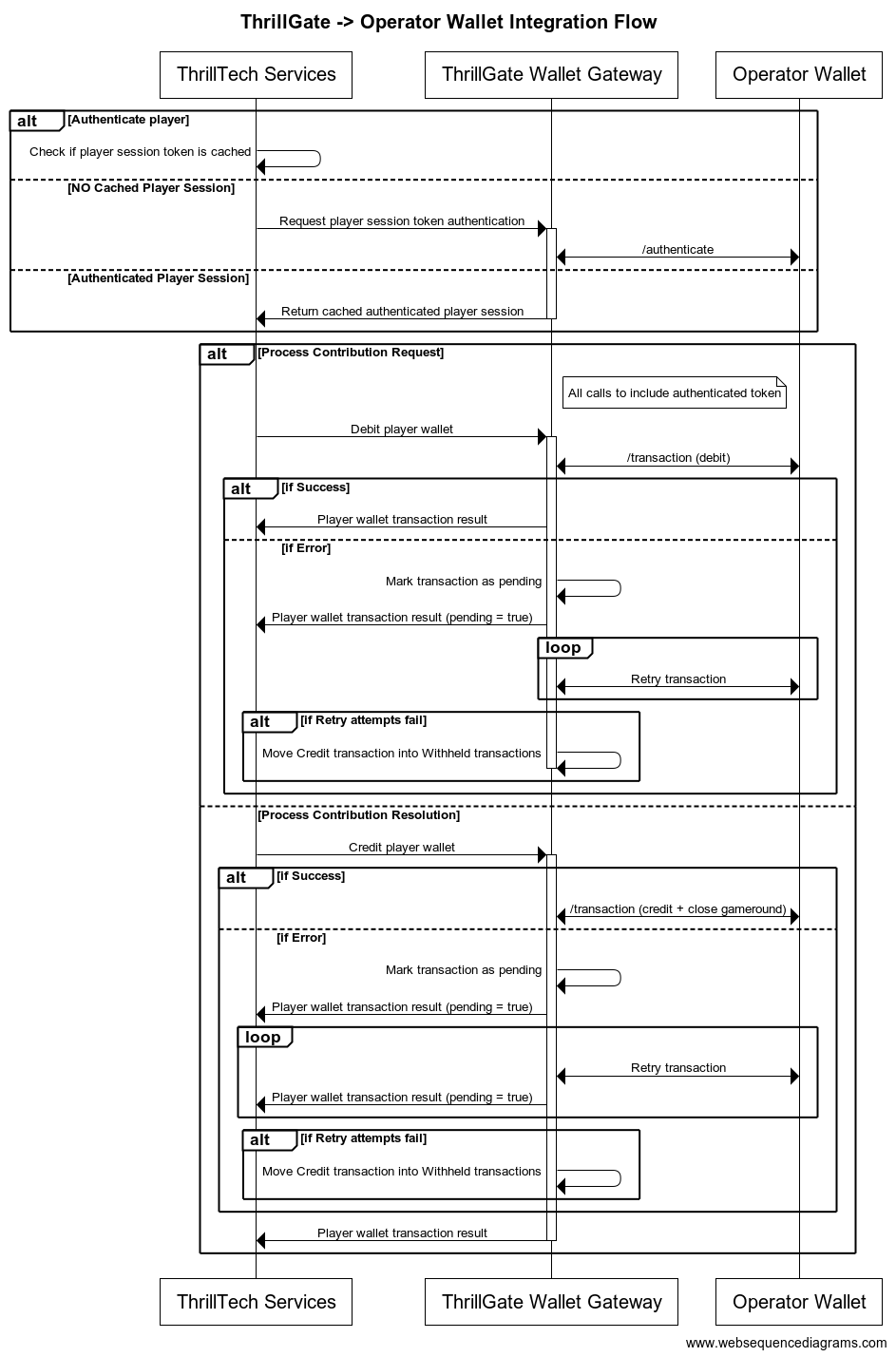
Configuring a Standard Wallet Integration in ThrillGate
To configure the ThrillGate Service to connect to your Standard Wallet API compliant service, you need to configure a Wallet resource.
To configure a wallet:
- URL:
POST http://localhost:8100/admin/wallets - Headers:
Authorization: Thrill ID Bearer token
- Body:
{
    "id": "Brand1Wallet",
    "operator_id": "thrilltech",
    "brand_id": "brand1",
    "wallet_type": "StandardWallet",
    "connection_details": {
        "protocol": "http",
        "host": "host.docker.internal",
        "port": 8201
    },
    "endpoints": {
        "auth": {
            "POST": "/wallet/authenticate"
        },
        "balance": {
            "GET": "/wallet/balance"
        },
        "cancel_bet": {
            "DELETE": "/wallet/cancel"
        },
        "transaction": {
            "POST": "/wallet/transaction"
        },
        "transaction_batch": {
            "POST": "/wallet/transaction/batch"
        },
        "cancel_batch": {
            "DELETE": "/wallet/transaction/batch"
        }
    },
    "config": {
        "secret_key": "12345",
        "accept_zero_value_credits": true,
        "must_close_gamerounds": false
    }
}
| Property | Description |
|---|---|
id | The ID you want to assign to the wallet. This is a unique identifier |
operator_id | The operator ID that this wallet is for |
brand_id | The brand ID that this wallet is for |
wallet_type | This must be set to StandardWallet |
connection_details.protocol | The protocol of the url. Usually http or https depending on your setup |
connection_details.host | The hostname for your server. While using the AIO container, it is recommended you keep this set to host.docker.internal |
connection_details.port | The port that your server is listening on |
endpoints | This is an object that describes the required endpoints for the Standard Wallet API |
endpoints.auth | This describes the endpoint that ThrillGate will make player authentication calls to |
endpoints.balance | This describes the endpoint that ThrillGate will make player balance requests to |
endpoints.transaction | This describes the endpoint that ThrillGate will call to perform transactions |
endpoints.cancel_bet | This describes the endpoint that ThrillGate will make to cancel transactions |
endpoints.transaction_batch | This describes the endpoint that ThrillGate will make for transaction batch calls |
endpoints.cancel_batch | This describes the endpoint that ThrillGate will make to cancel transaction batches |
config | An object that contains specific configuration elements for the Standard Wallet |
config.secret_key | This is the key that will be used to generate the HMAC value that is sent on each wallet request in the x-server-authorization header |
config.accept_zero_value_credits | This defines whether the external wallet supports Credit transactions which have a value of zero (0) |
config.must_close_gamerounds | This defines whether the external wallet requires gamerounds to be closed |
NOTE: If you need to change the definition of the endpoints, feel free to do so. Make sure that you use the correct HTTP verb and specify the endpoints as needed by your system.
Next Steps
Once you have understood the purpose of each of the Standard Wallet API calls as well as the flows around transaction and transaction batch handling, you are ready to start integrating the Standard Wallet API into your system. Refer to the provided API reference documentation and OpenAPI specs that have been provided to you.
Standard Wallet API: Player Authentication
In order for the ThrillPots system to take wagers (debit the player's wallet) and payout winnings (credit the player's wallet), it needs to be able to authenticate the player with the operator wallet.
This is done by calling the Standard Wallet's auth endpoint, passing in the provided player token and game code to the operator wallet and receiving the required player details (including the token that should be used for transaction calls)
This is done by ThrillGate calling the endpoint defined in endpoints.auth of the Standard Wallet's configuration. An example call's payload would look as follows:
{
    "operator_id": "your_operator_id",
    "brand_id": "your_brand_id",
    "player_token": "token_00001",
    "source_id": "AwesomeJackpotGameCode",
    "currency": "EUR"
}
If successful, the operator wallet must respond with a valid session token and player details that can be used for future transaction calls for this player.
Response example:
{
"id": "player_00001",
"token": "session_token_00001",
"currency": "EUR",
"balance": 100001927.79,
"operator_id": "thrilltech",
"brand_id": "brand1",
"nickname": null,
"gender": "?",
"country": "MT",
"jurisdiction": null,
"segments": null
}
Standard Wallet API: Transactions
Transactions
Once the player token has been authenticated, the ThrillPots system can start making transaction calls through ThrillGate.
In standard operation, the first transaction call will be a Debit transaction request to fetch funds from a player's wallet for the Jackpot Contribution bet. This call is also intended to open the game round for the jackpot contribution.
If successful, ThrillPots will process the jackpot contribution and determine if a win occurred.
The next transaction call that will be made will be a Credit transaction request. This call is intended to pay any winnings to the player account and to close the game round that was opened with the Debit transaction.
Transaction Errors
If an error occurs while executing transactions with the operator wallet, ThrillGate and ThrillPots cooperate to ensure that the transaction error is handled correctly.
When an error occurs, ThrillGate will attempt to retry the transaction request a set number of times. If all retries fail, the error will be sent to ThrillPots for further handling.
If there are certain wallet errors that you do not wish ThrillGate to perform its retry logic, you can configure that as part of the wallet configuration in ThrillGate.
Once an error has been sent back to ThrillPots, ThrillPots will decide whether a transaction needs to be cancelled or not. Transaction cancellation is discussed next.
Transaction Failure Handling
In certain situations (as described in the errors section above), it is necessary for transactions to be cancelled or put into a Pending state.
NOTE: ThrillPots will only cancel
Debittransaction
Debit transactions
In the case of a failed Debit transaction, ThrillPots will send a cancellation request for the Debit transaction using the Debit transaction ID.
Credit transactions
A credit transaction will never be cancelled. If it fails after a certain number of retries, ThrillGate will make the transaction as pending and will continue to retry sending the transaction to the operator's wallet. This will continue for a fairly long period of time (configurable). If the transaction fails after all the configured attempts, it will be marked as Withheld and will require manual reconciliation by the operator via the Backoffice.
Batch Transactions (Credit only)
ThrillPots uses Batch Transaction requests to communicate payouts to multiple players.
These types of payouts are only relevant to jackpots that are either:
- Multi-player payouts (community payouts)
- Raffle jackpot payouts
In both situations, since multiple players are considered winners from a single jackpot win, ThrillPots needs a way to credit wins to multiple players. Since these players are not guaranteed to be online at the time of the win, ThrillPots will not have access to any session token information for all the winners.
Batch Transactions are used in these special situations to communicate a set of credit operations that need to be applied to multiple players accounts.
Although unlikely, it is possible that not all the specified player accounts will be able to be credited with the winnings. Such a situation may arise if, for example, the player account has been banned/blocked or is self-excluded at the time of the jackpot win.
In these cases, the operator wallet is expected to flag the player account as an exception and continue to pay the remaining players in the transaction batch.
It is not considered an error if a player account in a transaction batch cannot be paid. The operator wallet should simply indicate this exception in the response and attempt to pay all other players.

Batch Transaction Failures
Since Batch Transactiona are only applicable to Credit transactions, the same retry -> pending failure flow as described above is applied.
There is another limited set of errors that require Batch Transactions to be retried as Pending transactions.
These errors are typically (but not limited to) errors such as network errors and timeouts. When an error occurs that leads ThrillGate to not be sure whether the operator's wallet has handled the transaction batch request, the request will first be retried, but after failing a specific number of times, the batch transaction will be marked as pending and continue to be retried in the background.
Frontend Integration
The final piece of the ThrillPots integration puzzle is the frontend integration. The frontend is responsible for displaying the Jackpot Ticker widget, showing players what the value of the various pots within the Jackpot are, the opt-in widget, allowing players to opt-in or opt-out of participation in the jackpot and so on.
The ThrillConnect Service has been specifically developed to provide an API and event stream over WebSockets to frontend clients to be able to interact with the ThrillPots system.
Integration Options
When integrating the frontend, there are two options that you can take:
- Use the existing libraries/components that ThrillTech has built to ease the effort of frontend integration:
- Develop your own integration with ThrillConnect and your own animation layer for the win animations
The sections below will detail the low level integration approach to help you understand how things work. You can then decide which of the options mentioned above you wish to take.
Sequence Diagram for the frontend to ThrillConnect integration
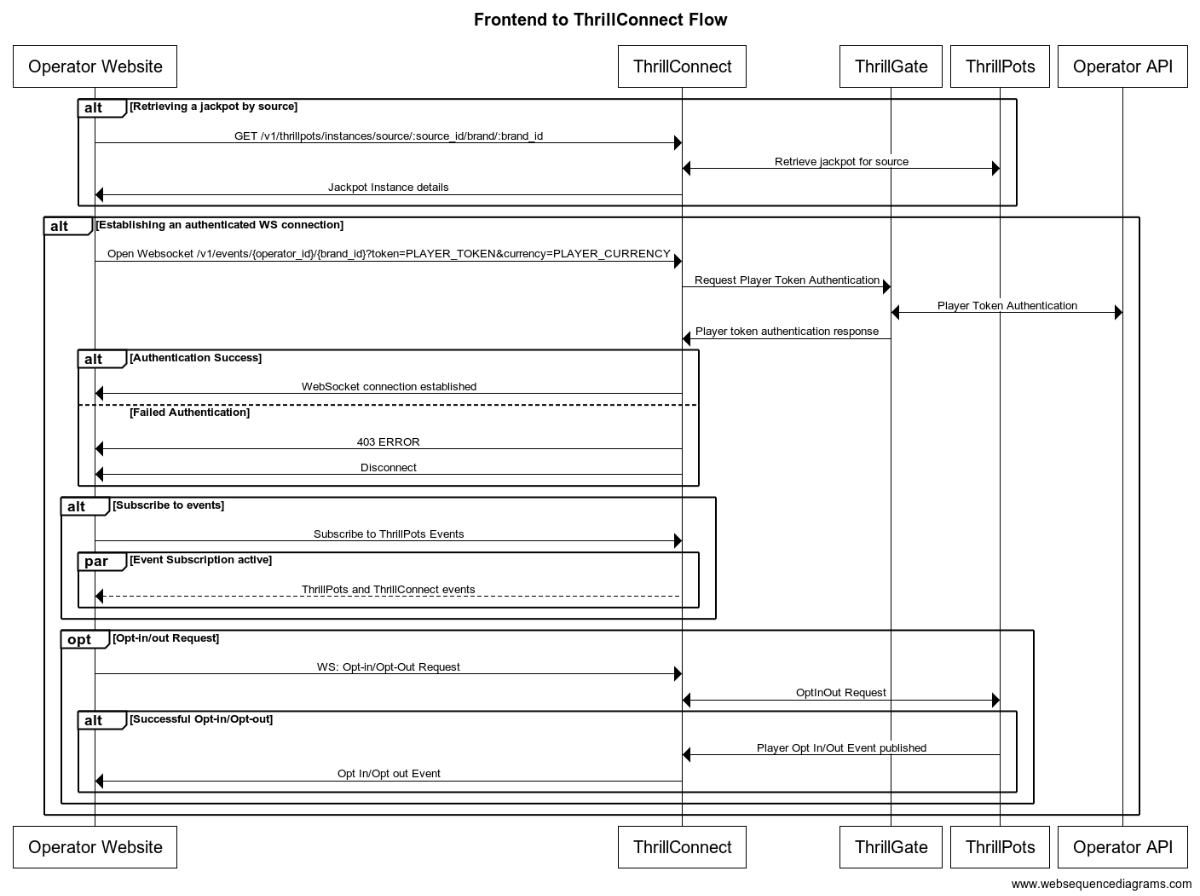
Integration Flow in detail
Fetching a Jackpot's details
One of the first things your frontend will most likely need to do is to retrieve jackpot details for your jackpot widget to display.
If you have followed the section on settings up the AIO container, you would have created a
Sourcecalledsitewide-casino.If you haven't gone through the process of setting up a source, we suggest that you review and understand sources and how they are used before continuing
To retrieve the jackpot for the sitewide-casino source, you will need to call:
GET /v1/thrillpots/instances/source/:source_id/brand/:brand_id?player_id=:player_id
replacing the :source_id and :brand_id values with the appropriate values that have been configured. If you used the default values from the Postman collection, you can use sitewide-casino for the source_id and thrilltech:brand1 for the brand_id.
If the player is already logged in, you can also pass the ID of the player via the query parameter player_id. Doing so will ensure that the player's opt-in status is returned in the jackpot instance information.
Establishing a WebSocket connection
In order to receive ThrillPots events and be able to opt players in or out of the jackpot, you will need to establish a websocket connection.
Once a player is logged into an operator's site, you can establish a WebSocket connection with ThrillConnect, passing in the player's session token.
NOTE
WebSocket connections are protected and can only be established by logged in players to prevent unauthorized and potentially dangerous abuse by attackers. Requiring a player a valid player session token in order to establish a WebSocket connection is a security-driven decision
To establish a WebSocket connection with ThrillConnect, open a WebSocket to:
/v1/events/{operator_id}/{brand_id}?token=PLAYER_TOKEN¤cy=PLAYER_CURRENCY
ThrillConnect will authenticate the token (the Player session token) from the query parameters with the operator's platform via ThrillGate. If the token is valid, the websocket connection will be established. If the token is invalid, the connection will receive a 403 FORBIDDEN error.
Subscribing to ThrillPots events
Once you have successfully established a WebSocket connection, you can now subscribe to ThrillPots events. This is done by sending a subscription request via the WebSocket to ThrillConnect. See below for the SubscribeRequest message that should be sent to subscribe to all ThrillPots events:
{
"SubscribeRequest": {
"events": [{
"source": "thrillpots",
"event_type": "*"
}]
}
}
If you would like to subscribe to only certain events, you can do so by explicitly specifying the events by source one-by-one.
ThrillPots currently publishes the folliowing event types:
- JackpotUpdateEvent
- WinEvent
- RaffleWinEvent
- OptInEvent
For more information about the structure of each of these events, see ThrillPots Event Structures
Player Opt-in / Opt-out
To opt a player in or out of a jackpot, you must send a PlayerOptInRequest message via the WebSocket connection.
Below are a few examples of opting a player in and out of a jackpot instance (please note, you will need to have the jackpot instance ID):
Opting in
{
"PlayerOptInRequest": {
"instance_id": "8dcc9f5a-f1c5-466f-83e9-928277d8bfb7",
"player_country": "MT",
"opt_in": true
}
}
Opting in with a preferred contribution value of 0.20
{
"PlayerOptInRequest": {
"instance_id": "8dcc9f5a-f1c5-466f-83e9-928277d8bfb7",
"player_country": "MT",
"opt_in": true,
"contribution_value": 0.2
}
}
Opting out of a Jackpot
{
"PlayerOptInRequest": {
"instance_id": "8dcc9f5a-f1c5-466f-83e9-928277d8bfb7",
"player_country": "MT",
"opt_in": false
}
}
Opting in with a preferred contribution value and preferred contribution currency
{
"PlayerOptInRequest": {
"instance_id": "8dcc9f5a-f1c5-466f-83e9-928277d8bfb7",
"player_country": "MT",
"opt_in": true,
"contribution_value": 0.2
"contribution_currency": "USD"
}
}
Opting out from a preferred contribution currency
{
"PlayerOptInRequest": {
"instance_id": "8dcc9f5a-f1c5-466f-83e9-928277d8bfb7",
"player_country": "MT",
"opt_in": false,
"contribution_currency": "USD"
}
}
Retrieving Exchange Rates
You may need to convert the values of a jackpot instance from the Jackpot currency to a player's currency. To help facilitate this, ThrillConnect exposes a currency endpoint which allows you to fetch the exchange rates used by ThrillPots.
To retrieve the 202408-1 exchange rates, you can call:
GET /v1/currencies
Retrieving a player's raffle ticket count
If player's are contributing to a Raffle jackpot, you may want to show the player how many tickets they have earned so far in the raffle. You can retrieve the player's current ticket count by requesting it via the WebSocket connection:
To retrieve a player's ticket count, send a PlayerRaffleTicketsRequest message:
{
"player_id": String,
"instance_id": String,
"brand_id": String
}
The instance_id is the instance ID of the Raffle jackpot, and the brand_id is in the format operator_id:brand_id.
If the request can be serviced, you should received a PlayerRaffleTicketsResponse message back:
{
"msg_type": "Message",
"source": "thrillpots",
"msg_name": "PlayerRaffleTicketResponse",
"operator_id": "OPERATOR_ID",
"brand_id": "BRAND_ID",
"player_id": "PLAYER_ID",
"data": {
"ticket_count": 4
},
"timestamp": 1711452762485
}
If there was an error processing the request, you will receive an Error message in response which will contain the message name that errored, as well as any relevant error details. For example:
{
"msg_type": "Error",
"source": "thrillpots",
"msg_name": "PlayerRaffleTicketRequest",
"operator_id": "OPERATOR_ID",
"brand_id": "BRAND_ID",
"player_id": "PLAYER_ID",
"data": {
"status_code": 404,
"code": "",
"message": "Error 404 Not Found from http://localhost:8084/instances/raffle/e0dee1ae-6231-458a-ad6d-4dc0c941e5c3/tickets/player_00001/brand/thrilltech:brand1"
},
"timestamp": 1711452757807
}
In this case, the request Jackpot instance ID could not be found.
ThrillConnect JS Client
ThrillConnect Client is the glue that connects your Portal and ThrillTech systems to provide seamless experience for your players. It is designed with minimialistic, yet powerful API, that can be easily consumed and covers all the narrow and tricky edgecases of the frontend integration. It's purpose is to make your frontend development trivial and expose the full API surface with minimum effort.
On this page you can find all the relevant details on how to use the Client, as well as examples and use cases.
Client version will be aligned with service version and just like that you'll be subscribed to all the latest and greatest features of our platform.
Source
Source code is avaiable for review & fork for all ThrilTech customers. You can find the client at https://github.com/thrilltech-io/connect-client.
Initialization
Client constructor needs the host address and BrandContext. Player context can optionally be passed on initialization or later on via authenticate method.
Additionally one can specify dev options, like the use of unsecure http/ws and client internal logs for dev convenience.
All the events of interest must be passed on to the constructor in the events array so that client can subscribe to relevant systems on the WS channel.
Player context
Player context type provides all necessary player details for establishing the WSS connection and interacting with the Jackpots from player perspective.
type PlayerContext = {
id: string,
token: string,
currency: string,
country: string,
}
Initialization without player context
Prior to having a valid player session and auth token, one can initialize the client without PlayerContext. In this limited mode the WS events will not be available and only public REST endpoints can be used to make requests. ( see API section for what is available )
import { ThrillConnect, ConnectEvents } from "./thrillconnect.js"
const client = new ThrillConnect({
host: "localhost:11000",
brand: {
operator_id: "thrilltech",
brand_id: "brand1",
},
dev: {
secure: false
},
events: [
ConnectEvents.JackpotUpdateEvent,
ConnectEvents.RaffleWinEvent,
ConnectEvents.JackpotWinEvent,
ConnectEvents.OptInEvent,
]
})
Later on, once we have player details, we can authenticate and subscribe to full functionality of the client.
client.authenticate({
id: "player_id_token_00001",
token: "token_00001",
country: "USA",
currency: "USD",
})
Initialization with player context
Alternatively, if player details are known from the start, those can be passed directly to the client constructor.
const client = new ThrillConnect({
host: "localhost:11000",
player: {
id: "player_00001",
token: "token_00001",
country: "USA",
currency: "USD",
},
brand: {
operator_id: "thrilltech",
brand_id: "brand1",
},
dev: {
secure: false
},
events: [
ConnectEvents.JackpotUpdateEvent,
ConnectEvents.RaffleWinEvent,
ConnectEvents.JackpotWinEvent,
ConnectEvents.OptInEvent,
]
})
API
Following is a list of all the available methods on connect client.
Adding an event listener
client.on(ConnectEvent, handler)
Adding an once off event listener
client.once(ConnectEvent, handler)
Removing an event listener
client.off(ConnectEvent, handler)
Passing player context
client.authenticate(PlayerContext)
Fetching the currency multipliers
const multipliers = await client.request().getCurrencies()
Fetching the list of defined sources for the provided BrandContext
const sources = await client.request().getSources()
Getting the Jackpot instance that maps to a source
const sourceId = "sitewide-jackpot"
const instance = await client.request().getJackpotForSource(sourceId)
Getting the player OptIn status for a source
Note: PlayerContext is required for this request.
const sourceId = "sitewide-jackpot"
const status = await client.request().getOptInStatusForSource(sourceId)
Opting in/out from a source
Note: PlayerContext is required for this request. This request uses the authenticated WS channel. When jackpot allows for variable contribution, preferred contribution value can be passed as 3 parameter.
const sourceId = "sitewide-jackpot"
const optIn = true
const preferredContributionValue = undefined
client.request().optIntoSource(sourceId, optIn, preferredContributionValue)
Opting in/out from an instance
Note: PlayerContext is required for this request. This request uses the authenticated WS channel. When jackpot allows for variable contribution, preferred contribution value can be passed as 3 parameter.
const instanceId = "dd7243ea-9992-47ae-a2a6-531b3f0e2197"
const optIn = true
const preferredContributionValue = undefined
client.request().optIntoInstance(instanceId, optIn, preferredContributionValue)
Events
Client receives events via the WS connection. In order to receive an event, it needs to explicitly be listed in the list of events in the Client constructor.
All the available events are listed in ConnectEvents.
import { ConnectEvents } from "./thrillconnect.js"
function updateTickers(e:JackpotUpdateEvent) {
console.log(e.status)
}
// subscribe to Jackpot updates
client.on(ConnectEvents.JackpotUpdateEvent, updateTickers)
// unsubscribe from Jackpot updates
client.off(ConnectEvents.JackpotUpdateEvent, updateTickers)
withSource helper
Jackpot source serves as alias for the instance, however properly handling the events, as well as parts of the API requires frontend to keep a reference to the instance identifier. To address this inconvinience, connect-client now supports internal caching of instance ID. Source bound client internally filters events and only fires those matching the jackpot instance id corresponding to the source.
const sourceBoundClient = await client.withSource("put-source-id-here")
await sourceBoundClient?.getJackpot()
await sourceBoundClient?.getTickers()
await sourceBoundClient?.getOptInStatus()
await sourceBoundClient?.optIn(true, 50)
sourceBoundClient?.on(ConnectEvents.JackpotUpdateEvent, handleUpdate)
Animation Driver
ThrillTech supplies a default set of Jackpot win animations to enrich the player experience during a Jackpot win. The animations driver is a JS library that takes care of win animations loading and playback. Animations are easily customizable and the driver allows for flexible cusomizations of the playback.
Source
Source code is avaiable for review & fork for all ThrilTech customers. You can find the driver at https://github.com/thrilltech-io/animations-driver.
Overview
The JS driver exposes two functions:
preload(config, tier, muted)- loads the required assets per pased configuration object. When muted, sounds will not be loaded.run(config, tier, amount, muted)- starts the animation sequence defined in the configuration. Run will do load if assets are not already loaded.
The preload function is intended to provide separation of the loading phase, so that in case of unreasonably slow connection, stale loading can be detected and acted upon (for example using a fallback alert / win message if assets load didnt complete in a certain period).
Mute state cannot be controlled after the animation is run. The current sound preference should be passed to the run ( and optionally preload ) and based on that the defined in configuration sfx are either loaded or not.
Usage
import { preload, run } from "./main.js"
const config = "/configs/example.json"
const tier = "super"
const amount = 10000
const muted = false
preload(config, tier, muted).then(()=>{
run(config, tier, amount, muted)
})
Configuration
See example configurations in ./public/configs in the driver repository.
Following is a full possible configuration with all settings commented inline.
{
"dom": {
// optional - skip "top" section if no header is required
"top": {
// id of top container
"id": "top-container",
// messages to display during presentation phase
"message": {
"id":"top-message",
// message during wheel spin
"wheel": "Stop the wheel and win BIG! BIG!",
// message during tickup
"tickup": "Congratulations!"
}
},
// optional - skip "bottom" section if no footer is required
"bottom": {
// id of bottom container
"id": "bottom-container",
// action button
"button": {
// id of the action button
"id": "action-button",
// actions during wheel phase
"wheel": {
"stop": "STOP THE WHEEL",
"skip": "SKIP THE WHEEL"
},
// actions during tickup phase
"tickup": {
"skip": "SKIP TICKUP"
},
// actions after tickup
"end": {
"close": "CLOSE"
}
}
},
// enable touch controls during phase
"touch": {
// touch during wheel acts as stop / skip
"wheel": {
"stop": true,
"skip": true
},
// touch during tickup acts as skip
"tickup": true
}
},
// ticker skin and font settings -
// skin provided and customised by thrilltech
"ticker": {
"skin": "/ticker/Win_BG.skel",
"font": "/fonts/rubik.woff",
"fontFamily": "rubik",
// maximum font size for the tickup
"maxFontSize": 80,
// https://developer.mozilla.org/en-US/docs/Web/JavaScript/Reference/Global_Objects/Intl/NumberFormat
// the currency for the win amount as per ISO 4217 currency codes
// optional, leave empty for no currency or monetary amount format
"currency":"JPY",
// A string with a BCP 47 language tag, optional
"currencyFormat":"en-US"
},
// wheel skin and segments settings -
// skin provided and customised by thrilltech
"wheel": {
"rotate": 0,
"base": "/wheel/Wheel_of_Fortune.skel",
// wheel has 8 segments, following is the order of tiers per segments
"segments": [
"mini",
"super",
"mini",
"epic",
"mini",
"super",
"epic",
"super"
],
// map of segment textures
"skins": {
"mini": "/skins/demo/mini.png",
"super": "/skins/demo/super.png",
"epic": "/skins/demo/epic.png"
}
},
// jackpot animation skin -
// skin provided and customised by thrilltech
"pots": {
"mini": {
// path of the spine export containing the mini tier animation
"source": "/pots/mini/Thrillpot.skel",
// prefix of the animation for this tier
"prefix": "",
// sound clips for all animation phases
"sfx": {
"intro": ["/sfx/base/mini/intro.mp3"],
"particles": ["/sfx/base/mini/confetti.mp3"],
"tickup_start": ["/sfx/base/mini/tickup-start.mp3"],
"tickup_loop": ["/sfx/base/mini/tickup-loop.mp3"],
"outro": ["/sfx/base/mini/outro.mp3]"
}
},
"super": {
// path of the spine export containing the mini tier animation
"source": "/pots/super/Thrillpot.skel",
// prefix of the animation for this tier
"prefix": "",
// sound clips for all animation phases
"sfx": {
"intro": ["/sfx/base/super/intro.mp3"],
"particles": ["/sfx/base/super/confetti.mp3"],
"tickup_start": ["/sfx/base/super/tickup-start.mp3"],
"tickup_loop": ["/sfx/base/super/tickup-loop.mp3"],
"outro": ["/sfx/base/super/outro.mp3]"
}
},
"epic": {
// path of the spine export containing the mini tier animation
"source": "/pots/epic/Thrillpot.skel",
// prefix of the animation for this tier
"prefix": "",
// sound clips for all animation phases
"sfx": {
"intro": ["/sfx/base/epic/intro.mp3"],
"particles": ["/sfx/base/epic/confetti.mp3"],
"tickup_start": ["/sfx/base/epic/tickup-start.mp3"],
"tickup_loop": ["/sfx/base/epic/tickup-loop.mp3"],
"outro": ["/sfx/base/epic/outro.mp3]"
}
},
},
// particles animation skin -
// skin provided and customised by thrilltech
"particles": {
"mini": {
"source": "/particles/confetti/Thrillpot.skel",
"prefix": ""
},
"super": {
"source": "/particles/confetti/Thrillpot.skel",
"prefix": ""
},
"epic": {
"source": "/particles/confetti/Thrillpot.skel",
"prefix": ""
}
}
}
SFX
Config contains sound definitions for various phases of the animation. All sounds are optional.
Sounds per animation phase are defined as an array. All elements of the phase array refer to the same sound effect. The intention is to provide multiple sfx formats and the runtime will automatically pick the one supported on the client system. Recommended formats to use are webm, wav and mp3. wav has the widest support accross devices, but is not as optimal as webm and mp3 in terms of filesize.
"sfx": {
"intro": ["/sfx/base/epic/intro.webm", "/sfx/base/epic/intro.wav"],
"particles": ["/sfx/base/epic/confetti.webm", "/sfx/base/epic/confetti.wav"],
"tickup_start": ["/sfx/base/epic/tickup-start.webm", "/sfx/base/epic/tickup-start.wav"],
"tickup_loop": ["/sfx/base/epic/tickup-loop.webm", "/sfx/base/epic/tickup-loop.wav"],
"outro": ["/sfx/base/epic/outro.webm", "/sfx/base/epic/outro.wav"]
}
Metrics
The ThrillPots system exposes Prometheus metrics per service via the /metrics endpoint.
Below is the list of metrics exposed per service:
ThrillPots Gateway
| Metric name | Metric Type | Description |
|---|---|---|
| contrib_req_sync_recv | Counter | Syncronous Contribution Requests Received |
| contrib_req_async_recv | Counter | Asyncronous Contribution Requests Received |
| contrib_req_queued | Gauge | Contribution Requests currently queued |
| contrib_req_processed | Counter | Contribution requests processed |
| contrib_avg_queue_time | Counter | Average Contribution Request Queue Time |
| contribution_webhook_calls | Counter | Contribution Webhook calls made |
| http_requests_avg_time | Family: Counter | HTTP Request Average Time |
ThrillPots Service
| Metric name | Metric Type | Description |
|---|---|---|
| contrib_req_recv | Counter | Contribution Requests Received |
| contrib_req_processed | Counter | Contribution requests processed |
| contrib_req_rejected | Counter | Contribution Requests rejected |
| http_requests_avg_time | Family: Counter | HTTP Request Average Time |
| preflight_avg_time | Counter | Average time spent validating contribution requests |
| jackpot_opts | Family: Counter | Opt-In/Out related metrics |
Thrillpots Gateway
ThrillPots Service
ThrillGate Bonus API
ThrillGate (Standard Wallet API)
ThrillConnect
Thrill-ID
BitBridge
ThrillOffice
Multi-Currency Support
The ThrillPots Platform provides advanced multi-currency support. It uses bespoke a bespoke system of algorithms known as the Always Fair Multi-Currency system to provide operators with fine grained control over the multi-currency configuration aspects of their jackpots.
The Basics
At a basic level, every Jackpot has a base currency. This is the currency that the jackpot operates in at the lowest level.
In order to process contributions for players that may be using wallet currencies that are different from the jackpot's base currency, the platform uses exchange rates that are updated frequently by the system.
In this basic scenario, all contributions are based on the jackpot's base currency.
Example
A Jackpot is configured to have a base currency of EUR and accept a minimum contribution of €0.10.
An opted-in player is using GBP as their wallet currency.
We know that EUR:GBP is not 1:1. For the purposes of this example, we will assume an exchange rate of 1:0.85.
Therefore, the GBP account player will be contributing a minimum of €0.10 to the jackpot, but in their transaction history, they will correctly see £0.085 being deducted from their account.
In this simple example, although the GBP player does not see an aesthetically pleasing bet amount for each contribution, they are wagering the correct amount into the jackpot. There are a few downsides with this approach, one of which is that the contribution amount in GBP may fluctuate over time depending on the prevailing exchange rate.
Always Fair Multi-currency Support
The Always Fair Multi-currency system allowed operators to define both minimum and maximum contributions on a per supported currency basis without compromising on the fairness and integrity of their jackpot maths.
With the system, the operator can specify more appealing and intuitive minimum (and maximum) contribution values as follows:
| Currency | Minimum Bet Balue |
|---|---|
| EUR (base) | 0.10 |
| GBP | 0.10 |
| USD | 0.10 |
| SEK | 1 |
| NOK | 1 |
| JPY | 10 |
| ZAR | 1 |
While this table of Jackpot Contribution sizes may look much better than if we simply used exchange rates to calculate the contribution value, a question of fairness does need to be raised.
What is the problem?
Lets imagine a EUR player is wagering €0.10 into a jackpot while a JPY player is wagering 10 JPY. Based on the above configuration, this will be accepted by the system. But what about fairness. If we simply "accepted" bets of different sizes into the jackpot, the JPY player would have an unfair advantage over the EUR player since the real world value of 10 JPY is not equal to €0.10 (based on the exchange rate at the time of writing, 10 JPY = ~€0.06).
This would mean that there would be greater value to be contributing in JPY than in EUR.
This is where the Always Fair technology comes into play.
What does Always Fair actually do?
The Always Fair Multi-Currency system ensures that the maths of the jackpot is scaled proportionally to the currency being used for contributions. Therefore, in the example above, the Always Fair algorithms ensures that the JPY player has their probabilities of hitting the jackpot scaled based on the value of their contribution in relation to the base currency of the jackpot. (Yes, we know thats a lot!)
While the detailed workings of the algorithm are beyond the scope of this document, here are the important take aways about what the Always Fair Multi-currency system enables:
- Allowed minimum and maximum contribution values to bet set per currency
- Ensuring that regardless of currency, contributions are always processed fairly - no player will receive an unfair advantage
Multi-Currency Opt-ins
The system supports two distinct modes of operation when it comes to player opt-ins.
1. Simple Opt-in/Opt-out
In this mode (which is default), if a player opts-in with Currency A, they are opted in. If they are able to change their currency to Currency B, they will still be opted in. If the Jackpot has a minimum contribution size defined for the player's currency (Currency B), then the contribution will be based on that configured minimum. If the jackpot does not have a minimum contribution defined for Currency B, the players contribution will be the value of minimum contribution of the jackpot's base currency.
If the jackpot does support Currency B as an alternate currency and the player opts out while using Currency B, they will also be opted out for Currency A.
2. Per-Currency Opt-In/Opt-out
In this mode, players are required to opt-in on a per currency basis. For example, if Player A opts in while using Currency A, but later on changes to using Currency B, they will not be considered opted in while using Currency B. In this mode, the player will need to explicitly opt-in for Currency B as well.
This logic extends to opting out as well. If a player has opted in for Currency A and separately for Currency B and then layer opts out for Currency B, they are still considered opted in (but only for Currency A). This is an important factor when it comes to community payout jackpots where only opted-in players are considered when picking the community winners.
Jackpot Freebets
The Jackpot Freebets feature provides operators with a way to promote their jackpot product by way of awarding players with free jackpot contributions.
Jackpot Freebets can be configured in two ways:
- Either entirely in the ThrillTech system using ThrillGate FreeBets
- In the operator's reward system, with a single additional integration point to award the freebets to a player
Example Use Cases
Jackpot Freebets can be used to:
-
introduce newplayers to your player-funded jackpot to "try it out". For example, players who were never opted in could accept an introductory offer which grants them 10 Jackpot Freebets (valued at €0.10 each) if they opt-in.
-
incentivise players that used to be opted in but no longer are to re-optin.
-
as rewards to valued players
Jackpot Freebets > Types of Freebets
There are two types of freebets available:
- Fixed Freebets
- Variable Freebets
Fixed Freebets
Fixed Freebets are configured to have a set number of "bets" at a specific value for each bet. For example:
10 contributions @ €0.10 per contribution
15 contributions @ €0.20 per contribution
When using Fixed Freebets, the ThrillPots system will lock the player's contribution (regardless of their selected opt-in amount) to the value of the freebets for the duration of the awarded freebets. Once the freebets is consumed, any further contributions will be made using the player's opted-in contribution value
Variable Freebets
Variable Freebets are configured as a single monetary value which the player can choose to use as they want. For example:
€0.50 worth of freebets
€2.00 worth of freebets
€5.00 worth of freebets
When using Variable Freebets, the system will use the smaller value of the player's opt-in amount and the remaining value in the freebet.
For example, if a player is opted in for €0.20 and has been awarded for €1.50 worth of Variable Freebets, the player will be able to make 7 contribution at €0.20 and then a final contribution of €0.10 to consume the remaining freebet.
This dynamic adjustment of the contribution value for the freebet is done automatically by the system.
Jackpot Freebets > Freebet Mechanics
In this section, you will find an explanation of how Freebets work.
Configuring Freebets
Freebets can be configured using the built-in functionality in the ThrillOffice platform or, if you already have a 3rd party or internal reward system, by using the Create Player Bonus API.
Configuring using ThrillOffice
Freebets are configured using the ThrillGate section of the ThrillOffice. When you hover over the ThrillGate icon on the left of the screen, you will see 3 options: Bonus Templates, Bonus Instances and Player Bonuses
1. Create a Freebet Template
- Click on
Bonus Templates
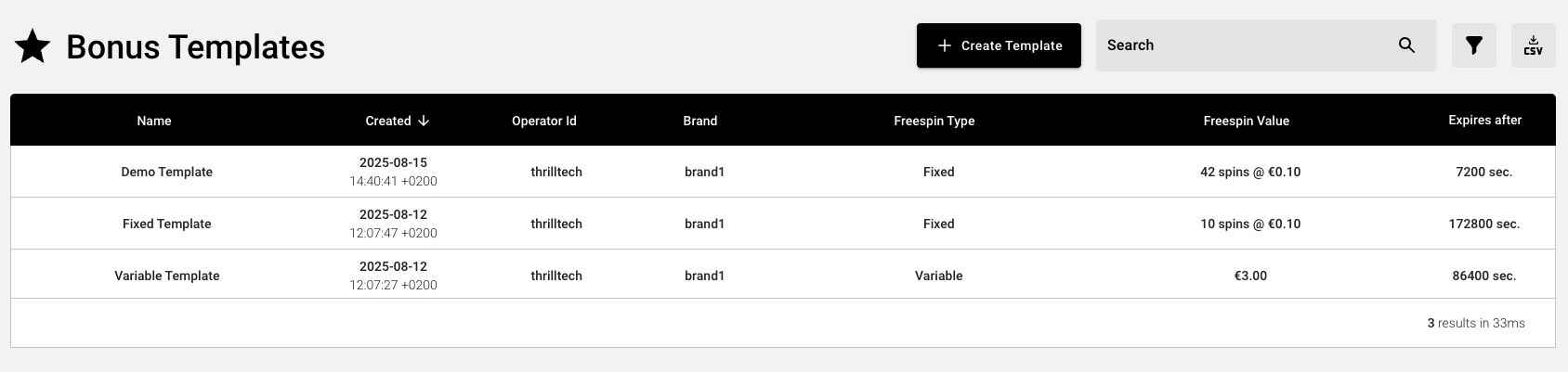
- Click the
Create Templatebutton near the top right of the screen
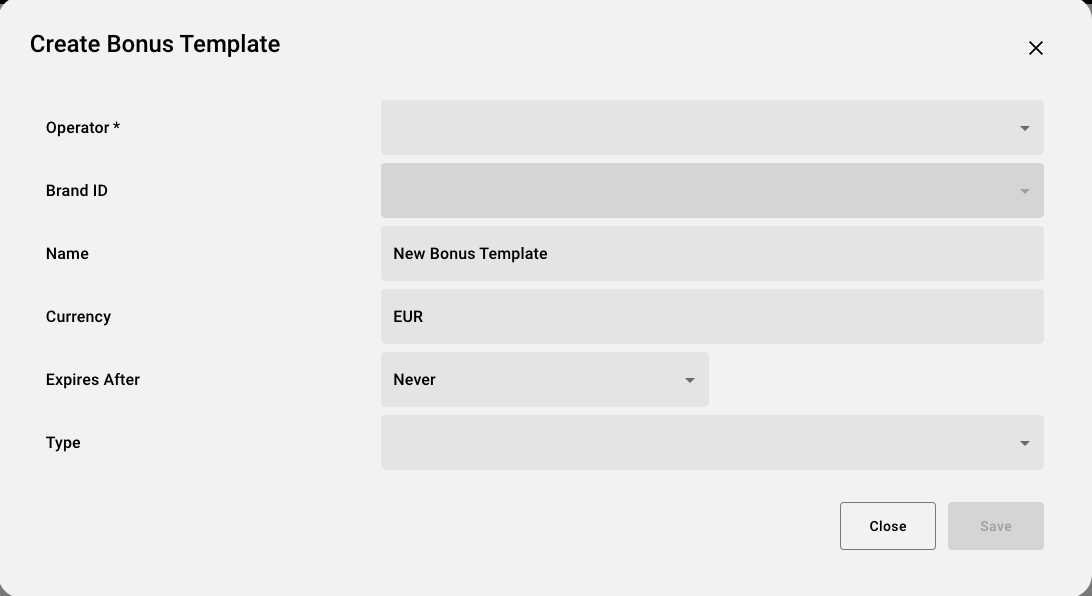
- Populate the form with the required details.
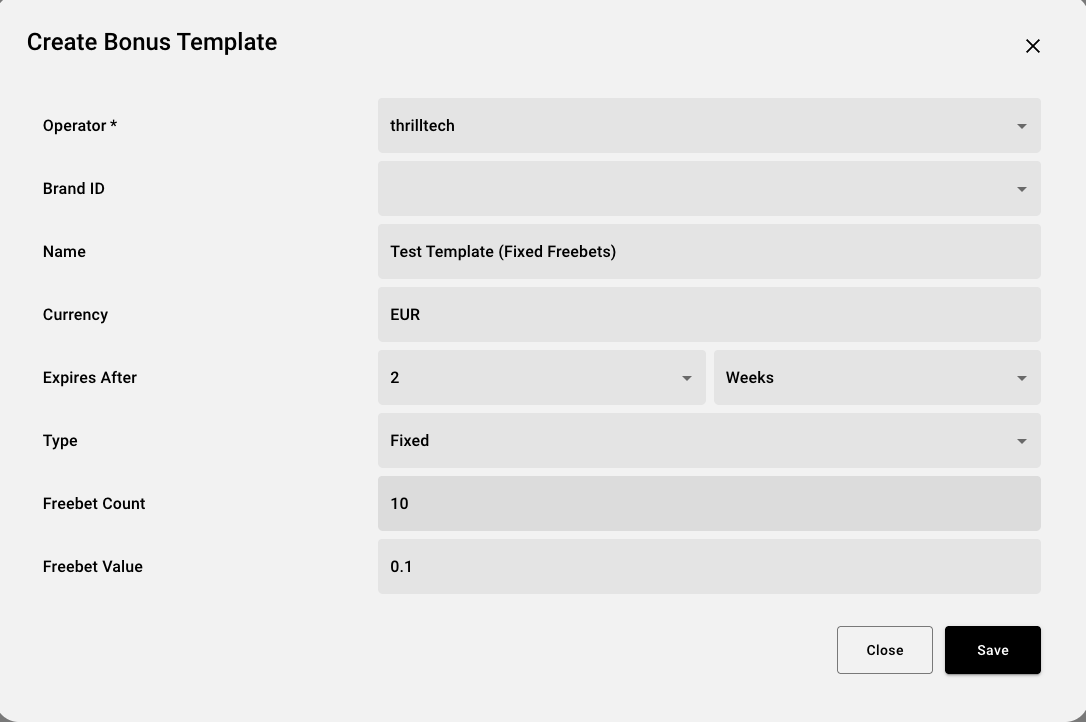
- Click
Save
Your new template should now be visible in the list of Bonus Templates
2. Instantiate the Template
- Hover over the ThrillGate icon again and select
Bonus Instances

- Click the
New Instancebutton near the top right of the screen - Populate the form, selecting the Bonus Template you created in the previous step
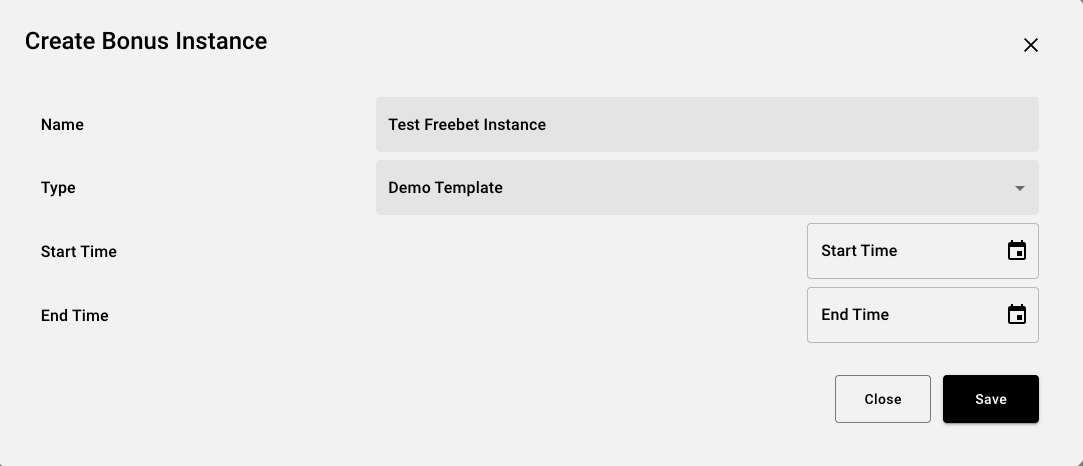
- Click
Save
3. Assign the Freebet Instance to Players
Now that we have a Bonus Template and a Bonus Instance Created, you can now assign Freebets to players. You can reuse the Bonus Instnace created in Step 2 above multiple times.
- Hover over the ThrillGate icon one more time and click on the
Player Bonusesmenu item
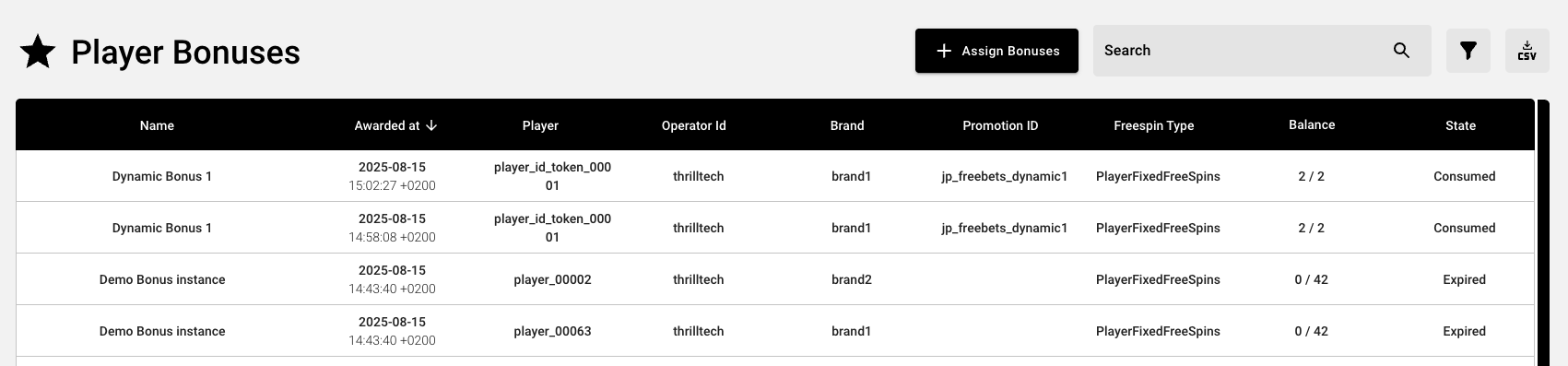
- Click the
Assign Bonusbutton near the top right of the screen - Select the bonus instance you wish to use
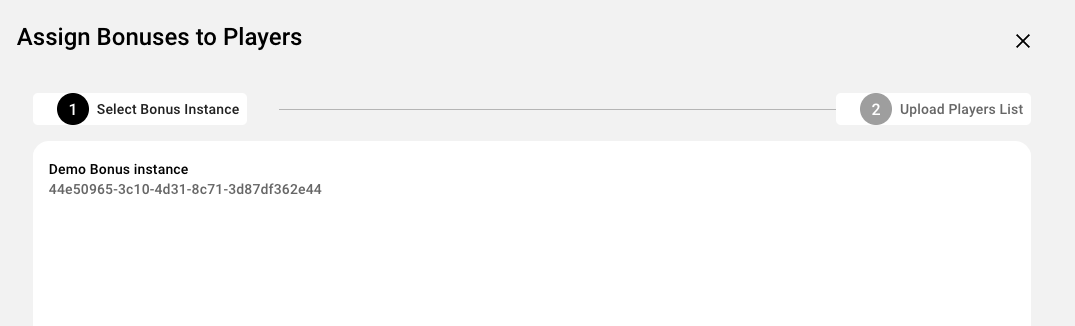
- Click the
Nextbutton
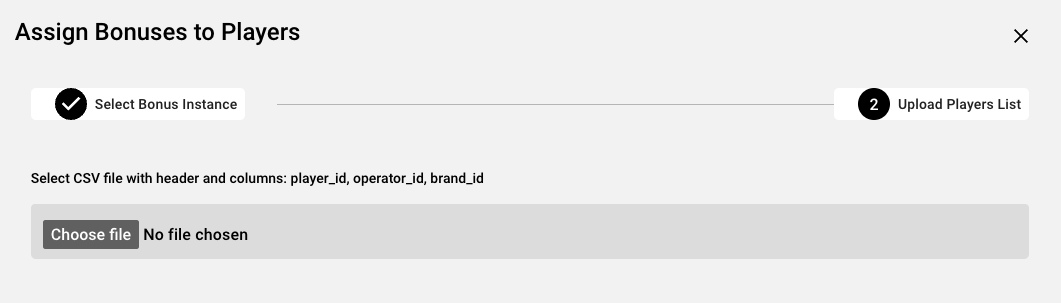
- Click the
Choose filebutton and select the CSV which contains the players you wish to assign bonuses to
NOTE: The format of the CSV file is detailed below here
- If the file is successfully imported, you will see an overview of the total cost
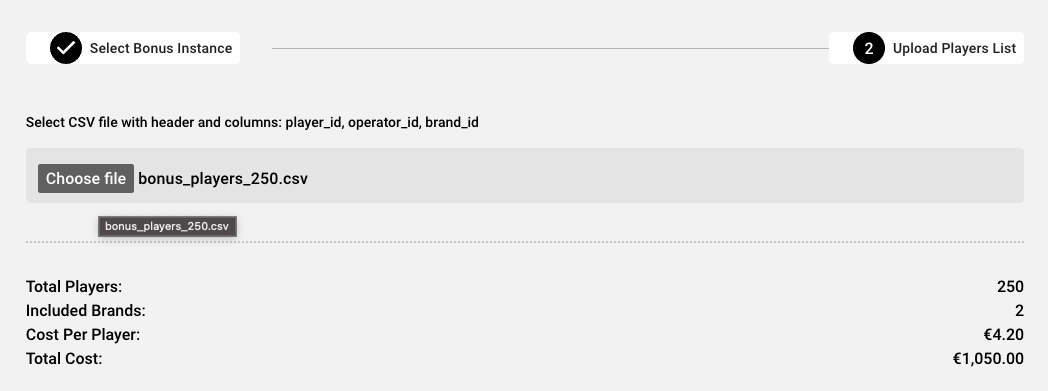
- Review the costs and once you are ready to proceed, click the
Assign Bonusesbutton at the bottom right of the form.- This will assign bonuses to the players in the CSV file you uploaded and the bonuses will be instantly available to these players
** You're done! You've successfully created a Bonus Template which can be used to create one or more Bonus Instances, which in turn can be used multiple times to assign bonuses to specific players **
Player CSV File Format
In order to specify which players should receive freebet bonuses, you need to upload a CSV file which contains the following information:
- The player's ID
- The player's Operator ID
- The player's Brand ID
The CSV file can contain other fields as well, but they will be ignored.
A correctly structured CSV contains a header row with the following headers (in any order):
- player_id
- operator_id
- brand_id
An example CSV file is available for download here
Jackpot Freebets > Configuring Freebets
This section will discuss 2 ways of configuring Freebets using the API.
You will use this if you wish to manage all freebet configurations via the ThrillTech system. The only downside to this approach is that the system does not support the flow of offering a freebet offer to a player and only awarding it if a player accepts.
IMPORTANT When creating Bonus Templates and Instances, if you support multiple player wallet currencies, you will need to create a Template (and instance) for each supported currency. If a player that uses EUR is awarded a NOK bonus, they will be unable to use the bonus unless they can change their account currency to NOK.
Freebets for external reward systems
Use this approach if you wish to make use of your existing rewards or bonusing system to creating freebets for players.
Jackpot Freebets > Configuring Freebets > ThrillGate
ThrillGate provides all the necessary functionality to configure Freebet templates, instances and finally, award freebets to players. This is useful for operators that do not have their own rewards management system or would prefer not to use their current bonusing system for Jackpot Freebets.
This section will discuss the process of configuring Jackpot Freebets at a more technical level. It is worth noting that the ThrillOffice system provides all this configuration in the user interface.
Process of configuring Jackpot Freebets
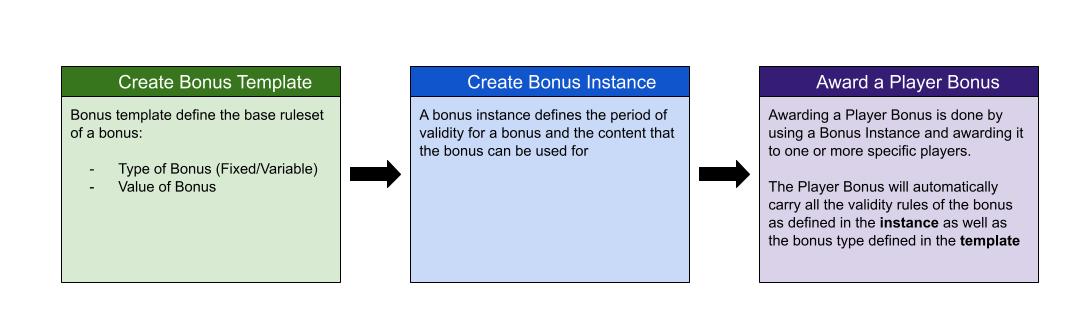
1. Create a FreeBets Iemplate
The first step of creating a template allows you to create re-usable rulesets for freebets in the system. Below is an example of creating both a Fixed Freebet template as well as a Variable Freebet template.
Fixed Freebets Template
- Endpoint: POST thrillgate/bonus/templates
- Payload: JSON
{
"name": "10 Freebets @ €0.10",
"operator_id": "thrilltech",
"brand_id": "brand1",
"freespin_type": {
"type": "FixedFreeSpins",
"count": 10,
"currency": "EUR",
"value": 0.1
},
"expires_after_ms": 0
}
Variable Freebets Template
{
"name": "€1.00 Freebets bonus",
"operator_id": "thrilltech",
"brand_id": "brand1",
"freespin_type": {
"type": "VariableFreeSpins",
"currency": "EUR",
"amount": 1.0
},
"expires_after_ms": 86400000 // awarded bonuses will expire after a day
}
The response from these calls will look something like this:
{
"id": "2ee990d6-84fd-43d4-909e-859312291135",
"name": "10 Freebets @ €0.10",
"operator_id": "thrilltech",
"brand_id": "brand1",
"freespin_type": {
"type": "FixedFreeSpins",
"count": 10,
"currency": "EUR",
"value": 0.1
},
"expires_after_ms": 0,
"created_by": null,
"timestamp_created": 1753795763112
}
Once the template is created, you can create one or more Freebet instances. Take note of the id value as we will use it in the next step.
2. Create a Freebets Instance
Now that we have a valid template available, we can create one or more instances, adding constraints (if needed) on which jackpots or games the freebet can be used for. You can also specify the validity of this instance by setting the timestamp_start and timestamp_end fields. If a Jackpot instance expires, it can no longer be used to award freebets to players.
- Endpoint: POST thrillgate/bonus/templates
- Payload: JSON
{
"template_id": "2ee990d6-84fd-43d4-909e-859312291135",
"instance_name": "Fixed Freebets: 10 bets @ €0.10 per bet for instance",
"available_for": [
{
// limit the bonus to a specific provider
"provider_id": "thrilltech",
"game_ids": []
// limit the bonus to specific game codes/source ids
// "provider_id": "thrilltech",
// "game_ids": [
// "903b26eb-3393-4784-a524-baacbba3a8ed"
// ]
}
],
"timestamp_start": 0,
"timestamp_end": 0
}
If successful, the response will look something like this:
{
"id": "9a1a696c-4011-473f-b950-49f7a39f3b0c",
"name": "Fixed Freebets: 10 bets @ €0.10 per bet for instance",
"operator_id": "thrilltech",
"brand_id": null,
"freespin_type": {
"type": "FixedFreeSpins",
"count": 10,
"currency": "EUR",
"value": 0.1
},
"template_id": "2ee990d6-84fd-43d4-909e-859312291135",
"available_for": [
{
"provider_id": "thrilltech",
"game_ids": []
}
],
"expires_after_ms": 0,
"timestamp_start": 0,
"timestamp_end": 0
}
Once again, remember to take note of the id value as we will use it in the 3rd and final step to award freebets to players.
3 Awarding Freebets to Players
In this step, we can now award Freebets to one or more players based on a specific Freebets Instance.
It is worth noting that the request_id field is the value that will be used for idempotency purposes. Ensure that each unique request uses a different value for the request_id.
- Endpoint: POST thrillgate/bonus/playerbonus/assign-instance
- Payload: JSON
{
"request_id": "1",
"instance_id": "9a1a696c-4011-473f-b950-49f7a39f3b0c",
"operator_id": "thrilltech",
"brand_id": "brand1",
"players": [
"player_id_token_00001",
"player_id_token_00002",
"player_id_token_00003",
"player_id_token_00004",
"player_id_token_00005",
"player_id_token_00006",
"player_id_token_00007",
"player_id_token_00008"
],
"promo_id": "jp_freebets_promo1"
}
Here we are awarding freebets to 8 players in the system. The players array contains the IDs of the players as they are in the operator's platform.
If successful, the response will look similar to this:
[
{
"id": "331f781e-e0a3-4d15-92e5-078d9d38c894",
"player_id": "player_id_token_00001",
"operator_id": "thrilltech",
"brand_id": "brand1",
"promo_id": "jp_freebets_promo1",
"bonus_instance_id": "9a1a696c-4011-473f-b950-49f7a39f3b0c",
"available_for": [
{
"provider_id": "thrilltech",
"game_ids": []
}
],
"bonus_data": {
"Freespins": {
"id": "9a1a696c-4011-473f-b950-49f7a39f3b0c",
"name": "Fixed Freebets: 10 bets @ €0.10 per bet for instance",
"freespin_type": {
"type": "PlayerFixedFreeSpins",
"count": 10,
"used": 0,
"currency": "EUR",
"value": 0.1
}
}
},
"state": "Available",
"timestamp_bonus_awarded": 1753796209614,
"timestamp_bonus_expires": 0,
"timestamp_bonus_consumed": null
}
// ..additional entries for each of the players
// ..
]
At this point, you have successfully awarded jackpot freebets to 8 players and they will take effect on the next contributions that the players make.
Jackpot Freebets > Configuring Freebets > External Reward System
If you would like to use your own Reward System to manage the offering and awarding of Jackpot Freebets, you are able to do so if you implement an integration with a new endpoint to award freebets directly to players.
Using this mechanism, you are able to create freebets with dynamic values, based on your internal system calculations (for example) without needing to use the Freebet Templates and Freebet Instances that were discussed in the Thrillgate section.
To create a Freebet for one or more players directly (without using Freebet instances), you can use the following mechanism.
Please note that the
request_idfield is used for idempotency purposes and should always be unique for each distinct call to the endpoint.
- Endpoint: POST thrillgate/bonus/playerbonus/create
- Payload:
{
"request_id": "2",
"operator_id": "thrilltech",
"brand_id": "brand1",
"players": [
"player_id_token_00001",
"player_id_token_00002",
"player_id_token_00003",
"player_id_token_00004",
"player_id_token_00005",
"player_id_token_00006",
"player_id_token_00007",
"player_id_token_00008",
"player_id_token_00009",
"player_id_token_00010"
],
"bonus_name": "Dynamic Freebets 1",
"bonus": {
"type": "FixedFreeSpins",
"count": 15,
"currency": "EUR",
"value": 0.25
},
// "available_for": [
// {
// "provider_id": "thrilltech",
// "game_ids": []
// }
// ],
// "timestamp_bonus_expires": 0,
"promo_id": "jp_freebets_dynamic1"
}
In the above example, we are awarding the Dynamic Freebets 1 to 10 players. Each player will receive 15 freebets, with each freebet valued at €0.25.
If you wanted to put an expiry time for the bonus, you could do so by using the timestamp_bonus_expires field and set the timestamp (unix epoch in milliseconds) for the absolute time for when the bonus will expire.
If the request was successful, you will receive a response similar to the following:
[
{
"id": "61668185-d21f-4db1-9217-5181514b97a4",
"player_id": "player_id_token_00001",
"operator_id": "thrilltech",
"brand_id": "brand1",
"promo_id": "jp_freebets_dynamic1",
"bonus_instance_id": "DYNAMICALLY_CREATED_1753802620622",
"available_for": [],
"bonus_data": {
"Freespins": {
"id": "DYNAMICALLY_CREATED_1753802620622",
"name": "Dynamic Freebets 1",
"freespin_type": {
"type": "PlayerFixedFreeSpins",
"count": 15,
"used": 0,
"currency": "EUR",
"value": 0.25
}
}
},
"state": "Available",
"timestamp_bonus_awarded": 1753802620622,
"timestamp_bonus_expires": 0,
"timestamp_bonus_consumed": null
},
// ... additional eleemnts for every other player will follow here
]
Jackpot Freebets > Freebet Events
The following events have been added to the system to support the Freebets feature:
| Event Name | Description |
|---|---|
| PlayerBonusAdded | Sent when freebets are awarded to a player |
| PlayerBonusRemoved | Sent when freebets are removed from a player |
| PlayerBonusUpdated | Sent when a player's freebet state changes (for example when a player uses part of the freebet) |
| PlayerBonusConsumed | Sent when a player's awarded freebets are completely consumed |
| PlayerBonusExpired | Sent when a player's awarded freebets expire |
Each of these events carries the exact same payload, which has the following structure:
{
"msg_type": "Event",
"source": "thrillgate",
"msg_name": "PlayerBonusAdded" | "PlayerBonusRemoved" | "PlayerBonusUpdated" | "PlayerBonusConsumed" | "PlayerBonusExpired",
"operator_id": String,
"brand_id": String,
"player_id": String,
"data": {
"id": String,
"promo_id": String | null,
"bonus_instance_id": String,
"available_for": [
{
"provider_id": String,
"game_ids": [String]
}
],
"bonus_data": {
"Freespins": {
"id": String,
"name": String,
"freespin_type": FreeSpinType, // see below for structure details
}
},
"state": "Available" | "Consumed" | "Expired",
"timestamp_bonus_awarded": Integer,
"timestamp_bonus_expires": Integer,
"timestamp_bonus_consumed": Integer | null
},
"timestamp": Integer
}
The FreeSpinType structure is an enumerated structure and can contain one of the following structures:
Fixed Freebets
{
"type": "PlayerFixedFreeSpins",
"count": Integer,
"used": Integer,
"currency": String,
"value": Number
}
Variable Freebets
{
"type": "PlayerVariableFreeSpins",
"amount": Decimal,
"amount_used": Decimal,
"currency": String,
}
Your frontend widgets can use the payload of these events along with the event context to decide what to display to the user.
Environment Variables
Each service has a list of environment variables which define its configuration for runtime. Use this reference to understand what each environment variable does, what it is used for and the possible values it can contain.
Quick Links
- ThrillPots Gateway
- ThrillPots Service
- ThrillGate Service
- ThrillConnect Service
- Thrill-ID Service
- BitBridge Service
- ThrillOffice Service
ThrillPots Gateway
| Variable Name | Default Value | Description |
|---|---|---|
| GW_LOG_LEVEL | info | The log level at which logs will be written. Possible values are info, debug, warn, trace |
| GW_WEB_HOST | 0.0.0.0 | The hostname to bind the web service to |
| GW_WEB_PORT | 80 | The port to bind the web service to |
| GW_MONGO_HOST | mongodb://localhost | The connection URI for the MongoDB server |
| GW_MONGO_DB_NAME | test | The DB name for the Service (should usually be set to thrillpots-gateway) |
| GW_MONGO_USERNAME | None | [Optional] The username to use to authenticate with MongoDB |
| GW_MONGO_PASSWORD | None | [Optional] The password to use to authenticate with MongoDB |
| GW_MONGO_RETRY_WRITES | true | Flag to set whether writes are retries when they fail |
| GW_REDIS_HOST | redis://localhost | The connection URI for REDIS. Possible schemas are: - Standalone: redis://hostname:port- Cluster: redis://hostname:port,redis://hostname2:port,..- Sentinel: sentinel://hostname:port/master/replica or sentinel+tls://hostname:port/master/replica |
| GW_REDIS_DB | 0 | The Redis DB number to use |
| GW_REDIS_USERNAME | None | [Optional] The REDIS username to use for authentication |
| GW_REDIS_PASSWORD | None | [Optional] The REDIS password to use for authentication |
| GW_REDIS_SECURE | false | [Optional] Defines if the REDIS connection is secure or not |
| GW_REDIS_CLUSTER | false | [Optional] Defines if the REDIS connection is secure or not. For a standard Sentinel deployment, this variable should be set to false |
| GW_JPSERVER_HOST | http://localhost:8084 | The URL for the ThrillPots Service. For clustered environments, this should point to the DNS entry for the ThrillPots Service on your internal load balancer |
| GW_THRILLID_HOST | http://localhost:9000 | The URL for the Thrill-ID Service. For clustered environments, this should point to the DNS entry for the Thrill-ID Service on your internal load balancer |
| GW_THRILLID_USERNAME | None | The username the service should use to authenticate with Thrill-ID. In a standard deployment, this should be set to thrillpots.gateway |
| GW_THRILLID_PASSWORD | None | The password the service should use to authenticate with Thrill-ID. In a default deployment, this will start off as password and can be changed via Thrill-ID directly |
| GW_THRILLGATE_HOST | None | The URL for the ThrillGate Service. For clustered environments, this should point to the DNS entery for the ThrillGate Service on your internal load balancer |
ThrillPots Service
| Variable Name | Default Value | Description |
|---|---|---|
| JP_LOG_LEVEL | info | The log level at which logs will be written. Possible values are info, debug, warn, trace |
| JP_WEB_HOST | 0.0.0.0 | The hostname to bind the web service to |
| JP_WEB_PORT | 80 | The port to bind the web service to |
| JP_MONGO_HOST | mongodb://localhost | The connection URI for the MongoDB server |
| JP_MONGO_DB_NAME | thrillpots | The DB name for the Service (should usually be set to thrillpots) |
| JP_MONGO_USERNAME | None | [Optional] The username to use to authenticate with MongoDB |
| JP_MONGO_PASSWORD | None | [Optional] The password to use to authenticate with MongoDB |
| JP_MONGO_RETRY_WRITES | true | Flag to set whether writes are retries when they fail |
| JP_REDIS_HOST | redis://localhost | The connection URI for REDIS. Possible schemas are: - Standalone: redis://hostname:port- Cluster: redis://hostname:port,redis://hostname2:port,..- Sentinel: sentinel://hostname:port/master/replica or sentinel+tls://hostname:port/master/replica |
| JP_REDIS_DB | 0 | The Redis DB number to use |
| JP_REDIS_USERNAME | None | [Optional] The REDIS username to use for authentication |
| JP_REDIS_PASSWORD | None | [Optional] The REDIS password to use for authentication |
| JP_REDIS_SECURE | false | [Optional] Defines if the REDIS connection is secure or not |
| JP_REDIS_CLUSTER | false | [Optional] Defines if the REDIS connection is secure or not. For a standard Sentinel deployment, this variable should be set to false |
| JP_THRILLID_HOST | http://localhost:9000 | The URL for the Thrill-ID Service. For clustered environments, this should point to the DNS entry for the Thrill-ID Service on your internal load balancer |
| JP_THRILLID_USERNAME | thrillpots | The username the service should use to authenticate with Thrill-ID. In a standard deployment, this should be set to thrillpots |
| JP_THRILLID_PASSWORD | password | The password the service should use to authenticate with Thrill-ID. In a default deployment, this will start off as password and can be changed via Thrill-ID directly |
| JP_SERVICE_CURRENCY_REFRESH | 86400000 | The amount of time between ThrillPots attempting to refresh its currency multipliers. The default is set to 24 hours (86400000 milliseconds) |
| JP_SERVICE_UPDATE_EVENT_FREQUENCY | 10000 | The amount of time (in milliseconds) between jackpot update events being sent out. The default is set to 10 seconds, but we recommend reducing this to a value between 2000 and 5000 (2s - 5s) |
| JP_SERVICE_AUTH_CACHE_TTL | 300 | The number of seconds to cache a player's authentication token. Change this to reflect the TTL on your system's player session token lifetimes |
| JP_RNG_BACKGROUND_CYCLING | false | If set to true, the RNG will automatically perform background cycling of its values in periods defined by JP_RNG_BACKGROUND_CYCL_DELAY_MIN_SECS and JP_RNG_BACKGROUND_CYCLE_DELAY_MAX_SECS |
| JP_RNG_BACKGROUND_CYCLE_DELAY_MIN_SECS | 0 | [Optional] The minimum amount of delay between background cycles. We recommend a value of 60 |
| JP_RNG_BACKGROUND_CYCLE_DELAY_MAX_SECS | 0 | [Optional] The maximum amount of delay between background cycles. We recommend a value of 180 |
| JP_RNG_MONITOR_PERIOD_SECS | 0 | [Optional] The maximum period between the randomness monitoring test running. We recommend a value of 600 |
| JP_RNG_FAILURES_TO_ALERT | None | [Optional] If RNG Monitoring is enabled, this variable defines the number of consecutive failures that are needed to generate an alert. We recommend setting this to a value of 5 or higher |
| JP_CC_URL | None | The URL of the ThrillTech CC Service which must be defined for all operator environments. For STAGING environments, this value should be set to https://cc-stg.thrillpots.io and for PRODUCTION environments, it should be set to: https://cc.thrilltechapi.com |
| JP_CC_OPERATOR_ID | None | This value identifies you as an operator and will be provided to you by ThrillTech |
| JP_CC_SERVICE_ID | None | This identifies the product and should be set to thrillpots |
ThrillGate Service
| Variable Name | Default Value | Description |
|---|---|---|
| TG_LOG_LEVEL | info | The log level at which logs will be written. Possible values are info, debug, warn, trace |
| TG_WEB_HOST | 0.0.0.0 | The hostname to bind the web service to |
| TG_WEB_PORT | 80 | The port to bind the web service to |
| TG_MONGO_HOST | mongodb://localhost | The connection URI for the MongoDB server |
| TG_MONGO_DB_NAME | test | The DB name for the Service (should usually be set to thrillgate) |
| TG_MONGO_USERNAME | None | [Optional] The username to use to authenticate with MongoDB |
| TG_MONGO_PASSWORD | None | [Optional] The password to use to authenticate with MongoDB |
| TG_MONGO_RETRY_WRITES | true | Flag to set whether writes are retries when they fail |
| TG_REDIS_HOST | redis://localhost | The connection URI for REDIS. Possible schemas are: - Standalone: redis://hostname:port- Cluster: redis://hostname:port,redis://hostname2:port,..- Sentinel: sentinel://hostname:port/master/replica or sentinel+tls://hostname:port/master/replica |
| TG_REDIS_DB | 0 | The Redis DB number to use |
| TG_REDIS_USERNAME | None | [Optional] The REDIS username to use for authentication |
| TG_REDIS_PASSWORD | None | [Optional] The REDIS password to use for authentication |
| TG_REDIS_SECURE | false | [Optional] Defines if the REDIS connection is secure or not |
| TG_REDIS_CLUSTER | false | [Optional] Defines if the REDIS connection is secure or not. For a standard Sentinel deployment, this variable should be set to false |
| TG_THRILLID_HOST | http://localhost:9000 | The URL for the Thrill-ID Service. For clustered environments, this should point to the DNS entry for the Thrill-ID Service on your internal load balancer |
| TG_THRILLID_USERNAME | None | The username the service should use to authenticate with Thrill-ID. In a standard deployment, this should be set to thrillgate |
| TG_THRILLID_PASSWORD | None | The password the service should use to authenticate with Thrill-ID. In a default deployment, this will start off as password and can be changed via Thrill-ID directly |
ThrillConnect Service
| Variable Name | Default Value | Description |
|---|---|---|
| TCS_LOG_LEVEL | info | The log level at which logs will be written. Possible values are info, debug, warn, trace |
| TCS_WEB_HOST | 0.0.0.0 | The hostname to bind the web service to |
| TCS_WEB_PORT | 80 | The port to bind the web service to |
| TCS_MONGO_HOST | mongodb://localhost | The connection URI for the MongoDB server |
| TCS_MONGO_DB_NAME | test | The DB name for the Service (should usually be set to thrillconnect) |
| TCS_MONGO_USERNAME | None | [Optional] The username to use to authenticate with MongoDB |
| TCS_MONGO_PASSWORD | None | [Optional] The password to use to authenticate with MongoDB |
| TCS_MONGO_RETRY_WRITES | true | Flag to set whether writes are retries when they fail |
| TCS_REDIS_HOST | redis://localhost | The connection URI for REDIS. Possible schemas are: - Standalone: redis://hostname:port- Cluster: redis://hostname:port,redis://hostname2:port,..- Sentinel: sentinel://hostname:port/master/replica or sentinel+tls://hostname:port/master/replica |
| TCS_REDIS_DB | 0 | The Redis DB number to use |
| TCS_REDIS_USERNAME | None | [Optional] The REDIS username to use for authentication |
| TCS_REDIS_PASSWORD | None | [Optional] The REDIS password to use for authentication |
| TCS_REDIS_SECURE | false | [Optional] Defines if the REDIS connection is secure or not |
| TCS_REDIS_CLUSTER | false | [Optional] Defines if the REDIS connection is secure or not. For a standard Sentinel deployment, this variable should be set to false |
| TCS_THRILLID_HOST | http://localhost:9000 | The URL for the Thrill-ID Service. For clustered environments, this should point to the DNS entry for the Thrill-ID Service on your internal load balancer |
| TCS_THRILLID_USERNAME | None | The username the service should use to authenticate with Thrill-ID. In a standard deployment, this should be set to thrillconnect |
| TCS_THRILLID_PASSWORD | None | The password the service should use to authenticate with Thrill-ID. In a default deployment, this will start off as password and can be changed via Thrill-ID directly |
Thrill-ID Service
| Variable Name | Default Value | Description |
|---|---|---|
| TID_LOG_LEVEL | info | The log level at which logs will be written. Possible values are info, debug, warn, trace |
| TID_WEB_HOST | 0.0.0.0 | The hostname to bind the web service to |
| TID_WEB_PORT | 80 | The port to bind the web service to |
| TID_MONGO_HOST | mongodb://localhost | The connection URI for the MongoDB server |
| TID_MONGO_DB_NAME | test | The DB name for the Service (should usually be set to thrillid) |
| TID_MONGO_USERNAME | None | [Optional] The username to use to authenticate with MongoDB |
| TID_MONGO_PASSWORD | None | [Optional] The password to use to authenticate with MongoDB |
| TID_MONGO_RETRY_WRITES | true | Flag to set whether writes are retries when they fail |
| TID_REDIS_HOST | redis://localhost | The connection URI for REDIS. Possible schemas are: - Standalone: redis://hostname:port- Cluster: redis://hostname:port,redis://hostname2:port,..- Sentinel: sentinel://hostname:port/master/replica or sentinel+tls://hostname:port/master/replica |
| TID_REDIS_DB | 0 | The Redis DB number to use |
| TID_REDIS_USERNAME | None | [Optional] The REDIS username to use for authentication |
| TID_REDIS_PASSWORD | None | [Optional] The REDIS password to use for authentication |
| TID_REDIS_SECURE | false | [Optional] Defines if the REDIS connection is secure or not |
| TID_REDIS_CLUSTER | false | [Optional] Defines if the REDIS connection is secure or not. For a standard Sentinel deployment, this variable should be set to false |
| TID_JWT_SECRET | default-secret-for-this-service | The secret used when generating JWT tokens during account authentication |
| TID_JWT_STRICT_IP_CHECK | true | Enforce strict IP checking when refreshing tokens |
| TID_JWT_LIFETIME_SECS | 1800 | The lifetime of a JWT token |
| TID_JWT_REFRESH_LIFETIME_SECS | 300 | The amount of grace period allowed for a refresh token |
BitBridge Service
| Variable Name | Default Value | Description |
|---|---|---|
| TT_LOG_LEVEL | info | The log level at which logs will be written. Possible values are info, debug, warn, trace |
| TT_WEB_HOST | 0.0.0.0 | The hostname to bind the web service to |
| TT_WEB_PORT | 80 | The port to bind the web service to |
| TT_MONGO_HOST | mongodb://localhost | The connection URI for the MongoDB server |
| TT_MONGO_DB_NAME | test | The DB name for the Service (should usually be set to bitbridge) |
| TT_MONGO_USERNAME | None | [Optional] The username to use to authenticate with MongoDB |
| TT_MONGO_PASSWORD | None | [Optional] The password to use to authenticate with MongoDB |
| TT_MONGO_RETRY_WRITES | true | Flag to set whether writes are retries when they fail |
| TT_REDIS_HOST | redis://localhost | The connection URI for REDIS. Possible schemas are: - Standalone: redis://hostname:port- Cluster: redis://hostname:port,redis://hostname2:port,..- Sentinel: sentinel://hostname:port/master/replica or sentinel+tls://hostname:port/master/replica |
| TT_REDIS_DB | 0 | The Redis DB number to use |
| TT_REDIS_USERNAME | None | [Optional] The REDIS username to use for authentication |
| TT_REDIS_PASSWORD | None | [Optional] The REDIS password to use for authentication |
| TT_REDIS_SECURE | false | [Optional] Defines if the REDIS connection is secure or not |
| TT_REDIS_CLUSTER | false | [Optional] Defines if the REDIS connection is secure or not. For a standard Sentinel deployment, this variable should be set to false |
| TT_THRILLID_HOST | http://localhost:9000 | The URL for the Thrill-ID Service. For clustered environments, this should point to the DNS entry for the Thrill-ID Service on your internal load balancer |
| TT_THRILLID_USERNAME | None | The username the service should use to authenticate with Thrill-ID. In a standard deployment, this should be set to bitbridge |
| TT_THRILLID_PASSWORD | None | The password the service should use to authenticate with Thrill-ID. In a default deployment, this will start off as password and can be changed via Thrill-ID directly |
| TT_MICRO_CURRENCIES | None | The list of currencies that should have "micro currency" alternatives generated for them. For example, if the list is BTC,ETH, then the system will also generate mBTC and mETH exchange rates |
ThrillOffice Service
| Variable Name | Default Value | Description |
|---|---|---|
| TO_LOG_LEVEL | info | The log level at which logs will be written. Possible values are info, debug, warn, trace |
| TO_WEB_HOST | 0.0.0.0 | The hostname to bind the web service to |
| TO_WEB_PORT | 80 | The port to bind the web service to |
| TO_MONGO_HOST | mongodb://localhost | The connection URI for the MongoDB server |
| TO_MONGO_DB_NAME | test | The DB name for the Service (should usually be set to thrilloffice) |
| TO_MONGO_USERNAME | None | [Optional] The username to use to authenticate with MongoDB |
| TO_MONGO_PASSWORD | None | [Optional] The password to use to authenticate with MongoDB |
| TO_MONGO_RETRY_WRITES | true | Flag to set whether writes are retries when they fail |
| TO_REDIS_HOST | redis://localhost | The connection URI for REDIS. Possible schemas are: - Standalone: redis://hostname:port- Cluster: redis://hostname:port,redis://hostname2:port,..- Sentinel: sentinel://hostname:port/master/replica or sentinel+tls://hostname:port/master/replica |
| TO_REDIS_DB | 0 | The Redis DB number to use |
| TO_REDIS_USERNAME | None | [Optional] The REDIS username to use for authentication |
| TO_REDIS_PASSWORD | None | [Optional] The REDIS password to use for authentication |
| TO_REDIS_SECURE | false | [Optional] Defines if the REDIS connection is secure or not |
| TO_REDIS_CLUSTER | false | [Optional] Defines if the REDIS connection is secure or not. For a standard Sentinel deployment, this variable should be set to false |
| TO_POTS_MONGO_HOST | mongodb://localhost | The connection URI for the MongoDB server for ThrillPots. Preferrably the connection string should indicate use of seconday instance for read purposes (?readPreference=secondary). |
| TO_POTS_MONGO_DB_NAME | test | The DB name for ThrillPots Service (should usually be set to thrillpots) |
| TO_POTS_MONGO_USERNAME | None | [Optional] The username to use to authenticate with MongoDB. A dedicated read-only user is recommended for this DB connection. |
| TO_POTS_MONGO_PASSWORD | None | [Optional] The password to use to authenticate with MongoDB |
| TO_THRILLGATE_MONGO_HOST | mongodb://localhost | The connection URI for the MongoDB server for ThrillGate. Preferrably the connection string should indicate use of seconday instance for read purposes (?readPreference=secondary). |
| TO_THRILLGATE_MONGO_DB_NAME | test | The DB name for ThrillGate Service (should usually be set to thrillgate) |
| TO_THRILLGATE_MONGO_USERNAME | None | [Optional] The username to use to authenticate with MongoDB. A dedicated read-only user is recommended for this DB connection. |
| TO_THRILLGATE_MONGO_PASSWORD | None | [Optional] The password to use to authenticate with MongoDB |
| TO_THRILLID_HOST | http://localhost:9000 | The URL for the Thrill-ID Service. For clustered environments, this should point to the DNS entry for the Thrill-ID Service on your internal load balancer |
| TO_THRILLID_USERNAME | None | The username the service should use to authenticate with Thrill-ID. In a standard deployment, this should be set to thrilloffice |
| TO_THRILLID_PASSWORD | None | The password the service should use to authenticate with Thrill-ID. In a default deployment, this will start off as password and can be changed via Thrill-ID directly |
ThrillPots Event Structures
This section provides the data definitions (in JSON) for each of the ThrillPots events.
Event: JackpotUpdateEvent
{
"id": String,
"jackpot_type": "Jackpot" | "Raffle",
"currency": String,
"pots": [PotTicker],
"allowed_brands": [String],
"allowed_sources": [String],
"status": String,
"timestamp_start": Number | null,
"timestamp_end": Number | null,
"last_updated": Number
}
References:
Event: WinEvent
{
"brand_id": String,
"player_id": String,
"source_id": String,
"instance_id": String,
"jackpot_name": String,
"jackpot_currency": String,
"timestamp": Number,
"win_pot_id": String,
"currency_multipliers": {
"brand_id": String,
"base_currency": String,
"multipliers": {
"EUR": Number,
"GBP": Number,
"ZAR": Number,
...
"NZD": Number,
"SEK": Number
}
}
"win_withheld": bool,
"community_winners": [PayoutRecord],
"games_in_jackpot": [String],
"seed": Number,
"metadata": null | Object,
}
References:
Event: RaffleWinEvent
{
"brand_id": String,
"instance_id": String,
"jackpot_name": String,
"jackpot_currency": String,
"currency_multipliers": {
"brand_id": String,
"base_currency": String,
"multipliers": {
"EUR": Number,
"GBP": Number,
"ZAR": Number,
...
"NZD": Number,
"SEK": Number
}
}
"timestamp": Number,
"winners": [
{
"player_id": String,
"brand_id": String,
"currency": String,
"win_amount": Number
}
],
"win_withheld": bool
}
References:
The winners field contains an array of tuples. The structure of each tuples is (String, CurrencyValue).
The first element in the tuple contains the ID of a winning player and the second element contains the amount that the player won.
Event: OptInEvent
{
"instance_id": String,
"player_id": String,
"ext_player_id": String,
"player_brand_id": String,
"preferred_contribution_value": Number,
"contribution_count": Number,
"contribution_value": Number,
"opted_in": Boolean,
"last_updated": Number,
}
Event: CommunityPayoutErrorEvent
{
"instance_id": String,
"gameround_id": String,
"tx_credit_id": String,
"failed_payouts": [
{
"player_id": String,
"brand_id": String,
"currency": String,
"win_amount": Number
}
]
}
Event: RafflePayoutErrorEvent
{
"instance_id": String,
"failed_payouts": [
{
"player_id": String,
"brand_id": String,
"currency": String,
"win_amount": Number
}
]
}
Structure References
PotTicker
{
"id": String,
"is_progressive": Boolean,
"current_value": Number,
"community_split": Number | null
}
CurrencyValue
{
"currency": String,
"value": Number
}
PayoutRecord
{
"player_id": String,
"brand_id": String,
"currency": String,
"win_amount": Number,
"reason": String,
}
Linked Jackpots
This feature allows jackpot instances to be linked together so that a contribution to one instance automatically results in a contribution to all linked instances. It is particularly useful in scenarios where multiple jackpots exist within a single game, for example Daily, Weekly, and Monthly raffles.
Previously, contributions had to be submitted individually for each jackpot instance. With this feature, links can be predefined, allowing a single request to result in a contribution to all associated instances.
API Version Compatability
Linked instances are supported only by the v2 contribution APIs, as this feature introduces a breaking change in the synchronous contribution response structure.
Automatic Contribution Propagation
A contribution to an instance is automatically applied to all directly linked jackpots. Only the links defined for the target instance (the instance being contributed to) are honored.
Failure Handling
- If the contribution to the main instance fails, contributions to linked instances will not be attempted.
- If a linked instance contribution fails (e.g., due to missing opt-in or validation failure), other linked instances will still be processed normally.
Opt-in Requirement
Opt-ins are not automatically propagated to linked instances. If a linked instance requires explicit opt-in, and the opt-in has not occurred, the contribution to that instance will fail with an error.
Example Scenarios
- Scenario 1: Weekly and Monthly raffles are linked to Daily raffle.
- A contribution to Daily raffle propagates to Daily, Weekly, and Monthly.
- Scenario 2: Weekly is linked to Daily, and Monthly is linked to Weekly.
- A contribution to Daily applies to Daily and Weekly, but not Monthly, since Monthly is not directly linked to Daily.
- Scenario 3: Weekly requires explicit opt-in, and the user has not opted in.
- A contribution to Daily would result in an error for Weekly, but other linked instances (e.g., Monthly) would still process normally.
Managing Instance Links
Instance links are defined in linked_instances collection in thrillpots service database and can be managed via the following CRUD APIs:
- Retrieve links for an instance
- Returns all linked jackpots defined for a given instance
- Set links for an instance
- Updates an instance's links based on the provided input.
- Delete links for an instance
- Removes all existing links for a given instance.
OAS and Swagger documentation
For more details on using this functionality, refer to the API documentation
NOTE: This is early documentation for the scheduling system and the documentation will be further extended over time with additional examples and more details
Advanced Scheduling
The ThrillPots system provides a relatively sophisticated sub-system which allows you to create schedules for your jackpot products.
It is important to understand what a schedule is in the context of ThrillPots.
At its core, a schedule is always bound to a Jackpot Instance. A schedule can be as simple as defining the date and time that a jackpot starts at, or defining an end date and time for jackpot.
Here are some interesting use cases that can be solved with schedules as well:
- Happy Hour Jackpot: Creating a jackpot that only accepts contributions during 17:00 and 18:00
- Promotional Jackpots: Creating a jackpot that only accepts contributions at peak times of site activity or to encourage players during low activity times
- Weekend Jackpots: Creating a jackpot that is only available on weekends
Schedules become even more powerful when used together with Raffle Jackpots. Raffle Jackpots are jackpots that resolve at the end of a predefined period of time. While players participate in the Raffle Jackpot by way of contribution (as with any other jackpot), raffle jackpots issue tickets to players based on either their Contribution or the base wager that they make into games.
Recurrence Rulesets
All the rules for the scheduling system revolve around "recurrence rules". Currently, recurrence rules are implemented for "Daily" and "Weekly" rulesets.
Daily rules
Daily rules define a set of hours within which the jackpot is available in. Traditionally, jackpot contributions are allowed during all hours of the day, but lets imagine that you wanted to create a jackpot that was only available during your site's "Happy Hour" which was between the hours of 7pm to 9pm UTC.
For such a rule to exist, you would only need to define a Daily recurrence rule which stipulated that the hours of 19:00 to 21:00 UTC were valid.
Weekly rules
Taking the example from above, lets imagine that we wanted to further constrain the available days of the raffle to be from Monday to Friday (no weekend contributions allowed!). In this case, we would create a "Weekly" ruleset which define the following days as being valid: Monday through to Friday.
As a last minute change, business might want to allow contributions to happen on a Saturday, but only between 08:00 UTC to 20:00 UTC. To allow this specificity of ruleset, we can apply an additional override for Saturday for those specific hours at the Weekly schedule level.
Technical Example
For a technical example of what a complete schedule as described above would look like, the following JSON structure accurately describes the ruleset. For arguments sake, we will define the schedule to start on the 1st of January 2024 UTC, with no end to the schedule.
To summarise, we will be creating a schedule that:
- Allows contributions to occur Monday, Tuesday, Wednesday, Thursday, Friday and Saturday
- From Monday to Friday, contributions will be allowed between 19:00:00 UTC and 21:00:00 UTC
- On Saturdays, contributions will be allowed between 08:00:00 UTC and 20:00:00 UTC
{
"timestamp_start": 1704067200000,
// No `timestamp_end` is specified since the schedule has no end
"recurrence_rules": [
{
"frequency": {
"Daily": {
"hours": [
[
{ "hour": 19, "minute": 0, "sec": 0 }.
{ "hour": 21, "minute": 0, "sec": 0 }
]
]
}
},
"interval": 1, // 1 means "every day". 2 would mean "every second day"
},
{
"frequency": {
"Weekly": {
"days": [
["Mon", null].
["Tue", null],
["Wed", null],
["Thu", null],
["Fri", null],
["Sat", {
"Daily": {
"hours": [
[
{ "hour": 8, "minute": 0, "sec": 0 },
{ "hour": 20, "minute": 0, "sec": 0 }
]
]
}
}]
]
}
}
}
]
}
As can be seen from this example, when defining the Weekly rule, each day of validity needs to be specified, along with any overrides to the underlying Daily rules that may exist.
Order of Precendence
It is important to note that any hourly overrides present in the Weekly ruleset will take precedence over those specified in the Daily rules.
How Scheduled Jackpots work
When a schedule is applied to a normal Jackpot Instance, the system performs some rudimentary initial checks (making sure that when the jackpot is created with a schedule in the future, that the status is correctly set to Pending).
Once the Jackpot Instance is Active, the applied schedule defines the periods of time during which contributions will be accepted by the Jackpot Instance. When the schedule is not accepting contributions, the Jackpot Instance will continue to be Active (this behaviour may change in the future).
How Scheduled Raffles work
When instantiating Raffle Jackpots, a schedule must be provided during instantiation time
The reason for this is due to the fact that raffles are fundamentally time-based entities with at least a start time and duration-per-raffle.
Raffles have an explicit duration which is defined as part of the Raffle Rules. Durations can be defined in units of Seconds, Minutes, Hours, Days or Weeks.
Raffles that have a schedule that is longer than a raffles duration are considered "recurring raffles" while raffles that have a schedule equal to their duration are considered "once-off raffles".
Lets examime a few examples to explore this concept:
Once off Raffles
Lets imagine a scenario where an operator wants to run a once-off raffle for the Festive season (Xmas) period which start from 00:00:00 UTC on the 1st of December 2024 and the raffle resolves (pays out) at 09:00:00 UTC on the 25th of December 2024.
Additional requirements for the raffle are that the raffle should only accept contributions between the hours of 8am CET until the end of each day.
In order to create a schedule for this type of raffle, we need to create rules that specify the hourly restrictions as well as the start and end of the raffle.
Example
{
// Sunday, 1 December 2024 00:00:00
"timestamp_start": 1733011200000,
// Wednesday, 25 December 2024 09:00:00
"timestamp_end": 1735117200000
"recurrence_rules": [
{
"frequency": {
"Daily": {
"hours": [
[
{ "hour": 8, "minute": 0, "sec": 0 }.
{ "hour": 23, "minute": 59, "sec": 59 }
]
]
}
},
"interval": 1,
}
]
}
As can be seen in the example, the timestamp_start and timestamp_end have been set to the period of the Festive Season (December 1st, 2024 to December 25th 2024 respectively) and the hours of availability are set from 08:00:00 UTC to 23:59:59 UTC.
Since the jackpot is available on all days through the period, there is no need to define the Weekly ruleset.
In addition to the schedule, the raffle will also need to be configured to run for the duration of the schedule. In this case, the duration will be 24 days and 9 hours.
NOTE In general, you as an operator do not need to worry about the duration configuration as this is configured as part of the Jackpot template by the ThrillTech Jackpot Model design team and not something you as an operator need to worry about.
Daily Raffles
In this example, we will be configuring a Raffle jackpot that is available on all days of the week and will resolve (pay prizes to players) at 10pm UTC (22:00:00 UTC) each day. The raffle will start at 00:00:00 of each day and end when it resolves daily.
Example:
In this example, the raffle started on August 1st, 2024 at 00:00:00 UTC:
{
// Thursday, 1 August 2024 00:00:00
"timestamp_start": 1722470400000,
"recurrence_rules": [
{
"frequency": {
"Daily": {
"hours": [
[
{ "hour": 0, "minute": 0, "sec": 0 }.
{ "hour": 22, "minute": 0, "sec": 0 }
]
]
}
},
"interval": 1,
}
]
}
In addition to the schedule, the raffle's duration will be defined to last 22 hours.
ThrillPots: Common Tasks / SOPs
** IMPORTANT NOTE **
This section only applies to Self-Hosted clients. SaaS customers will need to speak to their technical point-of-contact or customer success representative to request configuration changes to their service
This section will provide some Standard Operator Procedures for how to achieving various common tasks (both basic and advanced) within the ThrillPots system.
Basic Tasks
This section outlines various basic tasks that will be useful to you during the operation of the ThrillPots System.
Add a brand to the System
This process requires you to have a valid Thrill-ID token which can retrieved by authenticating with Thrill-ID. For more information, see the Thrill-ID section.
Overview
- Add the new brand to the relevant organisation in Thrill-ID
- Authenticate to retrieve a new token
- Add the new brand to the relevant jackpot instance(s)
Example Data
- New brand ID:
my-new-brand - Existing brand IDs:
["brand1", "brand2"] - Organisation ID:
my-organisation - Existing Jackpot Instance ID:
321e9e1b-8e7f-4329-bace-b8ec20b7543a
Steps
We need to add the brand to the relevant Organisation in Thrill-ID so that accounts associated with that organisation become aware of the new brand.
1. Add the new brand to the relevant organisation in Thrill-ID
- Service:
Thrill-ID - Method:
PUT - Path:
/admin/organisations/my-organisation - Content-Type:
application/json - Body:
{
"units": [
"brand1",
"brand2",
"my-new-brand"
]
}
2. Authenticate to retrieve a new token
- Service:
Thrill-ID - Method:
POST - Path:
https://thrillid.yourorg.com/accounts/auth - Content-Type:
application/json - Body:
{
"username": "example-account@yourorg.com",
"password": "some_really_random_password"
}
Upon successful authentication, the response will look as follows (although the value of the tokens and access entities will be probably be different) and will contain the new brand that you added:
{
"token": "eyJhbGciOiJIUzI1NiJ9...KydTfNYUSZFDEVNrQnWtKXNX_QYJ46RHn9tLu9qu5n",
"refresh_token": "eyJhbGciOiJUzI1NiJ9...4lsmg2MWa3TGh6J_g51Q",
"access_to": {
"org_id": "my-organisation",
"unit_ids": [
"brand1",
"brand2",
"my-new-brand"
]
}
}
4. Add the new brand to the relevant jackpot instance(s)
- Service:
ThrillPots Service - Method:
POST - Path:
/instances/allowed_brand - Content-Type:
application/json - Body:
{
"instance_id": "321e9e1b-8e7f-4329-bace-b8ec20b7543a",
"brand_id": "my-organisation:my-new-brand"
}
Create a new Jackpot Template and Jackpot Instance
This process requires you to have a valid Thrill-ID token which can retrieved by authenticating with Thrill-ID. For more information, see the Thrill-ID section.
Overview
- Create a new Jackpot Template
- Publish the Jackpot Template
- Instantiate a Jackpot Instance from the Jackpot Template
Example Data
- Operator ID:
my-operator - Brand ID:
my-brand
Steps
NOTE: The Operator and Brand must already exist in the system
1. Create a new Jackpot Template
- Service:
ThrillPots Service - Method:
POST - Path:
/templates - Content-Type:
application/json - Body:
{
"name": "Quick Hit Template for Developers",
"owner_id": "my-operator:my-brand",
"currency": "EUR",
"contribution_rules": {
"opt_in_required": true,
"contribution_type": {
"Fixed": 0.1
},
"operator_contribution_percentage": 0
},
"house_hold_contribution": {
"Percentage": 0.3
},
"win_selector_strategy": "Highest",
"pots": [
{
"id": "minor",
"contribution": {
"Percentage": 0.25
},
"seed_contribution": {
"Percentage": 0.85
},
"seed_strategy": {
"initial_seed_value": 10,
"min_reseed_value": 10,
"fund_strategy": "CollectToMinReseed",
"reseed_strategy": "Full"
},
"max_instantiation_count": null,
"is_progressive": true,
"supports_external_trigger": false,
"pot_types": [{
"HitRate": {
"max_magic_number": 5,
"cost_per_attempt": 0.1
}
}],
"criteria": null,
"max_pot_value": null
},
{
"id": "major",
"contribution": {
"Percentage": 0.25
},
"seed_contribution": {
"Percentage": 0.85
},
"seed_strategy": {
"initial_seed_value": 100,
"min_reseed_value": 100,
"fund_strategy": "CollectToMinReseed",
"reseed_strategy": "Full"
},
"max_instantiation_count": null,
"is_progressive": true,
"supports_external_trigger": false,
"pot_types": [{
"HitRate": {
"max_magic_number": 25,
"cost_per_attempt": 0.1
}
}],
"criteria": null,
"max_pot_value": null
},
{
"id": "mega",
"contribution": {
"Percentage": 0.2
},
"seed_contribution": {
"Percentage": 0.85
},
"seed_strategy": {
"initial_seed_value": 1000,
"min_reseed_value": 1000,
"fund_strategy": "CollectToMinReseed",
"reseed_strategy": "Full"
},
"max_instantiation_count": null,
"reseed_amount": null,
"is_progressive": true,
"supports_external_trigger": false,
"pot_types": [{
"HitRate": {
"max_magic_number": 50,
"cost_per_attempt": 0.1
}
}],
"criteria": null,
"max_pot_value": null
}
]
}
The response to this request, if successful, will contain the newly created template. Take a note of the id field for the next steps (We will refer to this as template-id)
NOTE If you want to control the ID assigned to the Jackpot Template, you can specify it by adding an
idfield to the root of the JSON object and giving it a custom identifier.
2. Publish the Jackpot Template
- Service:
ThrillPots Service - Method:
POST - Path:
/templates/publish - Content-Type:
application/json - Body:
{
"owner_id": "my-operator",
"template_id": "template-id",
"publish": true
}
3. Instantiate a Jackpot Instance from the Jackpot Template
- Service:
ThrillPots Service - Method:
POST - Path:
/templates/instantiate - Content-Type:
application/json - Body:
{
"template_owner_id": "my-operator",
"template_id": "template-id",
"instance_owner_id": "my-operator",
"instance_name": "New Jackpot Instance"
}
The response to this call will contain the details of the newly created Jackpot Instance. Take a note of the id field as this is the Jackpot Instance ID and is used in other calls like Adding a new Contribution Source
Add a new Contribution Source
This process requires you to have a valid Thrill-ID token which can retrieved by authenticating with Thrill-ID. For more information, see the Thrill-ID section.
Overview
- Create a
Contribution Source - Assign a
Jackpot Instanceto theContribution Source
Example Data
- Operator ID:
my-operator - Brand ID:
my-brand - New source ID:
my-new-source - Existing Jackpot Instance ID:
321e9e1b-8e7f-4329-bace-b8ec20b7543a
Steps
NOTE: The Jackpot Instance, Operator and Brand must already exist in the system
1. Create a Contribution Source
- Service:
ThrillPots Service - Method:
POST - Path:
/config/sources - Content-Type:
application/json - Body:
[
{
"owner_id": "my-operator:my-brand",
"source_name": "My New Source",
"source_id": "my-new-source"
}
]
2. Assign a Jackpot Instance to the Contribution Source
- Service:
ThrillPots Service - Method:
POST - Path:
/config/sources/assignjackpot - Content-Type:
application/json - Body:
{
"owner_id": "my-operator:my-brand",
"source_id": ["my-new-source"],
"instance_id": "321e9e1b-8e7f-4329-bace-b8ec20b7543a"
}
Switching Jackpot Models
Jackpot model switching API handles the creation of new jackpot instances from a template combined with the process of transfering pot values, optins, sources, etc. from an existing one, while doing a number of validations on whether the result of the switch is appropriate.
This process requires you to have a valid Thrill-ID token which can retrieved by authenticating with Thrill-ID. For more information, see the Thrill-ID section.
Overview
- Create a new Jackpot Template
- Publish the Jackpot Template
- Switch existing jackpot to the new model
Example Data
- Operator ID:
my-operator - Brand ID:
my-brand - Existing Jackpot Instance ID:
321e9e1b-8e7f-4329-bace-b8ec20b7543a - New Jackpot Template ID:
d4b6b464-79a7-4c2e-8982-b5781fc49020
Steps
NOTE: The Operator and Brand must already exist in the system
1. Create a new Jackpot Template
NOTE: Make sure to have the initial seed values for pots you are transfering money to set to zero. If not, an error will occur when attempting to switch models
2. Publish the Jackpot Template
3. Switch existing jackpot to the new model
- Service:
ThrillPots Service - Method:
POST - Path:
/instances/switchmodel - Content-Type:
application/json - Body:
{
"source_instance_id": "321e9e1b-8e7f-4329-bace-b8ec20b7543a",
"template_id": "d4b6b464-79a7-4c2e-8982-b5781fc49020",
"template_owner_id": "my-operator:my-brand",
"target_instance_owner_id": "my-operator:my-brand",
"target_instance_name": "Example Instance 2",
"pot_rules": [{
"source_pot": "minor",
"target_pot": {
"minor": 1
}
}, {
"source_pot": "major",
"target_pot": {
"minor": 0.05
"major": 0.95
}
}, {
"source_pot": "mega",
"target_pot": {
"minor": 0.2,
"major": 0.1,
"mega": 0.7
}
}],
"transfer_optins": true,
"reason": "Redistributing pot values",
"dry_run": true
}
NOTES:
- Model switching does not support Raffle type jackpots;
- Transfer to pots with non zero initial seed is not allowed and will result in an error;
- All source pots must have a target and the whole pot amount value must be transferred;
- Transfer of opt-ins can only happen if the jackpot shape is not changed (number of pots, pot names, etc.);
- No changes will be persisted if the dry_run flag is set;
General Services
Thrill-ID
Thrill-ID is a centralised authentication and authorization rights used by the entire ThrillTech technology ecosystem. It manages authentication and authorisation for both User and Service accounts.
There are 3 main sub-systems within the Thrill-ID service:
- Systems
- Organisations
- Accounts
Systems describe the ThrillTech systems which comprise the ThrillTech technology platform (for example ThrillPots, Thrill-ID, ThrillPots Gateway, ThrillGate are all "systems"). Each system exposes its own unique set of Resources which are defined as part of the system.
Organisations define the organisations and units to which Accounts are related. Within the iGaming realm, an Organisation describes the operator and its underlying brands. Accounts can then be bound to either the Organisation as a whole, or a brand/organisational unit.
For example, lets take an example of an Operator called MegaBet which has 2 brands, namely MegaSportsBet and MegaCasinoBet. This organisation structure is defined as follows:
{
"id": "megabet",
"units": [
"megasportsbet",
"megacasinobet"
],
"enabled": true
}
Finally, an Account describes either a User or Service account which can access and interact with the ThrillTech platform. Accounts can be restricted to specific System interactions, or have broad permissions across a number of System types. Accounts can be restricted not only to specific systems, but also to a subset of each system's exposed Resources.
IMPORTANT For the next sections, assume that all calls need to be authenticated. Authentication is done by passing your issued JWT token as a
Bearertoken in theAuthorizationheader.
Creating a new Organisation in Thrill-ID
To create a new organisation in Thrill-ID, we use the POST /admin/organisations endpoint on Thrill-ID.
Example:
Request: POST http://localhost:9000/admin/organisations
Body:
{
"id": "new_org_id",
"enabled": true,
"units": [
"org_unit1",
"org_unit2"
]
}
Once your new organisation is created, you are able to create user accounts for that organisation. It is important to note that if the organisation does not exist, attempts at creating accounts for the organisation will fail
Example: Backoffice User Account
A backoffice user account for user jackpot-manager@megabet.com which has access to both brands would most like have Write access to the ThrillPots system.
An example of such an account could look as follows:
Request: POST http://localhost:9000/admin/accounts
Body:
{
"account_type": "User",
"username": "jackpot-manager@megabet.com",
"password": "password of your choosing",
"org_unit": {
"org_id": "megabet"
},
"permissions": [
{
"system_id": "thrillpots",
"permissions": [
{
"resource_id": "Instances",
"permission": "Write"
},
{
"resource_id": "Reports",
"permission": "Read"
}
]
}
],
"enabled": true
}
Example: ThrillPots Integration Service Account
Now lets have a look at what a service account would look like if the service was intended to integrate with the ThrillPots Gateway service. This account will need Write access to jackpot Instances as well as Config access for the defined sources.
Request: POST http://localhost:9000/admin/accounts
Body:
{
"account_type": "Service",
"username": "thrillpots-integration-service@megabet.com",
"password": "password of your choosing",
"org_unit": {
"org_id": "megabet"
},
"permissions": [
{
"system_id": "thrillpots",
"permissions": [
{
"resource_id": "Instances",
"permission": "Write"
},
{
"resource_id": "Config",
"permission": "Read"
}
]
}
],
"enabled": true
}
Thrill-ID: Authenticating
In order to communicate with most APIs within the ThrillTech system you will need an authenticated token issued by Thrill-ID.
This section assumes that you have either been provided an account or have created an account as shown in the previous section.
Once you have the username and password for a valid account created in Thrill-ID, you will need the authenticate that account with Thrill-ID to retrieve a Bearer token for future use.
Example: Authenticating
In this example, we will assume that you have created an account with the following credentials:
username: "example-account@yourorg.com"
password: "some_really_random_password"
In order to authenticate with Thrill-ID and retrieve the account's token for use with other APIs, you need to make a call to POST /accounts/auth. For example, if the Thrill-ID service is hosted at https://thrillid.yourorg.com, the call would look like this:
- Request:
POST https://thrillid.yourorg.com/accounts/auth - Content-Type:
application/json - Body:
{
"username": "example-account@yourorg.com",
"password": "some_really_random_password"
}
Upon successful authentication, the response will look as follows (although the value of the tokens and access entities will be probably be different):
{
"token": "eyJhbGciOiJIUzI1NiJ9...KydTfNYUSZFDEVNrQnWtKXNX_QYJ46RHn9tLu9qu5n",
"refresh_token": "eyJhbGciOiJUzI1NiJ9...4lsmg2MWa3TGh6J_g51Q",
"access_to": {
"org_id": "thrilltech",
"unit_ids": [
"brand1",
"brand2",
]
}
}
Response Details
| Field name | Description |
|---|---|
| token | The Bearer token that should be used on all API calls. This must be passed in the Authorization header |
| refresh_token | Each token for a User account has a default lifetime of 1800s (30 minutes). If the token expires, you can refresh it using this refresh_token |
| access_to.org_id | The organisation that this account has access to |
| access_to.unit_ids | The organisational units (or brands) that this account has access to |
Using the Bearer Token
Once you have authenticated with Thrill-ID, you can pass the received token to future API calls within the ThrillTech system by setting the Authorization header to contain the token as a Bearer token, for example:
Authorization: Bearer eyJhbGciOiJIUzI1NiJ9...KydTfNYUSZFDEVNrQnWtKXNX_QYJ46RHn9tLu9qu5n
Refreshing tokens
To refresh a token for a User account, you can use the POST /accounts/refresh endpoint. Simply pass in the current token and refresh_token that you received from the initial authentication call and you will receive updated, valid tokens:
Example
- Request:
POST https://thrillid.yourorg.com/accounts/refresh - Content-Type:
application/json - Body:
{
"token": "eyJhbGciOiJIUzI1NiJ9...KydTfNYUSZFDEVNrQnWtKXNX_QYJ46RHn9tLu9qu5n",
"refresh_token": "eyJhbGciOiJUzI1NiJ9...4lsmg2MWa3TGh6J_g51Q"
}
If successful, the response will be the same as when you authenticated (just with new tokens):
{
"token": "eyJhbGciOiJIUzI1NiJ9...KydTfNYUSZFDEVNrQnWtKXNX_QYJ46RHn9tLu9qu5n",
"refresh_token": "eyJhbGciOiJUzI1NiJ9...4lsmg2MWa3TGh6J_g51Q",
"access_to": {
"org_id": "thrilltech",
"unit_ids": [
"brand1",
"brand2",
]
}
}
ThrillConnect Service
The ThrillConnect Service is designed to be an "edge" service, meaning that it can be deployed to the edge of your hosting environment and service requests from your frontend(s) as well as other services (both internal or 3rd party).
ThrillConnect provides the following API interfaces for your frontend to use:
- REST API (for information retrieval purposes)
- Authenticate WebSocket interface (for authenticated requests and ad-hoc event delivery)
ThrillConnect: ThrillPots REST API
ThrillConnect provides a REST API for your applications (frontend or otherwise) to safely retrieve information about jackpots that are running in the environment.
Retrieving a Jackpot for a particular Source
If you want to retrieve a jackpot for a specific source_id, you can call the following endpoint:
GET /v1/thrillpots/instances/source/:source_id/brand/:brand_id
| Parameter | Type | Required | Description |
|---|---|---|---|
source_id | Path | Yes | The source ID for the request |
brand_id | Path | Yes | The brand ID for the request |
player_id | Query | No | The player ID that the request should be specific for |
country_code | Query | No | The country code for the request |
This request will use the provided parameters to retrieve the most appropriate jackpot for the source_id, brand_id, player_id and country_code combination.
If you specific the player_id, you will also receive the opt-in status for that player in the response.
HINT: Once you have retrieved the Jackpot for a source, you can use the
idof the Jackpot instance for when you need to opt a player in or out
Retrieving Currency Exchange Rates
If you need to retrieve the active exchange rates in use by the ThrillPots system, you can call the currencies endpoint:
GET /v1/currencies
This will retrieve the current exchange rates from the base currency of the system, for example:
{
"last_updated": 1715126401000,
"base_currency": "EUR",
"multipliers": {
"EUR": 1.0,
"USD": 1.0762,
"GBP": 0.8592,
"CAD": 1.4753,
"PLN": 4.311,
...
"NZD": 1.7921,
"AUD": 1.6303,
"RON": 4.9753,
"SGD": 1.4567,
"SEK": 11.6761,
}
}
Retrieving ThrillPots Sources
You can retrieve all configured sources for a specific brand by using:
GET /v1/thrillpots/sources?owner_id=XXX
The response to this query, if any sources have been configured for the owner_id will look something like this:
[
{
"owner_id": "thrilltech:brand1",
"source_name": "site-wide",
"source_id": "site-wide-source",
"jackpots": [
{
"priority": 0,
"owner_id": "thrilltech",
"instance_id": "209cc142-ccb2-4e28-a763-0a031b560d74"
}
]
},
{
"owner_id": "thrilltech:brand1",
"source_name": "Deposit jackpot",
"source_id": "deposit-source",
"jackpots": [
{
"priority": 0,
"owner_id": "thrilltech",
"instance_id": "0a031b56-4e28-a763-ccb2-2090d74cc142"
}
]
}
]
ThrillConnect: WebSocket API
ThrillConnect exposes an authenticated WebSocket API for use by your frontend or service applications.
Connecting to the WebSocket endpoint
In order to connect to the ThrillConnect WebSocket endpoint, create a WebSocket client and connect to:
ws://thrillconnect_service_host/v1/events/:operator_id/:brand_id
| Parameter | Type | Required | Description |
|---|---|---|---|
operator_id | Path | Yes | The operator ID of the casino |
brand_id | Path | Yes | The brand ID of the casino |
token | Query | Yes | The session token for the player that is connecting |
currency | Query | Yes | The currency of the player that connecting |
Example
ws://thrillconnect_service_host/v1/events/casino-group/awesome-brand?token=session_token_00001¤cy=USD
Once a connection is established, ThrillConnect will attempt to authenticate the player using the token provided with your wallet/account system. This authentication will take place using the Authentication endpoint via ThrillGate.
If authentication is successful, the connection will remain open. If authentication fails, the connection will be closed with a 401 error.
WS Message Structure
All messages that you receive from the ThrillConnect WebSocket connection have the following structure:
{
"msg_type": String, ("Event" | "Message" | "Error"),
"source": String,
"msg_name": String,
"operator_id": String,
"brand_id": String,
"player_id": String,
"data": Object,
"timestamp: Number
}
| Field | Description |
|---|---|
msg_type | This can contain one of the following values: - Event - Message - Error |
source | This indicates the source system that sent the message. In the case of ThrillPots, the value will be thrillpots |
msg_name | The name of the message. Refer to the events and requests sections for more information |
operator_id | The operator ID that this message is targetted for |
brand_id | The brand ID that this message is targetted for |
player_id | If not null, the player_id that the message is targetted for |
data | The message payload (structure is dependent on the msg_type) |
timestamp | The timestamp (UNIX epoch) that the message was sent at |
ThrillConnect: Event Subscription
Subscribing for events
Once you have a connection established, you will usually want to subscribe for events. The ThrillTech event system allows you to specify which systems, and which events from those systems, you wish to subscribe to.
To subscribe for events from the ThrillPots system, you must send a SubscribeRequest message via the websocket connection. For example, to subscribe to all events from the thrillpots system, you can send the following message:
{
"SubscribeRequest": {
"events": [{
"source": "thrillpots",
"event_type": "*"
}]
}
}
If you want to subscribe to specific events only, for example if you only want to subscribe to JackpotUpdateEvents, you could send the following request:
{
"SubscribeRequest": {
"events": [{
"source": "thrillpots",
"event_type": "JackpotUpdate"
}]
}
}
Subscribing for Freebet Events
Freebet events are sent by the ThrillGate service, and you will need to specifically subscribe to those events. You can do this by adding the thrillgate source to the subscription:
{
"SubscribeRequest": {
"events": [{
"source": "thrillpots",
"event_type": "*"
},
{
"source": "thrillgate",
"event_type": "*"
}]
}
}
Basic Event Structure
All events have the following base structure:
{
"msg_type": String,
"source": String,
"msg_name": String,
"operator_id": String,
"brand_id": String,
"player_id": String,
"data": Object // This is where the pertinent event data resides (described below)
}
ThrillPots Event Types
The following events are available to be subscribe to for ThrillPots:
| Event | Description |
|---|---|
| JackpotUpdate | These events provide periodic updates for all active jackpots |
| OptInEvent | These events provide updates on the connected player's opt-in status |
| WinEvent | These events provide win notifications (not specifically for the connected player) |
| RaffleWinEvent | These events provide win notifications for raffle jackpot wins |
JackpotUpdate
JackpotUpdate events are sent periodically to keep your application informed of the latest jackpot values.
An example JackpotUpdate event could look like this:
{
"msg_type": "Event",
"source": "thrillpots",
"msg_name": "JackpotUpdate",
"operator_id": "thrilltech",
"brand_id": "brand1",
"player_id": null,
"data": {
"id": "f689317d-81c8-4395-b689-10ce6f88089e",
"currency": "EUR",
"pots": [
{
"id": "minor",
"is_progressive": true,
"current_value": 10.0,
"community_split": null
},
{
"id": "major",
"is_progressive": true,
"current_value": 100.21749999999994,
"community_split": null
},
{
"id": "mega",
"is_progressive": true,
"current_value": 1000.045,
"community_split": 0.5
}
],
"allowed_brands": [
"thrilltech:brand1",
"thrilltech:brand2",
],
"allowed_sources": [],
"status": "Active",
"last_updated": 1715154276442
},
"timestamp": 1715191298453
}
OptInEvent
When a player opts-in or opts-out of a jackpot, an event will be sent to that player's WebSocket connection. An structure of the data for an OptInEvent looks like this:
{
"instance_id": String,
"player_id": String,
"player_brand_id": String,
"preferred_contribution_value": Number,
"preferred_contriubtion_currency": String,
"opted_in": Boolean,
"requested_optin": Boolean,
"last_updated": Number,
}
WinEvent
When a Jackpot is won, the ThrillPots system publishes a WinEvent which contains the details of the win. This message is sent to all connections that are subscribed to the receive the event. The structure of the data portion of the Event message looks like this:
{
"brand_id": String,
"player_id": String,
"source_id": Option<String>,
"instance_id": String,
"jackpot_name": String,
"jackpot_currency": String,
"timestamp": u64,
"win_pot_id": String,
"win_amount": Number,
"currency_multipliers": {
"brand_id": String,
"base_currency": String,
"multipliers": {
"EUR": Number,
"GBP": Number,
"ZAR": Number,
...
"NZD": Number,
"SEK": Number
}
}
"win_withheld": bool,
"community_winners": null | [
{
"player_id": String,
"brand_id": String,
"currency": String,
"win_amount": Number,
"reason": String,
}
],
"games_in_jackpot": Vec<String>,
"seed": Decimal
}
RaffleWinEvent
When a Raffle Jackpot resolves and winners are determines, a RaffleWinEvent which contains the details of the wins will be sent. The message is sent to all connections that are subscribed to receive the event. The structure of the data portion of the Event message looks like this:
{
"brand_id": String,
"instance_id": String,
"jackpot_name": String,
"jackpot_currency": String,
"currency_multipliers": {
"brand_id": String,
"base_currency": String,
"multipliers": {
"EUR": Number,
"GBP": Number,
"ZAR": Number,
...
"NZD": Number,
"SEK": Number
}
}
"timestamp": Number,
"winners": [
{
"player_id": String,
"brand_id": String,
"currency": String,
"win_amount": Number
}
],
"win_withheld": bool
}
ThrillGate Event Types
The following Freebet/Bonus events are available to be subscribe to for ThrillGate:
| Event | Description |
|---|---|
| PlayerBonusAdded | Sent when a player is awarded a freebet bonus |
| PlayerBonusRemoved | Sent when a player has a freebet bonus removed |
| PlayerBonusUpdated | Sent when a player's freebet bonus is changed |
| PlayerBonusConsumed | Sent when a player has consumed their active freebet bonus |
| PlayerBonusExpired | Sent when a player's freebet bonus has expired |
Freebet/Bonus events
All the PlayerBonusXXX events carry the same payload (defined below).
PlayerBonusUpdateData
{
"bonus_data": {
"id": String,
"player_id": String,
"operator_id": String,
"brand_id": String,
"promo_id": String | null,
"bonus_instance_id": String,
"available_for": [GameBonusDetails],
"bonus_data": {
"Freespins": {
"id": String,
"name": String,
"freespin_type": PlayerFixedFreeSpins | PlayerVariableFreeSpins
}
}
"state": "Available" | "Consumed" | "Expired",
"timestamp_bonus_awarded": Integer,
"timestamp_bonus_expires": Integer,
"timestamp_bonus_consumed": Integer | null
}
}
GameBonusDetails
{
"provider_id": String,
"game_ids": [String]
}
PlayerFixedFreeSpins
{
"type": "PlayerFixedFreeSpins",
"currency": String,
"count": Integer,
"used": Integer,
"value": Number
}
PlayerVariableFreeSpins
{
"type": "PlayerFixedFreeSpins",
"currency": String,
"amount": Number,
"amount_used": Number
}
ThrillConnect: ThrillPots Requests
You can use the authenticated WebSocket connection to send requests that are relevant to the authenticated player.
Opt-In/Out Request
In order to opt a player into or out of a jackpot, you use the PlayerOptInRequest message. This allows you to send not only standard opt-in / opt-out requests, but also to specify the contribution value that the player wishes to opt-in with.
Example: Opting a player in with the default contribution value
{
"PlayerOptInRequest": {
"instance_id": "209cc142-ccb2-4e28-a763-0a031b560d74",
"brand_id": "thrilltech:brand1",
"player_country": "MT",
"opt_in": true
}
}
Example: Opting a player in with a specific contribution value (0.30)
{
"PlayerOptInRequest": {
"instance_id": "209cc142-ccb2-4e28-a763-0a031b560d74",
"brand_id": "thrilltech:brand1",
"player_country": "MT",
"opt_in": true,
"contribution_value": 0.3
}
}
Example: Opting a player out of a jackpot
{
"PlayerOptInRequest": {
"instance_id": "209cc142-ccb2-4e28-a763-0a031b560d74",
"brand_id": "thrilltech:brand1",
"player_country": "MT",
"opt_in": false
}
}
If the opt-in or opt-out request was successful, you will receive an OptInEvent
Opt-In/Out Request V2
V2 api allows to opt in via either source or instance identifier. Additionaly, opt_linked can be passed to opt in/out to any jackpot linked instances.
Example: Opting a player in with the default contribution value using source identifier
{
"PlayerOptInRequestV2": {
"target": {
"type": "source",
"id": "sitewide-casino"
},
"country": "MT",
"segments": ["vip-1", "regular"]
"opt_in": true
}
}
Example: Opting a player in with a specific contribution value (0.30) using instance identifier
{
"PlayerOptInRequestV2": {
"target": {
"type": "instance",
"id": "209cc142-ccb2-4e28-a763-0a031b560d74"
},
"country": "MT",
"contribution_preference": {
"value": 0.3
},
"opt_in": true,
}
}
Example: Opting a player in with a preferred contribution value and currency
{
"PlayerOptInRequestV2": {
"target": {
"type": "instance",
"id": "209cc142-ccb2-4e28-a763-0a031b560d74"
},
"country": "MT",
"contribution_preference": {
"value": 0.3
"currency": "EUR"
},
"opt_in": true,
}
}
Example: Opting a player in to all linked instances
{
"PlayerOptInRequestV2": {
"target": {
"type": "instance",
"id": "209cc142-ccb2-4e28-a763-0a031b560d74"
},
"country": "MT",
"opt_in": true,
"opt_linked": true
}
}
You will receive an OptInEvent for each instance the opt-in/out was successful
Retrieving a player's raffle tickets for a specific instance
To retrieve a player's raffle ticket count for a specific Raffle Jackpot, send the PlayerRaffleTicketsRequest message:
{
"PlayerRaffleTicketsRequest": {
"player_id": "player_00001",
"instance_id": "f0dee1ae-6231-458a-ad6d-4dc0c941e5c3",
"brand_id": "thrilltech:brand1"
}
}
If the request was valid, you will receive a PlayerRaffleTicketResponse message:
{
"msg_type": "Message",
"source": "thrillpots",
"msg_name": "PlayerRaffleTicketResponse",
"operator_id": "thrilltech",
"brand_id": "brand1",
"player_id": "player_00001",
"data": {
"instance_id": "f0dee1ae-6231-458a-ad6d-4dc0c941e5c3",
"ticket_count": 8
"timestamp_start": 134857982371,
"timestamp_end": 14384723487,
},
"timestamp": 1715191298453
}
Retrieving all of a player's raffle tickets for active raffles
To retrieve all the raffle tickets for all active raffles for a player (in other words, not specific to a particular raffle), you can use a modified version of the above PlayerRaffleTicketsRequest request (omitting the instance_id on the request):
{
"PlayerRaffleTicketsRequest": {
"player_id": "player_00001",
"brand_id": "thrilltech:brand1"
}
}
If the player has earned any raffle tickets on any active raffles, the response will be a PlayerRaffleTicketListResponse and will look something like this:
{
"msg_type": "Message",
"source": "thrillpots",
"msg_name": "PlayerRaffleTicketListResponse",
"operator_id": "thrilltech",
"brand_id": "brand1",
"player_id": "player_00001",
"data": {
"instance_tickets": [
{
"instance_id": "raffle_instance_a_id",
"ticket_count": 8
"timestamp_start": 134857982371,
"timestamp_end": 14384723487,
},
{
"instance_id": "raffle_instance_b_id",
"ticket_count": 3
"timestamp_start": 134857982371,
"timestamp_end": 14384723487,
},
]
},
"timestamp": 1715191298453
}
In the case that a player has not earned any raffle tickets for active raffles, the list will be empty. For example:
{
"msg_type": "Message",
"source": "thrillpots",
"msg_name": "PlayerRaffleTicketListResponse",
"operator_id": "thrilltech",
"brand_id": "brand1",
"player_id": "player_01010",
"data": {
"instance_tickets": []
},
"timestamp": 1715191298453
}
Service Configuration
By default, ThrillConnect will create default configurations for its dependencies and you will usually need to change these.
NOTE You will need to have an authenticated
Bearertoken in order to use the APIs described in this section
Authenticating
Authenticate using an administrative account via Thrill-ID. You can refer to the Thrill-ID documentation for more information, but below is an example:
- Request:
POST https://thrill-id.hostname/accounts/auth - Body (JSON):
{
"username": "admin@thrilltech.io",
"password": "password"
}
Once you have your token, you can proceed with updating the service configuration.
Updating Service Configuration
There are currently 2 service dependencies that can be configured for ThrillConnect:
- ThrillPots
- BitBridge
Updating the configuration for either of these services follows the same process as outlined below.
Example: Updating ThrillPots service host
In this example, we will update the host for the ThrillPots service which allows ThrillConnect to successfully communicate with ThrillPots. Let us imagine that we wish to change the host to host.docker.internal:8084, we would send the following message to ThrillConnect:
- Request:
POST https://thrillconnect.host-name/v1/admin/service - Headers:
Authorization: Bearer [TOKEN]
- Body (JSON):
{
"id": "thrillpots",
"host": "http://host.docker.internal:8084",
}
ThrillGate Service
ThrillGate is the service used to integrate with an operator's wallet and bonus APIs. It supports both Provider-to-Operator and Operator-to-Provider integration models, meaning that either ThrillTech can integrate to an operator's APIs or the operator can integrate to ThrillTech's "Standard" integration API.
At its core, ThrillGate provides a standard approach to authenticating player session tokens, performing transactions (both single and batches of transaction) as well as transaction cancellation mechanics.
Standard Wallet API
When doing an Operator-to-Provider integration, ThrillGate provides a definition of an API that should be exposed by the operator wallet. This definition is called the "Standard Wallet API" and supports all the functionality that ThrillTech services require from an integration with the operator platform.
Security
The Standard Wallet API uses HMAC to secure its payloads and allow the operator system to verify that the request has been sent from the expected ThrillGate source service.
Integrating
Refer to the product specific section(s) on integrating ThrillGate's Standard Wallet API with your platform.
Configuring Wallet Connectivity
Self-hosted operators have the ability to customize certain aspects of how ThrillGate integrates and operates when integrated with one or more operator wallet systems. This section describes the general configuration options available.
Customizing ThrillGate integration behaviour
NOTE: For all the API calls below, you will need to have a valid authenticated token issued by Thrill-ID and attach it as a
Bearertoken on theAuthorizationheader
Each brand must have a wallet definition created in ThrillGate. These wallet configurations are made via the POST thrillgate_server/admin/wallets Admin API.
Example
{
"id": "CasinoWallet",
"operator_id": "thrilltech",
"brand_id": "casino1",
"connection_details": {
"protocol": "https",
"host": "your_wallet_server_host",
"port": 443
},
"endpoints": {
"auth": "/auth",
"balance": "/balance",
"debit": "/debit",
"credit": "/credit",
"cancel_bet": "/cancel"
},
"config": {
"secret_key": "this_is_the_hmac_secret"
}
}
The ThrillGate wallet configuration supports customization of behaviour via the config field which is an object that supports the following properties:
| Property | Definition | Notes |
|---|---|---|
secret_key | HMAC key | If you use HMAC validation on your wallet to validate the messages that ThrillGate sends, this key must match the key that is configured on your wallet |
request_timeout | Base timeout in seconds for a Standard Wallet API call | Default is 10 seconds |
request_retry_limit | Maximum number of time to retry an API call | Default is 3 |
request_retry_backoff | Request retry backoff factor. The factor by which the timeout is increased on each retry | Default is 2 |
retry_backoff_sleep | Should the retry mechanism sleep (timeout * backoff * count) between attempts | Default is false |
error_response_rules | Definition of custom error response rules | More information can be found here |
Configuring Wallet Error Behaviour
NOTE: Self-Hosted customers have the ability to define these conditions themselves within ThrillGate. If you are a SaaS customer, you will need to request any specific rules that you wish you to have via your Account Manager
It is possible to configure the way ThrillGate reacts to specific wallet errors.
The standard wallet error structure is defined as:
{
"code": String,
"message": String
}
Therefore, if your wallet need to respond with a 403 error (for example), the response would be:
HTTP Error Code: 403
Body:
{
"code": "FORBIDDEN",
"message": "",
}
Now, if you wanted to configure ThrillGate to never retry when your wallet returns a 403 error, you could add the following sub-document to your wallet's config field:
{
...
"config": {
"error_response_rules": {
"403:FORBIDDEN": {
"must_retry": false
}
}
}
}
From this example, you can see that you can also specialise specific errors based on their code value in the error response.
In other words, you could create different rules for handling a 400 error with code set to INVALID_STRUCTURE and separate rules for 400 with code set to INVALID_PROPERTY_VALUE.
This type of control can be useful if your wallet has specific requirements for retry or cancellation handling from ThrillGate.
The error_response_rules object structure is defined as:
{
"HTTP_ERROR_CODE:ERROR_CODE_VALUE": {
"must_retry": Boolean,
"must_cancel": Boolean,
}
}
Both must_retry and must_cancel are optional values and default to true if not set.
BitBridge
BitBridge is a service that connects external data sources to the ThrillTech platform. Currently, it is primarily used for fetching (or receiving) updated exchange rates from either an operator's platform or an external feed provider and synchronising all services with these rates.
The default external provide we use as www.exchangerate-api.com. In order to make use of this exchange rate feed, you will need to create an API key with the provider and with that, BitBridge can be configured to use the provider.
If BitBridge is configured to retrieve exchange rates, it will do so hourly.
Configuring BitBridge for ExchangeRate-API.com
You will need to visit www.exchangerate-api.com and create a new API key for your organisation or environment. Once you have the key, go through these steps to configure BitBridge correctly. In this example, we are using MongoDB Compass:
- Connect to your MongoDB database and open the
bitbridge.configcollection - Click the ADD DATA button (assuming that you're using Compass)
- Select Insert Document
- Paste the following document into the dialog that opens up:
{
"doc_type": "job-config",
"job_type": "ExchangeRateAPI",
"config": {
"host": "https://v6.exchangerate-api.com",
"path": {
"GET": "/v6/:key/latest/:base_currency"
},
"response": "exchange",
"parameters": [
{
"location": "Path",
"key": "key",
"value": "YOUR_API_KEY_GOES_HERE"
},
{
"location": "Path",
"key": "base_currency",
"value": "EUR"
}
]
},
"active": true
}
- In the first element of
parameters, change thevaluefield to be your API KEY that you created on exchangerate-api.com - Save the document and restart bitbridge
Other Exchange Rate Providers
If you need BitBridge to be integrated with another internal or 3rd party exchange rate provider, please speak to your ThrillTech contact person or account manager about doing the integration.
Pushing Exchange Rates
If you would like to push exchange rates periodically to BitBridge from your own source of exchange rates, this is possible using the POST /currencies API endpoint available on BitBridge.
Each time you push new exchange rates to BitBridge, the rest of the ThrillTech services will be synchronised with the new exchange rates.
Example
In this example, we will be pushing currency exchange rates for the EUR base currency:
POST /currencies
{
"base_currency": "EUR",
"rates": {
"HNL": 26.6701,
"DJF": 192.0955,
"SCR": 15.3367,
"KHR": 4372.5658,
"GMD": 72.8486,
"BWP": 14.8547,
"GBP": 0.8578,
"BYN": 3.5272
}
}
As soon as the call is successfully complete, BitBridge will ensure that all other ThrillTech services are updated with the new exchange rates.
Retrieving latest exchange rates
If you would like to retrieve the latest exchange rates that BitBridge has, you can do so by calling the following endpoint:
GET /currencies/:base_currency
base_currency defines the base currency of the exchnage rate table that you want to retrieve. In a typical setup, BitBridge is only configured to fetch exchange rates for one base currency (eg base currency EUR). In this case, to retrieve the exchange rates for the EUR base currency, you would make the following call:
GET /currencies/EUR
If the exchange rates for the EUR base currency exist, you should receive a response that looks like this:
{
"last_updated": 1711396353136000,
"base_currency": "EUR",
"multipliers": {
"GYD": 226.0646,
"SBD": 8.9604,
"XAF": 655.957,
"MAD": 10.9099,
...
"KID": 1.6587,
"SLE": 24.4312,
"ARS": 923.8843,
"SAR": 4.0533,
"AFN": 77.2238
}
}
BitBridge messaging setup
BitBridge can be configured to use ThrillTech system events in order to dispatch messages to various channels. In order to do so, there are two required elements of configuration - dispatchers and templates.
NOTE: We provide a Postman collection which contains complete examples of payloads for the concepts described in this document here. We suggest reviewing the relevant payloads for complete examples of structures while working through this documentation
Dispatchers
Dispatchers are the entities that define the transport layer.
Currently, we support two types of transport - SMTP and Telegram.
Dispatchers explicitly list the events that they can handle.
- If an event matches more than one dispatcher, the highest priority one is selected.
- If multiple dispatchers have the same priority, they all attempt to handle the event.
operator_idandbrand_idcan be used to further narrow the list of available dispatchers for events carrying brand dimension.
This is what a SMTP dispatcher configuration looks like in the DB:
{
"id": "gmail.smtp.thrilltech",
"dispatcher_type": "Smtp",
"operator_id": "thrilltech",
"brand_id": "brand1",
"event_types": [
"ForgotPasswordStarted"
],
"enabled": true,
"config": {
"host": "smtp.gmail.com",
"user": "username",
"pass": "password"
},
"priority": 0,
"created": {
"$date": "2025-06-27T13:21:26.727Z"
},
"updated": {
"$date": "2025-06-27T13:21:26.727Z"
},
"owner_id": "thrilltech"
}
Dispatchers filtering
Dispatchers can optionally be bound to operator_id and brand_id allowing the use of different dispatchers ( email address, telegram bot ) per operator / operator:brand.
Dispatchers config
Config (defined in the .config field) is specific to the dispatcher type. Following are the examples of the two currently supported types.
SMTP:
"config": {
"host": "smtp.host.com",
"user": "username",
"pass": "password"
}
Telegram:
"config": {
"token": "xx-xx-xx"
}
Templates
Once an event matches a dispatcher, we need a suitable template to render the event. If an event matches more than one template, the highest priority one is selected. If multiple templates have the same priority, they all attempt to render the event and this results in multiple messages being sent.
Templates filtering
A template can optionally be bound to a single dispatcher, making it exclusive for that dispatcher.
A template can optionally define additional filtering rules, matching on the event data - e.g. matching a list of brands on the WinEvent.
Template filters can contain multiple nested And/Or conditions. Below you'll find common examples of such filters. When you have a use-case not covered by the examples, please contact us for assistance.
Example - filter matching only withheld wins.
"event_filter": {
"items": [
{
"Rule": {
"input_key": "data.win_withheld",
"target_value": true,
"match_mode": "BoolMatch"
}
}
],
"mode": "And"
},
Example - filter matching only wins greater than 100.
"event_filter": {
"items": [
{
"Rule": {
"input_key": "data.win_amount",
"target_value": 100,
"match_mode": "Gt"
}
}
],
"mode": "And"
},
Example - filter matching only wins that caused seed deficit.
"event_filter": {
"items": [
{
"Rule": {
"input_key": "data.seed_deficit",
"target_value": 0,
"match_mode": "Gt"
}
}
],
"mode": "And"
},
Example - filter matching only wins from brand A.
"event_filter": {
"items": [
{
"Rule": {
"input_key": "data.brand_id",
"target_value": "A",
"match_mode": "Exact"
}
}
],
"mode": "And"
},
Template subscribers
A template can explicitly list the message recipients. Depending on the template type those are:
- Telegram: chat / room identifiers
- e-mail: e-mail addresses
Template context
In some scenarios a template needs extra context, e.g. when the user triggers the Forgot Password flow and needs to receive the message on their user contact. A recipient context is then used. That context then provides the destination of the message.
Example recipient context, based on the Forgot Password event:
"context": {
"recipient": {
"Relative": "data.ForgotPasswordStarted.contacts.email"
}
},
Context can be either Relative or Absolute. Relative context uses data from the event payload. Absolute context provides its value as it is.
Template config
SMTP Template config
SMTP Template config consists of 3 values, the HTML content, plaintext content and e-mail subject. All the values do interpolation with the event payload.
"config": {
"template_html": "<html>A win was withheld! player: {{ data.player_id }}, amount: {{ data.win_amount }}, brand:{{ data.brand_id }}, withheld: {{ data.win_withheld }}</html>",
"template_plain": "Withheld win plaintext",
"template_subject": "Player {{ data.player_id }} had their win withheld!"
},
Telegram Template config
Telegram template config defines a list of messages. All messages will be sent, in the defined order. Possible message types and their corresponding data:
- Image: image url
- Video: video url
- Plaintext: text without any formatting
- Markdown: markdown formatted text, as per Telegram Markdown v2 spec
- Html: html formatted text, as per Telegram HTML rendering capabilities
All message types interpolate their data. You can use this to generate dynamic URLs for the Image / Video message types.
"config": {
"messages": [
{
"message_type": "Plaintext",
"message_data": " Player {{ data.player_id }} won the Jackpot!"
},
{
"message_type": "Video",
"message_data": "https://host.com./storage/jp_win_animation.gif"
},
{
"message_type": "Image",
"message_data": "https://host.com/storage/jp_win_{{ data.win_pot_id }}.png"
}
]
},
Template interpolation
Custom helpers functions are available in any template and can be used to transform values before they are inserted:
mask– masks sensitive strings with*charactersformat_decimal– formats numeric values with a desired precision
mask
{{mask value mask_length=4 show_first=0 show_last=0}}
mask_length- number of*characters inserted (default4)show_first- number of characters to keep from the start of the original string (default0)show_last- number of characters to keep from the end of the original string (default0)
Examples:
{{mask data.username}} => ****
{{mask data.username mask_length=6}} => ******
{{mask data.username show_first=2}} => my****
{{mask data.username show_last=2}} => ****er
{{mask data.username show_first=2 show_last=2}} => my****er
format_decimal
{{format_decimal value precision=0}}
value may be a number or a numeric string. The helper converts it to a floating point number and formats it with the desired precision.
Examples:
{{format_decimal data.amount}} => 10
{{format_decimal data.amount precision=3}} => 10.000
ThrillPots Overview
Welcome to the ThrillPots Integration Guide.
ThrillPots is an advanced standalone Jackpot Platform that allows casinos to offer their players jackpots over "everything". Be it offering a sitewide jackpot across games from various providers, to a seasonal Raffle jackpot for the 12 days of Christmas or even a Bad Beat jackpot for your poker players, ThrillPots can do it all (and more).
The goal of this guide is to make integrating with ThrillPots as painless as possible by providing you, the technical reader, with all the information you need and taking you step by step through a standard integration process.
Release Notes - June 2025
IMPORTANT: As with most of our releases, the intent is that all packages are deployed to their latest versions (stipulated in Docker Images (final images)).
General
This release brings with it a number of important features and changes:
-
The Always-Fair MultiCurrency system has been extended to provide support for currency-specific optin logic. Operators who support players changing their active currencies can now choose to require that players opt-in for each currency. If this is enabled, then players opted in for currency A will not automatically be opted in when switching to currency B.
-
A new
OptInEventfor bothThrillConnect -> FrontendandThrillPots Gateway -> Event Processor. This has been done to provide comprehensive and intentionally backward compatibility for existing integrations consuming the OptInEvent. This is related to the Always-Fair MultiCurrency Opt-Ins feature in ThrillPots. -
A new credit transaction handling flow which reduces the number of cancel requests for credit transactions to operator platforms (ideally to 0), while also ensuring that credit transactions (wins) are given the best chance to be processed to the player's wallet.
-
A new contribution constraint to limit jackpot contribution values to not be larger than the bet made into the underlying game.
BREAKING CHANGES
The following updates may represent breaking changes in your existing integration. Please review the release notes carefully and if you have any doubts, feel free to reach out to your technical point of contact.
- Changes to
OptInEvent - Retrieving opt-in status for a player via the "Get Instance by Source" APIs (v1 and v2) may create a breaking change due to an update in the shape of the
OptInRecord. Please review the latest schema documentation forOptInRecordto determine if you need to make changes. - ThrillConnect REST Opt-In endpoint (deprecated since 0.1.26) has been removed.
- New set of ENV variables required for Redis on ThrillOffice. Full list here.
- Extra data projected on Reconciliation Report API on ThrillOffice. API docs here.
New Features
ThrillPots
-
Always-Fair MultiCurrency Opt-Ins
- In the April 2025 Release, we introduced the *Always Fair Multicurrency solution which allowed minimum and maximum bets to be defined per currency while maintaining the integrity and fairness of the underlying jackpot maths and mechanics.
- This release brings a further enhancement to the platform, allowing operators which support multiple wallets per player account to allow players to opt-in and out for specific bet sizes per currency.
- Operators can also choose to treat each currency as a unique opt-in, meaning that if a player is opted in for EUR but then switches their account to a different currency, they will need to re-optin for the new currency at a new bet value. This is a configuration item and can be configured on a per-jackpot level.
-
Enhanced Community Payout Strategies: Random winner selection
- The Highest Contributor and Highest Contributor per Pot strategies can now be configured to randomly select winners from their list of potential winners. This allows operators to make use of the respective strategies as before, but also specify that winners should be randomly picked from a fixed size pool of the resulting list of candidates.
- For example, the strategy could now be defined to say:
- From the list of the top 500 highest contributors, randomly select 50 winners.
-
Contribution constraints based on Base Wager
- As of this release, it is possible to define the maximum allowed contribution to be relative to the base wager placed by players in the base game.
- The constraint is defined as a percentage of the base wager.
Example 1
- If you would like to prevent jackpot contributions from being larger than base wager bets, you can define that the contribution-to-base-wager cap is 100%.
- This means that if a player is staking €0.50, the player's contribution cannot be greater than €0.50 (regardless of their opt-in preference)
Example 2
- If you would like to limit jackpot contributions to being a maximum of 50% of the base wager, then the contribution-to-base-wager cap to be 50%
- eg Player bets €0.50 into a game, therefore the largest contribution allowed would be €0.25.
ThrillGate
- Standard Wallet:
- Player Session Token is now sent on the
X-TT-PLAYER-TOKENheader for the following calls:- Balance
- Transaction
- Cancel Transaction
- Player Session Token is now sent on the
ThrillPots Gateway
- Latest Winners API v2
- It is now possible to retrieve the latest winners for a jackpot by its
source_id. - The latest winners v2 API is available at:
POST /v2/jackpots/latest_winners- latest winners for all potsPOST /v2/jackpots/pot_winners- latest winners by pot- Both endpoints accept the following payload:
{ "target": { "id": "source_id" | "instance_id", "type": "source" | "instance" }, "operator_id": "operator_id", // eg "thrilltech" "player": { "brand_id": "brand_id", // eg "brand1" "id": "player_id", // optional "country": "country-code", // optional "segments": [list of segment identifiers] // can be empty }, "limit": 15, // Default = 10, min = 1, max = 20, "winners_for_player_brand": `true` | `false` // if `true`, will limit wins to players from the specific brand }
- It is now possible to retrieve the latest winners for a jackpot by its
BitBridge
- Added support for fetching configured crypto exchange rates from CoinMarketCap
- Desired crypto exchange rates can be set as part of the exchange rate fetching job
- Telegram integration now supports media. Any ThrillTech system event can result in multiple messages, including images and video messages.
- Added message template interpolation helper functions. For details on usage read Template Interpolation
Changes/Improvements
ThrillPots
- To support the new Credit Retry logic in ThrillGate (described below), Credit transaction requests can now be flagged as being in a
pendingstate. This allows the system to continue processing further transactions after a win while ThrillGate takes care of ensuring that the credit transactions kept getting retried in the background.
ThrillGate
-
Debit Transaction cancellation requests now support carrying an optional
gameround_idfor convenient lookups in certain platforms.- This can be enabled on the Wallet configuration by adding the following key:
must_send_gameround_on_cancellation: true- If you need assistance with configuring this, please reach out to the ThrillTech Engineering team for guidance.
- The new payload for
Cancel Transactionis defined as:
{ "transaction_id": "TRANSACTION_ID_TO_CANCEL", "gameround_id": "GAMEROUND_ID_OF_TRANSACTION", // optional if configured "player_id": "PLAYER_ID_FOR_TRANSACTOIN", // optional } - This can be enabled on the Wallet configuration by adding the following key:
-
Credit Transaction changes
- As of this release, all credit transactions will now be retried as usual and then put onto an on-going retry queue of Pending Transactions in the background. This change has been made to provide broader support of platforms that do not support cancellation of credit transactions.
- The Pending Transactions are retried over a longer period of time until a high limit of retries has been reached, at which point, they are moved to being Withheld Transactions and need to be handled manually through the ThrillOffice.
- This means that there will no longer be cancellations for any batch transactions or credit transactions.
NOTE The batch cancellation API on the standard wallet will be deprecated in the future. It is recommended to keep it available (if implemented) for the meanwhile.
ThrillConnect
-
If a jackpot is configured to be identified by a
game_code, the JackpotInstancereturned by "Get Jackpot By Source" calls will now return thegame_codeidentifier as part of the result data. -
When fetching Jackpot Instances by source, the instance data has now had the
opt_in_per_currencyflag included in its data.
ThrillOffice
- The winners reports now have a new
Community Wincolumn which shows the value of community payouts (if the jackpot tier supported a community payout). - A completely revamped approach to calculating contributions, GGR and Seed Deficits for various reports, including the Reconciliation Report.
- This approach will not only deliver accurate reporting for GGR, Hold and Seed Deficits going forward, but will also produce reconciliation reports for the lifetime of the system.
- NOTE: When the service starts up it will start a long-running migration to recalculate and regenerate the data for the Reconciliation Report. During this time, we advise that you do not use the reconciliation report.
- Winners report now includes the players brand in both web and download view.
- Current user is now displayed in Profile Settings.
- Transactions & Winners Reports now allow filtering on debit and credit transaction ids.
- The Opt-in report now includes the player's opted in currency per record
- ThrillOffice service has moved to using the jemalloc memory allocator (like other services) to improve memory consumption monitoring.
- ThrillOffice now exposes the ability to modify the allowed brands of a Jackpot Instance via the BackOffice UI.
- User modal now allows creation of Service accounts via BackOffice UI.
- New set of ENV variables required for Redis on ThrillOffice. Full list here.
- Extra data projected on Reconciliation Report API on ThrillOffice. API docs here.
Bug Fixes
ThrillPots
- Fixed a bug where contributions were counted against constrained jackpot tiers even if the player/contribution did not qualify for the tier.
Thrill-ID
- Fixed a bug which resulted in login events being sent for every account. This has been restricted to sending login events only for User accounts.
ThrillOffice
- Fixed a bug where the password policy was not being validated on user create / edit modal.
- Fixed resource access for organizations with hierarchy
BitBridge
- Improved Exchange Rate API error handling to prevent quota exhaustions.
Final Images
ThrillPots Terminology
Before you start integrating, it would helpful to understand the terminology that is used in the context of ThrillPots.
| Term | Definition |
|---|---|
| Source | A 'source' refers to any user interaction that can occur on your site. For example, a 'source' may be a game, a sports bet, a successful deposit and so forth. It is common to think of sources as games (and more specifically, their corresponding game codes) but there is no reason that the definition needs to be limited to games. |
| Bearer Token | A Bearer token is a security token that is sent using the Authorization header of an HTTP request. Typically, a Bearer token looks as follows: Authorization: Bearer token_goes_here |
| Jackpot Template | A 'jackpot template' contains the ruleset that is used to create one or more Jackpot Instances |
| Jackpot Instance | A 'jackpot instance' refers to a live jackpot that can be in one of many Jackpot States |
| Jackpot State | A jackpot instance can be in one of the following Jackpot States: Pending A pending jackpot is a scheduled jackpot that has not started to accept contributions or opt-ins from players Active An active jackpot is a jackpot that is accepting contributions and opt-ins, and can be won Paused A paused jackpot does not accept contributions but can be "unpaused" by setting its state back to Active Terminated A terminated jackpot is one that has ended due to either operator decision and manual intervention, or a scheduled jackpot that has reached the end of its lifetime. Terminated jackpots do not accept contributions or opt-ins and can not be re-activated. |
| Contribution | A jackpot bet made on behalf of a player |
| Owner ID | An owner_id specifies the organisation or organisational unit that created and owns the resource. The structure of an owner ID is: operator_id:brand_id, where the brand_id portion is optional. For example, it is valid to have an owner id only be the operator_id on its own, which means that the resource is owned by the organisation, and not a specific brand. |
| Operator ID | An operator ID defines the identifier for a specific operator within the system. An operator can be considered an 'organisation' which has one or more brands |
| Brand ID | A brand ID defines the identifier for a specific brand that an operator owns |
System Architecture
The ThrillPots system has 3 primary integration points:
- Betting integration: Event-Processor >> ThrillPots Gateway
- Wallet integration: ThrillGate >> Wallet
- Frontend integration: Frontend << >> ThrillConnect
At a high level, the diagram below provides a visual representation of the ThrillPots System Architecture:
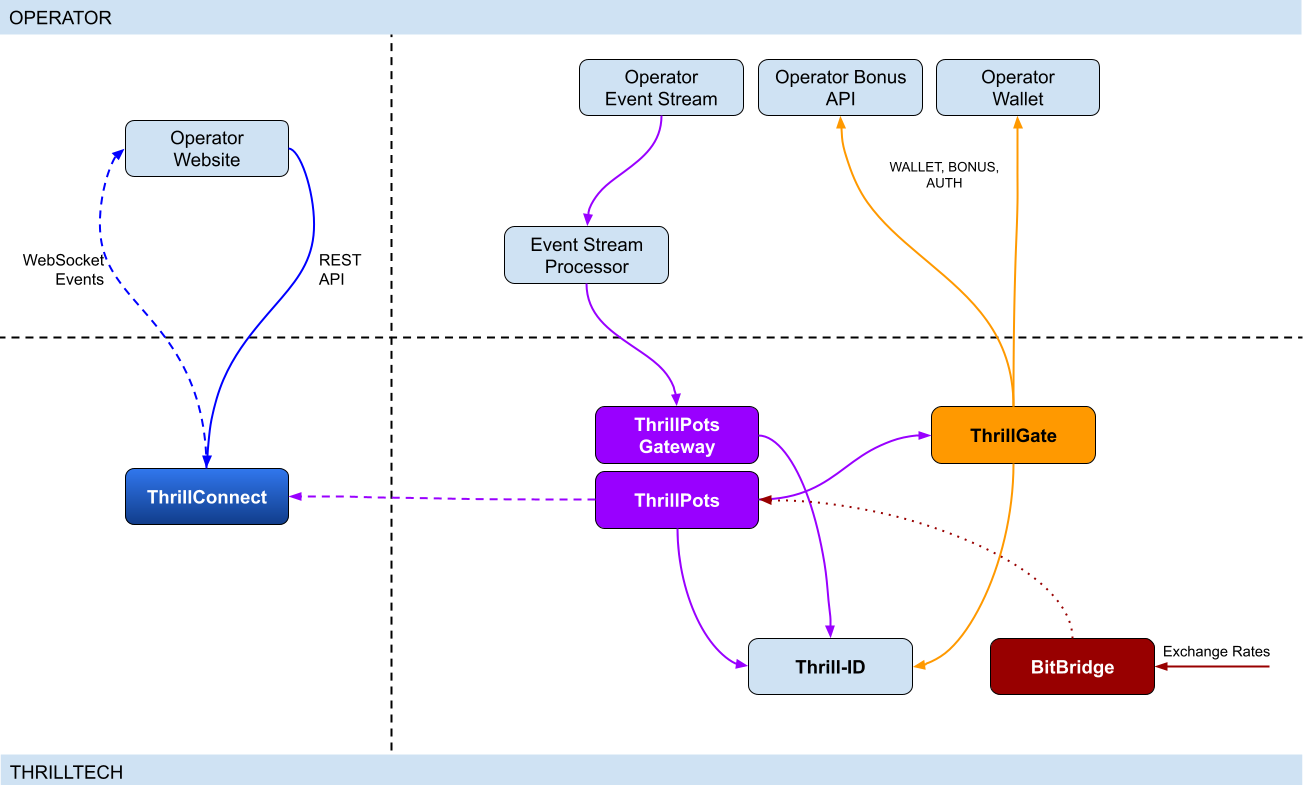
Integration points
ThrillPots has 3 primary integration points. This section will discuss each integration point and explain the purpose for each.
Betting integration
When it comes to Jackpot contributions, unlike normal games, player's do not make direct bets to jackpots. Rather, bets (contributions) are made on behalf of players via the operator's backend system.
Let's imagine a hypothetical casino where the operator has deployed a sitewide jackpot which is available to all players and is active across all casino content available on the site. The jackpot will receive a contribution bet each time a player makes a bet on any of the games on the site.
In order for these contributions to be made on behalf of the player, a simple event processor needs to be deployed that receives player game play / bet events and for each event makes a contribution request to the ThrillPots system.
In most platforms, this can be achieved by building a Kafka, RabbitMQ (or similar) event/stream processor which subscribes to the relevant topic/channel and makes REST API calls for each relevant event received. For platforms that do not have a message or event bus available, these events could be dispatched to the event processor via an alternative RPC mechanism such as REST, gRPC etc. This decision is all up to you, the integrating platform.
To learn more about this part of the integration, go to Event Stream Integration
Wallet Integration
When it comes to the wallet integration for ThrillPots, this integration is almost the same as any game provider integration. The wallet integration covers the following flows:
- Player token authentication
- Single Transactions (Debit & Credit)
- Batch Credit transaction (Multi-player payouts)
- Transaction cancellation
Integration is done against the ThrillGate service and can be performed in either direction (operator-to-provider or provider-to-operator).
To learn more about this part of the integration, go to Wallet Integration
Operator-to-Provider
If you decide to do an operator-to-provider integration, you will need to expose the endpoints required by the ThrillGate Standard Wallet Interface. All documentation can be found in the ThrillGate Standard Wallet Integration API documentation.
If you prefer for ThrillTech to integrate to your wallet API (provider-to-operator integration), you will need to provide the APIs and an integration environment for ThrillTech to develop the integration.
Frontend Integration
The ThrillConnect service is designed to support all frontend integrations. It exposes both a REST API (for end-user functionality like opt-in) as well as a WebSocket event stream for ad-hoc messaging and event broadcasts.
It is suggested to make use of the ThrillConnect JS API middleware layer which can easily be included in your site's code, freeing you up from the integration details and allowing you to focus on the visual and UX of the presentation layer.
To learn more about this part of the integration, go to Frontend Integration
Integrating ThrillPots Overview
The ThrillPots integration is best described as a 3-step process which is comprised of:
We suggest that before you dig into any of the three sections above, that you take the time to read this overview as it contains important information and pre-requisites that are needed for a smooth integration process.
PRE-REQUISITES
The rest of this guide assumes the following:
- You have the ThrillPots AIO Development container running and available. See this section for information on how to do this.
- You have a way to communicate with the services in the AIO Container (for example
curlorPostmanor similar tool)
Authentication and Authorization
Prior to making any calls to the ThrillPots service APIs, you need to authenticate with the ThrillTech platform using credentials that have been provisioned for you.
The ThrillTech platform uses a centralised authentication technology called Thrill-ID which provides governance over both User and Service accounts.
For integration purposes, you will need to provision a Service account (if one has not been provisioned for you yet). To learn more about provisioning accounts, please refer to the Thrill-ID documentation.
For an example of a Service account that would be suitable for the event stream integration service, see here
Setting up the AIO Container
The ThrillPots AIO Container is comprised of all the services necessary to run the ThrillPots platform from a single docker container.
The services made available are:
- ThrillPots Gateway (integrate your event/stream processor here)
- ThrillPots Service (the heart of the jackpot platform)
- ThrillGate (used to integrate with or to wallet APIs)
- ThrillConnect (integrate your frontend with this service)
- BitBridge (used for external data source integrations like exchange rates providers)
- ThrillTech Backoffice
- MongoDB
- Redis
The AIO container was designed to enable developers to deploy the entire ThrillPots stack on their local development machines on in a development environment quickly and easily.
In-Service Swagger UI
Each service provides access to a Swagger-UI for its API. Apart from ThrillConnect, which is an edge service, Swagger-UI support is compiled in to all the services and accessible via the /swagger-ui path.
ThrillConnect Swagger UI
Since ThrillConnect is an edge service and generally made available to the public internet, swagger-ui needs to be enabled via an environment variable.
In order to enable the /swagger-ui endpoint for the ThrillConnect service, you must set the TCS_ENABLE_SWAGGER environment variable to true.
Setting up the AIO Container: Pre-requisites
This short section explains the pre-requisites you will need in order to be able to setup the AIO container.
Pre-requisites
You will need the following software on your development machine:
Mandatory:
- Docker (or alternatively Docker Desktop)
- Postman
Optional:
Some type of MongoDB UI. We recommend you use MongoDB Compass
GitHub Access
You will need to have a GitHub account that has been granted access to the ThrillTech GitHub Organisation. This step is usually done as part of the initial technical kick off. As part of this access, you are granted access to repositories and packages that are needed.
Once you have provided ThrillTech with your Github account and we have added you as a collaborator, you need to have a Github Personal Access Token (classic) with permissions to read packages.
Go to your account's Settings -> Developer Settings -> Personal Access Tokens -> Tokens (classic) and create one.
(Click your avatar circle on the top right part of Github, click "Settings" and then "Developer Settings" is located at the bottom on the right of the menu of your account)
The only right it needs to have is to read packages.
Log in to our package repo and give your github username and the token your just created as password when prompted
docker login ghcr.io/thrilltech-io
Setting up the AIO Container: Initial Setup
Setting Up
Once you have provided ThrillTech with your Github account and we have added you as a collaborator, you need to have a Github Personal Access Token (classic) with permissions to read packages.
Go to your account's Settings -> Developer Settings -> Personal Access Tokens -> Tokens (classic)nd create one.
(Click your avatar circle on the top right part of Github, click "Settings" and then "Developer Settings" is located at the bottom on the right of the menu of your account)
The only right it needs to have is to read packages.
Log in to our package repo and give your github username and the token your just created as password when prompted:
docker login ghcr.io/thrilltech-io
Once you have successfully authenticated with the repository, you are ready to continue with the steps to getting the ThrillPots Dev Container running:
- Clone the https://github.com/thrilltech-io/dev-containers repository
- Go to the
/thrillpotsfolder in the repository and execute:docker compose up -d
NOTE: If you are running on MacOS on Apple Silicon, you may need to enable x86_64/amd64 emulation. Do this by going to Docker Desktop's settings -> General and finding the option called "Use Rosetta for x86_64/amd64 emulation on Apple Silicon" and enable it.
This will download all the necessary packages and run them via
Docker Compose. This process may take a few minutes to complete
- Import the provided Postman collection (
ThrillPots AIO Setup.postman_collection.json) which can be found in the repository into your Postman application - You will notice that it contains a number of endpoints, all numbered. The numbering indicates the sequence in which you must execute the calls.

- Execute all the steps in order
Once complete, you will have a ThrillPots system running and configured in 'standalone mode'. This means that you can make contributions and interact with the system, but there will be no external wallet calls made for player authentication or transactions.
In this mode, valid player IDs are in a range:
[player_00000 ... player_00999]
As part of the steps, you will also have created a Jackpot Template, and from this template you created a Jackpot instance. Jackpot Instances are the "running jackpots" that players contribute to. You also made a contribution directly to the jackpot.
You would also have created a Source and mapped the Jackpot Instance to the source and successfully made a contribution to the jackpot via the Source
The final step in the setup was the creation of an Internal mock wallet in ThrillGate. In a later section, where wallet integration is discussed, you will change this configuration to allow connectivity to your own wallet service, but for now, this mock wallet implementation is enough to get started with.
ThrillPots Wallet Configuration
IMPORTANT
Please note that when you change the wallet configuration for the ThrillPots service, you MUST restart the ThrillPots service for the changes to take effect.
Setting up the AIO Container: Admin Accounts
By default, the system is configured with an admin account called admin@thrilltech.io. This account has the ability to control all resources for the thrilltech oorganisation. You will have noticed that in all of the setup steps above, the owner_id or brand_id values were either thrilltech or thrilltech:brand1.
The ThrillPots system implements a "resource ownership" model which ensures that jackpot objects are not modifiable by unauthorized accounts.
Have a look at thrilltech:brand1. The first part before the : is the "organisation" or "operator id". The second part after the : is the "organisational unit" or "brand".
Creating a new ThrillPots admin account for a different organisation
If you want to create and manage ThrillPots resources for a different organisation/operator, you will first need to create a new orgnisation and admin account for that organisation. All of these actions are done through Thrill-ID.
The next steps assume that you are authenticated as
admin@thrilltech.io(as per Step 0 in the setup steps)
1. Create a new organisation
We first need to register a new organisation in Thrill-ID. For the purposes of this example, lets create a new organisation called "new-operator" which has 2 casino brands: new-mega-casino and new-mega-sportsbook.
To do this, make the following call to Thrill-ID:
POST http://localhost:9000/admin/organisations
Header: Authorization Value: Bearer AUTH_TOKEN_FOR_ADMIN@THRILLTECH.IO
Body:
{
"id": "new-operator",
"units": [
"new-mega-casino",
"new-mega-sportsbook"
],
"enabled": true,
}
You should receive a 200 OK.
Now we can create the new admin account for the new organisation
2. Create a new admin account
To create a new administrator account for the new-operator organisation we just created, we need to make another call to Thrill-ID, this time to create the actual account:
POST http://localhost:9000/admin/accounts
- Header:
Authorization - Value:
Bearer AUTH_TOKEN_FOR_ADMIN@THRILLTECH.IO
Body:
{
"account_type": "User",
"username": "admin@new-operator.com",
"password": "password",
"org_unit": {
"org_id": "new-operator"
},
"permissions": [
{
"system_id": "thrillpots",
"permissions": [{
"resource_id": "*",
"permission": "Admin"
}]
}
]
}
You should receive a 200 OK along with a response body showing you the newly created account.
3. Test the new admin account
Go back to Step 0 in the setup instructions and change the username and password to the new accounts username and password and try to authenticate. If everything went right, you should receive a new token for the account and can now proceed with managing ThrillPots resources for the new-operator organisation.
Once you are authenticated with the admin account for the new-operator organisation, you will be able to create Jackpot templates, instances, sources etc for the new-operator organisation.
NOTE: In previous versions of the platform, you also needed to configure the operator and brand separately in ThrillPots and ThrillGate. This is no longer needed since all services synchronise themselves with the Organisational structures defined in Thrill-ID
Event Processor Integration
In this section, we will discuss the Event Processor integration component that is required in order to enable the ability to make contributions to jackpots.
In general, this integration component needs to be able to receive the events that will drive jackpot contributions on behalf of users/players.
In a standard ThrillPots-powered system, it is usually gameplay that causes jackpot contributions to be made on behalf of players, but you are not limited to just this single use case.
From a simplistic perspective, the general logic should look something like this:
Authenticate your integration service with ThrillPots Gateway
Subscribe to gameplay/bet events from your event stream
When an event is received from your event stream:
- Read the properties of the event for game code, player ID and bet amount
- Make a contribution call to ThrillPots using these (and other values)
From here, it is relatively easy to see how you could expand the use case to create a Deposit jackpot. Lets imagine that the deposit flow was identified by source DEPOSIT. Lets also assume that when a successful deposit has been made by a player, that an event is published by the operator's platform. For argument's sake, lets call this event DEPOSIT_SUCCESS.
If we wanted to create a deposit jackpot, the logic could look as follows:
Subscribe to DEPOSIT_SUCCESS event
When an event is received:
- Read the properties of the event for the player ID and deposit amount
- Make a contribution call to ThrillPots using the DEPOSIT source_id and other properties
Sequence Diagram for the Event Processor integration

Authenticating via ThrillPots Gateway
The ThrillPots Gateway service exposes a REST endpoint which your event stream process can authenticate itself with Thrill-ID.
The endpoint is POST /authenticate/service and accepts a payload which contains the connecting service's username and password.
If authentication is successful, you will receive a response which contains token which must be used as a Bearer token in subsequent API requests to the ThrillPots Gateway service. Service tokens do not expire and therefore you do not need to be concerned with refreshing your token once it has been received.
See here for a Service account that you can provision for your Event Processor integration service.
Additional Information
If your event processor service is processing gameplay bet events, you should remember to filter out any and all events related to Jackpot Contributions as this could create loop of contributions on behalf of players
NOTE: For new integrations, we highly recommend that you integrate using the v2 Contribution API
Contributing to Jackpots
Now that you are processing events from your platform, you want to be able to make Contributions on behalf of players to the jackpot. The process of contributing is quite straight forward and does not require your service to be aware of player opt-in status. You will however need to decide which jackpot to contribute to and this can be done in one of two ways:
- Contribute by source
- Contribute direct to jackpot
Sources
A Source can be thought of as an operator-defined identifier for a user journey, a group of games, or even a single game. You can read more about Sources here,
Example: Sitewide Jackpot
If you wanted to create a site-wide jackpot for your casino vertical, you could create a Source named casino-sitewide, map a jackpot to the source and then send all contributions to that specific Source.
{
"token": "token_00001",
"brand_id": "thrilltech:brand1",
"player_id": "player_00001",
"player_country": "UK",
"source_id": "casino-sitewide",
"gameround_id": "1",
"currency": "EUR",
"base_wager": 1
}
Example: Deposit Jackpot
If you wanted to create a deposit jackpot, you can create a source called deposit, map the relevant jackpot to the source and then send all deposit-based contributions ot that source
{
"token": "token_00001",
"brand_id": "thrilltech:brand1",
"player_id": "player_00001",
"player_country": "UK",
"source_id": "deposit",
"gameround_id": "DEPOSIT_TX_ID",
"currency": "EUR",
"base_wager": 1
}
Example: Game Group Jackpot
If you wanted to create a jackpot for a specific set of games, for example, a jackpot for all egyptian themed games, you can create a source called egyptian-games and use that for contributions each time a player bets into a game that is egyption themed. This would naturally require your integration service to know which games are matched to which Game Group source.
{
"token": "token_00001",
"brand_id": "thrilltech:brand1",
"player_id": "player_00001",
"player_country": "UK",
"source_id": "egyptian-games",
"gameround_id": "1",
"currency": "EUR",
"base_wager": 1
}
Example: Game Specific Jackpots
If you want to split your liquidity by game title, you can create sources that correspond to the game codes of games in your system. Each source would need a jackpot mapped to it, but once that is done, you are able to make contributions to the source based on the game code of the base game bet.
{
"token": "token_00001",
"brand_id": "thrilltech:brand1",
"player_id": "player_00001",
"player_country": "UK",
"source_id": "provider-game-code",
"gameround_id": "1",
"currency": "EUR",
"base_wager": 1
}
Direct to Jackpot Contribution
An alternative to using sources is to make contributions directly to Jackpot Instances by their ID. For example, if you have created a Jackpot instance, you will have its ID available to you. This ID will not change over the lifetime of the jackpot. Making contributions directly to a Jackpot ID incurs less processing cost, but may also reduce the flexibility you may have in changing which jackpot players contribute to based on the content or user flows.
The only difference in the contribution payload is that the source_id is replaced with an instance_id field as seen below:
{
"instance_id": "0a1cfeea-5b07-4f2b-b2f1-2e4cd2aa991d",
"token": "token_00001",
"brand_id": "thrilltech:brand1",
"player_id": "player_00001",
"player_country": "MT",
"gameround_id": "1000",
"base_wager": 2,
"currency": "EUR"
}
Idempotent Contributions
If you require the ThrillPots system to prevent duplicate contributions being processed, then you can include the optional idempotency_key on your Contribution Request. The value of the idempotency_key must be a unique value generated by your system (for example a random UUID).
{
"token": "token_00001",
"brand_id": "thrilltech:brand1",
"player_id": "player_00001",
"player_country": "UK",
"source_id": "casino-sitewide",
"gameround_id": "1",
"currency": "EUR",
"base_wager": 1,
"idempotency_key": "unique_value_generated_by_your_system"
}
Synchronous vs Asynchronous contribution
The default contribution mechanism is synchronous. However, depending on your system architecture (and system load), you may prefer to make use of asynchronous contribution mechanics. In order to make asynchronous contributions, you need to provide a webhook that the ThrillPots system can call once the result of a contribution has been determined.
In order to make a contribution asynchronously, you simple need to add a callback property to either of the contribution payloads above to specify the webhook to call and which results you are interested in receiving.
The structure of the callback property is as follows:
{
"web_hook": "https://your.host/webhook",
"win_result_only": false
}
The web_hook field indicates the fully qualified HTTP path to your webhook and the win_result_only property indicates whether the webhook should only receive win results or all contribution results.
Therefore, an asynchronous contribution for a sitewide casino jackpot would look like this:
{
"token": "token_00001",
"brand_id": "thrilltech:brand1",
"player_id": "player_00001",
"player_country": "UK",
"source_id": "casino-sitewide",
"gameround_id": "1",
"currency": "EUR",
"base_wager": 1,
"callback": {
"web_hook": "https://your.host/webhook",
"win_result_only": false
}
}
When making an asynchronous contribution, the ThrillPots system will either return 200 OK with a JSON payload that contains a trace_id for the request when it has successfully accepted the contribution request for processing, or you will receive an error due to the request being malformed.
Any contribution request errors will be send to the webhook. The structure of the webhook payload is defined as follows:
Successful contribution result
{
"type": "data",
"contribution_amount": Number,
"contribution_currency": String,
"gameround_id": String,
"instance_id": String,
"metadata": null | Object,
"tickets_awarded": null | Number,
"timestamp": Number,
"win_amount": Number,
"win_pot_id": null | String,
"win_withheld": Boolean
}
Error result
{
"type": "error",
"status_code": Number,
"code": String,
"message": String,
}
The data portion will either be a ContributionResult structure or an Error structure. You can find more information on these structures in the API documentation.
Examples of payloads sent to the web hook
Contribution Result
{
"type": "data",
"contribution_amount": 0.1,
"contribution_currency": "EUR",
"gameround_id": "cc83c1cc-6260-44fc-822b-d3c03acf2d89",
"instance_id": "a49ff35f-6ecd-491f-b373-85e6caabacf1",
"metadata": null,
"tickets_awarded": null,
"timestamp": 1715714218408,
"win_amount": 0,
"win_pot_id": null,
"win_withheld": false
}
Error Result
{
"type": "error",
"status_code": 404,
"code": "GAME_NOT_FOUND",
"message": "sitewide-casino2",
}
Contribution Request Errors
A contribution request may result in a direct or a downstream error. A direct error is an error that is the result of the ThrillPots system return an error to the contribution request itself. A downstream error is an error that is propogated to the contribution request caller from a downstream system, such as ThrillGate or the operator wallet itself.
List of Direct Errors
For Direct Errors, you can expect:
| Error Code | Description |
|---|---|
CONTRIBUTION_REJECTED | The contribution was rejected due to a contribution rule failing, The rule in question will be contained within the CONTRIBUTION_REJECTED message |
GAME_NOT_FOUND | this occurs when making a contribution to source and the source does not exist |
CURRENCY_MULTIPLIERS_NOT_FOUND | self explanatory |
SYSTEM_ERROR | This is what you get with 500 http responses from ThrillPots |
OPTIN_ERROR | This occurs if the player;s optin record could not be updated |
SOURCE_JACKPOT_NOT_FOUND | This occurs if the jackpot mapped to the source could not be found |
SOURCE_JACKPOTS_NOT_ALLOWED | This occurs if the jackpot mapped to the source does not allow a contribution from this player (either country or brand not allowed) |
DB_ERROR | An internal DB ERROR |
UNSUPPORTED_BRAND | This is returned when the brand of the player (specified in contribution) is not supported by the jackpot or system |
Passing Metadata
If you need to pass contextual metadata from your event processor to your wallet, you can do so by adding a metadata field to the Contribution Request. This data will be passed through the system and attached to transaction requests to your wallet.
The metadata field can be any valid JSON value, for example:
Metadata containing an Object:
{
"token": "token_00001",
"brand_id": "thrilltech:brand1",
"player_id": "player_00001",
"player_country": "UK",
"source_id": "casino-sitewide",
"gameround_id": "1",
"currency": "EUR",
"base_wager": 1,
"metadata": {
"value1": "some value",
"value2": 1234
}
}
Metadata containing a String:
{
"token": "token_00001",
"brand_id": "thrilltech:brand1",
"player_id": "player_00001",
"player_country": "UK",
"source_id": "casino-sitewide",
"gameround_id": "1",
"currency": "EUR",
"base_wager": 1,
"metadata": "This is an arbitrary string value"
}
Event metadata
If you need to attach contextual metadata from your event processor to any subsequent JackpotWinEvent , you can do so by adding a event_metadata field to the Contribution Request. This data will be passed through the system and attached any resulting JackpotWinEvent under metadata.
The event_metadata field can be any valid JSON value, for example:
{
"instance_id": "ac2aad1d-16b6-4e9b-9e9a-d94f705a38f7",
"token": "token_00001",
"brand_id": "thrilltech:brand1",
"player_id": "player_00001",
"player_country": "MT",
"gameround_id": "1",
"base_wager": 1,
"currency": "EUR",
"event_metadata": {
"some": "data"
}
}
Will result in a JackpotWinEvent with metadata.
{
"event_type": "JackpotWinEvent",
"event_id": "8b4025fa-b4e7-4bd3-9e8c-3e95a1a2611d",
"data": {
"brand_id": "thrilltech:brand1",
"player_id": "player_00001",
"source_id": null,
"instance_id": "ac2aad1d-16b6-4e9b-9e9a-d94f705a38f7",
"jackpot_name": "QuickHit Instance",
"jackpot_currency": "EUR",
"timestamp": 1732010393528,
"win_pot_id": "major",
"win_amount": 100.05624999999992,
"currency_multipliers": {
"brand_id": "default",
"base_currency": "EUR",
"multipliers": {
"AMD": 430.0904,
},
"win_withheld": false,
"seed_deficit": 99.68125,
"community_winners": null,
"games_in_jackpot": [],
"seed": 100.0,
"metadata": {
"some": "data"
}
}
}
Contributing to Jackpots v2
The v2 Contribution API introduces a structured way to submit both source contributions and direct jackpot contributions within a single endpoint. It also enables advanced features such as linked jackpots and bet contexts.
- More information on linked jackpot instances can be found here
Key Enhancements Over V1
- Unified Contribution Model: Supports both source contributions and direct to instance contributions in the same request.
- Linked Jackpot Support: Contributions automatically propagate to all directly linked instances.
- Structured Data Format: Requests follow a more structured schema, ensuring consistency and extendability.
- Expanded Response Structure:
- Synchronous contributions return an array of results for all contributions made.
- Asynchronous contributions trigger multiple webhook events, one per contribution.
Propagation Rules
A contribution applies to the target instance (or instance behind source) as well as all instances directly linked to it . Only the links defined for the target instance are honored.
Failure Handling
- If the contribution to the main instance fails, contributions to linked instances will not be attempted.
- If a linked instance contribution fails (e.g., due to missing opt-in or validation failure), other linked instances will still be processed normally.
Opt-in Requirement
Opt-ins do not propagate automatically. If a linked instance requires explicit opt-in and the user has not opted in, the contribution fails for that instance.
API Request structure
{
// Contribution target
"target": {
// Contribution target type, can be either "source" or "instance"
"type": "source",
// Contribution target identifier
// eg. "sitewide-casino" in case of source contribution
// eg "bdfa6295-d5a5-4c54-98bf-046355ce0252" in case of direct contribution to jackpot
"id": "sitewide-casino"
},
// Jackpot instance owner identifier (operator id)
"owner_id": "thrilltech",
// Details of the contributing player
"player": {
// Player identifier
"id": "player_00001",
// Player authentication token
"token": "token_00001",
// Player country
"country": "UK",
// Player brand identifier
"brand_id": "brand1",
// Any segments that the player might be part of
"segments": ["vip-1", "regular"],
},
// Base game wager
"base_wager": {
// Base wager currency
"currency": "EUR",
// Base wager value
"value": 1
},
// The contribution source that caused the contribution to happen.
// For example, if a player made a bet on a game, this would be the game's gameround ID.
// If a player made a successful deposit, this would be the deposit's identifier.
// This field is stored by ThrillPots and is used a back-reference to the original user action
// that caused the contribution to happen.
"source": {
// Type of the contribution source. Defaults to `gameround` but can be any value you choose
"type": "gameround",
// Identifier of the contribution source
"id": "gameround_id_1"
},
// Opaque data object that contains pass-through data for the caller.
// The content of this property will be sent back on the JackpotContributionResponse to this request.
"metadata": {},
// Opaque data object that contains pass-through data for the caller.
// The content of this property will be attached to any resulting events. ( win events at that stage )
"event_metadata": {},
// Optional contribution request parameters. Each field in this field is optional as well.
"options": {
// Optional identifier of the vertical from which the contribution request originated
"vertical_id": "slots",
// Optional boolean specifying whether linked jackpots should be honored
"allow_linked_contributions": true,
// If you would like ThrillPots to not process duplicate contributions, then specify a unique
// `idempotency_key` here
"idempotency_key": "random_uuid_value",
// Specify the webhook to call and which results you are interested in receiving
"callback": {
"web_hook": "https://your.host/webhook",
"win_result_only": false
}
},
}
Synchronous Contribution
If you do not specify a callback in the options.callback field, your contribution request will be processed synchronously.
In this case, the response will be an array of JackpotContributionResponse structures. Normally, the array will only contain 1 result, however when the initial jackpot is linked to other jackpots, the array will contain more than one element, one for each jackpot that was linked.
- Returns results for the target jackpot instance and all of its linked instances.
- Result structure remains the same with the only difference it being an array.
[
{
"instance_id": "bdfa6295-d5a5-4c54-98bf-046355ce0252",
"timestamp": 1739972162307,
"gameround_id": "bb2a5277-1f00-47cf-b62c-9f639ddff146",
"win_amount": 0.0,
"win_pot_id": null,
"tickets_awarded": null,
"win_withheld": false,
"contribution_currency": "EUR",
"contribution_amount": 0.0775,
"metadata": null
},
{
"instance_id": "3c90cb1e-a594-437e-a695-e76acb0e6809",
"timestamp": 1739972162394,
"gameround_id": "7eab0af4-1477-44d9-88f0-a9b7763a6d30",
"win_amount": 0.0,
"win_pot_id": null,
"tickets_awarded": null,
"win_withheld": false,
"contribution_currency": "EUR",
"contribution_amount": 0.1,
"metadata": null
}
]
- If contribution to a linked instance fails (e.g., due to missing opt-in or regulatory restrictions), the response details which instances succeeded and which failed.
[
{
"instance_id": "bdfa6295-d5a5-4c54-98bf-046355ce0252",
"timestamp": 1739972093142,
"gameround_id": "0860e92b-6d75-45ab-a520-39ab511e18c1",
"win_amount": 0.0,
"win_pot_id": null,
"tickets_awarded": null,
"win_withheld": false,
"contribution_currency": "EUR",
"contribution_amount": 0.0775,
"metadata": null
},
{
"status_code": 400,
"code": "CONTRIBUTION_REJECTED",
"message": "PlayerNotOptedIn"
}
]
Asynchronous Contributions & Webhooks
For asynchronous contributions, the API does not return immediate results. Instead, a webhook event is triggered for each contribution, providing its final outcome.
win_result_onlyOption- If
win_result_onlyis enabled, the webhook will only be triggered for contributions that result in a win. - If disabled (default behavior), a webhook is sent for every contribution, regardless of the outcome.
- The webhook payload structure remains unchanged from v1 contributions.
- If
{
"type": "data",
"instance_id": "bdfa6295-d5a5-4c54-98bf-046355ce0252",
"timestamp": 1739972634263,
"gameround_id": "0174c60b-f827-4e9c-8f66-8d5444732071",
"win_amount": 0.0,
"win_pot_id": null,
"tickets_awarded": null,
"win_withheld": false,
"contribution_currency": "EUR",
"contribution_amount": 0.0775,
"metadata": null
}
OAS and Swagger documentation
For more details on using this functionality, refer to ThrillPots Service and ThrillPots Gateway API documentation
Contribution Sources
Contribution Sources are a concept in ThrillPots that allow operators create well-known identifiers for one or more Jackpot Instances. A contribution source is bound to an operator and brand ID.
Contribution Sources are valid targets/identifiers for jackpot contribution bets (as described in the Contributing to Jackpots section).
Why use sources instead of Jackpot Instance IDs
Sources provide a mechanism of indirection to Jackpot Instances. Since a Source will usually have a well-known and human-defined identifier, and can represent one or more Jackpot Instances at any point in time, they provide a very convenient way for Integrating services and frontends to work with Jackpot Instances.
For example, instead of hard coding a specific Jackpot Instance ID into your frontend or backend services, you can simply configure the more human-readable source_id and use the Source to determine at runtime which Jackpot Instance ID is being used. This is especially useful when Jackpot models are changed over time since your integrated product will not need to be modified unless there is a fundamental structural change to the jackpot itself (which is rarely the case).
Example
An early, but very common use-case Contribution Source can be seen below, where a Source has been created for Operator thrilltech, Brand brand1 and is the source for the "site wide casino jackpot".
In this case, the contribution flow would look like this:
┌──────────────────────────────┐
│Contribution to Source Request│ (POST https://thrillpots_gateway_host/jackpots/contribute/source)
└──────────────┬───────────────┘
│
│
│
▼
┌────────┐
│ Source │
└────────┘
│
│
│
▼
┌──────────────────┐
│ Jackpot Instance │
└──────────────────┘
Under the covers (in the data), this Contribution Source will most probably look something like this:
{
"owner_id": "thrilltech:brand1",
"source_name": "Casino Sitewide Source",
"source_id": "sitewide-casino",
"jackpots": [
{
"priority": {
"$numberLong": "0"
},
"owner_id": "thrilltech:brand1",
"instance_id": "12231b6a-a774-4a93-8f16-f8af9aee2076"
}
]
}
The jackpots array in this Contribution contains a single Jackpot Instance ID because in this case, there is only one Jackpot Instance required. We will discuss use cases where having multiple Jackpot Instances in this array can be useful.
Creating a Contribution Source
To create a Contribution Source, we follow a 2 step process:
- Create the new source
- Assign the desired Jackpot Instance to the Source
1. Create the new source
To create a source, we use the POST /config/sources endpoint on ThrillPots Service (link to API).
An example to create a "Site-wide Jackpot" source for the thrilltech:brand1 operator-casino would look like this:
POST http://<thrillpots-service-host>/config/sources
Payload
[
{
"owner_id": "thrilltech:brand1",
"source_name": "Casino Sitewide Source",
"source_id": "sitewide-casino"
}
]
FYI: If you have downloaded the ThrillPots AIO Setup Postman collection, an example of this step will be in the
Basic Setup > Create a Sourceendpoint.
2. Assign the desired Jackpot Instance to the Source
Once you have created a source, you can now assign a pre-existing Jackpot Instance to the source. This can be done using the POST /config/sources/assignjackpot endpoint on the ThrillPots Service (link to API).
POST http://<thrillpots-service-host>/config/sources/assignjackpot
Payload
{
"owner_id": "thrilltech:brand1",
"source_id": ["sitewide-casino"],
"instance_id": "{{instance_id}}"
}
Retrieving the Jackpot Instance from a source
To retrieve that relevant Jackpot Instance for a specific source, you can use the following methods:
ThrillPots Gateway
GET /jackpots/instances/source/:source_id/brand/:brand_id?player_id=:player_id
The parameters in the url above are:
| Parameter | Description |
|---|---|
source_id | The Source ID (for example, sitewide-casino from the example above) |
brand_id | This is the identifier for the brand in question, which is comprised of the operator_id:brand_id pairing |
player_id | [OPTIONAL] If a player_id is specified, the returned Jackpot Instance will also contain the opt-in details for the specified player |
ThrillConnect (used by the Frontend)
GET /v1/thrillpots/instances/source/:source_id/brand/:brand_id?player_id=:player_id
The parameters in the url above are the same as for ThrillPots Gateway:
| Parameter | Description |
|---|---|
source_id | The Source ID (for example, sitewide-casino from the example above) |
brand_id | This is the identifier for the brand in question, which is comprised of the operator_id:brand_id pairing |
player_id | [OPTIONAL] If a player_id is specified, the returned Jackpot Instance will also contain the opt-in details for the specified player |
Retrieving all sources in the System
To retrieve a list of sources for a specific operator brand, you can use one of the following methods:
ThrillPots Gateway
GET /sources?owner_id=:brand_id
The brand_id parameter in the URL is once again comprised of the operator_id:brand_id pair which identifies a specific brand. If any sources have been configured for the operator_id:brand_id specified, they will be returned in a response which contains a list of Source JSON objects and will look similar to this example:
[
{
"owner_id": "thrilltech:brand1",
"source_name": "Casino Sitewide Source",
"source_id": "sitewide-casino",
"jackpots": [
{
"priority": 0,
"owner_id": "thrilltech:brand1",
"instance_id": "12231b6a-a774-4a93-8f16-f8af9aee2076"
}
]
}
]
ThrillConnect (used by the Frontend)
GET /v1/thrillpots/sources?owner_id=:brand_id
As in the ThrillPots Gateway example above, the brand_id parameter in the URL is once again comprised of the operator_id:brand_id pair which identifies a specific brand. The response payload will look exactly the same as the response from the ThrillPots Gateway service above.
ThrillPots Events
ThrillPots publishes a number of events which your integration service can subscribe to. There are a number of reasons you may want to consume these events, for example:
- Synthesizing related Kafka/RabbitMQ events
- Storing the events for BI / Analysis purposes
The following events are currently published by ThrillPots Gateway:
JackpotUpdateEvent- contains the latest jackpot values for the specified Jackpot Instance- Reference
{
"event_type": "JackpotUpdateEvent",
"event_id": "d6f05820-1da2-4152-bcba-6c0186f6cd77"
"data": {
"id": "jackpot instance ID",
"status": String,
"jackpot_type": "Jackpot" | "Raffle",
"currency": String,
"allowed_brands": [String],
"allowed_sources": [String],
"pots": [
{
"id": String,
"is_progressive": Boolean,
"current_value": Number
}
],
"timestamp_start": Number | null,
"timestamp_end": Number | null
"last_updated": Number
}
}
JackpotWinEvent- contains the details of a jackpot win- Reference
{
"event_type": "JackpotWinEvent",
"event_id": "3fe809f4-c94f-4950-9b86-5f2d0b8f604f"
"data": {
"brand_id": String,
"player_id": String,
"source_id": String | null,
"instance_id": String,
"jackpot_name": String,
"timestamp": Number,
"win_pot_id": String,
"win_amount": Number,
"currency_multipliers": {
"brand_id": String,
"base_currency": String,
"multipliers": {
"EUR": Number,
"GBP": Number,
"ZAR": Number,
...
"NZD": Number,
"SEK": Number
}
}
"games_in_jackpot": [String],
"seed": Number,
"win_withheld": Boolean,
"seed_deficit": Number,
"community_winners": null | [{
"player_id": String,
"brand_id": String,
"currency": String,
"win_amount": Number
}],
"metadata": null | Object,
}
}
RaffleWinEvent- contains the details of a Raffle Win- Reference
{
"brand_id": String,
"instance_id": String,
"jackpot_name": String,
"jackpot_currency": String,
"currency_multipliers": {
"brand_id": String,
"base_currency": String,
"multipliers": {
"EUR": Number,
"GBP": Number,
"ZAR": Number,
...
"NZD": Number,
"SEK": Number
}
}
"timestamp": Number,
"winners": [
{
"player_id": String,
"brand_id": String,
"currency": String,
"win_amount": Number
}
],
"win_withheld": bool
}
OptInEvent- contains the details of a player opt-in or opt-out into a Jackpot Instance Reference
{
"event_type": "OptInEvent",
"event_id": "27045bf8-78d2-4f99-97f1-e7d2e3aa434d"
"data": {
"instance_id": String,
"player_id": String,
"player_brand_id": String,
"preferred_contribution_value": Number,
"preferred_contribution_currency": String.
"opted_in": Boolean,
"requested_optin": Boolean,
"contribution_preferences: {
"EUR": Number | null,
"USD": Number | null
..
},
"last_updated": Integer
}
}
CommunityPayoutErrorEvent- sent in case of an error that is encountered when processing community payouts Reference
{
"event_type": "CommunityPayoutErrorEvent",
"event_id": "c034a751-cf91-4722-bc89-a2f8af472805"
"data": {
"instance_id": String,
"gameround_id": String,
"tx_credit_id": String,
"failed_payouts": [
{
"player_id": String,
"brand_id": String,
"currency": String,
"win_amount": Number
}
]
}
}
RafflePayoutErrorEvent- sent in case of an error that is encountered when processing raffle payouts Reference
{
"event_type": "RafflePayoutErrorEvent",
"event_id": "e981296b-199f-4454-b4ec-b3f36910c2cc"
"data": {
"instance_id": String,
"failed_payouts": [
{
"player_id": String,
"brand_id": String,
"currency": String,
"win_amount": Number
}
]
}
}
The ThrillPots events are published via the WebSocket endpoint /events.
Authenticating the Websocket connection to receive events
Once you have established a WebSocket connection from your event processor service to ThrillPots Gateway, you will need to send an Authenticate message which contains your Thrill-ID JWT token to authenticate your service to receive events.
{
"action": {
"Authenticate": {
"auth_token": "{{thrill-id-jwt}}"
}
}
}
If the authentication fails, the connection will be closed. Once you have authenticated, you should start receiving the events from the ThrillPots service.
Wallet Integration
Introduction
When integrating ThrillPots to your wallet, you will need to implement what is known as the "Standard Wallet API". This API has been defined by ThrillTech and is what our ThrillGate services uses to communicate with your backend to process:
- Player Authentication
- Transactions
- Transaction cancellations
- Batch transactions# Wallet Integration
ThrillPots Wallet Configuration
IMPORTANT
Please note that when you change the wallet configuration for the ThrillPots service, you MUST restart the ThrillPots service for the changes to take effect. In this section, we will discuss how ThrillPots performs player authentication and jackpot contribution transactions.
When running in a non-development environment (such as staging or production), ThrillPots uses the ThrillGate Service as an integration layer to an operator's wallet API.
NOTE:
ThrillPots also supports an internal, in-memory wallet for development or isolated testing purposes. This wallet is enabled by default in the AIO development container
Types of Wallet Integrations
There are two types of wallet integrations that can be developed:
- Provider-to-Operator integration
- Operator-to-Provider integration (Standard Wallet Integration)
This section is been written for operators that have chosen to do an Operator-to-Provider integration. For a Provider-to-Operator integration, ThrillTech are responsible for implementing the integration to your wallet API and that topic is out of scope for this book.
- Batch transaction cancellations
All communications from ThrillGate are conducted over secure SSL REST calls to your system.
As part of all calls to your system, ThrillGate sends an HMAC in the X-Server-Authorization header which is calculated from the body of the request only. You can use this HMAC value to verify that the request is coming from the expected ThrillGate server.
NOTE: During integration you will receive the secret key that you can use to verify the HMAC value with.
Enabling Wallet Integration Mode in the AIO Container
In order to configure the container to support external wallet integration mode, some additional API calls need to be made.
In the provided Postman collection, you will find a folder called Wallet Integration Mode. In this folder you will find additional API calls that you need to make in order to configure the container to run in this mode.

The first API call (1. Create Wallet Configuration) makes a call to the ThrillGate service and sets up the "Standard Wallet API" connnector.
It is very important that you do NOT change the details in Step 2a or 2b as these are specific for the AIO container.
PLEASE NOTE:
When building your wallet integration, the ThrillGate service will attempt to connect to your wallet service on your localhost:8201. This is configured via Docker networking as:
Host: "host.docker.internal"
Port: 8201You can change the port, but we would recommend not changing the host unless you are absolutely sure you know what you are doing.
Once you have executed step 1, you can Enable or Disable the external wallet mode using steps 2a or 2b respectively.
Once you have completed the configuration, you will need to restart the ThrillPots service in the AIO container.
IMPORTANT
Each time you change the wallet configuration of ThrillPots, you must restart the ThrillPots Service for the configuration changes to take effect
Standard Wallet Integration
What is the Standard Wallet?
The Standard Wallet is a REST API definition (designed by ThrillTech) which an operator needs to implement support for. The ThrillGate service uses the Standard Wallet API (as a client) to communicate with the operator's wallet to perform the following actions:
- Player token authentication
- Debit / Credit transactions (single)
- Credit transaction batches
- Transaction cancellation
Standard Wallet Sequence flows
Below is a sequence diagram of the expected data flow between ThrillGate and the operator wallet API:
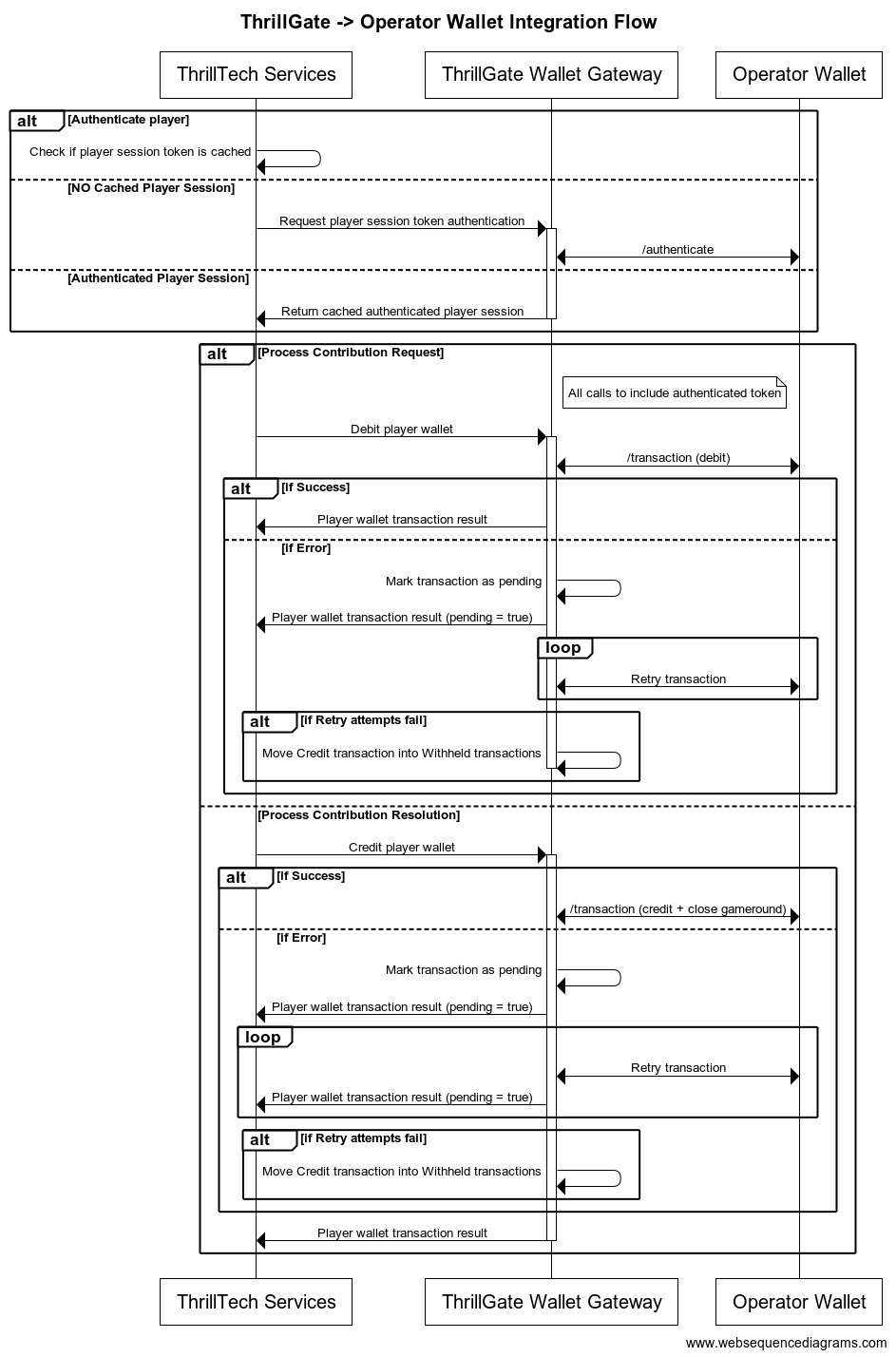
Configuring a Standard Wallet Integration in ThrillGate
To configure the ThrillGate Service to connect to your Standard Wallet API compliant service, you need to configure a Wallet resource.
To configure a wallet:
- URL:
POST http://localhost:8100/admin/wallets - Headers:
Authorization: Thrill ID Bearer token
- Body:
{
"id": "Brand1Wallet",
"operator_id": "thrilltech",
"brand_id": "brand1",
"wallet_type": "StandardWallet",
"connection_details": {
"protocol": "http",
"host": "host.docker.internal",
"port": 8201
},
"endpoints": {
"auth": {
"POST": "/wallet/authenticate"
},
"balance": {
"GET": "/wallet/balance"
},
"cancel_bet": {
"DELETE": "/wallet/cancel"
},
"transaction": {
"POST": "/wallet/transaction"
},
"transaction_batch": {
"POST": "/wallet/transaction/batch"
},
"cancel_batch": {
"DELETE": "/wallet/transaction/batch"
}
},
"config": {
"secret_key": "12345",
"accept_zero_value_credits": true,
"must_close_gamerounds": false
}
}
| Property | Description |
|---|---|
id | The ID you want to assign to the wallet. This is a unique identifier |
operator_id | The operator ID that this wallet is for |
brand_id | The brand ID that this wallet is for |
wallet_type | This must be set to StandardWallet |
connection_details.protocol | The protocol of the url. Usually http or https depending on your setup |
connection_details.host | The hostname for your server. While using the AIO container, it is recommended you keep this set to host.docker.internal |
connection_details.port | The port that your server is listening on |
endpoints | This is an object that describes the required endpoints for the Standard Wallet API |
endpoints.auth | This describes the endpoint that ThrillGate will make player authentication calls to |
endpoints.balance | This describes the endpoint that ThrillGate will make player balance requests to |
endpoints.transaction | This describes the endpoint that ThrillGate will call to perform transactions |
endpoints.cancel_bet | This describes the endpoint that ThrillGate will make to cancel transactions |
endpoints.transaction_batch | This describes the endpoint that ThrillGate will make for transaction batch calls |
endpoints.cancel_batch | This describes the endpoint that ThrillGate will make to cancel transaction batches |
config | An object that contains specific configuration elements for the Standard Wallet |
config.secret_key | This is the key that will be used to generate the HMAC value that is sent on each wallet request in the x-server-authorization header |
config.accept_zero_value_credits | This defines whether the external wallet supports Credit transactions which have a value of zero (0) |
config.must_close_gamerounds | This defines whether the external wallet requires gamerounds to be closed |
NOTE: If you need to change the definition of the endpoints, feel free to do so. Make sure that you use the correct HTTP verb and specify the endpoints as needed by your system.
Next Steps
Once you have understood the purpose of each of the Standard Wallet API calls as well as the flows around transaction and transaction batch handling, you are ready to start integrating the Standard Wallet API into your system. Refer to the provided API reference documentation and OpenAPI specs that have been provided to you.
Standard Wallet API: Player Authentication
In order for the ThrillPots system to take wagers (debit the player's wallet) and payout winnings (credit the player's wallet), it needs to be able to authenticate the player with the operator wallet.
This is done by calling the Standard Wallet's auth endpoint, passing in the provided player token and game code to the operator wallet and receiving the required player details (including the token that should be used for transaction calls)
This is done by ThrillGate calling the endpoint defined in endpoints.auth of the Standard Wallet's configuration. An example call's payload would look as follows:
{
"operator_id": "your_operator_id",
"brand_id": "your_brand_id",
"player_token": "token_00001",
"game_code": "AwesomeJackpotGameCode",
"currency": "EUR"
}
If successful, the operator wallet must respond with a valid session token and player details that can be used for future transaction calls for this player.
Response example:
{
"id": "player_00001",
"token": "session_token_00001",
"currency": "EUR",
"balance": 100001927.79,
"operator_id": "thrilltech",
"brand_id": "brand1",
"nickname": null,
"gender": "?",
"country": "MT",
"jurisdiction": null,
"segments": null
}
Standard Wallet API: Transactions
Transactions
Once the player token has been authenticated, the ThrillPots system can start making transaction calls through ThrillGate.
In standard operation, the first transaction call will be a Debit transaction request to fetch funds from a player's wallet for the Jackpot Contribution bet. This call is also intended to open the game round for the jackpot contribution.
If successful, ThrillPots will process the jackpot contribution and determine if a win occurred.
The next transaction call that will be made will be a Credit transaction request. This call is intended to pay any winnings to the player account and to close the game round that was opened with the Debit transaction.
Transaction Errors
If an error occurs while executing transactions with the operator wallet, ThrillGate and ThrillPots cooperate to ensure that the transaction error is handled correctly.
When an error occurs, ThrillGate will attempt to retry the transaction request a set number of times. If all retries fail, the error will be sent to ThrillPots for further handling.
If there are certain wallet errors that you do not wish ThrillGate to perform its retry logic, you can configure that as part of the wallet configuration in ThrillGate.
Please see the ThrillGate section on Configuring Wallet Error Behaviour for more information on how to configure ThrillGate's wallet error handling.
Once an error has been sent back to ThrillPots, ThrillPots will decide whether a transaction needs to be cancelled or not. Transaction cancellation is discussed next.
Transaction Failure Handling
In certain situations (as described in the errors section above), it is necessary for transactions to be cancelled or put into a Pending state.
NOTE: ThrillPots will only cancel
Debittransaction
Debit transactions
In the case of a failed Debit transaction, ThrillPots will send a cancellation request for the Debit transaction using the Debit transaction ID.
Credit transactions
A credit transaction will never be cancelled. If it fails after a certain number of retries, ThrillGate will make the transaction as pending and will continue to retry sending the transaction to the operator's wallet. This will continue for a fairly long period of time (configurable). If the transaction fails after all the configured attempts, it will be marked as Withheld and will require manual reconciliation by the operator via the Backoffice.
Transaction Batches (Credit only)
ThrillPots uses Transaction Batch requests to communicate payouts to multiple players.
These types of payouts are only relevant to jackpots that are either:
- Multi-player payouts (community payouts)
- Raffle jackpot payouts
In both situations, since multiple players are considered winners from a single jackpot win, ThrillPots needs a way to credit wins to multiple players. Since these players are not guaranteed to be online at the time of the win, ThrillPots will not have access to any session token information for all the winners.
Transaction Batches are used in these special situations to communicate a set of credit operations that need to be applied to multiple players accounts.
Although unlikely, it is possible that not all the specified player accounts will be able to be credited with the winnings. Such a situation may arise if, for example, the player account has been banned/blocked or is self-excluded at the time of the jackpot win.
In these cases, the operator wallet is expected to flag the player account as an exception and continue to pay the remaining players in the transaction batch.
It is not considered an error if a player account in a transaction batch cannot be paid. The operator wallet should simply indicate this exception in the response and attempt to pay all other players.

Transaction Batch Failures
Since Transaction Batches are only applicable to Credit transactions, the same retry -> pending failure flow as described above is applied.
There is another limited set of errors that require Transaction Batches to be retried as Pending transactions.
These errors are typically (but not limited to) errors such as network errors and timeouts. When an error occurs that leads ThrillGate to not be sure whether the operator's wallet has handled the transaction batch request, the request will first be retried, but after failing a specific number of times, the transaction batch will be marked as pending and continue to be retried in the background.
Frontend Integration
The final piece of the ThrillPots integration puzzle is the frontend integration. The frontend is responsible for displaying the Jackpot Ticker widget, showing players what the value of the various pots within the Jackpot are, the opt-in widget, allowing players to opt-in or opt-out of participation in the jackpot and so on.
The ThrillConnect Service has been specifically developed to provide an API and event stream over WebSockets to frontend clients to be able to interact with the ThrillPots system.
Integration Options
When integrating the frontend, there are two options that you can take:
- Use the existing libraries/components that ThrillTech has built to ease the effort of frontend integration:
- Develop your own integration with ThrillConnect and your own animation layer for the win animations
The sections below will detail the low level integration approach to help you understand how things work. You can then decide which of the options mentioned above you wish to take.
Sequence Diagram for the frontend to ThrillConnect integration
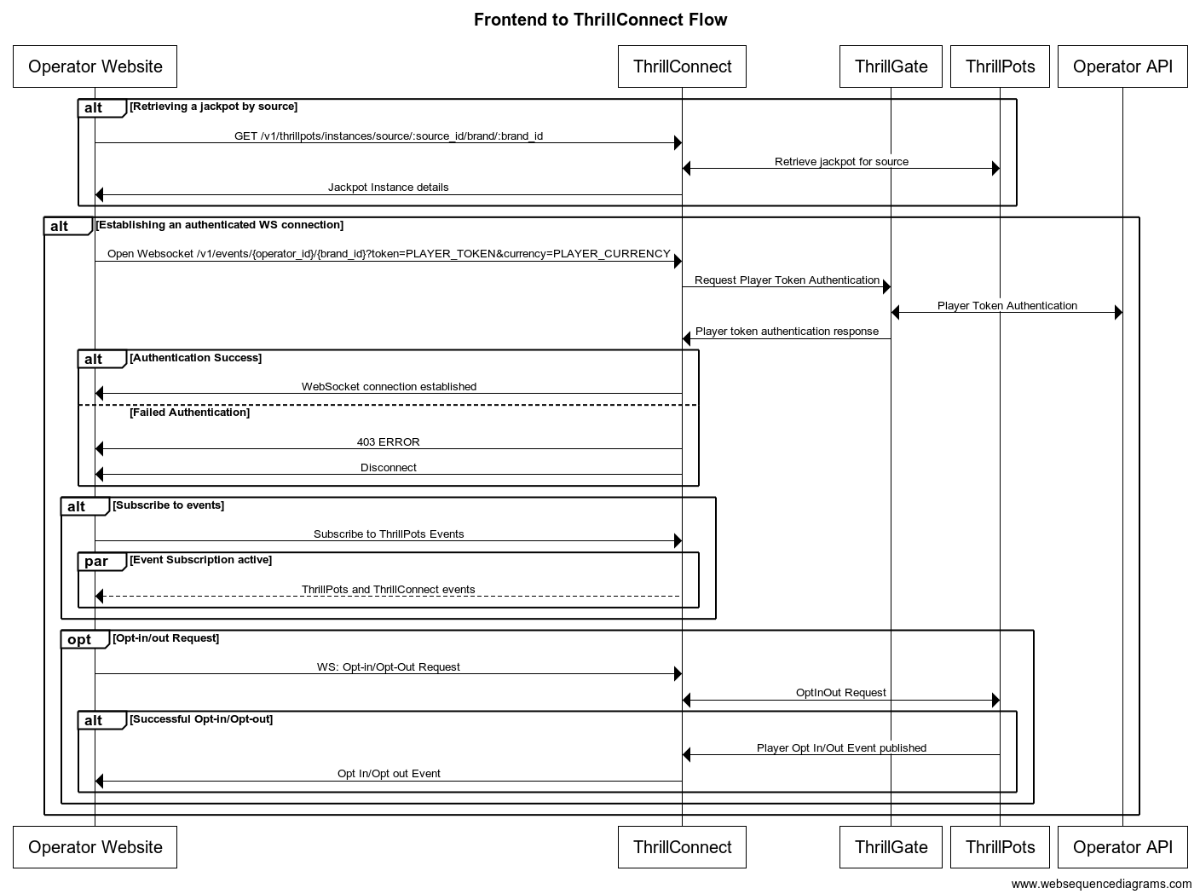
Integration Flow in detail
Fetching a Jackpot's details
One of the first things your frontend will most likely need to do is to retrieve jackpot details for your jackpot widget to display.
If you have followed the section on settings up the AIO container, you would have created a
Sourcecalledsitewide-casino.If you haven't gone through the process of setting up a source, we suggest that you review and understand sources and how they are used before continuing
To retrieve the jackpot for the sitewide-casino source, you will need to call:
GET /v1/thrillpots/instances/source/:source_id/brand/:brand_id?player_id=:player_id
replacing the :source_id and :brand_id values with the appropriate values that have been configured. If you used the default values from the Postman collection, you can use sitewide-casino for the source_id and thrilltech:brand1 for the brand_id.
If the player is already logged in, you can also pass the ID of the player via the query parameter player_id. Doing so will ensure that the player's opt-in status is returned in the jackpot instance information.
Establishing a WebSocket connection
In order to receive ThrillPots events and be able to opt players in or out of the jackpot, you will need to establish a websocket connection.
Once a player is logged into an operator's site, you can establish a WebSocket connection with ThrillConnect, passing in the player's session token.
NOTE
WebSocket connections are protected and can only be established by logged in players to prevent unauthorized and potentially dangerous abuse by attackers. Requiring a player a valid player session token in order to establish a WebSocket connection is a security-driven decision
To establish a WebSocket connection with ThrillConnect, open a WebSocket to:
/v1/events/{operator_id}/{brand_id}?token=PLAYER_TOKEN¤cy=PLAYER_CURRENCY
ThrillConnect will authenticate the token (the Player session token) from the query parameters with the operator's platform via ThrillGate. If the token is valid, the websocket connection will be established. If the token is invalid, the connection will receive a 403 FORBIDDEN error.
Subscribing to ThrillPots events
Once you have successfully established a WebSocket connection, you can now subscribe to ThrillPots events. This is done by sending a subscription request via the WebSocket to ThrillConnect. See below for the SubscribeRequest message that should be sent to subscribe to all ThrillPots events:
{
"SubscribeRequest": {
"events": [{
"source": "thrillpots",
"event_type": "*"
}]
}
}
If you would like to subscribe to only certain events, you can do so by explicitly specifying the events by source one-by-one.
ThrillPots currently publishes the folliowing event types:
- JackpotUpdateEvent
- WinEvent
- RaffleWinEvent
- OptInEvent
For more information about the structure of each of these events, see ThrillPots Event Structures
Player Opt-in / Opt-out
To opt a player in or out of a jackpot, you must send a PlayerOptInRequest message via the WebSocket connection.
Below are a few examples of opting a player in and out of a jackpot instance (please note, you will need to have the jackpot instance ID):
Opting in
{
"PlayerOptInRequest": {
"instance_id": "8dcc9f5a-f1c5-466f-83e9-928277d8bfb7",
"player_country": "MT",
"opt_in": true
}
}
Opting in with a preferred contribution value of 0.20
{
"PlayerOptInRequest": {
"instance_id": "8dcc9f5a-f1c5-466f-83e9-928277d8bfb7",
"player_country": "MT",
"opt_in": true,
"contribution_value": 0.2
}
}
Opting out of a Jackpot
{
"PlayerOptInRequest": {
"instance_id": "8dcc9f5a-f1c5-466f-83e9-928277d8bfb7",
"player_country": "MT",
"opt_in": false
}
}
Opting in with a preferred contribution value and preferred contribution currency
{
"PlayerOptInRequest": {
"instance_id": "8dcc9f5a-f1c5-466f-83e9-928277d8bfb7",
"player_country": "MT",
"opt_in": true,
"contribution_value": 0.2
"contribution_currency": "USD"
}
}
Opting out from a preferred contribution currency
{
"PlayerOptInRequest": {
"instance_id": "8dcc9f5a-f1c5-466f-83e9-928277d8bfb7",
"player_country": "MT",
"opt_in": false,
"contribution_currency": "USD"
}
}
Retrieving Exchange Rates
You may need to convert the values of a jackpot instance from the Jackpot currency to a player's currency. To help facilitate this, ThrillConnect exposes a currency endpoint which allows you to fetch the exchange rates used by ThrillPots.
To retrieve the 202408-1 exchange rates, you can call:
GET /v1/currencies
Retrieving a player's raffle ticket count
If player's are contributing to a Raffle jackpot, you may want to show the player how many tickets they have earned so far in the raffle. You can retrieve the player's current ticket count by requesting it via the WebSocket connection:
To retrieve a player's ticket count, send a PlayerRaffleTicketsRequest message:
{
"player_id": String,
"instance_id": String,
"brand_id": String
}
The instance_id is the instance ID of the Raffle jackpot, and the brand_id is in the format operator_id:brand_id.
If the request can be serviced, you should received a PlayerRaffleTicketsResponse message back:
{
"msg_type": "Message",
"source": "thrillpots",
"msg_name": "PlayerRaffleTicketResponse",
"operator_id": "OPERATOR_ID",
"brand_id": "BRAND_ID",
"player_id": "PLAYER_ID",
"data": {
"ticket_count": 4
},
"timestamp": 1711452762485
}
If there was an error processing the request, you will receive an Error message in response which will contain the message name that errored, as well as any relevant error details. For example:
{
"msg_type": "Error",
"source": "thrillpots",
"msg_name": "PlayerRaffleTicketRequest",
"operator_id": "OPERATOR_ID",
"brand_id": "BRAND_ID",
"player_id": "PLAYER_ID",
"data": {
"status_code": 404,
"code": "",
"message": "Error 404 Not Found from http://localhost:8084/instances/raffle/e0dee1ae-6231-458a-ad6d-4dc0c941e5c3/tickets/player_00001/brand/thrilltech:brand1"
},
"timestamp": 1711452757807
}
In this case, the request Jackpot instance ID could not be found.
ThrillConnect JS Client
ThrillConnect Client is the glue that connects your Portal and ThrillTech systems to provide seamless experience for your players. It is designed with minimialistic, yet powerful API, that can be easily consumed and covers all the narrow and tricky edgecases of the frontend integration. It's purpose is to make your frontend development trivial and expose the full API surface with minimum effort.
On this page you can find all the relevant details on how to use the Client, as well as examples and use cases.
Client version will be aligned with service version and just like that you'll be subscribed to all the latest and greatest features of our platform.
Source
Source code is avaiable for review & fork for all ThrilTech customers. You can find the client at https://github.com/thrilltech-io/connect-client.
Initialization
Client constructor needs the host address and BrandContext. Player context can optionally be passed on initialization or later on via authenticate method.
Additionally one can specify dev options, like the use of unsecure http/ws and client internal logs for dev convenience.
All the events of interest must be passed on to the constructor in the events array so that client can subscribe to relevant systems on the WS channel.
Player context
Player context type provides all necessary player details for establishing the WSS connection and interacting with the Jackpots from player perspective.
type PlayerContext = {
id: string,
token: string,
currency: string,
country: string,
}
Initialization without player context
Prior to having a valid player session and auth token, one can initialize the client without PlayerContext. In this limited mode the WS events will not be available and only public REST endpoints can be used to make requests. ( see API section for what is available )
import { ThrillConnect, ConnectEvents } from "./thrillconnect.js"
const client = new ThrillConnect({
host: "localhost:11000",
brand: {
operator_id: "thrilltech",
brand_id: "brand1",
},
dev: {
secure: false
},
events: [
ConnectEvents.JackpotUpdateEvent,
ConnectEvents.RaffleWinEvent,
ConnectEvents.JackpotWinEvent,
ConnectEvents.OptInEvent,
]
})
Later on, once we have player details, we can authenticate and subscribe to full functionality of the client.
client.authenticate({
id: "player_id_token_00001",
token: "token_00001",
country: "USA",
currency: "USD",
})
Initialization with player context
Alternatively, if player details are known from the start, those can be passed directly to the client constructor.
const client = new ThrillConnect({
host: "localhost:11000",
player: {
id: "player_00001",
token: "token_00001",
country: "USA",
currency: "USD",
},
brand: {
operator_id: "thrilltech",
brand_id: "brand1",
},
dev: {
secure: false
},
events: [
ConnectEvents.JackpotUpdateEvent,
ConnectEvents.RaffleWinEvent,
ConnectEvents.JackpotWinEvent,
ConnectEvents.OptInEvent,
]
})
API
Following is a list of all the available methods on connect client.
Adding an event listener
client.on(ConnectEvent, handler)
Adding an once off event listener
client.once(ConnectEvent, handler)
Removing an event listener
client.off(ConnectEvent, handler)
Passing player context
client.authenticate(PlayerContext)
Fetching the currency multipliers
const multipliers = await client.request().getCurrencies()
Fetching the list of defined sources for the provided BrandContext
const sources = await client.request().getSources()
Getting the Jackpot instance that maps to a source
const sourceId = "sitewide-jackpot"
const instance = await client.request().getJackpotForSource(sourceId)
Getting the player OptIn status for a source
Note: PlayerContext is required for this request.
const sourceId = "sitewide-jackpot"
const status = await client.request().getOptInStatusForSource(sourceId)
Opting in/out from a source
Note: PlayerContext is required for this request. This request uses the authenticated WS channel. When jackpot allows for variable contribution, preferred contribution value can be passed as 3 parameter.
const sourceId = "sitewide-jackpot"
const optIn = true
const preferredContributionValue = undefined
client.request().optIntoSource(sourceId, optIn, preferredContributionValue)
Opting in/out from an instance
Note: PlayerContext is required for this request. This request uses the authenticated WS channel. When jackpot allows for variable contribution, preferred contribution value can be passed as 3 parameter.
const instanceId = "dd7243ea-9992-47ae-a2a6-531b3f0e2197"
const optIn = true
const preferredContributionValue = undefined
client.request().optIntoInstance(instanceId, optIn, preferredContributionValue)
Events
Client receives events via the WS connection. In order to receive an event, it needs to explicitly be listed in the list of events in the Client constructor.
All the available events are listed in ConnectEvents.
import { ConnectEvents } from "./thrillconnect.js"
function updateTickers(e:JackpotUpdateEvent) {
console.log(e.status)
}
// subscribe to Jackpot updates
client.on(ConnectEvents.JackpotUpdateEvent, updateTickers)
// unsubscribe from Jackpot updates
client.off(ConnectEvents.JackpotUpdateEvent, updateTickers)
withSource helper
Jackpot source serves as alias for the instance, however properly handling the events, as well as parts of the API requires frontend to keep a reference to the instance identifier. To address this inconvinience, connect-client now supports internal caching of instance ID. Source bound client internally filters events and only fires those matching the jackpot instance id corresponding to the source.
const sourceBoundClient = await client.withSource("put-source-id-here")
await sourceBoundClient?.getJackpot()
await sourceBoundClient?.getTickers()
await sourceBoundClient?.getOptInStatus()
await sourceBoundClient?.optIn(true, 50)
sourceBoundClient?.on(ConnectEvents.JackpotUpdateEvent, handleUpdate)
Animation Driver
ThrillTech supplies a default set of Jackpot win animations to enrich the player experience during a Jackpot win. The animations driver is a JS library that takes care of win animations loading and playback. Animations are easily customizable and the driver allows for flexible cusomizations of the playback.
Source
Source code is avaiable for review & fork for all ThrilTech customers. You can find the driver at https://github.com/thrilltech-io/animations-driver.
Overview
The JS driver exposes two functions:
preload(config, tier, muted)- loads the required assets per pased configuration object. When muted, sounds will not be loaded.run(config, tier, amount, muted)- starts the animation sequence defined in the configuration. Run will do load if assets are not already loaded.
The preload function is intended to provide separation of the loading phase, so that in case of unreasonably slow connection, stale loading can be detected and acted upon (for example using a fallback alert / win message if assets load didnt complete in a certain period).
Mute state cannot be controlled after the animation is run. The current sound preference should be passed to the run ( and optionally preload ) and based on that the defined in configuration sfx are either loaded or not.
Usage
import { preload, run } from "./main.js"
const config = "/configs/example.json"
const tier = "super"
const amount = 10000
const muted = false
preload(config, tier, muted).then(()=>{
run(config, tier, amount, muted)
})
Configuration
See example configurations in ./public/configs in the driver repository.
Following is a full possible configuration with all settings commented inline.
{
"dom": {
// optional - skip "top" section if no header is required
"top": {
// id of top container
"id": "top-container",
// messages to display during presentation phase
"message": {
"id":"top-message",
// message during wheel spin
"wheel": "Stop the wheel and win BIG! BIG!",
// message during tickup
"tickup": "Congratulations!"
}
},
// optional - skip "bottom" section if no footer is required
"bottom": {
// id of bottom container
"id": "bottom-container",
// action button
"button": {
// id of the action button
"id": "action-button",
// actions during wheel phase
"wheel": {
"stop": "STOP THE WHEEL",
"skip": "SKIP THE WHEEL"
},
// actions during tickup phase
"tickup": {
"skip": "SKIP TICKUP"
},
// actions after tickup
"end": {
"close": "CLOSE"
}
}
},
// enable touch controls during phase
"touch": {
// touch during wheel acts as stop / skip
"wheel": {
"stop": true,
"skip": true
},
// touch during tickup acts as skip
"tickup": true
}
},
// ticker skin and font settings -
// skin provided and customised by thrilltech
"ticker": {
"skin": "/ticker/Win_BG.skel",
"font": "/fonts/rubik.woff",
"fontFamily": "rubik",
// maximum font size for the tickup
"maxFontSize": 80,
// https://developer.mozilla.org/en-US/docs/Web/JavaScript/Reference/Global_Objects/Intl/NumberFormat
// the currency for the win amount as per ISO 4217 currency codes
// optional, leave empty for no currency or monetary amount format
"currency":"JPY",
// A string with a BCP 47 language tag, optional
"currencyFormat":"en-US"
},
// wheel skin and segments settings -
// skin provided and customised by thrilltech
"wheel": {
"rotate": 0,
"base": "/wheel/Wheel_of_Fortune.skel",
// wheel has 8 segments, following is the order of tiers per segments
"segments": [
"mini",
"super",
"mini",
"epic",
"mini",
"super",
"epic",
"super"
],
// map of segment textures
"skins": {
"mini": "/skins/demo/mini.png",
"super": "/skins/demo/super.png",
"epic": "/skins/demo/epic.png"
}
},
// jackpot animation skin -
// skin provided and customised by thrilltech
"pots": {
"mini": {
// path of the spine export containing the mini tier animation
"source": "/pots/mini/Thrillpot.skel",
// prefix of the animation for this tier
"prefix": "",
// sound clips for all animation phases
"sfx": {
"intro": ["/sfx/base/mini/intro.mp3"],
"particles": ["/sfx/base/mini/confetti.mp3"],
"tickup_start": ["/sfx/base/mini/tickup-start.mp3"],
"tickup_loop": ["/sfx/base/mini/tickup-loop.mp3"],
"outro": ["/sfx/base/mini/outro.mp3]"
}
},
"super": {
// path of the spine export containing the mini tier animation
"source": "/pots/super/Thrillpot.skel",
// prefix of the animation for this tier
"prefix": "",
// sound clips for all animation phases
"sfx": {
"intro": ["/sfx/base/super/intro.mp3"],
"particles": ["/sfx/base/super/confetti.mp3"],
"tickup_start": ["/sfx/base/super/tickup-start.mp3"],
"tickup_loop": ["/sfx/base/super/tickup-loop.mp3"],
"outro": ["/sfx/base/super/outro.mp3]"
}
},
"epic": {
// path of the spine export containing the mini tier animation
"source": "/pots/epic/Thrillpot.skel",
// prefix of the animation for this tier
"prefix": "",
// sound clips for all animation phases
"sfx": {
"intro": ["/sfx/base/epic/intro.mp3"],
"particles": ["/sfx/base/epic/confetti.mp3"],
"tickup_start": ["/sfx/base/epic/tickup-start.mp3"],
"tickup_loop": ["/sfx/base/epic/tickup-loop.mp3"],
"outro": ["/sfx/base/epic/outro.mp3]"
}
},
},
// particles animation skin -
// skin provided and customised by thrilltech
"particles": {
"mini": {
"source": "/particles/confetti/Thrillpot.skel",
"prefix": ""
},
"super": {
"source": "/particles/confetti/Thrillpot.skel",
"prefix": ""
},
"epic": {
"source": "/particles/confetti/Thrillpot.skel",
"prefix": ""
}
}
}
SFX
Config contains sound definitions for various phases of the animation. All sounds are optional.
Sounds per animation phase are defined as an array. All elements of the phase array refer to the same sound effect. The intention is to provide multiple sfx formats and the runtime will automatically pick the one supported on the client system. Recommended formats to use are webm, wav and mp3. wav has the widest support accross devices, but is not as optimal as webm and mp3 in terms of filesize.
"sfx": {
"intro": ["/sfx/base/epic/intro.webm", "/sfx/base/epic/intro.wav"],
"particles": ["/sfx/base/epic/confetti.webm", "/sfx/base/epic/confetti.wav"],
"tickup_start": ["/sfx/base/epic/tickup-start.webm", "/sfx/base/epic/tickup-start.wav"],
"tickup_loop": ["/sfx/base/epic/tickup-loop.webm", "/sfx/base/epic/tickup-loop.wav"],
"outro": ["/sfx/base/epic/outro.webm", "/sfx/base/epic/outro.wav"]
}
Metrics
The ThrillPots system exposes Prometheus metrics per service via the /metrics endpoint.
Below is the list of metrics exposed per service:
ThrillPots Gateway
| Metric name | Metric Type | Description |
|---|---|---|
| contrib_req_sync_recv | Counter | Syncronous Contribution Requests Received |
| contrib_req_async_recv | Counter | Asyncronous Contribution Requests Received |
| contrib_req_queued | Gauge | Contribution Requests currently queued |
| contrib_req_processed | Counter | Contribution requests processed |
| contrib_avg_queue_time | Counter | Average Contribution Request Queue Time |
| contribution_webhook_calls | Counter | Contribution Webhook calls made |
| http_requests_avg_time | Family: Counter | HTTP Request Average Time |
ThrillPots Service
| Metric name | Metric Type | Description |
|---|---|---|
| contrib_req_recv | Counter | Contribution Requests Received |
| contrib_req_processed | Counter | Contribution requests processed |
| contrib_req_rejected | Counter | Contribution Requests rejected |
| http_requests_avg_time | Family: Counter | HTTP Request Average Time |
| preflight_avg_time | Counter | Average time spent validating contribution requests |
| jackpot_opts | Family: Counter | Opt-In/Out related metrics |
Thrillpots Gateway
ThrillPots Service
ThrillGate
ThrillConnect
Thrill-ID
BitBridge
ThrillOffice
Multi-Currency Support
The ThrillPots Platform provides advanced multi-currency support. It uses bespoke a bespoke system of algorithms known as the Always Fair Multi-Currency system to provide operators with fine grained control over the multi-currency configuration aspects of their jackpots.
The Basics
At a basic level, every Jackpot has a base currency. This is the currency that the jackpot operates in at the lowest level.
In order to process contributions for players that may be using wallet currencies that are different from the jackpot's base currency, the platform uses exchange rates that are updated frequently by the system.
In this basic scenario, all contributions are based on the jackpot's base currency.
Example
A Jackpot is configured to have a base currency of EUR and accept a minimum contribution of €0.10.
An opted-in player is using GBP as their wallet currency.
We know that EUR:GBP is not 1:1. For the purposes of this example, we will assume an exchange rate of 1:0.85.
Therefore, the GBP account player will be contributing a minimum of €0.10 to the jackpot, but in their transaction history, they will correctly see £0.085 being deducted from their account.
In this simple example, although the GBP player does not see an aesthetically pleasing bet amount for each contribution, they are wagering the correct amount into the jackpot. There are a few downsides with this approach, one of which is that the contribution amount in GBP may fluctuate over time depending on the prevailing exchange rate.
Always Fair Multi-currency Support
The Always Fair Multi-currency system allowed operators to define both minimum and maximum contributions on a per supported currency basis without compromising on the fairness and integrity of their jackpot maths.
With the system, the operator can specify more appealing and intuitive minimum (and maximum) contribution values as follows:
| Currency | Minimum Bet Balue |
|---|---|
| EUR (base) | 0.10 |
| GBP | 0.10 |
| USD | 0.10 |
| SEK | 1 |
| NOK | 1 |
| JPY | 10 |
| ZAR | 1 |
While this table of Jackpot Contribution sizes may look much better than if we simply used exchange rates to calculate the contribution value, a question of fairness does need to be raised.
What is the problem?
Lets imagine a EUR player is wagering €0.10 into a jackpot while a JPY player is wagering 10 JPY. Based on the above configuration, this will be accepted by the system. But what about fairness. If we simply "accepted" bets of different sizes into the jackpot, the JPY player would have an unfair advantage over the EUR player since the real world value of 10 JPY is not equal to €0.10 (based on the exchange rate at the time of writing, 10 JPY = ~€0.06).
This would mean that there would be greater value to be contributing in JPY than in EUR.
This is where the Always Fair technology comes into play.
What does Always Fair actually do?
The Always Fair Multi-Currency system ensures that the maths of the jackpot is scaled proportionally to the currency being used for contributions. Therefore, in the example above, the Always Fair algorithms ensures that the JPY player has their probabilities of hitting the jackpot scaled based on the value of their contribution in relation to the base currency of the jackpot. (Yes, we know thats a lot!)
While the detailed workings of the algorithm are beyond the scope of this document, here are the important take aways about what the Always Fair Multi-currency system enables:
- Allowed minimum and maximum contribution values to bet set per currency
- Ensuring that regardless of currency, contributions are always processed fairly - no player will receive an unfair advantage
Multi-Currency Opt-ins
The system supports two distinct modes of operation when it comes to player opt-ins.
1. Simple Opt-in/Opt-out
In this mode (which is default), if a player opts-in with Currency A, they are opted in. If they are able to change their currency to Currency B, they will still be opted in. If the Jackpot has a minimum contribution size defined for the player's currency (Currency B), then the contribution will be based on that configured minimum. If the jackpot does not have a minimum contribution defined for Currency B, the players contribution will be the value of minimum contribution of the jackpot's base currency.
If the jackpot does support Currency B as an alternate currency and the player opts out while using Currency B, they will also be opted out for Currency A.
2. Per-Currency Opt-In/Opt-out
In this mode, players are required to opt-in on a per currency basis. For example, if Player A opts in while using Currency A, but later on changes to using Currency B, they will not be considered opted in while using Currency B. In this mode, the player will need to explicitly opt-in for Currency B as well.
This logic extends to opting out as well. If a player has opted in for Currency A and separately for Currency B and then layer opts out for Currency B, they are still considered opted in (but only for Currency A). This is an important factor when it comes to community payout jackpots where only opted-in players are considered when picking the community winners.
Environment Variables
Each service has a list of environment variables which define its configuration for runtime. Use this reference to understand what each environment variable does, what it is used for and the possible values it can contain.
Quick Links
- ThrillPots Gateway
- ThrillPots Service
- ThrillGate Service
- ThrillConnect Service
- Thrill-ID Service
- BitBridge Service
- ThrillOffice Service
ThrillPots Gateway
| Variable Name | Default Value | Description |
|---|---|---|
| GW_LOG_LEVEL | info | The log level at which logs will be written. Possible values are info, debug, warn, trace |
| GW_WEB_HOST | 0.0.0.0 | The hostname to bind the web service to |
| GW_WEB_PORT | 80 | The port to bind the web service to |
| GW_MONGO_HOST | mongodb://localhost | The connection URI for the MongoDB server |
| GW_MONGO_DB_NAME | test | The DB name for the Service (should usually be set to thrillpots-gateway) |
| GW_MONGO_USERNAME | None | [Optional] The username to use to authenticate with MongoDB |
| GW_MONGO_PASSWORD | None | [Optional] The password to use to authenticate with MongoDB |
| GW_MONGO_RETRY_WRITES | true | Flag to set whether writes are retries when they fail |
| GW_REDIS_HOST | redis://localhost | The connection URI for REDIS. Possible schemas are: - Standalone: redis://hostname:port- Cluster: redis://hostname:port,redis://hostname2:port,..- Sentinel: sentinel://hostname:port/master/replica or sentinel+tls://hostname:port/master/replica |
| GW_REDIS_DB | 0 | The Redis DB number to use |
| GW_REDIS_USERNAME | None | [Optional] The REDIS username to use for authentication |
| GW_REDIS_PASSWORD | None | [Optional] The REDIS password to use for authentication |
| GW_REDIS_SECURE | false | [Optional] Defines if the REDIS connection is secure or not |
| GW_REDIS_CLUSTER | false | [Optional] Defines if the REDIS connection is secure or not. For a standard Sentinel deployment, this variable should be set to false |
| GW_JPSERVER_HOST | http://localhost:8084 | The URL for the ThrillPots Service. For clustered environments, this should point to the DNS entry for the ThrillPots Service on your internal load balancer |
| GW_THRILLID_HOST | http://localhost:9000 | The URL for the Thrill-ID Service. For clustered environments, this should point to the DNS entry for the Thrill-ID Service on your internal load balancer |
| GW_THRILLID_USERNAME | None | The username the service should use to authenticate with Thrill-ID. In a standard deployment, this should be set to thrillpots.gateway |
| GW_THRILLID_PASSWORD | None | The password the service should use to authenticate with Thrill-ID. In a default deployment, this will start off as password and can be changed via Thrill-ID directly |
| GW_THRILLGATE_HOST | None | The URL for the ThrillGate Service. For clustered environments, this should point to the DNS entery for the ThrillGate Service on your internal load balancer |
ThrillPots Service
| Variable Name | Default Value | Description |
|---|---|---|
| JP_LOG_LEVEL | info | The log level at which logs will be written. Possible values are info, debug, warn, trace |
| JP_WEB_HOST | 0.0.0.0 | The hostname to bind the web service to |
| JP_WEB_PORT | 80 | The port to bind the web service to |
| JP_MONGO_HOST | mongodb://localhost | The connection URI for the MongoDB server |
| JP_MONGO_DB_NAME | thrillpots | The DB name for the Service (should usually be set to thrillpots) |
| JP_MONGO_USERNAME | None | [Optional] The username to use to authenticate with MongoDB |
| JP_MONGO_PASSWORD | None | [Optional] The password to use to authenticate with MongoDB |
| JP_MONGO_RETRY_WRITES | true | Flag to set whether writes are retries when they fail |
| JP_REDIS_HOST | redis://localhost | The connection URI for REDIS. Possible schemas are: - Standalone: redis://hostname:port- Cluster: redis://hostname:port,redis://hostname2:port,..- Sentinel: sentinel://hostname:port/master/replica or sentinel+tls://hostname:port/master/replica |
| JP_REDIS_DB | 0 | The Redis DB number to use |
| JP_REDIS_USERNAME | None | [Optional] The REDIS username to use for authentication |
| JP_REDIS_PASSWORD | None | [Optional] The REDIS password to use for authentication |
| JP_REDIS_SECURE | false | [Optional] Defines if the REDIS connection is secure or not |
| JP_REDIS_CLUSTER | false | [Optional] Defines if the REDIS connection is secure or not. For a standard Sentinel deployment, this variable should be set to false |
| JP_THRILLID_HOST | http://localhost:9000 | The URL for the Thrill-ID Service. For clustered environments, this should point to the DNS entry for the Thrill-ID Service on your internal load balancer |
| JP_THRILLID_USERNAME | thrillpots | The username the service should use to authenticate with Thrill-ID. In a standard deployment, this should be set to thrillpots |
| JP_THRILLID_PASSWORD | password | The password the service should use to authenticate with Thrill-ID. In a default deployment, this will start off as password and can be changed via Thrill-ID directly |
| JP_SERVICE_CURRENCY_REFRESH | 86400000 | The amount of time between ThrillPots attempting to refresh its currency multipliers. The default is set to 24 hours (86400000 milliseconds) |
| JP_SERVICE_UPDATE_EVENT_FREQUENCY | 10000 | The amount of time (in milliseconds) between jackpot update events being sent out. The default is set to 10 seconds, but we recommend reducing this to a value between 2000 and 5000 (2s - 5s) |
| JP_SERVICE_AUTH_CACHE_TTL | 300 | The number of seconds to cache a player's authentication token. Change this to reflect the TTL on your system's player session token lifetimes |
| JP_RNG_BACKGROUND_CYCLING | false | If set to true, the RNG will automatically perform background cycling of its values in periods defined by JP_RNG_BACKGROUND_CYCL_DELAY_MIN_SECS and JP_RNG_BACKGROUND_CYCLE_DELAY_MAX_SECS |
| JP_RNG_BACKGROUND_CYCLE_DELAY_MIN_SECS | 0 | [Optional] The minimum amount of delay between background cycles. We recommend a value of 60 |
| JP_RNG_BACKGROUND_CYCLE_DELAY_MAX_SECS | 0 | [Optional] The maximum amount of delay between background cycles. We recommend a value of 180 |
| JP_RNG_MONITOR_PERIOD_SECS | 0 | [Optional] The maximum period between the randomness monitoring test running. We recommend a value of 600 |
| JP_RNG_FAILURES_TO_ALERT | None | [Optional] If RNG Monitoring is enabled, this variable defines the number of consecutive failures that are needed to generate an alert. We recommend setting this to a value of 5 or higher |
| JP_CC_URL | None | The URL of the ThrillTech CC Service which must be defined for all operator environments. For STAGING environments, this value should be set to https://cc-stg.thrillpots.io and for PRODUCTION environments, it should be set to: https://cc.thrilltechapi.com |
| JP_CC_OPERATOR_ID | None | This value identifies you as an operator and will be provided to you by ThrillTech |
| JP_CC_SERVICE_ID | None | This identifies the product and should be set to thrillpots |
ThrillGate Service
| Variable Name | Default Value | Description |
|---|---|---|
| TG_LOG_LEVEL | info | The log level at which logs will be written. Possible values are info, debug, warn, trace |
| TG_WEB_HOST | 0.0.0.0 | The hostname to bind the web service to |
| TG_WEB_PORT | 80 | The port to bind the web service to |
| TG_MONGO_HOST | mongodb://localhost | The connection URI for the MongoDB server |
| TG_MONGO_DB_NAME | test | The DB name for the Service (should usually be set to thrillgate) |
| TG_MONGO_USERNAME | None | [Optional] The username to use to authenticate with MongoDB |
| TG_MONGO_PASSWORD | None | [Optional] The password to use to authenticate with MongoDB |
| TG_MONGO_RETRY_WRITES | true | Flag to set whether writes are retries when they fail |
| TG_REDIS_HOST | redis://localhost | The connection URI for REDIS. Possible schemas are: - Standalone: redis://hostname:port- Cluster: redis://hostname:port,redis://hostname2:port,..- Sentinel: sentinel://hostname:port/master/replica or sentinel+tls://hostname:port/master/replica |
| TG_REDIS_DB | 0 | The Redis DB number to use |
| TG_REDIS_USERNAME | None | [Optional] The REDIS username to use for authentication |
| TG_REDIS_PASSWORD | None | [Optional] The REDIS password to use for authentication |
| TG_REDIS_SECURE | false | [Optional] Defines if the REDIS connection is secure or not |
| TG_REDIS_CLUSTER | false | [Optional] Defines if the REDIS connection is secure or not. For a standard Sentinel deployment, this variable should be set to false |
| TG_THRILLID_HOST | http://localhost:9000 | The URL for the Thrill-ID Service. For clustered environments, this should point to the DNS entry for the Thrill-ID Service on your internal load balancer |
| TG_THRILLID_USERNAME | None | The username the service should use to authenticate with Thrill-ID. In a standard deployment, this should be set to thrillgate |
| TG_THRILLID_PASSWORD | None | The password the service should use to authenticate with Thrill-ID. In a default deployment, this will start off as password and can be changed via Thrill-ID directly |
ThrillConnect Service
| Variable Name | Default Value | Description |
|---|---|---|
| TCS_LOG_LEVEL | info | The log level at which logs will be written. Possible values are info, debug, warn, trace |
| TCS_WEB_HOST | 0.0.0.0 | The hostname to bind the web service to |
| TCS_WEB_PORT | 80 | The port to bind the web service to |
| TCS_MONGO_HOST | mongodb://localhost | The connection URI for the MongoDB server |
| TCS_MONGO_DB_NAME | test | The DB name for the Service (should usually be set to thrillconnect) |
| TCS_MONGO_USERNAME | None | [Optional] The username to use to authenticate with MongoDB |
| TCS_MONGO_PASSWORD | None | [Optional] The password to use to authenticate with MongoDB |
| TCS_MONGO_RETRY_WRITES | true | Flag to set whether writes are retries when they fail |
| TCS_REDIS_HOST | redis://localhost | The connection URI for REDIS. Possible schemas are: - Standalone: redis://hostname:port- Cluster: redis://hostname:port,redis://hostname2:port,..- Sentinel: sentinel://hostname:port/master/replica or sentinel+tls://hostname:port/master/replica |
| TCS_REDIS_DB | 0 | The Redis DB number to use |
| TCS_REDIS_USERNAME | None | [Optional] The REDIS username to use for authentication |
| TCS_REDIS_PASSWORD | None | [Optional] The REDIS password to use for authentication |
| TCS_REDIS_SECURE | false | [Optional] Defines if the REDIS connection is secure or not |
| TCS_REDIS_CLUSTER | false | [Optional] Defines if the REDIS connection is secure or not. For a standard Sentinel deployment, this variable should be set to false |
| TCS_THRILLID_HOST | http://localhost:9000 | The URL for the Thrill-ID Service. For clustered environments, this should point to the DNS entry for the Thrill-ID Service on your internal load balancer |
| TCS_THRILLID_USERNAME | None | The username the service should use to authenticate with Thrill-ID. In a standard deployment, this should be set to thrillconnect |
| TCS_THRILLID_PASSWORD | None | The password the service should use to authenticate with Thrill-ID. In a default deployment, this will start off as password and can be changed via Thrill-ID directly |
Thrill-ID Service
| Variable Name | Default Value | Description |
|---|---|---|
| TID_LOG_LEVEL | info | The log level at which logs will be written. Possible values are info, debug, warn, trace |
| TID_WEB_HOST | 0.0.0.0 | The hostname to bind the web service to |
| TID_WEB_PORT | 80 | The port to bind the web service to |
| TID_MONGO_HOST | mongodb://localhost | The connection URI for the MongoDB server |
| TID_MONGO_DB_NAME | test | The DB name for the Service (should usually be set to thrillid) |
| TID_MONGO_USERNAME | None | [Optional] The username to use to authenticate with MongoDB |
| TID_MONGO_PASSWORD | None | [Optional] The password to use to authenticate with MongoDB |
| TID_MONGO_RETRY_WRITES | true | Flag to set whether writes are retries when they fail |
| TID_REDIS_HOST | redis://localhost | The connection URI for REDIS. Possible schemas are: - Standalone: redis://hostname:port- Cluster: redis://hostname:port,redis://hostname2:port,..- Sentinel: sentinel://hostname:port/master/replica or sentinel+tls://hostname:port/master/replica |
| TID_REDIS_DB | 0 | The Redis DB number to use |
| TID_REDIS_USERNAME | None | [Optional] The REDIS username to use for authentication |
| TID_REDIS_PASSWORD | None | [Optional] The REDIS password to use for authentication |
| TID_REDIS_SECURE | false | [Optional] Defines if the REDIS connection is secure or not |
| TID_REDIS_CLUSTER | false | [Optional] Defines if the REDIS connection is secure or not. For a standard Sentinel deployment, this variable should be set to false |
| TID_JWT_SECRET | default-secret-for-this-service | The secret used when generating JWT tokens during account authentication |
| TID_JWT_STRICT_IP_CHECK | true | Enforce strict IP checking when refreshing tokens |
| TID_JWT_LIFETIME_SECS | 1800 | The lifetime of a JWT token |
| TID_JWT_REFRESH_LIFETIME_SECS | 300 | The amount of grace period allowed for a refresh token |
BitBridge Service
| Variable Name | Default Value | Description |
|---|---|---|
| TT_LOG_LEVEL | info | The log level at which logs will be written. Possible values are info, debug, warn, trace |
| TT_WEB_HOST | 0.0.0.0 | The hostname to bind the web service to |
| TT_WEB_PORT | 80 | The port to bind the web service to |
| TT_MONGO_HOST | mongodb://localhost | The connection URI for the MongoDB server |
| TT_MONGO_DB_NAME | test | The DB name for the Service (should usually be set to bitbridge) |
| TT_MONGO_USERNAME | None | [Optional] The username to use to authenticate with MongoDB |
| TT_MONGO_PASSWORD | None | [Optional] The password to use to authenticate with MongoDB |
| TT_MONGO_RETRY_WRITES | true | Flag to set whether writes are retries when they fail |
| TT_REDIS_HOST | redis://localhost | The connection URI for REDIS. Possible schemas are: - Standalone: redis://hostname:port- Cluster: redis://hostname:port,redis://hostname2:port,..- Sentinel: sentinel://hostname:port/master/replica or sentinel+tls://hostname:port/master/replica |
| TT_REDIS_DB | 0 | The Redis DB number to use |
| TT_REDIS_USERNAME | None | [Optional] The REDIS username to use for authentication |
| TT_REDIS_PASSWORD | None | [Optional] The REDIS password to use for authentication |
| TT_REDIS_SECURE | false | [Optional] Defines if the REDIS connection is secure or not |
| TT_REDIS_CLUSTER | false | [Optional] Defines if the REDIS connection is secure or not. For a standard Sentinel deployment, this variable should be set to false |
| TT_THRILLID_HOST | http://localhost:9000 | The URL for the Thrill-ID Service. For clustered environments, this should point to the DNS entry for the Thrill-ID Service on your internal load balancer |
| TT_THRILLID_USERNAME | None | The username the service should use to authenticate with Thrill-ID. In a standard deployment, this should be set to bitbridge |
| TT_THRILLID_PASSWORD | None | The password the service should use to authenticate with Thrill-ID. In a default deployment, this will start off as password and can be changed via Thrill-ID directly |
ThrillOffice Service
| Variable Name | Default Value | Description |
|---|---|---|
| TO_LOG_LEVEL | info | The log level at which logs will be written. Possible values are info, debug, warn, trace |
| TO_WEB_HOST | 0.0.0.0 | The hostname to bind the web service to |
| TO_WEB_PORT | 80 | The port to bind the web service to |
| TO_MONGO_HOST | mongodb://localhost | The connection URI for the MongoDB server |
| TO_MONGO_DB_NAME | test | The DB name for the Service (should usually be set to thrilloffice) |
| TO_MONGO_USERNAME | None | [Optional] The username to use to authenticate with MongoDB |
| TO_MONGO_PASSWORD | None | [Optional] The password to use to authenticate with MongoDB |
| TO_MONGO_RETRY_WRITES | true | Flag to set whether writes are retries when they fail |
| TO_REDIS_HOST | redis://localhost | The connection URI for REDIS. Possible schemas are: - Standalone: redis://hostname:port- Cluster: redis://hostname:port,redis://hostname2:port,..- Sentinel: sentinel://hostname:port/master/replica or sentinel+tls://hostname:port/master/replica |
| TO_REDIS_DB | 0 | The Redis DB number to use |
| TO_REDIS_USERNAME | None | [Optional] The REDIS username to use for authentication |
| TO_REDIS_PASSWORD | None | [Optional] The REDIS password to use for authentication |
| TO_REDIS_SECURE | false | [Optional] Defines if the REDIS connection is secure or not |
| TO_REDIS_CLUSTER | false | [Optional] Defines if the REDIS connection is secure or not. For a standard Sentinel deployment, this variable should be set to false |
| TO_POTS_MONGO_HOST | mongodb://localhost | The connection URI for the MongoDB server for ThrillPots. Preferrably the connection string should indicate use of seconday instance for read purposes (?readPreference=secondary). |
| TO_POTS_MONGO_DB_NAME | test | The DB name for ThrillPots Service (should usually be set to thrillpots) |
| TO_POTS_MONGO_USERNAME | None | [Optional] The username to use to authenticate with MongoDB. A dedicated read-only user is recommended for this DB connection. |
| TO_POTS_MONGO_PASSWORD | None | [Optional] The password to use to authenticate with MongoDB |
| TO_THRILLID_HOST | http://localhost:9000 | The URL for the Thrill-ID Service. For clustered environments, this should point to the DNS entry for the Thrill-ID Service on your internal load balancer |
| TO_THRILLID_USERNAME | None | The username the service should use to authenticate with Thrill-ID. In a standard deployment, this should be set to thrilloffice |
| TO_THRILLID_PASSWORD | None | The password the service should use to authenticate with Thrill-ID. In a default deployment, this will start off as password and can be changed via Thrill-ID directly |
ThrillPots Event Structures
This section provides the data definitions (in JSON) for each of the ThrillPots events.
Event: JackpotUpdateEvent
{
"id": String,
"jackpot_type": "Jackpot" | "Raffle",
"currency": String,
"pots": [PotTicker],
"allowed_brands": [String],
"allowed_sources": [String],
"status": String,
"timestamp_start": Number | null,
"timestamp_end": Number | null,
"last_updated": Number
}
References:
Event: WinEvent
{
"brand_id": String,
"player_id": String,
"source_id": String,
"instance_id": String,
"jackpot_name": String,
"jackpot_currency": String,
"timestamp": Number,
"win_pot_id": String,
"currency_multipliers": {
"brand_id": String,
"base_currency": String,
"multipliers": {
"EUR": Number,
"GBP": Number,
"ZAR": Number,
...
"NZD": Number,
"SEK": Number
}
}
"win_withheld": bool,
"community_winners": [PayoutRecord],
"games_in_jackpot": [String],
"seed": Number,
"metadata": null | Object,
}
References:
Event: RaffleWinEvent
{
"brand_id": String,
"instance_id": String,
"jackpot_name": String,
"jackpot_currency": String,
"currency_multipliers": {
"brand_id": String,
"base_currency": String,
"multipliers": {
"EUR": Number,
"GBP": Number,
"ZAR": Number,
...
"NZD": Number,
"SEK": Number
}
}
"timestamp": Number,
"winners": [
{
"player_id": String,
"brand_id": String,
"currency": String,
"win_amount": Number
}
],
"win_withheld": bool
}
References:
The winners field contains an array of tuples. The structure of each tuples is (String, CurrencyValue).
The first element in the tuple contains the ID of a winning player and the second element contains the amount that the player won.
Event: OptInEvent
{
"instance_id": String,
"player_id": String,
"ext_player_id": String,
"player_brand_id": String,
"preferred_contribution_value": Number,
"contribution_count": Number,
"contribution_value": Number,
"opted_in": Boolean,
"last_updated": Number,
}
Event: CommunityPayoutErrorEvent
{
"instance_id": String,
"gameround_id": String,
"tx_credit_id": String,
"failed_payouts": [
{
"player_id": String,
"brand_id": String,
"currency": String,
"win_amount": Number
}
]
}
Event: RafflePayoutErrorEvent
{
"instance_id": String,
"failed_payouts": [
{
"player_id": String,
"brand_id": String,
"currency": String,
"win_amount": Number
}
]
}
Structure References
PotTicker
{
"id": String,
"is_progressive": Boolean,
"current_value": Number,
"community_split": Number | null
}
CurrencyValue
{
"currency": String,
"value": Number
}
PayoutRecord
{
"player_id": String,
"brand_id": String,
"currency": String,
"win_amount": Number,
"reason": String,
}
Linked Jackpots
This feature allows jackpot instances to be linked together so that a contribution to one instance automatically results in a contribution to all linked instances. It is particularly useful in scenarios where multiple jackpots exist within a single game, for example Daily, Weekly, and Monthly raffles.
Previously, contributions had to be submitted individually for each jackpot instance. With this feature, links can be predefined, allowing a single request to result in a contribution to all associated instances.
API Version Compatability
Linked instances are supported only by the v2 contribution APIs, as this feature introduces a breaking change in the synchronous contribution response structure.
Automatic Contribution Propagation
A contribution to an instance is automatically applied to all directly linked jackpots. Only the links defined for the target instance (the instance being contributed to) are honored.
Failure Handling
- If the contribution to the main instance fails, contributions to linked instances will not be attempted.
- If a linked instance contribution fails (e.g., due to missing opt-in or validation failure), other linked instances will still be processed normally.
Opt-in Requirement
Opt-ins are not automatically propagated to linked instances. If a linked instance requires explicit opt-in, and the opt-in has not occurred, the contribution to that instance will fail with an error.
Example Scenarios
- Scenario 1: Weekly and Monthly raffles are linked to Daily raffle.
- A contribution to Daily raffle propagates to Daily, Weekly, and Monthly.
- Scenario 2: Weekly is linked to Daily, and Monthly is linked to Weekly.
- A contribution to Daily applies to Daily and Weekly, but not Monthly, since Monthly is not directly linked to Daily.
- Scenario 3: Weekly requires explicit opt-in, and the user has not opted in.
- A contribution to Daily would result in an error for Weekly, but other linked instances (e.g., Monthly) would still process normally.
Managing Instance Links
Instance links are defined in linked_instances collection in thrillpots service database and can be managed via the following CRUD APIs:
- Retrieve links for an instance
- Returns all linked jackpots defined for a given instance
- Set links for an instance
- Updates an instance's links based on the provided input.
- Delete links for an instance
- Removes all existing links for a given instance.
OAS and Swagger documentation
For more details on using this functionality, refer to the API documentation
NOTE: This is early documentation for the scheduling system and the documentation will be further extended over time with additional examples and more details
Advanced Scheduling
The ThrillPots system provides a relatively sophisticated sub-system which allows you to create schedules for your jackpot products.
It is important to understand what a schedule is in the context of ThrillPots.
At its core, a schedule is always bound to a Jackpot Instance. A schedule can be as simple as defining the date and time that a jackpot starts at, or defining an end date and time for jackpot.
Here are some interesting use cases that can be solved with schedules as well:
- Happy Hour Jackpot: Creating a jackpot that only accepts contributions during 17:00 and 18:00
- Promotional Jackpots: Creating a jackpot that only accepts contributions at peak times of site activity or to encourage players during low activity times
- Weekend Jackpots: Creating a jackpot that is only available on weekends
Schedules become even more powerful when used together with Raffle Jackpots. Raffle Jackpots are jackpots that resolve at the end of a predefined period of time. While players participate in the Raffle Jackpot by way of contribution (as with any other jackpot), raffle jackpots issue tickets to players based on either their Contribution or the base wager that they make into games.
Recurrence Rulesets
All the rules for the scheduling system revolve around "recurrence rules". Currently, recurrence rules are implemented for "Daily" and "Weekly" rulesets.
Daily rules
Daily rules define a set of hours within which the jackpot is available in. Traditionally, jackpot contributions are allowed during all hours of the day, but lets imagine that you wanted to create a jackpot that was only available during your site's "Happy Hour" which was between the hours of 7pm to 9pm UTC.
For such a rule to exist, you would only need to define a Daily recurrence rule which stipulated that the hours of 19:00 to 21:00 UTC were valid.
Weekly rules
Taking the example from above, lets imagine that we wanted to further constrain the available days of the raffle to be from Monday to Friday (no weekend contributions allowed!). In this case, we would create a "Weekly" ruleset which define the following days as being valid: Monday through to Friday.
As a last minute change, business might want to allow contributions to happen on a Saturday, but only between 08:00 UTC to 20:00 UTC. To allow this specificity of ruleset, we can apply an additional override for Saturday for those specific hours at the Weekly schedule level.
Technical Example
For a technical example of what a complete schedule as described above would look like, the following JSON structure accurately describes the ruleset. For arguments sake, we will define the schedule to start on the 1st of January 2024 UTC, with no end to the schedule.
To summarise, we will be creating a schedule that:
- Allows contributions to occur Monday, Tuesday, Wednesday, Thursday, Friday and Saturday
- From Monday to Friday, contributions will be allowed between 19:00:00 UTC and 21:00:00 UTC
- On Saturdays, contributions will be allowed between 08:00:00 UTC and 20:00:00 UTC
{
"timestamp_start": 1704067200000,
// No `timestamp_end` is specified since the schedule has no end
"recurrence_rules": [
{
"frequency": {
"Daily": {
"hours": [
[
{ "hour": 19, "minute": 0, "sec": 0 }.
{ "hour": 21, "minute": 0, "sec": 0 }
]
]
}
},
"interval": 1, // 1 means "every day". 2 would mean "every second day"
},
{
"frequency": {
"Weekly": {
"days": [
["Mon", null].
["Tue", null],
["Wed", null],
["Thu", null],
["Fri", null],
["Sat", {
"Daily": {
"hours": [
[
{ "hour": 8, "minute": 0, "sec": 0 },
{ "hour": 20, "minute": 0, "sec": 0 }
]
]
}
}]
]
}
}
}
]
}
As can be seen from this example, when defining the Weekly rule, each day of validity needs to be specified, along with any overrides to the underlying Daily rules that may exist.
Order of Precendence
It is important to note that any hourly overrides present in the Weekly ruleset will take precedence over those specified in the Daily rules.
How Scheduled Jackpots work
When a schedule is applied to a normal Jackpot Instance, the system performs some rudimentary initial checks (making sure that when the jackpot is created with a schedule in the future, that the status is correctly set to Pending).
Once the Jackpot Instance is Active, the applied schedule defines the periods of time during which contributions will be accepted by the Jackpot Instance. When the schedule is not accepting contributions, the Jackpot Instance will continue to be Active (this behaviour may change in the future).
How Scheduled Raffles work
When instantiating Raffle Jackpots, a schedule must be provided during instantiation time
The reason for this is due to the fact that raffles are fundamentally time-based entities with at least a start time and duration-per-raffle.
Raffles have an explicit duration which is defined as part of the Raffle Rules. Durations can be defined in units of Seconds, Minutes, Hours, Days or Weeks.
Raffles that have a schedule that is longer than a raffles duration are considered "recurring raffles" while raffles that have a schedule equal to their duration are considered "once-off raffles".
Lets examime a few examples to explore this concept:
Once off Raffles
Lets imagine a scenario where an operator wants to run a once-off raffle for the Festive season (Xmas) period which start from 00:00:00 UTC on the 1st of December 2024 and the raffle resolves (pays out) at 09:00:00 UTC on the 25th of December 2024.
Additional requirements for the raffle are that the raffle should only accept contributions between the hours of 8am CET until the end of each day.
In order to create a schedule for this type of raffle, we need to create rules that specify the hourly restrictions as well as the start and end of the raffle.
Example
{
// Sunday, 1 December 2024 00:00:00
"timestamp_start": 1733011200000,
// Wednesday, 25 December 2024 09:00:00
"timestamp_end": 1735117200000
"recurrence_rules": [
{
"frequency": {
"Daily": {
"hours": [
[
{ "hour": 8, "minute": 0, "sec": 0 }.
{ "hour": 23, "minute": 59, "sec": 59 }
]
]
}
},
"interval": 1,
}
]
}
As can be seen in the example, the timestamp_start and timestamp_end have been set to the period of the Festive Season (December 1st, 2024 to December 25th 2024 respectively) and the hours of availability are set from 08:00:00 UTC to 23:59:59 UTC.
Since the jackpot is available on all days through the period, there is no need to define the Weekly ruleset.
In addition to the schedule, the raffle will also need to be configured to run for the duration of the schedule. In this case, the duration will be 24 days and 9 hours.
NOTE In general, you as an operator do not need to worry about the duration configuration as this is configured as part of the Jackpot template by the ThrillTech Jackpot Model design team and not something you as an operator need to worry about.
Daily Raffles
In this example, we will be configuring a Raffle jackpot that is available on all days of the week and will resolve (pay prizes to players) at 10pm UTC (22:00:00 UTC) each day. The raffle will start at 00:00:00 of each day and end when it resolves daily.
Example:
In this example, the raffle started on August 1st, 2024 at 00:00:00 UTC:
{
// Thursday, 1 August 2024 00:00:00
"timestamp_start": 1722470400000,
"recurrence_rules": [
{
"frequency": {
"Daily": {
"hours": [
[
{ "hour": 0, "minute": 0, "sec": 0 }.
{ "hour": 22, "minute": 0, "sec": 0 }
]
]
}
},
"interval": 1,
}
]
}
In addition to the schedule, the raffle's duration will be defined to last 22 hours.
ThrillPots: Common Tasks / SOPs
** IMPORTANT NOTE **
This section only applies to Self-Hosted clients. SaaS customers will need to speak to their technical point-of-contact or customer success representative to request configuration changes to their service
This section will provide some Standard Operator Procedures for how to achieving various common tasks (both basic and advanced) within the ThrillPots system.
Basic Tasks
This section outlines various basic tasks that will be useful to you during the operation of the ThrillPots System.
Add a brand to the System
This process requires you to have a valid Thrill-ID token which can retrieved by authenticating with Thrill-ID. For more information, see the Thrill-ID section.
Overview
- Add the new brand to the relevant organisation in Thrill-ID
- Authenticate to retrieve a new token
- Add the new brand to the relevant jackpot instance(s)
Example Data
- New brand ID:
my-new-brand - Existing brand IDs:
["brand1", "brand2"] - Organisation ID:
my-organisation - Existing Jackpot Instance ID:
321e9e1b-8e7f-4329-bace-b8ec20b7543a
Steps
We need to add the brand to the relevant Organisation in Thrill-ID so that accounts associated with that organisation become aware of the new brand.
1. Add the new brand to the relevant organisation in Thrill-ID
- Service:
Thrill-ID - Method:
PUT - Path:
/admin/organisations/my-organisation - Content-Type:
application/json - Body:
{
"units": [
"brand1",
"brand2",
"my-new-brand"
]
}
2. Authenticate to retrieve a new token
- Service:
Thrill-ID - Method:
POST - Path:
https://thrillid.yourorg.com/accounts/auth - Content-Type:
application/json - Body:
{
"username": "example-account@yourorg.com",
"password": "some_really_random_password"
}
Upon successful authentication, the response will look as follows (although the value of the tokens and access entities will be probably be different) and will contain the new brand that you added:
{
"token": "eyJhbGciOiJIUzI1NiJ9...KydTfNYUSZFDEVNrQnWtKXNX_QYJ46RHn9tLu9qu5n",
"refresh_token": "eyJhbGciOiJUzI1NiJ9...4lsmg2MWa3TGh6J_g51Q",
"access_to": {
"org_id": "my-organisation",
"unit_ids": [
"brand1",
"brand2",
"my-new-brand"
]
}
}
4. Add the new brand to the relevant jackpot instance(s)
- Service:
ThrillPots Service - Method:
POST - Path:
/instances/allowed_brand - Content-Type:
application/json - Body:
{
"instance_id": "321e9e1b-8e7f-4329-bace-b8ec20b7543a",
"brand_id": "my-organisation:my-new-brand"
}
Create a new Jackpot Template and Jackpot Instance
This process requires you to have a valid Thrill-ID token which can retrieved by authenticating with Thrill-ID. For more information, see the Thrill-ID section.
Overview
- Create a new Jackpot Template
- Publish the Jackpot Template
- Instantiate a Jackpot Instance from the Jackpot Template
Example Data
- Operator ID:
my-operator - Brand ID:
my-brand
Steps
NOTE: The Operator and Brand must already exist in the system
1. Create a new Jackpot Template
- Service:
ThrillPots Service - Method:
POST - Path:
/templates - Content-Type:
application/json - Body:
{
"name": "Quick Hit Template for Developers",
"owner_id": "my-operator:my-brand",
"currency": "EUR",
"contribution_rules": {
"opt_in_required": true,
"contribution_type": {
"Fixed": 0.1
},
"operator_contribution_percentage": 0
},
"house_hold_contribution": {
"Percentage": 0.3
},
"win_selector_strategy": "Highest",
"pots": [
{
"id": "minor",
"contribution": {
"Percentage": 0.25
},
"seed_contribution": {
"Percentage": 0.85
},
"seed_strategy": {
"initial_seed_value": 10,
"min_reseed_value": 10,
"fund_strategy": "CollectToMinReseed",
"reseed_strategy": "Full"
},
"max_instantiation_count": null,
"is_progressive": true,
"supports_external_trigger": false,
"pot_types": [{
"HitRate": {
"max_magic_number": 5,
"cost_per_attempt": 0.1
}
}],
"criteria": null,
"max_pot_value": null
},
{
"id": "major",
"contribution": {
"Percentage": 0.25
},
"seed_contribution": {
"Percentage": 0.85
},
"seed_strategy": {
"initial_seed_value": 100,
"min_reseed_value": 100,
"fund_strategy": "CollectToMinReseed",
"reseed_strategy": "Full"
},
"max_instantiation_count": null,
"is_progressive": true,
"supports_external_trigger": false,
"pot_types": [{
"HitRate": {
"max_magic_number": 25,
"cost_per_attempt": 0.1
}
}],
"criteria": null,
"max_pot_value": null
},
{
"id": "mega",
"contribution": {
"Percentage": 0.2
},
"seed_contribution": {
"Percentage": 0.85
},
"seed_strategy": {
"initial_seed_value": 1000,
"min_reseed_value": 1000,
"fund_strategy": "CollectToMinReseed",
"reseed_strategy": "Full"
},
"max_instantiation_count": null,
"reseed_amount": null,
"is_progressive": true,
"supports_external_trigger": false,
"pot_types": [{
"HitRate": {
"max_magic_number": 50,
"cost_per_attempt": 0.1
}
}],
"criteria": null,
"max_pot_value": null
}
]
}
The response to this request, if successful, will contain the newly created template. Take a note of the id field for the next steps (We will refer to this as template-id)
NOTE If you want to control the ID assigned to the Jackpot Template, you can specify it by adding an
idfield to the root of the JSON object and giving it a custom identifier.
2. Publish the Jackpot Template
- Service:
ThrillPots Service - Method:
POST - Path:
/templates/publish - Content-Type:
application/json - Body:
{
"owner_id": "my-operator",
"template_id": "template-id",
"publish": true
}
3. Instantiate a Jackpot Instance from the Jackpot Template
- Service:
ThrillPots Service - Method:
POST - Path:
/templates/instantiate - Content-Type:
application/json - Body:
{
"template_owner_id": "my-operator",
"template_id": "template-id",
"instance_owner_id": "my-operator",
"instance_name": "New Jackpot Instance"
}
The response to this call will contain the details of the newly created Jackpot Instance. Take a note of the id field as this is the Jackpot Instance ID and is used in other calls like Adding a new Contribution Source
Add a new Contribution Source
This process requires you to have a valid Thrill-ID token which can retrieved by authenticating with Thrill-ID. For more information, see the Thrill-ID section.
Overview
- Create a
Contribution Source - Assign a
Jackpot Instanceto theContribution Source
Example Data
- Operator ID:
my-operator - Brand ID:
my-brand - New source ID:
my-new-source - Existing Jackpot Instance ID:
321e9e1b-8e7f-4329-bace-b8ec20b7543a
Steps
NOTE: The Jackpot Instance, Operator and Brand must already exist in the system
1. Create a Contribution Source
- Service:
ThrillPots Service - Method:
POST - Path:
/config/sources - Content-Type:
application/json - Body:
[
{
"owner_id": "my-operator:my-brand",
"source_name": "My New Source",
"source_id": "my-new-source"
}
]
2. Assign a Jackpot Instance to the Contribution Source
- Service:
ThrillPots Service - Method:
POST - Path:
/config/sources/assignjackpot - Content-Type:
application/json - Body:
{
"owner_id": "my-operator:my-brand",
"source_id": ["my-new-source"],
"instance_id": "321e9e1b-8e7f-4329-bace-b8ec20b7543a"
}
Switching Jackpot Models
Jackpot model switching API handles the creation of new jackpot instances from a template combined with the process of transfering pot values, optins, sources, etc. from an existing one, while doing a number of validations on whether the result of the switch is appropriate.
This process requires you to have a valid Thrill-ID token which can retrieved by authenticating with Thrill-ID. For more information, see the Thrill-ID section.
Overview
- Create a new Jackpot Template
- Publish the Jackpot Template
- Switch existing jackpot to the new model
Example Data
- Operator ID:
my-operator - Brand ID:
my-brand - Existing Jackpot Instance ID:
321e9e1b-8e7f-4329-bace-b8ec20b7543a - New Jackpot Template ID:
d4b6b464-79a7-4c2e-8982-b5781fc49020
Steps
NOTE: The Operator and Brand must already exist in the system
1. Create a new Jackpot Template
NOTE: Make sure to have the initial seed values for pots you are transfering money to set to zero. If not, an error will occur when attempting to switch models
2. Publish the Jackpot Template
3. Switch existing jackpot to the new model
- Service:
ThrillPots Service - Method:
POST - Path:
/instances/switchmodel - Content-Type:
application/json - Body:
{
"source_instance_id": "321e9e1b-8e7f-4329-bace-b8ec20b7543a",
"template_id": "d4b6b464-79a7-4c2e-8982-b5781fc49020",
"template_owner_id": "my-operator:my-brand",
"target_instance_owner_id": "my-operator:my-brand",
"target_instance_name": "Example Instance 2",
"pot_rules": [{
"source_pot": "minor",
"target_pot": {
"minor": 1
}
}, {
"source_pot": "major",
"target_pot": {
"minor": 0.05
"major": 0.95
}
}, {
"source_pot": "mega",
"target_pot": {
"minor": 0.2,
"major": 0.1,
"mega": 0.7
}
}],
"transfer_optins": true,
"reason": "Redistributing pot values",
"dry_run": true
}
NOTES:
- Model switching does not support Raffle type jackpots;
- Transfer to pots with non zero initial seed is not allowed and will result in an error;
- All source pots must have a target and the whole pot amount value must be transferred;
- Transfer of opt-ins can only happen if the jackpot shape is not changed (number of pots, pot names, etc.);
- No changes will be persisted if the dry_run flag is set;
General Services
Thrill-ID
Thrill-ID is a centralised authentication and authorization rights used by the entire ThrillTech technology ecosystem. It manages authentication and authorisation for both User and Service accounts.
There are 3 main sub-systems within the Thrill-ID service:
- Systems
- Organisations
- Accounts
Systems describe the ThrillTech systems which comprise the ThrillTech technology platform (for example ThrillPots, Thrill-ID, ThrillPots Gateway, ThrillGate are all "systems"). Each system exposes its own unique set of Resources which are defined as part of the system.
Organisations define the organisations and units to which Accounts are related. Within the iGaming realm, an Organisation describes the operator and its underlying brands. Accounts can then be bound to either the Organisation as a whole, or a brand/organisational unit.
For example, lets take an example of an Operator called MegaBet which has 2 brands, namely MegaSportsBet and MegaCasinoBet. This organisation structure is defined as follows:
{
"id": "megabet",
"units": [
"megasportsbet",
"megacasinobet"
],
"enabled": true
}
Finally, an Account describes either a User or Service account which can access and interact with the ThrillTech platform. Accounts can be restricted to specific System interactions, or have broad permissions across a number of System types. Accounts can be restricted not only to specific systems, but also to a subset of each system's exposed Resources.
IMPORTANT For the next sections, assume that all calls need to be authenticated. Authentication is done by passing your issued JWT token as a
Bearertoken in theAuthorizationheader.
Creating a new Organisation in Thrill-ID
To create a new organisation in Thrill-ID, we use the POST /admin/organisations endpoint on Thrill-ID.
Example:
Request: POST http://localhost:9000/admin/organisations
Body:
{
"id": "new_org_id",
"enabled": true,
"units": [
"org_unit1",
"org_unit2"
]
}
Once your new organisation is created, you are able to create user accounts for that organisation. It is important to note that if the organisation does not exist, attempts at creating accounts for the organisation will fail
Example: Backoffice User Account
A backoffice user account for user jackpot-manager@megabet.com which has access to both brands would most like have Write access to the ThrillPots system.
An example of such an account could look as follows:
Request: POST http://localhost:9000/admin/accounts
Body:
{
"account_type": "User",
"username": "jackpot-manager@megabet.com",
"password": "password of your choosing",
"org_unit": {
"org_id": "megabet"
},
"permissions": [
{
"system_id": "thrillpots",
"permissions": [
{
"resource_id": "Instances",
"permission": "Write"
},
{
"resource_id": "Reports",
"permission": "Read"
}
]
}
],
"enabled": true
}
Example: ThrillPots Integration Service Account
Now lets have a look at what a service account would look like if the service was intended to integrate with the ThrillPots Gateway service. This account will need Write access to jackpot Instances as well as Config access for the defined sources.
Request: POST http://localhost:9000/admin/accounts
Body:
{
"account_type": "Service",
"username": "thrillpots-integration-service@megabet.com",
"password": "password of your choosing",
"org_unit": {
"org_id": "megabet"
},
"permissions": [
{
"system_id": "thrillpots",
"permissions": [
{
"resource_id": "Instances",
"permission": "Write"
},
{
"resource_id": "Config",
"permission": "Read"
}
]
}
],
"enabled": true
}
Thrill-ID: Authenticating
In order to communicate with most APIs within the ThrillTech system you will need an authenticated token issued by Thrill-ID.
This section assumes that you have either been provided an account or have created an account as shown in the previous section.
Once you have the username and password for a valid account created in Thrill-ID, you will need the authenticate that account with Thrill-ID to retrieve a Bearer token for future use.
Example: Authenticating
In this example, we will assume that you have created an account with the following credentials:
username: "example-account@yourorg.com"
password: "some_really_random_password"
In order to authenticate with Thrill-ID and retrieve the account's token for use with other APIs, you need to make a call to POST /accounts/auth. For example, if the Thrill-ID service is hosted at https://thrillid.yourorg.com, the call would look like this:
- Request:
POST https://thrillid.yourorg.com/accounts/auth - Content-Type:
application/json - Body:
{
"username": "example-account@yourorg.com",
"password": "some_really_random_password"
}
Upon successful authentication, the response will look as follows (although the value of the tokens and access entities will be probably be different):
{
"token": "eyJhbGciOiJIUzI1NiJ9...KydTfNYUSZFDEVNrQnWtKXNX_QYJ46RHn9tLu9qu5n",
"refresh_token": "eyJhbGciOiJUzI1NiJ9...4lsmg2MWa3TGh6J_g51Q",
"access_to": {
"org_id": "thrilltech",
"unit_ids": [
"brand1",
"brand2",
]
}
}
Response Details
| Field name | Description |
|---|---|
| token | The Bearer token that should be used on all API calls. This must be passed in the Authorization header |
| refresh_token | Each token for a User account has a default lifetime of 1800s (30 minutes). If the token expires, you can refresh it using this refresh_token |
| access_to.org_id | The organisation that this account has access to |
| access_to.unit_ids | The organisational units (or brands) that this account has access to |
Using the Bearer Token
Once you have authenticated with Thrill-ID, you can pass the received token to future API calls within the ThrillTech system by setting the Authorization header to contain the token as a Bearer token, for example:
Authorization: Bearer eyJhbGciOiJIUzI1NiJ9...KydTfNYUSZFDEVNrQnWtKXNX_QYJ46RHn9tLu9qu5n
Refreshing tokens
To refresh a token for a User account, you can use the POST /accounts/refresh endpoint. Simply pass in the current token and refresh_token that you received from the initial authentication call and you will receive updated, valid tokens:
Example
- Request:
POST https://thrillid.yourorg.com/accounts/refresh - Content-Type:
application/json - Body:
{
"token": "eyJhbGciOiJIUzI1NiJ9...KydTfNYUSZFDEVNrQnWtKXNX_QYJ46RHn9tLu9qu5n",
"refresh_token": "eyJhbGciOiJUzI1NiJ9...4lsmg2MWa3TGh6J_g51Q"
}
If successful, the response will be the same as when you authenticated (just with new tokens):
{
"token": "eyJhbGciOiJIUzI1NiJ9...KydTfNYUSZFDEVNrQnWtKXNX_QYJ46RHn9tLu9qu5n",
"refresh_token": "eyJhbGciOiJUzI1NiJ9...4lsmg2MWa3TGh6J_g51Q",
"access_to": {
"org_id": "thrilltech",
"unit_ids": [
"brand1",
"brand2",
]
}
}
ThrillConnect Service
The ThrillConnect Service is designed to be an "edge" service, meaning that it can be deployed to the edge of your hosting environment and service requests from your frontend(s) as well as other services (both internal or 3rd party).
ThrillConnect provides the following API interfaces for your frontend to use:
- REST API (for information retrieval purposes)
- Authenticate WebSocket interface (for authenticated requests and ad-hoc event delivery)
ThrillConnect: ThrillPots REST API
ThrillConnect provides a REST API for your applications (frontend or otherwise) to safely retrieve information about jackpots that are running in the environment.
Retrieving a Jackpot for a particular Source
If you want to retrieve a jackpot for a specific source_id, you can call the following endpoint:
GET /v1/thrillpots/instances/source/:source_id/brand/:brand_id
| Parameter | Type | Required | Description |
|---|---|---|---|
source_id | Path | Yes | The source ID for the request |
brand_id | Path | Yes | The brand ID for the request |
player_id | Query | No | The player ID that the request should be specific for |
country_code | Query | No | The country code for the request |
This request will use the provided parameters to retrieve the most appropriate jackpot for the source_id, brand_id, player_id and country_code combination.
If you specific the player_id, you will also receive the opt-in status for that player in the response.
HINT: Once you have retrieved the Jackpot for a source, you can use the
idof the Jackpot instance for when you need to opt a player in or out
Retrieving Currency Exchange Rates
If you need to retrieve the active exchange rates in use by the ThrillPots system, you can call the currencies endpoint:
GET /v1/currencies
This will retrieve the current exchange rates from the base currency of the system, for example:
{
"last_updated": 1715126401000,
"base_currency": "EUR",
"multipliers": {
"EUR": 1.0,
"USD": 1.0762,
"GBP": 0.8592,
"CAD": 1.4753,
"PLN": 4.311,
...
"NZD": 1.7921,
"AUD": 1.6303,
"RON": 4.9753,
"SGD": 1.4567,
"SEK": 11.6761,
}
}
Retrieving ThrillPots Sources
You can retrieve all configured sources for a specific brand by using:
GET /v1/thrillpots/sources?owner_id=XXX
The response to this query, if any sources have been configured for the owner_id will look something like this:
[
{
"owner_id": "thrilltech:brand1",
"source_name": "site-wide",
"source_id": "site-wide-source",
"jackpots": [
{
"priority": 0,
"owner_id": "thrilltech",
"instance_id": "209cc142-ccb2-4e28-a763-0a031b560d74"
}
]
},
{
"owner_id": "thrilltech:brand1",
"source_name": "Deposit jackpot",
"source_id": "deposit-source",
"jackpots": [
{
"priority": 0,
"owner_id": "thrilltech",
"instance_id": "0a031b56-4e28-a763-ccb2-2090d74cc142"
}
]
}
]
ThrillConnect: WebSocket API
ThrillConnect exposes an authenticated WebSocket API for use by your frontend or service applications.
Connecting to the WebSocket endpoint
In order to connect to the ThrillConnect WebSocket endpoint, create a WebSocket client and connect to:
ws://thrillconnect_service_host/v1/events/:operator_id/:brand_id
| Parameter | Type | Required | Description |
|---|---|---|---|
operator_id | Path | Yes | The operator ID of the casino |
brand_id | Path | Yes | The brand ID of the casino |
token | Query | Yes | The session token for the player that is connecting |
currency | Query | Yes | The currency of the player that connecting |
Example
ws://thrillconnect_service_host/v1/events/casino-group/awesome-brand?token=session_token_00001¤cy=USD
Once a connection is established, ThrillConnect will attempt to authenticate the player using the token provided with your wallet/account system. This authentication will take place using the Authentication endpoint via ThrillGate.
If authentication is successful, the connection will remain open. If authentication fails, the connection will be closed with a 401 error.
WS Message Structure
All messages that you receive from the ThrillConnect WebSocket connection have the following structure:
{
"msg_type": String, ("Event" | "Message" | "Error"),
"source": String,
"msg_name": String,
"operator_id": String,
"brand_id": String,
"player_id": String,
"data": Object,
"timestamp: Number
}
| Field | Description |
|---|---|
msg_type | This can contain one of the following values: - Event - Message - Error |
source | This indicates the source system that sent the message. In the case of ThrillPots, the value will be thrillpots |
msg_name | The name of the message. Refer to the events and requests sections for more information |
operator_id | The operator ID that this message is targetted for |
brand_id | The brand ID that this message is targetted for |
player_id | If not null, the player_id that the message is targetted for |
data | The message payload (structure is dependent on the msg_type) |
timestamp | The timestamp (UNIX epoch) that the message was sent at |
ThrillConnect: Event Subscription
Subscribing for events
Once you have a connection established, you will usually want to subscribe for events. The ThrillTech event system allows you to specify which systems, and which events from those systems, you wish to subscribe to.
To subscribe for events from the ThrillPots system, you must send a SubscribeRequest message via the websocket connection. For example, to subscribe to all events from the thrillpots system, you can send the following message:
{
"SubscribeRequest": {
"events": [{
"source": "thrillpots",
"event_type": "*"
}]
}
}
If you want to subscribe to specific events only, for example if you only want to subscribe to JackpotUpdateEvents, you could send the following request:
{
"SubscribeRequest": {
"events": [{
"source": "thrillpots",
"event_type": "JackpotUpdate"
}]
}
}
Event Types
The following events are available to be subscribe to for ThrillPots:
| Event | Description |
|---|---|
| JackpotUpdate | These events provide periodic updates for all active jackpots |
| OptInEvent | These events provide updates on the connected player's opt-in status |
| WinEvent | These events provide win notifications (not specifically for the connected player) |
| RaffleWinEvent | These events provide win notifications for raffle jackpot wins |
JackpotUpdate
JackpotUpdate events are sent periodically to keep your application informed of the latest jackpot values.
An example JackpotUpdate event could look like this:
{
"msg_type": "Event",
"source": "thrillpots",
"msg_name": "JackpotUpdate",
"operator_id": "thrilltech",
"brand_id": "brand1",
"player_id": null,
"data": {
"id": "f689317d-81c8-4395-b689-10ce6f88089e",
"currency": "EUR",
"pots": [
{
"id": "minor",
"is_progressive": true,
"current_value": 10.0,
"community_split": null
},
{
"id": "major",
"is_progressive": true,
"current_value": 100.21749999999994,
"community_split": null
},
{
"id": "mega",
"is_progressive": true,
"current_value": 1000.045,
"community_split": 0.5
}
],
"allowed_brands": [
"thrilltech:brand1",
"thrilltech:brand2",
],
"allowed_sources": [],
"status": "Active",
"last_updated": 1715154276442
},
"timestamp": 1715191298453
}
OptInEvent
When a player opts-in or opts-out of a jackpot, an event will be sent to that player's WebSocket connection. An structure of the data for an OptInEvent looks like this:
{
"instance_id": String,
"player_id": String,
"player_brand_id": String,
"preferred_contribution_value": Number,
"preferred_contriubtion_currency": String,
"opted_in": Boolean,
"requested_optin": Boolean,
"last_updated": Number,
}
WinEvent
When a Jackpot is won, the ThrillPots system publishes a WinEvent which contains the details of the win. This message is sent to all connections that are subscribed to the receive the event. The structure of the data portion of the Event message looks like this:
{
"brand_id": String,
"player_id": String,
"source_id": Option<String>,
"instance_id": String,
"jackpot_name": String,
"jackpot_currency": String,
"timestamp": u64,
"win_pot_id": String,
"win_amount": Number,
"currency_multipliers": {
"brand_id": String,
"base_currency": String,
"multipliers": {
"EUR": Number,
"GBP": Number,
"ZAR": Number,
...
"NZD": Number,
"SEK": Number
}
}
"win_withheld": bool,
"community_winners": null | [
{
"player_id": String,
"brand_id": String,
"currency": String,
"win_amount": Number,
"reason": String,
}
],
"games_in_jackpot": Vec<String>,
"seed": Decimal
}
RaffleWinEvent
When a Raffle Jackpot resolves and winners are determines, a RaffleWinEvent which contains the details of the wins will be sent. The message is sent to all connections that are subscribed to receive the event. The structure of the data portion of the Event message looks like this:
{
"brand_id": String,
"instance_id": String,
"jackpot_name": String,
"jackpot_currency": String,
"currency_multipliers": {
"brand_id": String,
"base_currency": String,
"multipliers": {
"EUR": Number,
"GBP": Number,
"ZAR": Number,
...
"NZD": Number,
"SEK": Number
}
}
"timestamp": Number,
"winners": [
{
"player_id": String,
"brand_id": String,
"currency": String,
"win_amount": Number
}
],
"win_withheld": bool
}
ThrillConnect: ThrillPots Requests
You can use the authenticated WebSocket connection to send requests that are relevant to the authenticated player.
Opt-In/Out Request
In order to opt a player into or out of a jackpot, you use the PlayerOptInRequest message. This allows you to send not only standard opt-in / opt-out requests, but also to specify the contribution value that the player wishes to opt-in with.
Example: Opting a player in with the default contribution value
{
"PlayerOptInRequest": {
"instance_id": "209cc142-ccb2-4e28-a763-0a031b560d74",
"brand_id": "thrilltech:brand1",
"player_country": "MT",
"opt_in": true
}
}
Example: Opting a player in with a specific contribution value (0.30)
{
"PlayerOptInRequest": {
"instance_id": "209cc142-ccb2-4e28-a763-0a031b560d74",
"brand_id": "thrilltech:brand1",
"player_country": "MT",
"opt_in": true,
"contribution_value": 0.3
}
}
Example: Opting a player out of a jackpot
{
"PlayerOptInRequest": {
"instance_id": "209cc142-ccb2-4e28-a763-0a031b560d74",
"brand_id": "thrilltech:brand1",
"player_country": "MT",
"opt_in": false
}
}
If the opt-in or opt-out request was successful, you will receive an OptInEvent
Opt-In/Out Request V2
V2 api allows to opt in via either source or instance identifier. Additionaly, opt_linked can be passed to opt in/out to any jackpot linked instances.
Example: Opting a player in with the default contribution value using source identifier
{
"PlayerOptInRequestV2": {
"target": {
"type": "source",
"id": "sitewide-casino"
},
"country": "MT",
"segments": ["vip-1", "regular"]
"opt_in": true
}
}
Example: Opting a player in with a specific contribution value (0.30) using instance identifier
{
"PlayerOptInRequestV2": {
"target": {
"type": "instance",
"id": "209cc142-ccb2-4e28-a763-0a031b560d74"
},
"country": "MT",
"contribution_preference": {
"value": 0.3
},
"opt_in": true,
}
}
Example: Opting a player in with a preferred contribution value and currency
{
"PlayerOptInRequestV2": {
"target": {
"type": "instance",
"id": "209cc142-ccb2-4e28-a763-0a031b560d74"
},
"country": "MT",
"contribution_preference": {
"value": 0.3
"currency": "EUR"
},
"opt_in": true,
}
}
Example: Opting a player in to all linked instances
{
"PlayerOptInRequestV2": {
"target": {
"type": "instance",
"id": "209cc142-ccb2-4e28-a763-0a031b560d74"
},
"country": "MT",
"opt_in": true,
"opt_linked": true
}
}
You will receive an OptInEvent for each instance the opt-in/out was successful
Retrieving a player's raffle tickets for a specific instance
To retrieve a player's raffle ticket count for a specific Raffle Jackpot, send the PlayerRaffleTicketsRequest message:
{
"PlayerRaffleTicketsRequest": {
"player_id": "player_00001",
"instance_id": "f0dee1ae-6231-458a-ad6d-4dc0c941e5c3",
"brand_id": "thrilltech:brand1"
}
}
If the request was valid, you will receive a PlayerRaffleTicketResponse message:
{
"msg_type": "Message",
"source": "thrillpots",
"msg_name": "PlayerRaffleTicketResponse",
"operator_id": "thrilltech",
"brand_id": "brand1",
"player_id": "player_00001",
"data": {
"instance_id": "f0dee1ae-6231-458a-ad6d-4dc0c941e5c3",
"ticket_count": 8
"timestamp_start": 134857982371,
"timestamp_end": 14384723487,
},
"timestamp": 1715191298453
}
Retrieving all of a player's raffle tickets for active raffles
To retrieve all the raffle tickets for all active raffles for a player (in other words, not specific to a particular raffle), you can use a modified version of the above PlayerRaffleTicketsRequest request (omitting the instance_id on the request):
{
"PlayerRaffleTicketsRequest": {
"player_id": "player_00001",
"brand_id": "thrilltech:brand1"
}
}
If the player has earned any raffle tickets on any active raffles, the response will be a PlayerRaffleTicketListResponse and will look something like this:
{
"msg_type": "Message",
"source": "thrillpots",
"msg_name": "PlayerRaffleTicketListResponse",
"operator_id": "thrilltech",
"brand_id": "brand1",
"player_id": "player_00001",
"data": {
"instance_tickets": [
{
"instance_id": "raffle_instance_a_id",
"ticket_count": 8
"timestamp_start": 134857982371,
"timestamp_end": 14384723487,
},
{
"instance_id": "raffle_instance_b_id",
"ticket_count": 3
"timestamp_start": 134857982371,
"timestamp_end": 14384723487,
},
]
},
"timestamp": 1715191298453
}
In the case that a player has not earned any raffle tickets for active raffles, the list will be empty. For example:
{
"msg_type": "Message",
"source": "thrillpots",
"msg_name": "PlayerRaffleTicketListResponse",
"operator_id": "thrilltech",
"brand_id": "brand1",
"player_id": "player_01010",
"data": {
"instance_tickets": []
},
"timestamp": 1715191298453
}
Service Configuration
By default, ThrillConnect will create default configurations for its dependencies and you will usually need to change these.
NOTE You will need to have an authenticated
Bearertoken in order to use the APIs described in this section
Authenticating
Authenticate using an administrative account via Thrill-ID. You can refer to the Thrill-ID documentation for more information, but below is an example:
- Request:
POST https://thrill-id.hostname/accounts/auth - Body (JSON):
{
"username": "admin@thrilltech.io",
"password": "password"
}
Once you have your token, you can proceed with updating the service configuration.
Updating Service Configuration
There are currently 2 service dependencies that can be configured for ThrillConnect:
- ThrillPots
- BitBridge
Updating the configuration for either of these services follows the same process as outlined below.
Example: Updating ThrillPots service host
In this example, we will update the host for the ThrillPots service which allows ThrillConnect to successfully communicate with ThrillPots. Let us imagine that we wish to change the host to host.docker.internal:8084, we would send the following message to ThrillConnect:
- Request:
POST https://thrillconnect.host-name/v1/admin/service - Headers:
Authorization: Bearer [TOKEN]
- Body (JSON):
{
"id": "thrillpots",
"host": "http://host.docker.internal:8084",
}
ThrillGate Service
ThrillGate is the service used to integrate with an operator's wallet and bonus APIs. It supports both Provider-to-Operator and Operator-to-Provider integration models, meaning that either ThrillTech can integrate to an operator's APIs or the operator can integrate to ThrillTech's "Standard" integration API.
At its core, ThrillGate provides a standard approach to authenticating player session tokens, performing transactions (both single and batches of transaction) as well as transaction cancellation mechanics.
Standard Wallet API
When doing an Operator-to-Provider integration, ThrillGate provides a definition of an API that should be exposed by the operator wallet. This definition is called the "Standard Wallet API" and supports all the functionality that ThrillTech services require from an integration with the operator platform.
Security
The Standard Wallet API uses HMAC to secure its payloads and allow the operator system to verify that the request has been sent from the expected ThrillGate source service.
Integrating
Refer to the product specific section(s) on integrating ThrillGate's Standard Wallet API with your platform.
Configuring Wallet Connectivity
Self-hosted operators have the ability to customize certain aspects of how ThrillGate integrates and operates when integrated with one or more operator wallet systems. This section describes the general configuration options available.
Customizing ThrillGate integration behaviour
NOTE: For all the API calls below, you will need to have a valid authenticated token issued by Thrill-ID and attach it as a
Bearertoken on theAuthorizationheader
Each brand must have a wallet definition created in ThrillGate. These wallet configurations are made via the POST thrillgate_server/admin/wallets Admin API.
Example
{
"id": "CasinoWallet",
"operator_id": "thrilltech",
"brand_id": "casino1",
"connection_details": {
"protocol": "https",
"host": "your_wallet_server_host",
"port": 443
},
"endpoints": {
"auth": "/auth",
"balance": "/balance",
"debit": "/debit",
"credit": "/credit",
"cancel_bet": "/cancel"
},
"config": {
"secret_key": "this_is_the_hmac_secret"
}
}
The ThrillGate wallet configuration supports customization of behaviour via the config field which is an object that supports the following properties:
| Property | Definition | Notes |
|---|---|---|
secret_key | HMAC key | If you use HMAC validation on your wallet to validate the messages that ThrillGate sends, this key must match the key that is configured on your wallet |
request_timeout | Base timeout in seconds for a Standard Wallet API call | Default is 10 seconds |
request_retry_limit | Maximum number of time to retry an API call | Default is 3 |
request_retry_backoff | Request retry backoff factor. The factor by which the timeout is increased on each retry | Default is 2 |
retry_backoff_sleep | Should the retry mechanism sleep (timeout * backoff * count) between attempts | Default is false |
error_response_rules | Definition of custom error response rules | More information can be found here |
Configuring Wallet Error Behaviour
NOTE: Self-Hosted customers have the ability to define these conditions themselves within ThrillGate. If you are a SaaS customer, you will need to request any specific rules that you wish you to have via your Account Manager
It is possible to configure the way ThrillGate reacts to specific wallet errors.
The standard wallet error structure is defined as:
{
"code": String,
"message": String
}
Therefore, if your wallet need to respond with a 403 error (for example), the response would be:
HTTP Error Code: 403
Body:
{
"code": "FORBIDDEN",
"message": "",
}
Now, if you wanted to configure ThrillGate to never retry when your wallet returns a 403 error, you could add the following sub-document to your wallet's config field:
{
...
"config": {
"error_response_rules": {
"403:FORBIDDEN": {
"must_retry": false
}
}
}
}
From this example, you can see that you can also specialise specific errors based on their code value in the error response.
In other words, you could create different rules for handling a 400 error with code set to INVALID_STRUCTURE and separate rules for 400 with code set to INVALID_PROPERTY_VALUE.
This type of control can be useful if your wallet has specific requirements for retry or cancellation handling from ThrillGate.
The error_response_rules object structure is defined as:
{
"HTTP_ERROR_CODE:ERROR_CODE_VALUE": {
"must_retry": Boolean,
"must_cancel": Boolean,
}
}
Both must_retry and must_cancel are optional values and default to true if not set.
BitBridge
BitBridge is a service that connects external data sources to the ThrillTech platform. Currently, it is primarily used for fetching (or receiving) updated exchange rates from either an operator's platform or an external feed provider and synchronising all services with these rates.
The default external provide we use as www.exchangerate-api.com. In order to make use of this exchange rate feed, you will need to create an API key with the provider and with that, BitBridge can be configured to use the provider.
If BitBridge is configured to retrieve exchange rates, it will do so hourly.
Configuring BitBridge for ExchangeRate-API.com
You will need to visit www.exchangerate-api.com and create a new API key for your organisation or environment. Once you have the key, go through these steps to configure BitBridge correctly. In this example, we are using MongoDB Compass:
- Connect to your MongoDB database and open the
bitbridge.configcollection - Click the ADD DATA button (assuming that you're using Compass)
- Select Insert Document
- Paste the following document into the dialog that opens up:
{
"doc_type": "job-config",
"job_type": "ExchangeRateAPI",
"config": {
"host": "https://v6.exchangerate-api.com",
"path": {
"GET": "/v6/:key/latest/:base_currency"
},
"response": "exchange",
"parameters": [
{
"location": "Path",
"key": "key",
"value": "YOUR_API_KEY_GOES_HERE"
},
{
"location": "Path",
"key": "base_currency",
"value": "EUR"
}
]
},
"active": true
}
- In the first element of
parameters, change thevaluefield to be your API KEY that you created on exchangerate-api.com - Save the document and restart bitbridge
Other Exchange Rate Providers
If you need BitBridge to be integrated with another internal or 3rd party exchange rate provider, please speak to your ThrillTech contact person or account manager about doing the integration.
Pushing Exchange Rates
If you would like to push exchange rates periodically to BitBridge from your own source of exchange rates, this is possible using the POST /currencies API endpoint available on BitBridge.
Each time you push new exchange rates to BitBridge, the rest of the ThrillTech services will be synchronised with the new exchange rates.
Example
In this example, we will be pushing currency exchange rates for the EUR base currency:
POST /currencies
{
"base_currency": "EUR",
"rates": {
"HNL": 26.6701,
"DJF": 192.0955,
"SCR": 15.3367,
"KHR": 4372.5658,
"GMD": 72.8486,
"BWP": 14.8547,
"GBP": 0.8578,
"BYN": 3.5272
}
}
As soon as the call is successfully complete, BitBridge will ensure that all other ThrillTech services are updated with the new exchange rates.
Retrieving latest exchange rates
If you would like to retrieve the latest exchange rates that BitBridge has, you can do so by calling the following endpoint:
GET /currencies/:base_currency
base_currency defines the base currency of the exchnage rate table that you want to retrieve. In a typical setup, BitBridge is only configured to fetch exchange rates for one base currency (eg base currency EUR). In this case, to retrieve the exchange rates for the EUR base currency, you would make the following call:
GET /currencies/EUR
If the exchange rates for the EUR base currency exist, you should receive a response that looks like this:
{
"last_updated": 1711396353136000,
"base_currency": "EUR",
"multipliers": {
"GYD": 226.0646,
"SBD": 8.9604,
"XAF": 655.957,
"MAD": 10.9099,
...
"KID": 1.6587,
"SLE": 24.4312,
"ARS": 923.8843,
"SAR": 4.0533,
"AFN": 77.2238
}
}
BitBridge messaging setup
BitBridge can be configured to use ThrillTech system events in order to dispatch messages to various channels. In order to do so, there are two required elements of configuration - dispatchers and templates.
NOTE: We provide a Postman collection which contains complete examples of payloads for the concepts described in this document here. We suggest reviewing the relevant payloads for complete examples of structures while working through this documentation
Dispatchers
Dispatchers are the entities that define the transport layer.
Currently, we support two types of transport - SMTP and Telegram.
Dispatchers explicitly list the events that they can handle.
- If an event matches more than one dispatcher, the highest priority one is selected.
- If multiple dispatchers have the same priority, they all attempt to handle the event.
operator_idandbrand_idcan be used to further narrow the list of available dispatchers for events carrying brand dimension.
This is what a SMTP dispatcher configuration looks like in the DB:
{
"id": "gmail.smtp.thrilltech",
"dispatcher_type": "Smtp",
"operator_id": "thrilltech",
"brand_id": "brand1",
"event_types": [
"ForgotPasswordStarted"
],
"enabled": true,
"config": {
"host": "smtp.gmail.com",
"user": "username",
"pass": "password"
},
"priority": 0,
"created": {
"$date": "2025-06-27T13:21:26.727Z"
},
"updated": {
"$date": "2025-06-27T13:21:26.727Z"
},
"owner_id": "thrilltech"
}
Dispatchers filtering
Dispatchers can optionally be bound to operator_id and brand_id allowing the use of different dispatchers ( email address, telegram bot ) per operator / operator:brand.
Dispatchers config
Config (defined in the .config field) is specific to the dispatcher type. Following are the examples of the two currently supported types.
SMTP:
"config": {
"host": "smtp.host.com",
"user": "username",
"pass": "password"
}
Telegram:
"config": {
"token": "xx-xx-xx"
}
Templates
Once an event matches a dispatcher, we need a suitable template to render the event. If an event matches more than one template, the highest priority one is selected. If multiple templates have the same priority, they all attempt to render the event and this results in multiple messages being sent.
Templates filtering
A template can optionally be bound to a single dispatcher, making it exclusive for that dispatcher.
A template can optionally define additional filtering rules, matching on the event data - e.g. matching a list of brands on the WinEvent.
Template filters can contain multiple nested And/Or conditions. Below you'll find common examples of such filters. When you have a use-case not covered by the examples, please contact us for assistance.
Example - filter matching only withheld wins.
"event_filter": {
"items": [
{
"Rule": {
"input_key": "data.win_withheld",
"target_value": true,
"match_mode": "BoolMatch"
}
}
],
"mode": "And"
},
Example - filter matching only wins greater than 100.
"event_filter": {
"items": [
{
"Rule": {
"input_key": "data.win_amount",
"target_value": 100,
"match_mode": "Gt"
}
}
],
"mode": "And"
},
Example - filter matching only wins that caused seed deficit.
"event_filter": {
"items": [
{
"Rule": {
"input_key": "data.seed_deficit",
"target_value": 0,
"match_mode": "Gt"
}
}
],
"mode": "And"
},
Example - filter matching only wins from brand A.
"event_filter": {
"items": [
{
"Rule": {
"input_key": "data.brand_id",
"target_value": "A",
"match_mode": "Exact"
}
}
],
"mode": "And"
},
Template subscribers
A template can explicitly list the message recipients. Depending on the template type those are:
- Telegram: chat / room identifiers
- e-mail: e-mail addresses
Template context
In some scenarios a template needs extra context, e.g. when the user triggers the Forgot Password flow and needs to receive the message on their user contact. A recipient context is then used. That context then provides the destination of the message.
Example recipient context, based on the Forgot Password event:
"context": {
"recipient": {
"Relative": "data.ForgotPasswordStarted.contacts.email"
}
},
Context can be either Relative or Absolute. Relative context uses data from the event payload. Absolute context provides its value as it is.
Template config
SMTP Template config
SMTP Template config consists of 3 values, the HTML content, plaintext content and e-mail subject. All the values do interpolation with the event payload.
"config": {
"template_html": "<html>A win was withheld! player: {{ data.player_id }}, amount: {{ data.win_amount }}, brand:{{ data.brand_id }}, withheld: {{ data.win_withheld }}</html>",
"template_plain": "Withheld win plaintext",
"template_subject": "Player {{ data.player_id }} had their win withheld!"
},
Telegram Template config
Telegram template config defines a list of messages. All messages will be sent, in the defined order. Possible message types and their corresponding data:
- Image: image url
- Video: video url
- Plaintext: text without any formatting
- Markdown: markdown formatted text, as per Telegram Markdown v2 spec
- Html: html formatted text, as per Telegram HTML rendering capabilities
All message types interpolate their data. You can use this to generate dynamic URLs for the Image / Video message types.
"config": {
"messages": [
{
"message_type": "Plaintext",
"message_data": " Player {{ data.player_id }} won the Jackpot!"
},
{
"message_type": "Video",
"message_data": "https://host.com./storage/jp_win_animation.gif"
},
{
"message_type": "Image",
"message_data": "https://host.com/storage/jp_win_{{ data.win_pot_id }}.png"
}
]
},
Template interpolation
Custom helpers functions are available in any template and can be used to transform values before they are inserted:
mask– masks sensitive strings with*charactersformat_decimal– formats numeric values with a desired precision
mask
{{mask value mask_length=4 show_first=0 show_last=0}}
mask_length- number of*characters inserted (default4)show_first- number of characters to keep from the start of the original string (default0)show_last- number of characters to keep from the end of the original string (default0)
Examples:
{{mask data.username}} => ****
{{mask data.username mask_length=6}} => ******
{{mask data.username show_first=2}} => my****
{{mask data.username show_last=2}} => ****er
{{mask data.username show_first=2 show_last=2}} => my****er
format_decimal
{{format_decimal value precision=0}}
value may be a number or a numeric string. The helper converts it to a floating point number and formats it with the desired precision.
Examples:
{{format_decimal data.amount}} => 10
{{format_decimal data.amount precision=3}} => 10.000
ThrillPots Overview
Welcome to the ThrillPots Integration Guide.
ThrillPots is an advanced standalone Jackpot Platform that allows casinos to offer their players jackpots over "everything". Be it offering a sitewide jackpot across games from various providers, to a seasonal Raffle jackpot for the 12 days of Christmas or even a Bad Beat jackpot for your poker players, ThrillPots can do it all (and more).
The goal of this guide is to make integrating with ThrillPots as painless as possible by providing you, the technical reader, with all the information you need and taking you step by step through a standard integration process.
Release Notes - April 2025
IMPORTANT: As with most of our releases, the intent is that all packages are deployed to their latest versions (stipulated in Docker Images (final images)).
General
- Updated the standard operator procedures to reflect the simplification of processed introduced with the sychronising of Organisational information across the services
New Features
ThrillPots
-
Idempotent Contributions
-
We have introduced an optional
idempotency_keyin all contribution payload to provide idempotency for contributions coming from your system. To opt-in to using the new idempotency feature, simply add theidempotency_keyto your contribution payload containing a unique identifier. If you do not need this functionality, no changes are needed in your existing integration.Example with idempotency key
{ "token": "token_00001", "brand_id": "thrilltech:brand1", "player_id": "player_00001", "player_country": "UK", "source_id": "casino-sitewide", "gameround_id": "1", "currency": "EUR", "base_wager": 1, "idempotency_key": "unique_value_generated_by_your_system" } -
If multiple contributions with the same
idempotency_keyare received by ThrillPots Gateway, all subsequent requests within a period of 120s will be rejected
-
-
Jackpot Linking
- Introduced the ability to create links between jackpot instances. Contributions made to one instance will now also trigger contributions to all its linked instances. These links are managed via the instance_links database collection and can be configured through CRUD operations.
- For more information on the functionality, visit Linked Jackpots documentation
-
V2 Opt-In Model & API
- Implemented a new opt-in model, allowing players to opt in to a jackpot using either a source or an instance identifier.
- The V2 API supports opting to linked jackpots in addition to the main instance in a single request.
- For more information on the functionality, visit ThrillPots swagger documentation
-
V2 Contribution Model & API
- Implemented a new contribution model (V2), allowing contributions to be processed for either a source or an instance using a single endpoint.
- The V2 API supports linked contributions, ensuring contributions to linked jackpots are handled seamlessly. The response now contains an array of all the contribution results.
- For more information on the functionality, visit Contributing v2 documentation
-
Always-Fair MultiCurrency Implementation
- Previously, the minimum bets were governed by the minimum bet set in the jackpot currency. For example, if a jackpot was configured in EUR with a minimum contribution of €0.10, the minimum contributions in other currencies needed to be equal to or higher than €0.10 (once converted). This would lead to players in other currencies seeing contribution sizes that were not "pleasing" as well as varying bet transactions in their currencies due to fluctuating exchange rates
- As of this release, it will be possible to configure a minimum contribution value on a per currency basis, allowing jackpots to support stable bet size values for various currencies.
- For example:
- EUR players: min bet = €0.10
- USD players: min bet = $0.10
- GBP players: min bet = £0.10
- SEK players: min bet = 1 SEK
- NOK players: min bet = 1 NOK
- The Always-Fair algorithm ensures that all player contributions, as long as they meet the minimum contribution requirements, will be treated with equal fairness. This means that even if $0.10 is less than £0.10, the jackpot logic can now provide balanced probabilities to both bets, with the £0.10 contribution receiving a proportionally better chance of triggering the jackpot than the $0.10 contribution.
-
New Community Payout Strategy: Daily Contributors For Period
- Introduced a new payout strategy that allows for flexible criteria definitions in community jackpots. This update enhances the way contributions are tracked and winners are selected, providing a more dynamic and engaging experience for players. The new strategy allows for various criteria to be defined for selecting community winners. These criteria include:
- Minimum Daily Contribution Count: Ensures that winners must have made a minimum number of contributions on a daily basis.
- Minimum Daily Contribution Value: Requires winners to have contributed a minimum amount on a daily basis.
- Minimum Number of Days Contributed: Mandates that winners must have contributed over a specified number of days within a period with the daily minimums defined.
- Minimum Total Contribution Count for Period: Sets a minimum total number of contributions required over a defined period.
- Minimum Total Contribution Value for Period: Specifies a minimum total value that must be contributed over a period.
- By offering multiple criteria for winning, players are encouraged to participate more actively, as they can aim to meet different thresholds. The flexible criteria ensure that winners are selected based on their level of participation and contribution.
- Introduced a new payout strategy that allows for flexible criteria definitions in community jackpots. This update enhances the way contributions are tracked and winners are selected, providing a more dynamic and engaging experience for players. The new strategy allows for various criteria to be defined for selecting community winners. These criteria include:
ThrillPots Gateway
-
A new environment variable has been introduced:
GW_THRILLGATE_HOST- This environment variable must contain the fully qualified host for your
ThrillGateservice (eg https://thrillgate.internal.cluster) - ThrillPots Gateway will fail too boot if this environment variable is missing.
- This environment variable must contain the fully qualified host for your
-
V2 Opt-In Model & API
- Exposed newly introduced v2 optin model and API
- For more information on the functionality, visit ThrillPots Gateway swagger documentation
-
V2 Contribution Model & API
- Exposed newly introduced v2 optin model and API
- Async Behavior: Contributions processed through the V2 API may result in multiple webhook calls, ensuring all linked contribution results can be processed in a backward-compatible manner.
- For more information on the functionality, visit Contributing v2 documentation
ThrillConnect
- V2 Opt-In Model & API
- Added support for v2 optin request on websocket stream
- For more information on the functionality, visit ThrillConnect WebSocket Requests documentation
ThrillGate
-
ThrillGate now synchronises its
thrillgate.operatorsMonogDB collection with the Thrill-ID Organisations. Existing documents will not be affected or deleted, but if changes to the organisation are made in Thrill-ID, those changes will automatically be synchronised in ThrillGate.- After this update, you can rely on only making changes in Thrill-ID for organisations and brands and the rest of the system will be synchronised.
-
UKGC Max Bet support (part 2)
- The v2 Contribution APIs now provide the needed ability to determine when to apply the max bet rules (slot games) and when not
BitBridge
- Support for adding crypto exchange rates to the system via coinlayer.com
- Logic for synthesizing "micro" crypto currency exchange rates added
ThrillOffice
-
Improved routes and deep linking
- All backoffice routes have been redacted to allow for deep linking and filters serialization. View with filters can be shared as a link that will result in same filters applied.
-
Session persisted filters
- Reporting filters will preserve their state when navigating through backoffice. Filters applied on a view will persist when navigating in and out of the view.
-
Seed deficit in Winners view
- Jackpot winners view now exposes any associated seed deficit. Additional "deficit only" filter available.
-
Seed deficit improvements
- View now allows to see wins from mixed instances / brands. Regular reporting filters apply.
-
Streaming reports
- CSV exports are now streamed to the client. This allows for exports of any size on any device. (note: safari is not supported due to unsupported FS api)
-
Aggregated contributors API
- New API endpoint exposing aggregated queries over contribution records. Allows for querying the data over large set of parameters. API docs
Changes/Improvements
ThrillPots
- Improved indexing on the
log_xxxxcollections
ThrillGate
- Failed auth attempts no longer blindly retry. Retries are now selective based on the type of error received.
- Removed the
TransactionType:Noneenumeration from the system. This should reduce confusion as to what to do with this value.
ThrillConnect
-
When opting players in or out via the WS connection, the
PlayerOptInRequestno longer requires theplayer_idto be set. Instead theplayer_idis determined from the secure WS connection.- This change does not require any changes from existing integrations since the
player_idfield will now be ignored by ThrillConnect. However, the new payload for thePlayerOptInRequestlooks as follows (v1 Optin API):
{ "PlayerOptInRequest": { "instance_id": "209cc142-ccb2-4e28-a763-0a031b560d74", "brand_id": "thrilltech:brand1", "player_country": "MT", "opt_in": true } } - This change does not require any changes from existing integrations since the
Bug Fixes
ThrillPots
- Fixed a bug where a player would receive credit for contributing to a specific pot even if the the player did not qualify for the pot. This bug was only produced for Jackpot Tiers that had qualifying constraints applied to them.
ThrillOffice
- Fixed missing titles in Org modals.
- Fixed issue where admin user needs to hard refresh browser to see admin sections.
- Fixed issue with routes composition and filtering.
Final Images
ThrillPots Terminology
Before you start integrating, it would helpful to understand the terminology that is used in the context of ThrillPots.
| Term | Definition |
|---|---|
| Source | A 'source' refers to any user interaction that can occur on your site. For example, a 'source' may be a game, a sports bet, a successful deposit and so forth. It is common to think of sources as games (and more specifically, their corresponding game codes) but there is no reason that the definition needs to be limited to games. |
| Bearer Token | A Bearer token is a security token that is sent using the Authorization header of an HTTP request. Typically, a Bearer token looks as follows: Authorization: Bearer token_goes_here |
| Jackpot Template | A 'jackpot template' contains the ruleset that is used to create one or more Jackpot Instances |
| Jackpot Instance | A 'jackpot instance' refers to a live jackpot that can be in one of many Jackpot States |
| Jackpot State | A jackpot instance can be in one of the following Jackpot States: Pending A pending jackpot is a scheduled jackpot that has not started to accept contributions or opt-ins from players Active An active jackpot is a jackpot that is accepting contributions and opt-ins, and can be won Paused A paused jackpot does not accept contributions but can be "unpaused" by setting its state back to Active Terminated A terminated jackpot is one that has ended due to either operator decision and manual intervention, or a scheduled jackpot that has reached the end of its lifetime. Terminated jackpots do not accept contributions or opt-ins and can not be re-activated. |
| Contribution | A jackpot bet made on behalf of a player |
| Owner ID | An owner_id specifies the organisation or organisational unit that created and owns the resource. The structure of an owner ID is: operator_id:brand_id, where the brand_id portion is optional. For example, it is valid to have an owner id only be the operator_id on its own, which means that the resource is owned by the organisation, and not a specific brand. |
| Operator ID | An operator ID defines the identifier for a specific operator within the system. An operator can be considered an 'organisation' which has one or more brands |
| Brand ID | A brand ID defines the identifier for a specific brand that an operator owns |
System Architecture
The ThrillPots system has 3 primary integration points:
- Betting integration: Event-Processor >> ThrillPots Gateway
- Wallet integration: ThrillGate >> Wallet
- Frontend integration: Frontend << >> ThrillConnect
At a high level, the diagram below provides a visual representation of the ThrillPots System Architecture:
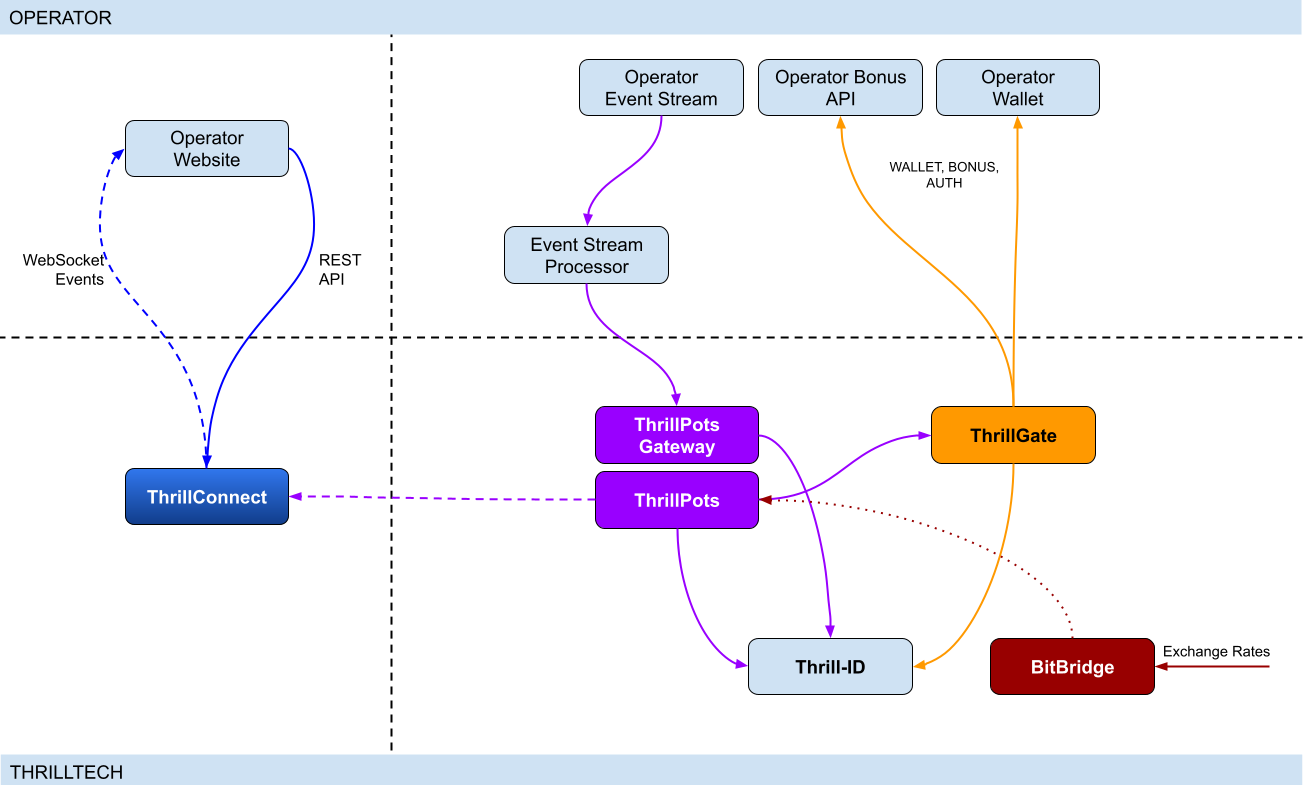
Integration points
ThrillPots has 3 primary integration points. This section will discuss each integration point and explain the purpose for each.
Betting integration
When it comes to Jackpot contributions, unlike normal games, player's do not make direct bets to jackpots. Rather, bets (contributions) are made on behalf of players via the operator's backend system.
Let's imagine a hypothetical casino where the operator has deployed a sitewide jackpot which is available to all players and is active across all casino content available on the site. The jackpot will receive a contribution bet each time a player makes a bet on any of the games on the site.
In order for these contributions to be made on behalf of the player, a simple event processor needs to be deployed that receives player game play / bet events and for each event makes a contribution request to the ThrillPots system.
In most platforms, this can be achieved by building a Kafka, RabbitMQ (or similar) event/stream processor which subscribes to the relevant topic/channel and makes REST API calls for each relevant event received. For platforms that do not have a message or event bus available, these events could be dispatched to the event processor via an alternative RPC mechanism such as REST, gRPC etc. This decision is all up to you, the integrating platform.
To learn more about this part of the integration, go to Event Stream Integration
Wallet Integration
When it comes to the wallet integration for ThrillPots, this integration is almost the same as any game provider integration. The wallet integration covers the following flows:
- Player token authentication
- Single Transactions (Debit & Credit)
- Batch Credit transaction (Multi-player payouts)
- Transaction cancellation
Integration is done against the ThrillGate service and can be performed in either direction (operator-to-provider or provider-to-operator).
To learn more about this part of the integration, go to Wallet Integration
Operator-to-Provider
If you decide to do an operator-to-provider integration, you will need to expose the endpoints required by the ThrillGate Standard Wallet Interface. All documentation can be found in the ThrillGate Standard Wallet Integration API documentation.
If you prefer for ThrillTech to integrate to your wallet API (provider-to-operator integration), you will need to provide the APIs and an integration environment for ThrillTech to develop the integration.
Frontend Integration
The ThrillConnect service is designed to support all frontend integrations. It exposes both a REST API (for end-user functionality like opt-in) as well as a WebSocket event stream for ad-hoc messaging and event broadcasts.
It is suggested to make use of the ThrillConnect JS API middleware layer which can easily be included in your site's code, freeing you up from the integration details and allowing you to focus on the visual and UX of the presentation layer.
To learn more about this part of the integration, go to Frontend Integration
Integrating ThrillPots Overview
The ThrillPots integration is best described as a 3-step process which is comprised of:
We suggest that before you dig into any of the three sections above, that you take the time to read this overview as it contains important information and pre-requisites that are needed for a smooth integration process.
PRE-REQUISITES
The rest of this guide assumes the following:
- You have the ThrillPots AIO Development container running and available. See this section for information on how to do this.
- You have a way to communicate with the services in the AIO Container (for example
curlorPostmanor similar tool)
Authentication and Authorization
Prior to making any calls to the ThrillPots service APIs, you need to authenticate with the ThrillTech platform using credentials that have been provisioned for you.
The ThrillTech platform uses a centralised authentication technology called Thrill-ID which provides governance over both User and Service accounts.
For integration purposes, you will need to provision a Service account (if one has not been provisioned for you yet). To learn more about provisioning accounts, please refer to the Thrill-ID documentation.
For an example of a Service account that would be suitable for the event stream integration service, see here
Setting up the AIO Container
The ThrillPots AIO Container is comprised of all the services necessary to run the ThrillPots platform from a single docker container.
The services made available are:
- ThrillPots Gateway (integrate your event/stream processor here)
- ThrillPots Service (the heart of the jackpot platform)
- ThrillGate (used to integrate with or to wallet APIs)
- ThrillConnect (integrate your frontend with this service)
- BitBridge (used for external data source integrations like exchange rates providers)
- ThrillTech Backoffice
- MongoDB
- Redis
The AIO container was designed to enable developers to deploy the entire ThrillPots stack on their local development machines on in a development environment quickly and easily.
In-Service Swagger UI
Each service provides access to a Swagger-UI for its API. Apart from ThrillConnect, which is an edge service, Swagger-UI support is compiled in to all the services and accessible via the /swagger-ui path.
ThrillConnect Swagger UI
Since ThrillConnect is an edge service and generally made available to the public internet, swagger-ui needs to be enabled via an environment variable.
In order to enable the /swagger-ui endpoint for the ThrillConnect service, you must set the TCS_ENABLE_SWAGGER environment variable to true.
Setting up the AIO Container: Pre-requisites
This short section explains the pre-requisites you will need in order to be able to setup the AIO container.
Pre-requisites
You will need the following software on your development machine:
Mandatory:
- Docker (or alternatively Docker Desktop)
- Postman
Optional:
Some type of MongoDB UI. We recommend you use MongoDB Compass
GitHub Access
You will need to have a GitHub account that has been granted access to the ThrillTech GitHub Organisation. This step is usually done as part of the initial technical kick off. As part of this access, you are granted access to repositories and packages that are needed.
Once you have provided ThrillTech with your Github account and we have added you as a collaborator, you need to have a Github Personal Access Token (classic) with permissions to read packages.
Go to your account's Settings -> Developer Settings -> Personal Access Tokens -> Tokens (classic) and create one.
(Click your avatar circle on the top right part of Github, click "Settings" and then "Developer Settings" is located at the bottom on the right of the menu of your account)
The only right it needs to have is to read packages.
Log in to our package repo and give your github username and the token your just created as password when prompted
docker login ghcr.io/thrilltech-io
Setting up the AIO Container: Initial Setup
Setting Up
Once you have provided ThrillTech with your Github account and we have added you as a collaborator, you need to have a Github Personal Access Token (classic) with permissions to read packages.
Go to your account's Settings -> Developer Settings -> Personal Access Tokens -> Tokens (classic)nd create one.
(Click your avatar circle on the top right part of Github, click "Settings" and then "Developer Settings" is located at the bottom on the right of the menu of your account)
The only right it needs to have is to read packages.
Log in to our package repo and give your github username and the token your just created as password when prompted:
docker login ghcr.io/thrilltech-io
Once you have successfully authenticated with the repository, you are ready to continue with the steps to getting the ThrillPots Dev Container running:
- Clone the https://github.com/thrilltech-io/dev-containers repository
- Go to the
/thrillpotsfolder in the repository and execute:docker compose up -d
NOTE: If you are running on MacOS on Apple Silicon, you may need to enable x86_64/amd64 emulation. Do this by going to Docker Desktop's settings -> General and finding the option called "Use Rosetta for x86_64/amd64 emulation on Apple Silicon" and enable it.
This will download all the necessary packages and run them via
Docker Compose. This process may take a few minutes to complete
- Import the provided Postman collection (
ThrillPots AIO Setup.postman_collection.json) which can be found in the repository into your Postman application - You will notice that it contains a number of endpoints, all numbered. The numbering indicates the sequence in which you must execute the calls.

- Execute all the steps in order
Once complete, you will have a ThrillPots system running and configured in 'standalone mode'. This means that you can make contributions and interact with the system, but there will be no external wallet calls made for player authentication or transactions.
In this mode, valid player IDs are in a range:
[player_00000 ... player_00999]
As part of the steps, you will also have created a Jackpot Template, and from this template you created a Jackpot instance. Jackpot Instances are the "running jackpots" that players contribute to. You also made a contribution directly to the jackpot.
You would also have created a Source and mapped the Jackpot Instance to the source and successfully made a contribution to the jackpot via the Source
The final step in the setup was the creation of an Internal mock wallet in ThrillGate. In a later section, where wallet integration is discussed, you will change this configuration to allow connectivity to your own wallet service, but for now, this mock wallet implementation is enough to get started with.
ThrillPots Wallet Configuration
IMPORTANT
Please note that when you change the wallet configuration for the ThrillPots service, you MUST restart the ThrillPots service for the changes to take effect.
Setting up the AIO Container: Admin Accounts
By default, the system is configured with an admin account called admin@thrilltech.io. This account has the ability to control all resources for the thrilltech oorganisation. You will have noticed that in all of the setup steps above, the owner_id or brand_id values were either thrilltech or thrilltech:brand1.
The ThrillPots system implements a "resource ownership" model which ensures that jackpot objects are not modifiable by unauthorized accounts.
Have a look at thrilltech:brand1. The first part before the : is the "organisation" or "operator id". The second part after the : is the "organisational unit" or "brand".
Creating a new ThrillPots admin account for a different organisation
If you want to create and manage ThrillPots resources for a different organisation/operator, you will first need to create a new orgnisation and admin account for that organisation. All of these actions are done through Thrill-ID.
The next steps assume that you are authenticated as
admin@thrilltech.io(as per Step 0 in the setup steps)
1. Create a new organisation
We first need to register a new organisation in Thrill-ID. For the purposes of this example, lets create a new organisation called "new-operator" which has 2 casino brands: new-mega-casino and new-mega-sportsbook.
To do this, make the following call to Thrill-ID:
POST http://localhost:9000/admin/organisations
Header: Authorization Value: Bearer AUTH_TOKEN_FOR_ADMIN@THRILLTECH.IO
Body:
{
"id": "new-operator",
"units": [
"new-mega-casino",
"new-mega-sportsbook"
],
"enabled": true,
}
You should receive a 200 OK.
Now we can create the new admin account for the new organisation
2. Create a new admin account
To create a new administrator account for the new-operator organisation we just created, we need to make another call to Thrill-ID, this time to create the actual account:
POST http://localhost:9000/admin/accounts
- Header:
Authorization - Value:
Bearer AUTH_TOKEN_FOR_ADMIN@THRILLTECH.IO
Body:
{
"account_type": "User",
"username": "admin@new-operator.com",
"password": "password",
"org_unit": {
"org_id": "new-operator"
},
"permissions": [
{
"system_id": "thrillpots",
"permissions": [{
"resource_id": "*",
"permission": "Admin"
}]
}
]
}
You should receive a 200 OK along with a response body showing you the newly created account.
3. Test the new admin account
Go back to Step 0 in the setup instructions and change the username and password to the new accounts username and password and try to authenticate. If everything went right, you should receive a new token for the account and can now proceed with managing ThrillPots resources for the new-operator organisation.
Once you are authenticated with the admin account for the new-operator organisation, you will be able to create Jackpot templates, instances, sources etc for the new-operator organisation.
NOTE: In previous versions of the platform, you also needed to configure the operator and brand separately in ThrillPots and ThrillGate. This is no longer needed since all services synchronise themselves with the Organisational structures defined in Thrill-ID
Event Processor Integration
In this section, we will discuss the Event Processor integration component that is required in order to enable the ability to make contributions to jackpots.
In general, this integration component needs to be able to receive the events that will drive jackpot contributions on behalf of users/players.
In a standard ThrillPots-powered system, it is usually gameplay that causes jackpot contributions to be made on behalf of players, but you are not limited to just this single use case.
From a simplistic perspective, the general logic should look something like this:
Authenticate your integration service with ThrillPots Gateway
Subscribe to gameplay/bet events from your event stream
When an event is received from your event stream:
- Read the properties of the event for game code, player ID and bet amount
- Make a contribution call to ThrillPots using these (and other values)
From here, it is relatively easy to see how you could expand the use case to create a Deposit jackpot. Lets imagine that the deposit flow was identified by source DEPOSIT. Lets also assume that when a successful deposit has been made by a player, that an event is published by the operator's platform. For argument's sake, lets call this event DEPOSIT_SUCCESS.
If we wanted to create a deposit jackpot, the logic could look as follows:
Subscribe to DEPOSIT_SUCCESS event
When an event is received:
- Read the properties of the event for the player ID and deposit amount
- Make a contribution call to ThrillPots using the DEPOSIT source_id and other properties
Sequence Diagram for the Event Processor integration

Authenticating via ThrillPots Gateway
The ThrillPots Gateway service exposes a REST endpoint which your event stream process can authenticate itself with Thrill-ID.
The endpoint is POST /authenticate/service and accepts a payload which contains the connecting service's username and password.
If authentication is successful, you will receive a response which contains token which must be used as a Bearer token in subsequent API requests to the ThrillPots Gateway service. Service tokens do not expire and therefore you do not need to be concerned with refreshing your token once it has been received.
See here for a Service account that you can provision for your Event Processor integration service.
Additional Information
If your event processor service is processing gameplay bet events, you should remember to filter out any and all events related to Jackpot Contributions as this could create loop of contributions on behalf of players
NOTE: For new integrations, we highly recommend that you integrate using the v2 Contribution API
Contributing to Jackpots
Now that you are processing events from your platform, you want to be able to make Contributions on behalf of players to the jackpot. The process of contributing is quite straight forward and does not require your service to be aware of player opt-in status. You will however need to decide which jackpot to contribute to and this can be done in one of two ways:
- Contribute by source
- Contribute direct to jackpot
Sources
A Source can be thought of as an operator-defined identifier for a user journey, a group of games, or even a single game. You can read more about Sources here,
Example: Sitewide Jackpot
If you wanted to create a site-wide jackpot for your casino vertical, you could create a Source named casino-sitewide, map a jackpot to the source and then send all contributions to that specific Source.
{
"token": "token_00001",
"brand_id": "thrilltech:brand1",
"player_id": "player_00001",
"player_country": "UK",
"source_id": "casino-sitewide",
"gameround_id": "1",
"currency": "EUR",
"base_wager": 1
}
Example: Deposit Jackpot
If you wanted to create a deposit jackpot, you can create a source called deposit, map the relevant jackpot to the source and then send all deposit-based contributions ot that source
{
"token": "token_00001",
"brand_id": "thrilltech:brand1",
"player_id": "player_00001",
"player_country": "UK",
"source_id": "deposit",
"gameround_id": "DEPOSIT_TX_ID",
"currency": "EUR",
"base_wager": 1
}
Example: Game Group Jackpot
If you wanted to create a jackpot for a specific set of games, for example, a jackpot for all egyptian themed games, you can create a source called egyptian-games and use that for contributions each time a player bets into a game that is egyption themed. This would naturally require your integration service to know which games are matched to which Game Group source.
{
"token": "token_00001",
"brand_id": "thrilltech:brand1",
"player_id": "player_00001",
"player_country": "UK",
"source_id": "egyptian-games",
"gameround_id": "1",
"currency": "EUR",
"base_wager": 1
}
Example: Game Specific Jackpots
If you want to split your liquidity by game title, you can create sources that correspond to the game codes of games in your system. Each source would need a jackpot mapped to it, but once that is done, you are able to make contributions to the source based on the game code of the base game bet.
{
"token": "token_00001",
"brand_id": "thrilltech:brand1",
"player_id": "player_00001",
"player_country": "UK",
"source_id": "provider-game-code",
"gameround_id": "1",
"currency": "EUR",
"base_wager": 1
}
Direct to Jackpot Contribution
An alternative to using sources is to make contributions directly to Jackpot Instances by their ID. For example, if you have created a Jackpot instance, you will have its ID available to you. This ID will not change over the lifetime of the jackpot. Making contributions directly to a Jackpot ID incurs less processing cost, but may also reduce the flexibility you may have in changing which jackpot players contribute to based on the content or user flows.
The only difference in the contribution payload is that the source_id is replaced with an instance_id field as seen below:
{
"instance_id": "0a1cfeea-5b07-4f2b-b2f1-2e4cd2aa991d",
"token": "token_00001",
"brand_id": "thrilltech:brand1",
"player_id": "player_00001",
"player_country": "MT",
"gameround_id": "1000",
"base_wager": 2,
"currency": "EUR"
}
Idempotent Contributions
If you require the ThrillPots system to prevent duplicate contributions being processed, then you can include the optional idempotency_key on your Contribution Request. The value of the idempotency_key must be a unique value generated by your system (for example a random UUID).
{
"token": "token_00001",
"brand_id": "thrilltech:brand1",
"player_id": "player_00001",
"player_country": "UK",
"source_id": "casino-sitewide",
"gameround_id": "1",
"currency": "EUR",
"base_wager": 1,
"idempotency_key": "unique_value_generated_by_your_system"
}
Synchronous vs Asynchronous contribution
The default contribution mechanism is synchronous. However, depending on your system architecture (and system load), you may prefer to make use of asynchronous contribution mechanics. In order to make asynchronous contributions, you need to provide a webhook that the ThrillPots system can call once the result of a contribution has been determined.
In order to make a contribution asynchronously, you simple need to add a callback property to either of the contribution payloads above to specify the webhook to call and which results you are interested in receiving.
The structure of the callback property is as follows:
{
"web_hook": "https://your.host/webhook",
"win_result_only": false
}
The web_hook field indicates the fully qualified HTTP path to your webhook and the win_result_only property indicates whether the webhook should only receive win results or all contribution results.
Therefore, an asynchronous contribution for a sitewide casino jackpot would look like this:
{
"token": "token_00001",
"brand_id": "thrilltech:brand1",
"player_id": "player_00001",
"player_country": "UK",
"source_id": "casino-sitewide",
"gameround_id": "1",
"currency": "EUR",
"base_wager": 1,
"callback": {
"web_hook": "https://your.host/webhook",
"win_result_only": false
}
}
When making an asynchronous contribution, the ThrillPots system will either return 200 OK with a JSON payload that contains a trace_id for the request when it has successfully accepted the contribution request for processing, or you will receive an error due to the request being malformed.
Any contribution request errors will be send to the webhook. The structure of the webhook payload is defined as follows:
Successful contribution result
{
"type": "data",
"contribution_amount": Number,
"contribution_currency": String,
"gameround_id": String,
"instance_id": String,
"metadata": null | Object,
"tickets_awarded": null | Number,
"timestamp": Number,
"win_amount": Number,
"win_pot_id": null | String,
"win_withheld": Boolean
}
Error result
{
"type": "error",
"status_code": Number,
"code": String,
"message": String,
}
The data portion will either be a ContributionResult structure or an Error structure. You can find more information on these structures in the API documentation.
Examples of payloads sent to the web hook
Contribution Result
{
"type": "data",
"contribution_amount": 0.1,
"contribution_currency": "EUR",
"gameround_id": "cc83c1cc-6260-44fc-822b-d3c03acf2d89",
"instance_id": "a49ff35f-6ecd-491f-b373-85e6caabacf1",
"metadata": null,
"tickets_awarded": null,
"timestamp": 1715714218408,
"win_amount": 0,
"win_pot_id": null,
"win_withheld": false
}
Error Result
{
"type": "error",
"status_code": 404,
"code": "GAME_NOT_FOUND",
"message": "sitewide-casino2",
}
Contribution Request Errors
A contribution request may result in a direct or a downstream error. A direct error is an error that is the result of the ThrillPots system return an error to the contribution request itself. A downstream error is an error that is propogated to the contribution request caller from a downstream system, such as ThrillGate or the operator wallet itself.
List of Direct Errors
For Direct Errors, you can expect:
| Error Code | Description |
|---|---|
CONTRIBUTION_REJECTED | The contribution was rejected due to a contribution rule failing, The rule in question will be contained within the CONTRIBUTION_REJECTED message |
GAME_NOT_FOUND | this occurs when making a contribution to source and the source does not exist |
CURRENCY_MULTIPLIERS_NOT_FOUND | self explanatory |
SYSTEM_ERROR | This is what you get with 500 http responses from ThrillPots |
OPTIN_ERROR | This occurs if the player;s optin record could not be updated |
SOURCE_JACKPOT_NOT_FOUND | This occurs if the jackpot mapped to the source could not be found |
SOURCE_JACKPOTS_NOT_ALLOWED | This occurs if the jackpot mapped to the source does not allow a contribution from this player (either country or brand not allowed) |
DB_ERROR | An internal DB ERROR |
UNSUPPORTED_BRAND | This is returned when the brand of the player (specified in contribution) is not supported by the jackpot or system |
Passing Metadata
If you need to pass contextual metadata from your event processor to your wallet, you can do so by adding a metadata field to the Contribution Request. This data will be passed through the system and attached to transaction requests to your wallet.
The metadata field can be any valid JSON value, for example:
Metadata containing an Object:
{
"token": "token_00001",
"brand_id": "thrilltech:brand1",
"player_id": "player_00001",
"player_country": "UK",
"source_id": "casino-sitewide",
"gameround_id": "1",
"currency": "EUR",
"base_wager": 1,
"metadata": {
"value1": "some value",
"value2": 1234
}
}
Metadata containing a String:
{
"token": "token_00001",
"brand_id": "thrilltech:brand1",
"player_id": "player_00001",
"player_country": "UK",
"source_id": "casino-sitewide",
"gameround_id": "1",
"currency": "EUR",
"base_wager": 1,
"metadata": "This is an arbitrary string value"
}
Event metadata
If you need to attach contextual metadata from your event processor to any subsequent JackpotWinEvent , you can do so by adding a event_metadata field to the Contribution Request. This data will be passed through the system and attached any resulting JackpotWinEvent under metadata.
The event_metadata field can be any valid JSON value, for example:
{
"instance_id": "ac2aad1d-16b6-4e9b-9e9a-d94f705a38f7",
"token": "token_00001",
"brand_id": "thrilltech:brand1",
"player_id": "player_00001",
"player_country": "MT",
"gameround_id": "1",
"base_wager": 1,
"currency": "EUR",
"event_metadata": {
"some": "data"
}
}
Will result in a JackpotWinEvent with metadata.
{
"event_type": "JackpotWinEvent",
"event_id": "8b4025fa-b4e7-4bd3-9e8c-3e95a1a2611d",
"data": {
"brand_id": "thrilltech:brand1",
"player_id": "player_00001",
"source_id": null,
"instance_id": "ac2aad1d-16b6-4e9b-9e9a-d94f705a38f7",
"jackpot_name": "QuickHit Instance",
"jackpot_currency": "EUR",
"timestamp": 1732010393528,
"win_pot_id": "major",
"win_amount": 100.05624999999992,
"currency_multipliers": {
"brand_id": "default",
"base_currency": "EUR",
"multipliers": {
"AMD": 430.0904,
},
"win_withheld": false,
"seed_deficit": 99.68125,
"community_winners": null,
"games_in_jackpot": [],
"seed": 100.0,
"metadata": {
"some": "data"
}
}
}
Contributing to Jackpots v2
The v2 Contribution API introduces a structured way to submit both source contributions and direct jackpot contributions within a single endpoint. It also enables advanced features such as linked jackpots and bet contexts.
- More information on jackpot sources can be found here
- More information on linked jackpot instances can be found here
Key Enhancements Over V1
- Unified Contribution Model: Supports both source contributions and direct to instance contributions in the same request.
- Linked Jackpot Support: Contributions automatically propagate to all directly linked instances.
- Structured Data Format: Requests follow a more structured schema, ensuring consistency and extendability.
- Expanded Response Structure:
- Synchronous contributions return an array of results for all contributions made.
- Asynchronous contributions trigger multiple webhook events, one per contribution.
Propagation Rules
A contribution applies to the target instance (or instance behind source) as well as all instances directly linked to it . Only the links defined for the target instance are honored.
Failure Handling
- If the contribution to the main instance fails, contributions to linked instances will not be attempted.
- If a linked instance contribution fails (e.g., due to missing opt-in or validation failure), other linked instances will still be processed normally.
Opt-in Requirement
Opt-ins do not propagate automatically. If a linked instance requires explicit opt-in and the user has not opted in, the contribution fails for that instance.
API Request structure
{
// Contribution target
"target": {
// Contribution target type, can be either "source" or "instance"
"type": "source",
// Contribution target identifier
// eg. "sitewide-casino" in case of source contribution
// eg "bdfa6295-d5a5-4c54-98bf-046355ce0252" in case of direct contribution to jackpot
"id": "sitewide-casino"
},
// Jackpot instance owner identifier (operator id)
"owner_id": "thrilltech",
// Details of the contributing player
"player": {
// Player identifier
"id": "player_00001",
// Player authentication token
"token": "token_00001",
// Player country
"country": "UK",
// Player brand identifier
"brand_id": "brand1",
// Any segments that the player might be part of
"segments": ["vip-1", "regular"],
},
// Base game wager
"base_wager": {
// Base wager currency
"currency": "EUR",
// Base wager value
"value": 1
},
// The contribution source that caused the contribution to happen.
// For example, if a player made a bet on a game, this would be the game's gameround ID.
// If a player made a successful deposit, this would be the deposit's identifier.
// This field is stored by ThrillPots and is used a back-reference to the original user action
// that caused the contribution to happen.
"source": {
// Type of the contribution source. Defaults to `gameround` but can be any value you choose
"type": "gameround",
// Identifier of the contribution source
"id": "gameround_id_1"
},
// Opaque data object that contains pass-through data for the caller.
// The content of this property will be sent back on the JackpotContributionResponse to this request.
"metadata": {},
// Opaque data object that contains pass-through data for the caller.
// The content of this property will be attached to any resulting events. ( win events at that stage )
"event_metadata": {},
// Optional contribution request parameters. Each field in this field is optional as well.
"options": {
// Optional identifier of the vertical from which the contribution request originated
"vertical_id": "slots",
// Optional boolean specifying whether linked jackpots should be honored
"allow_linked_contributions": true,
// If you would like ThrillPots to not process duplicate contributions, then specify a unique
// `idempotency_key` here
"idempotency_key": "random_uuid_value",
// Specify the webhook to call and which results you are interested in receiving
"callback": {
"web_hook": "https://your.host/webhook",
"win_result_only": false
}
},
}
Synchronous Contribution
If you do not specify a callback in the options.callback field, your contribution request will be processed synchronously.
In this case, the response will be an array of JackpotContributionResponse structures. Normally, the array will only contain 1 result, however when the initial jackpot is linked to other jackpots, the array will contain more than one element, one for each jackpot that was linked.
- Returns results for the target jackpot instance and all of its linked instances.
- Result structure remains the same with the only difference it being an array.
[
{
"instance_id": "bdfa6295-d5a5-4c54-98bf-046355ce0252",
"timestamp": 1739972162307,
"gameround_id": "bb2a5277-1f00-47cf-b62c-9f639ddff146",
"win_amount": 0.0,
"win_pot_id": null,
"tickets_awarded": null,
"win_withheld": false,
"contribution_currency": "EUR",
"contribution_amount": 0.0775,
"metadata": null
},
{
"instance_id": "3c90cb1e-a594-437e-a695-e76acb0e6809",
"timestamp": 1739972162394,
"gameround_id": "7eab0af4-1477-44d9-88f0-a9b7763a6d30",
"win_amount": 0.0,
"win_pot_id": null,
"tickets_awarded": null,
"win_withheld": false,
"contribution_currency": "EUR",
"contribution_amount": 0.1,
"metadata": null
}
]
- If contribution to a linked instance fails (e.g., due to missing opt-in or regulatory restrictions), the response details which instances succeeded and which failed.
[
{
"instance_id": "bdfa6295-d5a5-4c54-98bf-046355ce0252",
"timestamp": 1739972093142,
"gameround_id": "0860e92b-6d75-45ab-a520-39ab511e18c1",
"win_amount": 0.0,
"win_pot_id": null,
"tickets_awarded": null,
"win_withheld": false,
"contribution_currency": "EUR",
"contribution_amount": 0.0775,
"metadata": null
},
{
"status_code": 400,
"code": "CONTRIBUTION_REJECTED",
"message": "PlayerNotOptedIn"
}
]
Asynchronous Contributions & Webhooks
For asynchronous contributions, the API does not return immediate results. Instead, a webhook event is triggered for each contribution, providing its final outcome.
win_result_onlyOption- If
win_result_onlyis enabled, the webhook will only be triggered for contributions that result in a win. - If disabled (default behavior), a webhook is sent for every contribution, regardless of the outcome.
- The webhook payload structure remains unchanged from v1 contributions.
- If
{
"type": "data",
"instance_id": "bdfa6295-d5a5-4c54-98bf-046355ce0252",
"timestamp": 1739972634263,
"gameround_id": "0174c60b-f827-4e9c-8f66-8d5444732071",
"win_amount": 0.0,
"win_pot_id": null,
"tickets_awarded": null,
"win_withheld": false,
"contribution_currency": "EUR",
"contribution_amount": 0.0775,
"metadata": null
}
OAS and Swagger documentation
For more details on using this functionality, refer to ThrillPots Service and ThrillPots Gateway API documentation
Contribution Sources
Contribution Sources are a concept in ThrillPots that allow operators create well-known identifiers for one or more Jackpot Instances. A contribution source is bound to an operator and brand ID.
Contribution Sources are valid targets/identifiers for jackpot contribution bets (as described in the Contributing to Jackpots section).
Why use sources instead of Jackpot Instance IDs
Sources provide a mechanism of indirection to Jackpot Instances. Since a Source will usually have a well-known and human-defined identifier, and can represent one or more Jackpot Instances at any point in time, they provide a very convenient way for Integrating services and frontends to work with Jackpot Instances.
For example, instead of hard coding a specific Jackpot Instance ID into your frontend or backend services, you can simply configure the more human-readable source_id and use the Source to determine at runtime which Jackpot Instance ID is being used. This is especially useful when Jackpot models are changed over time since your integrated product will not need to be modified unless there is a fundamental structural change to the jackpot itself (which is rarely the case).
Example
An early, but very common use-case Contribution Source can be seen below, where a Source has been created for Operator thrilltech, Brand brand1 and is the source for the "site wide casino jackpot".
In this case, the contribution flow would look like this:
┌──────────────────────────────┐
│Contribution to Source Request│ (POST https://thrillpots_gateway_host/jackpots/contribute/source)
└──────────────┬───────────────┘
│
│
│
▼
┌────────┐
│ Source │
└────────┘
│
│
│
▼
┌──────────────────┐
│ Jackpot Instance │
└──────────────────┘
Under the covers (in the data), this Contribution Source will most probably look something like this:
{
"owner_id": "thrilltech:brand1",
"source_name": "Casino Sitewide Source",
"source_id": "sitewide-casino",
"jackpots": [
{
"priority": {
"$numberLong": "0"
},
"owner_id": "thrilltech:brand1",
"instance_id": "12231b6a-a774-4a93-8f16-f8af9aee2076"
}
]
}
The jackpots array in this Contribution contains a single Jackpot Instance ID because in this case, there is only one Jackpot Instance required. We will discuss use cases where having multiple Jackpot Instances in this array can be useful.
Creating a Contribution Source
To create a Contribution Source, we follow a 2 step process:
- Create the new source
- Assign the desired Jackpot Instance to the Source
1. Create the new source
To create a source, we use the POST /config/sources endpoint on ThrillPots Service (link to API).
An example to create a "Site-wide Jackpot" source for the thrilltech:brand1 operator-casino would look like this:
POST http://<thrillpots-service-host>/config/sources
Payload
[
{
"owner_id": "thrilltech:brand1",
"source_name": "Casino Sitewide Source",
"source_id": "sitewide-casino"
}
]
FYI: If you have downloaded the ThrillPots AIO Setup Postman collection, an example of this step will be in the
Basic Setup > Create a Sourceendpoint.
2. Assign the desired Jackpot Instance to the Source
Once you have created a source, you can now assign a pre-existing Jackpot Instance to the source. This can be done using the POST /config/sources/assignjackpot endpoint on the ThrillPots Service (link to API).
POST http://<thrillpots-service-host>/config/sources/assignjackpot
Payload
{
"owner_id": "thrilltech:brand1",
"source_id": ["sitewide-casino"],
"instance_id": "{{instance_id}}"
}
Retrieving the Jackpot Instance from a source
To retrieve that relevant Jackpot Instance for a specific source, you can use the following methods:
ThrillPots Gateway
GET /jackpots/instances/source/:source_id/brand/:brand_id?player_id=:player_id
The parameters in the url above are:
| Parameter | Description |
|---|---|
source_id | The Source ID (for example, sitewide-casino from the example above) |
brand_id | This is the identifier for the brand in question, which is comprised of the operator_id:brand_id pairing |
player_id | [OPTIONAL] If a player_id is specified, the returned Jackpot Instance will also contain the opt-in details for the specified player |
ThrillConnect (used by the Frontend)
GET /v1/thrillpots/instances/source/:source_id/brand/:brand_id?player_id=:player_id
The parameters in the url above are the same as for ThrillPots Gateway:
| Parameter | Description |
|---|---|
source_id | The Source ID (for example, sitewide-casino from the example above) |
brand_id | This is the identifier for the brand in question, which is comprised of the operator_id:brand_id pairing |
player_id | [OPTIONAL] If a player_id is specified, the returned Jackpot Instance will also contain the opt-in details for the specified player |
Retrieving all sources in the System
To retrieve a list of sources for a specific operator brand, you can use one of the following methods:
ThrillPots Gateway
GET /sources?owner_id=:brand_id
The brand_id parameter in the URL is once again comprised of the operator_id:brand_id pair which identifies a specific brand. If any sources have been configured for the operator_id:brand_id specified, they will be returned in a response which contains a list of Source JSON objects and will look similar to this example:
[
{
"owner_id": "thrilltech:brand1",
"source_name": "Casino Sitewide Source",
"source_id": "sitewide-casino",
"jackpots": [
{
"priority": 0,
"owner_id": "thrilltech:brand1",
"instance_id": "12231b6a-a774-4a93-8f16-f8af9aee2076"
}
]
}
]
ThrillConnect (used by the Frontend)
GET /v1/thrillpots/sources?owner_id=:brand_id
As in the ThrillPots Gateway example above, the brand_id parameter in the URL is once again comprised of the operator_id:brand_id pair which identifies a specific brand. The response payload will look exactly the same as the response from the ThrillPots Gateway service above.
ThrillPots Events
ThrillPots publishes a number of events which your integration service can subscribe to. There are a number of reasons you may want to consume these events, for example:
- Synthesizing related Kafka/RabbitMQ events
- Storing the events for BI / Analysis purposes
The following events are currently published by ThrillPots Gateway:
JackpotUpdateEvent- contains the latest jackpot values for the specified Jackpot Instance- Reference
{
"event_type": "JackpotUpdateEvent",
"event_id": "d6f05820-1da2-4152-bcba-6c0186f6cd77"
"data": {
"id": "jackpot instance ID",
"status": String,
"jackpot_type": "Jackpot" | "Raffle",
"currency": String,
"allowed_brands": [String],
"allowed_sources": [String],
"pots": [
{
"id": String,
"is_progressive": Boolean,
"current_value": Number
}
],
"timestamp_start": Number | null,
"timestamp_end": Number | null
"last_updated": Number
}
}
JackpotWinEvent- contains the details of a jackpot win- Reference
{
"event_type": "JackpotWinEvent",
"event_id": "3fe809f4-c94f-4950-9b86-5f2d0b8f604f"
"data": {
"brand_id": String,
"player_id": String,
"source_id": String | null,
"instance_id": String,
"jackpot_name": String,
"timestamp": Number,
"win_pot_id": String,
"win_amount": Number,
"currency_multipliers": {
"brand_id": String,
"base_currency": String,
"multipliers": {
"EUR": Number,
"GBP": Number,
"ZAR": Number,
...
"NZD": Number,
"SEK": Number
}
}
"games_in_jackpot": [String],
"seed": Number,
"win_withheld": Boolean,
"seed_deficit": Number,
"community_winners": null | [{
"player_id": String,
"brand_id": String,
"currency": String,
"win_amount": Number
}],
"metadata": null | Object,
}
}
RaffleWinEvent- contains the details of a Raffle Win- Reference
{
"brand_id": String,
"instance_id": String,
"jackpot_name": String,
"jackpot_currency": String,
"currency_multipliers": {
"brand_id": String,
"base_currency": String,
"multipliers": {
"EUR": Number,
"GBP": Number,
"ZAR": Number,
...
"NZD": Number,
"SEK": Number
}
}
"timestamp": Number,
"winners": [
{
"player_id": String,
"brand_id": String,
"currency": String,
"win_amount": Number
}
],
"win_withheld": bool
}
OptInEvent- contains the details of a player opt-in or opt-out into a Jackpot Instance Reference
{
"event_type": "OptInEvent",
"event_id": "27045bf8-78d2-4f99-97f1-e7d2e3aa434d"
"data": {
"instance_id": String,
"player_id": String,
"ext_player_id": String,
"player_brand_id": String,
"preferred_contribution_value": [Number],
"contribution_count": Integer,
"contribution_value": Number,
"opted_in": Boolean,
"last_updated": Integer
}
}
CommunityPayoutErrorEvent- sent in case of an error that is encountered when processing community payouts Reference
{
"event_type": "CommunityPayoutErrorEvent",
"event_id": "c034a751-cf91-4722-bc89-a2f8af472805"
"data": {
"instance_id": String,
"gameround_id": String,
"tx_credit_id": String,
"failed_payouts": [
{
"player_id": String,
"brand_id": String,
"currency": String,
"win_amount": Number
}
]
}
}
RafflePayoutErrorEvent- sent in case of an error that is encountered when processing raffle payouts Reference
{
"event_type": "RafflePayoutErrorEvent",
"event_id": "e981296b-199f-4454-b4ec-b3f36910c2cc"
"data": {
"instance_id": String,
"failed_payouts": [
{
"player_id": String,
"brand_id": String,
"currency": String,
"win_amount": Number
}
]
}
}
The ThrillPots events are published via the WebSocket endpoint /events.
Authenticating the Websocket connection to receive events
Once you have established a WebSocket connection from your event processor service to ThrillPots Gateway, you will need to send an Authenticate message which contains your Thrill-ID JWT token to authenticate your service to receive events.
{
"action": {
"Authenticate": {
"auth_token": "{{thrill-id-jwt}}"
}
}
}
If the authentication fails, the connection will be closed. Once you have authenticated, you should start receiving the events from the ThrillPots service.
Wallet Integration
Introduction
When integrating ThrillPots to your wallet, you will need to implement what is known as the "Standard Wallet API". This API has been defined by ThrillTech and is what our ThrillGate services uses to communicate with your backend to process:
- Player Authentication
- Transactions
- Transaction cancellations
- Batch transactions# Wallet Integration
ThrillPots Wallet Configuration
IMPORTANT
Please note that when you change the wallet configuration for the ThrillPots service, you MUST restart the ThrillPots service for the changes to take effect. In this section, we will discuss how ThrillPots performs player authentication and jackpot contribution transactions.
When running in a non-development environment (such as staging or production), ThrillPots uses the ThrillGate Service as an integration layer to an operator's wallet API.
NOTE:
ThrillPots also supports an internal, in-memory wallet for development or isolated testing purposes. This wallet is enabled by default in the AIO development container
Types of Wallet Integrations
There are two types of wallet integrations that can be developed:
- Provider-to-Operator integration
- Operator-to-Provider integration (Standard Wallet Integration)
This section is been written for operators that have chosen to do an Operator-to-Provider integration. For a Provider-to-Operator integration, ThrillTech are responsible for implementing the integration to your wallet API and that topic is out of scope for this book.
- Batch transaction cancellations
All communications from ThrillGate are conducted over secure SSL REST calls to your system.
As part of all calls to your system, ThrillGate sends an HMAC in the X-Server-Authorization header which is calculated from the body of the request only. You can use this HMAC value to verify that the request is coming from the expected ThrillGate server.
NOTE: During integration you will receive the secret key that you can use to verify the HMAC value with.
Enabling Wallet Integration Mode in the AIO Container
In order to configure the container to support external wallet integration mode, some additional API calls need to be made.
In the provided Postman collection, you will find a folder called Wallet Integration Mode. In this folder you will find additional API calls that you need to make in order to configure the container to run in this mode.

The first API call (1. Create Wallet Configuration) makes a call to the ThrillGate service and sets up the "Standard Wallet API" connnector.
It is very important that you do NOT change the details in Step 2a or 2b as these are specific for the AIO container.
PLEASE NOTE:
When building your wallet integration, the ThrillGate service will attempt to connect to your wallet service on your localhost:8201. This is configured via Docker networking as:
Host: "host.docker.internal"
Port: 8201You can change the port, but we would recommend not changing the host unless you are absolutely sure you know what you are doing.
Once you have executed step 1, you can Enable or Disable the external wallet mode using steps 2a or 2b respectively.
Once you have completed the configuration, you will need to restart the ThrillPots service in the AIO container.
IMPORTANT
Each time you change the wallet configuration of ThrillPots, you must restart the ThrillPots Service for the configuration changes to take effect
Standard Wallet Integration
What is the Standard Wallet?
The Standard Wallet is a REST API definition (designed by ThrillTech) which an operator needs to implement support for. The ThrillGate service uses the Standard Wallet API (as a client) to communicate with the operator's wallet to perform the following actions:
- Player token authentication
- Debit / Credit transactions (single)
- Credit transaction batches
- Transaction cancellation
Standard Wallet Sequence flows
Below is a sequence diagram of the expected data flow between ThrillGate and the operator wallet API:
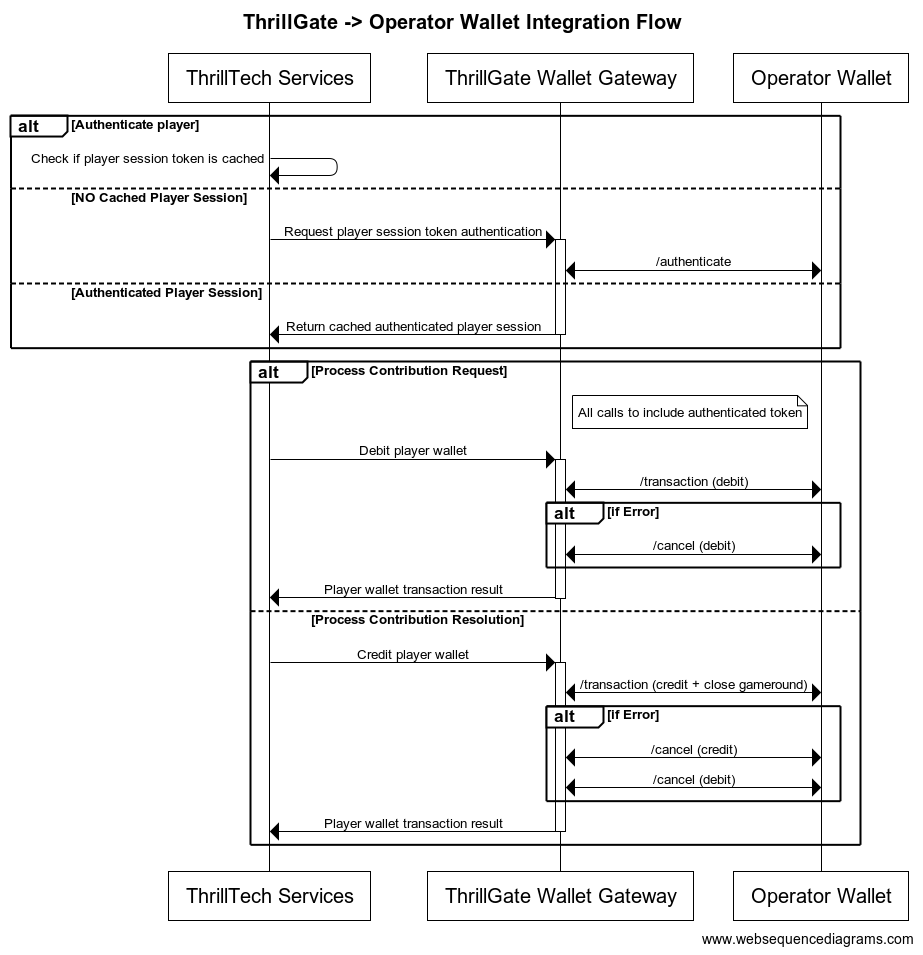
Configuring a Standard Wallet Integration in ThrillGate
To configure the ThrillGate Service to connect to your Standard Wallet API compliant service, you need to configure a Wallet resource.
To configure a wallet:
- URL:
POST http://localhost:8100/admin/wallets - Headers:
Authorization: Thrill ID Bearer token
- Body:
{
"id": "Brand1Wallet",
"operator_id": "thrilltech",
"brand_id": "brand1",
"wallet_type": "StandardWallet",
"connection_details": {
"protocol": "http",
"host": "host.docker.internal",
"port": 8201
},
"endpoints": {
"auth": {
"POST": "/wallet/authenticate"
},
"balance": {
"GET": "/wallet/balance"
},
"cancel_bet": {
"DELETE": "/wallet/cancel"
},
"transaction": {
"POST": "/wallet/transaction"
},
"transaction_batch": {
"POST": "/wallet/transaction/batch"
},
"cancel_batch": {
"DELETE": "/wallet/transaction/batch"
}
},
"config": {
"secret_key": "12345",
"accept_zero_value_credits": true,
"must_close_gamerounds": false
}
}
| Property | Description |
|---|---|
id | The ID you want to assign to the wallet. This is a unique identifier |
operator_id | The operator ID that this wallet is for |
brand_id | The brand ID that this wallet is for |
wallet_type | This must be set to StandardWallet |
connection_details.protocol | The protocol of the url. Usually http or https depending on your setup |
connection_details.host | The hostname for your server. While using the AIO container, it is recommended you keep this set to host.docker.internal |
connection_details.port | The port that your server is listening on |
endpoints | This is an object that describes the required endpoints for the Standard Wallet API |
endpoints.auth | This describes the endpoint that ThrillGate will make player authentication calls to |
endpoints.balance | This describes the endpoint that ThrillGate will make player balance requests to |
endpoints.transaction | This describes the endpoint that ThrillGate will call to perform transactions |
endpoints.cancel_bet | This describes the endpoint that ThrillGate will make to cancel transactions |
endpoints.transaction_batch | This describes the endpoint that ThrillGate will make for transaction batch calls |
endpoints.cancel_batch | This describes the endpoint that ThrillGate will make to cancel transaction batches |
config | An object that contains specific configuration elements for the Standard Wallet |
config.secret_key | This is the key that will be used to generate the HMAC value that is sent on each wallet request in the x-server-authorization header |
config.accept_zero_value_credits | This defines whether the external wallet supports Credit transactions which have a value of zero (0) |
config.must_close_gamerounds | This defines whether the external wallet requires gamerounds to be closed |
NOTE: If you need to change the definition of the endpoints, feel free to do so. Make sure that you use the correct HTTP verb and specify the endpoints as needed by your system.
Next Steps
Once you have understood the purpose of each of the Standard Wallet API calls as well as the flows around transaction and transaction batch handling, you are ready to start integrating the Standard Wallet API into your system. Refer to the provided API reference documentation and OpenAPI specs that have been provided to you.
Standard Wallet API: Player Authentication
In order for the ThrillPots system to take wagers (debit the player's wallet) and payout winnings (credit the player's wallet), it needs to be able to authenticate the player with the operator wallet.
This is done by calling the Standard Wallet's auth endpoint, passing in the provided player token and game code to the operator wallet and receiving the required player details (including the token that should be used for transaction calls)
This is done by ThrillGate calling the endpoint defined in endpoints.auth of the Standard Wallet's configuration. An example call's payload would look as follows:
{
"operator_id": "your_operator_id",
"brand_id": "your_brand_id",
"player_token": "token_00001",
"game_code": "AwesomeJackpotGameCode",
"currency": "EUR"
}
If successful, the operator wallet must respond with a valid session token and player details that can be used for future transaction calls for this player.
Response example:
{
"id": "player_00001",
"token": "session_token_00001",
"currency": "EUR",
"balance": 100001927.79,
"operator_id": "thrilltech",
"brand_id": "brand1",
"nickname": null,
"gender": "?",
"country": "MT",
"jurisdiction": null,
"segments": null
}
Standard Wallet API: Transactions
Transactions
Once the player token has been authenticated, the ThrillPots system can start making transaction calls through ThrillGate.
In standard operation, the first transaction call will be a Debit transaction request to fetch funds from a player's wallet for the Jackpot Contribution bet. This call is also intended to open the game round for the jackpot contribution.
If successful, ThrillPots will process the jackpot contribution and determine if a win occurred.
The next transaction call that will be made will be a Credit transaction request. This call is intended to pay any winnings to the player account and to close the game round that was opened with the Debit transaction.
Transaction Errors
If an error occurs while executing transactions with the operator wallet, ThrillGate and ThrillPots cooperate to ensure that the transaction error is handled correctly.
When an error occurs, ThrillGate will attempt to retry the transaction request a set number of times. If all retries fail, the error will be sent to ThrillPots for further handling.
If there are certain wallet errors that you do not wish ThrillGate to perform its retry logic, you can configure that as part of the wallet configuration in ThrillGate.
Please see the ThrillGate section on Configuring Wallet Error Behaviour for more information on how to configure ThrillGate's wallet error handling.
Once an error has been sent back to ThrillPots, ThrillPots will decide whether a transaction needs to be cancelled or not. Transaction cancellation is discussed next.
#@ Transaction Cancellation
In certain situations (as described in the errors section above), it is necessary for transactions to be cancelled. In general, ThrillPots handles transaction cancellation logic as follows:
If the Debit transaction failed
ThrillPots will send a cancellation request for the Debit transaction using the Debit transaction ID.
If the Credit transaction failed
ThrillPots will first send a cancellation request for the Credit transaction and then a separate cancellation request for the Debit transaction. Both requests will be sent with the respective transaction IDs.
Transaction Batches (Credit only)
ThrillPots uses Transaction Batch requests to communicate payouts to multiple players.
These types of payouts are only relevant to jackpots that are either:
- Multi-player payouts (community payouts)
- Raffle jackpot payouts
In both situations, since multiple players are considered winners from a single jackpot win, ThrillPots needs a way to credit wins to multiple players. Since these players are not guaranteed to be online at the time of the win, ThrillPots will not have access to any session token information for all the winners.
Transaction Batches are used in these special situations to communicate a set of credit operations that need to be applied to multiple players accounts.
Although unlikely, it is possible that not all the specified player accounts will be able to be credited with the winnings. Such a situation may arise if, for example, the player account has been banned/blocked or is self-excluded at the time of the jackpot win.
In these cases, the operator wallet is expected to flag the player account as an exception and continue to pay the remaining players in the transaction batch.
It is not considered an error if a player account in a transaction batch cannot be paid. The operator wallet should simply indicate this exception in the response and attempt to pay all other players.

Transaction Batch Cancellation
We have discussed what Transaction Batch exceptions are and how they are handled.
There is another limited set of errors that require Transaction Batches to be cancelled.
These errors are typically (but not limited to) errors such as network errors and timeouts. When an error occurs that leads ThrillGate to not be sure whether the operator's wallet has handled the transaction batch request, the request will first be retried, but after failing a specific number of times, the transaction batch will be cancelled.
Each transaction batch request has a unique identifier, and this identifier will be sent as part of the transaction batch cancellation request.
Frontend Integration
The final piece of the ThrillPots integration puzzle is the frontend integration. The frontend is responsible for displaying the Jackpot Ticker widget, showing players what the value of the various pots within the Jackpot are, the opt-in widget, allowing players to opt-in or opt-out of participation in the jackpot and so on.
The ThrillConnect Service has been specifically developed to provide an API and event stream over WebSockets to frontend clients to be able to interact with the ThrillPots system.
Integration Options
When integrating the frontend, there are two options that you can take:
- Use the existing libraries/components that ThrillTech has built to ease the effort of frontend integration:
- Develop your own integration with ThrillConnect and your own animation layer for the win animations
The sections below will detail the low level integration approach to help you understand how things work. You can then decide which of the options mentioned above you wish to take.
Sequence Diagram for the frontend to ThrillConnect integration

Integration Flow in detail
Fetching a Jackpot's details
One of the first things your frontend will most likely need to do is to retrieve jackpot details for your jackpot widget to display.
If you have followed the section on settings up the AIO container, you would have created a
Sourcecalledsitewide-casino.If you haven't gone through the process of setting up a source, we suggest that you review and understand sources and how they are used before continuing
To retrieve the jackpot for the sitewide-casino source, you will need to call:
GET /v1/thrillpots/instances/source/:source_id/brand/:brand_id?player_id=:player_id
replacing the :source_id and :brand_id values with the appropriate values that have been configured. If you used the default values from the Postman collection, you can use sitewide-casino for the source_id and thrilltech:brand1 for the brand_id.
If the player is already logged in, you can also pass the ID of the player via the query parameter player_id. Doing so will ensure that the player's opt-in status is returned in the jackpot instance information.
Establishing a WebSocket connection
In order to receive ThrillPots events and be able to opt players in or out of the jackpot, you will need to establish a websocket connection.
Once a player is logged into an operator's site, you can establish a WebSocket connection with ThrillConnect, passing in the player's session token.
NOTE
WebSocket connections are protected and can only be established by logged in players to prevent unauthorized and potentially dangerous abuse by attackers. Requiring a player a valid player session token in order to establish a WebSocket connection is a security-driven decision
To establish a WebSocket connection with ThrillConnect, open a WebSocket to:
/v1/events/{operator_id}/{brand_id}?token=PLAYER_TOKEN¤cy=PLAYER_CURRENCY
ThrillConnect will authenticate the token (the Player session token) from the query parameters with the operator's platform via ThrillGate. If the token is valid, the websocket connection will be established. If the token is invalid, the connection will receive a 403 FORBIDDEN error.
Subscribing to ThrillPots events
Once you have successfully established a WebSocket connection, you can now subscribe to ThrillPots events. This is done by sending a subscription request via the WebSocket to ThrillConnect. See below for the SubscribeRequest message that should be sent to subscribe to all ThrillPots events:
{
"SubscribeRequest": {
"events": [{
"source": "thrillpots",
"event_type": "*"
}]
}
}
If you would like to subscribe to only certain events, you can do so by explicitly specifying the events by source one-by-one.
ThrillPots currently publishes the folliowing event types:
- JackpotUpdateEvent
- WinEvent
- RaffleWinEvent
- OptInEvent
For more information about the structure of each of these events, see ThrillPots Event Structures
Player Opt-in / Opt-out
To opt a player in or out of a jackpot, you must send a PlayerOptInRequest message via the WebSocket connection.
Below are a few examples of opting a player in and out of a jackpot instance (please note, you will need to have the jackpot instance ID):
Opting in
{
"PlayerOptInRequest": {
"instance_id": "8dcc9f5a-f1c5-466f-83e9-928277d8bfb7",
"player_id": "player_00001",
"brand_id": "thrilltech:brand1",
"player_country": "MT",
"opt_in": true
}
}
Opting in with a preferred contribution value of 0.20
{
"PlayerOptInRequest": {
"instance_id": "8dcc9f5a-f1c5-466f-83e9-928277d8bfb7",
"player_id": "player_00001",
"brand_id": "thrilltech:brand1",
"player_country": "MT",
"opt_in": true,
"contribution_value": 0.2
}
}
Opting out of a Jackpot
{
"PlayerOptInRequest": {
"instance_id": "8dcc9f5a-f1c5-466f-83e9-928277d8bfb7",
"player_id": "player_00001",
"brand_id": "thrilltech:brand1",
"player_country": "MT",
"opt_in": false
}
}
Retrieving Exchange Rates
You may need to convert the values of a jackpot instance from the Jackpot currency to a player's currency. To help facilitate this, ThrillConnect exposes a currency endpoint which allows you to fetch the exchange rates used by ThrillPots.
To retrieve the 202408-1 exchange rates, you can call:
GET /v1/currencies
Retrieving a player's raffle ticket count
If player's are contributing to a Raffle jackpot, you may want to show the player how many tickets they have earned so far in the raffle. You can retrieve the player's current ticket count by requesting it via the WebSocket connection:
To retrieve a player's ticket count, send a PlayerRaffleTicketsRequest message:
{
"player_id": String,
"instance_id": String,
"brand_id": String
}
The instance_id is the instance ID of the Raffle jackpot, and the brand_id is in the format operator_id:brand_id.
If the request can be serviced, you should received a PlayerRaffleTicketsResponse message back:
{
"msg_type": "Message",
"source": "thrillpots",
"msg_name": "PlayerRaffleTicketResponse",
"operator_id": "OPERATOR_ID",
"brand_id": "BRAND_ID",
"player_id": "PLAYER_ID",
"data": {
"ticket_count": 4
},
"timestamp": 1711452762485
}
If there was an error processing the request, you will receive an Error message in response which will contain the message name that errored, as well as any relevant error details. For example:
{
"msg_type": "Error",
"source": "thrillpots",
"msg_name": "PlayerRaffleTicketRequest",
"operator_id": "OPERATOR_ID",
"brand_id": "BRAND_ID",
"player_id": "PLAYER_ID",
"data": {
"status_code": 404,
"code": "",
"message": "Error 404 Not Found from http://localhost:8084/instances/raffle/e0dee1ae-6231-458a-ad6d-4dc0c941e5c3/tickets/player_00001/brand/thrilltech:brand1"
},
"timestamp": 1711452757807
}
In this case, the request Jackpot instance ID could not be found.
ThrillConnect JS Client
ThrillConnect Client is the glue that connects your Portal and ThrillTech systems to provide seamless experience for your players. It is designed with minimialistic, yet powerful API, that can be easily consumed and covers all the narrow and tricky edgecases of the frontend integration. It's purpose is to make your frontend development trivial and expose the full API surface with minimum effort.
On this page you can find all the relevant details on how to use the Client, as well as examples and use cases.
Client version will be aligned with service version and just like that you'll be subscribed to all the latest and greatest features of our platform.
Source
Source code is avaiable for review & fork for all ThrilTech customers. You can find the client at https://github.com/thrilltech-io/connect-client.
Initialization
Client constructor needs the host address and BrandContext. Player context can optionally be passed on initialization or later on via authenticate method.
Additionally one can specify dev options, like the use of unsecure http/ws and client internal logs for dev convenience.
All the events of interest must be passed on to the constructor in the events array so that client can subscribe to relevant systems on the WS channel.
Player context
Player context type provides all necessary player details for establishing the WSS connection and interacting with the Jackpots from player perspective.
type PlayerContext = {
id: string,
token: string,
currency: string,
country: string,
}
Initialization without player context
Prior to having a valid player session and auth token, one can initialize the client without PlayerContext. In this limited mode the WS events will not be available and only public REST endpoints can be used to make requests. ( see API section for what is available )
import { ThrillConnect, ConnectEvents } from "./thrillconnect.js"
const client = new ThrillConnect({
host: "localhost:11000",
brand: {
operator_id: "thrilltech",
brand_id: "brand1",
},
dev: {
secure: false
},
events: [
ConnectEvents.JackpotUpdateEvent,
ConnectEvents.RaffleWinEvent,
ConnectEvents.JackpotWinEvent,
ConnectEvents.OptInEvent,
]
})
Later on, once we have player details, we can authenticate and subscribe to full functionality of the client.
client.authenticate({
id: "player_id_token_00001",
token: "token_00001",
country: "USA",
currency: "USD",
})
Initialization with player context
Alternatively, if player details are known from the start, those can be passed directly to the client constructor.
const client = new ThrillConnect({
host: "localhost:11000",
player: {
id: "player_00001",
token: "token_00001",
country: "USA",
currency: "USD",
},
brand: {
operator_id: "thrilltech",
brand_id: "brand1",
},
dev: {
secure: false
},
events: [
ConnectEvents.JackpotUpdateEvent,
ConnectEvents.RaffleWinEvent,
ConnectEvents.JackpotWinEvent,
ConnectEvents.OptInEvent,
]
})
API
Following is a list of all the available methods on connect client.
Adding an event listener
client.on(ConnectEvent, handler)
Adding an once off event listener
client.once(ConnectEvent, handler)
Removing an event listener
client.off(ConnectEvent, handler)
Passing player context
client.authenticate(PlayerContext)
Fetching the currency multipliers
const multipliers = await client.request().getCurrencies()
Fetching the list of defined sources for the provided BrandContext
const sources = await client.request().getSources()
Getting the Jackpot instance that maps to a source
const sourceId = "sitewide-jackpot"
const instance = await client.request().getJackpotForSource(sourceId)
Getting the player OptIn status for a source
Note: PlayerContext is required for this request.
const sourceId = "sitewide-jackpot"
const status = await client.request().getOptInStatusForSource(sourceId)
Opting in/out from a source
Note: PlayerContext is required for this request. This request uses the authenticated WS channel. When jackpot allows for variable contribution, preferred contribution value can be passed as 3 parameter.
const sourceId = "sitewide-jackpot"
const optIn = true
const preferredContributionValue = undefined
client.request().optIntoSource(sourceId, optIn, preferredContributionValue)
Opting in/out from an instance
Note: PlayerContext is required for this request. This request uses the authenticated WS channel. When jackpot allows for variable contribution, preferred contribution value can be passed as 3 parameter.
const instanceId = "dd7243ea-9992-47ae-a2a6-531b3f0e2197"
const optIn = true
const preferredContributionValue = undefined
client.request().optIntoInstance(instanceId, optIn, preferredContributionValue)
Events
Client receives events via the WS connection. In order to receive an event, it needs to explicitly be listed in the list of events in the Client constructor.
All the available events are listed in ConnectEvents.
import { ConnectEvents } from "./thrillconnect.js"
function updateTickers(e:JackpotUpdateEvent) {
console.log(e.status)
}
// subscribe to Jackpot updates
client.on(ConnectEvents.JackpotUpdateEvent, updateTickers)
// unsubscribe from Jackpot updates
client.off(ConnectEvents.JackpotUpdateEvent, updateTickers)
Animation Driver
ThrillTech supplies a default set of Jackpot win animations to enrich the player experience during a Jackpot win. The animations driver is a JS library that takes care of win animations loading and playback. Animations are easily customizable and the driver allows for flexible cusomizations of the playback.
Source
Source code is avaiable for review & fork for all ThrilTech customers. You can find the driver at https://github.com/thrilltech-io/animations-driver.
Overview
The JS driver exposes two functions:
preload(config, tier, muted)- loads the required assets per pased configuration object. When muted, sounds will not be loaded.run(config, tier, amount, muted)- starts the animation sequence defined in the configuration. Run will do load if assets are not already loaded.
The preload function is intended to provide separation of the loading phase, so that in case of unreasonably slow connection, stale loading can be detected and acted upon (for example using a fallback alert / win message if assets load didnt complete in a certain period).
Mute state cannot be controlled after the animation is run. The current sound preference should be passed to the run ( and optionally preload ) and based on that the defined in configuration sfx are either loaded or not.
Usage
import { preload, run } from "./main.js"
const config = "/configs/example.json"
const tier = "super"
const amount = 10000
const muted = false
preload(config, tier, muted).then(()=>{
run(config, tier, amount, muted)
})
Configuration
See example configurations in ./public/configs in the driver repository.
Following is a full possible configuration with all settings commented inline.
{
"dom": {
// optional - skip "top" section if no header is required
"top": {
// id of top container
"id": "top-container",
// messages to display during presentation phase
"message": {
"id":"top-message",
// message during wheel spin
"wheel": "Stop the wheel and win BIG! BIG!",
// message during tickup
"tickup": "Congratulations!"
}
},
// optional - skip "bottom" section if no footer is required
"bottom": {
// id of bottom container
"id": "bottom-container",
// action button
"button": {
// id of the action button
"id": "action-button",
// actions during wheel phase
"wheel": {
"stop": "STOP THE WHEEL",
"skip": "SKIP THE WHEEL"
},
// actions during tickup phase
"tickup": {
"skip": "SKIP TICKUP"
},
// actions after tickup
"end": {
"close": "CLOSE"
}
}
},
// enable touch controls during phase
"touch": {
// touch during wheel acts as stop / skip
"wheel": {
"stop": true,
"skip": true
},
// touch during tickup acts as skip
"tickup": true
}
},
// ticker skin and font settings -
// skin provided and customised by thrilltech
"ticker": {
"skin": "/ticker/Win_BG.skel",
"font": "/fonts/rubik.woff",
"fontFamily": "rubik",
// maximum font size for the tickup
"maxFontSize": 80,
// https://developer.mozilla.org/en-US/docs/Web/JavaScript/Reference/Global_Objects/Intl/NumberFormat
// the currency for the win amount as per ISO 4217 currency codes
// optional, leave empty for no currency or monetary amount format
"currency":"JPY",
// A string with a BCP 47 language tag, optional
"currencyFormat":"en-US"
},
// wheel skin and segments settings -
// skin provided and customised by thrilltech
"wheel": {
"rotate": 0,
"base": "/wheel/Wheel_of_Fortune.skel",
// wheel has 8 segments, following is the order of tiers per segments
"segments": [
"mini",
"super",
"mini",
"epic",
"mini",
"super",
"epic",
"super"
],
// map of segment textures
"skins": {
"mini": "/skins/demo/mini.png",
"super": "/skins/demo/super.png",
"epic": "/skins/demo/epic.png"
}
},
// jackpot animation skin -
// skin provided and customised by thrilltech
"pots": {
"mini": {
// path of the spine export containing the mini tier animation
"source": "/pots/mini/Thrillpot.skel",
// prefix of the animation for this tier
"prefix": "",
// sound clips for all animation phases
"sfx": {
"intro": ["/sfx/base/mini/intro.mp3"],
"particles": ["/sfx/base/mini/confetti.mp3"],
"tickup_start": ["/sfx/base/mini/tickup-start.mp3"],
"tickup_loop": ["/sfx/base/mini/tickup-loop.mp3"],
"outro": ["/sfx/base/mini/outro.mp3]"
}
},
"super": {
// path of the spine export containing the mini tier animation
"source": "/pots/super/Thrillpot.skel",
// prefix of the animation for this tier
"prefix": "",
// sound clips for all animation phases
"sfx": {
"intro": ["/sfx/base/super/intro.mp3"],
"particles": ["/sfx/base/super/confetti.mp3"],
"tickup_start": ["/sfx/base/super/tickup-start.mp3"],
"tickup_loop": ["/sfx/base/super/tickup-loop.mp3"],
"outro": ["/sfx/base/super/outro.mp3]"
}
},
"epic": {
// path of the spine export containing the mini tier animation
"source": "/pots/epic/Thrillpot.skel",
// prefix of the animation for this tier
"prefix": "",
// sound clips for all animation phases
"sfx": {
"intro": ["/sfx/base/epic/intro.mp3"],
"particles": ["/sfx/base/epic/confetti.mp3"],
"tickup_start": ["/sfx/base/epic/tickup-start.mp3"],
"tickup_loop": ["/sfx/base/epic/tickup-loop.mp3"],
"outro": ["/sfx/base/epic/outro.mp3]"
}
},
},
// particles animation skin -
// skin provided and customised by thrilltech
"particles": {
"mini": {
"source": "/particles/confetti/Thrillpot.skel",
"prefix": ""
},
"super": {
"source": "/particles/confetti/Thrillpot.skel",
"prefix": ""
},
"epic": {
"source": "/particles/confetti/Thrillpot.skel",
"prefix": ""
}
}
}
SFX
Config contains sound definitions for various phases of the animation. All sounds are optional.
Sounds per animation phase are defined as an array. All elements of the phase array refer to the same sound effect. The intention is to provide multiple sfx formats and the runtime will automatically pick the one supported on the client system. Recommended formats to use are webm, wav and mp3. wav has the widest support accross devices, but is not as optimal as webm and mp3 in terms of filesize.
"sfx": {
"intro": ["/sfx/base/epic/intro.webm", "/sfx/base/epic/intro.wav"],
"particles": ["/sfx/base/epic/confetti.webm", "/sfx/base/epic/confetti.wav"],
"tickup_start": ["/sfx/base/epic/tickup-start.webm", "/sfx/base/epic/tickup-start.wav"],
"tickup_loop": ["/sfx/base/epic/tickup-loop.webm", "/sfx/base/epic/tickup-loop.wav"],
"outro": ["/sfx/base/epic/outro.webm", "/sfx/base/epic/outro.wav"]
}
Metrics
The ThrillPots system exposes Prometheus metrics per service via the /metrics endpoint.
Below is the list of metrics exposed per service:
ThrillPots Gateway
| Metric name | Metric Type | Description |
|---|---|---|
| contrib_req_sync_recv | Counter | Syncronous Contribution Requests Received |
| contrib_req_async_recv | Counter | Asyncronous Contribution Requests Received |
| contrib_req_queued | Gauge | Contribution Requests currently queued |
| contrib_req_processed | Counter | Contribution requests processed |
| contrib_avg_queue_time | Counter | Average Contribution Request Queue Time |
| contribution_webhook_calls | Counter | Contribution Webhook calls made |
| http_requests_avg_time | Family: Counter | HTTP Request Average Time |
ThrillPots Service
| Metric name | Metric Type | Description |
|---|---|---|
| contrib_req_recv | Counter | Contribution Requests Received |
| contrib_req_processed | Counter | Contribution requests processed |
| contrib_req_rejected | Counter | Contribution Requests rejected |
| http_requests_avg_time | Family: Counter | HTTP Request Average Time |
| preflight_avg_time | Counter | Average time spent validating contribution requests |
| jackpot_opts | Family: Counter | Opt-In/Out related metrics |
Thrillpots Gateway
ThrillPots Service
ThrillGate
ThrillConnect
Thrill-ID
BitBridge
ThrillOffice
Environment Variables
Each service has a list of environment variables which define its configuration for runtime. Use this reference to understand what each environment variable does, what it is used for and the possible values it can contain.
Quick Links
- ThrillPots Gateway
- ThrillPots Service
- ThrillGate Service
- ThrillConnect Service
- Thrill-ID Service
- BitBridge Service
ThrillPots Gateway
| Variable Name | Default Value | Description |
|---|---|---|
| GW_LOG_LEVEL | info | The log level at which logs will be written. Possible values are info, debug, warn, trace |
| GW_WEB_HOST | 0.0.0.0 | The hostname to bind the web service to |
| GW_WEB_PORT | 80 | The port to bind the web service to |
| GW_MONGO_HOST | mongodb://localhost | The connection URI for the MongoDB server |
| GW_MONGO_DB_NAME | test | The DB name for the Service (should usually be set to thrillpots-gateway) |
| GW_MONGO_USERNAME | None | [Optional] The username to use to authenticate with MongoDB |
| GW_MONGO_PASSWORD | None | [Optional] The password to use to authenticate with MongoDB |
| GW_MONGO_RETRY_WRITES | true | Flag to set whether writes are retries when they fail |
| GW_REDIS_HOST | redis://localhost | The connection URI for REDIS. Possible schemas are: - Standalone: redis://hostname:port- Cluster: redis://hostname:port,redis://hostname2:port,..- Sentinel: sentinel://hostname:port/master/replica or sentinel+tls://hostname:port/master/replica |
| GW_REDIS_DB | 0 | The Redis DB number to use |
| GW_REDIS_USERNAME | None | [Optional] The REDIS username to use for authentication |
| GW_REDIS_PASSWORD | None | [Optional] The REDIS password to use for authentication |
| GW_REDIS_SECURE | false | [Optional] Defines if the REDIS connection is secure or not |
| GW_REDIS_CLUSTER | false | [Optional] Defines if the REDIS connection is secure or not. For a standard Sentinel deployment, this variable should be set to false |
| GW_JPSERVER_HOST | http://localhost:8084 | The URL for the ThrillPots Service. For clustered environments, this should point to the DNS entry for the ThrillPots Service on your internal load balancer |
| GW_THRILLID_HOST | http://localhost:9000 | The URL for the Thrill-ID Service. For clustered environments, this should point to the DNS entry for the Thrill-ID Service on your internal load balancer |
| GW_THRILLID_USERNAME | None | The username the service should use to authenticate with Thrill-ID. In a standard deployment, this should be set to thrillpots.gateway |
| GW_THRILLID_PASSWORD | None | The password the service should use to authenticate with Thrill-ID. In a default deployment, this will start off as password and can be changed via Thrill-ID directly |
| GW_THRILLGATE_HOST | None | The URL for the ThrillGate Service. For clustered environments, this should point to the DNS entry for the ThrillGate Service on your internal load balancer |
ThrillPots Service
| Variable Name | Default Value | Description |
|---|---|---|
| JP_LOG_LEVEL | info | The log level at which logs will be written. Possible values are info, debug, warn, trace |
| JP_WEB_HOST | 0.0.0.0 | The hostname to bind the web service to |
| JP_WEB_PORT | 80 | The port to bind the web service to |
| JP_MONGO_HOST | mongodb://localhost | The connection URI for the MongoDB server |
| JP_MONGO_DB_NAME | thrillpots | The DB name for the Service (should usually be set to thrillpots) |
| JP_MONGO_USERNAME | None | [Optional] The username to use to authenticate with MongoDB |
| JP_MONGO_PASSWORD | None | [Optional] The password to use to authenticate with MongoDB |
| JP_MONGO_RETRY_WRITES | true | Flag to set whether writes are retries when they fail |
| JP_REDIS_HOST | redis://localhost | The connection URI for REDIS. Possible schemas are: - Standalone: redis://hostname:port- Cluster: redis://hostname:port,redis://hostname2:port,..- Sentinel: sentinel://hostname:port/master/replica or sentinel+tls://hostname:port/master/replica |
| JP_REDIS_DB | 0 | The Redis DB number to use |
| JP_REDIS_USERNAME | None | [Optional] The REDIS username to use for authentication |
| JP_REDIS_PASSWORD | None | [Optional] The REDIS password to use for authentication |
| JP_REDIS_SECURE | false | [Optional] Defines if the REDIS connection is secure or not |
| JP_REDIS_CLUSTER | false | [Optional] Defines if the REDIS connection is secure or not. For a standard Sentinel deployment, this variable should be set to false |
| JP_THRILLID_HOST | http://localhost:9000 | The URL for the Thrill-ID Service. For clustered environments, this should point to the DNS entry for the Thrill-ID Service on your internal load balancer |
| JP_THRILLID_USERNAME | thrillpots | The username the service should use to authenticate with Thrill-ID. In a standard deployment, this should be set to thrillpots |
| JP_THRILLID_PASSWORD | password | The password the service should use to authenticate with Thrill-ID. In a default deployment, this will start off as password and can be changed via Thrill-ID directly |
| JP_SERVICE_CURRENCY_REFRESH | 86400000 | The amount of time between ThrillPots attempting to refresh its currency multipliers. The default is set to 24 hours (86400000 milliseconds) |
| JP_SERVICE_UPDATE_EVENT_FREQUENCY | 10000 | The amount of time (in milliseconds) between jackpot update events being sent out. The default is set to 10 seconds, but we recommend reducing this to a value between 2000 and 5000 (2s - 5s) |
| JP_SERVICE_AUTH_CACHE_TTL | 300 | The number of seconds to cache a player's authentication token. Change this to reflect the TTL on your system's player session token lifetimes |
| JP_RNG_BACKGROUND_CYCLING | false | If set to true, the RNG will automatically perform background cycling of its values in periods defined by JP_RNG_BACKGROUND_CYCL_DELAY_MIN_SECS and JP_RNG_BACKGROUND_CYCLE_DELAY_MAX_SECS |
| JP_RNG_BACKGROUND_CYCLE_DELAY_MIN_SECS | 0 | [Optional] The minimum amount of delay between background cycles. We recommend a value of 60 |
| JP_RNG_BACKGROUND_CYCLE_DELAY_MAX_SECS | 0 | [Optional] The maximum amount of delay between background cycles. We recommend a value of 180 |
| JP_RNG_MONITOR_PERIOD_SECS | 0 | [Optional] The maximum period between the randomness monitoring test running. We recommend a value of 600 |
| JP_RNG_FAILURES_TO_ALERT | None | [Optional] If RNG Monitoring is enabled, this variable defines the number of consecutive failures that are needed to generate an alert. We recommend setting this to a value of 5 or higher |
| JP_CC_URL | None | The URL of the ThrillTech CC Service which must be defined for all operator environments. For STAGING environments, this value should be set to https://cc-stg.thrillpots.io and for PRODUCTION environments, it should be set to: https://cc.thrilltechapi.com |
| JP_CC_OPERATOR_ID | None | This value identifies you as an operator and will be provided to you by ThrillTech |
| JP_CC_SERVICE_ID | None | This identifies the product and should be set to thrillpots |
ThrillGate Service
| Variable Name | Default Value | Description |
|---|---|---|
| TG_LOG_LEVEL | info | The log level at which logs will be written. Possible values are info, debug, warn, trace |
| TG_WEB_HOST | 0.0.0.0 | The hostname to bind the web service to |
| TG_WEB_PORT | 80 | The port to bind the web service to |
| TG_MONGO_HOST | mongodb://localhost | The connection URI for the MongoDB server |
| TG_MONGO_DB_NAME | test | The DB name for the Service (should usually be set to thrillgate) |
| TG_MONGO_USERNAME | None | [Optional] The username to use to authenticate with MongoDB |
| TG_MONGO_PASSWORD | None | [Optional] The password to use to authenticate with MongoDB |
| TG_MONGO_RETRY_WRITES | true | Flag to set whether writes are retries when they fail |
| TG_REDIS_HOST | redis://localhost | The connection URI for REDIS. Possible schemas are: - Standalone: redis://hostname:port- Cluster: redis://hostname:port,redis://hostname2:port,..- Sentinel: sentinel://hostname:port/master/replica or sentinel+tls://hostname:port/master/replica |
| TG_REDIS_DB | 0 | The Redis DB number to use |
| TG_REDIS_USERNAME | None | [Optional] The REDIS username to use for authentication |
| TG_REDIS_PASSWORD | None | [Optional] The REDIS password to use for authentication |
| TG_REDIS_SECURE | false | [Optional] Defines if the REDIS connection is secure or not |
| TG_REDIS_CLUSTER | false | [Optional] Defines if the REDIS connection is secure or not. For a standard Sentinel deployment, this variable should be set to false |
| TG_THRILLID_HOST | http://localhost:9000 | The URL for the Thrill-ID Service. For clustered environments, this should point to the DNS entry for the Thrill-ID Service on your internal load balancer |
| TG_THRILLID_USERNAME | None | The username the service should use to authenticate with Thrill-ID. In a standard deployment, this should be set to thrillgate |
| TG_THRILLID_PASSWORD | None | The password the service should use to authenticate with Thrill-ID. In a default deployment, this will start off as password and can be changed via Thrill-ID directly |
ThrillConnect Service
| Variable Name | Default Value | Description |
|---|---|---|
| TCS_LOG_LEVEL | info | The log level at which logs will be written. Possible values are info, debug, warn, trace |
| TCS_WEB_HOST | 0.0.0.0 | The hostname to bind the web service to |
| TCS_WEB_PORT | 80 | The port to bind the web service to |
| TCS_MONGO_HOST | mongodb://localhost | The connection URI for the MongoDB server |
| TCS_MONGO_DB_NAME | test | The DB name for the Service (should usually be set to thrillconnect) |
| TCS_MONGO_USERNAME | None | [Optional] The username to use to authenticate with MongoDB |
| TCS_MONGO_PASSWORD | None | [Optional] The password to use to authenticate with MongoDB |
| TCS_MONGO_RETRY_WRITES | true | Flag to set whether writes are retries when they fail |
| TCS_REDIS_HOST | redis://localhost | The connection URI for REDIS. Possible schemas are: - Standalone: redis://hostname:port- Cluster: redis://hostname:port,redis://hostname2:port,..- Sentinel: sentinel://hostname:port/master/replica or sentinel+tls://hostname:port/master/replica |
| TCS_REDIS_DB | 0 | The Redis DB number to use |
| TCS_REDIS_USERNAME | None | [Optional] The REDIS username to use for authentication |
| TCS_REDIS_PASSWORD | None | [Optional] The REDIS password to use for authentication |
| TCS_REDIS_SECURE | false | [Optional] Defines if the REDIS connection is secure or not |
| TCS_REDIS_CLUSTER | false | [Optional] Defines if the REDIS connection is secure or not. For a standard Sentinel deployment, this variable should be set to false |
| TCS_THRILLID_HOST | http://localhost:9000 | The URL for the Thrill-ID Service. For clustered environments, this should point to the DNS entry for the Thrill-ID Service on your internal load balancer |
| TCS_THRILLID_USERNAME | None | The username the service should use to authenticate with Thrill-ID. In a standard deployment, this should be set to thrillconnect |
| TCS_THRILLID_PASSWORD | None | The password the service should use to authenticate with Thrill-ID. In a default deployment, this will start off as password and can be changed via Thrill-ID directly |
Thrill-ID Service
| Variable Name | Default Value | Description |
|---|---|---|
| TID_LOG_LEVEL | info | The log level at which logs will be written. Possible values are info, debug, warn, trace |
| TID_WEB_HOST | 0.0.0.0 | The hostname to bind the web service to |
| TID_WEB_PORT | 80 | The port to bind the web service to |
| TID_MONGO_HOST | mongodb://localhost | The connection URI for the MongoDB server |
| TID_MONGO_DB_NAME | test | The DB name for the Service (should usually be set to thrillid) |
| TID_MONGO_USERNAME | None | [Optional] The username to use to authenticate with MongoDB |
| TID_MONGO_PASSWORD | None | [Optional] The password to use to authenticate with MongoDB |
| TID_MONGO_RETRY_WRITES | true | Flag to set whether writes are retries when they fail |
| TID_REDIS_HOST | redis://localhost | The connection URI for REDIS. Possible schemas are: - Standalone: redis://hostname:port- Cluster: redis://hostname:port,redis://hostname2:port,..- Sentinel: sentinel://hostname:port/master/replica or sentinel+tls://hostname:port/master/replica |
| TID_REDIS_DB | 0 | The Redis DB number to use |
| TID_REDIS_USERNAME | None | [Optional] The REDIS username to use for authentication |
| TID_REDIS_PASSWORD | None | [Optional] The REDIS password to use for authentication |
| TID_REDIS_SECURE | false | [Optional] Defines if the REDIS connection is secure or not |
| TID_REDIS_CLUSTER | false | [Optional] Defines if the REDIS connection is secure or not. For a standard Sentinel deployment, this variable should be set to false |
| TID_JWT_SECRET | default-secret-for-this-service | The secret used when generating JWT tokens during account authentication |
| TID_JWT_STRICT_IP_CHECK | true | Enforce strict IP checking when refreshing tokens |
| TID_JWT_LIFETIME_SECS | 1800 | The lifetime of a JWT token |
| TID_JWT_REFRESH_LIFETIME_SECS | 300 | The amount of grace period allowed for a refresh token |
BitBridge Service
| Variable Name | Default Value | Description |
|---|---|---|
| TT_LOG_LEVEL | info | The log level at which logs will be written. Possible values are info, debug, warn, trace |
| TT_WEB_HOST | 0.0.0.0 | The hostname to bind the web service to |
| TT_WEB_PORT | 80 | The port to bind the web service to |
| TT_MONGO_HOST | mongodb://localhost | The connection URI for the MongoDB server |
| TT_MONGO_DB_NAME | test | The DB name for the Service (should usually be set to bitbridge) |
| TT_MONGO_USERNAME | None | [Optional] The username to use to authenticate with MongoDB |
| TT_MONGO_PASSWORD | None | [Optional] The password to use to authenticate with MongoDB |
| TT_MONGO_RETRY_WRITES | true | Flag to set whether writes are retries when they fail |
| TT_REDIS_HOST | redis://localhost | The connection URI for REDIS. Possible schemas are: - Standalone: redis://hostname:port- Cluster: redis://hostname:port,redis://hostname2:port,..- Sentinel: sentinel://hostname:port/master/replica or sentinel+tls://hostname:port/master/replica |
| TT_REDIS_DB | 0 | The Redis DB number to use |
| TT_REDIS_USERNAME | None | [Optional] The REDIS username to use for authentication |
| TT_REDIS_PASSWORD | None | [Optional] The REDIS password to use for authentication |
| TT_REDIS_SECURE | false | [Optional] Defines if the REDIS connection is secure or not |
| TT_REDIS_CLUSTER | false | [Optional] Defines if the REDIS connection is secure or not. For a standard Sentinel deployment, this variable should be set to false |
| TT_THRILLID_HOST | http://localhost:9000 | The URL for the Thrill-ID Service. For clustered environments, this should point to the DNS entry for the Thrill-ID Service on your internal load balancer |
| TT_THRILLID_USERNAME | None | The username the service should use to authenticate with Thrill-ID. In a standard deployment, this should be set to bitbridge |
| TT_THRILLID_PASSWORD | None | The password the service should use to authenticate with Thrill-ID. In a default deployment, this will start off as password and can be changed via Thrill-ID directly |
ThrillPots Event Structures
This section provides the data definitions (in JSON) for each of the ThrillPots events.
Event: JackpotUpdateEvent
{
"id": String,
"jackpot_type": "Jackpot" | "Raffle",
"currency": String,
"pots": [PotTicker],
"allowed_brands": [String],
"allowed_sources": [String],
"status": String,
"timestamp_start": Number | null,
"timestamp_end": Number | null,
"last_updated": Number
}
References:
Event: WinEvent
{
"brand_id": String,
"player_id": String,
"source_id": String,
"instance_id": String,
"jackpot_name": String,
"jackpot_currency": String,
"timestamp": Number,
"win_pot_id": String,
"currency_multipliers": {
"brand_id": String,
"base_currency": String,
"multipliers": {
"EUR": Number,
"GBP": Number,
"ZAR": Number,
...
"NZD": Number,
"SEK": Number
}
}
"win_withheld": bool,
"community_winners": [PayoutRecord],
"games_in_jackpot": [String],
"seed": Number,
"metadata": null | Object,
}
References:
Event: RaffleWinEvent
{
"brand_id": String,
"instance_id": String,
"jackpot_name": String,
"jackpot_currency": String,
"currency_multipliers": {
"brand_id": String,
"base_currency": String,
"multipliers": {
"EUR": Number,
"GBP": Number,
"ZAR": Number,
...
"NZD": Number,
"SEK": Number
}
}
"timestamp": Number,
"winners": [
{
"player_id": String,
"brand_id": String,
"currency": String,
"win_amount": Number
}
],
"win_withheld": bool
}
References:
The winners field contains an array of tuples. The structure of each tuples is (String, CurrencyValue).
The first element in the tuple contains the ID of a winning player and the second element contains the amount that the player won.
Event: OptInEvent
{
"instance_id": String,
"player_id": String,
"ext_player_id": String,
"player_brand_id": String,
"preferred_contribution_value": Number,
"contribution_count": Number,
"contribution_value": Number,
"opted_in": Boolean,
"last_updated": Number,
}
Event: CommunityPayoutErrorEvent
{
"instance_id": String,
"gameround_id": String,
"tx_credit_id": String,
"failed_payouts": [
{
"player_id": String,
"brand_id": String,
"currency": String,
"win_amount": Number
}
]
}
Event: RafflePayoutErrorEvent
{
"instance_id": String,
"failed_payouts": [
{
"player_id": String,
"brand_id": String,
"currency": String,
"win_amount": Number
}
]
}
Structure References
PotTicker
{
"id": String,
"is_progressive": Boolean,
"current_value": Number,
"community_split": Number | null
}
CurrencyValue
{
"currency": String,
"value": Number
}
PayoutRecord
{
"player_id": String,
"brand_id": String,
"currency": String,
"win_amount": Number,
"reason": String,
}
Linked Jackpots
This feature allows jackpot instances to be linked together so that a contribution to one instance automatically results in a contribution to all linked instances. It is particularly useful in scenarios where multiple jackpots exist within a single game, for example Daily, Weekly, and Monthly raffles.
Previously, contributions had to be submitted individually for each jackpot instance. With this feature, links can be predefined, allowing a single request to result in a contribution to all associated instances.
API Version Compatability
Linked instances are supported only by the v2 contribution APIs, as this feature introduces a breaking change in the synchronous contribution response structure.
Automatic Contribution Propagation
A contribution to an instance is automatically applied to all directly linked jackpots. Only the links defined for the target instance (the instance being contributed to) are honored.
Failure Handling
- If the contribution to the main instance fails, contributions to linked instances will not be attempted.
- If a linked instance contribution fails (e.g., due to missing opt-in or validation failure), other linked instances will still be processed normally.
Opt-in Requirement
Opt-ins are not automatically propagated to linked instances. If a linked instance requires explicit opt-in, and the opt-in has not occurred, the contribution to that instance will fail with an error.
Example Scenarios
- Scenario 1: Weekly and Monthly raffles are linked to Daily raffle.
- A contribution to Daily raffle propagates to Daily, Weekly, and Monthly.
- Scenario 2: Weekly is linked to Daily, and Monthly is linked to Weekly.
- A contribution to Daily applies to Daily and Weekly, but not Monthly, since Monthly is not directly linked to Daily.
- Scenario 3: Weekly requires explicit opt-in, and the user has not opted in.
- A contribution to Daily would result in an error for Weekly, but other linked instances (e.g., Monthly) would still process normally.
Managing Instance Links
Instance links are defined in linked_instances collection in thrillpots service database and can be managed via the following CRUD APIs:
- Retrieve links for an instance
- Returns all linked jackpots defined for a given instance
- Set links for an instance
- Updates an instance's links based on the provided input.
- Delete links for an instance
- Removes all existing links for a given instance.
OAS and Swagger documentation
For more details on using this functionality, refer to the API documentation
NOTE: This is early documentation for the scheduling system and the documentation will be further extended over time with additional examples and more details
Advanced Scheduling
The ThrillPots system provides a relatively sophisticated sub-system which allows you to create schedules for your jackpot products.
It is important to understand what a schedule is in the context of ThrillPots.
At its core, a schedule is always bound to a Jackpot Instance. A schedule can be as simple as defining the date and time that a jackpot starts at, or defining an end date and time for jackpot.
Here are some interesting use cases that can be solved with schedules as well:
- Happy Hour Jackpot: Creating a jackpot that only accepts contributions during 17:00 and 18:00
- Promotional Jackpots: Creating a jackpot that only accepts contributions at peak times of site activity or to encourage players during low activity times
- Weekend Jackpots: Creating a jackpot that is only available on weekends
Schedules become even more powerful when used together with Raffle Jackpots. Raffle Jackpots are jackpots that resolve at the end of a predefined period of time. While players participate in the Raffle Jackpot by way of contribution (as with any other jackpot), raffle jackpots issue tickets to players based on either their Contribution or the base wager that they make into games.
Recurrence Rulesets
All the rules for the scheduling system revolve around "recurrence rules". Currently, recurrence rules are implemented for "Daily" and "Weekly" rulesets.
Daily rules
Daily rules define a set of hours within which the jackpot is available in. Traditionally, jackpot contributions are allowed during all hours of the day, but lets imagine that you wanted to create a jackpot that was only available during your site's "Happy Hour" which was between the hours of 7pm to 9pm UTC.
For such a rule to exist, you would only need to define a Daily recurrence rule which stipulated that the hours of 19:00 to 21:00 UTC were valid.
Weekly rules
Taking the example from above, lets imagine that we wanted to further constrain the available days of the raffle to be from Monday to Friday (no weekend contributions allowed!). In this case, we would create a "Weekly" ruleset which define the following days as being valid: Monday through to Friday.
As a last minute change, business might want to allow contributions to happen on a Saturday, but only between 08:00 UTC to 20:00 UTC. To allow this specificity of ruleset, we can apply an additional override for Saturday for those specific hours at the Weekly schedule level.
Technical Example
For a technical example of what a complete schedule as described above would look like, the following JSON structure accurately describes the ruleset. For arguments sake, we will define the schedule to start on the 1st of January 2024 UTC, with no end to the schedule.
To summarise, we will be creating a schedule that:
- Allows contributions to occur Monday, Tuesday, Wednesday, Thursday, Friday and Saturday
- From Monday to Friday, contributions will be allowed between 19:00:00 UTC and 21:00:00 UTC
- On Saturdays, contributions will be allowed between 08:00:00 UTC and 20:00:00 UTC
{
"timestamp_start": 1704067200000,
// No `timestamp_end` is specified since the schedule has no end
"recurrence_rules": [
{
"frequency": {
"Daily": {
"hours": [
[
{ "hour": 19, "minute": 0, "sec": 0 }.
{ "hour": 21, "minute": 0, "sec": 0 }
]
]
}
},
"interval": 1, // 1 means "every day". 2 would mean "every second day"
},
{
"frequency": {
"Weekly": {
"days": [
["Mon", null].
["Tue", null],
["Wed", null],
["Thu", null],
["Fri", null],
["Sat", {
"Daily": {
"hours": [
[
{ "hour": 8, "minute": 0, "sec": 0 },
{ "hour": 20, "minute": 0, "sec": 0 }
]
]
}
}]
]
}
}
}
]
}
As can be seen from this example, when defining the Weekly rule, each day of validity needs to be specified, along with any overrides to the underlying Daily rules that may exist.
Order of Precendence
It is important to note that any hourly overrides present in the Weekly ruleset will take precedence over those specified in the Daily rules.
How Scheduled Jackpots work
When a schedule is applied to a normal Jackpot Instance, the system performs some rudimentary initial checks (making sure that when the jackpot is created with a schedule in the future, that the status is correctly set to Pending).
Once the Jackpot Instance is Active, the applied schedule defines the periods of time during which contributions will be accepted by the Jackpot Instance. When the schedule is not accepting contributions, the Jackpot Instance will continue to be Active (this behaviour may change in the future).
How Scheduled Raffles work
When instantiating Raffle Jackpots, a schedule must be provided during instantiation time
The reason for this is due to the fact that raffles are fundamentally time-based entities with at least a start time and duration-per-raffle.
Raffles have an explicit duration which is defined as part of the Raffle Rules. Durations can be defined in units of Seconds, Minutes, Hours, Days or Weeks.
Raffles that have a schedule that is longer than a raffles duration are considered "recurring raffles" while raffles that have a schedule equal to their duration are considered "once-off raffles".
Lets examime a few examples to explore this concept:
Once off Raffles
Lets imagine a scenario where an operator wants to run a once-off raffle for the Festive season (Xmas) period which start from 00:00:00 UTC on the 1st of December 2024 and the raffle resolves (pays out) at 09:00:00 UTC on the 25th of December 2024.
Additional requirements for the raffle are that the raffle should only accept contributions between the hours of 8am CET until the end of each day.
In order to create a schedule for this type of raffle, we need to create rules that specify the hourly restrictions as well as the start and end of the raffle.
Example
{
// Sunday, 1 December 2024 00:00:00
"timestamp_start": 1733011200000,
// Wednesday, 25 December 2024 09:00:00
"timestamp_end": 1735117200000
"recurrence_rules": [
{
"frequency": {
"Daily": {
"hours": [
[
{ "hour": 8, "minute": 0, "sec": 0 }.
{ "hour": 23, "minute": 59, "sec": 59 }
]
]
}
},
"interval": 1,
}
]
}
As can be seen in the example, the timestamp_start and timestamp_end have been set to the period of the Festive Season (December 1st, 2024 to December 25th 2024 respectively) and the hours of availability are set from 08:00:00 UTC to 23:59:59 UTC.
Since the jackpot is available on all days through the period, there is no need to define the Weekly ruleset.
In addition to the schedule, the raffle will also need to be configured to run for the duration of the schedule. In this case, the duration will be 24 days and 9 hours.
NOTE In general, you as an operator do not need to worry about the duration configuration as this is configured as part of the Jackpot template by the ThrillTech Jackpot Model design team and not something you as an operator need to worry about.
Daily Raffles
In this example, we will be configuring a Raffle jackpot that is available on all days of the week and will resolve (pay prizes to players) at 10pm UTC (22:00:00 UTC) each day. The raffle will start at 00:00:00 of each day and end when it resolves daily.
Example:
In this example, the raffle started on August 1st, 2024 at 00:00:00 UTC:
{
// Thursday, 1 August 2024 00:00:00
"timestamp_start": 1722470400000,
"recurrence_rules": [
{
"frequency": {
"Daily": {
"hours": [
[
{ "hour": 0, "minute": 0, "sec": 0 }.
{ "hour": 22, "minute": 0, "sec": 0 }
]
]
}
},
"interval": 1,
}
]
}
In addition to the schedule, the raffle's duration will be defined to last 22 hours.
ThrillPots: Common Tasks / SOPs
** IMPORTANT NOTE **
This section only applies to Self-Hosted clients. SaaS customers will need to speak to their technical point-of-contact or customer success representative to request configuration changes to their service
This section will provide some Standard Operator Procedures for how to achieving various common tasks (both basic and advanced) within the ThrillPots system.
Basic Tasks
This section outlines various basic tasks that will be useful to you during the operation of the ThrillPots System.
Add a brand to the System
This process requires you to have a valid Thrill-ID token which can retrieved by authenticating with Thrill-ID. For more information, see the Thrill-ID section.
Overview
- Add the new brand to the relevant organisation in Thrill-ID
- Authenticate to retrieve a new token
- Add the new brand to the relevant jackpot instance(s)
Example Data
- New brand ID:
my-new-brand - Existing brand IDs:
["brand1", "brand2"] - Organisation ID:
my-organisation - Existing Jackpot Instance ID:
321e9e1b-8e7f-4329-bace-b8ec20b7543a
Steps
We need to add the brand to the relevant Organisation in Thrill-ID so that accounts associated with that organisation become aware of the new brand.
1. Add the new brand to the relevant organisation in Thrill-ID
- Service:
Thrill-ID - Method:
PUT - Path:
/admin/organisations/my-organisation - Content-Type:
application/json - Body:
{
"units": [
"brand1",
"brand2",
"my-new-brand"
]
}
2. Authenticate to retrieve a new token
- Service:
Thrill-ID - Method:
POST - Path:
https://thrillid.yourorg.com/accounts/auth - Content-Type:
application/json - Body:
{
"username": "example-account@yourorg.com",
"password": "some_really_random_password"
}
Upon successful authentication, the response will look as follows (although the value of the tokens and access entities will be probably be different) and will contain the new brand that you added:
{
"token": "eyJhbGciOiJIUzI1NiJ9...KydTfNYUSZFDEVNrQnWtKXNX_QYJ46RHn9tLu9qu5n",
"refresh_token": "eyJhbGciOiJUzI1NiJ9...4lsmg2MWa3TGh6J_g51Q",
"access_to": {
"org_id": "my-organisation",
"unit_ids": [
"brand1",
"brand2",
"my-new-brand"
]
}
}
4. Add the new brand to the relevant jackpot instance(s)
- Service:
ThrillPots Service - Method:
POST - Path:
/instances/allowed_brand - Content-Type:
application/json - Body:
{
"instance_id": "321e9e1b-8e7f-4329-bace-b8ec20b7543a",
"brand_id": "my-organisation:my-new-brand"
}
Create a new Jackpot Template and Jackpot Instance
This process requires you to have a valid Thrill-ID token which can retrieved by authenticating with Thrill-ID. For more information, see the Thrill-ID section.
Overview
- Create a new Jackpot Template
- Publish the Jackpot Template
- Instantiate a Jackpot Instance from the Jackpot Template
Example Data
- Operator ID:
my-operator - Brand ID:
my-brand
Steps
NOTE: The Operator and Brand must already exist in the system
1. Create a new Jackpot Template
- Service:
ThrillPots Service - Method:
POST - Path:
/templates - Content-Type:
application/json - Body:
{
"name": "Quick Hit Template for Developers",
"owner_id": "my-operator:my-brand",
"currency": "EUR",
"contribution_rules": {
"opt_in_required": true,
"contribution_type": {
"Fixed": 0.1
},
"operator_contribution_percentage": 0
},
"house_hold_contribution": {
"Percentage": 0.3
},
"win_selector_strategy": "Highest",
"pots": [
{
"id": "minor",
"contribution": {
"Percentage": 0.25
},
"seed_contribution": {
"Percentage": 0.85
},
"seed_strategy": {
"initial_seed_value": 10,
"min_reseed_value": 10,
"fund_strategy": "CollectToMinReseed",
"reseed_strategy": "Full"
},
"max_instantiation_count": null,
"is_progressive": true,
"supports_external_trigger": false,
"pot_types": [{
"HitRate": {
"max_magic_number": 5,
"cost_per_attempt": 0.1
}
}],
"criteria": null,
"max_pot_value": null
},
{
"id": "major",
"contribution": {
"Percentage": 0.25
},
"seed_contribution": {
"Percentage": 0.85
},
"seed_strategy": {
"initial_seed_value": 100,
"min_reseed_value": 100,
"fund_strategy": "CollectToMinReseed",
"reseed_strategy": "Full"
},
"max_instantiation_count": null,
"is_progressive": true,
"supports_external_trigger": false,
"pot_types": [{
"HitRate": {
"max_magic_number": 25,
"cost_per_attempt": 0.1
}
}],
"criteria": null,
"max_pot_value": null
},
{
"id": "mega",
"contribution": {
"Percentage": 0.2
},
"seed_contribution": {
"Percentage": 0.85
},
"seed_strategy": {
"initial_seed_value": 1000,
"min_reseed_value": 1000,
"fund_strategy": "CollectToMinReseed",
"reseed_strategy": "Full"
},
"max_instantiation_count": null,
"reseed_amount": null,
"is_progressive": true,
"supports_external_trigger": false,
"pot_types": [{
"HitRate": {
"max_magic_number": 50,
"cost_per_attempt": 0.1
}
}],
"criteria": null,
"max_pot_value": null
}
]
}
The response to this request, if successful, will contain the newly created template. Take a note of the id field for the next steps (We will refer to this as template-id)
NOTE If you want to control the ID assigned to the Jackpot Template, you can specify it by adding an
idfield to the root of the JSON object and giving it a custom identifier.
2. Publish the Jackpot Template
- Service:
ThrillPots Service - Method:
POST - Path:
/templates/publish - Content-Type:
application/json - Body:
{
"owner_id": "my-operator",
"template_id": "template-id",
"publish": true
}
3. Instantiate a Jackpot Instance from the Jackpot Template
- Service:
ThrillPots Service - Method:
POST - Path:
/templates/instantiate - Content-Type:
application/json - Body:
{
"template_owner_id": "my-operator",
"template_id": "template-id",
"instance_owner_id": "my-operator",
"instance_name": "New Jackpot Instance"
}
The response to this call will contain the details of the newly created Jackpot Instance. Take a note of the id field as this is the Jackpot Instance ID and is used in other calls like Adding a new Contribution Source
Add a new Contribution Source
This process requires you to have a valid Thrill-ID token which can retrieved by authenticating with Thrill-ID. For more information, see the Thrill-ID section.
Overview
- Create a
Contribution Source - Assign a
Jackpot Instanceto theContribution Source
Example Data
- Operator ID:
my-operator - Brand ID:
my-brand - New source ID:
my-new-source - Existing Jackpot Instance ID:
321e9e1b-8e7f-4329-bace-b8ec20b7543a
Steps
NOTE: The Jackpot Instance, Operator and Brand must already exist in the system
1. Create a Contribution Source
- Service:
ThrillPots Service - Method:
POST - Path:
/config/sources - Content-Type:
application/json - Body:
[
{
"owner_id": "my-operator:my-brand",
"source_name": "My New Source",
"source_id": "my-new-source"
}
]
2. Assign a Jackpot Instance to the Contribution Source
- Service:
ThrillPots Service - Method:
POST - Path:
/config/sources/assignjackpot - Content-Type:
application/json - Body:
{
"owner_id": "my-operator:my-brand",
"source_id": ["my-new-source"],
"instance_id": "321e9e1b-8e7f-4329-bace-b8ec20b7543a"
}
Switching Jackpot Models
Jackpot model switching API handles the creation of new jackpot instances from a template combined with the process of transfering pot values, optins, sources, etc. from an existing one, while doing a number of validations on whether the result of the switch is appropriate.
This process requires you to have a valid Thrill-ID token which can retrieved by authenticating with Thrill-ID. For more information, see the Thrill-ID section.
Overview
- Create a new Jackpot Template
- Publish the Jackpot Template
- Switch existing jackpot to the new model
Example Data
- Operator ID:
my-operator - Brand ID:
my-brand - Existing Jackpot Instance ID:
321e9e1b-8e7f-4329-bace-b8ec20b7543a - New Jackpot Template ID:
d4b6b464-79a7-4c2e-8982-b5781fc49020
Steps
NOTE: The Operator and Brand must already exist in the system
1. Create a new Jackpot Template
NOTE: Make sure to have the initial seed values for pots you are transfering money to set to zero. If not, an error will occur when attempting to switch models
2. Publish the Jackpot Template
3. Switch existing jackpot to the new model
- Service:
ThrillPots Service - Method:
POST - Path:
/instances/switchmodel - Content-Type:
application/json - Body:
{
"source_instance_id": "321e9e1b-8e7f-4329-bace-b8ec20b7543a",
"template_id": "d4b6b464-79a7-4c2e-8982-b5781fc49020",
"template_owner_id": "my-operator:my-brand",
"target_instance_owner_id": "my-operator:my-brand",
"target_instance_name": "Example Instance 2",
"pot_rules": [{
"source_pot": "minor",
"target_pot": {
"minor": 1
}
}, {
"source_pot": "major",
"target_pot": {
"minor": 0.05
"major": 0.95
}
}, {
"source_pot": "mega",
"target_pot": {
"minor": 0.2,
"major": 0.1,
"mega": 0.7
}
}],
"transfer_optins": true,
"reason": "Redistributing pot values",
"dry_run": true
}
NOTES:
- Model switching does not support Raffle type jackpots;
- Transfer to pots with non zero initial seed is not allowed and will result in an error;
- All source pots must have a target and the whole pot amount value must be transferred;
- Transfer of opt-ins can only happen if the jackpot shape is not changed (number of pots, pot names, etc.);
- No changes will be persisted if the dry_run flag is set;
General Services
Thrill-ID
Thrill-ID is a centralised authentication and authorization rights used by the entire ThrillTech technology ecosystem. It manages authentication and authorisation for both User and Service accounts.
There are 3 main sub-systems within the Thrill-ID service:
- Systems
- Organisations
- Accounts
Systems describe the ThrillTech systems which comprise the ThrillTech technology platform (for example ThrillPots, Thrill-ID, ThrillPots Gateway, ThrillGate are all "systems"). Each system exposes its own unique set of Resources which are defined as part of the system.
Organisations define the organisations and units to which Accounts are related. Within the iGaming realm, an Organisation describes the operator and its underlying brands. Accounts can then be bound to either the Organisation as a whole, or a brand/organisational unit.
For example, lets take an example of an Operator called MegaBet which has 2 brands, namely MegaSportsBet and MegaCasinoBet. This organisation structure is defined as follows:
{
"id": "megabet",
"units": [
"megasportsbet",
"megacasinobet"
],
"enabled": true
}
Finally, an Account describes either a User or Service account which can access and interact with the ThrillTech platform. Accounts can be restricted to specific System interactions, or have broad permissions across a number of System types. Accounts can be restricted not only to specific systems, but also to a subset of each system's exposed Resources.
IMPORTANT For the next sections, assume that all calls need to be authenticated. Authentication is done by passing your issued JWT token as a
Bearertoken in theAuthorizationheader.
Creating a new Organisation in Thrill-ID
To create a new organisation in Thrill-ID, we use the POST /admin/organisations endpoint on Thrill-ID.
Example:
Request: POST http://localhost:9000/admin/organisations
Body:
{
"id": "new_org_id",
"enabled": true,
"units": [
"org_unit1",
"org_unit2"
]
}
Once your new organisation is created, you are able to create user accounts for that organisation. It is important to note that if the organisation does not exist, attempts at creating accounts for the organisation will fail
Example: Backoffice User Account
A backoffice user account for user jackpot-manager@megabet.com which has access to both brands would most like have Write access to the ThrillPots system.
An example of such an account could look as follows:
Request: POST http://localhost:9000/admin/accounts
Body:
{
"account_type": "User",
"username": "jackpot-manager@megabet.com",
"password": "password of your choosing",
"org_unit": {
"org_id": "megabet"
},
"permissions": [
{
"system_id": "thrillpots",
"permissions": [
{
"resource_id": "Instances",
"permission": "Write"
},
{
"resource_id": "Reports",
"permission": "Read"
}
]
}
],
"enabled": true
}
Example: ThrillPots Integration Service Account
Now lets have a look at what a service account would look like if the service was intended to integrate with the ThrillPots Gateway service. This account will need Write access to jackpot Instances as well as Config access for the defined sources.
Request: POST http://localhost:9000/admin/accounts
Body:
{
"account_type": "Service",
"username": "thrillpots-integration-service@megabet.com",
"password": "password of your choosing",
"org_unit": {
"org_id": "megabet"
},
"permissions": [
{
"system_id": "thrillpots",
"permissions": [
{
"resource_id": "Instances",
"permission": "Write"
},
{
"resource_id": "Config",
"permission": "Read"
}
]
}
],
"enabled": true
}
Thrill-ID: Authenticating
In order to communicate with most APIs within the ThrillTech system you will need an authenticated token issued by Thrill-ID.
This section assumes that you have either been provided an account or have created an account as shown in the previous section.
Once you have the username and password for a valid account created in Thrill-ID, you will need the authenticate that account with Thrill-ID to retrieve a Bearer token for future use.
Example: Authenticating
In this example, we will assume that you have created an account with the following credentials:
username: "example-account@yourorg.com"
password: "some_really_random_password"
In order to authenticate with Thrill-ID and retrieve the account's token for use with other APIs, you need to make a call to POST /accounts/auth. For example, if the Thrill-ID service is hosted at https://thrillid.yourorg.com, the call would look like this:
- Request:
POST https://thrillid.yourorg.com/accounts/auth - Content-Type:
application/json - Body:
{
"username": "example-account@yourorg.com",
"password": "some_really_random_password"
}
Upon successful authentication, the response will look as follows (although the value of the tokens and access entities will be probably be different):
{
"token": "eyJhbGciOiJIUzI1NiJ9...KydTfNYUSZFDEVNrQnWtKXNX_QYJ46RHn9tLu9qu5n",
"refresh_token": "eyJhbGciOiJUzI1NiJ9...4lsmg2MWa3TGh6J_g51Q",
"access_to": {
"org_id": "thrilltech",
"unit_ids": [
"brand1",
"brand2",
]
}
}
Response Details
| Field name | Description |
|---|---|
| token | The Bearer token that should be used on all API calls. This must be passed in the Authorization header |
| refresh_token | Each token for a User account has a default lifetime of 1800s (30 minutes). If the token expires, you can refresh it using this refresh_token |
| access_to.org_id | The organisation that this account has access to |
| access_to.unit_ids | The organisational units (or brands) that this account has access to |
Using the Bearer Token
Once you have authenticated with Thrill-ID, you can pass the received token to future API calls within the ThrillTech system by setting the Authorization header to contain the token as a Bearer token, for example:
Authorization: Bearer eyJhbGciOiJIUzI1NiJ9...KydTfNYUSZFDEVNrQnWtKXNX_QYJ46RHn9tLu9qu5n
Refreshing tokens
To refresh a token for a User account, you can use the POST /accounts/refresh endpoint. Simply pass in the current token and refresh_token that you received from the initial authentication call and you will receive updated, valid tokens:
Example
- Request:
POST https://thrillid.yourorg.com/accounts/refresh - Content-Type:
application/json - Body:
{
"token": "eyJhbGciOiJIUzI1NiJ9...KydTfNYUSZFDEVNrQnWtKXNX_QYJ46RHn9tLu9qu5n",
"refresh_token": "eyJhbGciOiJUzI1NiJ9...4lsmg2MWa3TGh6J_g51Q"
}
If successful, the response will be the same as when you authenticated (just with new tokens):
{
"token": "eyJhbGciOiJIUzI1NiJ9...KydTfNYUSZFDEVNrQnWtKXNX_QYJ46RHn9tLu9qu5n",
"refresh_token": "eyJhbGciOiJUzI1NiJ9...4lsmg2MWa3TGh6J_g51Q",
"access_to": {
"org_id": "thrilltech",
"unit_ids": [
"brand1",
"brand2",
]
}
}
ThrillConnect Service
The ThrillConnect Service is designed to be an "edge" service, meaning that it can be deployed to the edge of your hosting environment and service requests from your frontend(s) as well as other services (both internal or 3rd party).
ThrillConnect provides the following API interfaces for your frontend to use:
- REST API (for information retrieval purposes)
- Authenticate WebSocket interface (for authenticated requests and ad-hoc event delivery)
ThrillConnect: ThrillPots REST API
ThrillConnect provides a REST API for your applications (frontend or otherwise) to safely retrieve information about jackpots that are running in the environment.
Retrieving a Jackpot for a particular Source
If you want to retrieve a jackpot for a specific source_id, you can call the following endpoint:
GET /v1/thrillpots/instances/source/:source_id/brand/:brand_id
| Parameter | Type | Required | Description |
|---|---|---|---|
source_id | Path | Yes | The source ID for the request |
brand_id | Path | Yes | The brand ID for the request |
player_id | Query | No | The player ID that the request should be specific for |
country_code | Query | No | The country code for the request |
This request will use the provided parameters to retrieve the most appropriate jackpot for the source_id, brand_id, player_id and country_code combination.
If you specific the player_id, you will also receive the opt-in status for that player in the response.
HINT: Once you have retrieved the Jackpot for a source, you can use the
idof the Jackpot instance for when you need to opt a player in or out
Retrieving Currency Exchange Rates
If you need to retrieve the active exchange rates in use by the ThrillPots system, you can call the currencies endpoint:
GET /v1/currencies
This will retrieve the current exchange rates from the base currency of the system, for example:
{
"last_updated": 1715126401000,
"base_currency": "EUR",
"multipliers": {
"EUR": 1.0,
"USD": 1.0762,
"GBP": 0.8592,
"CAD": 1.4753,
"PLN": 4.311,
...
"NZD": 1.7921,
"AUD": 1.6303,
"RON": 4.9753,
"SGD": 1.4567,
"SEK": 11.6761,
}
}
Retrieving ThrillPots Sources
You can retrieve all configured sources for a specific brand by using:
GET /v1/thrillpots/sources?owner_id=XXX
The response to this query, if any sources have been configured for the owner_id will look something like this:
[
{
"owner_id": "thrilltech:brand1",
"source_name": "site-wide",
"source_id": "site-wide-source",
"jackpots": [
{
"priority": 0,
"owner_id": "thrilltech",
"instance_id": "209cc142-ccb2-4e28-a763-0a031b560d74"
}
]
},
{
"owner_id": "thrilltech:brand1",
"source_name": "Deposit jackpot",
"source_id": "deposit-source",
"jackpots": [
{
"priority": 0,
"owner_id": "thrilltech",
"instance_id": "0a031b56-4e28-a763-ccb2-2090d74cc142"
}
]
}
]
ThrillConnect: WebSocket API
ThrillConnect exposes an authenticated WebSocket API for use by your frontend or service applications.
Connecting to the WebSocket endpoint
In order to connect to the ThrillConnect WebSocket endpoint, create a WebSocket client and connect to:
ws://thrillconnect_service_host/v1/events/:operator_id/:brand_id
| Parameter | Type | Required | Description |
|---|---|---|---|
operator_id | Path | Yes | The operator ID of the casino |
brand_id | Path | Yes | The brand ID of the casino |
token | Query | Yes | The session token for the player that is connecting |
currency | Query | Yes | The currency of the player that connecting |
Example
ws://thrillconnect_service_host/v1/events/casino-group/awesome-brand?token=session_token_00001¤cy=USD
Once a connection is established, ThrillConnect will attempt to authenticate the player using the token provided with your wallet/account system. This authentication will take place using the Authentication endpoint via ThrillGate.
If authentication is successful, the connection will remain open. If authentication fails, the connection will be closed with a 401 error.
WS Message Structure
All messages that you receive from the ThrillConnect WebSocket connection have the following structure:
{
"msg_type": String, ("Event" | "Message" | "Error"),
"source": String,
"msg_name": String,
"operator_id": String,
"brand_id": String,
"player_id": String,
"data": Object,
"timestamp: Number
}
| Field | Description |
|---|---|
msg_type | This can contain one of the following values: - Event - Message - Error |
source | This indicates the source system that sent the message. In the case of ThrillPots, the value will be thrillpots |
msg_name | The name of the message. Refer to the events and requests sections for more information |
operator_id | The operator ID that this message is targetted for |
brand_id | The brand ID that this message is targetted for |
player_id | If not null, the player_id that the message is targetted for |
data | The message payload (structure is dependent on the msg_type) |
timestamp | The timestamp (UNIX epoch) that the message was sent at |
ThrillConnect: Event Subscription
Subscribing for events
Once you have a connection established, you will usually want to subscribe for events. The ThrillTech event system allows you to specify which systems, and which events from those systems, you wish to subscribe to.
To subscribe for events from the ThrillPots system, you must send a SubscribeRequest message via the websocket connection. For example, to subscribe to all events from the thrillpots system, you can send the following message:
{
"SubscribeRequest": {
"events": [{
"source": "thrillpots",
"event_type": "*"
}]
}
}
If you want to subscribe to specific events only, for example if you only want to subscribe to JackpotUpdateEvents, you could send the following request:
{
"SubscribeRequest": {
"events": [{
"source": "thrillpots",
"event_type": "JackpotUpdate"
}]
}
}
Event Types
The following events are available to be subscribe to for ThrillPots:
| Event | Description |
|---|---|
| JackpotUpdate | These events provide periodic updates for all active jackpots |
| OptInEvent | These events provide updates on the connected player's opt-in status |
| WinEvent | These events provide win notifications (not specifically for the connected player) |
| RaffleWinEvent | These events provide win notifications for raffle jackpot wins |
JackpotUpdate
JackpotUpdate events are sent periodically to keep your application informed of the latest jackpot values.
An example JackpotUpdate event could look like this:
{
"msg_type": "Event",
"source": "thrillpots",
"msg_name": "JackpotUpdate",
"operator_id": "thrilltech",
"brand_id": "brand1",
"player_id": null,
"data": {
"id": "f689317d-81c8-4395-b689-10ce6f88089e",
"currency": "EUR",
"pots": [
{
"id": "minor",
"is_progressive": true,
"current_value": 10.0,
"community_split": null
},
{
"id": "major",
"is_progressive": true,
"current_value": 100.21749999999994,
"community_split": null
},
{
"id": "mega",
"is_progressive": true,
"current_value": 1000.045,
"community_split": 0.5
}
],
"allowed_brands": [
"thrilltech:brand1",
"thrilltech:brand2",
],
"allowed_sources": [],
"status": "Active",
"last_updated": 1715154276442
},
"timestamp": 1715191298453
}
OptInEvent
When a player opts-in or opts-out of a jackpot, an event will be sent to that player's WebSocket connection. An structure of the data for an OptInEvent looks like this:
{
"instance_id": String,
"player_id": String,
"player_brand_id": String,
"preferred_contribution_value": Number,
"opted_in": Boolean,
"last_updated": Number,
}
WinEvent
When a Jackpot is won, the ThrillPots system publishes a WinEvent which contains the details of the win. This message is sent to all connections that are subscribed to the receive the event. The structure of the data portion of the Event message looks like this:
{
"brand_id": String,
"player_id": String,
"source_id": Option<String>,
"instance_id": String,
"jackpot_name": String,
"jackpot_currency": String,
"timestamp": u64,
"win_pot_id": String,
"win_amount": Number,
"currency_multipliers": {
"brand_id": String,
"base_currency": String,
"multipliers": {
"EUR": Number,
"GBP": Number,
"ZAR": Number,
...
"NZD": Number,
"SEK": Number
}
}
"win_withheld": bool,
"community_winners": null | [
{
"player_id": String,
"brand_id": String,
"currency": String,
"win_amount": Number,
"reason": String,
}
],
"games_in_jackpot": Vec<String>,
"seed": Decimal
}
RaffleWinEvent
When a Raffle Jackpot resolves and winners are determines, a RaffleWinEvent which contains the details of the wins will be sent. The message is sent to all connections that are subscribed to receive the event. The structure of the data portion of the Event message looks like this:
{
"brand_id": String,
"instance_id": String,
"jackpot_name": String,
"jackpot_currency": String,
"currency_multipliers": {
"brand_id": String,
"base_currency": String,
"multipliers": {
"EUR": Number,
"GBP": Number,
"ZAR": Number,
...
"NZD": Number,
"SEK": Number
}
}
"timestamp": Number,
"winners": [
{
"player_id": String,
"brand_id": String,
"currency": String,
"win_amount": Number
}
],
"win_withheld": bool
}
ThrillConnect: ThrillPots Requests
You can use the authenticated WebSocket connection to send requests that are relevant to the authenticated player.
Opt-In/Out Request
In order to opt a player into or out of a jackpot, you use the PlayerOptInRequest message. This allows you to send not only standard opt-in / opt-out requests, but also to specify the contribution value that the player wishes to opt-in with.
Example: Opting a player in with the default contribution value
{
"PlayerOptInRequest": {
"instance_id": "209cc142-ccb2-4e28-a763-0a031b560d74",
"brand_id": "thrilltech:brand1",
"player_country": "MT",
"opt_in": true
}
}
Example: Opting a player in with a specific contribution value (0.30)
{
"PlayerOptInRequest": {
"instance_id": "209cc142-ccb2-4e28-a763-0a031b560d74",
"brand_id": "thrilltech:brand1",
"player_country": "MT",
"opt_in": true,
"contribution_value": 0.3
}
}
Example: Opting a player out of a jackpot
{
"PlayerOptInRequest": {
"instance_id": "209cc142-ccb2-4e28-a763-0a031b560d74",
"brand_id": "thrilltech:brand1",
"player_country": "MT",
"opt_in": false
}
}
If the opt-in or opt-out request was successful, you will receive an OptInEvent
Opt-In/Out Request V2
V2 api allows to opt in via either source or instance identifier. Additionaly, opt_linked can be passed to opt in/out to any jackpot linked instances.
Example: Opting a player in with the default contribution value using source identifier
{
"PlayerOptInRequestV2": {
"target": {
"type": "source",
"id": "sitewide-casino"
},
"country": "MT",
"segments": ["vip-1", "regular"]
"opt_in": true
}
}
Example: Opting a player in with a specific contribution value (0.30) using instance identifier
{
"PlayerOptInRequestV2": {
"target": {
"type": "instance",
"id": "209cc142-ccb2-4e28-a763-0a031b560d74"
},
"country": "MT",
"contribution_preference": {
"value": 0.3
},
"opt_in": true,
}
}
Example: Opting a player in with a preferred contribution value and currency
{
"PlayerOptInRequestV2": {
"target": {
"type": "instance",
"id": "209cc142-ccb2-4e28-a763-0a031b560d74"
},
"country": "MT",
"contribution_preference": {
"value": 0.3
"currency": "EUR"
},
"opt_in": true,
}
}
Example: Opting a player in to all linked instances
{
"PlayerOptInRequestV2": {
"target": {
"type": "instance",
"id": "209cc142-ccb2-4e28-a763-0a031b560d74"
},
"country": "MT",
"opt_in": true,
"opt_linked": true
}
}
You will receive an OptInEvent for each instance the opt-in/out was successful
Retrieving a player's raffle tickets for a specific instance
To retrieve a player's raffle ticket count for a specific Raffle Jackpot, send the PlayerRaffleTicketsRequest message:
{
"PlayerRaffleTicketsRequest": {
"player_id": "player_00001",
"instance_id": "f0dee1ae-6231-458a-ad6d-4dc0c941e5c3",
"brand_id": "thrilltech:brand1"
}
}
If the request was valid, you will receive a PlayerRaffleTicketResponse message:
{
"msg_type": "Message",
"source": "thrillpots",
"msg_name": "PlayerRaffleTicketResponse",
"operator_id": "thrilltech",
"brand_id": "brand1",
"player_id": "player_00001",
"data": {
"instance_id": "f0dee1ae-6231-458a-ad6d-4dc0c941e5c3",
"ticket_count": 8
"timestamp_start": 134857982371,
"timestamp_end": 14384723487,
},
"timestamp": 1715191298453
}
Retrieving all of a player's raffle tickets for active raffles
To retrieve all the raffle tickets for all active raffles for a player (in other words, not specific to a particular raffle), you can use a modified version of the above PlayerRaffleTicketsRequest request (omitting the instance_id on the request):
{
"PlayerRaffleTicketsRequest": {
"player_id": "player_00001",
"brand_id": "thrilltech:brand1"
}
}
If the player has earned any raffle tickets on any active raffles, the response will be a PlayerRaffleTicketListResponse and will look something like this:
{
"msg_type": "Message",
"source": "thrillpots",
"msg_name": "PlayerRaffleTicketListResponse",
"operator_id": "thrilltech",
"brand_id": "brand1",
"player_id": "player_00001",
"data": {
"instance_tickets": [
{
"instance_id": "raffle_instance_a_id",
"ticket_count": 8
"timestamp_start": 134857982371,
"timestamp_end": 14384723487,
},
{
"instance_id": "raffle_instance_b_id",
"ticket_count": 3
"timestamp_start": 134857982371,
"timestamp_end": 14384723487,
},
]
},
"timestamp": 1715191298453
}
In the case that a player has not earned any raffle tickets for active raffles, the list will be empty. For example:
{
"msg_type": "Message",
"source": "thrillpots",
"msg_name": "PlayerRaffleTicketListResponse",
"operator_id": "thrilltech",
"brand_id": "brand1",
"player_id": "player_01010",
"data": {
"instance_tickets": []
},
"timestamp": 1715191298453
}
Service Configuration
By default, ThrillConnect will create default configurations for its dependencies and you will usually need to change these.
NOTE You will need to have an authenticated
Bearertoken in order to use the APIs described in this section
Authenticating
Authenticate using an administrative account via Thrill-ID. You can refer to the Thrill-ID documentation for more information, but below is an example:
- Request:
POST https://thrill-id.hostname/accounts/auth - Body (JSON):
{
"username": "admin@thrilltech.io",
"password": "password"
}
Once you have your token, you can proceed with updating the service configuration.
Updating Service Configuration
There are currently 2 service dependencies that can be configured for ThrillConnect:
- ThrillPots
- BitBridge
Updating the configuration for either of these services follows the same process as outlined below.
Example: Updating ThrillPots service host
In this example, we will update the host for the ThrillPots service which allows ThrillConnect to successfully communicate with ThrillPots. Let us imagine that we wish to change the host to host.docker.internal:8084, we would send the following message to ThrillConnect:
- Request:
POST https://thrillconnect.host-name/v1/admin/service - Headers:
Authorization: Bearer [TOKEN]
- Body (JSON):
{
"id": "thrillpots",
"host": "http://host.docker.internal:8084",
}
ThrillGate Service
ThrillGate is the service used to integrate with an operator's wallet and bonus APIs. It supports both Provider-to-Operator and Operator-to-Provider integration models, meaning that either ThrillTech can integrate to an operator's APIs or the operator can integrate to ThrillTech's "Standard" integration API.
At its core, ThrillGate provides a standard approach to authenticating player session tokens, performing transactions (both single and batches of transaction) as well as transaction cancellation mechanics.
Standard Wallet API
When doing an Operator-to-Provider integration, ThrillGate provides a definition of an API that should be exposed by the operator wallet. This definition is called the "Standard Wallet API" and supports all the functionality that ThrillTech services require from an integration with the operator platform.
Security
The Standard Wallet API uses HMAC to secure its payloads and allow the operator system to verify that the request has been sent from the expected ThrillGate source service.
Integrating
Refer to the product specific section(s) on integrating ThrillGate's Standard Wallet API with your platform.
Configuring Wallet Connectivity
Self-hosted operators have the ability to customize certain aspects of how ThrillGate integrates and operates when integrated with one or more operator wallet systems. This section describes the general configuration options available.
Customizing ThrillGate integration behaviour
NOTE: For all the API calls below, you will need to have a valid authenticated token issued by Thrill-ID and attach it as a
Bearertoken on theAuthorizationheader
Each brand must have a wallet definition created in ThrillGate. These wallet configurations are made via the POST thrillgate_server/admin/wallets Admin API.
Example
{
"id": "CasinoWallet",
"operator_id": "thrilltech",
"brand_id": "casino1",
"connection_details": {
"protocol": "https",
"host": "your_wallet_server_host",
"port": 443
},
"endpoints": {
"auth": "/auth",
"balance": "/balance",
"debit": "/debit",
"credit": "/credit",
"cancel_bet": "/cancel"
},
"config": {
"secret_key": "this_is_the_hmac_secret"
}
}
The ThrillGate wallet configuration supports customization of behaviour via the config field which is an object that supports the following properties:
| Property | Definition | Notes |
|---|---|---|
secret_key | HMAC key | If you use HMAC validation on your wallet to validate the messages that ThrillGate sends, this key must match the key that is configured on your wallet |
request_timeout | Base timeout in seconds for a Standard Wallet API call | Default is 10 seconds |
request_retry_limit | Maximum number of time to retry an API call | Default is 3 |
request_retry_backoff | Request retry backoff factor. The factor by which the timeout is increased on each retry | Default is 2 |
retry_backoff_sleep | Should the retry mechanism sleep (timeout * backoff * count) between attempts | Default is false |
error_response_rules | Definition of custom error response rules | More information can be found here |
Configuring Wallet Error Behaviour
NOTE: Self-Hosted customers have the ability to define these conditions themselves within ThrillGate. If you are a SaaS customer, you will need to request any specific rules that you wish you to have via your Account Manager
It is possible to configure the way ThrillGate reacts to specific wallet errors.
The standard wallet error structure is defined as:
{
"code": String,
"message": String
}
Therefore, if your wallet need to respond with a 403 error (for example), the response would be:
HTTP Error Code: 403
Body:
{
"code": "FORBIDDEN",
"message": "",
}
Now, if you wanted to configure ThrillGate to never retry when your wallet returns a 403 error, you could add the following sub-document to your wallet's config field:
{
...
"config": {
"error_response_rules": {
"403:FORBIDDEN": {
"must_retry": false
}
}
}
}
From this example, you can see that you can also specialise specific errors based on their code value in the error response.
In other words, you could create different rules for handling a 400 error with code set to INVALID_STRUCTURE and separate rules for 400 with code set to INVALID_PROPERTY_VALUE.
This type of control can be useful if your wallet has specific requirements for retry or cancellation handling from ThrillGate.
The error_response_rules object structure is defined as:
{
"HTTP_ERROR_CODE:ERROR_CODE_VALUE": {
"must_retry": Boolean,
"must_cancel": Boolean,
}
}
Both must_retry and must_cancel are optional values and default to true if not set.
BitBridge
BitBridge is a service that connects external data sources to the ThrillTech platform. Currently, it is primarily used for fetching (or receiving) updated exchange rates from either an operator's platform or an external feed provider and synchronising all services with these rates.
The default external provide we use as www.exchangerate-api.com. In order to make use of this exchange rate feed, you will need to create an API key with the provider and with that, BitBridge can be configured to use the provider.
If BitBridge is configured to retrieve exchange rates, it will do so hourly.
Configuring BitBridge for ExchangeRate-API.com
You will need to visit www.exchangerate-api.com and create a new API key for your organisation or environment. Once you have the key, go through these steps to configure BitBridge correctly. In this example, we are using MongoDB Compass:
- Connect to your MongoDB database and open the
bitbridge.configcollection - Click the ADD DATA button (assuming that you're using Compass)
- Select Insert Document
- Paste the following document into the dialog that opens up:
{
"doc_type": "job-config",
"job_type": "ExchangeRateAPI",
"config": {
"host": "https://v6.exchangerate-api.com",
"path": {
"GET": "/v6/:key/latest/:base_currency"
},
"response": "exchange",
"parameters": [
{
"location": "Path",
"key": "key",
"value": "YOUR_API_KEY_GOES_HERE"
},
{
"location": "Path",
"key": "base_currency",
"value": "EUR"
}
]
},
"active": true
}
- In the first element of
parameters, change thevaluefield to be your API KEY that you created on exchangerate-api.com - Save the document and restart bitbridge
Other Exchange Rate Providers
If you need BitBridge to be integrated with another internal or 3rd party exchange rate provider, please speak to your ThrillTech contact person or account manager about doing the integration.
Pushing Exchange Rates
If you would like to push exchange rates periodically to BitBridge from your own source of exchange rates, this is possible using the POST /currencies API endpoint available on BitBridge.
Each time you push new exchange rates to BitBridge, the rest of the ThrillTech services will be synchronised with the new exchange rates.
Example
In this example, we will be pushing currency exchange rates for the EUR base currency:
POST /currencies
{
"base_currency": "EUR",
"rates": {
"HNL": 26.6701,
"DJF": 192.0955,
"SCR": 15.3367,
"KHR": 4372.5658,
"GMD": 72.8486,
"BWP": 14.8547,
"GBP": 0.8578,
"BYN": 3.5272
}
}
As soon as the call is successfully complete, BitBridge will ensure that all other ThrillTech services are updated with the new exchange rates.
Retrieving latest exchange rates
If you would like to retrieve the latest exchange rates that BitBridge has, you can do so by calling the following endpoint:
GET /currencies/:base_currency
base_currency defines the base currency of the exchnage rate table that you want to retrieve. In a typical setup, BitBridge is only configured to fetch exchange rates for one base currency (eg base currency EUR). In this case, to retrieve the exchange rates for the EUR base currency, you would make the following call:
GET /currencies/EUR
If the exchange rates for the EUR base currency exist, you should receive a response that looks like this:
{
"last_updated": 1711396353136000,
"base_currency": "EUR",
"multipliers": {
"GYD": 226.0646,
"SBD": 8.9604,
"XAF": 655.957,
"MAD": 10.9099,
...
"KID": 1.6587,
"SLE": 24.4312,
"ARS": 923.8843,
"SAR": 4.0533,
"AFN": 77.2238
}
}
ThrillPots Overview
Welcome to the ThrillPots Integration Guide.
ThrillPots is an advanced standalone Jackpot Platform that allows casinos to offer their players jackpots over "everything". Be it offering a sitewide jackpot across games from various providers, to a seasonal Raffle jackpot for the 12 days of Christmas or even a Bad Beat jackpot for your poker players, ThrillPots can do it all (and more).
The goal of this guide is to make integrating with ThrillPots as painless as possible by providing you, the technical reader, with all the information you need and taking you step by step through a standard integration process.
Release Notes - January 2025
IMPORTANT: As with most of our releases, the intent is that all packages are deployed to their latest versions (stipulated in Docker Images (final images)). This release has a hard dependency on the new Thrill ID v0.1.15 and the new services will not boot successfully without it.
General
- Up to now, some services would incorrectly return a
401error in the case where permissions were missing for a specific request. This has now been addressed and all errors caused by missing permissions will now returnForbidden(403)instead ofUnauthorized(401)responses.
New Features
ThrillPots
-
Jackpot Tipping Point Data
- Tipping point data is now stored in
log_winnerscollection whenever a win occurs;
- Tipping point data is now stored in
-
Raffles Scheduled Duration
- Scheduled duration is now supported for one timed raffle jackpots;
{ "jackpot_type": "Raffle", "raffle_rules": { ... "duration": "Schedule", ... }, ... }- The schedule provided during instantiation determines when the jackpot activates and when it resolves
-
Jackpot Model Switching
- Jackpot model switching API handles the creation of new jackpot instances from a template combined with the process of transfering pot values, optins, sources, etc. from an existing one, while doing a number of validations on whether the result of the switch is appropriate.
- Pot transfer logic is improved to support distribution between multiple targets.
- Maximum pot and seed values are validated and any overflow is transferred accordingly.
- For more information see Switching Jackpot Models
-
Seed value adjustments
- Seed adjustments are now validated to ensure the resulting value will not exceed the maximum defined for the pot;
ThrillPots Gateway
-
Win event metadata decoration
Each contribution request now accepts optional
event_metadatainput that in case of a win will be attached to the win event undermetadata. For example a contribution:curl --location 'http://thrillpots/jackpots/contribute/jackpot' \ --header 'Content-Type: application/json' \ --header 'Authorization: xxx' \ --data '{ "instance_id": "ac2aad1d-16b6-4e9b-9e9a-d94f705a38f7", "token": "token_00001", "brand_id": "thrilltech:brand1", "player_id": "player_00001", "player_country": "MT", "gameround_id": "1", "base_wager": 1, "currency": "EUR", "event_metadata": { "some": "data" } }'Will result in a JackpotWinEvent with metadata.
{ "event_type": "JackpotWinEvent", "event_id": "8b4025fa-b4e7-4bd3-9e8c-3e95a1a2611d", "data": { "brand_id": "thrilltech:brand1", "player_id": "player_00001", "source_id": null, "instance_id": "ac2aad1d-16b6-4e9b-9e9a-d94f705a38f7", "jackpot_name": "QuickHit Instance", "jackpot_currency": "EUR", "timestamp": 1732010393528, "win_pot_id": "major", "win_amount": 100.05624999999992, "currency_multipliers": { "brand_id": "default", "base_currency": "EUR", "multipliers": { "AMD": 430.0904, }, "win_withheld": false, "seed_deficit": 99.68125, "community_winners": null, "games_in_jackpot": [], "seed": 100.0, "metadata": { "some": "data" } } } -
Jackpot update event community split
- Jackpot update event now contains a new optional field called community_split. This field contains the percentage of the pot that will be paid out to the community winners (if any)
- You can find the updated structure here
-
Win event payout reason
- Community winner records now contain payout strategy that caused the win
- You can find the updated structure here
ThrillConnect
- Jackpot Ticker Cache
- ThrillConnect now caches the latest Jackpot Ticker updates (usually receives via the WebSocket) and makes the latest values available via a REST endpoint.
- This endpoint is a low cost manner to retrieve the latest jackpot ticker values for a specific jackpot for frontend as well as CRM and Marketing tools
- The new endpoint is located at
GET thrillconnect/v1/thrillpots/ticker/:instance_id - When called the structure returned is the same as the JackpotUpdateEvent
- Added metrics providing insight over WS usage; Exposed current open WS connections, total messages over WS and total messages proxied.
- Jackpot update event community split
- Jackpot update event now contains a new optional field called community_split. This field contains the percentage of the pot that will be paid out to the community winners (if any)
- You can find the updated structure here
- Win event payout reason
- Community winner records now contain payout strategy that caused the win
- You can find the updated structure here
- Community split in instance details
- Get jackpot by source via ThrillConnect API includes the community_split pot property for community tiers.
- You can find the updated response structure here
ThrillGate
- Added metrics for all wallet requests; Exposed total requests per type and total durations per type.
- Added further configuration options for wallet connectivity behaviour. Operators can now customise behaviour like request timeouts, retry counts, retry backoff delays and so on. More information can be found here
ThrillOffice
- Permission presets on user modal. Admins can now easily assign role-based permission sets to users ( e.g. "reporting" ).
- System status view displays status of each proxied service configured. Services with certified libraries will display their checksums.
- Dashboard view now allows timeframe selection.
- New control on Jackpots Instances view enables 10s polling of the instances data and updates the view accordingly.
- New "Reconciliation" view provides insight over all jackpot instances' key metrics in any point in time. Currently exposed metrics on the view include "GGR", "Seed deficit", "Total contributions", "Seed Value", "Pot Value" and "Total Value". By default hisorical data is bucketed by months and users can select an arbitrary point in time using the filters.
Changes/Improvements
ThrillPots
- Optimised the event throughput from ThrillPots Gateway to its websocket event listeners
- ThrillPots now synchronises its
thrillpots.brandscollection with the organisational structure defined in Thrill-ID. This makes the addition of new brands easier, since you only need to add the brands to the organisation in Thrill-ID and the change will be applied to ThrillPots as well.
ThrillGate
- Added error logging to the Standard Wallet API integration logic to product ERROR logs when a Standard Wallet API call results in an error response
- Single and Batch
CreditTransaction requests to operator wallets now make use of thesource_variantfield for transactions that are wins (amountandjackpot_amount> 0.0). Thesource_variantfield will now carry theidof the pot that was won (for example,minor,major,megaetc) - Extended withheld transactions API to support search by transaction ID.
Thrill-ID
- Thrill-ID organisations can now be defined as a hierarchical structure.
- This feature allows organisations to control sub-organisations, with each organisational level being able to have its own brands
- For existing self-hosted clients, this feature is fully backward compatible with your existing organisational structures and no action is needed unless you specifically need to model more complex organisational relationships.
- The body payload for the
POST thrill-id/admin/organisationsendpoint has been updated to include an optionalparent_idfield. To specify that an organisation is a child of another organisation, specify the parent organisation'sidin theparent_idfield. For example:
{ "id": "child_operation", "name": "Child Organisation", "parent_id": "parent_org_id", "enabled": true, "units": [ "super_casino_child" ] }- If you would like to understand more about what this feature offers, please contact your customer success manager.
Bit-Bridge
- Bit-Bridge is now a client of Thrill-ID. A Thrill-ID migration brings up the default system definitions and credentials. Clients are encouraged to change the default service account password post upgrade. A new set of ENV variables for Bit-Bridge is required for setting up the Thrill-ID client.
You can find the full list of ENV variables and description here.
ThrillOffice
- New installs now infer the initial proxy host configuration for Thrill-ID from ENV variable
TO_THRILLID_HOST. - Reporting views data filtering based on user brand/org.
- All user password flows allowed without any extra Thrill-ID permissions required.
- Improved flow for withheld transactions settlement. Improved dialogues and acknowledgement.
- Opt-Ins view now displays the preferred contribution value of the Opt-In record.
- Liability Report view promoted to Reconciliation and exposes extra instance data.
Bug Fixes
ThrillPots
- Updated indexes on the
thrillpots.log_rejected_contribution_summariescollection to prevent key collissions when a jackpot instance has multiple versions.- This index update is executed as a migration and replaces the old index
entry_type_1_instance_id_1_data.player_id_1_data.brand_id_1with a new index:data.player_id_1_data.brand_id_1_instance_id_1_instance_version_1_entry_type_1
- This index update is executed as a migration and replaces the old index
- Unallocated community payout amounts are now returned to the reinstantiated pot
- Fixed inconsistent opt-in data for jackpots that don't require opting.
ThrillOffice
- Dashboard view now shows correct instance currency.
- Forgot password links fixed.
Final Images
ThrillPots Terminology
Before you start integrating, it would helpful to understand the terminology that is used in the context of ThrillPots.
| Term | Definition |
|---|---|
| Source | A 'source' refers to any user interaction that can occur on your site. For example, a 'source' may be a game, a sports bet, a successful deposit and so forth. It is common to think of sources as games (and more specifically, their corresponding game codes) but there is no reason that the definition needs to be limited to games. |
| Bearer Token | A Bearer token is a security token that is sent using the Authorization header of an HTTP request. Typically, a Bearer token looks as follows: Authorization: Bearer token_goes_here |
| Jackpot Template | A 'jackpot template' contains the ruleset that is used to create one or more Jackpot Instances |
| Jackpot Instance | A 'jackpot instance' refers to a live jackpot that can be in one of many Jackpot States |
| Jackpot State | A jackpot instance can be in one of the following Jackpot States: Pending A pending jackpot is a scheduled jackpot that has not started to accept contributions or opt-ins from players Active An active jackpot is a jackpot that is accepting contributions and opt-ins, and can be won Paused A paused jackpot does not accept contributions but can be "unpaused" by setting its state back to Active Terminated A terminated jackpot is one that has ended due to either operator decision and manual intervention, or a scheduled jackpot that has reached the end of its lifetime. Terminated jackpots do not accept contributions or opt-ins and can not be re-activated. |
| Contribution | A jackpot bet made on behalf of a player |
| Owner ID | An owner_id specifies the organisation or organisational unit that created and owns the resource. The structure of an owner ID is: operator_id:brand_id, where the brand_id portion is optional. For example, it is valid to have an owner id only be the operator_id on its own, which means that the resource is owned by the organisation, and not a specific brand. |
| Operator ID | An operator ID defines the identifier for a specific operator within the system. An operator can be considered an 'organisation' which has one or more brands |
| Brand ID | A brand ID defines the identifier for a specific brand that an operator owns |
System Architecture
The ThrillPots system has 3 primary integration points:
- Betting integration: Event-Processor >> ThrillPots Gateway
- Wallet integration: ThrillGate >> Wallet
- Frontend integration: Frontend << >> ThrillConnect
At a high level, the diagram below provides a visual representation of the ThrillPots System Architecture:
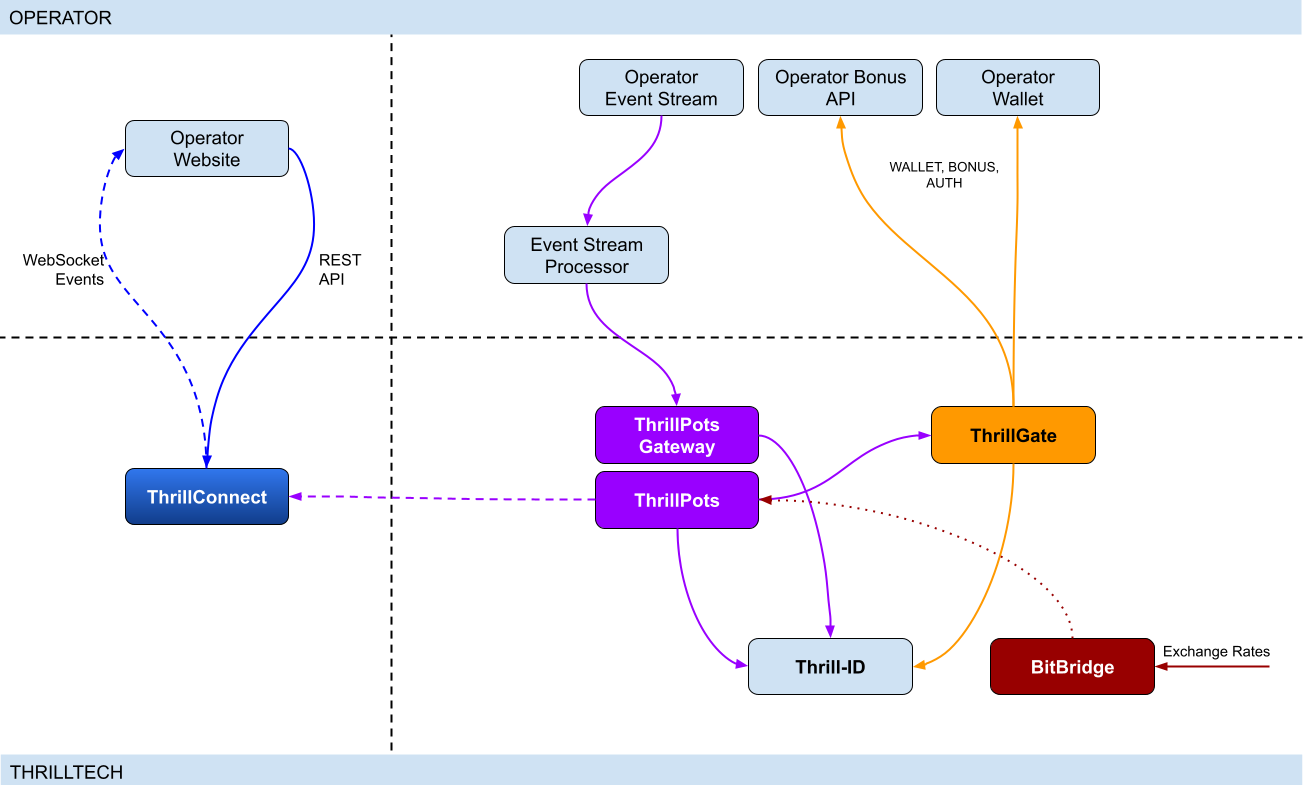
Integration points
ThrillPots has 3 primary integration points. This section will discuss each integration point and explain the purpose for each.
Betting integration
When it comes to Jackpot contributions, unlike normal games, player's do not make direct bets to jackpots. Rather, bets (contributions) are made on behalf of players via the operator's backend system.
Let's imagine a hypothetical casino where the operator has deployed a sitewide jackpot which is available to all players and is active across all casino content available on the site. The jackpot will receive a contribution bet each time a player makes a bet on any of the games on the site.
In order for these contributions to be made on behalf of the player, a simple event processor needs to be deployed that receives player game play / bet events and for each event makes a contribution request to the ThrillPots system.
In most platforms, this can be achieved by building a Kafka, RabbitMQ (or similar) event/stream processor which subscribes to the relevant topic/channel and makes REST API calls for each relevant event received. For platforms that do not have a message or event bus available, these events could be dispatched to the event processor via an alternative RPC mechanism such as REST, gRPC etc. This decision is all up to you, the integrating platform.
To learn more about this part of the integration, go to Event Stream Integration
Wallet Integration
When it comes to the wallet integration for ThrillPots, this integration is almost the same as any game provider integration. The wallet integration covers the following flows:
- Player token authentication
- Single Transactions (Debit & Credit)
- Batch Credit transaction (Multi-player payouts)
- Transaction cancellation
Integration is done against the ThrillGate service and can be performed in either direction (operator-to-provider or provider-to-operator).
To learn more about this part of the integration, go to Wallet Integration
Operator-to-Provider
If you decide to do an operator-to-provider integration, you will need to expose the endpoints required by the ThrillGate Standard Wallet Interface. All documentation can be found in the ThrillGate Standard Wallet Integration API documentation.
If you prefer for ThrillTech to integrate to your wallet API (provider-to-operator integration), you will need to provide the APIs and an integration environment for ThrillTech to develop the integration.
Frontend Integration
The ThrillConnect service is designed to support all frontend integrations. It exposes both a REST API (for end-user functionality like opt-in) as well as a WebSocket event stream for ad-hoc messaging and event broadcasts.
It is suggested to make use of the ThrillConnect JS API middleware layer which can easily be included in your site's code, freeing you up from the integration details and allowing you to focus on the visual and UX of the presentation layer.
To learn more about this part of the integration, go to Frontend Integration
Integrating ThrillPots Overview
The ThrillPots integration is best described as a 3-step process which is comprised of:
We suggest that before you dig into any of the three sections above, that you take the time to read this overview as it contains important information and pre-requisites that are needed for a smooth integration process.
PRE-REQUISITES
The rest of this guide assumes the following:
- You have the ThrillPots AIO Development container running and available. See this section for information on how to do this.
- You have a way to communicate with the services in the AIO Container (for example
curlorPostmanor similar tool)
Authentication and Authorization
Prior to making any calls to the ThrillPots service APIs, you need to authenticate with the ThrillTech platform using credentials that have been provisioned for you.
The ThrillTech platform uses a centralised authentication technology called Thrill-ID which provides governance over both User and Service accounts.
For integration purposes, you will need to provision a Service account (if one has not been provisioned for you yet). To learn more about provisioning accounts, please refer to the Thrill-ID documentation.
For an example of a Service account that would be suitable for the event stream integration service, see here
Setting up the AIO Container
The ThrillPots AIO Container is comprised of all the services necessary to run the ThrillPots platform from a single docker container.
The services made available are:
- ThrillPots Gateway (integrate your event/stream processor here)
- ThrillPots Service (the heart of the jackpot platform)
- ThrillGate (used to integrate with or to wallet APIs)
- ThrillConnect (integrate your frontend with this service)
- BitBridge (used for external data source integrations like exchange rates providers)
- ThrillTech Backoffice
- MongoDB
- Redis
The AIO container was designed to enable developers to deploy the entire ThrillPots stack on their local development machines on in a development environment quickly and easily.
In-Service Swagger UI
Each service provides access to a Swagger-UI for its API. Apart from ThrillConnect, which is an edge service, Swagger-UI support is compiled in to all the services and accessible via the /swagger-ui path.
ThrillConnect Swagger UI
Since ThrillConnect is an edge service and generally made available to the public internet, swagger-ui needs to be enabled via an environment variable.
In order to enable the /swagger-ui endpoint for the ThrillConnect service, you must set the TCS_ENABLE_SWAGGER environment variable to true.
Setting up the AIO Container: Pre-requisites
This short section explains the pre-requisites you will need in order to be able to setup the AIO container.
Pre-requisites
You will need the following software on your development machine:
Mandatory:
- Docker (or alternatively Docker Desktop)
- Postman
Optional:
Some type of MongoDB UI. We recommend you use MongoDB Compass
GitHub Access
You will need to have a GitHub account that has been granted access to the ThrillTech GitHub Organisation. This step is usually done as part of the initial technical kick off. As part of this access, you are granted access to repositories and packages that are needed.
Once you have provided ThrillTech with your Github account and we have added you as a collaborator, you need to have a Github Personal Access Token (classic) with permissions to read packages.
Go to your account's Settings -> Developer Settings -> Personal Access Tokens -> Tokens (classic) and create one.
(Click your avatar circle on the top right part of Github, click "Settings" and then "Developer Settings" is located at the bottom on the right of the menu of your account)
The only right it needs to have is to read packages.
Log in to our package repo and give your github username and the token your just created as password when prompted
docker login ghcr.io/thrilltech-io
Setting up the AIO Container: Initial Setup
Setting Up
Once you have provided ThrillTech with your Github account and we have added you as a collaborator, you need to have a Github Personal Access Token (classic) with permissions to read packages.
Go to your account's Settings -> Developer Settings -> Personal Access Tokens -> Tokens (classic)nd create one.
(Click your avatar circle on the top right part of Github, click "Settings" and then "Developer Settings" is located at the bottom on the right of the menu of your account)
The only right it needs to have is to read packages.
Log in to our package repo and give your github username and the token your just created as password when prompted:
docker login ghcr.io/thrilltech-io
Once you have successfully authenticated with the repository, you are ready to continue with the steps to getting the ThrillPots Dev Container running:
- Clone the https://github.com/thrilltech-io/dev-containers repository
- Go to the
/thrillpotsfolder in the repository and execute:docker compose up -d
NOTE: If you are running on MacOS on Apple Silicon, you may need to enable x86_64/amd64 emulation. Do this by going to Docker Desktop's settings -> General and finding the option called "Use Rosetta for x86_64/amd64 emulation on Apple Silicon" and enable it.
This will download all the necessary packages and run them via
Docker Compose. This process may take a few minutes to complete
- Import the provided Postman collection (
ThrillPots AIO Setup.postman_collection.json) which can be found in the repository into your Postman application - You will notice that it contains a number of endpoints, all numbered. The numbering indicates the sequence in which you must execute the calls.

- Execute all the steps in order
Once complete, you will have a ThrillPots system running and configured in 'standalone mode'. This means that you can make contributions and interact with the system, but there will be no external wallet calls made for player authentication or transactions.
In this mode, valid player IDs are in a range:
[player_00000 ... player_00999]
As part of the steps, you will also have created a Jackpot Template, and from this template you created a Jackpot instance. Jackpot Instances are the "running jackpots" that players contribute to. You also made a contribution directly to the jackpot.
You would also have created a Source and mapped the Jackpot Instance to the source and successfully made a contribution to the jackpot via the Source
The final step in the setup was the creation of an Internal mock wallet in ThrillGate. In a later section, where wallet integration is discussed, you will change this configuration to allow connectivity to your own wallet service, but for now, this mock wallet implementation is enough to get started with.
ThrillPots Wallet Configuration
IMPORTANT
Please note that when you change the wallet configuration for the ThrillPots service, you MUST restart the ThrillPots service for the changes to take effect.
Setting up the AIO Container: Admin Accounts
By default, the system is configured with an admin account called admin@thrilltech.io. This account has the ability to control all resources for the thrilltech oorganisation. You will have noticed that in all of the setup steps above, the owner_id or brand_id values were either thrilltech or thrilltech:brand1.
The ThrillPots system implements a "resource ownership" model which ensures that jackpot objects are not modifiable by unauthorized accounts.
Have a look at thrilltech:brand1. The first part before the : is the "organisation" or "operator id". The second part after the : is the "organisational unit" or "brand".
Creating a new ThrillPots admin account for a different organisation
If you want to create and manage ThrillPots resources for a different organisation/operator, you will first need to create a new orgnisation and admin account for that organisation. All of these actions are done through Thrill-ID.
The next steps assume that you are authenticated as
admin@thrilltech.io(as per Step 0 in the setup steps)
1. Create a new organisation
We first need to register a new organisation in Thrill-ID. For the purposes of this example, lets create a new organisation called "new-operator" which has 2 casino brands: new-mega-casino and new-mega-sportsbook.
To do this, make the following call to Thrill-ID:
POST http://localhost:9000/admin/organisations
Header: Authorization Value: Bearer AUTH_TOKEN_FOR_ADMIN@THRILLTECH.IO
Body:
{
"id": "new-operator",
"units": [
"new-mega-casino",
"new-mega-sportsbook"
],
"enabled": true,
}
You should receive a 200 OK.
Now we can create the new admin account for the new organisation
2. Create a new admin account
To create a new administrator account for the new-operator organisation we just created, we need to make another call to Thrill-ID, this time to create the actual account:
POST http://localhost:9000/admin/accounts
- Header:
Authorization - Value:
Bearer AUTH_TOKEN_FOR_ADMIN@THRILLTECH.IO
Body:
{
"account_type": "User",
"username": "admin@new-operator.com",
"password": "password",
"org_unit": {
"org_id": "new-operator"
},
"permissions": [
{
"system_id": "thrillpots",
"permissions": [{
"resource_id": "*",
"permission": "Admin"
}]
}
]
}
You should receive a 200 OK along with a response body showing you the newly created account.
3. Test the new admin account
Go back to Step 0 in the setup instructions and change the username and password to the new accounts username and password and try to authenticate. If everything went right, you should receive a new token for the account and can now proceed with managing ThrillPots resources for the new-operator organisation.
Once you are authenticated with the admin account for the new-operator organisation, you will be able to create Jackpot templates, instances, sources etc for the new-operator organisation.
4. Create the Operator and Brands in ThrillPots
We now need to create the operator and associated brands in ThrillPots. To do this we make the following calls:
Add Operator
POST http://localhost:8084/config/operators
- Header:
Authorization - Value:
Bearer AUTH_TOKEN_FOR_ADMIN@THRILLTECH.IO
Body:
[
{
"id": "new-operator",
"name": "New Operator"
}
]
Add Brands to Operator
POST http://localhost:8084/config/operators/new-operator/brands
- Header:
Authorization - Value:
Bearer AUTH_TOKEN_FOR_ADMIN@THRILLTECH.IO
Body:
[
[
"new-mega-casino",
"new-mega-sportsbook@"
]
{
"id": "new-mega-casino",
"name": "Mega Casino"
},
{
"id": "new-mega-sportsbook",
"name": "Mega Sportsbook"
}
]
Event Processor Integration
In this section, we will discuss the Event Processor integration component that is required in order to enable the ability to make contributions to jackpots.
In general, this integration component needs to be able to receive the events that will drive jackpot contributions on behalf of users/players.
In a standard ThrillPots-powered system, it is usually gameplay that causes jackpot contributions to be made on behalf of players, but you are not limited to just this single use case.
From a simplistic perspective, the general logic should look something like this:
Authenticate your integration service with ThrillPots Gateway
Subscribe to gameplay/bet events from your event stream
When an event is received from your event stream:
- Read the properties of the event for game code, player ID and bet amount
- Make a contribution call to ThrillPots using these (and other values)
From here, it is relatively easy to see how you could expand the use case to create a Deposit jackpot. Lets imagine that the deposit flow was identified by source DEPOSIT. Lets also assume that when a successful deposit has been made by a player, that an event is published by the operator's platform. For argument's sake, lets call this event DEPOSIT_SUCCESS.
If we wanted to create a deposit jackpot, the logic could look as follows:
Subscribe to DEPOSIT_SUCCESS event
When an event is received:
- Read the properties of the event for the player ID and deposit amount
- Make a contribution call to ThrillPots using the DEPOSIT source_id and other properties
Sequence Diagram for the Event Processor integration

Authenticating via ThrillPots Gateway
The ThrillPots Gateway service exposes a REST endpoint which your event stream process can authenticate itself with Thrill-ID.
The endpoint is POST /authenticate/service and accepts a payload which contains the connecting service's username and password.
If authentication is successful, you will receive a response which contains token which must be used as a Bearer token in subsequent API requests to the ThrillPots Gateway service. Service tokens do not expire and therefore you do not need to be concerned with refreshing your token once it has been received.
See here for a Service account that you can provision for your Event Processor integration service.
Additional Information
If your event processor service is processing gameplay bet events, you should remember to filter out any and all events related to Jackpot Contributions as this could create loop of contributions on behalf of players
Contributing to Jackpots
Now that you are processing events from your platform, you want to be able to make Contributions on behalf of players to the jackpot. The process of contributing is quite straight forward and does not require your service to be aware of player opt-in status. You will however need to decide which jackpot to contribute to and this can be done in one of two ways:
- Contribute by source
- Contribute direct to jackpot
Sources
A Source can be thought of as an operator-defined identifier for a user journey, a group of games, or even a single game. You can read more about Sources here,
Example: Sitewide Jackpot
If you wanted to create a site-wide jackpot for your casino vertical, you could create a Source named casino-sitewide, map a jackpot to the source and then send all contributions to that specific Source.
{
"token": "token_00001",
"brand_id": "thrilltech:brand1",
"player_id": "player_00001",
"player_country": "UK",
"source_id": "casino-sitewide",
"gameround_id": "1",
"currency": "EUR",
"base_wager": 1
}
Example: Deposit Jackpot
If you wanted to create a deposit jackpot, you can create a source called deposit, map the relevant jackpot to the source and then send all deposit-based contributions ot that source
{
"token": "token_00001",
"brand_id": "thrilltech:brand1",
"player_id": "player_00001",
"player_country": "UK",
"source_id": "deposit",
"gameround_id": "DEPOSIT_TX_ID",
"currency": "EUR",
"base_wager": 1
}
Example: Game Group Jackpot
If you wanted to create a jackpot for a specific set of games, for example, a jackpot for all egyptian themed games, you can create a source called egyptian-games and use that for contributions each time a player bets into a game that is egyption themed. This would naturally require your integration service to know which games are matched to which Game Group source.
{
"token": "token_00001",
"brand_id": "thrilltech:brand1",
"player_id": "player_00001",
"player_country": "UK",
"source_id": "egyptian-games",
"gameround_id": "1",
"currency": "EUR",
"base_wager": 1
}
Example: Game Specific Jackpots
If you want to split your liquidity by game title, you can create sources that correspond to the game codes of games in your system. Each source would need a jackpot mapped to it, but once that is done, you are able to make contributions to the source based on the game code of the base game bet.
{
"token": "token_00001",
"brand_id": "thrilltech:brand1",
"player_id": "player_00001",
"player_country": "UK",
"source_id": "provider-game-code",
"gameround_id": "1",
"currency": "EUR",
"base_wager": 1
}
Direct to Jackpot Contribution
An alternative to using sources is to make contributions directly to Jackpot Instances by their ID. For example, if you have created a Jackpot instance, you will have its ID available to you. This ID will not change over the lifetime of the jackpot. Making contributions directly to a Jackpot ID incurs less processing cost, but may also reduce the flexibility you may have in changing which jackpot players contribute to based on the content or user flows.
The only difference in the contribution payload is that the source_id is replaced with an instance_id field as seen below:
{
"instance_id": "0a1cfeea-5b07-4f2b-b2f1-2e4cd2aa991d",
"token": "token_00001",
"brand_id": "thrilltech:brand1",
"player_id": "player_00001",
"player_country": "MT",
"gameround_id": "1000",
"base_wager": 2,
"currency": "EUR"
}
Synchronous vs Asynchronous contribution
The default contribution mechanism is synchronous. However, depending on your system architecture (and system load), you may prefer to make use of asynchronous contribution mechanics. In order to make asynchronous contributions, you need to provide a webhook that the ThrillPots system can call once the result of a contribution has been determined.
In order to make a contribution asynchronously, you simple need to add a callback property to either of the contribution payloads above to specify the webhook to call and which results you are interested in receiving.
The structure of the callback property is as follows:
{
"web_hook": "https://your.host/webhook",
"win_result_only": false
}
The web_hook field indicates the fully qualified HTTP path to your webhook and the win_result_only property indicates whether the webhook should only receive win results or all contribution results.
Therefore, an asynchronous contribution for a sitewide casino jackpot would look like this:
{
"token": "token_00001",
"brand_id": "thrilltech:brand1",
"player_id": "player_00001",
"player_country": "UK",
"source_id": "casino-sitewide",
"gameround_id": "1",
"currency": "EUR",
"base_wager": 1,
"callback": {
"web_hook": "https://your.host/webhook",
"win_result_only": false
}
}
When making an asynchronous contribution, the ThrillPots system will either return 200 OK with a JSON payload that contains a trace_id for the request when it has successfully accepted the contribution request for processing, or you will receive an error due to the request being malformed.
Any contribution request errors will be send to the webhook. The structure of the webhook payload is defined as follows:
Successful contribution result
{
"type": "data",
"contribution_amount": Number,
"contribution_currency": String,
"gameround_id": String,
"instance_id": String,
"metadata": null | Object,
"tickets_awarded": null | Number,
"timestamp": Number,
"win_amount": Number,
"win_pot_id": null | String,
"win_withheld": Boolean
}
Error result
{
"type": "error",
"status_code": Number,
"code": String,
"message": String,
}
The data portion will either be a ContributionResult structure or an Error structure. You can find more information on these structures in the API documentation.
Examples of payloads sent to the web hook
Contribution Result
{
"type": "data",
"contribution_amount": 0.1,
"contribution_currency": "EUR",
"gameround_id": "cc83c1cc-6260-44fc-822b-d3c03acf2d89",
"instance_id": "a49ff35f-6ecd-491f-b373-85e6caabacf1",
"metadata": null,
"tickets_awarded": null,
"timestamp": 1715714218408,
"win_amount": 0,
"win_pot_id": null,
"win_withheld": false
}
Error Result
{
"type": "error",
"status_code": 404,
"code": "GAME_NOT_FOUND",
"message": "sitewide-casino2",
}
Contribution Request Errors
A contribution request may result in a direct or a downstream error. A direct error is an error that is the result of the ThrillPots system return an error to the contribution request itself. A downstream error is an error that is propogated to the contribution request caller from a downstream system, such as ThrillGate or the operator wallet itself.
List of Direct Errors
For Direct Errors, you can expect:
| Error Code | Description |
|---|---|
CONTRIBUTION_REJECTED | The contribution was rejected due to a contribution rule failing, The rule in question will be contained within the CONTRIBUTION_REJECTED message |
GAME_NOT_FOUND | this occurs when making a contribution to source and the source does not exist |
CURRENCY_MULTIPLIERS_NOT_FOUND | self explanatory |
SYSTEM_ERROR | This is what you get with 500 http responses from ThrillPots |
OPTIN_ERROR | This occurs if the player;s optin record could not be updated |
SOURCE_JACKPOT_NOT_FOUND | This occurs if the jackpot mapped to the source could not be found |
SOURCE_JACKPOTS_NOT_ALLOWED | This occurs if the jackpot mapped to the source does not allow a contribution from this player (either country or brand not allowed) |
DB_ERROR | An internal DB ERROR |
UNSUPPORTED_BRAND | This is returned when the brand of the player (specified in contribution) is not supported by the jackpot or system |
Passing Metadata
If you need to pass contextual metadata from your event processor to your wallet, you can do so by adding a metadata field to the Contribution Request. This data will be passed through the system and attached to transaction requests to your wallet.
The metadata field can be any valid JSON value, for example:
Metadata containing an Object:
{
"token": "token_00001",
"brand_id": "thrilltech:brand1",
"player_id": "player_00001",
"player_country": "UK",
"source_id": "casino-sitewide",
"gameround_id": "1",
"currency": "EUR",
"base_wager": 1,
"metadata": {
"value1": "some value",
"value2": 1234
}
}
Metadata containing a String:
{
"token": "token_00001",
"brand_id": "thrilltech:brand1",
"player_id": "player_00001",
"player_country": "UK",
"source_id": "casino-sitewide",
"gameround_id": "1",
"currency": "EUR",
"base_wager": 1,
"metadata": "This is an arbitrary string value"
}
Event metadata
If you need to attach contextual metadata from your event processor to any subsequent JackpotWinEvent , you can do so by adding a event_metadata field to the Contribution Request. This data will be passed through the system and attached any resulting JackpotWinEvent under metadata.
The event_metadata field can be any valid JSON value, for example:
{
"instance_id": "ac2aad1d-16b6-4e9b-9e9a-d94f705a38f7",
"token": "token_00001",
"brand_id": "thrilltech:brand1",
"player_id": "player_00001",
"player_country": "MT",
"gameround_id": "1",
"base_wager": 1,
"currency": "EUR",
"event_metadata": {
"some": "data"
}
}
Will result in a JackpotWinEvent with metadata.
{
"event_type": "JackpotWinEvent",
"event_id": "8b4025fa-b4e7-4bd3-9e8c-3e95a1a2611d",
"data": {
"brand_id": "thrilltech:brand1",
"player_id": "player_00001",
"source_id": null,
"instance_id": "ac2aad1d-16b6-4e9b-9e9a-d94f705a38f7",
"jackpot_name": "QuickHit Instance",
"jackpot_currency": "EUR",
"timestamp": 1732010393528,
"win_pot_id": "major",
"win_amount": 100.05624999999992,
"currency_multipliers": {
"brand_id": "default",
"base_currency": "EUR",
"multipliers": {
"AMD": 430.0904,
},
"win_withheld": false,
"seed_deficit": 99.68125,
"community_winners": null,
"games_in_jackpot": [],
"seed": 100.0,
"metadata": {
"some": "data"
}
}
}
Contribution Sources
Contribution Sources are a concept in ThrillPots that allow operators create well-known identifiers for one or more Jackpot Instances. A contribution source is bound to an operator and brand ID.
Contribution Sources are valid targets/identifiers for jackpot contribution bets (as described in the Contributing to Jackpots section).
Why use sources instead of Jackpot Instance IDs
Sources provide a mechanism of indirection to Jackpot Instances. Since a Source will usually have a well-known and human-defined identifier, and can represent one or more Jackpot Instances at any point in time, they provide a very convenient way for Integrating services and frontends to work with Jackpot Instances.
For example, instead of hard coding a specific Jackpot Instance ID into your frontend or backend services, you can simply configure the more human-readable source_id and use the Source to determine at runtime which Jackpot Instance ID is being used. This is especially useful when Jackpot models are changed over time since your integrated product will not need to be modified unless there is a fundamental structural change to the jackpot itself (which is rarely the case).
Example
An early, but very common use-case Contribution Source can be seen below, where a Source has been created for Operator thrilltech, Brand brand1 and is the source for the "site wide casino jackpot".
In this case, the contribution flow would look like this:
┌──────────────────────────────┐
│Contribution to Source Request│ (POST https://thrillpots_gateway_host/jackpots/contribute/source)
└──────────────┬───────────────┘
│
│
│
▼
┌────────┐
│ Source │
└────────┘
│
│
│
▼
┌──────────────────┐
│ Jackpot Instance │
└──────────────────┘
Under the covers (in the data), this Contribution Source will most probably look something like this:
{
"owner_id": "thrilltech:brand1",
"source_name": "Casino Sitewide Source",
"source_id": "sitewide-casino",
"jackpots": [
{
"priority": {
"$numberLong": "0"
},
"owner_id": "thrilltech:brand1",
"instance_id": "12231b6a-a774-4a93-8f16-f8af9aee2076"
}
]
}
The jackpots array in this Contribution contains a single Jackpot Instance ID because in this case, there is only one Jackpot Instance required. We will discuss use cases where having multiple Jackpot Instances in this array can be useful.
Creating a Contribution Source
To create a Contribution Source, we follow a 2 step process:
- Create the new source
- Assign the desired Jackpot Instance to the Source
1. Create the new source
To create a source, we use the POST /config/sources endpoint on ThrillPots Service (link to API).
An example to create a "Site-wide Jackpot" source for the thrilltech:brand1 operator-casino would look like this:
POST http://<thrillpots-service-host>/config/sources
Payload
[
{
"owner_id": "thrilltech:brand1",
"source_name": "Casino Sitewide Source",
"source_id": "sitewide-casino"
}
]
FYI: If you have downloaded the ThrillPots AIO Setup Postman collection, an example of this step will be in the
Basic Setup > Create a Sourceendpoint.
2. Assign the desired Jackpot Instance to the Source
Once you have created a source, you can now assign a pre-existing Jackpot Instance to the source. This can be done using the POST /config/sources/assignjackpot endpoint on the ThrillPots Service (link to API).
POST http://<thrillpots-service-host>/config/sources/assignjackpot
Payload
{
"owner_id": "thrilltech:brand1",
"source_id": ["sitewide-casino"],
"instance_id": "{{instance_id}}"
}
Retrieving the Jackpot Instance from a source
To retrieve that relevant Jackpot Instance for a specific source, you can use the following methods:
ThrillPots Gateway
GET /jackpots/instances/source/:source_id/brand/:brand_id?player_id=:player_id
The parameters in the url above are:
| Parameter | Description |
|---|---|
source_id | The Source ID (for example, sitewide-casino from the example above) |
brand_id | This is the identifier for the brand in question, which is comprised of the operator_id:brand_id pairing |
player_id | [OPTIONAL] If a player_id is specified, the returned Jackpot Instance will also contain the opt-in details for the specified player |
ThrillConnect (used by the Frontend)
GET /v1/thrillpots/instances/source/:source_id/brand/:brand_id?player_id=:player_id
The parameters in the url above are the same as for ThrillPots Gateway:
| Parameter | Description |
|---|---|
source_id | The Source ID (for example, sitewide-casino from the example above) |
brand_id | This is the identifier for the brand in question, which is comprised of the operator_id:brand_id pairing |
player_id | [OPTIONAL] If a player_id is specified, the returned Jackpot Instance will also contain the opt-in details for the specified player |
Retrieving all sources in the System
To retrieve a list of sources for a specific operator brand, you can use one of the following methods:
ThrillPots Gateway
GET /sources?owner_id=:brand_id
The brand_id parameter in the URL is once again comprised of the operator_id:brand_id pair which identifies a specific brand. If any sources have been configured for the operator_id:brand_id specified, they will be returned in a response which contains a list of Source JSON objects and will look similar to this example:
[
{
"owner_id": "thrilltech:brand1",
"source_name": "Casino Sitewide Source",
"source_id": "sitewide-casino",
"jackpots": [
{
"priority": 0,
"owner_id": "thrilltech:brand1",
"instance_id": "12231b6a-a774-4a93-8f16-f8af9aee2076"
}
]
}
]
ThrillConnect (used by the Frontend)
GET /v1/thrillpots/sources?owner_id=:brand_id
As in the ThrillPots Gateway example above, the brand_id parameter in the URL is once again comprised of the operator_id:brand_id pair which identifies a specific brand. The response payload will look exactly the same as the response from the ThrillPots Gateway service above.
ThrillPots Events
ThrillPots publishes a number of events which your integration service can subscribe to. There are a number of reasons you may want to consume these events, for example:
- Synthesizing related Kafka/RabbitMQ events
- Storing the events for BI / Analysis purposes
The following events are currently published by ThrillPots Gateway:
JackpotUpdateEvent- contains the latest jackpot values for the specified Jackpot Instance- Reference
{
"event_type": "JackpotUpdateEvent",
"event_id": "d6f05820-1da2-4152-bcba-6c0186f6cd77"
"data": {
"id": "jackpot instance ID",
"status": String,
"jackpot_type": "Jackpot" | "Raffle",
"currency": String,
"allowed_brands": [String],
"allowed_sources": [String],
"pots": [
{
"id": String,
"is_progressive": Boolean,
"current_value": Number
}
],
"timestamp_start": Number | null,
"timestamp_end": Number | null
"last_updated": Number
}
}
JackpotWinEvent- contains the details of a jackpot win- Reference
{
"event_type": "JackpotWinEvent",
"event_id": "3fe809f4-c94f-4950-9b86-5f2d0b8f604f"
"data": {
"brand_id": String,
"player_id": String,
"source_id": String | null,
"instance_id": String,
"jackpot_name": String,
"timestamp": Number,
"win_pot_id": String,
"win_amount": Number,
"currency_multipliers": {
"brand_id": String,
"base_currency": String,
"multipliers": {
"EUR": Number,
"GBP": Number,
"ZAR": Number,
...
"NZD": Number,
"SEK": Number
}
}
"games_in_jackpot": [String],
"seed": Number,
"win_withheld": Boolean,
"seed_deficit": Number,
"community_winners": null | [{
"player_id": String,
"brand_id": String,
"currency": String,
"win_amount": Number
}],
"metadata": null | Object,
}
}
RaffleWinEvent- contains the details of a Raffle Win- Reference
{
"brand_id": String,
"instance_id": String,
"jackpot_name": String,
"jackpot_currency": String,
"currency_multipliers": {
"brand_id": String,
"base_currency": String,
"multipliers": {
"EUR": Number,
"GBP": Number,
"ZAR": Number,
...
"NZD": Number,
"SEK": Number
}
}
"timestamp": Number,
"winners": [
{
"player_id": String,
"brand_id": String,
"currency": String,
"win_amount": Number
}
],
"win_withheld": bool
}
OptInEvent- contains the details of a player opt-in or opt-out into a Jackpot Instance Reference
{
"event_type": "OptInEvent",
"event_id": "27045bf8-78d2-4f99-97f1-e7d2e3aa434d"
"data": {
"instance_id": String,
"player_id": String,
"ext_player_id": String,
"player_brand_id": String,
"preferred_contribution_value": [Number],
"contribution_count": Integer,
"contribution_value": Number,
"opted_in": Boolean,
"last_updated": Integer
}
}
CommunityPayoutErrorEvent- sent in case of an error that is encountered when processing community payouts Reference
{
"event_type": "CommunityPayoutErrorEvent",
"event_id": "c034a751-cf91-4722-bc89-a2f8af472805"
"data": {
"instance_id": String,
"gameround_id": String,
"tx_credit_id": String,
"failed_payouts": [
{
"player_id": String,
"brand_id": String,
"currency": String,
"win_amount": Number
}
]
}
}
RafflePayoutErrorEvent- sent in case of an error that is encountered when processing raffle payouts Reference
{
"event_type": "RafflePayoutErrorEvent",
"event_id": "e981296b-199f-4454-b4ec-b3f36910c2cc"
"data": {
"instance_id": String,
"failed_payouts": [
{
"player_id": String,
"brand_id": String,
"currency": String,
"win_amount": Number
}
]
}
}
The ThrillPots events are published via the WebSocket endpoint /events.
Authenticating the Websocket connection to receive events
Once you have established a WebSocket connection from your event processor service to ThrillPots Gateway, you will need to send an Authenticate message which contains your Thrill-ID JWT token to authenticate your service to receive events.
{
"action": {
"Authenticate": {
"auth_token": "{{thrill-id-jwt}}"
}
}
}
If the authentication fails, the connection will be closed. Once you have authenticated, you should start receiving the events from the ThrillPots service.
Wallet Integration
Introduction
When integrating ThrillPots to your wallet, you will need to implement what is known as the "Standard Wallet API". This API has been defined by ThrillTech and is what our ThrillGate services uses to communicate with your backend to process:
- Player Authentication
- Transactions
- Transaction cancellations
- Batch transactions# Wallet Integration
ThrillPots Wallet Configuration
IMPORTANT
Please note that when you change the wallet configuration for the ThrillPots service, you MUST restart the ThrillPots service for the changes to take effect. In this section, we will discuss how ThrillPots performs player authentication and jackpot contribution transactions.
When running in a non-development environment (such as staging or production), ThrillPots uses the ThrillGate Service as an integration layer to an operator's wallet API.
NOTE:
ThrillPots also supports an internal, in-memory wallet for development or isolated testing purposes. This wallet is enabled by default in the AIO development container
Types of Wallet Integrations
There are two types of wallet integrations that can be developed:
- Provider-to-Operator integration
- Operator-to-Provider integration (Standard Wallet Integration)
This section is been written for operators that have chosen to do an Operator-to-Provider integration. For a Provider-to-Operator integration, ThrillTech are responsible for implementing the integration to your wallet API and that topic is out of scope for this book.
- Batch transaction cancellations
All communications from ThrillGate are conducted over secure SSL REST calls to your system.
As part of all calls to your system, ThrillGate sends an HMAC in the X-Server-Authorization header which is calculated from the body of the request only. You can use this HMAC value to verify that the request is coming from the expected ThrillGate server.
NOTE: During integration you will receive the secret key that you can use to verify the HMAC value with.
Enabling Wallet Integration Mode in the AIO Container
In order to configure the container to support external wallet integration mode, some additional API calls need to be made.
In the provided Postman collection, you will find a folder called Wallet Integration Mode. In this folder you will find additional API calls that you need to make in order to configure the container to run in this mode.

The first API call (1. Create Wallet Configuration) makes a call to the ThrillGate service and sets up the "Standard Wallet API" connnector.
It is very important that you do NOT change the details in Step 2a or 2b as these are specific for the AIO container.
PLEASE NOTE:
When building your wallet integration, the ThrillGate service will attempt to connect to your wallet service on your localhost:8201. This is configured via Docker networking as:
Host: "host.docker.internal"
Port: 8201You can change the port, but we would recommend not changing the host unless you are absolutely sure you know what you are doing.
Once you have executed step 1, you can Enable or Disable the external wallet mode using steps 2a or 2b respectively.
Once you have completed the configuration, you will need to restart the ThrillPots service in the AIO container.
IMPORTANT
Each time you change the wallet configuration of ThrillPots, you must restart the ThrillPots Service for the configuration changes to take effect
Standard Wallet Integration
What is the Standard Wallet?
The Standard Wallet is a REST API definition (designed by ThrillTech) which an operator needs to implement support for. The ThrillGate service uses the Standard Wallet API (as a client) to communicate with the operator's wallet to perform the following actions:
- Player token authentication
- Debit / Credit transactions (single)
- Credit transaction batches
- Transaction cancellation
Standard Wallet Sequence flows
Below is a sequence diagram of the expected data flow between ThrillGate and the operator wallet API:
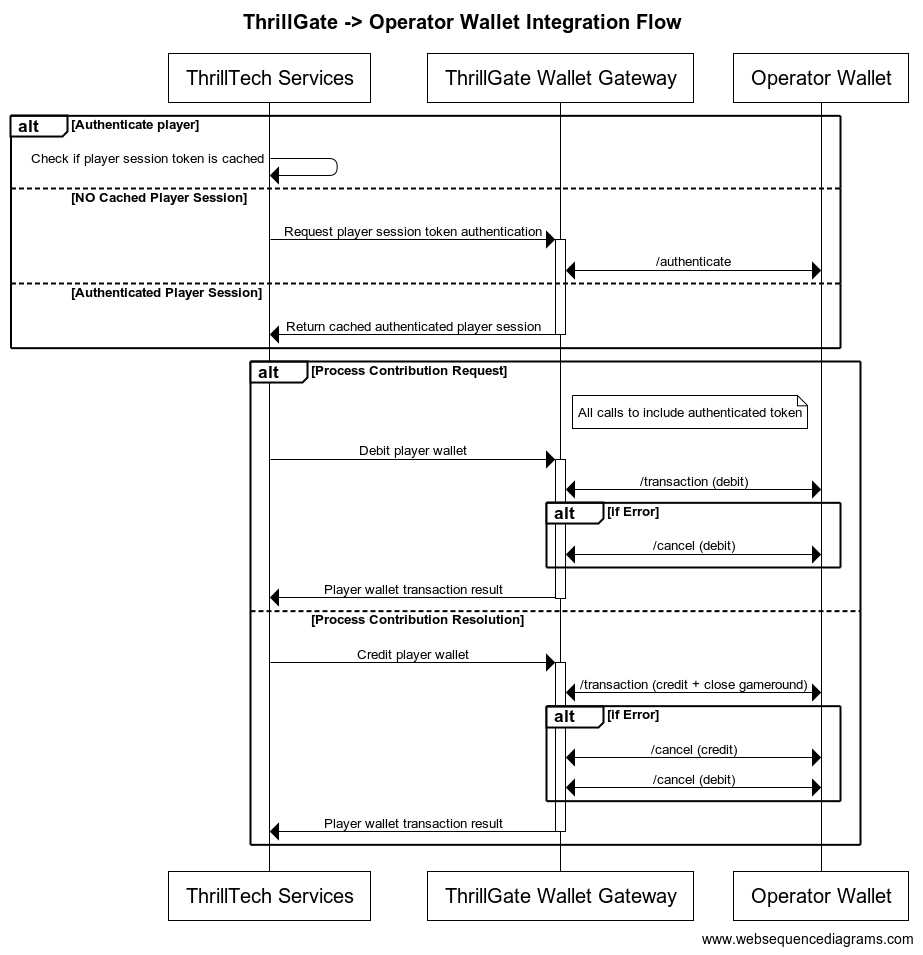
Configuring a Standard Wallet Integration in ThrillGate
To configure the ThrillGate Service to connect to your Standard Wallet API compliant service, you need to configure a Wallet resource.
To configure a wallet:
- URL:
POST http://localhost:8100/admin/wallets - Headers:
Authorization: Thrill ID Bearer token
- Body:
{
"id": "Brand1Wallet",
"operator_id": "thrilltech",
"brand_id": "brand1",
"wallet_type": "StandardWallet",
"connection_details": {
"protocol": "http",
"host": "host.docker.internal",
"port": 8201
},
"endpoints": {
"auth": {
"POST": "/wallet/authenticate"
},
"balance": {
"GET": "/wallet/balance"
},
"cancel_bet": {
"DELETE": "/wallet/cancel"
},
"transaction": {
"POST": "/wallet/transaction"
},
"transaction_batch": {
"POST": "/wallet/transaction/batch"
},
"cancel_batch": {
"DELETE": "/wallet/transaction/batch"
}
},
"config": {
"secret_key": "12345",
"accept_zero_value_credits": true,
"must_close_gamerounds": false
}
}
| Property | Description |
|---|---|
id | The ID you want to assign to the wallet. This is a unique identifier |
operator_id | The operator ID that this wallet is for |
brand_id | The brand ID that this wallet is for |
wallet_type | This must be set to StandardWallet |
connection_details.protocol | The protocol of the url. Usually http or https depending on your setup |
connection_details.host | The hostname for your server. While using the AIO container, it is recommended you keep this set to host.docker.internal |
connection_details.port | The port that your server is listening on |
endpoints | This is an object that describes the required endpoints for the Standard Wallet API |
endpoints.auth | This describes the endpoint that ThrillGate will make player authentication calls to |
endpoints.balance | This describes the endpoint that ThrillGate will make player balance requests to |
endpoints.transaction | This describes the endpoint that ThrillGate will call to perform transactions |
endpoints.cancel_bet | This describes the endpoint that ThrillGate will make to cancel transactions |
endpoints.transaction_batch | This describes the endpoint that ThrillGate will make for transaction batch calls |
endpoints.cancel_batch | This describes the endpoint that ThrillGate will make to cancel transaction batches |
config | An object that contains specific configuration elements for the Standard Wallet |
config.secret_key | This is the key that will be used to generate the HMAC value that is sent on each wallet request in the x-server-authorization header |
config.accept_zero_value_credits | This defines whether the external wallet supports Credit transactions which have a value of zero (0) |
config.must_close_gamerounds | This defines whether the external wallet requires gamerounds to be closed |
NOTE: If you need to change the definition of the endpoints, feel free to do so. Make sure that you use the correct HTTP verb and specify the endpoints as needed by your system.
Next Steps
Once you have understood the purpose of each of the Standard Wallet API calls as well as the flows around transaction and transaction batch handling, you are ready to start integrating the Standard Wallet API into your system. Refer to the provided API reference documentation and OpenAPI specs that have been provided to you.
Standard Wallet API: Player Authentication
In order for the ThrillPots system to take wagers (debit the player's wallet) and payout winnings (credit the player's wallet), it needs to be able to authenticate the player with the operator wallet.
This is done by calling the Standard Wallet's auth endpoint, passing in the provided player token and game code to the operator wallet and receiving the required player details (including the token that should be used for transaction calls)
This is done by ThrillGate calling the endpoint defined in endpoints.auth of the Standard Wallet's configuration. An example call's payload would look as follows:
{
"operator_id": "your_operator_id",
"brand_id": "your_brand_id",
"player_token": "token_00001",
"game_code": "AwesomeJackpotGameCode",
"currency": "EUR"
}
If successful, the operator wallet must respond with a valid session token and player details that can be used for future transaction calls for this player.
Response example:
{
"id": "player_00001",
"token": "session_token_00001",
"currency": "EUR",
"balance": 100001927.79,
"operator_id": "thrilltech",
"brand_id": "brand1",
"nickname": null,
"gender": "?",
"country": "MT",
"jurisdiction": null,
"segments": null
}
Standard Wallet API: Transactions
Transactions
Once the player token has been authenticated, the ThrillPots system can start making transaction calls through ThrillGate.
In standard operation, the first transaction call will be a Debit transaction request to fetch funds from a player's wallet for the Jackpot Contribution bet. This call is also intended to open the game round for the jackpot contribution.
If successful, ThrillPots will process the jackpot contribution and determine if a win occurred.
The next transaction call that will be made will be a Credit transaction request. This call is intended to pay any winnings to the player account and to close the game round that was opened with the Debit transaction.
Transaction Errors
If an error occurs while executing transactions with the operator wallet, ThrillGate and ThrillPots cooperate to ensure that the transaction error is handled correctly.
When an error occurs, ThrillGate will attempt to retry the transaction request a set number of times. If all retries fail, the error will be sent to ThrillPots for further handling.
If there are certain wallet errors that you do not wish ThrillGate to perform its retry logic, you can configure that as part of the wallet configuration in ThrillGate.
Please see the ThrillGate section on Configuring Wallet Error Behaviour for more information on how to configure ThrillGate's wallet error handling.
Once an error has been sent back to ThrillPots, ThrillPots will decide whether a transaction needs to be cancelled or not. Transaction cancellation is discussed next.
#@ Transaction Cancellation
In certain situations (as described in the errors section above), it is necessary for transactions to be cancelled. In general, ThrillPots handles transaction cancellation logic as follows:
If the Debit transaction failed
ThrillPots will send a cancellation request for the Debit transaction using the Debit transaction ID.
If the Credit transaction failed
ThrillPots will first send a cancellation request for the Credit transaction and then a separate cancellation request for the Debit transaction. Both requests will be sent with the respective transaction IDs.
Transaction Batches (Credit only)
ThrillPots uses Transaction Batch requests to communicate payouts to multiple players.
These types of payouts are only relevant to jackpots that are either:
- Multi-player payouts (community payouts)
- Raffle jackpot payouts
In both situations, since multiple players are considered winners from a single jackpot win, ThrillPots needs a way to credit wins to multiple players. Since these players are not guaranteed to be online at the time of the win, ThrillPots will not have access to any session token information for all the winners.
Transaction Batches are used in these special situations to communicate a set of credit operations that need to be applied to multiple players accounts.
Although unlikely, it is possible that not all the specified player accounts will be able to be credited with the winnings. Such a situation may arise if, for example, the player account has been banned/blocked or is self-excluded at the time of the jackpot win.
In these cases, the operator wallet is expected to flag the player account as an exception and continue to pay the remaining players in the transaction batch.
It is not considered an error if a player account in a transaction batch cannot be paid. The operator wallet should simply indicate this exception in the response and attempt to pay all other players.

Transaction Batch Cancellation
We have discussed what Transaction Batch exceptions are and how they are handled.
There is another limited set of errors that require Transaction Batches to be cancelled.
These errors are typically (but not limited to) errors such as network errors and timeouts. When an error occurs that leads ThrillGate to not be sure whether the operator's wallet has handled the transaction batch request, the request will first be retried, but after failing a specific number of times, the transaction batch will be cancelled.
Each transaction batch request has a unique identifier, and this identifier will be sent as part of the transaction batch cancellation request.
Frontend Integration
The final piece of the ThrillPots integration puzzle is the frontend integration. The frontend is responsible for displaying the Jackpot Ticker widget, showing players what the value of the various pots within the Jackpot are, the opt-in widget, allowing players to opt-in or opt-out of participation in the jackpot and so on.
The ThrillConnect Service has been specifically developed to provide an API and event stream over WebSockets to frontend clients to be able to interact with the ThrillPots system.
Integration Options
When integrating the frontend, there are two options that you can take:
- Use the existing libraries/components that ThrillTech has built to ease the effort of frontend integration:
- Develop your own integration with ThrillConnect and your own animation layer for the win animations
The sections below will detail the low level integration approach to help you understand how things work. You can then decide which of the options mentioned above you wish to take.
Sequence Diagram for the frontend to ThrillConnect integration

Integration Flow in detail
Fetching a Jackpot's details
One of the first things your frontend will most likely need to do is to retrieve jackpot details for your jackpot widget to display.
If you have followed the section on settings up the AIO container, you would have created a
Sourcecalledsitewide-casino.If you haven't gone through the process of setting up a source, we suggest that you review and understand sources and how they are used before continuing
To retrieve the jackpot for the sitewide-casino source, you will need to call:
GET /v1/thrillpots/instances/source/:source_id/brand/:brand_id?player_id=:player_id
replacing the :source_id and :brand_id values with the appropriate values that have been configured. If you used the default values from the Postman collection, you can use sitewide-casino for the source_id and thrilltech:brand1 for the brand_id.
If the player is already logged in, you can also pass the ID of the player via the query parameter player_id. Doing so will ensure that the player's opt-in status is returned in the jackpot instance information.
Establishing a WebSocket connection
In order to receive ThrillPots events and be able to opt players in or out of the jackpot, you will need to establish a websocket connection.
Once a player is logged into an operator's site, you can establish a WebSocket connection with ThrillConnect, passing in the player's session token.
NOTE
WebSocket connections are protected and can only be established by logged in players to prevent unauthorized and potentially dangerous abuse by attackers. Requiring a player a valid player session token in order to establish a WebSocket connection is a security-driven decision
To establish a WebSocket connection with ThrillConnect, open a WebSocket to:
/v1/events/{operator_id}/{brand_id}?token=PLAYER_TOKEN¤cy=PLAYER_CURRENCY
ThrillConnect will authenticate the token (the Player session token) from the query parameters with the operator's platform via ThrillGate. If the token is valid, the websocket connection will be established. If the token is invalid, the connection will receive a 403 FORBIDDEN error.
Subscribing to ThrillPots events
Once you have successfully established a WebSocket connection, you can now subscribe to ThrillPots events. This is done by sending a subscription request via the WebSocket to ThrillConnect. See below for the SubscribeRequest message that should be sent to subscribe to all ThrillPots events:
{
"SubscribeRequest": {
"events": [{
"source": "thrillpots",
"event_type": "*"
}]
}
}
If you would like to subscribe to only certain events, you can do so by explicitly specifying the events by source one-by-one.
ThrillPots currently publishes the folliowing event types:
- JackpotUpdateEvent
- WinEvent
- RaffleWinEvent
- OptInEvent
For more information about the structure of each of these events, see ThrillPots Event Structures
Player Opt-in / Opt-out
To opt a player in or out of a jackpot, you must send a PlayerOptInRequest message via the WebSocket connection.
Below are a few examples of opting a player in and out of a jackpot instance (please note, you will need to have the jackpot instance ID):
Opting in
{
"PlayerOptInRequest": {
"instance_id": "8dcc9f5a-f1c5-466f-83e9-928277d8bfb7",
"player_id": "player_00001",
"brand_id": "thrilltech:brand1",
"player_country": "MT",
"opt_in": true
}
}
Opting in with a preferred contribution value of 0.20
{
"PlayerOptInRequest": {
"instance_id": "8dcc9f5a-f1c5-466f-83e9-928277d8bfb7",
"player_id": "player_00001",
"brand_id": "thrilltech:brand1",
"player_country": "MT",
"opt_in": true,
"contribution_value": 0.2
}
}
Opting out of a Jackpot
{
"PlayerOptInRequest": {
"instance_id": "8dcc9f5a-f1c5-466f-83e9-928277d8bfb7",
"player_id": "player_00001",
"brand_id": "thrilltech:brand1",
"player_country": "MT",
"opt_in": false
}
}
Retrieving Exchange Rates
You may need to convert the values of a jackpot instance from the Jackpot currency to a player's currency. To help facilitate this, ThrillConnect exposes a currency endpoint which allows you to fetch the exchange rates used by ThrillPots.
To retrieve the 202408-1 exchange rates, you can call:
GET /v1/currencies
Retrieving a player's raffle ticket count
If player's are contributing to a Raffle jackpot, you may want to show the player how many tickets they have earned so far in the raffle. You can retrieve the player's current ticket count by requesting it via the WebSocket connection:
To retrieve a player's ticket count, send a PlayerRaffleTicketsRequest message:
{
"player_id": String,
"instance_id": String,
"brand_id": String
}
The instance_id is the instance ID of the Raffle jackpot, and the brand_id is in the format operator_id:brand_id.
If the request can be serviced, you should received a PlayerRaffleTicketsResponse message back:
{
"msg_type": "Message",
"source": "thrillpots",
"msg_name": "PlayerRaffleTicketResponse",
"operator_id": "OPERATOR_ID",
"brand_id": "BRAND_ID",
"player_id": "PLAYER_ID",
"data": {
"ticket_count": 4
},
"timestamp": 1711452762485
}
If there was an error processing the request, you will receive an Error message in response which will contain the message name that errored, as well as any relevant error details. For example:
{
"msg_type": "Error",
"source": "thrillpots",
"msg_name": "PlayerRaffleTicketRequest",
"operator_id": "OPERATOR_ID",
"brand_id": "BRAND_ID",
"player_id": "PLAYER_ID",
"data": {
"status_code": 404,
"code": "",
"message": "Error 404 Not Found from http://localhost:8084/instances/raffle/e0dee1ae-6231-458a-ad6d-4dc0c941e5c3/tickets/player_00001/brand/thrilltech:brand1"
},
"timestamp": 1711452757807
}
In this case, the request Jackpot instance ID could not be found.
ThrillConnect JS Client
ThrillConnect Client is the glue that connects your Portal and ThrillTech systems to provide seamless experience for your players. It is designed with minimialistic, yet powerful API, that can be easily consumed and covers all the narrow and tricky edgecases of the frontend integration. It's purpose is to make your frontend development trivial and expose the full API surface with minimum effort.
On this page you can find all the relevant details on how to use the Client, as well as examples and use cases.
Client version will be aligned with service version and just like that you'll be subscribed to all the latest and greatest features of our platform.
Source
Source code is avaiable for review & fork for all ThrilTech customers. You can find the client at https://github.com/thrilltech-io/connect-client.
Initialization
Client constructor needs the host address and BrandContext. Player context can optionally be passed on initialization or later on via authenticate method.
Additionally one can specify dev options, like the use of unsecure http/ws and client internal logs for dev convenience.
All the events of interest must be passed on to the constructor in the events array so that client can subscribe to relevant systems on the WS channel.
Player context
Player context type provides all necessary player details for establishing the WSS connection and interacting with the Jackpots from player perspective.
type PlayerContext = {
id: string,
token: string,
currency: string,
country: string,
}
Initialization without player context
Prior to having a valid player session and auth token, one can initialize the client without PlayerContext. In this limited mode the WS events will not be available and only public REST endpoints can be used to make requests. ( see API section for what is available )
import { ThrillConnect, ConnectEvents } from "./thrillconnect.js"
const client = new ThrillConnect({
host: "localhost:11000",
brand: {
operator_id: "thrilltech",
brand_id: "brand1",
},
dev: {
secure: false
},
events: [
ConnectEvents.JackpotUpdateEvent,
ConnectEvents.RaffleWinEvent,
ConnectEvents.JackpotWinEvent,
ConnectEvents.OptInEvent,
]
})
Later on, once we have player details, we can authenticate and subscribe to full functionality of the client.
client.authenticate({
id: "player_id_token_00001",
token: "token_00001",
country: "USA",
currency: "USD",
})
Initialization with player context
Alternatively, if player details are known from the start, those can be passed directly to the client constructor.
const client = new ThrillConnect({
host: "localhost:11000",
player: {
id: "player_00001",
token: "token_00001",
country: "USA",
currency: "USD",
},
brand: {
operator_id: "thrilltech",
brand_id: "brand1",
},
dev: {
secure: false
},
events: [
ConnectEvents.JackpotUpdateEvent,
ConnectEvents.RaffleWinEvent,
ConnectEvents.JackpotWinEvent,
ConnectEvents.OptInEvent,
]
})
API
Following is a list of all the available methods on connect client.
Adding an event listener
client.on(ConnectEvent, handler)
Adding an once off event listener
client.once(ConnectEvent, handler)
Removing an event listener
client.off(ConnectEvent, handler)
Passing player context
client.authenticate(PlayerContext)
Fetching the currency multipliers
const multipliers = await client.request().getCurrencies()
Fetching the list of defined sources for the provided BrandContext
const sources = await client.request().getSources()
Getting the Jackpot instance that maps to a source
const sourceId = "sitewide-jackpot"
const instance = await client.request().getJackpotForSource(sourceId)
Getting the player OptIn status for a source
Note: PlayerContext is required for this request.
const sourceId = "sitewide-jackpot"
const status = await client.request().getOptInStatusForSource(sourceId)
Opting in/out from a source
Note: PlayerContext is required for this request. This request uses the authenticated WS channel. When jackpot allows for variable contribution, preferred contribution value can be passed as 3 parameter.
const sourceId = "sitewide-jackpot"
const optIn = true
const preferredContributionValue = undefined
client.request().optIntoSource(sourceId, optIn, preferredContributionValue)
Opting in/out from an instance
Note: PlayerContext is required for this request. This request uses the authenticated WS channel. When jackpot allows for variable contribution, preferred contribution value can be passed as 3 parameter.
const instanceId = "dd7243ea-9992-47ae-a2a6-531b3f0e2197"
const optIn = true
const preferredContributionValue = undefined
client.request().optIntoInstance(instanceId, optIn, preferredContributionValue)
Events
Client receives events via the WS connection. In order to receive an event, it needs to explicitly be listed in the list of events in the Client constructor.
All the available events are listed in ConnectEvents.
import { ConnectEvents } from "./thrillconnect.js"
function updateTickers(e:JackpotUpdateEvent) {
console.log(e.status)
}
// subscribe to Jackpot updates
client.on(ConnectEvents.JackpotUpdateEvent, updateTickers)
// unsubscribe from Jackpot updates
client.off(ConnectEvents.JackpotUpdateEvent, updateTickers)
Animation Driver
ThrillTech supplies a default set of Jackpot win animations to enrich the player experience during a Jackpot win. The animations driver is a JS library that takes care of win animations loading and playback. Animations are easily customizable and the driver allows for flexible cusomizations of the playback.
Source
Source code is avaiable for review & fork for all ThrilTech customers. You can find the driver at https://github.com/thrilltech-io/animations-driver.
Overview
The JS driver exposes two functions:
preload(config, tier, muted)- loads the required assets per pased configuration object. When muted, sounds will not be loaded.run(config, tier, amount, muted)- starts the animation sequence defined in the configuration. Run will do load if assets are not already loaded.
The preload function is intended to provide separation of the loading phase, so that in case of unreasonably slow connection, stale loading can be detected and acted upon (for example using a fallback alert / win message if assets load didnt complete in a certain period).
Mute state cannot be controlled after the animation is run. The current sound preference should be passed to the run ( and optionally preload ) and based on that the defined in configuration sfx are either loaded or not.
Usage
import { preload, run } from "./main.js"
const config = "/configs/example.json"
const tier = "super"
const amount = 10000
const muted = false
preload(config, tier, muted).then(()=>{
run(config, tier, amount, muted)
})
Configuration
See example configurations in ./public/configs in the driver repository.
Following is a full possible configuration with all settings commented inline.
{
"dom": {
// optional - skip "top" section if no header is required
"top": {
// id of top container
"id": "top-container",
// messages to display during presentation phase
"message": {
"id":"top-message",
// message during wheel spin
"wheel": "Stop the wheel and win BIG! BIG!",
// message during tickup
"tickup": "Congratulations!"
}
},
// optional - skip "bottom" section if no footer is required
"bottom": {
// id of bottom container
"id": "bottom-container",
// action button
"button": {
// id of the action button
"id": "action-button",
// actions during wheel phase
"wheel": {
"stop": "STOP THE WHEEL",
"skip": "SKIP THE WHEEL"
},
// actions during tickup phase
"tickup": {
"skip": "SKIP TICKUP"
},
// actions after tickup
"end": {
"close": "CLOSE"
}
}
},
// enable touch controls during phase
"touch": {
// touch during wheel acts as stop / skip
"wheel": {
"stop": true,
"skip": true
},
// touch during tickup acts as skip
"tickup": true
}
},
// ticker skin and font settings -
// skin provided and customised by thrilltech
"ticker": {
"skin": "/ticker/Win_BG.skel",
"font": "/fonts/rubik.woff",
"fontFamily": "rubik",
// maximum font size for the tickup
"maxFontSize": 80,
// https://developer.mozilla.org/en-US/docs/Web/JavaScript/Reference/Global_Objects/Intl/NumberFormat
// the currency for the win amount as per ISO 4217 currency codes
// optional, leave empty for no currency or monetary amount format
"currency":"JPY",
// A string with a BCP 47 language tag, optional
"currencyFormat":"en-US"
},
// wheel skin and segments settings -
// skin provided and customised by thrilltech
"wheel": {
"rotate": 0,
"base": "/wheel/Wheel_of_Fortune.skel",
// wheel has 8 segments, following is the order of tiers per segments
"segments": [
"mini",
"super",
"mini",
"epic",
"mini",
"super",
"epic",
"super"
],
// map of segment textures
"skins": {
"mini": "/skins/demo/mini.png",
"super": "/skins/demo/super.png",
"epic": "/skins/demo/epic.png"
}
},
// jackpot animation skin -
// skin provided and customised by thrilltech
"pots": {
"mini": {
// path of the spine export containing the mini tier animation
"source": "/pots/mini/Thrillpot.skel",
// prefix of the animation for this tier
"prefix": "",
// sound clips for all animation phases
"sfx": {
"intro": ["/sfx/base/mini/intro.mp3"],
"particles": ["/sfx/base/mini/confetti.mp3"],
"tickup_start": ["/sfx/base/mini/tickup-start.mp3"],
"tickup_loop": ["/sfx/base/mini/tickup-loop.mp3"],
"outro": ["/sfx/base/mini/outro.mp3]"
}
},
"super": {
// path of the spine export containing the mini tier animation
"source": "/pots/super/Thrillpot.skel",
// prefix of the animation for this tier
"prefix": "",
// sound clips for all animation phases
"sfx": {
"intro": ["/sfx/base/super/intro.mp3"],
"particles": ["/sfx/base/super/confetti.mp3"],
"tickup_start": ["/sfx/base/super/tickup-start.mp3"],
"tickup_loop": ["/sfx/base/super/tickup-loop.mp3"],
"outro": ["/sfx/base/super/outro.mp3]"
}
},
"epic": {
// path of the spine export containing the mini tier animation
"source": "/pots/epic/Thrillpot.skel",
// prefix of the animation for this tier
"prefix": "",
// sound clips for all animation phases
"sfx": {
"intro": ["/sfx/base/epic/intro.mp3"],
"particles": ["/sfx/base/epic/confetti.mp3"],
"tickup_start": ["/sfx/base/epic/tickup-start.mp3"],
"tickup_loop": ["/sfx/base/epic/tickup-loop.mp3"],
"outro": ["/sfx/base/epic/outro.mp3]"
}
},
},
// particles animation skin -
// skin provided and customised by thrilltech
"particles": {
"mini": {
"source": "/particles/confetti/Thrillpot.skel",
"prefix": ""
},
"super": {
"source": "/particles/confetti/Thrillpot.skel",
"prefix": ""
},
"epic": {
"source": "/particles/confetti/Thrillpot.skel",
"prefix": ""
}
}
}
SFX
Config contains sound definitions for various phases of the animation. All sounds are optional.
Sounds per animation phase are defined as an array. All elements of the phase array refer to the same sound effect. The intention is to provide multiple sfx formats and the runtime will automatically pick the one supported on the client system. Recommended formats to use are webm, wav and mp3. wav has the widest support accross devices, but is not as optimal as webm and mp3 in terms of filesize.
"sfx": {
"intro": ["/sfx/base/epic/intro.webm", "/sfx/base/epic/intro.wav"],
"particles": ["/sfx/base/epic/confetti.webm", "/sfx/base/epic/confetti.wav"],
"tickup_start": ["/sfx/base/epic/tickup-start.webm", "/sfx/base/epic/tickup-start.wav"],
"tickup_loop": ["/sfx/base/epic/tickup-loop.webm", "/sfx/base/epic/tickup-loop.wav"],
"outro": ["/sfx/base/epic/outro.webm", "/sfx/base/epic/outro.wav"]
}
Metrics
The ThrillPots system exposes Prometheus metrics per service via the /metrics endpoint.
Below is the list of metrics exposed per service:
ThrillPots Gateway
| Metric name | Metric Type | Description |
|---|---|---|
| contrib_req_sync_recv | Counter | Syncronous Contribution Requests Received |
| contrib_req_async_recv | Counter | Asyncronous Contribution Requests Received |
| contrib_req_queued | Gauge | Contribution Requests currently queued |
| contrib_req_processed | Counter | Contribution requests processed |
| contrib_avg_queue_time | Counter | Average Contribution Request Queue Time |
| contribution_webhook_calls | Counter | Contribution Webhook calls made |
| http_requests_avg_time | Family: Counter | HTTP Request Average Time |
ThrillPots Service
| Metric name | Metric Type | Description |
|---|---|---|
| contrib_req_recv | Counter | Contribution Requests Received |
| contrib_req_processed | Counter | Contribution requests processed |
| contrib_req_rejected | Counter | Contribution Requests rejected |
| http_requests_avg_time | Family: Counter | HTTP Request Average Time |
| preflight_avg_time | Counter | Average time spent validating contribution requests |
| jackpot_opts | Family: Counter | Opt-In/Out related metrics |
Thrillpots Gateway
ThrillPots Service
ThrillGate
ThrillConnect
Thrill-ID
BitBridge
ThrillOffice
Environment Variables
Each service has a list of environment variables which define its configuration for runtime. Use this reference to understand what each environment variable does, what it is used for and the possible values it can contain.
Quick Links
- ThrillPots Gateway
- ThrillPots Service
- ThrillGate Service
- ThrillConnect Service
- Thrill-ID Service
- BitBridge Service
ThrillPots Gateway
| Variable Name | Default Value | Description |
|---|---|---|
| GW_LOG_LEVEL | info | The log level at which logs will be written. Possible values are info, debug, warn, trace |
| GW_WEB_HOST | 0.0.0.0 | The hostname to bind the web service to |
| GW_WEB_PORT | 80 | The port to bind the web service to |
| GW_MONGO_HOST | mongodb://localhost | The connection URI for the MongoDB server |
| GW_MONGO_DB_NAME | test | The DB name for the Service (should usually be set to thrillpots-gateway) |
| GW_MONGO_USERNAME | None | [Optional] The username to use to authenticate with MongoDB |
| GW_MONGO_PASSWORD | None | [Optional] The password to use to authenticate with MongoDB |
| GW_MONGO_RETRY_WRITES | true | Flag to set whether writes are retries when they fail |
| GW_REDIS_HOST | redis://localhost | The connection URI for REDIS. Possible schemas are: - Standalone: redis://hostname:port- Cluster: redis://hostname:port,redis://hostname2:port,..- Sentinel: sentinel://hostname:port/master/replica or sentinel+tls://hostname:port/master/replica |
| GW_REDIS_DB | 0 | The Redis DB number to use |
| GW_REDIS_USERNAME | None | [Optional] The REDIS username to use for authentication |
| GW_REDIS_PASSWORD | None | [Optional] The REDIS password to use for authentication |
| GW_REDIS_SECURE | false | [Optional] Defines if the REDIS connection is secure or not |
| GW_REDIS_CLUSTER | false | [Optional] Defines if the REDIS connection is secure or not. For a standard Sentinel deployment, this variable should be set to false |
| GW_JPSERVER_HOST | http://localhost:8084 | The URL for the ThrillPots Service. For clustered environments, this should point to the DNS entry for the ThrillPots Service on your internal load balancer |
| GW_THRILLID_HOST | http://localhost:9000 | The URL for the Thrill-ID Service. For clustered environments, this should point to the DNS entry for the Thrill-ID Service on your internal load balancer |
| GW_THRILLID_USERNAME | None | The username the service should use to authenticate with Thrill-ID. In a standard deployment, this should be set to thrillpots.gateway |
| GW_THRILLID_PASSWORD | None | The password the service should use to authenticate with Thrill-ID. In a default deployment, this will start off as password and can be changed via Thrill-ID directly |
ThrillPots Service
| Variable Name | Default Value | Description |
|---|---|---|
| JP_LOG_LEVEL | info | The log level at which logs will be written. Possible values are info, debug, warn, trace |
| JP_WEB_HOST | 0.0.0.0 | The hostname to bind the web service to |
| JP_WEB_PORT | 80 | The port to bind the web service to |
| JP_MONGO_HOST | mongodb://localhost | The connection URI for the MongoDB server |
| JP_MONGO_DB_NAME | thrillpots | The DB name for the Service (should usually be set to thrillpots) |
| JP_MONGO_USERNAME | None | [Optional] The username to use to authenticate with MongoDB |
| JP_MONGO_PASSWORD | None | [Optional] The password to use to authenticate with MongoDB |
| JP_MONGO_RETRY_WRITES | true | Flag to set whether writes are retries when they fail |
| JP_REDIS_HOST | redis://localhost | The connection URI for REDIS. Possible schemas are: - Standalone: redis://hostname:port- Cluster: redis://hostname:port,redis://hostname2:port,..- Sentinel: sentinel://hostname:port/master/replica or sentinel+tls://hostname:port/master/replica |
| JP_REDIS_DB | 0 | The Redis DB number to use |
| JP_REDIS_USERNAME | None | [Optional] The REDIS username to use for authentication |
| JP_REDIS_PASSWORD | None | [Optional] The REDIS password to use for authentication |
| JP_REDIS_SECURE | false | [Optional] Defines if the REDIS connection is secure or not |
| JP_REDIS_CLUSTER | false | [Optional] Defines if the REDIS connection is secure or not. For a standard Sentinel deployment, this variable should be set to false |
| JP_THRILLID_HOST | http://localhost:9000 | The URL for the Thrill-ID Service. For clustered environments, this should point to the DNS entry for the Thrill-ID Service on your internal load balancer |
| JP_THRILLID_USERNAME | thrillpots | The username the service should use to authenticate with Thrill-ID. In a standard deployment, this should be set to thrillpots |
| JP_THRILLID_PASSWORD | password | The password the service should use to authenticate with Thrill-ID. In a default deployment, this will start off as password and can be changed via Thrill-ID directly |
| JP_SERVICE_CURRENCY_REFRESH | 86400000 | The amount of time between ThrillPots attempting to refresh its currency multipliers. The default is set to 24 hours (86400000 milliseconds) |
| JP_SERVICE_UPDATE_EVENT_FREQUENCY | 10000 | The amount of time (in milliseconds) between jackpot update events being sent out. The default is set to 10 seconds, but we recommend reducing this to a value between 2000 and 5000 (2s - 5s) |
| JP_SERVICE_AUTH_CACHE_TTL | 300 | The number of seconds to cache a player's authentication token. Change this to reflect the TTL on your system's player session token lifetimes |
| JP_RNG_BACKGROUND_CYCLING | false | If set to true, the RNG will automatically perform background cycling of its values in periods defined by JP_RNG_BACKGROUND_CYCL_DELAY_MIN_SECS and JP_RNG_BACKGROUND_CYCLE_DELAY_MAX_SECS |
| JP_RNG_BACKGROUND_CYCLE_DELAY_MIN_SECS | 0 | [Optional] The minimum amount of delay between background cycles. We recommend a value of 60 |
| JP_RNG_BACKGROUND_CYCLE_DELAY_MAX_SECS | 0 | [Optional] The maximum amount of delay between background cycles. We recommend a value of 180 |
| JP_RNG_MONITOR_PERIOD_SECS | 0 | [Optional] The maximum period between the randomness monitoring test running. We recommend a value of 600 |
| JP_RNG_FAILURES_TO_ALERT | None | [Optional] If RNG Monitoring is enabled, this variable defines the number of consecutive failures that are needed to generate an alert. We recommend setting this to a value of 5 or higher |
| JP_CC_URL | None | The URL of the ThrillTech CC Service which must be defined for all operator environments. For STAGING environments, this value should be set to https://cc-stg.thrillpots.io and for PRODUCTION environments, it should be set to: https://cc.thrilltechapi.com |
| JP_CC_OPERATOR_ID | None | This value identifies you as an operator and will be provided to you by ThrillTech |
| JP_CC_SERVICE_ID | None | This identifies the product and should be set to thrillpots |
ThrillGate Service
| Variable Name | Default Value | Description |
|---|---|---|
| TG_LOG_LEVEL | info | The log level at which logs will be written. Possible values are info, debug, warn, trace |
| TG_WEB_HOST | 0.0.0.0 | The hostname to bind the web service to |
| TG_WEB_PORT | 80 | The port to bind the web service to |
| TG_MONGO_HOST | mongodb://localhost | The connection URI for the MongoDB server |
| TG_MONGO_DB_NAME | test | The DB name for the Service (should usually be set to thrillgate) |
| TG_MONGO_USERNAME | None | [Optional] The username to use to authenticate with MongoDB |
| TG_MONGO_PASSWORD | None | [Optional] The password to use to authenticate with MongoDB |
| TG_MONGO_RETRY_WRITES | true | Flag to set whether writes are retries when they fail |
| TG_REDIS_HOST | redis://localhost | The connection URI for REDIS. Possible schemas are: - Standalone: redis://hostname:port- Cluster: redis://hostname:port,redis://hostname2:port,..- Sentinel: sentinel://hostname:port/master/replica or sentinel+tls://hostname:port/master/replica |
| TG_REDIS_DB | 0 | The Redis DB number to use |
| TG_REDIS_USERNAME | None | [Optional] The REDIS username to use for authentication |
| TG_REDIS_PASSWORD | None | [Optional] The REDIS password to use for authentication |
| TG_REDIS_SECURE | false | [Optional] Defines if the REDIS connection is secure or not |
| TG_REDIS_CLUSTER | false | [Optional] Defines if the REDIS connection is secure or not. For a standard Sentinel deployment, this variable should be set to false |
| TG_THRILLID_HOST | http://localhost:9000 | The URL for the Thrill-ID Service. For clustered environments, this should point to the DNS entry for the Thrill-ID Service on your internal load balancer |
| TG_THRILLID_USERNAME | None | The username the service should use to authenticate with Thrill-ID. In a standard deployment, this should be set to thrillgate |
| TG_THRILLID_PASSWORD | None | The password the service should use to authenticate with Thrill-ID. In a default deployment, this will start off as password and can be changed via Thrill-ID directly |
ThrillConnect Service
| Variable Name | Default Value | Description |
|---|---|---|
| TCS_LOG_LEVEL | info | The log level at which logs will be written. Possible values are info, debug, warn, trace |
| TCS_WEB_HOST | 0.0.0.0 | The hostname to bind the web service to |
| TCS_WEB_PORT | 80 | The port to bind the web service to |
| TCS_MONGO_HOST | mongodb://localhost | The connection URI for the MongoDB server |
| TCS_MONGO_DB_NAME | test | The DB name for the Service (should usually be set to thrillconnect) |
| TCS_MONGO_USERNAME | None | [Optional] The username to use to authenticate with MongoDB |
| TCS_MONGO_PASSWORD | None | [Optional] The password to use to authenticate with MongoDB |
| TCS_MONGO_RETRY_WRITES | true | Flag to set whether writes are retries when they fail |
| TCS_REDIS_HOST | redis://localhost | The connection URI for REDIS. Possible schemas are: - Standalone: redis://hostname:port- Cluster: redis://hostname:port,redis://hostname2:port,..- Sentinel: sentinel://hostname:port/master/replica or sentinel+tls://hostname:port/master/replica |
| TCS_REDIS_DB | 0 | The Redis DB number to use |
| TCS_REDIS_USERNAME | None | [Optional] The REDIS username to use for authentication |
| TCS_REDIS_PASSWORD | None | [Optional] The REDIS password to use for authentication |
| TCS_REDIS_SECURE | false | [Optional] Defines if the REDIS connection is secure or not |
| TCS_REDIS_CLUSTER | false | [Optional] Defines if the REDIS connection is secure or not. For a standard Sentinel deployment, this variable should be set to false |
| TCS_THRILLID_HOST | http://localhost:9000 | The URL for the Thrill-ID Service. For clustered environments, this should point to the DNS entry for the Thrill-ID Service on your internal load balancer |
| TCS_THRILLID_USERNAME | None | The username the service should use to authenticate with Thrill-ID. In a standard deployment, this should be set to thrillconnect |
| TCS_THRILLID_PASSWORD | None | The password the service should use to authenticate with Thrill-ID. In a default deployment, this will start off as password and can be changed via Thrill-ID directly |
Thrill-ID Service
| Variable Name | Default Value | Description |
|---|---|---|
| TID_LOG_LEVEL | info | The log level at which logs will be written. Possible values are info, debug, warn, trace |
| TID_WEB_HOST | 0.0.0.0 | The hostname to bind the web service to |
| TID_WEB_PORT | 80 | The port to bind the web service to |
| TID_MONGO_HOST | mongodb://localhost | The connection URI for the MongoDB server |
| TID_MONGO_DB_NAME | test | The DB name for the Service (should usually be set to thrillid) |
| TID_MONGO_USERNAME | None | [Optional] The username to use to authenticate with MongoDB |
| TID_MONGO_PASSWORD | None | [Optional] The password to use to authenticate with MongoDB |
| TID_MONGO_RETRY_WRITES | true | Flag to set whether writes are retries when they fail |
| TID_REDIS_HOST | redis://localhost | The connection URI for REDIS. Possible schemas are: - Standalone: redis://hostname:port- Cluster: redis://hostname:port,redis://hostname2:port,..- Sentinel: sentinel://hostname:port/master/replica or sentinel+tls://hostname:port/master/replica |
| TID_REDIS_DB | 0 | The Redis DB number to use |
| TID_REDIS_USERNAME | None | [Optional] The REDIS username to use for authentication |
| TID_REDIS_PASSWORD | None | [Optional] The REDIS password to use for authentication |
| TID_REDIS_SECURE | false | [Optional] Defines if the REDIS connection is secure or not |
| TID_REDIS_CLUSTER | false | [Optional] Defines if the REDIS connection is secure or not. For a standard Sentinel deployment, this variable should be set to false |
| TID_JWT_SECRET | default-secret-for-this-service | The secret used when generating JWT tokens during account authentication |
| TID_JWT_STRICT_IP_CHECK | true | Enforce strict IP checking when refreshing tokens |
| TID_JWT_LIFETIME_SECS | 1800 | The lifetime of a JWT token |
| TID_JWT_REFRESH_LIFETIME_SECS | 300 | The amount of grace period allowed for a refresh token |
BitBridge Service
| Variable Name | Default Value | Description |
|---|---|---|
| TT_LOG_LEVEL | info | The log level at which logs will be written. Possible values are info, debug, warn, trace |
| TT_WEB_HOST | 0.0.0.0 | The hostname to bind the web service to |
| TT_WEB_PORT | 80 | The port to bind the web service to |
| TT_MONGO_HOST | mongodb://localhost | The connection URI for the MongoDB server |
| TT_MONGO_DB_NAME | test | The DB name for the Service (should usually be set to bitbridge) |
| TT_MONGO_USERNAME | None | [Optional] The username to use to authenticate with MongoDB |
| TT_MONGO_PASSWORD | None | [Optional] The password to use to authenticate with MongoDB |
| TT_MONGO_RETRY_WRITES | true | Flag to set whether writes are retries when they fail |
| TT_REDIS_HOST | redis://localhost | The connection URI for REDIS. Possible schemas are: - Standalone: redis://hostname:port- Cluster: redis://hostname:port,redis://hostname2:port,..- Sentinel: sentinel://hostname:port/master/replica or sentinel+tls://hostname:port/master/replica |
| TT_REDIS_DB | 0 | The Redis DB number to use |
| TT_REDIS_USERNAME | None | [Optional] The REDIS username to use for authentication |
| TT_REDIS_PASSWORD | None | [Optional] The REDIS password to use for authentication |
| TT_REDIS_SECURE | false | [Optional] Defines if the REDIS connection is secure or not |
| TT_REDIS_CLUSTER | false | [Optional] Defines if the REDIS connection is secure or not. For a standard Sentinel deployment, this variable should be set to false |
| TT_THRILLID_HOST | http://localhost:9000 | The URL for the Thrill-ID Service. For clustered environments, this should point to the DNS entry for the Thrill-ID Service on your internal load balancer |
| TT_THRILLID_USERNAME | None | The username the service should use to authenticate with Thrill-ID. In a standard deployment, this should be set to bitbridge |
| TT_THRILLID_PASSWORD | None | The password the service should use to authenticate with Thrill-ID. In a default deployment, this will start off as password and can be changed via Thrill-ID directly |
ThrillPots Event Structures
This section provides the data definitions (in JSON) for each of the ThrillPots events.
Event: JackpotUpdateEvent
{
"id": String,
"jackpot_type": "Jackpot" | "Raffle",
"currency": String,
"pots": [PotTicker],
"allowed_brands": [String],
"allowed_sources": [String],
"status": String,
"timestamp_start": Number | null,
"timestamp_end": Number | null,
"last_updated": Number
}
References:
Event: WinEvent
{
"brand_id": String,
"player_id": String,
"source_id": String,
"instance_id": String,
"jackpot_name": String,
"jackpot_currency": String,
"timestamp": Number,
"win_pot_id": String,
"currency_multipliers": {
"brand_id": String,
"base_currency": String,
"multipliers": {
"EUR": Number,
"GBP": Number,
"ZAR": Number,
...
"NZD": Number,
"SEK": Number
}
}
"win_withheld": bool,
"community_winners": [PayoutRecord],
"games_in_jackpot": [String],
"seed": Number,
"metadata": null | Object,
}
References:
Event: RaffleWinEvent
{
"brand_id": String,
"instance_id": String,
"jackpot_name": String,
"jackpot_currency": String,
"currency_multipliers": {
"brand_id": String,
"base_currency": String,
"multipliers": {
"EUR": Number,
"GBP": Number,
"ZAR": Number,
...
"NZD": Number,
"SEK": Number
}
}
"timestamp": Number,
"winners": [
{
"player_id": String,
"brand_id": String,
"currency": String,
"win_amount": Number
}
],
"win_withheld": bool
}
References:
The winners field contains an array of tuples. The structure of each tuples is (String, CurrencyValue).
The first element in the tuple contains the ID of a winning player and the second element contains the amount that the player won.
Event: OptInEvent
{
"instance_id": String,
"player_id": String,
"ext_player_id": String,
"player_brand_id": String,
"preferred_contribution_value": Number,
"contribution_count": Number,
"contribution_value": Number,
"opted_in": Boolean,
"last_updated": Number,
}
Event: CommunityPayoutErrorEvent
{
"instance_id": String,
"gameround_id": String,
"tx_credit_id": String,
"failed_payouts": [
{
"player_id": String,
"brand_id": String,
"currency": String,
"win_amount": Number
}
]
}
Event: RafflePayoutErrorEvent
{
"instance_id": String,
"failed_payouts": [
{
"player_id": String,
"brand_id": String,
"currency": String,
"win_amount": Number
}
]
}
Structure References
PotTicker
{
"id": String,
"is_progressive": Boolean,
"current_value": Number,
"community_split": Number | null
}
CurrencyValue
{
"currency": String,
"value": Number
}
PayoutRecord
{
"player_id": String,
"brand_id": String,
"currency": String,
"win_amount": Number,
"reason": String,
}
NOTE: This is early documentation for the scheduling system and the documentation will be further extended over time with additional examples and more details
Advanced Scheduling
The ThrillPots system provides a relatively sophisticated sub-system which allows you to create schedules for your jackpot products.
It is important to understand what a schedule is in the context of ThrillPots.
At its core, a schedule is always bound to a Jackpot Instance. A schedule can be as simple as defining the date and time that a jackpot starts at, or defining an end date and time for jackpot.
Here are some interesting use cases that can be solved with schedules as well:
- Happy Hour Jackpot: Creating a jackpot that only accepts contributions during 17:00 and 18:00
- Promotional Jackpots: Creating a jackpot that only accepts contributions at peak times of site activity or to encourage players during low activity times
- Weekend Jackpots: Creating a jackpot that is only available on weekends
Schedules become even more powerful when used together with Raffle Jackpots. Raffle Jackpots are jackpots that resolve at the end of a predefined period of time. While players participate in the Raffle Jackpot by way of contribution (as with any other jackpot), raffle jackpots issue tickets to players based on either their Contribution or the base wager that they make into games.
Recurrence Rulesets
All the rules for the scheduling system revolve around "recurrence rules". Currently, recurrence rules are implemented for "Daily" and "Weekly" rulesets.
Daily rules
Daily rules define a set of hours within which the jackpot is available in. Traditionally, jackpot contributions are allowed during all hours of the day, but lets imagine that you wanted to create a jackpot that was only available during your site's "Happy Hour" which was between the hours of 7pm to 9pm UTC.
For such a rule to exist, you would only need to define a Daily recurrence rule which stipulated that the hours of 19:00 to 21:00 UTC were valid.
Weekly rules
Taking the example from above, lets imagine that we wanted to further constrain the available days of the raffle to be from Monday to Friday (no weekend contributions allowed!). In this case, we would create a "Weekly" ruleset which define the following days as being valid: Monday through to Friday.
As a last minute change, business might want to allow contributions to happen on a Saturday, but only between 08:00 UTC to 20:00 UTC. To allow this specificity of ruleset, we can apply an additional override for Saturday for those specific hours at the Weekly schedule level.
Technical Example
For a technical example of what a complete schedule as described above would look like, the following JSON structure accurately describes the ruleset. For arguments sake, we will define the schedule to start on the 1st of January 2024 UTC, with no end to the schedule.
To summarise, we will be creating a schedule that:
- Allows contributions to occur Monday, Tuesday, Wednesday, Thursday, Friday and Saturday
- From Monday to Friday, contributions will be allowed between 19:00:00 UTC and 21:00:00 UTC
- On Saturdays, contributions will be allowed between 08:00:00 UTC and 20:00:00 UTC
{
"timestamp_start": 1704067200000,
// No `timestamp_end` is specified since the schedule has no end
"recurrence_rules": [
{
"frequency": {
"Daily": {
"hours": [
[
{ "hour": 19, "minute": 0, "sec": 0 }.
{ "hour": 21, "minute": 0, "sec": 0 }
]
]
}
},
"interval": 1, // 1 means "every day". 2 would mean "every second day"
},
{
"frequency": {
"Weekly": {
"days": [
["Mon", null].
["Tue", null],
["Wed", null],
["Thu", null],
["Fri", null],
["Sat", {
"Daily": {
"hours": [
[
{ "hour": 8, "minute": 0, "sec": 0 },
{ "hour": 20, "minute": 0, "sec": 0 }
]
]
}
}]
]
}
}
}
]
}
As can be seen from this example, when defining the Weekly rule, each day of validity needs to be specified, along with any overrides to the underlying Daily rules that may exist.
Order of Precendence
It is important to note that any hourly overrides present in the Weekly ruleset will take precedence over those specified in the Daily rules.
How Scheduled Jackpots work
When a schedule is applied to a normal Jackpot Instance, the system performs some rudimentary initial checks (making sure that when the jackpot is created with a schedule in the future, that the status is correctly set to Pending).
Once the Jackpot Instance is Active, the applied schedule defines the periods of time during which contributions will be accepted by the Jackpot Instance. When the schedule is not accepting contributions, the Jackpot Instance will continue to be Active (this behaviour may change in the future).
How Scheduled Raffles work
When instantiating Raffle Jackpots, a schedule must be provided during instantiation time
The reason for this is due to the fact that raffles are fundamentally time-based entities with at least a start time and duration-per-raffle.
Raffles have an explicit duration which is defined as part of the Raffle Rules. Durations can be defined in units of Seconds, Minutes, Hours, Days or Weeks.
Raffles that have a schedule that is longer than a raffles duration are considered "recurring raffles" while raffles that have a schedule equal to their duration are considered "once-off raffles".
Lets examime a few examples to explore this concept:
Once off Raffles
Lets imagine a scenario where an operator wants to run a once-off raffle for the Festive season (Xmas) period which start from 00:00:00 UTC on the 1st of December 2024 and the raffle resolves (pays out) at 09:00:00 UTC on the 25th of December 2024.
Additional requirements for the raffle are that the raffle should only accept contributions between the hours of 8am CET until the end of each day.
In order to create a schedule for this type of raffle, we need to create rules that specify the hourly restrictions as well as the start and end of the raffle.
Example
{
// Sunday, 1 December 2024 00:00:00
"timestamp_start": 1733011200000,
// Wednesday, 25 December 2024 09:00:00
"timestamp_end": 1735117200000
"recurrence_rules": [
{
"frequency": {
"Daily": {
"hours": [
[
{ "hour": 8, "minute": 0, "sec": 0 }.
{ "hour": 23, "minute": 59, "sec": 59 }
]
]
}
},
"interval": 1,
}
]
}
As can be seen in the example, the timestamp_start and timestamp_end have been set to the period of the Festive Season (December 1st, 2024 to December 25th 2024 respectively) and the hours of availability are set from 08:00:00 UTC to 23:59:59 UTC.
Since the jackpot is available on all days through the period, there is no need to define the Weekly ruleset.
In addition to the schedule, the raffle will also need to be configured to run for the duration of the schedule. In this case, the duration will be 24 days and 9 hours.
NOTE In general, you as an operator do not need to worry about the duration configuration as this is configured as part of the Jackpot template by the ThrillTech Jackpot Model design team and not something you as an operator need to worry about.
Daily Raffles
In this example, we will be configuring a Raffle jackpot that is available on all days of the week and will resolve (pay prizes to players) at 10pm UTC (22:00:00 UTC) each day. The raffle will start at 00:00:00 of each day and end when it resolves daily.
Example:
In this example, the raffle started on August 1st, 2024 at 00:00:00 UTC:
{
// Thursday, 1 August 2024 00:00:00
"timestamp_start": 1722470400000,
"recurrence_rules": [
{
"frequency": {
"Daily": {
"hours": [
[
{ "hour": 0, "minute": 0, "sec": 0 }.
{ "hour": 22, "minute": 0, "sec": 0 }
]
]
}
},
"interval": 1,
}
]
}
In addition to the schedule, the raffle's duration will be defined to last 22 hours.
ThrillPots: Common Tasks / SOPs
** IMPORTANT NOTE **
This section only applies to Self-Hosted clients. SaaS customers will need to speak to their technical point-of-contact or customer success representative to request configuration changes to their service
This section will provide some Standard Operator Procedures for how to achieving various common tasks (both basic and advanced) within the ThrillPots system.
Basic Tasks
This section outlines various basic tasks that will be useful to you during the operation of the ThrillPots System.
Add a brand to the System
This process requires you to have a valid Thrill-ID token which can retrieved by authenticating with Thrill-ID. For more information, see the Thrill-ID section.
Overview
- Add the new brand to the relevant organisation in Thrill-ID
- Authenticate to retrieve a new token
- Add the new brand to ThrillPots
- Add the new brand to the relevant jackpot instance(s)
- Add the new brand to ThrillGate
Example Data
- New brand ID:
my-new-brand - Existing brand IDs:
["brand1", "brand2"] - Organisation ID:
my-organisation - Existing Jackpot Instance ID:
321e9e1b-8e7f-4329-bace-b8ec20b7543a
Steps
We need to add the brand to the relevant Organisation in Thrill-ID so that accounts associated with that organisation become aware of the new brand.
1. Add the new brand to the relevant organisation in Thrill-ID
- Service:
Thrill-ID - Method:
PUT - Path:
/admin/organisations/my-organisation - Content-Type:
application/json - Body:
{
"units": [
"brand1",
"brand2",
"my-new-brand"
]
}
2. Authenticate to retrieve a new token
- Service:
Thrill-ID - Method:
POST - Path:
https://thrillid.yourorg.com/accounts/auth - Content-Type:
application/json - Body:
{
"username": "example-account@yourorg.com",
"password": "some_really_random_password"
}
Upon successful authentication, the response will look as follows (although the value of the tokens and access entities will be probably be different) and will contain the new brand that you added:
{
"token": "eyJhbGciOiJIUzI1NiJ9...KydTfNYUSZFDEVNrQnWtKXNX_QYJ46RHn9tLu9qu5n",
"refresh_token": "eyJhbGciOiJUzI1NiJ9...4lsmg2MWa3TGh6J_g51Q",
"access_to": {
"org_id": "my-organisation",
"unit_ids": [
"brand1",
"brand2",
"my-new-brand"
]
}
}
3. Add the new brand to ThrillPots
- Service:
ThrillPots Service - Method:
POST - Path:
/config/operators/:operator_id/brands - Content-Type:
application/json - Body:
[
{
"id": "my-new-brand",
"name": "My New Brand"
}
]
NOTE: You can add multiple brands using this call. Simply add more elements to the body's array.
4. Add the new brand to the relevant jackpot instance(s)
- Service:
ThrillPots Service - Method:
POST - Path:
/instances/allowed_brand - Content-Type:
application/json - Body:
{
"instance_id": "321e9e1b-8e7f-4329-bace-b8ec20b7543a",
"brand_id": "my-organisation:my-new-brand"
}
5. Add the new brand to ThrillGate
INFO Currently you need to update the complete
Operatorin ThrillGate. In the future, more convenient APIs will be provided.You can retrieve an
Operatorobject using theGET /admin/operators?id={operator_id}method (for example, in this case we would useGET /admin/operators?id=my-operator)
- Service:
ThrillGate Service - Method:
PUT - Path:
/admin/operators - Content-Type:
application/json - Body:
{
"id": "my-operator",
"name": "My Operator",
"wallet_id": "",
"enabled": true,
"currency": "EUR",
"brands": [
{
"id": "brand1",
"name": "Brand 1",
"wallet_id": null,
"enabled": true,
"currency": "EUR"
},
{
"id": "brand2",
"name": "Brand 2",
"wallet_id": null,
"enabled": true,
"currency": "EUR"
},
{
"id": "my-new-brand",
"name": "My New Brand",
"wallet_id": null,
"enabled": true,
"currency": "EUR"
}
]
}
Create a new Jackpot Template and Jackpot Instance
This process requires you to have a valid Thrill-ID token which can retrieved by authenticating with Thrill-ID. For more information, see the Thrill-ID section.
Overview
- Create a new Jackpot Template
- Publish the Jackpot Template
- Instantiate a Jackpot Instance from the Jackpot Template
Example Data
- Operator ID:
my-operator - Brand ID:
my-brand
Steps
NOTE: The Operator and Brand must already exist in the system
1. Create a new Jackpot Template
- Service:
ThrillPots Service - Method:
POST - Path:
/templates - Content-Type:
application/json - Body:
{
"name": "Quick Hit Template for Developers",
"owner_id": "my-operator:my-brand",
"currency": "EUR",
"contribution_rules": {
"opt_in_required": true,
"contribution_type": {
"Fixed": 0.1
},
"operator_contribution_percentage": 0
},
"house_hold_contribution": {
"Percentage": 0.3
},
"win_selector_strategy": "Highest",
"pots": [
{
"id": "minor",
"contribution": {
"Percentage": 0.25
},
"seed_contribution": {
"Percentage": 0.85
},
"seed_strategy": {
"initial_seed_value": 10,
"min_reseed_value": 10,
"fund_strategy": "CollectToMinReseed",
"reseed_strategy": "Full"
},
"max_instantiation_count": null,
"is_progressive": true,
"supports_external_trigger": false,
"pot_types": [{
"HitRate": {
"max_magic_number": 5,
"cost_per_attempt": 0.1
}
}],
"criteria": null,
"max_pot_value": null
},
{
"id": "major",
"contribution": {
"Percentage": 0.25
},
"seed_contribution": {
"Percentage": 0.85
},
"seed_strategy": {
"initial_seed_value": 100,
"min_reseed_value": 100,
"fund_strategy": "CollectToMinReseed",
"reseed_strategy": "Full"
},
"max_instantiation_count": null,
"is_progressive": true,
"supports_external_trigger": false,
"pot_types": [{
"HitRate": {
"max_magic_number": 25,
"cost_per_attempt": 0.1
}
}],
"criteria": null,
"max_pot_value": null
},
{
"id": "mega",
"contribution": {
"Percentage": 0.2
},
"seed_contribution": {
"Percentage": 0.85
},
"seed_strategy": {
"initial_seed_value": 1000,
"min_reseed_value": 1000,
"fund_strategy": "CollectToMinReseed",
"reseed_strategy": "Full"
},
"max_instantiation_count": null,
"reseed_amount": null,
"is_progressive": true,
"supports_external_trigger": false,
"pot_types": [{
"HitRate": {
"max_magic_number": 50,
"cost_per_attempt": 0.1
}
}],
"criteria": null,
"max_pot_value": null
}
]
}
The response to this request, if successful, will contain the newly created template. Take a note of the id field for the next steps (We will refer to this as template-id)
NOTE If you want to control the ID assigned to the Jackpot Template, you can specify it by adding an
idfield to the root of the JSON object and giving it a custom identifier.
2. Publish the Jackpot Template
- Service:
ThrillPots Service - Method:
POST - Path:
/templates/publish - Content-Type:
application/json - Body:
{
"owner_id": "my-operator",
"template_id": "template-id",
"publish": true
}
3. Instantiate a Jackpot Instance from the Jackpot Template
- Service:
ThrillPots Service - Method:
POST - Path:
/templates/instantiate - Content-Type:
application/json - Body:
{
"template_owner_id": "my-operator",
"template_id": "template-id",
"instance_owner_id": "my-operator",
"instance_name": "New Jackpot Instance"
}
The response to this call will contain the details of the newly created Jackpot Instance. Take a note of the id field as this is the Jackpot Instance ID and is used in other calls like Adding a new Contribution Source
Add a new Contribution Source
This process requires you to have a valid Thrill-ID token which can retrieved by authenticating with Thrill-ID. For more information, see the Thrill-ID section.
Overview
- Create a
Contribution Source - Assign a
Jackpot Instanceto theContribution Source
Example Data
- Operator ID:
my-operator - Brand ID:
my-brand - New source ID:
my-new-source - Existing Jackpot Instance ID:
321e9e1b-8e7f-4329-bace-b8ec20b7543a
Steps
NOTE: The Jackpot Instance, Operator and Brand must already exist in the system
1. Create a Contribution Source
- Service:
ThrillPots Service - Method:
POST - Path:
/config/sources - Content-Type:
application/json - Body:
[
{
"owner_id": "my-operator:my-brand",
"source_name": "My New Source",
"source_id": "my-new-source"
}
]
2. Assign a Jackpot Instance to the Contribution Source
- Service:
ThrillPots Service - Method:
POST - Path:
/config/sources/assignjackpot - Content-Type:
application/json - Body:
{
"owner_id": "my-operator:my-brand",
"source_id": ["my-new-source"],
"instance_id": "321e9e1b-8e7f-4329-bace-b8ec20b7543a"
}
Switching Jackpot Models
Jackpot model switching API handles the creation of new jackpot instances from a template combined with the process of transfering pot values, optins, sources, etc. from an existing one, while doing a number of validations on whether the result of the switch is appropriate.
This process requires you to have a valid Thrill-ID token which can retrieved by authenticating with Thrill-ID. For more information, see the Thrill-ID section.
Overview
- Create a new Jackpot Template
- Publish the Jackpot Template
- Switch existing jackpot to the new model
Example Data
- Operator ID:
my-operator - Brand ID:
my-brand - Existing Jackpot Instance ID:
321e9e1b-8e7f-4329-bace-b8ec20b7543a - New Jackpot Template ID:
d4b6b464-79a7-4c2e-8982-b5781fc49020
Steps
NOTE: The Operator and Brand must already exist in the system
1. Create a new Jackpot Template
NOTE: Make sure to have the initial seed values for pots you are transfering money to set to zero. If not, an error will occur when attempting to switch models
2. Publish the Jackpot Template
3. Switch existing jackpot to the new model
- Service:
ThrillPots Service - Method:
POST - Path:
/instances/switchmodel - Content-Type:
application/json - Body:
{
"source_instance_id": "321e9e1b-8e7f-4329-bace-b8ec20b7543a",
"template_id": "d4b6b464-79a7-4c2e-8982-b5781fc49020",
"template_owner_id": "my-operator:my-brand",
"target_instance_owner_id": "my-operator:my-brand",
"target_instance_name": "Example Instance 2",
"pot_rules": [{
"source_pot": "minor",
"target_pot": {
"minor": 1
}
}, {
"source_pot": "major",
"target_pot": {
"minor": 0.05
"major": 0.95
}
}, {
"source_pot": "mega",
"target_pot": {
"minor": 0.2,
"major": 0.1,
"mega": 0.7
}
}],
"transfer_optins": true,
"reason": "Redistributing pot values",
"dry_run": true
}
NOTES:
- Model switching does not support Raffle type jackpots;
- Transfer to pots with non zero initial seed is not allowed and will result in an error;
- All source pots must have a target and the whole pot amount value must be transferred;
- Transfer of opt-ins can only happen if the jackpot shape is not changed (number of pots, pot names, etc.);
- No changes will be persisted if the dry_run flag is set;
General Services
Thrill-ID
Thrill-ID is a centralised authentication and authorization rights used by the entire ThrillTech technology ecosystem. It manages authentication and authorisation for both User and Service accounts.
There are 3 main sub-systems within the Thrill-ID service:
- Systems
- Organisations
- Accounts
Systems describe the ThrillTech systems which comprise the ThrillTech technology platform (for example ThrillPots, Thrill-ID, ThrillPots Gateway, ThrillGate are all "systems"). Each system exposes its own unique set of Resources which are defined as part of the system.
Organisations define the organisations and units to which Accounts are related. Within the iGaming realm, an Organisation describes the operator and its underlying brands. Accounts can then be bound to either the Organisation as a whole, or a brand/organisational unit.
For example, lets take an example of an Operator called MegaBet which has 2 brands, namely MegaSportsBet and MegaCasinoBet. This organisation structure is defined as follows:
{
"id": "megabet",
"units": [
"megasportsbet",
"megacasinobet"
],
"enabled": true
}
Finally, an Account describes either a User or Service account which can access and interact with the ThrillTech platform. Accounts can be restricted to specific System interactions, or have broad permissions across a number of System types. Accounts can be restricted not only to specific systems, but also to a subset of each system's exposed Resources.
IMPORTANT For the next sections, assume that all calls need to be authenticated. Authentication is done by passing your issued JWT token as a
Bearertoken in theAuthorizationheader.
Creating a new Organisation in Thrill-ID
To create a new organisation in Thrill-ID, we use the POST /admin/organisations endpoint on Thrill-ID.
Example:
Request: POST http://localhost:9000/admin/organisations
Body:
{
"id": "new_org_id",
"enabled": true,
"units": [
"org_unit1",
"org_unit2"
]
}
Once your new organisation is created, you are able to create user accounts for that organisation. It is important to note that if the organisation does not exist, attempts at creating accounts for the organisation will fail
Example: Backoffice User Account
A backoffice user account for user jackpot-manager@megabet.com which has access to both brands would most like have Write access to the ThrillPots system.
An example of such an account could look as follows:
Request: POST http://localhost:9000/admin/accounts
Body:
{
"account_type": "User",
"username": "jackpot-manager@megabet.com",
"password": "password of your choosing",
"org_unit": {
"org_id": "megabet"
},
"permissions": [
{
"system_id": "thrillpots",
"permissions": [
{
"resource_id": "Instances",
"permission": "Write"
},
{
"resource_id": "Reports",
"permission": "Read"
}
]
}
],
"enabled": true
}
Example: ThrillPots Integration Service Account
Now lets have a look at what a service account would look like if the service was intended to integrate with the ThrillPots Gateway service. This account will need Write access to jackpot Instances as well as Config access for the defined sources.
Request: POST http://localhost:9000/admin/accounts
Body:
{
"account_type": "Service",
"username": "thrillpots-integration-service@megabet.com",
"password": "password of your choosing",
"org_unit": {
"org_id": "megabet"
},
"permissions": [
{
"system_id": "thrillpots",
"permissions": [
{
"resource_id": "Instances",
"permission": "Write"
},
{
"resource_id": "Config",
"permission": "Read"
}
]
}
],
"enabled": true
}
Thrill-ID: Authenticating
In order to communicate with most APIs within the ThrillTech system you will need an authenticated token issued by Thrill-ID.
This section assumes that you have either been provided an account or have created an account as shown in the previous section.
Once you have the username and password for a valid account created in Thrill-ID, you will need the authenticate that account with Thrill-ID to retrieve a Bearer token for future use.
Example: Authenticating
In this example, we will assume that you have created an account with the following credentials:
username: "example-account@yourorg.com"
password: "some_really_random_password"
In order to authenticate with Thrill-ID and retrieve the account's token for use with other APIs, you need to make a call to POST /accounts/auth. For example, if the Thrill-ID service is hosted at https://thrillid.yourorg.com, the call would look like this:
- Request:
POST https://thrillid.yourorg.com/accounts/auth - Content-Type:
application/json - Body:
{
"username": "example-account@yourorg.com",
"password": "some_really_random_password"
}
Upon successful authentication, the response will look as follows (although the value of the tokens and access entities will be probably be different):
{
"token": "eyJhbGciOiJIUzI1NiJ9...KydTfNYUSZFDEVNrQnWtKXNX_QYJ46RHn9tLu9qu5n",
"refresh_token": "eyJhbGciOiJUzI1NiJ9...4lsmg2MWa3TGh6J_g51Q",
"access_to": {
"org_id": "thrilltech",
"unit_ids": [
"brand1",
"brand2",
]
}
}
Response Details
| Field name | Description |
|---|---|
| token | The Bearer token that should be used on all API calls. This must be passed in the Authorization header |
| refresh_token | Each token for a User account has a default lifetime of 1800s (30 minutes). If the token expires, you can refresh it using this refresh_token |
| access_to.org_id | The organisation that this account has access to |
| access_to.unit_ids | The organisational units (or brands) that this account has access to |
Using the Bearer Token
Once you have authenticated with Thrill-ID, you can pass the received token to future API calls within the ThrillTech system by setting the Authorization header to contain the token as a Bearer token, for example:
Authorization: Bearer eyJhbGciOiJIUzI1NiJ9...KydTfNYUSZFDEVNrQnWtKXNX_QYJ46RHn9tLu9qu5n
Refreshing tokens
To refresh a token for a User account, you can use the POST /accounts/refresh endpoint. Simply pass in the current token and refresh_token that you received from the initial authentication call and you will receive updated, valid tokens:
Example
- Request:
POST https://thrillid.yourorg.com/accounts/refresh - Content-Type:
application/json - Body:
{
"token": "eyJhbGciOiJIUzI1NiJ9...KydTfNYUSZFDEVNrQnWtKXNX_QYJ46RHn9tLu9qu5n",
"refresh_token": "eyJhbGciOiJUzI1NiJ9...4lsmg2MWa3TGh6J_g51Q"
}
If successful, the response will be the same as when you authenticated (just with new tokens):
{
"token": "eyJhbGciOiJIUzI1NiJ9...KydTfNYUSZFDEVNrQnWtKXNX_QYJ46RHn9tLu9qu5n",
"refresh_token": "eyJhbGciOiJUzI1NiJ9...4lsmg2MWa3TGh6J_g51Q",
"access_to": {
"org_id": "thrilltech",
"unit_ids": [
"brand1",
"brand2",
]
}
}
ThrillConnect Service
The ThrillConnect Service is designed to be an "edge" service, meaning that it can be deployed to the edge of your hosting environment and service requests from your frontend(s) as well as other services (both internal or 3rd party).
ThrillConnect provides the following API interfaces for your frontend to use:
- REST API (for information retrieval purposes)
- Authenticate WebSocket interface (for authenticated requests and ad-hoc event delivery)
ThrillConnect: ThrillPots REST API
ThrillConnect provides a REST API for your applications (frontend or otherwise) to safely retrieve information about jackpots that are running in the environment.
Retrieving a Jackpot for a particular Source
If you want to retrieve a jackpot for a specific source_id, you can call the following endpoint:
GET /v1/thrillpots/instances/source/:source_id/brand/:brand_id
| Parameter | Type | Required | Description |
|---|---|---|---|
source_id | Path | Yes | The source ID for the request |
brand_id | Path | Yes | The brand ID for the request |
player_id | Query | No | The player ID that the request should be specific for |
country_code | Query | No | The country code for the request |
This request will use the provided parameters to retrieve the most appropriate jackpot for the source_id, brand_id, player_id and country_code combination.
If you specific the player_id, you will also receive the opt-in status for that player in the response.
HINT: Once you have retrieved the Jackpot for a source, you can use the
idof the Jackpot instance for when you need to opt a player in or out
Retrieving Currency Exchange Rates
If you need to retrieve the active exchange rates in use by the ThrillPots system, you can call the currencies endpoint:
GET /v1/currencies
This will retrieve the current exchange rates from the base currency of the system, for example:
{
"last_updated": 1715126401000,
"base_currency": "EUR",
"multipliers": {
"EUR": 1.0,
"USD": 1.0762,
"GBP": 0.8592,
"CAD": 1.4753,
"PLN": 4.311,
...
"NZD": 1.7921,
"AUD": 1.6303,
"RON": 4.9753,
"SGD": 1.4567,
"SEK": 11.6761,
}
}
Retrieving ThrillPots Sources
You can retrieve all configured sources for a specific brand by using:
GET /v1/thrillpots/sources?owner_id=XXX
The response to this query, if any sources have been configured for the owner_id will look something like this:
[
{
"owner_id": "thrilltech:brand1",
"source_name": "site-wide",
"source_id": "site-wide-source",
"jackpots": [
{
"priority": 0,
"owner_id": "thrilltech",
"instance_id": "209cc142-ccb2-4e28-a763-0a031b560d74"
}
]
},
{
"owner_id": "thrilltech:brand1",
"source_name": "Deposit jackpot",
"source_id": "deposit-source",
"jackpots": [
{
"priority": 0,
"owner_id": "thrilltech",
"instance_id": "0a031b56-4e28-a763-ccb2-2090d74cc142"
}
]
}
]
ThrillConnect: WebSocket API
ThrillConnect exposes an authenticated WebSocket API for use by your frontend or service applications.
Connecting to the WebSocket endpoint
In order to connect to the ThrillConnect WebSocket endpoint, create a WebSocket client and connect to:
ws://thrillconnect_service_host/v1/events/:operator_id/:brand_id
| Parameter | Type | Required | Description |
|---|---|---|---|
operator_id | Path | Yes | The operator ID of the casino |
brand_id | Path | Yes | The brand ID of the casino |
token | Query | Yes | The session token for the player that is connecting |
currency | Query | Yes | The currency of the player that connecting |
Example
ws://thrillconnect_service_host/v1/events/casino-group/awesome-brand?token=session_token_00001¤cy=USD
Once a connection is established, ThrillConnect will attempt to authenticate the player using the token provided with your wallet/account system. This authentication will take place using the Authentication endpoint via ThrillGate.
If authentication is successful, the connection will remain open. If authentication fails, the connection will be closed with a 401 error.
WS Message Structure
All messages that you receive from the ThrillConnect WebSocket connection have the following structure:
{
"msg_type": String, ("Event" | "Message" | "Error"),
"source": String,
"msg_name": String,
"operator_id": String,
"brand_id": String,
"player_id": String,
"data": Object,
"timestamp: Number
}
| Field | Description |
|---|---|
msg_type | This can contain one of the following values: - Event - Message - Error |
source | This indicates the source system that sent the message. In the case of ThrillPots, the value will be thrillpots |
msg_name | The name of the message. Refer to the events and requests sections for more information |
operator_id | The operator ID that this message is targetted for |
brand_id | The brand ID that this message is targetted for |
player_id | If not null, the player_id that the message is targetted for |
data | The message payload (structure is dependent on the msg_type) |
timestamp | The timestamp (UNIX epoch) that the message was sent at |
ThrillConnect: Event Subscription
Subscribing for events
Once you have a connection established, you will usually want to subscribe for events. The ThrillTech event system allows you to specify which systems, and which events from those systems, you wish to subscribe to.
To subscribe for events from the ThrillPots system, you must send a SubscribeRequest message via the websocket connection. For example, to subscribe to all events from the thrillpots system, you can send the following message:
{
"SubscribeRequest": {
"events": [{
"source": "thrillpots",
"event_type": "*"
}]
}
}
If you want to subscribe to specific events only, for example if you only want to subscribe to JackpotUpdateEvents, you could send the following request:
{
"SubscribeRequest": {
"events": [{
"source": "thrillpots",
"event_type": "JackpotUpdate"
}]
}
}
Event Types
The following events are available to be subscribe to for ThrillPots:
| Event | Description |
|---|---|
| JackpotUpdate | These events provide periodic updates for all active jackpots |
| OptInEvent | These events provide updates on the connected player's opt-in status |
| WinEvent | These events provide win notifications (not specifically for the connected player) |
| RaffleWinEvent | These events provide win notifications for raffle jackpot wins |
JackpotUpdate
JackpotUpdate events are sent periodically to keep your application informed of the latest jackpot values.
An example JackpotUpdate event could look like this:
{
"msg_type": "Event",
"source": "thrillpots",
"msg_name": "JackpotUpdate",
"operator_id": "thrilltech",
"brand_id": "brand1",
"player_id": null,
"data": {
"id": "f689317d-81c8-4395-b689-10ce6f88089e",
"currency": "EUR",
"pots": [
{
"id": "minor",
"is_progressive": true,
"current_value": 10.0,
"community_split": null
},
{
"id": "major",
"is_progressive": true,
"current_value": 100.21749999999994,
"community_split": null
},
{
"id": "mega",
"is_progressive": true,
"current_value": 1000.045,
"community_split": 0.5
}
],
"allowed_brands": [
"thrilltech:brand1",
"thrilltech:brand2",
],
"allowed_sources": [],
"status": "Active",
"last_updated": 1715154276442
},
"timestamp": 1715191298453
}
OptInEvent
When a player opts-in or opts-out of a jackpot, an event will be sent to that player's WebSocket connection. An structure of the data for an OptInEvent looks like this:
{
"instance_id": String,
"player_id": String,
"player_brand_id": String,
"preferred_contribution_value": Number,
"opted_in": Boolean,
"last_updated": Number,
}
WinEvent
When a Jackpot is won, the ThrillPots system publishes a WinEvent which contains the details of the win. This message is sent to all connections that are subscribed to the receive the event. The structure of the data portion of the Event message looks like this:
{
"brand_id": String,
"player_id": String,
"source_id": Option<String>,
"instance_id": String,
"jackpot_name": String,
"jackpot_currency": String,
"timestamp": u64,
"win_pot_id": String,
"win_amount": Number,
"currency_multipliers": {
"brand_id": String,
"base_currency": String,
"multipliers": {
"EUR": Number,
"GBP": Number,
"ZAR": Number,
...
"NZD": Number,
"SEK": Number
}
}
"win_withheld": bool,
"community_winners": null | [
{
"player_id": String,
"brand_id": String,
"currency": String,
"win_amount": Number,
"reason": String,
}
],
"games_in_jackpot": Vec<String>,
"seed": Decimal
}
RaffleWinEvent
When a Raffle Jackpot resolves and winners are determines, a RaffleWinEvent which contains the details of the wins will be sent. The message is sent to all connections that are subscribed to receive the event. The structure of the data portion of the Event message looks like this:
{
"brand_id": String,
"instance_id": String,
"jackpot_name": String,
"jackpot_currency": String,
"currency_multipliers": {
"brand_id": String,
"base_currency": String,
"multipliers": {
"EUR": Number,
"GBP": Number,
"ZAR": Number,
...
"NZD": Number,
"SEK": Number
}
}
"timestamp": Number,
"winners": [
{
"player_id": String,
"brand_id": String,
"currency": String,
"win_amount": Number
}
],
"win_withheld": bool
}
ThrillConnect: ThrillPots Requests
You can use the authenticated WebSocket connection to send requests that are relevant to the authenticated player.
Opt-In/Out Request
In order to opt a player into or out of a jackpot, you use the PlayerOptInRequest message. This allows you to send not only standard opt-in / opt-out requests, but also to specify the contribution value that the player wishes to opt-in with.
Example: Opting a player in with the default contribution value
{
"PlayerOptInRequest": {
"instance_id": "209cc142-ccb2-4e28-a763-0a031b560d74",
"player_id": "player_id_token_00001",
"brand_id": "thrilltech:brand1",
"player_country": "MT",
"opt_in": true
}
}
Example: Opting a player in with a specific contribution value (0.30)
{
"PlayerOptInRequest": {
"instance_id": "209cc142-ccb2-4e28-a763-0a031b560d74",
"player_id": "player_id_token_00001",
"brand_id": "thrilltech:brand1",
"player_country": "MT",
"opt_in": true,
"contribution_value": 0.3
}
}
Example: Opting a player out of a jackpot
{
"PlayerOptInRequest": {
"instance_id": "209cc142-ccb2-4e28-a763-0a031b560d74",
"player_id": "player_id_token_00001",
"brand_id": "thrilltech:brand1",
"player_country": "MT",
"opt_in": false
}
}
If the opt-in or opt-out request was successful, you will receive an OptInEvent
Retrieving a player's raffle tickets for a specific instance
To retrieve a player's raffle ticket count for a specific Raffle Jackpot, send the PlayerRaffleTicketsRequest message:
{
"PlayerRaffleTicketsRequest": {
"player_id": "player_00001",
"instance_id": "f0dee1ae-6231-458a-ad6d-4dc0c941e5c3",
"brand_id": "thrilltech:brand1"
}
}
If the request was valid, you will receive a PlayerRaffleTicketResponse message:
{
"msg_type": "Message",
"source": "thrillpots",
"msg_name": "PlayerRaffleTicketResponse",
"operator_id": "thrilltech",
"brand_id": "brand1",
"player_id": "player_00001",
"data": {
"instance_id": "f0dee1ae-6231-458a-ad6d-4dc0c941e5c3",
"ticket_count": 8
"timestamp_start": 134857982371,
"timestamp_end": 14384723487,
},
"timestamp": 1715191298453
}
Retrieving all of a player's raffle tickets for active raffles
To retrieve all the raffle tickets for all active raffles for a player (in other words, not specific to a particular raffle), you can use a modified version of the above PlayerRaffleTicketsRequest request (omitting the instance_id on the request):
{
"PlayerRaffleTicketsRequest": {
"player_id": "player_00001",
"brand_id": "thrilltech:brand1"
}
}
If the player has earned any raffle tickets on any active raffles, the response will be a PlayerRaffleTicketListResponse and will look something like this:
{
"msg_type": "Message",
"source": "thrillpots",
"msg_name": "PlayerRaffleTicketListResponse",
"operator_id": "thrilltech",
"brand_id": "brand1",
"player_id": "player_00001",
"data": {
"instance_tickets": [
{
"instance_id": "raffle_instance_a_id",
"ticket_count": 8
"timestamp_start": 134857982371,
"timestamp_end": 14384723487,
},
{
"instance_id": "raffle_instance_b_id",
"ticket_count": 3
"timestamp_start": 134857982371,
"timestamp_end": 14384723487,
},
]
},
"timestamp": 1715191298453
}
In the case that a player has not earned any raffle tickets for active raffles, the list will be empty. For example:
{
"msg_type": "Message",
"source": "thrillpots",
"msg_name": "PlayerRaffleTicketListResponse",
"operator_id": "thrilltech",
"brand_id": "brand1",
"player_id": "player_01010",
"data": {
"instance_tickets": []
},
"timestamp": 1715191298453
}
Service Configuration
By default, ThrillConnect will create default configurations for its dependencies and you will usually need to change these.
NOTE You will need to have an authenticated
Bearertoken in order to use the APIs described in this section
Authenticating
Authenticate using an administrative account via Thrill-ID. You can refer to the Thrill-ID documentation for more information, but below is an example:
- Request:
POST https://thrill-id.hostname/accounts/auth - Body (JSON):
{
"username": "admin@thrilltech.io",
"password": "password"
}
Once you have your token, you can proceed with updating the service configuration.
Updating Service Configuration
There are currently 2 service dependencies that can be configured for ThrillConnect:
- ThrillPots
- BitBridge
Updating the configuration for either of these services follows the same process as outlined below.
Example: Updating ThrillPots service host
In this example, we will update the host for the ThrillPots service which allows ThrillConnect to successfully communicate with ThrillPots. Let us imagine that we wish to change the host to host.docker.internal:8084, we would send the following message to ThrillConnect:
- Request:
POST https://thrillconnect.host-name/v1/admin/service - Headers:
Authorization: Bearer [TOKEN]
- Body (JSON):
{
"id": "thrillpots",
"host": "http://host.docker.internal:8084",
}
ThrillGate Service
ThrillGate is the service used to integrate with an operator's wallet and bonus APIs. It supports both Provider-to-Operator and Operator-to-Provider integration models, meaning that either ThrillTech can integrate to an operator's APIs or the operator can integrate to ThrillTech's "Standard" integration API.
At its core, ThrillGate provides a standard approach to authenticating player session tokens, performing transactions (both single and batches of transaction) as well as transaction cancellation mechanics.
Standard Wallet API
When doing an Operator-to-Provider integration, ThrillGate provides a definition of an API that should be exposed by the operator wallet. This definition is called the "Standard Wallet API" and supports all the functionality that ThrillTech services require from an integration with the operator platform.
Security
The Standard Wallet API uses HMAC to secure its payloads and allow the operator system to verify that the request has been sent from the expected ThrillGate source service.
Integrating
Refer to the product specific section(s) on integrating ThrillGate's Standard Wallet API with your platform.
Configuring Wallet Connectivity
Self-hosted operators have the ability to customize certain aspects of how ThrillGate integrates and operates when integrated with one or more operator wallet systems. This section describes the general configuration options available.
Customizing ThrillGate integration behaviour
NOTE: For all the API calls below, you will need to have a valid authenticated token issued by Thrill-ID and attach it as a
Bearertoken on theAuthorizationheader
Each brand must have a wallet definition created in ThrillGate. These wallet configurations are made via the POST thrillgate_server/admin/wallets Admin API.
Example
{
"id": "CasinoWallet",
"operator_id": "thrilltech",
"brand_id": "casino1",
"connection_details": {
"protocol": "https",
"host": "your_wallet_server_host",
"port": 443
},
"endpoints": {
"auth": "/auth",
"balance": "/balance",
"debit": "/debit",
"credit": "/credit",
"cancel_bet": "/cancel"
},
"config": {
"secret_key": "this_is_the_hmac_secret"
}
}
The ThrillGate wallet configuration supports customization of behaviour via the config field which is an object that supports the following properties:
| Property | Definition | Notes |
|---|---|---|
secret_key | HMAC key | If you use HMAC validation on your wallet to validate the messages that ThrillGate sends, this key must match the key that is configured on your wallet |
request_timeout | Base timeout in seconds for a Standard Wallet API call | Default is 10 seconds |
request_retry_limit | Maximum number of time to retry an API call | Default is 3 |
request_retry_backoff | Request retry backoff factor. The factor by which the timeout is increased on each retry | Default is 2 |
retry_backoff_sleep | Should the retry mechanism sleep (timeout * backoff * count) between attempts | Default is false |
error_response_rules | Definition of custom error response rules | More information can be found here |
Configuring Wallet Error Behaviour
NOTE: Self-Hosted customers have the ability to define these conditions themselves within ThrillGate. If you are a SaaS customer, you will need to request any specific rules that you wish you to have via your Account Manager
It is possible to configure the way ThrillGate reacts to specific wallet errors.
The standard wallet error structure is defined as:
{
"code": String,
"message": String
}
Therefore, if your wallet need to respond with a 403 error (for example), the response would be:
HTTP Error Code: 403
Body:
{
"code": "FORBIDDEN",
"message": "",
}
Now, if you wanted to configure ThrillGate to never retry when your wallet returns a 403 error, you could add the following sub-document to your wallet's config field:
{
...
"config": {
"error_response_rules": {
"403:FORBIDDEN": {
"must_retry": false
}
}
}
}
From this example, you can see that you can also specialise specific errors based on their code value in the error response.
In other words, you could create different rules for handling a 400 error with code set to INVALID_STRUCTURE and separate rules for 400 with code set to INVALID_PROPERTY_VALUE.
This type of control can be useful if your wallet has specific requirements for retry or cancellation handling from ThrillGate.
The error_response_rules object structure is defined as:
{
"HTTP_ERROR_CODE:ERROR_CODE_VALUE": {
"must_retry": Boolean,
"must_cancel": Boolean,
}
}
Both must_retry and must_cancel are optional values and default to true if not set.
BitBridge
BitBridge is a service that connects external data sources to the ThrillTech platform. Currently, it is primarily used for fetching (or receiving) updated exchange rates from either an operator's platform or an external feed provider and synchronising all services with these rates.
The default external provide we use as www.exchangerate-api.com. In order to make use of this exchange rate feed, you will need to create an API key with the provider and with that, BitBridge can be configured to use the provider.
If BitBridge is configured to retrieve exchange rates, it will do so hourly.
Configuring BitBridge for ExchangeRate-API.com
You will need to visit www.exchangerate-api.com and create a new API key for your organisation or environment. Once you have the key, go through these steps to configure BitBridge correctly. In this example, we are using MongoDB Compass:
- Connect to your MongoDB database and open the
bitbridge.configcollection - Click the ADD DATA button (assuming that you're using Compass)
- Select Insert Document
- Paste the following document into the dialog that opens up:
{
"doc_type": "job-config",
"job_type": "ExchangeRateAPI",
"config": {
"host": "https://v6.exchangerate-api.com",
"path": {
"GET": "/v6/:key/latest/:base_currency"
},
"response": "exchange",
"parameters": [
{
"location": "Path",
"key": "key",
"value": "YOUR_API_KEY_GOES_HERE"
},
{
"location": "Path",
"key": "base_currency",
"value": "EUR"
}
]
},
"active": true
}
- In the first element of
parameters, change thevaluefield to be your API KEY that you created on exchangerate-api.com - Save the document and restart bitbridge
Other Exchange Rate Providers
If you need BitBridge to be integrated with another internal or 3rd party exchange rate provider, please speak to your ThrillTech contact person or account manager about doing the integration.
Pushing Exchange Rates
If you would like to push exchange rates periodically to BitBridge from your own source of exchange rates, this is possible using the POST /currencies API endpoint available on BitBridge.
Each time you push new exchange rates to BitBridge, the rest of the ThrillTech services will be synchronised with the new exchange rates.
Example
In this example, we will be pushing currency exchange rates for the EUR base currency:
POST /currencies
{
"base_currency": "EUR",
"rates": {
"HNL": 26.6701,
"DJF": 192.0955,
"SCR": 15.3367,
"KHR": 4372.5658,
"GMD": 72.8486,
"BWP": 14.8547,
"GBP": 0.8578,
"BYN": 3.5272
}
}
As soon as the call is successfully complete, BitBridge will ensure that all other ThrillTech services are updated with the new exchange rates.
Retrieving latest exchange rates
If you would like to retrieve the latest exchange rates that BitBridge has, you can do so by calling the following endpoint:
GET /currencies/:base_currency
base_currency defines the base currency of the exchnage rate table that you want to retrieve. In a typical setup, BitBridge is only configured to fetch exchange rates for one base currency (eg base currency EUR). In this case, to retrieve the exchange rates for the EUR base currency, you would make the following call:
GET /currencies/EUR
If the exchange rates for the EUR base currency exist, you should receive a response that looks like this:
{
"last_updated": 1711396353136000,
"base_currency": "EUR",
"multipliers": {
"GYD": 226.0646,
"SBD": 8.9604,
"XAF": 655.957,
"MAD": 10.9099,
...
"KID": 1.6587,
"SLE": 24.4312,
"ARS": 923.8843,
"SAR": 4.0533,
"AFN": 77.2238
}
}
ThrillPots Overview
Welcome to the ThrillPots Integration Guide.
ThrillPots is an advanced standalone Jackpot Platform that allows casinos to offer their players jackpots over "everything". Be it offering a sitewide jackpot across games from various providers, to a seasonal Raffle jackpot for the 12 days of Christmas or even a Bad Beat jackpot for your poker players, ThrillPots can do it all (and more).
The goal of this guide is to make integrating with ThrillPots as painless as possible by providing you, the technical reader, with all the information you need and taking you step by step through a standard integration process.
Release Notes - October 2024
IMPORTANT: As with most of our releases, the intent is that all packages are deployed to their latest versions (stipulated in Docker Images (final images)). This release has a hard dependency on the new Thrill ID v0.1.11 and the new services will not boot successfully without it.
General
- Upgraded the MongoDB driver used by all the services to the latest production-ready version provided by MongoDB.
- Upgraded the Redis driver used by all the service to the latest production-ready version provided by Redis. This upgrade allows us to use RESP3 protocol instead of RESP2 (compatible with Redis v6+).
- TLS Authentication Support added for both MongoDB and Redis
- Added documentation for all environment variables per service
- Added new documentation for Contribution Sources
- Added documentation for
CommunityPayoutErrorEventandRafflePayoutErrorEventwhich are sent from the ThrillPots Gateway here
MongoDB and Redis TLS Authentication
MongoDB Configuration
If you wish to use TLS certificates for authentication with MongoDB, below is an example of how to configure the relevant environment variables:
# Add to URI: tls=true and authMechanism=MONGODB-X509
MONGO_HOST=mongodb://localhost:27217/?tls=true&authMechanism=MONGODB-X509
# Set if using a private CA not in the OS Root certificate store
MONGO_CERT_FILE_CA=certs/ca.crt
# Combined client authentication certificate and private key in X.509 PEM format
MONGO_CERT_FILE_CLIENT=certs/mongodb-client.pem
Redis Configuration
To configure TLS authentication for Redis, see below for how to configure your environment variables:
# Uses rediss as the schema
REDIS_HOST=rediss://localhost:6278
# Set secure to true
REDIS_SECURE=true
# Set if using a private CA not in the OS Root certificate store
REDIS_CERT_FILE_CA=certs/ca.crt
To setup the client certs and keys, you can do this with either:
# Combined client authentication certificate and private key in X.509 PEM format
REDIS_CERT_FILE_CLIENT=certs/cachedb-client.pem
or:
# Client authentication certificate file
REDIS_CERT_FILE_CLIENT=certs/cachedb-client.crt
# Client private key file
REDIS_CERT_FILE_KEY=certs/cachedb-client.key
New Features
ThrillPots
-
Multi-strategy Community Payouts
- Up until now, community payouts were limited to a single payout strategy (Active Players, Highest Lifetime Contributor, or the new Highest Contribution Per Win). With this release, it is now possible to define multiple community payout strategies for a single community win.
For example, if you allocate 50% of the pot to be paid out to the community, you are now able to create sophisticated community payout strategies such as:
- Pay 20% to X random players that were active contributors to the jackpot in the last n hours
- Pay 20% to the top Y highest contributors to the pot
- Pay the remaining 10% to the top Z highest contributors of the jackpots lifetime
NOTE: Community payout strategies are defined as part of the jackpot mathematical model. If you would like to migrate your model to take advantage of multi-strategy community payouts in the future, please contact your Customer Success manager or technical point of contact to discuss further.
IMPORTANT Existing community jackpot templates and instances will be automatically migrated to the new structure needed for the feature. The migrations have been written in such a way that they are repeatable (no loss of data), so in case of unexpected interruption or error, the migrations can be re-run.
-
New Community Payout Strategy: Highest Contributor Per Win
- In previous versions, the Highest Contributor strategy would track and reward the highest contributors for all time against a jackpot instance.
- This new strategy provides the following capabilities:
- Contributions are tracked per player, per pot (jackpot tier)
- When this strategy is used to select community winners for a pot that has been won, the contribution values per pot are used for the selection.
- When a specific pot is won by a player, all players have their contribution counters for that pot reset
- This strategy provides a fair way to introduce new brands to a multi-brand community jackpot by eliminating any advantage players from longer-participating brands may have had.
-
Raffle Ticket Accumulation Mode
- As of this release, Raffle Tickets can be awarded based on accumulated contributions or base wager costs.
- What this means is that you can set the "price" of a raffle ticket to be X (eg €2.00), and as players contribute or wager, the system will accumulate the selected metric until the cost of the ticket has been reached, at which point a ticket will be awarded.
- For example:
- A ticket's cost is set to €2.00 of base wager
- A player is playing a slot game for €0.10 spins at a time.
- After 20 spins at €0.10 per spin, the player will be awarded a raffle ticket.
-
Winners Feeds from ThrillPots Gateway
-
Implemented functionality to retrieve latest winners per pot, as well as over all pots.
- jackpot_latest_winners_for_instance_pot
- Returns a HashMap where the keys are the pot identifiers, and the values are arrays containing the latest winners for the pot
- jackpot_latest_winners_for_instance
- Returns an array containing the latest winners over all pots
- jackpot_latest_winners_for_instance_pot
-
APIs are served in ThrillPots Service as well as ThrillPots Gateway at the following routes:
-
ThrillPots Service
GET /instances/:instance_id/pot_winnersGET /instances/:instance_id/latest_winners
-
ThrillPots Gateway
GET /jackpots/instances/jackpot/:instance_id/pot_winnersGET /jackpots/instances/jackpot/:instance_id/latest_winners
-
-
Both APIs accept the following query parameters:
brand_id(Optional) - filters the winners by brand_id. If not provided, winners across all brands will be returned.limit(Optional, default: 10) - limits the number of winners returned. In the case of pot_winners_for_instance, limit is considered per pot
-
Changes/Improvements
ThrillPots
-
ThrillPots Gateway now proxies the integrated client's credentials to ThrillPots Service.
- This means that the accounts used by your Event Processor and other services that are integrated with ThrillPots Gateway will need to have their permissions reviewed to ensure that the expected capabilities are available.
- In general, a standard ThrillPots Gateway client integration account should require the following permission set:
{ "system_id": "thrillpots", "permissions": [{ "resource_id": "*", "permission": "Write" }] }A full account document may look as follows:
{ "account_type": "Service", "username": "thrillpots.gateway.client", "password": "**********", "org_unit": { "org_id": "YOUR_OPERATOR_ID" }, "permissions": [ { "system_id": "thrillpots", "permissions": [{ "resource_id": "*", "permission": "Write" }] } ] }- We recommend that you test all your services that are integrated with ThrillPots Gateway to ensure that they are still working as expected. If not, please contact your ThrillTech Technical Point of Contact for further support.
-
Improved
allowed_brandshandling on Jackpot instantiation- Previously, when instantiating a Jackpot, the
allowed_brandswould be duplicated from the Jackpot Template to the Jackpot instance in all cases. - Going forward, if instantiation is targetted at a specific brand, the
allowed_brandsarray will only contain the targetted brand, instead of the full list of brands under the operator.
- Previously, when instantiating a Jackpot, the
-
Events sent from ThrillPots Gateway now carry a unique
event_ididentifier for each event.- This can be used to detect already-processed events in your downstream listeners (if you have more than one listener subscribed to events)
-
Audit records in
log_contributionsandlog_winnersnow carry their respective Debit and Credit (if relevant) transaction IDs. The new fields are calledtx_debit_idandtx_credit_idrespectively. -
Audit records for opt-ins now carry the
contribution_valuefor the opt-in. Values ofnullmean that the player opted-in for the minimum amount.
ThrillGate
- The
metadatafield of batch transactions is now correctly populated with metadata that is sent on contribution requests - Additional request/response DEBUG-level logging has been added
ThrillOffice
- Introduced administration endpoints to be able to configure the endpoints of ThrillTech services:
-
Get all services:
GET /services
Example
Response Payload
[ { "id": "thrillid", "host": "http://localhost:9000", "event_channel": null }, { "id": "thrillpots", "host": "http://localhost:8084", "event_channel": null }, { "id": "thrillgate", "host": "http://localhost:8100", "event_channel": null }, { "id": "thrilldrops", "host": "http://localhost:8500", "event_channel": null } ] -
Create new service:
POST /services
Example
Request Payload:
{ "id":"a-new-service", "host": "http://newservice:9999" } -
Update service:
PUT /services/:service_idservice_idparameter is the identifier of the service to modify
Example to update the host
Request:
PUT /services/thrillidPayload:{ "host": "http://thrillid:9000" } -
Delete service:
DELETE /services/:service_idservice_idparameter is the identifier of the service to modify
Example Request:
DELETE /services/a-new-service
-
Bug Fixes
ThrillPots
house_contributionon contribution audit records (log_contributions) are now correctly converted to player currency as well.- When wins are withheld due to holding account rules, there was a defect where the withheld flag was not propogated correctly in all cases. This has now been fixed
ThrillGate
- Batch Transaction cancellations correctly send the list of individual player transaction IDs in ALL cases. There were a limited set of cases where the player-specific transaction IDs were not sent, and this has now been corrected.
- Transaction Cancellation now carries the correct player ID in addition to the transaction ID to be cancelled. In previous builds, the player ID sent was a fully decorated ID and not the ID of the player as provided by the operator's platform.
ThrillConnect
Serviceconnections to ThrillConnect did not receive events that they were subscribed for. This has now been fixed and anyServicebased event subscribers listening to ThrillConnect events will once again start receiving events.
Final Images
ThrillPots Terminology
Before you start integrating, it would helpful to understand the terminology that is used in the context of ThrillPots.
| Term | Definition |
|---|---|
| Source | A 'source' refers to any user interaction that can occur on your site. For example, a 'source' may be a game, a sports bet, a successful deposit and so forth. It is common to think of sources as games (and more specifically, their corresponding game codes) but there is no reason that the definition needs to be limited to games. |
| Bearer Token | A Bearer token is a security token that is sent using the Authorization header of an HTTP request. Typically, a Bearer token looks as follows: Authorization: Bearer token_goes_here |
| Jackpot Template | A 'jackpot template' contains the ruleset that is used to create one or more Jackpot Instances |
| Jackpot Instance | A 'jackpot instance' refers to a live jackpot that can be in one of many Jackpot States |
| Jackpot State | A jackpot instance can be in one of the following Jackpot States: Pending A pending jackpot is a scheduled jackpot that has not started to accept contributions or opt-ins from players Active An active jackpot is a jackpot that is accepting contributions and opt-ins, and can be won Paused A paused jackpot does not accept contributions but can be "unpaused" by setting its state back to Active Terminated A terminated jackpot is one that has ended due to either operator decision and manual intervention, or a scheduled jackpot that has reached the end of its lifetime. Terminated jackpots do not accept contributions or opt-ins and can not be re-activated. |
| Contribution | A jackpot bet made on behalf of a player |
| Owner ID | An owner_id specifies the organisation or organisational unit that created and owns the resource. The structure of an owner ID is: operator_id:brand_id, where the brand_id portion is optional. For example, it is valid to have an owner id only be the operator_id on its own, which means that the resource is owned by the organisation, and not a specific brand. |
| Operator ID | An operator ID defines the identifier for a specific operator within the system. An operator can be considered an 'organisation' which has one or more brands |
| Brand ID | A brand ID defines the identifier for a specific brand that an operator owns |
System Architecture
The ThrillPots system has 3 primary integration points:
- Betting integration: Event-Processor >> ThrillPots Gateway
- Wallet integration: ThrillGate >> Wallet
- Frontend integration: Frontend << >> ThrillConnect
At a high level, the diagram below provides a visual representation of the ThrillPots System Architecture:
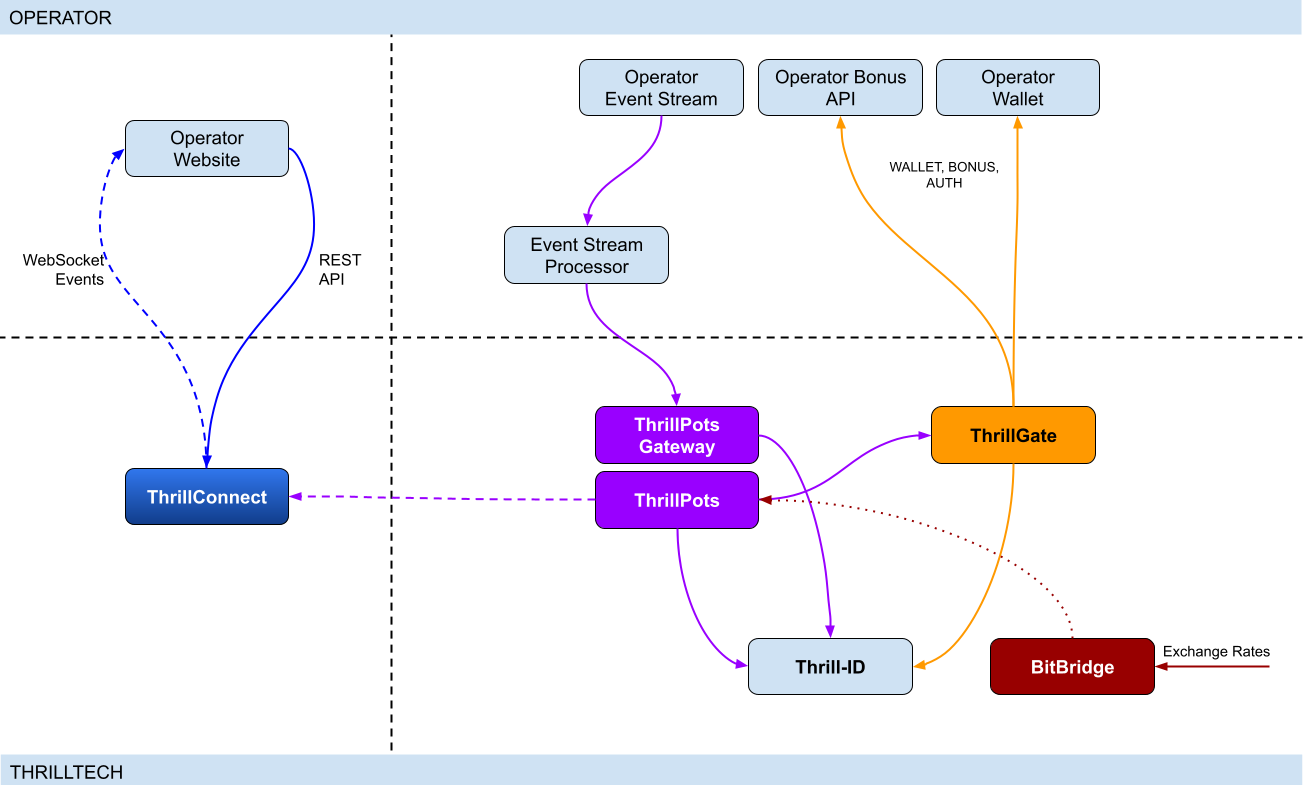
Integration points
ThrillPots has 3 primary integration points. This section will discuss each integration point and explain the purpose for each.
Betting integration
When it comes to Jackpot contributions, unlike normal games, player's do not make direct bets to jackpots. Rather, bets (contributions) are made on behalf of players via the operator's backend system.
Let's imagine a hypothetical casino where the operator has deployed a sitewide jackpot which is available to all players and is active across all casino content available on the site. The jackpot will receive a contribution bet each time a player makes a bet on any of the games on the site.
In order for these contributions to be made on behalf of the player, a simple event processor needs to be deployed that receives player game play / bet events and for each event makes a contribution request to the ThrillPots system.
In most platforms, this can be achieved by building a Kafka, RabbitMQ (or similar) event/stream processor which subscribes to the relevant topic/channel and makes REST API calls for each relevant event received. For platforms that do not have a message or event bus available, these events could be dispatched to the event processor via an alternative RPC mechanism such as REST, gRPC etc. This decision is all up to you, the integrating platform.
To learn more about this part of the integration, go to Event Stream Integration
Wallet Integration
When it comes to the wallet integration for ThrillPots, this integration is almost the same as any game provider integration. The wallet integration covers the following flows:
- Player token authentication
- Single Transactions (Debit & Credit)
- Batch Credit transaction (Multi-player payouts)
- Transaction cancellation
Integration is done against the ThrillGate service and can be performed in either direction (operator-to-provider or provider-to-operator).
To learn more about this part of the integration, go to Wallet Integration
Operator-to-Provider
If you decide to do an operator-to-provider integration, you will need to expose the endpoints required by the ThrillGate Standard Wallet Interface. All documentation can be found in the ThrillGate Standard Wallet Integration API documentation.
If you prefer for ThrillTech to integrate to your wallet API (provider-to-operator integration), you will need to provide the APIs and an integration environment for ThrillTech to develop the integration.
Frontend Integration
The ThrillConnect service is designed to support all frontend integrations. It exposes both a REST API (for end-user functionality like opt-in) as well as a WebSocket event stream for ad-hoc messaging and event broadcasts.
It is suggested to make use of the ThrillConnect JS API middleware layer which can easily be included in your site's code, freeing you up from the integration details and allowing you to focus on the visual and UX of the presentation layer.
To learn more about this part of the integration, go to Frontend Integration
Integrating ThrillPots Overview
The ThrillPots integration is best described as a 3-step process which is comprised of:
We suggest that before you dig into any of the three sections above, that you take the time to read this overview as it contains important information and pre-requisites that are needed for a smooth integration process.
PRE-REQUISITES
The rest of this guide assumes the following:
- You have the ThrillPots AIO Development container running and available. See this section for information on how to do this.
- You have a way to communicate with the services in the AIO Container (for example
curlorPostmanor similar tool)
Authentication and Authorization
Prior to making any calls to the ThrillPots service APIs, you need to authenticate with the ThrillTech platform using credentials that have been provisioned for you.
The ThrillTech platform uses a centralised authentication technology called Thrill-ID which provides governance over both User and Service accounts.
For integration purposes, you will need to provision a Service account (if one has not been provisioned for you yet). To learn more about provisioning accounts, please refer to the Thrill-ID documentation.
For an example of a Service account that would be suitable for the event stream integration service, see here
Setting up the AIO Container
The ThrillPots AIO Container is comprised of all the services necessary to run the ThrillPots platform from a single docker container.
The services made available are:
- ThrillPots Gateway (integrate your event/stream processor here)
- ThrillPots Service (the heart of the jackpot platform)
- ThrillGate (used to integrate with or to wallet APIs)
- ThrillConnect (integrate your frontend with this service)
- BitBridge (used for external data source integrations like exchange rates providers)
- ThrillTech Backoffice
- MongoDB
- Redis
The AIO container was designed to enable developers to deploy the entire ThrillPots stack on their local development machines on in a development environment quickly and easily.
In-Service Swagger UI
Each service provides access to a Swagger-UI for its API. Apart from ThrillConnect, which is an edge service, Swagger-UI support is compiled in to all the services and accessible via the /swagger-ui path.
ThrillConnect Swagger UI
Since ThrillConnect is an edge service and generally made available to the public internet, swagger-ui needs to be enabled via an environment variable.
In order to enable the /swagger-ui endpoint for the ThrillConnect service, you must set the TCS_ENABLE_SWAGGER environment variable to true.
Setting up the AIO Container: Pre-requisites
This short section explains the pre-requisites you will need in order to be able to setup the AIO container.
Pre-requisites
You will need the following software on your development machine:
Mandatory:
- Docker (or alternatively Docker Desktop)
- Postman
Optional:
Some type of MongoDB UI. We recommend you use MongoDB Compass
GitHub Access
You will need to have a GitHub account that has been granted access to the ThrillTech GitHub Organisation. This step is usually done as part of the initial technical kick off. As part of this access, you are granted access to repositories and packages that are needed.
Once you have provided ThrillTech with your Github account and we have added you as a collaborator, you need to have a Github Personal Access Token (classic) with permissions to read packages.
Go to your account's Settings -> Developer Settings -> Personal Access Tokens -> Tokens (classic) and create one.
(Click your avatar circle on the top right part of Github, click "Settings" and then "Developer Settings" is located at the bottom on the right of the menu of your account)
The only right it needs to have is to read packages.
Log in to our package repo and give your github username and the token your just created as password when prompted
docker login ghcr.io/thrilltech-io
Setting up the AIO Container: Initial Setup
Setting Up
Once you have provided ThrillTech with your Github account and we have added you as a collaborator, you need to have a Github Personal Access Token (classic) with permissions to read packages.
Go to your account's Settings -> Developer Settings -> Personal Access Tokens -> Tokens (classic)nd create one.
(Click your avatar circle on the top right part of Github, click "Settings" and then "Developer Settings" is located at the bottom on the right of the menu of your account)
The only right it needs to have is to read packages.
Log in to our package repo and give your github username and the token your just created as password when prompted:
docker login ghcr.io/thrilltech-io
Once you have successfully authenticated with the repository, you are ready to continue with the steps to getting the ThrillPots Dev Container running:
- Clone the https://github.com/thrilltech-io/dev-containers repository
- Go to the
/thrillpotsfolder in the repository and execute:docker compose up -d
NOTE: If you are running on MacOS on Apple Silicon, you may need to enable x86_64/amd64 emulation. Do this by going to Docker Desktop's settings -> General and finding the option called "Use Rosetta for x86_64/amd64 emulation on Apple Silicon" and enable it.
This will download all the necessary packages and run them via
Docker Compose. This process may take a few minutes to complete
- Import the provided Postman collection (
ThrillPots AIO Setup.postman_collection.json) which can be found in the repository into your Postman application - You will notice that it contains a number of endpoints, all numbered. The numbering indicates the sequence in which you must execute the calls.

- Execute all the steps in order
Once complete, you will have a ThrillPots system running and configured in 'standalone mode'. This means that you can make contributions and interact with the system, but there will be no external wallet calls made for player authentication or transactions.
In this mode, valid player IDs are in a range:
[player_00000 ... player_00999]
As part of the steps, you will also have created a Jackpot Template, and from this template you created a Jackpot instance. Jackpot Instances are the "running jackpots" that players contribute to. You also made a contribution directly to the jackpot.
You would also have created a Source and mapped the Jackpot Instance to the source and successfully made a contribution to the jackpot via the Source
The final step in the setup was the creation of an Internal mock wallet in ThrillGate. In a later section, where wallet integration is discussed, you will change this configuration to allow connectivity to your own wallet service, but for now, this mock wallet implementation is enough to get started with.
ThrillPots Wallet Configuration
IMPORTANT
Please note that when you change the wallet configuration for the ThrillPots service, you MUST restart the ThrillPots service for the changes to take effect.
Setting up the AIO Container: Admin Accounts
By default, the system is configured with an admin account called admin@thrilltech.io. This account has the ability to control all resources for the thrilltech oorganisation. You will have noticed that in all of the setup steps above, the owner_id or brand_id values were either thrilltech or thrilltech:brand1.
The ThrillPots system implements a "resource ownership" model which ensures that jackpot objects are not modifiable by unauthorized accounts.
Have a look at thrilltech:brand1. The first part before the : is the "organisation" or "operator id". The second part after the : is the "organisational unit" or "brand".
Creating a new ThrillPots admin account for a different organisation
If you want to create and manage ThrillPots resources for a different organisation/operator, you will first need to create a new orgnisation and admin account for that organisation. All of these actions are done through Thrill-ID.
The next steps assume that you are authenticated as
admin@thrilltech.io(as per Step 0 in the setup steps)
1. Create a new organisation
We first need to register a new organisation in Thrill-ID. For the purposes of this example, lets create a new organisation called "new-operator" which has 2 casino brands: new-mega-casino and new-mega-sportsbook.
To do this, make the following call to Thrill-ID:
POST http://localhost:9000/admin/organisations
Header: Authorization Value: Bearer AUTH_TOKEN_FOR_ADMIN@THRILLTECH.IO
Body:
{
"id": "new-operator",
"units": [
"new-mega-casino",
"new-mega-sportsbook"
],
"enabled": true,
}
You should receive a 200 OK.
Now we can create the new admin account for the new organisation
2. Create a new admin account
To create a new administrator account for the new-operator organisation we just created, we need to make another call to Thrill-ID, this time to create the actual account:
POST http://localhost:9000/admin/accounts
- Header:
Authorization - Value:
Bearer AUTH_TOKEN_FOR_ADMIN@THRILLTECH.IO
Body:
{
"account_type": "User",
"username": "admin@new-operator.com",
"password": "password",
"org_unit": {
"org_id": "new-operator"
},
"permissions": [
{
"system_id": "thrillpots",
"permissions": [{
"resource_id": "*",
"permission": "Admin"
}]
}
]
}
You should receive a 200 OK along with a response body showing you the newly created account.
3. Test the new admin account
Go back to Step 0 in the setup instructions and change the username and password to the new accounts username and password and try to authenticate. If everything went right, you should receive a new token for the account and can now proceed with managing ThrillPots resources for the new-operator organisation.
Once you are authenticated with the admin account for the new-operator organisation, you will be able to create Jackpot templates, instances, sources etc for the new-operator organisation.
4. Create the Operator and Brands in ThrillPots
We now need to create the operator and associated brands in ThrillPots. To do this we make the following calls:
Add Operator
POST http://localhost:8084/config/operators
- Header:
Authorization - Value:
Bearer AUTH_TOKEN_FOR_ADMIN@THRILLTECH.IO
Body:
[
{
"id": "new-operator",
"name": "New Operator"
}
]
Add Brands to Operator
POST http://localhost:8084/config/operators/new-operator/brands
- Header:
Authorization - Value:
Bearer AUTH_TOKEN_FOR_ADMIN@THRILLTECH.IO
Body:
[
[
"new-mega-casino",
"new-mega-sportsbook@"
]
{
"id": "new-mega-casino",
"name": "Mega Casino"
},
{
"id": "new-mega-sportsbook",
"name": "Mega Sportsbook"
}
]
Event Processor Integration
In this section, we will discuss the Event Processor integration component that is required in order to enable the ability to make contributions to jackpots.
In general, this integration component needs to be able to receive the events that will drive jackpot contributions on behalf of users/players.
In a standard ThrillPots-powered system, it is usually gameplay that causes jackpot contributions to be made on behalf of players, but you are not limited to just this single use case.
From a simplistic perspective, the general logic should look something like this:
Authenticate your integration service with ThrillPots Gateway
Subscribe to gameplay/bet events from your event stream
When an event is received from your event stream:
- Read the properties of the event for game code, player ID and bet amount
- Make a contribution call to ThrillPots using these (and other values)
From here, it is relatively easy to see how you could expand the use case to create a Deposit jackpot. Lets imagine that the deposit flow was identified by source DEPOSIT. Lets also assume that when a successful deposit has been made by a player, that an event is published by the operator's platform. For argument's sake, lets call this event DEPOSIT_SUCCESS.
If we wanted to create a deposit jackpot, the logic could look as follows:
Subscribe to DEPOSIT_SUCCESS event
When an event is received:
- Read the properties of the event for the player ID and deposit amount
- Make a contribution call to ThrillPots using the DEPOSIT source_id and other properties
Sequence Diagram for the Event Processor integration

Authenticating via ThrillPots Gateway
The ThrillPots Gateway service exposes a REST endpoint which your event stream process can authenticate itself with Thrill-ID.
The endpoint is POST /authenticate/service and accepts a payload which contains the connecting service's username and password.
If authentication is successful, you will receive a response which contains token which must be used as a Bearer token in subsequent API requests to the ThrillPots Gateway service. Service tokens do not expire and therefore you do not need to be concerned with refreshing your token once it has been received.
See here for a Service account that you can provision for your Event Processor integration service.
Additional Information
If your event processor service is processing gameplay bet events, you should remember to filter out any and all events related to Jackpot Contributions as this could create loop of contributions on behalf of players
Contributing to Jackpots
Now that you are processing events from your platform, you want to be able to make Contributions on behalf of players to the jackpot. The process of contributing is quite straight forward and does not require your service to be aware of player opt-in status. You will however need to decide which jackpot to contribute to and this can be done in one of two ways:
- Contribute by source
- Contribute direct to jackpot
Sources
A Source can be thought of as an operator-defined identifier for a user journey, a group of games, or even a single game. You can read more about Sources here,
Example: Sitewide Jackpot
If you wanted to create a site-wide jackpot for your casino vertical, you could create a Source named casino-sitewide, map a jackpot to the source and then send all contributions to that specific Source.
{
"token": "token_00001",
"brand_id": "thrilltech:brand1",
"player_id": "player_00001",
"player_country": "UK",
"source_id": "casino-sitewide",
"gameround_id": "1",
"currency": "EUR",
"base_wager": 1
}
Example: Deposit Jackpot
If you wanted to create a deposit jackpot, you can create a source called deposit, map the relevant jackpot to the source and then send all deposit-based contributions ot that source
{
"token": "token_00001",
"brand_id": "thrilltech:brand1",
"player_id": "player_00001",
"player_country": "UK",
"source_id": "deposit",
"gameround_id": "DEPOSIT_TX_ID",
"currency": "EUR",
"base_wager": 1
}
Example: Game Group Jackpot
If you wanted to create a jackpot for a specific set of games, for example, a jackpot for all egyptian themed games, you can create a source called egyptian-games and use that for contributions each time a player bets into a game that is egyption themed. This would naturally require your integration service to know which games are matched to which Game Group source.
{
"token": "token_00001",
"brand_id": "thrilltech:brand1",
"player_id": "player_00001",
"player_country": "UK",
"source_id": "egyptian-games",
"gameround_id": "1",
"currency": "EUR",
"base_wager": 1
}
Example: Game Specific Jackpots
If you want to split your liquidity by game title, you can create sources that correspond to the game codes of games in your system. Each source would need a jackpot mapped to it, but once that is done, you are able to make contributions to the source based on the game code of the base game bet.
{
"token": "token_00001",
"brand_id": "thrilltech:brand1",
"player_id": "player_00001",
"player_country": "UK",
"source_id": "provider-game-code",
"gameround_id": "1",
"currency": "EUR",
"base_wager": 1
}
Direct to Jackpot Contribution
An alternative to using sources is to make contributions directly to Jackpot Instances by their ID. For example, if you have created a Jackpot instance, you will have its ID available to you. This ID will not change over the lifetime of the jackpot. Making contributions directly to a Jackpot ID incurs less processing cost, but may also reduce the flexibility you may have in changing which jackpot players contribute to based on the content or user flows.
The only difference in the contribution payload is that the source_id is replaced with an instance_id field as seen below:
{
"instance_id": "0a1cfeea-5b07-4f2b-b2f1-2e4cd2aa991d",
"token": "token_00001",
"brand_id": "thrilltech:brand1",
"player_id": "player_00001",
"player_country": "MT",
"gameround_id": "1000",
"base_wager": 2,
"currency": "EUR"
}
Synchronous vs Asynchronous contribution
The default contribution mechanism is synchronous. However, depending on your system architecture (and system load), you may prefer to make use of asynchronous contribution mechanics. In order to make asynchronous contributions, you need to provide a webhook that the ThrillPots system can call once the result of a contribution has been determined.
In order to make a contribution asynchronously, you simple need to add a callback property to either of the contribution payloads above to specify the webhook to call and which results you are interested in receiving.
The structure of the callback property is as follows:
{
"web_hook": "https://your.host/webhook",
"win_result_only": false
}
The web_hook field indicates the fully qualified HTTP path to your webhook and the win_result_only property indicates whether the webhook should only receive win results or all contribution results.
Therefore, an asynchronous contribution for a sitewide casino jackpot would look like this:
{
"token": "token_00001",
"brand_id": "thrilltech:brand1",
"player_id": "player_00001",
"player_country": "UK",
"source_id": "casino-sitewide",
"gameround_id": "1",
"currency": "EUR",
"base_wager": 1,
"callback": {
"web_hook": "https://your.host/webhook",
"win_result_only": false
}
}
When making an asynchronous contribution, the ThrillPots system will either return 200 OK with a JSON payload that contains a trace_id for the request when it has successfully accepted the contribution request for processing, or you will receive an error due to the request being malformed.
Any contribution request errors will be send to the webhook. The structure of the webhook payload is defined as follows:
Successful contribution result
{
"type": "data",
"contribution_amount": Number,
"contribution_currency": String,
"gameround_id": String,
"instance_id": String,
"metadata": null | Object,
"tickets_awarded": null | Number,
"timestamp": Number,
"win_amount": Number,
"win_pot_id": null | String,
"win_withheld": Boolean
}
Error result
{
"type": "error",
"status_code": Number,
"code": String,
"message": String,
}
The data portion will either be a ContributionResult structure or an Error structure. You can find more information on these structures in the API documentation.
Examples of payloads sent to the web hook
Contribution Result
{
"type": "data",
"contribution_amount": 0.1,
"contribution_currency": "EUR",
"gameround_id": "cc83c1cc-6260-44fc-822b-d3c03acf2d89",
"instance_id": "a49ff35f-6ecd-491f-b373-85e6caabacf1",
"metadata": null,
"tickets_awarded": null,
"timestamp": 1715714218408,
"win_amount": 0,
"win_pot_id": null,
"win_withheld": false
}
Error Result
{
"type": "error",
"status_code": 404,
"code": "GAME_NOT_FOUND",
"message": "sitewide-casino2",
}
Contribution Request Errors
A contribution request may result in a direct or a downstream error. A direct error is an error that is the result of the ThrillPots system return an error to the contribution request itself. A downstream error is an error that is propogated to the contribution request caller from a downstream system, such as ThrillGate or the operator wallet itself.
List of Direct Errors
For Direct Errors, you can expect:
| Error Code | Description |
|---|---|
CONTRIBUTION_REJECTED | The contribution was rejected due to a contribution rule failing, The rule in question will be contained within the CONTRIBUTION_REJECTED message |
GAME_NOT_FOUND | this occurs when making a contribution to source and the source does not exist |
CURRENCY_MULTIPLIERS_NOT_FOUND | self explanatory |
SYSTEM_ERROR | This is what you get with 500 http responses from ThrillPots |
OPTIN_ERROR | This occurs if the player;s optin record could not be updated |
SOURCE_JACKPOT_NOT_FOUND | This occurs if the jackpot mapped to the source could not be found |
SOURCE_JACKPOTS_NOT_ALLOWED | This occurs if the jackpot mapped to the source does not allow a contribution from this player (either country or brand not allowed) |
DB_ERROR | An internal DB ERROR |
UNSUPPORTED_BRAND | This is returned when the brand of the player (specified in contribution) is not supported by the jackpot or system |
Passing Metadata
If you need to pass contextual metadata from your event processor to your wallet, you can do so by adding a metadata field to the Contribution Request. This data will be passed through the system and attached to transaction requests to your wallet.
The metadata field can be any valid JSON value, for example:
Metadata containing an Object:
{
"token": "token_00001",
"brand_id": "thrilltech:brand1",
"player_id": "player_00001",
"player_country": "UK",
"source_id": "casino-sitewide",
"gameround_id": "1",
"currency": "EUR",
"base_wager": 1,
"metadata": {
"value1": "some value",
"value2": 1234
}
}
Metadata containing a String:
{
"token": "token_00001",
"brand_id": "thrilltech:brand1",
"player_id": "player_00001",
"player_country": "UK",
"source_id": "casino-sitewide",
"gameround_id": "1",
"currency": "EUR",
"base_wager": 1,
"metadata": "This is an arbitrary string value"
}
Contribution Sources
Contribution Sources are a concept in ThrillPots that allow operators create well-known identifiers for one or more Jackpot Instances. A contribution source is bound to an operator and brand ID.
Contribution Sources are valid targets/identifiers for jackpot contribution bets (as described in the Contributing to Jackpots section).
Why use sources instead of Jackpot Instance IDs
Sources provide a mechanism of indirection to Jackpot Instances. Since a Source will usually have a well-known and human-defined identifier, and can represent one or more Jackpot Instances at any point in time, they provide a very convenient way for Integrating services and frontends to work with Jackpot Instances.
For example, instead of hard coding a specific Jackpot Instance ID into your frontend or backend services, you can simply configure the more human-readable source_id and use the Source to determine at runtime which Jackpot Instance ID is being used. This is especially useful when Jackpot models are changed over time since your integrated product will not need to be modified unless there is a fundamental structural change to the jackpot itself (which is rarely the case).
Example
An early, but very common use-case Contribution Source can be seen below, where a Source has been created for Operator thrilltech, Brand brand1 and is the source for the "site wide casino jackpot".
In this case, the contribution flow would look like this:
┌──────────────────────────────┐
│Contribution to Source Request│ (POST https://thrillpots_gateway_host/jackpots/contribute/source)
└──────────────┬───────────────┘
│
│
│
▼
┌────────┐
│ Source │
└────────┘
│
│
│
▼
┌──────────────────┐
│ Jackpot Instance │
└──────────────────┘
Under the covers (in the data), this Contribution Source will most probably look something like this:
{
"owner_id": "thrilltech:brand1",
"source_name": "Casino Sitewide Source",
"source_id": "sitewide-casino",
"jackpots": [
{
"priority": {
"$numberLong": "0"
},
"owner_id": "thrilltech:brand1",
"instance_id": "12231b6a-a774-4a93-8f16-f8af9aee2076"
}
]
}
The jackpots array in this Contribution contains a single Jackpot Instance ID because in this case, there is only one Jackpot Instance required. We will discuss use cases where having multiple Jackpot Instances in this array can be useful.
Creating a Contribution Source
To create a Contribution Source, we follow a 2 step process:
- Create the new source
- Assign the desired Jackpot Instance to the Source
1. Create the new source
To create a source, we use the POST /config/sources endpoint on ThrillPots Service (link to API).
An example to create a "Site-wide Jackpot" source for the thrilltech:brand1 operator-casino would look like this:
POST http://<thrillpots-service-host>/config/sources
Payload
[
{
"owner_id": "thrilltech:brand1",
"source_name": "Casino Sitewide Source",
"source_id": "sitewide-casino"
}
]
FYI: If you have downloaded the ThrillPots AIO Setup Postman collection, an example of this step will be in the
Basic Setup > Create a Sourceendpoint.
2. Assign the desired Jackpot Instance to the Source
Once you have created a source, you can now assign a pre-existing Jackpot Instance to the source. This can be done using the POST /config/sources/assignjackpot endpoint on the ThrillPots Service (link to API).
POST http://<thrillpots-service-host>/config/sources/assignjackpot
Payload
{
"owner_id": "thrilltech:brand1",
"source_id": ["sitewide-casino"],
"instance_id": "{{instance_id}}"
}
Retrieving the Jackpot Instance from a source
To retrieve that relevant Jackpot Instance for a specific source, you can use the following methods:
ThrillPots Gateway
GET /jackpots/instances/source/:source_id/brand/:brand_id?player_id=:player_id
The parameters in the url above are:
| Parameter | Description |
|---|---|
source_id | The Source ID (for example, sitewide-casino from the example above) |
brand_id | This is the identifier for the brand in question, which is comprised of the operator_id:brand_id pairing |
player_id | [OPTIONAL] If a player_id is specified, the returned Jackpot Instance will also contain the opt-in details for the specified player |
ThrillConnect (used by the Frontend)
GET /v1/thrillpots/instances/source/:source_id/brand/:brand_id?player_id=:player_id
The parameters in the url above are the same as for ThrillPots Gateway:
| Parameter | Description |
|---|---|
source_id | The Source ID (for example, sitewide-casino from the example above) |
brand_id | This is the identifier for the brand in question, which is comprised of the operator_id:brand_id pairing |
player_id | [OPTIONAL] If a player_id is specified, the returned Jackpot Instance will also contain the opt-in details for the specified player |
Retrieving all sources in the System
To retrieve a list of sources for a specific operator brand, you can use one of the following methods:
ThrillPots Gateway
GET /sources?owner_id=:brand_id
The brand_id parameter in the URL is once again comprised of the operator_id:brand_id pair which identifies a specific brand. If any sources have been configured for the operator_id:brand_id specified, they will be returned in a response which contains a list of Source JSON objects and will look similar to this example:
[
{
"owner_id": "thrilltech:brand1",
"source_name": "Casino Sitewide Source",
"source_id": "sitewide-casino",
"jackpots": [
{
"priority": 0,
"owner_id": "thrilltech:brand1",
"instance_id": "12231b6a-a774-4a93-8f16-f8af9aee2076"
}
]
}
]
ThrillConnect (used by the Frontend)
GET /v1/thrillpots/sources?owner_id=:brand_id
As in the ThrillPots Gateway example above, the brand_id parameter in the URL is once again comprised of the operator_id:brand_id pair which identifies a specific brand. The response payload will look exactly the same as the response from the ThrillPots Gateway service above.
ThrillPots Events
ThrillPots publishes a number of events which your integration service can subscribe to. There are a number of reasons you may want to consume these events, for example:
- Synthesizing related Kafka/RabbitMQ events
- Storing the events for BI / Analysis purposes
The following events are currently published by ThrillPots Gateway:
JackpotUpdateEvent- contains the latest jackpot values for the specified Jackpot Instance- Reference
{
"event_type": "JackpotUpdateEvent",
"event_id": "d6f05820-1da2-4152-bcba-6c0186f6cd77"
"data": {
"id": "jackpot instance ID",
"status": String,
"currency": String,
"allowed_brands": [String],
"allowed_sources": [String],
"pots": [
{
"id": String,
"is_progressive": Boolean,
"current_value": Number
}
],
"last_updated": Number
}
}
JackpotWinEvent- contains the details of a jackpot win- Reference
{
"event_type": "JackpotWinEvent",
"event_id": "3fe809f4-c94f-4950-9b86-5f2d0b8f604f"
"data": {
"brand_id": String,
"player_id": String,
"source_id": String | null,
"instance_id": String,
"jackpot_name": String,
"timestamp": Number,
"win_pot_id": String,
"win_amount": Number,
"currency_multipliers": {
"brand_id": String,
"base_currency": String,
"multipliers": {
"EUR": Number,
"GBP": Number,
"ZAR": Number,
...
"NZD": Number,
"SEK": Number
}
}
"games_in_jackpot": [String],
"seed": Number,
"win_withheld": Boolean,
"seed_deficit": Number,
"community_winners": null | [{
"player_id": String,
"brand_id": String,
"currency": String,
"win_amount": Number
}]
}
}
RaffleWinEvent- contains the details of a Raffle Win- Reference
{
"brand_id": String,
"instance_id": String,
"jackpot_name": String,
"jackpot_currency": String,
"currency_multipliers": {
"brand_id": String,
"base_currency": String,
"multipliers": {
"EUR": Number,
"GBP": Number,
"ZAR": Number,
...
"NZD": Number,
"SEK": Number
}
}
"timestamp": Number,
"winners": [
{
"player_id": String,
"brand_id": String,
"currency": String,
"win_amount": Number
}
],
"win_withheld": bool
}
OptInEvent- contains the details of a player opt-in or opt-out into a Jackpot Instance Reference
{
"event_type": "OptInEvent",
"event_id": "27045bf8-78d2-4f99-97f1-e7d2e3aa434d"
"data": {
"instance_id": String,
"player_id": String,
"ext_player_id": String,
"player_brand_id": String,
"preferred_contribution_value": [Number],
"contribution_count": Integer,
"contribution_value": Number,
"opted_in": Boolean,
"last_updated": Integer
}
}
CommunityPayoutErrorEvent- sent in case of an error that is encountered when processing community payouts Reference
{
"event_type": "CommunityPayoutErrorEvent",
"event_id": "c034a751-cf91-4722-bc89-a2f8af472805"
"data": {
"instance_id": String,
"gameround_id": String,
"tx_credit_id": String,
"failed_payouts": [
{
"player_id": String,
"brand_id": String,
"currency": String,
"win_amount": Number
}
]
}
}
RafflePayoutErrorEvent- sent in case of an error that is encountered when processing raffle payouts Reference
{
"event_type": "RafflePayoutErrorEvent",
"event_id": "e981296b-199f-4454-b4ec-b3f36910c2cc"
"data": {
"instance_id": String,
"failed_payouts": [
{
"player_id": String,
"brand_id": String,
"currency": String,
"win_amount": Number
}
]
}
}
The ThrillPots events are published via the WebSocket endpoint /events.
Authenticating the Websocket connection to receive events
Once you have established a WebSocket connection from your event processor service to ThrillPots Gateway, you will need to send an Authenticate message which contains your Thrill-ID JWT token to authenticate your service to receive events.
{
"action": {
"Authenticate": {
"auth_token": "{{thrill-id-jwt}}"
}
}
}
If the authentication fails, the connection will be closed. Once you have authenticated, you should start receiving the events from the ThrillPots service.
Wallet Integration
Introduction
When integrating ThrillPots to your wallet, you will need to implement what is known as the "Standard Wallet API". This API has been defined by ThrillTech and is what our ThrillGate services uses to communicate with your backend to process:
- Player Authentication
- Transactions
- Transaction cancellations
- Batch transactions# Wallet Integration
ThrillPots Wallet Configuration
IMPORTANT
Please note that when you change the wallet configuration for the ThrillPots service, you MUST restart the ThrillPots service for the changes to take effect. In this section, we will discuss how ThrillPots performs player authentication and jackpot contribution transactions.
When running in a non-development environment (such as staging or production), ThrillPots uses the ThrillGate Service as an integration layer to an operator's wallet API.
NOTE:
ThrillPots also supports an internal, in-memory wallet for development or isolated testing purposes. This wallet is enabled by default in the AIO development container
Types of Wallet Integrations
There are two types of wallet integrations that can be developed:
- Provider-to-Operator integration
- Operator-to-Provider integration (Standard Wallet Integration)
This section is been written for operators that have chosen to do an Operator-to-Provider integration. For a Provider-to-Operator integration, ThrillTech are responsible for implementing the integration to your wallet API and that topic is out of scope for this book.
- Batch transaction cancellations
All communications from ThrillGate are conducted over secure SSL REST calls to your system.
As part of all calls to your system, ThrillGate sends an HMAC in the X-Server-Authorization header which is calculated from the body of the request only. You can use this HMAC value to verify that the request is coming from the expected ThrillGate server.
NOTE: During integration you will receive the secret key that you can use to verify the HMAC value with.
Enabling Wallet Integration Mode in the AIO Container
In order to configure the container to support external wallet integration mode, some additional API calls need to be made.
In the provided Postman collection, you will find a folder called Wallet Integration Mode. In this folder you will find additional API calls that you need to make in order to configure the container to run in this mode.

The first API call (1. Create Wallet Configuration) makes a call to the ThrillGate service and sets up the "Standard Wallet API" connnector.
It is very important that you do NOT change the details in Step 2a or 2b as these are specific for the AIO container.
PLEASE NOTE:
When building your wallet integration, the ThrillGate service will attempt to connect to your wallet service on your localhost:8201. This is configured via Docker networking as:
Host: "host.docker.internal"
Port: 8201You can change the port, but we would recommend not changing the host unless you are absolutely sure you know what you are doing.
Once you have executed step 1, you can Enable or Disable the external wallet mode using steps 2a or 2b respectively.
Once you have completed the configuration, you will need to restart the ThrillPots service in the AIO container.
IMPORTANT
Each time you change the wallet configuration of ThrillPots, you must restart the ThrillPots Service for the configuration changes to take effect
Standard Wallet Integration
What is the Standard Wallet?
The Standard Wallet is a REST API definition (designed by ThrillTech) which an operator needs to implement support for. The ThrillGate service uses the Standard Wallet API (as a client) to communicate with the operator's wallet to perform the following actions:
- Player token authentication
- Debit / Credit transactions (single)
- Credit transaction batches
- Transaction cancellation
Standard Wallet Sequence flows
Below is a sequence diagram of the expected data flow between ThrillGate and the operator wallet API:
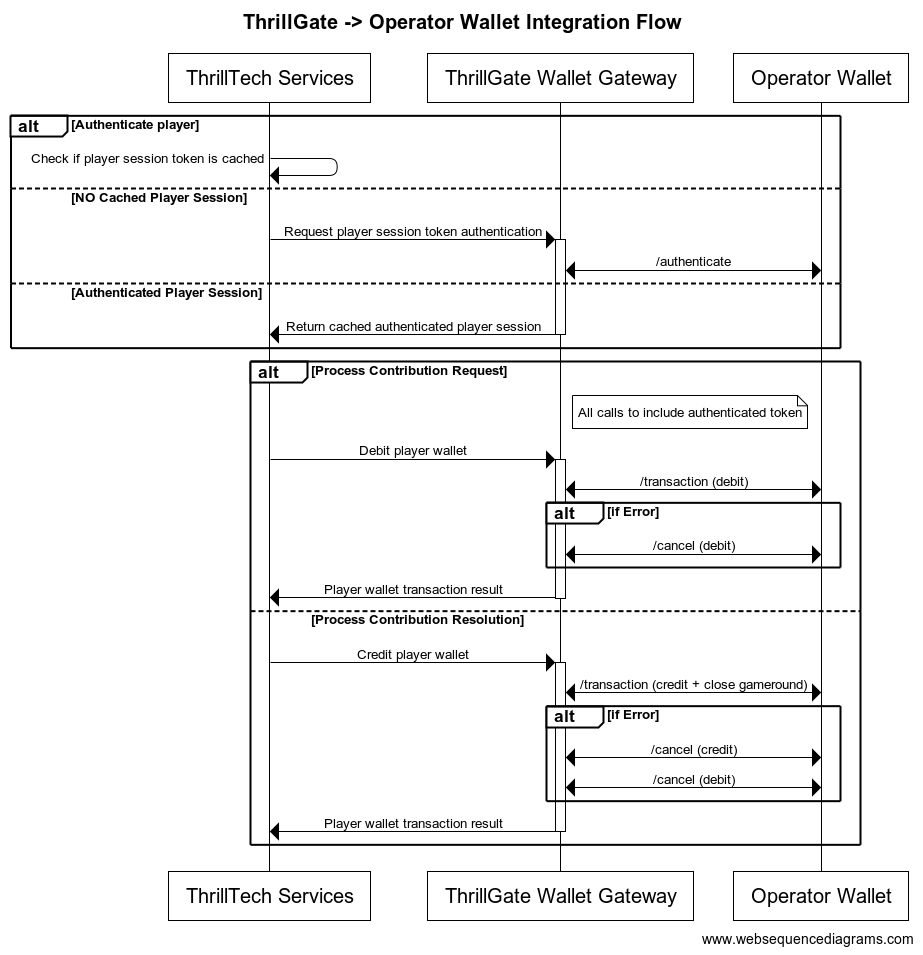
Configuring a Standard Wallet Integration in ThrillGate
To configure the ThrillGate Service to connect to your Standard Wallet API compliant service, you need to configure a Wallet resource.
To configure a wallet:
- URL:
POST http://localhost:8100/admin/wallets - Headers:
Authorization: Thrill ID Bearer token
- Body:
{
"id": "Brand1Wallet",
"operator_id": "thrilltech",
"brand_id": "brand1",
"wallet_type": "StandardWallet",
"connection_details": {
"protocol": "http",
"host": "host.docker.internal",
"port": 8201
},
"endpoints": {
"auth": {
"POST": "/wallet/authenticate"
},
"balance": {
"GET": "/wallet/balance"
},
"cancel_bet": {
"DELETE": "/wallet/cancel"
},
"transaction": {
"POST": "/wallet/transaction"
},
"transaction_batch": {
"POST": "/wallet/transaction/batch"
},
"cancel_batch": {
"DELETE": "/wallet/transaction/batch"
}
},
"config": {
"secret_key": "12345",
"accept_zero_value_credits": true,
"must_close_gamerounds": false
}
}
| Property | Description |
|---|---|
id | The ID you want to assign to the wallet. This is a unique identifier |
operator_id | The operator ID that this wallet is for |
brand_id | The brand ID that this wallet is for |
wallet_type | This must be set to StandardWallet |
connection_details.protocol | The protocol of the url. Usually http or https depending on your setup |
connection_details.host | The hostname for your server. While using the AIO container, it is recommended you keep this set to host.docker.internal |
connection_details.port | The port that your server is listening on |
endpoints | This is an object that describes the required endpoints for the Standard Wallet API |
endpoints.auth | This describes the endpoint that ThrillGate will make player authentication calls to |
endpoints.balance | This describes the endpoint that ThrillGate will make player balance requests to |
endpoints.transaction | This describes the endpoint that ThrillGate will call to perform transactions |
endpoints.cancel_bet | This describes the endpoint that ThrillGate will make to cancel transactions |
endpoints.transaction_batch | This describes the endpoint that ThrillGate will make for transaction batch calls |
endpoints.cancel_batch | This describes the endpoint that ThrillGate will make to cancel transaction batches |
config | An object that contains specific configuration elements for the Standard Wallet |
config.secret_key | This is the key that will be used to generate the HMAC value that is sent on each wallet request in the x-server-authorization header |
config.accept_zero_value_credits | This defines whether the external wallet supports Credit transactions which have a value of zero (0) |
config.must_close_gamerounds | This defines whether the external wallet requires gamerounds to be closed |
NOTE: If you need to change the definition of the endpoints, feel free to do so. Make sure that you use the correct HTTP verb and specify the endpoints as needed by your system.
Next Steps
Once you have understood the purpose of each of the Standard Wallet API calls as well as the flows around transaction and transaction batch handling, you are ready to start integrating the Standard Wallet API into your system. Refer to the provided API reference documentation and OpenAPI specs that have been provided to you.
Standard Wallet API: Player Authentication
In order for the ThrillPots system to take wagers (debit the player's wallet) and payout winnings (credit the player's wallet), it needs to be able to authenticate the player with the operator wallet.
This is done by calling the Standard Wallet's auth endpoint, passing in the provided player token and game code to the operator wallet and receiving the required player details (including the token that should be used for transaction calls)
This is done by ThrillGate calling the endpoint defined in endpoints.auth of the Standard Wallet's configuration. An example call's payload would look as follows:
{
"operator_id": "your_operator_id",
"brand_id": "your_brand_id",
"player_token": "token_00001",
"game_code": "AwesomeJackpotGameCode",
"currency": "EUR"
}
If successful, the operator wallet must respond with a valid session token and player details that can be used for future transaction calls for this player.
Response example:
{
"id": "player_00001",
"token": "session_token_00001",
"currency": "EUR",
"balance": 100001927.79,
"operator_id": "thrilltech",
"brand_id": "brand1",
"nickname": null,
"gender": "?",
"country": "MT",
"jurisdiction": null,
"segments": null
}
Standard Wallet API: Transactions
Transactions
Once the player token has been authenticated, the ThrillPots system can start making transaction calls through ThrillGate.
In standard operation, the first transaction call will be a Debit transaction request to fetch funds from a player's wallet for the Jackpot Contribution bet. This call is also intended to open the game round for the jackpot contribution.
If successful, ThrillPots will process the jackpot contribution and determine if a win occurred.
The next transaction call that will be made will be a Credit transaction request. This call is intended to pay any winnings to the player account and to close the game round that was opened with the Debit transaction.
Transaction Errors
If an error occurs while executing transactions with the operator wallet, ThrillGate and ThrillPots cooperate to ensure that the transaction error is handled correctly.
When an error occurs, ThrillGate will attempt to retry the transaction request a set number of times. If all retries fail, the error will be sent to ThrillPots for further handling.
If there are certain wallet errors that you do not wish ThrillGate to perform its retry logic, you can configure that as part of the wallet configuration in ThrillGate.
Please see the ThrillGate section on Configuring Wallet Error Behaviour for more information on how to configure ThrillGate's wallet error handling.
Once an error has been sent back to ThrillPots, ThrillPots will decide whether a transaction needs to be cancelled or not. Transaction cancellation is discussed next.
#@ Transaction Cancellation
In certain situations (as described in the errors section above), it is necessary for transactions to be cancelled. In general, ThrillPots handles transaction cancellation logic as follows:
If the Debit transaction failed
ThrillPots will send a cancellation request for the Debit transaction using the Debit transaction ID.
If the Credit transaction failed
ThrillPots will first send a cancellation request for the Credit transaction and then a separate cancellation request for the Debit transaction. Both requests will be sent with the respective transaction IDs.
Transaction Batches (Credit only)
ThrillPots uses Transaction Batch requests to communicate payouts to multiple players.
These types of payouts are only relevant to jackpots that are either:
- Multi-player payouts (community payouts)
- Raffle jackpot payouts
In both situations, since multiple players are considered winners from a single jackpot win, ThrillPots needs a way to credit wins to multiple players. Since these players are not guaranteed to be online at the time of the win, ThrillPots will not have access to any session token information for all the winners.
Transaction Batches are used in these special situations to communicate a set of credit operations that need to be applied to multiple players accounts.
Although unlikely, it is possible that not all the specified player accounts will be able to be credited with the winnings. Such a situation may arise if, for example, the player account has been banned/blocked or is self-excluded at the time of the jackpot win.
In these cases, the operator wallet is expected to flag the player account as an exception and continue to pay the remaining players in the transaction batch.
It is not considered an error if a player account in a transaction batch cannot be paid. The operator wallet should simply indicate this exception in the response and attempt to pay all other players.

Transaction Batch Cancellation
We have discussed what Transaction Batch exceptions are and how they are handled.
There is another limited set of errors that require Transaction Batches to be cancelled.
These errors are typically (but not limited to) errors such as network errors and timeouts. When an error occurs that leads ThrillGate to not be sure whether the operator's wallet has handled the transaction batch request, the request will first be retried, but after failing a specific number of times, the transaction batch will be cancelled.
Each transaction batch request has a unique identifier, and this identifier will be sent as part of the transaction batch cancellation request.
Frontend Integration
The final piece of the ThrillPots integration puzzle is the frontend integration. The frontend is responsible for displaying the Jackpot Ticker widget, showing players what the value of the various pots within the Jackpot are, the opt-in widget, allowing players to opt-in or opt-out of participation in the jackpot and so on.
The ThrillConnect Service has been specifically developed to provide an API and event stream over WebSockets to frontend clients to be able to interact with the ThrillPots system.
Integration Options
When integrating the frontend, there are two options that you can take:
- Use the existing libraries/components that ThrillTech has built to ease the effort of frontend integration:
- Develop your own integration with ThrillConnect and your own animation layer for the win animations
The sections below will detail the low level integration approach to help you understand how things work. You can then decide which of the options mentioned above you wish to take.
Sequence Diagram for the frontend to ThrillConnect integration

Integration Flow in detail
Fetching a Jackpot's details
One of the first things your frontend will most likely need to do is to retrieve jackpot details for your jackpot widget to display.
If you have followed the section on settings up the AIO container, you would have created a
Sourcecalledsitewide-casino.If you haven't gone through the process of setting up a source, we suggest that you review and understand sources and how they are used before continuing
To retrieve the jackpot for the sitewide-casino source, you will need to call:
GET /v1/thrillpots/instances/source/:source_id/brand/:brand_id?player_id=:player_id
replacing the :source_id and :brand_id values with the appropriate values that have been configured. If you used the default values from the Postman collection, you can use sitewide-casino for the source_id and thrilltech:brand1 for the brand_id.
If the player is already logged in, you can also pass the ID of the player via the query parameter player_id. Doing so will ensure that the player's opt-in status is returned in the jackpot instance information.
Establishing a WebSocket connection
In order to receive ThrillPots events and be able to opt players in or out of the jackpot, you will need to establish a websocket connection.
Once a player is logged into an operator's site, you can establish a WebSocket connection with ThrillConnect, passing in the player's session token.
NOTE
WebSocket connections are protected and can only be established by logged in players to prevent unauthorized and potentially dangerous abuse by attackers. Requiring a player a valid player session token in order to establish a WebSocket connection is a security-driven decision
To establish a WebSocket connection with ThrillConnect, open a WebSocket to:
/v1/events/{operator_id}/{brand_id}?token=PLAYER_TOKEN¤cy=PLAYER_CURRENCY
ThrillConnect will authenticate the token (the Player session token) from the query parameters with the operator's platform via ThrillGate. If the token is valid, the websocket connection will be established. If the token is invalid, the connection will receive a 403 FORBIDDEN error.
Subscribing to ThrillPots events
Once you have successfully established a WebSocket connection, you can now subscribe to ThrillPots events. This is done by sending a subscription request via the WebSocket to ThrillConnect. See below for the SubscribeRequest message that should be sent to subscribe to all ThrillPots events:
{
"SubscribeRequest": {
"events": [{
"source": "thrillpots",
"event_type": "*"
}]
}
}
If you would like to subscribe to only certain events, you can do so by explicitly specifying the events by source one-by-one.
ThrillPots currently publishes the folliowing event types:
- JackpotUpdateEvent
- WinEvent
- RaffleWinEvent
- OptInEvent
For more information about the structure of each of these events, see ThrillPots Event Structures
Player Opt-in / Opt-out
To opt a player in or out of a jackpot, you must send a PlayerOptInRequest message via the WebSocket connection.
Below are a few examples of opting a player in and out of a jackpot instance (please note, you will need to have the jackpot instance ID):
Opting in
{
"PlayerOptInRequest": {
"instance_id": "8dcc9f5a-f1c5-466f-83e9-928277d8bfb7",
"player_id": "player_00001",
"brand_id": "thrilltech:brand1",
"player_country": "MT",
"opt_in": true
}
}
Opting in with a preferred contribution value of 0.20
{
"PlayerOptInRequest": {
"instance_id": "8dcc9f5a-f1c5-466f-83e9-928277d8bfb7",
"player_id": "player_00001",
"brand_id": "thrilltech:brand1",
"player_country": "MT",
"opt_in": true,
"contribution_value": 0.2
}
}
Opting out of a Jackpot
{
"PlayerOptInRequest": {
"instance_id": "8dcc9f5a-f1c5-466f-83e9-928277d8bfb7",
"player_id": "player_00001",
"brand_id": "thrilltech:brand1",
"player_country": "MT",
"opt_in": false
}
}
Retrieving Exchange Rates
You may need to convert the values of a jackpot instance from the Jackpot currency to a player's currency. To help facilitate this, ThrillConnect exposes a currency endpoint which allows you to fetch the exchange rates used by ThrillPots.
To retrieve the 202408-1 exchange rates, you can call:
GET /v1/currencies
Retrieving a player's raffle ticket count
If player's are contributing to a Raffle jackpot, you may want to show the player how many tickets they have earned so far in the raffle. You can retrieve the player's current ticket count by requesting it via the WebSocket connection:
To retrieve a player's ticket count, send a PlayerRaffleTicketsRequest message:
{
"player_id": String,
"instance_id": String,
"brand_id": String
}
The instance_id is the instance ID of the Raffle jackpot, and the brand_id is in the format operator_id:brand_id.
If the request can be serviced, you should received a PlayerRaffleTicketsResponse message back:
{
"msg_type": "Message",
"source": "thrillpots",
"msg_name": "PlayerRaffleTicketResponse",
"operator_id": "OPERATOR_ID",
"brand_id": "BRAND_ID",
"player_id": "PLAYER_ID",
"data": {
"ticket_count": 4
},
"timestamp": 1711452762485
}
If there was an error processing the request, you will receive an Error message in response which will contain the message name that errored, as well as any relevant error details. For example:
{
"msg_type": "Error",
"source": "thrillpots",
"msg_name": "PlayerRaffleTicketRequest",
"operator_id": "OPERATOR_ID",
"brand_id": "BRAND_ID",
"player_id": "PLAYER_ID",
"data": {
"status_code": 404,
"code": "",
"message": "Error 404 Not Found from http://localhost:8084/instances/raffle/e0dee1ae-6231-458a-ad6d-4dc0c941e5c3/tickets/player_00001/brand/thrilltech:brand1"
},
"timestamp": 1711452757807
}
In this case, the request Jackpot instance ID could not be found.
ThrillConnect JS Client
ThrillConnect Client is the glue that connects your Portal and ThrillTech systems to provide seamless experience for your players. It is designed with minimialistic, yet powerful API, that can be easily consumed and covers all the narrow and tricky edgecases of the frontend integration. It's purpose is to make your frontend development trivial and expose the full API surface with minimum effort.
On this page you can find all the relevant details on how to use the Client, as well as examples and use cases.
Client version will be aligned with service version and just like that you'll be subscribed to all the latest and greatest features of our platform.
Source
Source code is avaiable for review & fork for all ThrilTech customers. You can find the client at https://github.com/thrilltech-io/connect-client.
Initialization
Client constructor needs the host address and BrandContext. Player context can optionally be passed on initialization or later on via authenticate method.
Additionally one can specify dev options, like the use of unsecure http/ws and client internal logs for dev convenience.
All the events of interest must be passed on to the constructor in the events array so that client can subscribe to relevant systems on the WS channel.
Player context
Player context type provides all necessary player details for establishing the WSS connection and interacting with the Jackpots from player perspective.
type PlayerContext = {
id: string,
token: string,
currency: string,
country: string,
}
Initialization without player context
Prior to having a valid player session and auth token, one can initialize the client without PlayerContext. In this limited mode the WS events will not be available and only public REST endpoints can be used to make requests. ( see API section for what is available )
import { ThrillConnect, ConnectEvents } from "./thrillconnect.js"
const client = new ThrillConnect({
host: "localhost:11000",
brand: {
operator_id: "thrilltech",
brand_id: "brand1",
},
dev: {
secure: false
},
events: [
ConnectEvents.JackpotUpdateEvent,
ConnectEvents.RaffleWinEvent,
ConnectEvents.JackpotWinEvent,
ConnectEvents.OptInEvent,
]
})
Later on, once we have player details, we can authenticate and subscribe to full functionality of the client.
client.authenticate({
id: "player_id_token_00001",
token: "token_00001",
country: "USA",
currency: "USD",
})
Initialization with player context
Alternatively, if player details are known from the start, those can be passed directly to the client constructor.
const client = new ThrillConnect({
host: "localhost:11000",
player: {
id: "player_00001",
token: "token_00001",
country: "USA",
currency: "USD",
},
brand: {
operator_id: "thrilltech",
brand_id: "brand1",
},
dev: {
secure: false
},
events: [
ConnectEvents.JackpotUpdateEvent,
ConnectEvents.RaffleWinEvent,
ConnectEvents.JackpotWinEvent,
ConnectEvents.OptInEvent,
]
})
API
Following is a list of all the available methods on connect client.
Adding an event listener
client.on(ConnectEvent, handler)
Adding an once off event listener
client.once(ConnectEvent, handler)
Removing an event listener
client.off(ConnectEvent, handler)
Passing player context
client.authenticate(PlayerContext)
Fetching the currency multipliers
const multipliers = await client.request().getCurrencies()
Fetching the list of defined sources for the provided BrandContext
const sources = await client.request().getSources()
Getting the Jackpot instance that maps to a source
const sourceId = "sitewide-jackpot"
const instance = await client.request().getJackpotForSource(sourceId)
Getting the player OptIn status for a source
Note: PlayerContext is required for this request.
const sourceId = "sitewide-jackpot"
const status = await client.request().getOptInStatusForSource(sourceId)
Opting in/out from a source
Note: PlayerContext is required for this request. This request uses the authenticated WS channel. When jackpot allows for variable contribution, preferred contribution value can be passed as 3 parameter.
const sourceId = "sitewide-jackpot"
const optIn = true
const preferredContributionValue = undefined
client.request().optIntoSource(sourceId, optIn, preferredContributionValue)
Opting in/out from an instance
Note: PlayerContext is required for this request. This request uses the authenticated WS channel. When jackpot allows for variable contribution, preferred contribution value can be passed as 3 parameter.
const instanceId = "dd7243ea-9992-47ae-a2a6-531b3f0e2197"
const optIn = true
const preferredContributionValue = undefined
client.request().optIntoInstance(instanceId, optIn, preferredContributionValue)
Events
Client receives events via the WS connection. In order to receive an event, it needs to explicitly be listed in the list of events in the Client constructor.
All the available events are listed in ConnectEvents.
import { ConnectEvents } from "./thrillconnect.js"
function updateTickers(e:JackpotUpdateEvent) {
console.log(e.status)
}
// subscribe to Jackpot updates
client.on(ConnectEvents.JackpotUpdateEvent, updateTickers)
// unsubscribe from Jackpot updates
client.off(ConnectEvents.JackpotUpdateEvent, updateTickers)
Animation Driver
ThrillTech supplies a default set of Jackpot win animations to enrich the player experience during a Jackpot win. The animations driver is a JS library that takes care of win animations loading and playback. Animations are easily customizable and the driver allows for flexible cusomizations of the playback.
Source
Source code is avaiable for review & fork for all ThrilTech customers. You can find the driver at https://github.com/thrilltech-io/animations-driver.
Overview
The JS driver exposes two functions:
preload(config, tier, muted)- loads the required assets per pased configuration object. When muted, sounds will not be loaded.run(config, tier, amount, muted)- starts the animation sequence defined in the configuration. Run will do load if assets are not already loaded.
The preload function is intended to provide separation of the loading phase, so that in case of unreasonably slow connection, stale loading can be detected and acted upon (for example using a fallback alert / win message if assets load didnt complete in a certain period).
Mute state cannot be controlled after the animation is run. The current sound preference should be passed to the run ( and optionally preload ) and based on that the defined in configuration sfx are either loaded or not.
Usage
import { preload, run } from "./main.js"
const config = "/configs/example.json"
const tier = "super"
const amount = 10000
const muted = false
preload(config, tier, muted).then(()=>{
run(config, tier, amount, muted)
})
Configuration
See example configurations in ./public/configs in the driver repository.
Following is a full possible configuration with all settings commented inline.
{
"dom": {
// optional - skip "top" section if no header is required
"top": {
// id of top container
"id": "top-container",
// messages to display during presentation phase
"message": {
"id":"top-message",
// message during wheel spin
"wheel": "Stop the wheel and win BIG! BIG!",
// message during tickup
"tickup": "Congratulations!"
}
},
// optional - skip "bottom" section if no footer is required
"bottom": {
// id of bottom container
"id": "bottom-container",
// action button
"button": {
// id of the action button
"id": "action-button",
// actions during wheel phase
"wheel": {
"stop": "STOP THE WHEEL",
"skip": "SKIP THE WHEEL"
},
// actions during tickup phase
"tickup": {
"skip": "SKIP TICKUP"
},
// actions after tickup
"end": {
"close": "CLOSE"
}
}
},
// enable touch controls during phase
"touch": {
// touch during wheel acts as stop / skip
"wheel": {
"stop": true,
"skip": true
},
// touch during tickup acts as skip
"tickup": true
}
},
// ticker skin and font settings -
// skin provided and customised by thrilltech
"ticker": {
"skin": "/ticker/Win_BG.skel",
"font": "/fonts/rubik.woff",
"fontFamily": "rubik",
// maximum font size for the tickup
"maxFontSize": 80,
// https://developer.mozilla.org/en-US/docs/Web/JavaScript/Reference/Global_Objects/Intl/NumberFormat
// the currency for the win amount as per ISO 4217 currency codes
// optional, leave empty for no currency or monetary amount format
"currency":"JPY",
// A string with a BCP 47 language tag, optional
"currencyFormat":"en-US"
},
// wheel skin and segments settings -
// skin provided and customised by thrilltech
"wheel": {
"rotate": 0,
"base": "/wheel/Wheel_of_Fortune.skel",
// wheel has 8 segments, following is the order of tiers per segments
"segments": [
"mini",
"super",
"mini",
"epic",
"mini",
"super",
"epic",
"super"
],
// map of segment textures
"skins": {
"mini": "/skins/demo/mini.png",
"super": "/skins/demo/super.png",
"epic": "/skins/demo/epic.png"
}
},
// jackpot animation skin -
// skin provided and customised by thrilltech
"pots": {
"mini": {
// path of the spine export containing the mini tier animation
"source": "/pots/mini/Thrillpot.skel",
// prefix of the animation for this tier
"prefix": "",
// sound clips for all animation phases
"sfx": {
"intro": ["/sfx/base/mini/intro.mp3"],
"particles": ["/sfx/base/mini/confetti.mp3"],
"tickup_start": ["/sfx/base/mini/tickup-start.mp3"],
"tickup_loop": ["/sfx/base/mini/tickup-loop.mp3"],
"outro": ["/sfx/base/mini/outro.mp3]"
}
},
"super": {
// path of the spine export containing the mini tier animation
"source": "/pots/super/Thrillpot.skel",
// prefix of the animation for this tier
"prefix": "",
// sound clips for all animation phases
"sfx": {
"intro": ["/sfx/base/super/intro.mp3"],
"particles": ["/sfx/base/super/confetti.mp3"],
"tickup_start": ["/sfx/base/super/tickup-start.mp3"],
"tickup_loop": ["/sfx/base/super/tickup-loop.mp3"],
"outro": ["/sfx/base/super/outro.mp3]"
}
},
"epic": {
// path of the spine export containing the mini tier animation
"source": "/pots/epic/Thrillpot.skel",
// prefix of the animation for this tier
"prefix": "",
// sound clips for all animation phases
"sfx": {
"intro": ["/sfx/base/epic/intro.mp3"],
"particles": ["/sfx/base/epic/confetti.mp3"],
"tickup_start": ["/sfx/base/epic/tickup-start.mp3"],
"tickup_loop": ["/sfx/base/epic/tickup-loop.mp3"],
"outro": ["/sfx/base/epic/outro.mp3]"
}
},
},
// particles animation skin -
// skin provided and customised by thrilltech
"particles": {
"mini": {
"source": "/particles/confetti/Thrillpot.skel",
"prefix": ""
},
"super": {
"source": "/particles/confetti/Thrillpot.skel",
"prefix": ""
},
"epic": {
"source": "/particles/confetti/Thrillpot.skel",
"prefix": ""
}
}
}
SFX
Config contains sound definitions for various phases of the animation. All sounds are optional.
Sounds per animation phase are defined as an array. All elements of the phase array refer to the same sound effect. The intention is to provide multiple sfx formats and the runtime will automatically pick the one supported on the client system. Recommended formats to use are webm, wav and mp3. wav has the widest support accross devices, but is not as optimal as webm and mp3 in terms of filesize.
"sfx": {
"intro": ["/sfx/base/epic/intro.webm", "/sfx/base/epic/intro.wav"],
"particles": ["/sfx/base/epic/confetti.webm", "/sfx/base/epic/confetti.wav"],
"tickup_start": ["/sfx/base/epic/tickup-start.webm", "/sfx/base/epic/tickup-start.wav"],
"tickup_loop": ["/sfx/base/epic/tickup-loop.webm", "/sfx/base/epic/tickup-loop.wav"],
"outro": ["/sfx/base/epic/outro.webm", "/sfx/base/epic/outro.wav"]
}
Metrics
The ThrillPots system exposes Prometheus metrics per service via the /metrics endpoint.
Below is the list of metrics exposed per service:
ThrillPots Gateway
| Metric name | Metric Type | Description |
|---|---|---|
| contrib_req_sync_recv | Counter | Syncronous Contribution Requests Received |
| contrib_req_async_recv | Counter | Asyncronous Contribution Requests Received |
| contrib_req_queued | Gauge | Contribution Requests currently queued |
| contrib_req_processed | Counter | Contribution requests processed |
| contrib_avg_queue_time | Counter | Average Contribution Request Queue Time |
| contribution_webhook_calls | Counter | Contribution Webhook calls made |
| http_requests_avg_time | Family: Counter | HTTP Request Average Time |
ThrillPots Service
| Metric name | Metric Type | Description |
|---|---|---|
| contrib_req_recv | Counter | Contribution Requests Received |
| contrib_req_processed | Counter | Contribution requests processed |
| contrib_req_rejected | Counter | Contribution Requests rejected |
| http_requests_avg_time | Family: Counter | HTTP Request Average Time |
| preflight_avg_time | Counter | Average time spent validating contribution requests |
| jackpot_opts | Family: Counter | Opt-In/Out related metrics |
Thrillpots Gateway
ThrillPots Service
ThrillGate
ThrillConnect
Thrill-ID
BitBridge
Environment Variables
Each service has a list of environment variables which define its configuration for runtime. Use this reference to understand what each environment variable does, what it is used for and the possible values it can contain.
Quick Links
- ThrillPots Gateway
- ThrillPots Service
- ThrillGate Service
- ThrillConnect Service
- Thrill-ID Service
- BitBridge Service
ThrillPots Gateway
| Variable Name | Default Value | Description |
|---|---|---|
| GW_LOG_LEVEL | info | The log level at which logs will be written. Possible values are info, debug, warn, trace |
| GW_WEB_HOST | 0.0.0.0 | The hostname to bind the web service to |
| GW_WEB_PORT | 80 | The port to bind the web service to |
| GW_MONGO_HOST | mongodb://localhost | The connection URI for the MongoDB server |
| GW_MONGO_DB_NAME | test | The DB name for the Service (should usually be set to thrillpots-gateway) |
| GW_MONGO_USERNAME | None | [Optional] The username to use to authenticate with MongoDB |
| GW_MONGO_PASSWORD | None | [Optional] The password to use to authenticate with MongoDB |
| GW_MONGO_RETRY_WRITES | true | Flag to set whether writes are retries when they fail |
| GW_REDIS_HOST | redis://localhost | The connection URI for REDIS. Possible schemas are: - Standalone: redis://hostname:port- Cluster: redis://hostname:port,redis://hostname2:port,..- Sentinel: sentinel://hostname:port/master/replica or sentinel+tls://hostname:port/master/replica |
| GW_REDIS_DB | 0 | The Redis DB number to use |
| GW_REDIS_USERNAME | None | [Optional] The REDIS username to use for authentication |
| GW_REDIS_PASSWORD | None | [Optional] The REDIS password to use for authentication |
| GW_REDIS_SECURE | false | [Optional] Defines if the REDIS connection is secure or not |
| GW_REDIS_CLUSTER | false | [Optional] Defines if the REDIS connection is secure or not. For a standard Sentinel deployment, this variable should be set to false |
| GW_JPSERVER_HOST | http://localhost:8084 | The URL for the ThrillPots Service. For clustered environments, this should point to the DNS entry for the ThrillPots Service on your internal load balancer |
| GW_THRILLID_HOST | http://localhost:9000 | The URL for the Thrill-ID Service. For clustered environments, this should point to the DNS entry for the Thrill-ID Service on your internal load balancer |
| GW_THRILLID_USERNAME | None | The username the service should use to authenticate with Thrill-ID. In a standard deployment, this should be set to thrillpots.gateway |
| GW_THRILLID_PASSWORD | None | The password the service should use to authenticate with Thrill-ID. In a default deployment, this will start off as password and can be changed via Thrill-ID directly |
ThrillPots Service
| Variable Name | Default Value | Description |
|---|---|---|
| JP_LOG_LEVEL | info | The log level at which logs will be written. Possible values are info, debug, warn, trace |
| JP_WEB_HOST | 0.0.0.0 | The hostname to bind the web service to |
| JP_WEB_PORT | 80 | The port to bind the web service to |
| JP_MONGO_HOST | mongodb://localhost | The connection URI for the MongoDB server |
| JP_MONGO_DB_NAME | thrillpots | The DB name for the Service (should usually be set to thrillpots) |
| JP_MONGO_USERNAME | None | [Optional] The username to use to authenticate with MongoDB |
| JP_MONGO_PASSWORD | None | [Optional] The password to use to authenticate with MongoDB |
| JP_MONGO_RETRY_WRITES | true | Flag to set whether writes are retries when they fail |
| JP_REDIS_HOST | redis://localhost | The connection URI for REDIS. Possible schemas are: - Standalone: redis://hostname:port- Cluster: redis://hostname:port,redis://hostname2:port,..- Sentinel: sentinel://hostname:port/master/replica or sentinel+tls://hostname:port/master/replica |
| JP_REDIS_DB | 0 | The Redis DB number to use |
| JP_REDIS_USERNAME | None | [Optional] The REDIS username to use for authentication |
| JP_REDIS_PASSWORD | None | [Optional] The REDIS password to use for authentication |
| JP_REDIS_SECURE | false | [Optional] Defines if the REDIS connection is secure or not |
| JP_REDIS_CLUSTER | false | [Optional] Defines if the REDIS connection is secure or not. For a standard Sentinel deployment, this variable should be set to false |
| JP_THRILLID_HOST | http://localhost:9000 | The URL for the Thrill-ID Service. For clustered environments, this should point to the DNS entry for the Thrill-ID Service on your internal load balancer |
| JP_THRILLID_USERNAME | thrillpots | The username the service should use to authenticate with Thrill-ID. In a standard deployment, this should be set to thrillpots |
| JP_THRILLID_PASSWORD | password | The password the service should use to authenticate with Thrill-ID. In a default deployment, this will start off as password and can be changed via Thrill-ID directly |
| JP_SERVICE_CURRENCY_REFRESH | 86400000 | The amount of time between ThrillPots attempting to refresh its currency multipliers. The default is set to 24 hours (86400000 milliseconds) |
| JP_SERVICE_UPDATE_EVENT_FREQUENCY | 10000 | The amount of time (in milliseconds) between jackpot update events being sent out. The default is set to 10 seconds, but we recommend reducing this to a value between 2000 and 5000 (2s - 5s) |
| JP_SERVICE_AUTH_CACHE_TTL | 300 | The number of seconds to cache a player's authentication token. Change this to reflect the TTL on your system's player session token lifetimes |
| JP_RNG_BACKGROUND_CYCLING | false | If set to true, the RNG will automatically perform background cycling of its values in periods defined by JP_RNG_BACKGROUND_CYCL_DELAY_MIN_SECS and JP_RNG_BACKGROUND_CYCLE_DELAY_MAX_SECS |
| JP_RNG_BACKGROUND_CYCLE_DELAY_MIN_SECS | 0 | [Optional] The minimum amount of delay between background cycles. We recommend a value of 60 |
| JP_RNG_BACKGROUND_CYCLE_DELAY_MAX_SECS | 0 | [Optional] The maximum amount of delay between background cycles. We recommend a value of 180 |
| JP_RNG_MONITOR_PERIOD_SECS | 0 | [Optional] The maximum period between the randomness monitoring test running. We recommend a value of 600 |
| JP_RNG_FAILURES_TO_ALERT | None | [Optional] If RNG Monitoring is enabled, this variable defines the number of consecutive failures that are needed to generate an alert. We recommend setting this to a value of 5 or higher |
| JP_CC_URL | None | The URL of the ThrillTech CC Service which must be defined for all operator environments. For STAGING environments, this value should be set to https://cc-stg.thrillpots.io and for PRODUCTION environments, it should be set to: https://cc.thrilltechapi.com |
| JP_CC_OPERATOR_ID | None | This value identifies you as an operator and will be provided to you by ThrillTech |
| JP_CC_SERVICE_ID | None | This identifies the product and should be set to thrillpots |
ThrillGate Service
| Variable Name | Default Value | Description |
|---|---|---|
| TG_LOG_LEVEL | info | The log level at which logs will be written. Possible values are info, debug, warn, trace |
| TG_WEB_HOST | 0.0.0.0 | The hostname to bind the web service to |
| TG_WEB_PORT | 80 | The port to bind the web service to |
| TG_MONGO_HOST | mongodb://localhost | The connection URI for the MongoDB server |
| TG_MONGO_DB_NAME | test | The DB name for the Service (should usually be set to thrillgate) |
| TG_MONGO_USERNAME | None | [Optional] The username to use to authenticate with MongoDB |
| TG_MONGO_PASSWORD | None | [Optional] The password to use to authenticate with MongoDB |
| TG_MONGO_RETRY_WRITES | true | Flag to set whether writes are retries when they fail |
| TG_REDIS_HOST | redis://localhost | The connection URI for REDIS. Possible schemas are: - Standalone: redis://hostname:port- Cluster: redis://hostname:port,redis://hostname2:port,..- Sentinel: sentinel://hostname:port/master/replica or sentinel+tls://hostname:port/master/replica |
| TG_REDIS_DB | 0 | The Redis DB number to use |
| TG_REDIS_USERNAME | None | [Optional] The REDIS username to use for authentication |
| TG_REDIS_PASSWORD | None | [Optional] The REDIS password to use for authentication |
| TG_REDIS_SECURE | false | [Optional] Defines if the REDIS connection is secure or not |
| TG_REDIS_CLUSTER | false | [Optional] Defines if the REDIS connection is secure or not. For a standard Sentinel deployment, this variable should be set to false |
| TG_THRILLID_HOST | http://localhost:9000 | The URL for the Thrill-ID Service. For clustered environments, this should point to the DNS entry for the Thrill-ID Service on your internal load balancer |
| TG_THRILLID_USERNAME | None | The username the service should use to authenticate with Thrill-ID. In a standard deployment, this should be set to thrillgate |
| TG_THRILLID_PASSWORD | None | The password the service should use to authenticate with Thrill-ID. In a default deployment, this will start off as password and can be changed via Thrill-ID directly |
ThrillConnect Service
| Variable Name | Default Value | Description |
|---|---|---|
| TCS_LOG_LEVEL | info | The log level at which logs will be written. Possible values are info, debug, warn, trace |
| TCS_WEB_HOST | 0.0.0.0 | The hostname to bind the web service to |
| TCS_WEB_PORT | 80 | The port to bind the web service to |
| TCS_MONGO_HOST | mongodb://localhost | The connection URI for the MongoDB server |
| TCS_MONGO_DB_NAME | test | The DB name for the Service (should usually be set to thrillconnect) |
| TCS_MONGO_USERNAME | None | [Optional] The username to use to authenticate with MongoDB |
| TCS_MONGO_PASSWORD | None | [Optional] The password to use to authenticate with MongoDB |
| TCS_MONGO_RETRY_WRITES | true | Flag to set whether writes are retries when they fail |
| TCS_REDIS_HOST | redis://localhost | The connection URI for REDIS. Possible schemas are: - Standalone: redis://hostname:port- Cluster: redis://hostname:port,redis://hostname2:port,..- Sentinel: sentinel://hostname:port/master/replica or sentinel+tls://hostname:port/master/replica |
| TCS_REDIS_DB | 0 | The Redis DB number to use |
| TCS_REDIS_USERNAME | None | [Optional] The REDIS username to use for authentication |
| TCS_REDIS_PASSWORD | None | [Optional] The REDIS password to use for authentication |
| TCS_REDIS_SECURE | false | [Optional] Defines if the REDIS connection is secure or not |
| TCS_REDIS_CLUSTER | false | [Optional] Defines if the REDIS connection is secure or not. For a standard Sentinel deployment, this variable should be set to false |
| TCS_THRILLID_HOST | http://localhost:9000 | The URL for the Thrill-ID Service. For clustered environments, this should point to the DNS entry for the Thrill-ID Service on your internal load balancer |
| TCS_THRILLID_USERNAME | None | The username the service should use to authenticate with Thrill-ID. In a standard deployment, this should be set to thrillconnect |
| TCS_THRILLID_PASSWORD | None | The password the service should use to authenticate with Thrill-ID. In a default deployment, this will start off as password and can be changed via Thrill-ID directly |
Thrill-ID Service
| Variable Name | Default Value | Description |
|---|---|---|
| TID_LOG_LEVEL | info | The log level at which logs will be written. Possible values are info, debug, warn, trace |
| TID_WEB_HOST | 0.0.0.0 | The hostname to bind the web service to |
| TID_WEB_PORT | 80 | The port to bind the web service to |
| TID_MONGO_HOST | mongodb://localhost | The connection URI for the MongoDB server |
| TID_MONGO_DB_NAME | test | The DB name for the Service (should usually be set to thrillid) |
| TID_MONGO_USERNAME | None | [Optional] The username to use to authenticate with MongoDB |
| TID_MONGO_PASSWORD | None | [Optional] The password to use to authenticate with MongoDB |
| TID_MONGO_RETRY_WRITES | true | Flag to set whether writes are retries when they fail |
| TID_REDIS_HOST | redis://localhost | The connection URI for REDIS. Possible schemas are: - Standalone: redis://hostname:port- Cluster: redis://hostname:port,redis://hostname2:port,..- Sentinel: sentinel://hostname:port/master/replica or sentinel+tls://hostname:port/master/replica |
| TID_REDIS_DB | 0 | The Redis DB number to use |
| TID_REDIS_USERNAME | None | [Optional] The REDIS username to use for authentication |
| TID_REDIS_PASSWORD | None | [Optional] The REDIS password to use for authentication |
| TID_REDIS_SECURE | false | [Optional] Defines if the REDIS connection is secure or not |
| TID_REDIS_CLUSTER | false | [Optional] Defines if the REDIS connection is secure or not. For a standard Sentinel deployment, this variable should be set to false |
| TID_JWT_SECRET | default-secret-for-this-service | The secret used when generating JWT tokens during account authentication |
| TID_JWT_STRICT_IP_CHECK | true | Enforce strict IP checking when refreshing tokens |
| TID_JWT_LIFETIME_SECS | 1800 | The lifetime of a JWT token |
| TID_JWT_REFRESH_LIFETIME_SECS | 300 | The amount of grace period allowed for a refresh token |
BitBridge Service
| Variable Name | Default Value | Description |
|---|---|---|
| TT_LOG_LEVEL | info | The log level at which logs will be written. Possible values are info, debug, warn, trace |
| TT_WEB_HOST | 0.0.0.0 | The hostname to bind the web service to |
| TT_WEB_PORT | 80 | The port to bind the web service to |
| TT_MONGO_HOST | mongodb://localhost | The connection URI for the MongoDB server |
| TT_MONGO_DB_NAME | test | The DB name for the Service (should usually be set to bitbridge) |
| TT_MONGO_USERNAME | None | [Optional] The username to use to authenticate with MongoDB |
| TT_MONGO_PASSWORD | None | [Optional] The password to use to authenticate with MongoDB |
| TT_MONGO_RETRY_WRITES | true | Flag to set whether writes are retries when they fail |
| TT_REDIS_HOST | redis://localhost | The connection URI for REDIS. Possible schemas are: - Standalone: redis://hostname:port- Cluster: redis://hostname:port,redis://hostname2:port,..- Sentinel: sentinel://hostname:port/master/replica or sentinel+tls://hostname:port/master/replica |
| TT_REDIS_DB | 0 | The Redis DB number to use |
| TT_REDIS_USERNAME | None | [Optional] The REDIS username to use for authentication |
| TT_REDIS_PASSWORD | None | [Optional] The REDIS password to use for authentication |
| TT_REDIS_SECURE | false | [Optional] Defines if the REDIS connection is secure or not |
| TT_REDIS_CLUSTER | false | [Optional] Defines if the REDIS connection is secure or not. For a standard Sentinel deployment, this variable should be set to false |
ThrillPots Event Structures
This section provides the data definitions (in JSON) for each of the ThrillPots events.
Event: JackpotUpdateEvent
{
"id": String,
"currency": String,
"pots": [PotTicker],
"allowed_brands": [String],
"allowed_sources": [String],
"status": String,
"last_updated": Number
}
References:
Event: WinEvent
{
"brand_id": String,
"player_id": String,
"source_id": String,
"instance_id": String,
"jackpot_name": String,
"jackpot_currency": String,
"timestamp": Number,
"win_pot_id": String,
"currency_multipliers": {
"brand_id": String,
"base_currency": String,
"multipliers": {
"EUR": Number,
"GBP": Number,
"ZAR": Number,
...
"NZD": Number,
"SEK": Number
}
}
"win_withheld": bool,
"community_winners": [PayoutRecord],
"games_in_jackpot": [String],
"seed": Number
}
References:
Event: RaffleWinEvent
{
"brand_id": String,
"instance_id": String,
"jackpot_name": String,
"jackpot_currency": String,
"currency_multipliers": {
"brand_id": String,
"base_currency": String,
"multipliers": {
"EUR": Number,
"GBP": Number,
"ZAR": Number,
...
"NZD": Number,
"SEK": Number
}
}
"timestamp": Number,
"winners": [
{
"player_id": String,
"brand_id": String,
"currency": String,
"win_amount": Number
}
],
"win_withheld": bool
}
References:
The winners field contains an array of tuples. The structure of each tuples is (String, CurrencyValue).
The first element in the tuple contains the ID of a winning player and the second element contains the amount that the player won.
Event: OptInEvent
{
"instance_id": String,
"player_id": String,
"ext_player_id": String,
"player_brand_id": String,
"preferred_contribution_value": Number,
"contribution_count": Number,
"contribution_value": Number,
"opted_in": Boolean,
"last_updated": Number,
}
Event: CommunityPayoutErrorEvent
{
"instance_id": String,
"gameround_id": String,
"tx_credit_id": String,
"failed_payouts": [
{
"player_id": String,
"brand_id": String,
"currency": String,
"win_amount": Number
}
]
}
Event: RafflePayoutErrorEvent
{
"instance_id": String,
"failed_payouts": [
{
"player_id": String,
"brand_id": String,
"currency": String,
"win_amount": Number
}
]
}
Structure References
PotTicker
{
"id": String,
"is_progressive": Boolean,
"current_value": Number
}
CurrencyValue
{
"currency": String,
"value": Number
}
PayoutRecord
{
"player_id": String,
"brand_id": String,
"currency": String,
"win_amount": Number
}
NOTE: This is early documentation for the scheduling system and the documentation will be further extended over time with additional examples and more details
Advanced Scheduling
The ThrillPots system provides a relatively sophisticated sub-system which allows you to create schedules for your jackpot products.
It is important to understand what a schedule is in the context of ThrillPots.
At its core, a schedule is always bound to a Jackpot Instance. A schedule can be as simple as defining the date and time that a jackpot starts at, or defining an end date and time for jackpot.
Here are some interesting use cases that can be solved with schedules as well:
- Happy Hour Jackpot: Creating a jackpot that only accepts contributions during 17:00 and 18:00
- Promotional Jackpots: Creating a jackpot that only accepts contributions at peak times of site activity or to encourage players during low activity times
- Weekend Jackpots: Creating a jackpot that is only available on weekends
Schedules become even more powerful when used together with Raffle Jackpots. Raffle Jackpots are jackpots that resolve at the end of a predefined period of time. While players participate in the Raffle Jackpot by way of contribution (as with any other jackpot), raffle jackpots issue tickets to players based on either their Contribution or the base wager that they make into games.
Recurrence Rulesets
All the rules for the scheduling system revolve around "recurrence rules". Currently, recurrence rules are implemented for "Daily" and "Weekly" rulesets.
Daily rules
Daily rules define a set of hours within which the jackpot is available in. Traditionally, jackpot contributions are allowed during all hours of the day, but lets imagine that you wanted to create a jackpot that was only available during your site's "Happy Hour" which was between the hours of 7pm to 9pm UTC.
For such a rule to exist, you would only need to define a Daily recurrence rule which stipulated that the hours of 19:00 to 21:00 UTC were valid.
Weekly rules
Taking the example from above, lets imagine that we wanted to further constrain the available days of the raffle to be from Monday to Friday (no weekend contributions allowed!). In this case, we would create a "Weekly" ruleset which define the following days as being valid: Monday through to Friday.
As a last minute change, business might want to allow contributions to happen on a Saturday, but only between 08:00 UTC to 20:00 UTC. To allow this specificity of ruleset, we can apply an additional override for Saturday for those specific hours at the Weekly schedule level.
Technical Example
For a technical example of what a complete schedule as described above would look like, the following JSON structure accurately describes the ruleset. For arguments sake, we will define the schedule to start on the 1st of January 2024 UTC, with no end to the schedule.
To summarise, we will be creating a schedule that:
- Allows contributions to occur Monday, Tuesday, Wednesday, Thursday, Friday and Saturday
- From Monday to Friday, contributions will be allowed between 19:00:00 UTC and 21:00:00 UTC
- On Saturdays, contributions will be allowed between 08:00:00 UTC and 20:00:00 UTC
{
"timestamp_start": 1704067200000,
// No `timestamp_end` is specified since the schedule has no end
"recurrence_rules": [
{
"frequency": {
"Daily": {
"hours": [
[
{ "hour": 19, "minute": 0, "sec": 0 }.
{ "hour": 21, "minute": 0, "sec": 0 }
]
]
}
},
"interval": 1, // 1 means "every day". 2 would mean "every second day"
},
{
"frequency": {
"Weekly": {
"days": [
["Mon", null].
["Tue", null],
["Wed", null],
["Thu", null],
["Fri", null],
["Sat", {
"Daily": {
"hours": [
[
{ "hour": 8, "minute": 0, "sec": 0 },
{ "hour": 20, "minute": 0, "sec": 0 }
]
]
}
}]
]
}
}
}
]
}
As can be seen from this example, when defining the Weekly rule, each day of validity needs to be specified, along with any overrides to the underlying Daily rules that may exist.
Order of Precendence
It is important to note that any hourly overrides present in the Weekly ruleset will take precedence over those specified in the Daily rules.
How Scheduled Jackpots work
When a schedule is applied to a normal Jackpot Instance, the system performs some rudimentary initial checks (making sure that when the jackpot is created with a schedule in the future, that the status is correctly set to Pending).
Once the Jackpot Instance is Active, the applied schedule defines the periods of time during which contributions will be accepted by the Jackpot Instance. When the schedule is not accepting contributions, the Jackpot Instance will continue to be Active (this behaviour may change in the future).
How Scheduled Raffles work
When instantiating Raffle Jackpots, a schedule must be provided during instantiation time
The reason for this is due to the fact that raffles are fundamentally time-based entities with at least a start time and duration-per-raffle.
Raffles have an explicit duration which is defined as part of the Raffle Rules. Durations can be defined in units of Seconds, Minutes, Hours, Days or Weeks.
Raffles that have a schedule that is longer than a raffles duration are considered "recurring raffles" while raffles that have a schedule equal to their duration are considered "once-off raffles".
Lets examime a few examples to explore this concept:
Once off Raffles
Lets imagine a scenario where an operator wants to run a once-off raffle for the Festive season (Xmas) period which start from 00:00:00 UTC on the 1st of December 2024 and the raffle resolves (pays out) at 09:00:00 UTC on the 25th of December 2024.
Additional requirements for the raffle are that the raffle should only accept contributions between the hours of 8am CET until the end of each day.
In order to create a schedule for this type of raffle, we need to create rules that specify the hourly restrictions as well as the start and end of the raffle.
Example
{
// Sunday, 1 December 2024 00:00:00
"timestamp_start": 1733011200000,
// Wednesday, 25 December 2024 09:00:00
"timestamp_end": 1735117200000
"recurrence_rules": [
{
"frequency": {
"Daily": {
"hours": [
[
{ "hour": 8, "minute": 0, "sec": 0 }.
{ "hour": 23, "minute": 59, "sec": 59 }
]
]
}
},
"interval": 1,
}
]
}
As can be seen in the example, the timestamp_start and timestamp_end have been set to the period of the Festive Season (December 1st, 2024 to December 25th 2024 respectively) and the hours of availability are set from 08:00:00 UTC to 23:59:59 UTC.
Since the jackpot is available on all days through the period, there is no need to define the Weekly ruleset.
In addition to the schedule, the raffle will also need to be configured to run for the duration of the schedule. In this case, the duration will be 24 days and 9 hours.
NOTE In general, you as an operator do not need to worry about the duration configuration as this is configured as part of the Jackpot template by the ThrillTech Jackpot Model design team and not something you as an operator need to worry about.
Daily Raffles
In this example, we will be configuring a Raffle jackpot that is available on all days of the week and will resolve (pay prizes to players) at 10pm UTC (22:00:00 UTC) each day. The raffle will start at 00:00:00 of each day and end when it resolves daily.
Example:
In this example, the raffle started on August 1st, 2024 at 00:00:00 UTC:
{
// Thursday, 1 August 2024 00:00:00
"timestamp_start": 1722470400000,
"recurrence_rules": [
{
"frequency": {
"Daily": {
"hours": [
[
{ "hour": 0, "minute": 0, "sec": 0 }.
{ "hour": 22, "minute": 0, "sec": 0 }
]
]
}
},
"interval": 1,
}
]
}
In addition to the schedule, the raffle's duration will be defined to last 22 hours.
ThrillPots: Common Tasks / SOPs
** IMPORTANT NOTE **
This section only applies to Self-Hosted clients. SaaS customers will need to speak to their technical point-of-contact or customer success representative to request configuration changes to their service
This section will provide some Standard Operator Procedures for how to achieving various common tasks (both basic and advanced) within the ThrillPots system.
Basic Tasks
This section outlines various basic tasks that will be useful to you during the operation of the ThrillPots System.
Add a brand to the System
This process requires you to have a valid Thrill-ID token which can retrieved by authenticating with Thrill-ID. For more information, see the Thrill-ID section.
Overview
- Add the new brand to the relevant organisation in Thrill-ID
- Authenticate to retrieve a new token
- Add the new brand to ThrillPots
- Add the new brand to the relevant jackpot instance(s)
- Add the new brand to ThrillGate
Example Data
- New brand ID:
my-new-brand - Existing brand IDs:
["brand1", "brand2"] - Organisation ID:
my-organisation - Existing Jackpot Instance ID:
321e9e1b-8e7f-4329-bace-b8ec20b7543a
Steps
We need to add the brand to the relevant Organisation in Thrill-ID so that accounts associated with that organisation become aware of the new brand.
1. Add the new brand to the relevant organisation in Thrill-ID
- Service:
Thrill-ID - Method:
PUT - Path:
/admin/organisations/my-organisation - Content-Type:
application/json - Body:
{
"units": [
"brand1",
"brand2",
"my-new-brand"
]
}
2. Authenticate to retrieve a new token
- Service:
Thrill-ID - Method:
POST - Path:
https://thrillid.yourorg.com/accounts/auth - Content-Type:
application/json - Body:
{
"username": "example-account@yourorg.com",
"password": "some_really_random_password"
}
Upon successful authentication, the response will look as follows (although the value of the tokens and access entities will be probably be different) and will contain the new brand that you added:
{
"token": "eyJhbGciOiJIUzI1NiJ9...KydTfNYUSZFDEVNrQnWtKXNX_QYJ46RHn9tLu9qu5n",
"refresh_token": "eyJhbGciOiJUzI1NiJ9...4lsmg2MWa3TGh6J_g51Q",
"access_to": {
"org_id": "my-organisation",
"unit_ids": [
"brand1",
"brand2",
"my-new-brand"
]
}
}
3. Add the new brand to ThrillPots
- Service:
ThrillPots Service - Method:
POST - Path:
/config/operators/:operator_id/brands - Content-Type:
application/json - Body:
[
{
"id": "my-new-brand",
"name": "My New Brand"
}
]
NOTE: You can add multiple brands using this call. Simply add more elements to the body's array.
4. Add the new brand to the relevant jackpot instance(s)
- Service:
ThrillPots Service - Method:
POST - Path:
/instances/allowed_brand - Content-Type:
application/json - Body:
{
"instance_id": "321e9e1b-8e7f-4329-bace-b8ec20b7543a",
"brand_id": "my-organisation:my-new-brand"
}
5. Add the new brand to ThrillGate
INFO Currently you need to update the complete
Operatorin ThrillGate. In the future, more convenient APIs will be provided.You can retrieve an
Operatorobject using theGET /admin/operators?id={operator_id}method (for example, in this case we would useGET /admin/operators?id=my-operator)
- Service:
ThrillGate Service - Method:
PUT - Path:
/admin/operators - Content-Type:
application/json - Body:
{
"id": "my-operator",
"name": "My Operator",
"wallet_id": "",
"enabled": true,
"currency": "EUR",
"brands": [
{
"id": "brand1",
"name": "Brand 1",
"wallet_id": null,
"enabled": true,
"currency": "EUR"
},
{
"id": "brand2",
"name": "Brand 2",
"wallet_id": null,
"enabled": true,
"currency": "EUR"
},
{
"id": "my-new-brand",
"name": "My New Brand",
"wallet_id": null,
"enabled": true,
"currency": "EUR"
}
]
}
Create a new Jackpot Template and Jackpot Instance
This process requires you to have a valid Thrill-ID token which can retrieved by authenticating with Thrill-ID. For more information, see the Thrill-ID section.
Overview
- Create a new Jackpot Template
- Publish the Jackpot Template
- Instantiate a Jackpot Instance from the Jackpot Template
Example Data
- Operator ID:
my-operator - Brand ID:
my-brand
Steps
NOTE: The Operator and Brand must already exist in the system
1. Create a new Jackpot Template
- Service:
ThrillPots Service - Method:
POST - Path:
/templates - Content-Type:
application/json - Body:
{
"name": "Quick Hit Template for Developers",
"owner_id": "my-operator:my-brand",
"currency": "EUR",
"contribution_rules": {
"opt_in_required": true,
"contribution_type": {
"Fixed": 0.1
},
"operator_contribution_percentage": 0
},
"house_hold_contribution": {
"Percentage": 0.3
},
"win_selector_strategy": "Highest",
"pots": [
{
"id": "minor",
"contribution": {
"Percentage": 0.25
},
"seed_contribution": {
"Percentage": 0.85
},
"seed_strategy": {
"initial_seed_value": 10,
"min_reseed_value": 10,
"fund_strategy": "CollectToMinReseed",
"reseed_strategy": "Full"
},
"max_instantiation_count": null,
"is_progressive": true,
"supports_external_trigger": false,
"pot_types": [{
"HitRate": {
"max_magic_number": 5,
"cost_per_attempt": 0.1
}
}],
"criteria": null,
"max_pot_value": null
},
{
"id": "major",
"contribution": {
"Percentage": 0.25
},
"seed_contribution": {
"Percentage": 0.85
},
"seed_strategy": {
"initial_seed_value": 100,
"min_reseed_value": 100,
"fund_strategy": "CollectToMinReseed",
"reseed_strategy": "Full"
},
"max_instantiation_count": null,
"is_progressive": true,
"supports_external_trigger": false,
"pot_types": [{
"HitRate": {
"max_magic_number": 25,
"cost_per_attempt": 0.1
}
}],
"criteria": null,
"max_pot_value": null
},
{
"id": "mega",
"contribution": {
"Percentage": 0.2
},
"seed_contribution": {
"Percentage": 0.85
},
"seed_strategy": {
"initial_seed_value": 1000,
"min_reseed_value": 1000,
"fund_strategy": "CollectToMinReseed",
"reseed_strategy": "Full"
},
"max_instantiation_count": null,
"reseed_amount": null,
"is_progressive": true,
"supports_external_trigger": false,
"pot_types": [{
"HitRate": {
"max_magic_number": 50,
"cost_per_attempt": 0.1
}
}],
"criteria": null,
"max_pot_value": null
}
]
}
The response to this request, if successful, will contain the newly created template. Take a note of the id field for the next steps (We will refer to this as template-id)
NOTE If you want to control the ID assigned to the Jackpot Template, you can specify it by adding an
idfield to the root of the JSON object and giving it a custom identifier.
2. Publish the Jackpot Template
- Service:
ThrillPots Service - Method:
POST - Path:
/templates/publish - Content-Type:
application/json - Body:
{
"owner_id": "my-operator",
"template_id": "template-id",
"publish": true
}
3. Instantiate a Jackpot Instance from the Jackpot Template
- Service:
ThrillPots Service - Method:
POST - Path:
/templates/instantiate - Content-Type:
application/json - Body:
{
"template_owner_id": "my-operator",
"template_id": "template-id",
"instance_owner_id": "my-operator",
"instance_name": "New Jackpot Instance"
}
The response to this call will contain the details of the newly created Jackpot Instance. Take a note of the id field as this is the Jackpot Instance ID and is used in other calls like Adding a new Contribution Source
Add a new Contribution Source
This process requires you to have a valid Thrill-ID token which can retrieved by authenticating with Thrill-ID. For more information, see the Thrill-ID section.
Overview
- Create a
Contribution Source - Assign a
Jackpot Instanceto theContribution Source
Example Data
- Operator ID:
my-operator - Brand ID:
my-brand - New source ID:
my-new-source - Existing Jackpot Instance ID:
321e9e1b-8e7f-4329-bace-b8ec20b7543a
Steps
NOTE: The Jackpot Instance, Operator and Brand must already exist in the system
1. Create a Contribution Source
- Service:
ThrillPots Service - Method:
POST - Path:
/config/sources - Content-Type:
application/json - Body:
[
{
"owner_id": "my-operator:my-brand",
"source_name": "My New Source",
"source_id": "my-new-source"
}
]
2. Assign a Jackpot Instance to the Contribution Source
- Service:
ThrillPots Service - Method:
POST - Path:
/config/sources/assignjackpot - Content-Type:
application/json - Body:
{
"owner_id": "my-operator:my-brand",
"source_id": ["my-new-source"],
"instance_id": "321e9e1b-8e7f-4329-bace-b8ec20b7543a"
}
General Services
Thrill-ID
Thrill-ID is a centralised authentication and authorization rights used by the entire ThrillTech technology ecosystem. It manages authentication and authorisation for both User and Service accounts.
There are 3 main sub-systems within the Thrill-ID service:
- Systems
- Organisations
- Accounts
Systems describe the ThrillTech systems which comprise the ThrillTech technology platform (for example ThrillPots, Thrill-ID, ThrillPots Gateway, ThrillGate are all "systems"). Each system exposes its own unique set of Resources which are defined as part of the system.
Organisations define the organisations and units to which Accounts are related. Within the iGaming realm, an Organisation describes the operator and its underlying brands. Accounts can then be bound to either the Organisation as a whole, or a brand/organisational unit.
For example, lets take an example of an Operator called MegaBet which has 2 brands, namely MegaSportsBet and MegaCasinoBet. This organisation structure is defined as follows:
{
"id": "megabet",
"units": [
"megasportsbet",
"megacasinobet"
],
"enabled": true
}
Finally, an Account describes either a User or Service account which can access and interact with the ThrillTech platform. Accounts can be restricted to specific System interactions, or have broad permissions across a number of System types. Accounts can be restricted not only to specific systems, but also to a subset of each system's exposed Resources.
IMPORTANT For the next sections, assume that all calls need to be authenticated. Authentication is done by passing your issued JWT token as a
Bearertoken in theAuthorizationheader.
Creating a new Organisation in Thrill-ID
To create a new organisation in Thrill-ID, we use the POST /admin/organisations endpoint on Thrill-ID.
Example:
Request: POST http://localhost:9000/admin/organisations
Body:
{
"id": "new_org_id",
"enabled": true,
"units": [
"org_unit1",
"org_unit2"
]
}
Once your new organisation is created, you are able to create user accounts for that organisation. It is important to note that if the organisation does not exist, attempts at creating accounts for the organisation will fail
Example: Backoffice User Account
A backoffice user account for user jackpot-manager@megabet.com which has access to both brands would most like have Write access to the ThrillPots system.
An example of such an account could look as follows:
Request: POST http://localhost:9000/admin/accounts
Body:
{
"account_type": "User",
"username": "jackpot-manager@megabet.com",
"password": "password of your choosing",
"org_unit": {
"org_id": "megabet"
},
"permissions": [
{
"system_id": "thrillpots",
"permissions": [
{
"resource_id": "Instances",
"permission": "Write"
},
{
"resource_id": "Reports",
"permission": "Read"
}
]
}
],
"enabled": true
}
Example: ThrillPots Integration Service Account
Now lets have a look at what a service account would look like if the service was intended to integrate with the ThrillPots Gateway service. This account will need Write access to jackpot Instances as well as Config access for the defined sources.
Request: POST http://localhost:9000/admin/accounts
Body:
{
"account_type": "Service",
"username": "thrillpots-integration-service@megabet.com",
"password": "password of your choosing",
"org_unit": {
"org_id": "megabet"
},
"permissions": [
{
"system_id": "thrillpots",
"permissions": [
{
"resource_id": "Instances",
"permission": "Write"
},
{
"resource_id": "Config",
"permission": "Read"
}
]
}
],
"enabled": true
}
Thrill-ID: Authenticating
In order to communicate with most APIs within the ThrillTech system you will need an authenticated token issued by Thrill-ID.
This section assumes that you have either been provided an account or have created an account as shown in the previous section.
Once you have the username and password for a valid account created in Thrill-ID, you will need the authenticate that account with Thrill-ID to retrieve a Bearer token for future use.
Example: Authenticating
In this example, we will assume that you have created an account with the following credentials:
username: "example-account@yourorg.com"
password: "some_really_random_password"
In order to authenticate with Thrill-ID and retrieve the account's token for use with other APIs, you need to make a call to POST /accounts/auth. For example, if the Thrill-ID service is hosted at https://thrillid.yourorg.com, the call would look like this:
- Request:
POST https://thrillid.yourorg.com/accounts/auth - Content-Type:
application/json - Body:
{
"username": "example-account@yourorg.com",
"password": "some_really_random_password"
}
Upon successful authentication, the response will look as follows (although the value of the tokens and access entities will be probably be different):
{
"token": "eyJhbGciOiJIUzI1NiJ9...KydTfNYUSZFDEVNrQnWtKXNX_QYJ46RHn9tLu9qu5n",
"refresh_token": "eyJhbGciOiJUzI1NiJ9...4lsmg2MWa3TGh6J_g51Q",
"access_to": {
"org_id": "thrilltech",
"unit_ids": [
"brand1",
"brand2",
]
}
}
Response Details
| Field name | Description |
|---|---|
| token | The Bearer token that should be used on all API calls. This must be passed in the Authorization header |
| refresh_token | Each token for a User account has a default lifetime of 1800s (30 minutes). If the token expires, you can refresh it using this refresh_token |
| access_to.org_id | The organisation that this account has access to |
| access_to.unit_ids | The organisational units (or brands) that this account has access to |
Using the Bearer Token
Once you have authenticated with Thrill-ID, you can pass the received token to future API calls within the ThrillTech system by setting the Authorization header to contain the token as a Bearer token, for example:
Authorization: Bearer eyJhbGciOiJIUzI1NiJ9...KydTfNYUSZFDEVNrQnWtKXNX_QYJ46RHn9tLu9qu5n
Refreshing tokens
To refresh a token for a User account, you can use the POST /accounts/refresh endpoint. Simply pass in the current token and refresh_token that you received from the initial authentication call and you will receive updated, valid tokens:
Example
- Request:
POST https://thrillid.yourorg.com/accounts/refresh - Content-Type:
application/json - Body:
{
"token": "eyJhbGciOiJIUzI1NiJ9...KydTfNYUSZFDEVNrQnWtKXNX_QYJ46RHn9tLu9qu5n",
"refresh_token": "eyJhbGciOiJUzI1NiJ9...4lsmg2MWa3TGh6J_g51Q"
}
If successful, the response will be the same as when you authenticated (just with new tokens):
{
"token": "eyJhbGciOiJIUzI1NiJ9...KydTfNYUSZFDEVNrQnWtKXNX_QYJ46RHn9tLu9qu5n",
"refresh_token": "eyJhbGciOiJUzI1NiJ9...4lsmg2MWa3TGh6J_g51Q",
"access_to": {
"org_id": "thrilltech",
"unit_ids": [
"brand1",
"brand2",
]
}
}
ThrillConnect Service
The ThrillConnect Service is designed to be an "edge" service, meaning that it can be deployed to the edge of your hosting environment and service requests from your frontend(s) as well as other services (both internal or 3rd party).
ThrillConnect provides the following API interfaces for your frontend to use:
- REST API (for information retrieval purposes)
- Authenticate WebSocket interface (for authenticated requests and ad-hoc event delivery)
ThrillConnect: ThrillPots REST API
ThrillConnect provides a REST API for your applications (frontend or otherwise) to safely retrieve information about jackpots that are running in the environment.
Retrieving a Jackpot for a particular Source
If you want to retrieve a jackpot for a specific source_id, you can call the following endpoint:
GET /v1/thrillpots/instances/source/:source_id/brand/:brand_id
| Parameter | Type | Required | Description |
|---|---|---|---|
source_id | Path | Yes | The source ID for the request |
brand_id | Path | Yes | The brand ID for the request |
player_id | Query | No | The player ID that the request should be specific for |
country_code | Query | No | The country code for the request |
This request will use the provided parameters to retrieve the most appropriate jackpot for the source_id, brand_id, player_id and country_code combination.
If you specific the player_id, you will also receive the opt-in status for that player in the response.
HINT: Once you have retrieved the Jackpot for a source, you can use the
idof the Jackpot instance for when you need to opt a player in or out
Retrieving Currency Exchange Rates
If you need to retrieve the active exchange rates in use by the ThrillPots system, you can call the currencies endpoint:
GET /v1/currencies
This will retrieve the current exchange rates from the base currency of the system, for example:
{
"last_updated": 1715126401000,
"base_currency": "EUR",
"multipliers": {
"EUR": 1.0,
"USD": 1.0762,
"GBP": 0.8592,
"CAD": 1.4753,
"PLN": 4.311,
...
"NZD": 1.7921,
"AUD": 1.6303,
"RON": 4.9753,
"SGD": 1.4567,
"SEK": 11.6761,
}
}
Retrieving ThrillPots Sources
You can retrieve all configured sources for a specific brand by using:
GET /v1/thrillpots/sources?owner_id=XXX
The response to this query, if any sources have been configured for the owner_id will look something like this:
[
{
"owner_id": "thrilltech:brand1",
"source_name": "site-wide",
"source_id": "site-wide-source",
"jackpots": [
{
"priority": 0,
"owner_id": "thrilltech",
"instance_id": "209cc142-ccb2-4e28-a763-0a031b560d74"
}
]
},
{
"owner_id": "thrilltech:brand1",
"source_name": "Deposit jackpot",
"source_id": "deposit-source",
"jackpots": [
{
"priority": 0,
"owner_id": "thrilltech",
"instance_id": "0a031b56-4e28-a763-ccb2-2090d74cc142"
}
]
}
]
ThrillConnect: WebSocket API
ThrillConnect exposes an authenticated WebSocket API for use by your frontend or service applications.
Connecting to the WebSocket endpoint
In order to connect to the ThrillConnect WebSocket endpoint, create a WebSocket client and connect to:
ws://thrillconnect_service_host/v1/events/:operator_id/:brand_id
| Parameter | Type | Required | Description |
|---|---|---|---|
operator_id | Path | Yes | The operator ID of the casino |
brand_id | Path | Yes | The brand ID of the casino |
token | Query | Yes | The session token for the player that is connecting |
currency | Query | Yes | The currency of the player that connecting |
Example
ws://thrillconnect_service_host/v1/events/casino-group/awesome-brand?token=session_token_00001¤cy=USD
Once a connection is established, ThrillConnect will attempt to authenticate the player using the token provided with your wallet/account system. This authentication will take place using the Authentication endpoint via ThrillGate.
If authentication is successful, the connection will remain open. If authentication fails, the connection will be closed with a 401 error.
WS Message Structure
All messages that you receive from the ThrillConnect WebSocket connection have the following structure:
{
"msg_type": String, ("Event" | "Message" | "Error"),
"source": String,
"msg_name": String,
"operator_id": String,
"brand_id": String,
"player_id": String,
"data": Object,
"timestamp: Number
}
| Field | Description |
|---|---|
msg_type | This can contain one of the following values: - Event - Message - Error |
source | This indicates the source system that sent the message. In the case of ThrillPots, the value will be thrillpots |
msg_name | The name of the message. Refer to the events and requests sections for more information |
operator_id | The operator ID that this message is targetted for |
brand_id | The brand ID that this message is targetted for |
player_id | If not null, the player_id that the message is targetted for |
data | The message payload (structure is dependent on the msg_type) |
timestamp | The timestamp (UNIX epoch) that the message was sent at |
ThrillConnect: Event Subscription
Subscribing for events
Once you have a connection established, you will usually want to subscribe for events. The ThrillTech event system allows you to specify which systems, and which events from those systems, you wish to subscribe to.
To subscribe for events from the ThrillPots system, you must send a SubscribeRequest message via the websocket connection. For example, to subscribe to all events from the thrillpots system, you can send the following message:
{
"SubscribeRequest": {
"events": [{
"source": "thrillpots",
"event_type": "*"
}]
}
}
If you want to subscribe to specific events only, for example if you only want to subscribe to JackpotUpdateEvents, you could send the following request:
{
"SubscribeRequest": {
"events": [{
"source": "thrillpots",
"event_type": "JackpotUpdate"
}]
}
}
Event Types
The following events are available to be subscribe to for ThrillPots:
| Event | Description |
|---|---|
| JackpotUpdate | These events provide periodic updates for all active jackpots |
| OptInEvent | These events provide updates on the connected player's opt-in status |
| WinEvent | These events provide win notifications (not specifically for the connected player) |
| RaffleWinEvent | These events provide win notifications for raffle jackpot wins |
JackpotUpdate
JackpotUpdate events are sent periodically to keep your application informed of the latest jackpot values.
An example JackpotUpdate event could look like this:
{
"msg_type": "Event",
"source": "thrillpots",
"msg_name": "JackpotUpdate",
"operator_id": "thrilltech",
"brand_id": "brand1",
"player_id": null,
"data": {
"id": "f689317d-81c8-4395-b689-10ce6f88089e",
"currency": "EUR",
"pots": [
{
"id": "minor",
"is_progressive": true,
"current_value": 10.0
},
{
"id": "major",
"is_progressive": true,
"current_value": 100.21749999999994
},
{
"id": "mega",
"is_progressive": true,
"current_value": 1000.045
}
],
"allowed_brands": [
"thrilltech:brand1",
"thrilltech:brand2",
],
"allowed_sources": [],
"status": "Active",
"last_updated": 1715154276442
},
"timestamp": 1715191298453
}
OptInEvent
When a player opts-in or opts-out of a jackpot, an event will be sent to that player's WebSocket connection. An structure of the data for an OptInEvent looks like this:
{
"instance_id": String,
"player_id": String,
"player_brand_id": String,
"preferred_contribution_value": Number,
"opted_in": Boolean,
"last_updated": Number,
}
WinEvent
When a Jackpot is won, the ThrillPots system publishes a WinEvent which contains the details of the win. This message is sent to all connections that are subscribed to the receive the event. The structure of the data portion of the Event message looks like this:
{
"brand_id": String,
"player_id": String,
"source_id": Option<String>,
"instance_id": String,
"jackpot_name": String,
"jackpot_currency": String,
"timestamp": u64,
"win_pot_id": String,
"win_amount": Number,
"currency_multipliers": {
"brand_id": String,
"base_currency": String,
"multipliers": {
"EUR": Number,
"GBP": Number,
"ZAR": Number,
...
"NZD": Number,
"SEK": Number
}
}
"win_withheld": bool,
"community_winners": null | [
{
"player_id": String,
"brand_id": String,
"currency": String,
"win_amount": Number
}
],
"games_in_jackpot": Vec<String>,
"seed": Decimal
}
RaffleWinEvent
When a Raffle Jackpot resolves and winners are determines, a RaffleWinEvent which contains the details of the wins will be sent. The message is sent to all connections that are subscribed to receive the event. The structure of the data portion of the Event message looks like this:
{
"brand_id": String,
"instance_id": String,
"jackpot_name": String,
"jackpot_currency": String,
"currency_multipliers": {
"brand_id": String,
"base_currency": String,
"multipliers": {
"EUR": Number,
"GBP": Number,
"ZAR": Number,
...
"NZD": Number,
"SEK": Number
}
}
"timestamp": Number,
"winners": [
{
"player_id": String,
"brand_id": String,
"currency": String,
"win_amount": Number
}
],
"win_withheld": bool
}
ThrillConnect: ThrillPots Requests
You can use the authenticated WebSocket connection to send requests that are relevant to the authenticated player.
Opt-In/Out Request
In order to opt a player into or out of a jackpot, you use the PlayerOptInRequest message. This allows you to send not only standard opt-in / opt-out requests, but also to specify the contribution value that the player wishes to opt-in with.
Example: Opting a player in with the default contribution value
{
"PlayerOptInRequest": {
"instance_id": "209cc142-ccb2-4e28-a763-0a031b560d74",
"player_id": "player_id_token_00001",
"brand_id": "thrilltech:brand1",
"player_country": "MT",
"opt_in": true
}
}
Example: Opting a player in with a specific contribution value (0.30)
{
"PlayerOptInRequest": {
"instance_id": "209cc142-ccb2-4e28-a763-0a031b560d74",
"player_id": "player_id_token_00001",
"brand_id": "thrilltech:brand1",
"player_country": "MT",
"opt_in": true,
"contribution_value": 0.3
}
}
Example: Opting a player out of a jackpot
{
"PlayerOptInRequest": {
"instance_id": "209cc142-ccb2-4e28-a763-0a031b560d74",
"player_id": "player_id_token_00001",
"brand_id": "thrilltech:brand1",
"player_country": "MT",
"opt_in": false
}
}
If the opt-in or opt-out request was successful, you will receive an OptInEvent
Retrieving a player's raffle tickets for a specific instance
To retrieve a player's raffle ticket count for a specific Raffle Jackpot, send the PlayerRaffleTicketsRequest message:
{
"PlayerRaffleTicketsRequest": {
"player_id": "player_00001",
"instance_id": "f0dee1ae-6231-458a-ad6d-4dc0c941e5c3",
"brand_id": "thrilltech:brand1"
}
}
If the request was valid, you will receive a PlayerRaffleTicketResponse message:
{
"msg_type": "Message",
"source": "thrillpots",
"msg_name": "PlayerRaffleTicketResponse",
"operator_id": "thrilltech",
"brand_id": "brand1",
"player_id": "player_00001",
"data": {
"instance_id": "f0dee1ae-6231-458a-ad6d-4dc0c941e5c3",
"ticket_count": 8
"timestamp_start": 134857982371,
"timestamp_end": 14384723487,
},
"timestamp": 1715191298453
}
Retrieving all of a player's raffle tickets for active raffles
To retrieve all the raffle tickets for all active raffles for a player (in other words, not specific to a particular raffle), you can use a modified version of the above PlayerRaffleTicketsRequest request (omitting the instance_id on the request):
{
"PlayerRaffleTicketsRequest": {
"player_id": "player_00001",
"brand_id": "thrilltech:brand1"
}
}
If the player has earned any raffle tickets on any active raffles, the response will be a PlayerRaffleTicketListResponse and will look something like this:
{
"msg_type": "Message",
"source": "thrillpots",
"msg_name": "PlayerRaffleTicketListResponse",
"operator_id": "thrilltech",
"brand_id": "brand1",
"player_id": "player_00001",
"data": {
"instance_tickets": [
{
"instance_id": "raffle_instance_a_id",
"ticket_count": 8
"timestamp_start": 134857982371,
"timestamp_end": 14384723487,
},
{
"instance_id": "raffle_instance_b_id",
"ticket_count": 3
"timestamp_start": 134857982371,
"timestamp_end": 14384723487,
},
]
},
"timestamp": 1715191298453
}
In the case that a player has not earned any raffle tickets for active raffles, the list will be empty. For example:
{
"msg_type": "Message",
"source": "thrillpots",
"msg_name": "PlayerRaffleTicketListResponse",
"operator_id": "thrilltech",
"brand_id": "brand1",
"player_id": "player_01010",
"data": {
"instance_tickets": []
},
"timestamp": 1715191298453
}
Service Configuration
By default, ThrillConnect will create default configurations for its dependencies and you will usually need to change these.
NOTE You will need to have an authenticated
Bearertoken in order to use the APIs described in this section
Authenticating
Authenticate using an administrative account via Thrill-ID. You can refer to the Thrill-ID documentation for more information, but below is an example:
- Request:
POST https://thrill-id.hostname/accounts/auth - Body (JSON):
{
"username": "admin@thrilltech.io",
"password": "password"
}
Once you have your token, you can proceed with updating the service configuration.
Updating Service Configuration
There are currently 2 service dependencies that can be configured for ThrillConnect:
- ThrillPots
- BitBridge
Updating the configuration for either of these services follows the same process as outlined below.
Example: Updating ThrillPots service host
In this example, we will update the host for the ThrillPots service which allows ThrillConnect to successfully communicate with ThrillPots. Let us imagine that we wish to change the host to host.docker.internal:8084, we would send the following message to ThrillConnect:
- Request:
POST https://thrillconnect.host-name/v1/admin/service - Headers:
Authorization: Bearer [TOKEN]
- Body (JSON):
{
"id": "thrillpots",
"host": "http://host.docker.internal:8084",
}
ThrillGate Service
ThrillGate is the service used to integrate with an operator's wallet and bonus APIs. It supports both Provider-to-Operator and Operator-to-Provider integration models, meaning that either ThrillTech can integrate to an operator's APIs or the operator can integrate to ThrillTech's "Standard" integration API.
At its core, ThrillGate provides a standard approach to authenticating player session tokens, performing transactions (both single and batches of transaction) as well as transaction cancellation mechanics.
Standard Wallet API
When doing an Operator-to-Provider integration, ThrillGate provides a definition of an API that should be exposed by the operator wallet. This definition is called the "Standard Wallet API" and supports all the functionality that ThrillTech services require from an integration with the operator platform.
Security
The Standard Wallet API uses HMAC to secure its payloads and allow the operator system to verify that the request has been sent from the expected ThrillGate source service.
Integrating
Refer to the product specific section(s) on integrating ThrillGate's Standard Wallet API with your platform.
Configuring Wallet Error Behaviour
NOTE: Self-Hosted customers have the ability to define these conditions themselves within ThrillGate. If you are a SaaS customer, you will need to request any specific rules that you wish you to have via your Account Manager
It is possible to configure the way ThrillGate reacts to specific wallet errors.
The standard wallet error structure is defined as:
{
"code": String,
"message": String
}
Therefore, if your wallet need to respond with a 403 error (for example), the response would be:
HTTP Error Code: 403
Body:
{
"code": "FORBIDDEN",
"message": "",
}
Now, if you wanted to configure ThrillGate to never retry when your wallet returns a 403 error, you could add the following sub-document to your wallet's config field:
{
...
"config": {
"error_response_rules": {
"403:FORBIDDEN": {
"must_retry": false
}
}
}
}
From this example, you can see that you can also specialise specific errors based on their code value in the error response.
In other words, you could create different rules for handling a 400 error with code set to INVALID_STRUCTURE and separate rules for 400 with code set to INVALID_PROPERTY_VALUE.
This type of control can be useful if your wallet has specific requirements for retry or cancellation handling from ThrillGate.
The error_response_rules object structure is defined as:
{
"HTTP_ERROR_CODE:ERROR_CODE_VALUE": {
"must_retry": Boolean,
"must_cancel": Boolean,
}
}
Both must_retry and must_cancel are optional values and default to true if not set.
BitBridge
BitBridge is a service that connects external data sources to the ThrillTech platform. Currently, it is primarily used for fetching (or receiving) updated exchange rates from either an operator's platform or an external feed provider and synchronising all services with these rates.
The default external provide we use as www.exchangerate-api.com. In order to make use of this exchange rate feed, you will need to create an API key with the provider and with that, BitBridge can be configured to use the provider.
If BitBridge is configured to retrieve exchange rates, it will do so hourly.
Configuring BitBridge for ExchangeRate-API.com
You will need to visit www.exchangerate-api.com and create a new API key for your organisation or environment. Once you have the key, go through these steps to configure BitBridge correctly. In this example, we are using MongoDB Compass:
- Connect to your MongoDB database and open the
bitbridge.configcollection - Click the ADD DATA button (assuming that you're using Compass)
- Select Insert Document
- Paste the following document into the dialog that opens up:
{
"doc_type": "job-config",
"job_type": "ExchangeRateAPI",
"config": {
"host": "https://v6.exchangerate-api.com",
"path": {
"GET": "/v6/:key/latest/:base_currency"
},
"response": "exchange",
"parameters": [
{
"location": "Path",
"key": "key",
"value": "YOUR_API_KEY_GOES_HERE"
},
{
"location": "Path",
"key": "base_currency",
"value": "EUR"
}
]
},
"active": true
}
- In the first element of
parameters, change thevaluefield to be your API KEY that you created on exchangerate-api.com - Save the document and restart bitbridge
Other Exchange Rate Providers
If you need BitBridge to be integrated with another internal or 3rd party exchange rate provider, please speak to your ThrillTech contact person or account manager about doing the integration.
Pushing Exchange Rates
If you would like to push exchange rates periodically to BitBridge from your own source of exchange rates, this is possible using the POST /currencies API endpoint available on BitBridge.
Each time you push new exchange rates to BitBridge, the rest of the ThrillTech services will be synchronised with the new exchange rates.
Example
In this example, we will be pushing currency exchange rates for the EUR base currency:
POST /currencies
{
"base_currency": "EUR",
"rates": {
"HNL": 26.6701,
"DJF": 192.0955,
"SCR": 15.3367,
"KHR": 4372.5658,
"GMD": 72.8486,
"BWP": 14.8547,
"GBP": 0.8578,
"BYN": 3.5272
}
}
As soon as the call is successfully complete, BitBridge will ensure that all other ThrillTech services are updated with the new exchange rates.
Retrieving latest exchange rates
If you would like to retrieve the latest exchange rates that BitBridge has, you can do so by calling the following endpoint:
GET /currencies/:base_currency
base_currency defines the base currency of the exchnage rate table that you want to retrieve. In a typical setup, BitBridge is only configured to fetch exchange rates for one base currency (eg base currency EUR). In this case, to retrieve the exchange rates for the EUR base currency, you would make the following call:
GET /currencies/EUR
If the exchange rates for the EUR base currency exist, you should receive a response that looks like this:
{
"last_updated": 1711396353136000,
"base_currency": "EUR",
"multipliers": {
"GYD": 226.0646,
"SBD": 8.9604,
"XAF": 655.957,
"MAD": 10.9099,
...
"KID": 1.6587,
"SLE": 24.4312,
"ARS": 923.8843,
"SAR": 4.0533,
"AFN": 77.2238
}
}
ThrillOffice Overview
The highlight of our September release is the new ThrillOffice service. A complementary update of Thrill-ID brings the required system definition and default service credentials for ThrillOffice.
Release Notes - September 2024
ThrillOffice
Backoffice image is now replaced by ThrillOffice. This new image packs a standalone service and requires some extra ENV config to operate. Please refer to installation and upgrading sections for details.
Changelog
| Version | Highlights |
|---|---|
| 0.0.3 | Default timeframe filter on reporting views. Snapshots on the hour |
| 0.0.2 | Support for encrypted data |
| 0.0.1 | Initial release |
New Features
Dashboard view
Dashboard provides a quick overview over brands performance. It introduces several widgets ( with more coming up soon):
- Total Contributions
- Total Winners
- Total opted in players
- Total GGR
- Bets distribution
- Top Contributors
- Top Wins
- Top Net Contributors
All widgets use derived timeseries data which initially will only show all-time totals and in a month time will enable more precise time frame selection.
Raffles
Raffles view is specialized instances view that targets raffles. It provides all relevant details for a Raffle Jackpot. Allows for precise filtering on brand and/or status. Expanding a Raffle instance row will display details on prizes and schedule.
Raffle Winners
Raffle Winners view is a specialized winners view for Raffles. It can be accessed by selecting Winners in Raffle instance's context menu.
Liability Report
Liability report view provides an overview of each Jackpot instances month-to-month liability. Like other reporting views it allows for targeting a brand, single instance or precise time frame.
Improved Filtering
Filters slider now includes an improved time selector that provides shortcuts for frequently used time frames.
Cross brand reporting
All reporting views now allow viewing entries across all available brands.
Thrill-ID
This update of Thrill-ID packs system and account DB migrations to support ThrillOffice service.
Final Images
ThrillOffice Overview
September brings big updates for our BackOffice!
Along with lots of new frontend features, it comes with its own service.
This service will take responsibility of all the reporting functionallity, currently exposed on ThrillPots.
This way new BackOffice features will not be tied with upgrades on the core service and will come more frequently and easier to digest.
ThrillOffice service will also provide historical data over instances, various stats and much more data to analyze and give insight on Jackpots performance.
ThrillOffice Overview
September brings big updates for our BackOffice!
Along with lots of new frontend features, it comes with its own service.
This service will take responsibility of all the reporting functionallity, currently exposed on ThrillPots.
This way new BackOffice features will not be tied with upgrades on the core service and will come more frequently and easier to digest.
ThrillOffice service will also provide historical data over instances, various stats and much more data to analyze and give insight on Jackpots performance.
New Features
Dashboard view
Dashboard provides a quick overview over brands performance. It introduces several widgets ( with more coming up soon):
- Total Contributions
- Total Winners
- Total opted in players
- Total GGR
- Bets distribution
- Top Contributors
- Top Wins
- Top Net Contributors
All widgets use derived timeseries data which initially will only show all-time totals and in a month time will enable more precise time frame selection.
Raffles
Raffles view is specialized instances view that targets raffles. It provides all relevant details for a Raffle Jackpot. Allows for precise filtering on brand and/or status. Expanding a Raffle instance row will display details on prizes and schedule.
Raffle Winners
Raffle Winners view is a specialized winners view for Raffles. It can be accessed by selecting Winners in Raffle instance's context menu.
Liability Report
Liability report view provides an overview of each Jackpot instances month-to-month liability. Like other reporting views it allows for targeting a brand, single instance or precise time frame.
Improved Filtering
Filters slider now includes an improved time selector that provides shortcuts for frequently used time frames.
Cross brand reporting
All reporting views now allow viewing entries across all available brands.
ThrillOffice service - Installation instructions
ThrillOffice image now packs a fully fledged standalone service that needs some extra context to operate properly. By design, ThrillOffice utilizes a secondary, read-only connection to ThrillPots DB in order to generate regular snapshots and detailed insights of the Jackpots' operations, storing these in its own new DB.
ThrillPots DB user
It is recommended that a separate user for Mongo DB is created on ThrillPots DB for the use of ThrillOffice. This user should have read-only permissions.
ThrillOffice DB
ThrillOffice now uses its own DB in Mongo to persist various snapshots and aggregation results.
Please note that the ENV configuration defines 2 separate DB connections - the one to service's own DB and additional one to ThrillPots DB where readPreference set to secondary.
Replicas and redundancy
A single instance of the service is sufficient.
ENV Variables
Following is the full list of ENV variables that ThrillOffice uses. Most of the exposed configuration is in line of the rest of the services, with the addition of the secondary DB connection to ThrillPots DB.
TO_WEB_HOST=0.0.0.0
TO_WEB_PORT=8088
TO_LOG_LEVEL=debug
TO_MONGO_HOST=mongodb://localhost:27017
TO_MONGO_DB_NAME=thrilloffice
TO_MONGO_USERNAME=admin
TO_MONGO_PASSWORD=admin
TO_POTS_MONGO_HOST=mongodb://localhost:27017/?readPreference=secondary
TO_POTS_MONGO_DB_NAME=thrillpots
TO_POTS_MONGO_USERNAME=admin
TO_POTS_MONGO_PASSWORD=admin
TO_THRILLID_HOST=http://localhost:9000
TO_THRILLID_USERNAME=thrilloffice
TO_THRILLID_PASSWORD=password
TO_FULL_PROXY=false
Reporting users account permissions
All Backoffice user accounts will need to be updated via the Thrill-ID API to be able to access the new ThrillOffice system. To do so you need to execute the following steps:
- Fetch the registered users in Thrill-ID
curl '{{THRILLID_HOST}}/admin/accounts' \
--header 'Authorization: Bearer {{ADMIN_ACCOUNT_JWT}}'
- Using the ID of the reporting user, configure the account with the following permissions
curl --request PUT '{{THRILLID_HOST}}/admin/accounts' \
--header 'Content-Type: application/json' \
--header 'Authorization: Bearer {{ADMIN_ACCOUNT_JWT}}' \
--data '{
"id": {{REPORTING_USER_ID}},
"permissions": [
{
"system_id": "thrillpots",
"permissions": []
},
{
"system_id": "thrilloffice",
"permissions": [{
"resource_id": "*",
"permission": "Read"
}]
}
]
}'
Hostname configuration in DB
Once service boots it will create a services collection under the DB that its configured to use (TO_MONGO_DB_NAME in ENV). Documents in that collection will need to be edited with the hostnames of the listed services matching the environment where ThrillOffice is running. A ThrillOffice service reboot is required after the modifications.
ThrillOffice upgrading from Backoffice
Our previous Backoffice instance required specific load balancer setup where path rules were mapping to internal services. With the ThrillOffice service, those no longer required and is recommended that those path rules on the LB are removed.
ThrillID credentials
New service needs a service account that will be brought up automatically by ThrillID new version. For clients that only want to upgrade to ThrillOffice, without upgrading ThrillID version, this service account needs to be created manually.
ThrillPots Terminology
Before you start integrating, it would helpful to understand the terminology that is used in the context of ThrillPots.
| Term | Definition |
|---|---|
| Source | A 'source' refers to any user interaction that can occur on your site. For example, a 'source' may be a game, a sports bet, a successful deposit and so forth. It is common to think of sources as games (and more specifically, their corresponding game codes) but there is no reason that the definition needs to be limited to games. |
| Bearer Token | A Bearer token is a security token that is sent using the Authorization header of an HTTP request. Typically, a Bearer token looks as follows: Authorization: Bearer token_goes_here |
| Jackpot Template | A 'jackpot template' contains the ruleset that is used to create one or more Jackpot Instances |
| Jackpot Instance | A 'jackpot instance' refers to a live jackpot that can be in one of many Jackpot States |
| Jackpot State | A jackpot instance can be in one of the following Jackpot States: Pending A pending jackpot is a scheduled jackpot that has not started to accept contributions or opt-ins from players Active An active jackpot is a jackpot that is accepting contributions and opt-ins, and can be won Paused A paused jackpot does not accept contributions but can be "unpaused" by setting its state back to Active Terminated A terminated jackpot is one that has ended due to either operator decision and manual intervention, or a scheduled jackpot that has reached the end of its lifetime. Terminated jackpots do not accept contributions or opt-ins and can not be re-activated. |
| Contribution | A jackpot bet made on behalf of a player |
| Owner ID | An owner_id specifies the organisation or organisational unit that created and owns the resource. The structure of an owner ID is: operator_id:brand_id, where the brand_id portion is optional. For example, it is valid to have an owner id only be the operator_id on its own, which means that the resource is owned by the organisation, and not a specific brand. |
| Operator ID | An operator ID defines the identifier for a specific operator within the system. An operator can be considered an 'organisation' which has one or more brands |
| Brand ID | A brand ID defines the identifier for a specific brand that an operator owns |
System Architecture
The ThrillPots system has 3 primary integration points:
- Betting integration: Event-Processor >> ThrillPots Gateway
- Wallet integration: ThrillGate >> Wallet
- Frontend integration: Frontend << >> ThrillConnect
At a high level, the diagram below provides a visual representation of the ThrillPots System Architecture:
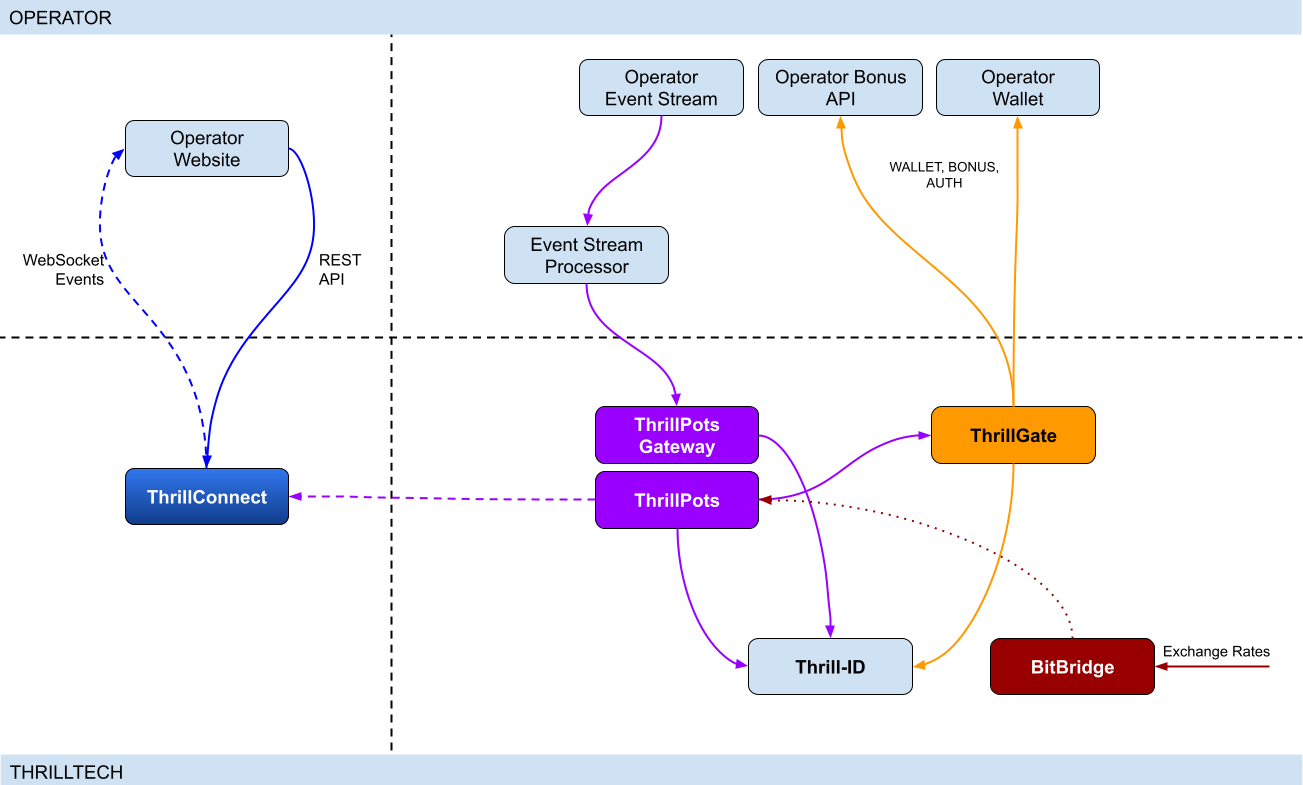
Integration points
ThrillPots has 3 primary integration points. This section will discuss each integration point and explain the purpose for each.
Betting integration
When it comes to Jackpot contributions, unlike normal games, player's do not make direct bets to jackpots. Rather, bets (contributions) are made on behalf of players via the operator's backend system.
Let's imagine a hypothetical casino where the operator has deployed a sitewide jackpot which is available to all players and is active across all casino content available on the site. The jackpot will receive a contribution bet each time a player makes a bet on any of the games on the site.
In order for these contributions to be made on behalf of the player, a simple event processor needs to be deployed that receives player game play / bet events and for each event makes a contribution request to the ThrillPots system.
In most platforms, this can be achieved by building a Kafka, RabbitMQ (or similar) event/stream processor which subscribes to the relevant topic/channel and makes REST API calls for each relevant event received. For platforms that do not have a message or event bus available, these events could be dispatched to the event processor via an alternative RPC mechanism such as REST, gRPC etc. This decision is all up to you, the integrating platform.
To learn more about this part of the integration, go to Event Stream Integration
Wallet Integration
When it comes to the wallet integration for ThrillPots, this integration is almost the same as any game provider integration. The wallet integration covers the following flows:
- Player token authentication
- Single Transactions (Debit & Credit)
- Batch Credit transaction (Multi-player payouts)
- Transaction cancellation
Integration is done against the ThrillGate service and can be performed in either direction (operator-to-provider or provider-to-operator).
To learn more about this part of the integration, go to Wallet Integration
Operator-to-Provider
If you decide to do an operator-to-provider integration, you will need to expose the endpoints required by the ThrillGate Standard Wallet Interface. All documentation can be found in the ThrillGate Standard Wallet Integration API documentation.
If you prefer for ThrillTech to integrate to your wallet API (provider-to-operator integration), you will need to provide the APIs and an integration environment for ThrillTech to develop the integration.
Frontend Integration
The ThrillConnect service is designed to support all frontend integrations. It exposes both a REST API (for end-user functionality like opt-in) as well as a WebSocket event stream for ad-hoc messaging and event broadcasts.
It is suggested to make use of the ThrillConnect JS API middleware layer which can easily be included in your site's code, freeing you up from the integration details and allowing you to focus on the visual and UX of the presentation layer.
To learn more about this part of the integration, go to Frontend Integration
Integrating ThrillPots Overview
The ThrillPots integration is best described as a 3-step process which is comprised of:
We suggest that before you dig into any of the three sections above, that you take the time to read this overview as it contains important information and pre-requisites that are needed for a smooth integration process.
PRE-REQUISITES
The rest of this guide assumes the following:
- You have the ThrillPots AIO Development container running and available. See this section for information on how to do this.
- You have a way to communicate with the services in the AIO Container (for example
curlorPostmanor similar tool)
Authentication and Authorization
Prior to making any calls to the ThrillPots service APIs, you need to authenticate with the ThrillTech platform using credentials that have been provisioned for you.
The ThrillTech platform uses a centralised authentication technology called Thrill-ID which provides governance over both User and Service accounts.
For integration purposes, you will need to provision a Service account (if one has not been provisioned for you yet). To learn more about provisioning accounts, please refer to the Thrill-ID documentation.
For an example of a Service account that would be suitable for the event stream integration service, see here
Setting up the AIO Container
The ThrillPots AIO Container is comprised of all the services necessary to run the ThrillPots platform from a single docker container.
The services made available are:
- ThrillPots Gateway (integrate your event/stream processor here)
- ThrillPots Service (the heart of the jackpot platform)
- ThrillGate (used to integrate with or to wallet APIs)
- ThrillConnect (integrate your frontend with this service)
- BitBridge (used for external data source integrations like exchange rates providers)
- ThrillTech Backoffice
- MongoDB
- Redis
The AIO container was designed to enable developers to deploy the entire ThrillPots stack on their local development machines on in a development environment quickly and easily.
In-Service Swagger UI
Each service provides access to a Swagger-UI for its API. Apart from ThrillConnect, which is an edge service, Swagger-UI support is compiled in to all the services and accessible via the /swagger-ui path.
ThrillConnect Swagger UI
Since ThrillConnect is an edge service and generally made available to the public internet, swagger-ui needs to be enabled via an environment variable.
In order to enable the /swagger-ui endpoint for the ThrillConnect service, you must set the TCS_ENABLE_SWAGGER environment variable to true.
Setting up the AIO Container: Pre-requisites
This short section explains the pre-requisites you will need in order to be able to setup the AIO container.
Pre-requisites
You will need the following software on your development machine:
Mandatory:
- Docker (or alternatively Docker Desktop)
- Postman
Optional:
Some type of MongoDB UI. We recommend you use MongoDB Compass
GitHub Access
You will need to have a GitHub account that has been granted access to the ThrillTech GitHub Organisation. This step is usually done as part of the initial technical kick off. As part of this access, you are granted access to repositories and packages that are needed.
Once you have provided ThrillTech with your Github account and we have added you as a collaborator, you need to have a Github Personal Access Token (classic) with permissions to read packages.
Go to your account's Settings -> Developer Settings -> Personal Access Tokens -> Tokens (classic) and create one.
(Click your avatar circle on the top right part of Github, click "Settings" and then "Developer Settings" is located at the bottom on the right of the menu of your account)
The only right it needs to have is to read packages.
Log in to our package repo and give your github username and the token your just created as password when prompted
docker login ghcr.io/thrilltech-io
Setting up the AIO Container: Initial Setup
Setting Up
Once you have provided ThrillTech with your Github account and we have added you as a collaborator, you need to have a Github Personal Access Token (classic) with permissions to read packages.
Go to your account's Settings -> Developer Settings -> Personal Access Tokens -> Tokens (classic)nd create one.
(Click your avatar circle on the top right part of Github, click "Settings" and then "Developer Settings" is located at the bottom on the right of the menu of your account)
The only right it needs to have is to read packages.
Log in to our package repo and give your github username and the token your just created as password when prompted:
docker login ghcr.io/thrilltech-io
Once you have successfully authenticated with the repository, you are ready to continue with the steps to getting the ThrillPots Dev Container running:
- Clone the https://github.com/thrilltech-io/dev-containers repository
- Go to the
/thrillpotsfolder in the repository and execute:docker compose up -d
NOTE: If you are running on MacOS on Apple Silicon, you may need to enable x86_64/amd64 emulation. Do this by going to Docker Desktop's settings -> General and finding the option called "Use Rosetta for x86_64/amd64 emulation on Apple Silicon" and enable it.
This will download all the necessary packages and run them via
Docker Compose. This process may take a few minutes to complete
- Import the provided Postman collection (
ThrillPots AIO Setup.postman_collection.json) which can be found in the repository into your Postman application - You will notice that it contains a number of endpoints, all numbered. The numbering indicates the sequence in which you must execute the calls.

- Execute all the steps in order
Once complete, you will have a ThrillPots system running and configured in 'standalone mode'. This means that you can make contributions and interact with the system, but there will be no external wallet calls made for player authentication or transactions.
In this mode, valid player IDs are in a range:
[player_00000 ... player_00999]
As part of the steps, you will also have created a Jackpot Template, and from this template you created a Jackpot instance. Jackpot Instances are the "running jackpots" that players contribute to. You also made a contribution directly to the jackpot.
You would also have created a Source and mapped the Jackpot Instance to the source and successfully made a contribution to the jackpot via the Source
The final step in the setup was the creation of an Internal mock wallet in ThrillGate. In a later section, where wallet integration is discussed, you will change this configuration to allow connectivity to your own wallet service, but for now, this mock wallet implementation is enough to get started with.
ThrillPots Wallet Configuration
IMPORTANT
Please note that when you change the wallet configuration for the ThrillPots service, you MUST restart the ThrillPots service for the changes to take effect.
Setting up the AIO Container: Admin Accounts
By default, the system is configured with an admin account called admin@thrilltech.io. This account has the ability to control all resources for the thrilltech oorganisation. You will have noticed that in all of the setup steps above, the owner_id or brand_id values were either thrilltech or thrilltech:brand1.
The ThrillPots system implements a "resource ownership" model which ensures that jackpot objects are not modifiable by unauthorized accounts.
Have a look at thrilltech:brand1. The first part before the : is the "organisation" or "operator id". The second part after the : is the "organisational unit" or "brand".
Creating a new ThrillPots admin account for a different organisation
If you want to create and manage ThrillPots resources for a different organisation/operator, you will first need to create a new orgnisation and admin account for that organisation. All of these actions are done through Thrill-ID.
The next steps assume that you are authenticated as
admin@thrilltech.io(as per Step 0 in the setup steps)
1. Create a new organisation
We first need to register a new organisation in Thrill-ID. For the purposes of this example, lets create a new organisation called "new-operator" which has 2 casino brands: new-mega-casino and new-mega-sportsbook.
To do this, make the following call to Thrill-ID:
POST http://localhost:9000/admin/organisations
Header: Authorization Value: Bearer AUTH_TOKEN_FOR_ADMIN@THRILLTECH.IO
Body:
{
"id": "new-operator",
"units": [
"new-mega-casino",
"new-mega-sportsbook"
],
"enabled": true,
}
You should receive a 200 OK.
Now we can create the new admin account for the new organisation
2. Create a new admin account
To create a new administrator account for the new-operator organisation we just created, we need to make another call to Thrill-ID, this time to create the actual account:
POST http://localhost:9000/admin/accounts
- Header:
Authorization - Value:
Bearer AUTH_TOKEN_FOR_ADMIN@THRILLTECH.IO
Body:
{
"account_type": "User",
"username": "admin@new-operator.com",
"password": "password",
"org_unit": {
"org_id": "new-operator"
},
"permissions": [
{
"system_id": "thrillpots",
"permissions": [{
"resource_id": "*",
"permission": "Admin"
}]
}
]
}
You should receive a 200 OK along with a response body showing you the newly created account.
3. Test the new admin account
Go back to Step 0 in the setup instructions and change the username and password to the new accounts username and password and try to authenticate. If everything went right, you should receive a new token for the account and can now proceed with managing ThrillPots resources for the new-operator organisation.
Once you are authenticated with the admin account for the new-operator organisation, you will be able to create Jackpot templates, instances, sources etc for the new-operator organisation.
4. Create the Operator and Brands in ThrillPots
We now need to create the operator and associated brands in ThrillPots. To do this we make the following calls:
Add Operator
POST http://localhost:8084/config/operators
- Header:
Authorization - Value:
Bearer AUTH_TOKEN_FOR_ADMIN@THRILLTECH.IO
Body:
[
{
"id": "new-operator",
"name": "New Operator"
}
]
Add Brands to Operator
POST http://localhost:8084/config/operators/new-operator/brands
- Header:
Authorization - Value:
Bearer AUTH_TOKEN_FOR_ADMIN@THRILLTECH.IO
Body:
[
[
"new-mega-casino",
"new-mega-sportsbook@"
]
{
"id": "new-mega-casino",
"name": "Mega Casino"
},
{
"id": "new-mega-sportsbook",
"name": "Mega Sportsbook"
}
]
Event Processor Integration
In this section, we will discuss the Event Processor integration component that is required in order to enable the ability to make contributions to jackpots.
In general, this integration component needs to be able to receive the events that will drive jackpot contributions on behalf of users/players.
In a standard ThrillPots-powered system, it is usually gameplay that causes jackpot contributions to be made on behalf of players, but you are not limited to just this single use case.
From a simplistic perspective, the general logic should look something like this:
Authenticate your integration service with ThrillPots Gateway
Subscribe to gameplay/bet events from your event stream
When an event is received from your event stream:
- Read the properties of the event for game code, player ID and bet amount
- Make a contribution call to ThrillPots using these (and other values)
From here, it is relatively easy to see how you could expand the use case to create a Deposit jackpot. Lets imagine that the deposit flow was identified by source DEPOSIT. Lets also assume that when a successful deposit has been made by a player, that an event is published by the operator's platform. For argument's sake, lets call this event DEPOSIT_SUCCESS.
If we wanted to create a deposit jackpot, the logic could look as follows:
Subscribe to DEPOSIT_SUCCESS event
When an event is received:
- Read the properties of the event for the player ID and deposit amount
- Make a contribution call to ThrillPots using the DEPOSIT source_id and other properties
Sequence Diagram for the Event Processor integration

Authenticating via ThrillPots Gateway
The ThrillPots Gateway service exposes a REST endpoint which your event stream process can authenticate itself with Thrill-ID.
The endpoint is POST /authenticate/service and accepts a payload which contains the connecting service's username and password.
If authentication is successful, you will receive a response which contains token which must be used as a Bearer token in subsequent API requests to the ThrillPots Gateway service. Service tokens do not expire and therefore you do not need to be concerned with refreshing your token once it has been received.
See here for a Service account that you can provision for your Event Processor integration service.
Additional Information
If your event processor service is processing gameplay bet events, you should remember to filter out any and all events related to Jackpot Contributions as this could create loop of contributions on behalf of players
Contributing to Jackpots
Now that you are processing events from your platform, you want to be able to make Contributions on behalf of players to the jackpot. The process of contributing is quite straight forward and does not require your service to be aware of player opt-in status. You will however need to decide which jackpot to contribute to and this can be done in one of two ways:
- Contribute by source
- Contribute direct to jackpot
Sources
A Source can be thought of as an operator-defined identifier for a user journey, a group of games, or even a single game.
Example: Sitewide Jackpot
If you wanted to create a site-wide jackpot for your casino vertical, you could create a Source named casino-sitewide, map a jackpot to the source and then send all contributions to that specific Source.
{
"token": "token_00001",
"brand_id": "thrilltech:brand1",
"player_id": "player_00001",
"player_country": "UK",
"source_id": "casino-sitewide",
"gameround_id": "1",
"currency": "EUR",
"base_wager": 1
}
Example: Deposit Jackpot
If you wanted to create a deposit jackpot, you can create a source called deposit, map the relevant jackpot to the source and then send all deposit-based contributions ot that source
{
"token": "token_00001",
"brand_id": "thrilltech:brand1",
"player_id": "player_00001",
"player_country": "UK",
"source_id": "deposit",
"gameround_id": "DEPOSIT_TX_ID",
"currency": "EUR",
"base_wager": 1
}
Example: Game Group Jackpot
If you wanted to create a jackpot for a specific set of games, for example, a jackpot for all egyptian themed games, you can create a source called egyptian-games and use that for contributions each time a player bets into a game that is egyption themed. This would naturally require your integration service to know which games are matched to which Game Group source.
{
"token": "token_00001",
"brand_id": "thrilltech:brand1",
"player_id": "player_00001",
"player_country": "UK",
"source_id": "egyptian-games",
"gameround_id": "1",
"currency": "EUR",
"base_wager": 1
}
Example: Game Specific Jackpots
If you want to split your liquidity by game title, you can create sources that correspond to the game codes of games in your system. Each source would need a jackpot mapped to it, but once that is done, you are able to make contributions to the source based on the game code of the base game bet.
{
"token": "token_00001",
"brand_id": "thrilltech:brand1",
"player_id": "player_00001",
"player_country": "UK",
"source_id": "provider-game-code",
"gameround_id": "1",
"currency": "EUR",
"base_wager": 1
}
Direct to Jackpot Contribution
An alternative to using sources is to make contributions directly to Jackpot Instances by their ID. For example, if you have created a Jackpot instance, you will have its ID available to you. This ID will not change over the lifetime of the jackpot. Making contributions directly to a Jackpot ID incurs less processing cost, but may also reduce the flexibility you may have in changing which jackpot players contribute to based on the content or user flows.
The only difference in the contribution payload is that the source_id is replaced with an instance_id field as seen below:
{
"instance_id": "0a1cfeea-5b07-4f2b-b2f1-2e4cd2aa991d",
"token": "token_00001",
"brand_id": "thrilltech:brand1",
"player_id": "player_00001",
"player_country": "MT",
"gameround_id": "1000",
"base_wager": 2,
"currency": "EUR"
}
Synchronous vs Asynchronous contribution
The default contribution mechanism is synchronous. However, depending on your system architecture (and system load), you may prefer to make use of asynchronous contribution mechanics. In order to make asynchronous contributions, you need to provide a webhook that the ThrillPots system can call once the result of a contribution has been determined.
In order to make a contribution asynchronously, you simple need to add a callback property to either of the contribution payloads above to specify the webhook to call and which results you are interested in receiving.
The structure of the callback property is as follows:
{
"web_hook": "https://your.host/webhook",
"win_result_only": false
}
The web_hook field indicates the fully qualified HTTP path to your webhook and the win_result_only property indicates whether the webhook should only receive win results or all contribution results.
Therefore, an asynchronous contribution for a sitewide casino jackpot would look like this:
{
"token": "token_00001",
"brand_id": "thrilltech:brand1",
"player_id": "player_00001",
"player_country": "UK",
"source_id": "casino-sitewide",
"gameround_id": "1",
"currency": "EUR",
"base_wager": 1,
"callback": {
"web_hook": "https://your.host/webhook",
"win_result_only": false
}
}
When making an asynchronous contribution, the ThrillPots system will either return 200 OK with a JSON payload that contains a trace_id for the request when it has successfully accepted the contribution request for processing, or you will receive an error due to the request being malformed.
Any contribution request errors will be send to the webhook. The structure of the webhook payload is defined as follows:
{
"payload_type": "data" | "error",
"data": Object
}
The data portion will either be a ContributionResult structure or an Error structure. You can find more information on these structures in the API documentation.
Examples of payloads sent to the web hook
Contribution Result
{
"type": "data",
"contribution_amount": 0.1,
"contribution_currency": "EUR",
"gameround_id": "cc83c1cc-6260-44fc-822b-d3c03acf2d89",
"instance_id": "a49ff35f-6ecd-491f-b373-85e6caabacf1",
"metadata": null,
"tickets_awarded": null,
"timestamp": 1715714218408,
"win_amount": 0,
"win_pot_id": null,
"win_withheld": false
}
Error Result
{
"type": "error",
"status_code": 404,
"code": "GAME_NOT_FOUND",
"message": "sitewide-casino2",
}
Contribution Request Errors
A contribution request may result in a direct or a downstream error. A direct error is an error that is the result of the ThrillPots system return an error to the contribution request itself. A downstream error is an error that is propogated to the contribution request caller from a downstream system, such as ThrillGate or the operator wallet itself.
List of Direct Errors
For Direct Errors, you can expect:
| Error Code | Description |
|---|---|
CONTRIBUTION_REJECTED | The contribution was rejected due to a contribution rule failing, The rule in question will be contained within the CONTRIBUTION_REJECTED message |
GAME_NOT_FOUND | this occurs when making a contribution to source and the source does not exist |
CURRENCY_MULTIPLIERS_NOT_FOUND | self explanatory |
SYSTEM_ERROR | This is what you get with 500 http responses from ThrillPots |
OPTIN_ERROR | This occurs if the player;s optin record could not be updated |
SOURCE_JACKPOT_NOT_FOUND | This occurs if the jackpot mapped to the source could not be found |
SOURCE_JACKPOTS_NOT_ALLOWED | This occurs if the jackpot mapped to the source does not allow a contribution from this player (either country or brand not allowed) |
DB_ERROR | An internal DB ERROR |
UNSUPPORTED_BRAND | This is returned when the brand of the player (specified in contribution) is not supported by the jackpot or system |
Passing Metadata
If you need to pass contextual metadata from your event processor to your wallet, you can do so by adding a metadata field to the Contribution Request. This data will be passed through the system and attached to transaction requests to your wallet.
The metadata field can be any valid JSON value, for example:
Metadata containing an Object:
{
"token": "token_00001",
"brand_id": "thrilltech:brand1",
"player_id": "player_00001",
"player_country": "UK",
"source_id": "casino-sitewide",
"gameround_id": "1",
"currency": "EUR",
"base_wager": 1,
"metadata": {
"value1": "some value",
"value2": 1234
}
}
Metadata containing a String:
{
"token": "token_00001",
"brand_id": "thrilltech:brand1",
"player_id": "player_00001",
"player_country": "UK",
"source_id": "casino-sitewide",
"gameround_id": "1",
"currency": "EUR",
"base_wager": 1,
"metadata": "This is an arbitrary string value"
}
ThrillPots Events
ThrillPots publishes a number of events which your integration service can subscribe to. There are a number of reasons you may want to consume these events, for example:
- Synthesizing related Kafka/RabbitMQ events
- Storing the events for BI / Analysis purposes
The following events are currently published by ThrillPots Gateway:
JackpotUpdateEvent- contains the latest jackpot values for the specified Jackpot Instance- Reference
{
"event_type": "JackpotUpdateEvent",
"data": {
"id": "jackpot instance ID",
"status": String,
"currency": String,
"allowed_brands": [String],
"allowed_sources": [String],
"pots": [
{
"id": String,
"is_progressive": Boolean,
"current_value": Number
}
],
"last_updated": Number
}
}
JackpotWinEvent- contains the details of a jackpot win- Reference
{
"event_type": "JackpotWinEvent",
"data": {
"brand_id": String,
"player_id": String,
"source_id": String | null,
"instance_id": String,
"jackpot_name": String,
"timestamp": Number,
"win_pot_id": String,
"win_amount": Number,
"currency_multipliers": {
"brand_id": String,
"base_currency": String,
"multipliers": {
"EUR": Number,
"GBP": Number,
"ZAR": Number,
...
"NZD": Number,
"SEK": Number
}
}
"games_in_jackpot": [String],
"seed": Number,
"win_withheld": Boolean,
"seed_deficit": Number,
"community_winners": null | [{
"player_id": String,
"brand_id": String,
"currency": String,
"win_amount": Number
}]
}
}
RaffleWinEvent- contains the details of a Raffle Win- Reference
{
"brand_id": String,
"instance_id": String,
"jackpot_name": String,
"jackpot_currency": String,
"currency_multipliers": {
"brand_id": String,
"base_currency": String,
"multipliers": {
"EUR": Number,
"GBP": Number,
"ZAR": Number,
...
"NZD": Number,
"SEK": Number
}
}
"timestamp": Number,
"winners": [
{
"player_id": String,
"brand_id": String,
"currency": String,
"win_amount": Number
}
],
"win_withheld": bool
}
OptInEvent- contains the details of a player opt-in or opt-out into a Jackpot Instance Reference
{
"event_type": "OptInEvent",
"data": {
"instance_id": String,
"player_id": String,
"ext_player_id": String,
"player_brand_id": String,
"preferred_contribution_value": [Number],
"contribution_count": Integer,
"contribution_value": Number,
"opted_in": Boolean,
"last_updated": Integer
}
}
The ThrillPots events are published via the WebSocket endpoint /events.
Authenticating the Websocket connection to receive events
Once you have established a WebSocket connection from your event processor service to ThrillPots Gateway, you will need to send an Authenticate message which contains your Thrill-ID JWT token to authenticate your service to receive events.
{
"action": {
"Authenticate": {
"auth_token": "{{thrill-id-jwt}}"
}
}
}
If the authentication fails, the connection will be closed. Once you have authenticated, you should start receiving the events from the ThrillPots service.
Wallet Integration
Introduction
When integrating ThrillPots to your wallet, you will need to implement what is known as the "Standard Wallet API". This API has been defined by ThrillTech and is what our ThrillGate services uses to communicate with your backend to process:
- Player Authentication
- Transactions
- Transaction cancellations
- Batch transactions# Wallet Integration
ThrillPots Wallet Configuration
IMPORTANT
Please note that when you change the wallet configuration for the ThrillPots service, you MUST restart the ThrillPots service for the changes to take effect. In this section, we will discuss how ThrillPots performs player authentication and jackpot contribution transactions.
When running in a non-development environment (such as staging or production), ThrillPots uses the ThrillGate Service as an integration layer to an operator's wallet API.
NOTE:
ThrillPots also supports an internal, in-memory wallet for development or isolated testing purposes. This wallet is enabled by default in the AIO development container
Types of Wallet Integrations
There are two types of wallet integrations that can be developed:
- Provider-to-Operator integration
- Operator-to-Provider integration (Standard Wallet Integration)
This section is been written for operators that have chosen to do an Operator-to-Provider integration. For a Provider-to-Operator integration, ThrillTech are responsible for implementing the integration to your wallet API and that topic is out of scope for this book.
- Batch transaction cancellations
All communications from ThrillGate are conducted over secure SSL REST calls to your system.
As part of all calls to your system, ThrillGate sends an HMAC in the X-Server-Authorization header which is calculated from the body of the request only. You can use this HMAC value to verify that the request is coming from the expected ThrillGate server.
NOTE: During integration you will receive the secret key that you can use to verify the HMAC value with.
Enabling Wallet Integration Mode in the AIO Container
In order to configure the container to support external wallet integration mode, some additional API calls need to be made.
In the provided Postman collection, you will find a folder called Wallet Integration Mode. In this folder you will find additional API calls that you need to make in order to configure the container to run in this mode.

The first API call (1. Create Wallet Configuration) makes a call to the ThrillGate service and sets up the "Standard Wallet API" connnector.
It is very important that you do NOT change the details in Step 2a or 2b as these are specific for the AIO container.
PLEASE NOTE:
When building your wallet integration, the ThrillGate service will attempt to connect to your wallet service on your localhost:8201. This is configured via Docker networking as:
Host: "host.docker.internal"
Port: 8201You can change the port, but we would recommend not changing the host unless you are absolutely sure you know what you are doing.
Once you have executed step 1, you can Enable or Disable the external wallet mode using steps 2a or 2b respectively.
Once you have completed the configuration, you will need to restart the ThrillPots service in the AIO container.
IMPORTANT
Each time you change the wallet configuration of ThrillPots, you must restart the ThrillPots Service for the configuration changes to take effect
Standard Wallet Integration
What is the Standard Wallet?
The Standard Wallet is a REST API definition (designed by ThrillTech) which an operator needs to implement support for. The ThrillGate service uses the Standard Wallet API (as a client) to communicate with the operator's wallet to perform the following actions:
- Player token authentication
- Debit / Credit transactions (single)
- Credit transaction batches
- Transaction cancellation
Standard Wallet Sequence flows
Below is a sequence diagram of the expected data flow between ThrillGate and the operator wallet API:
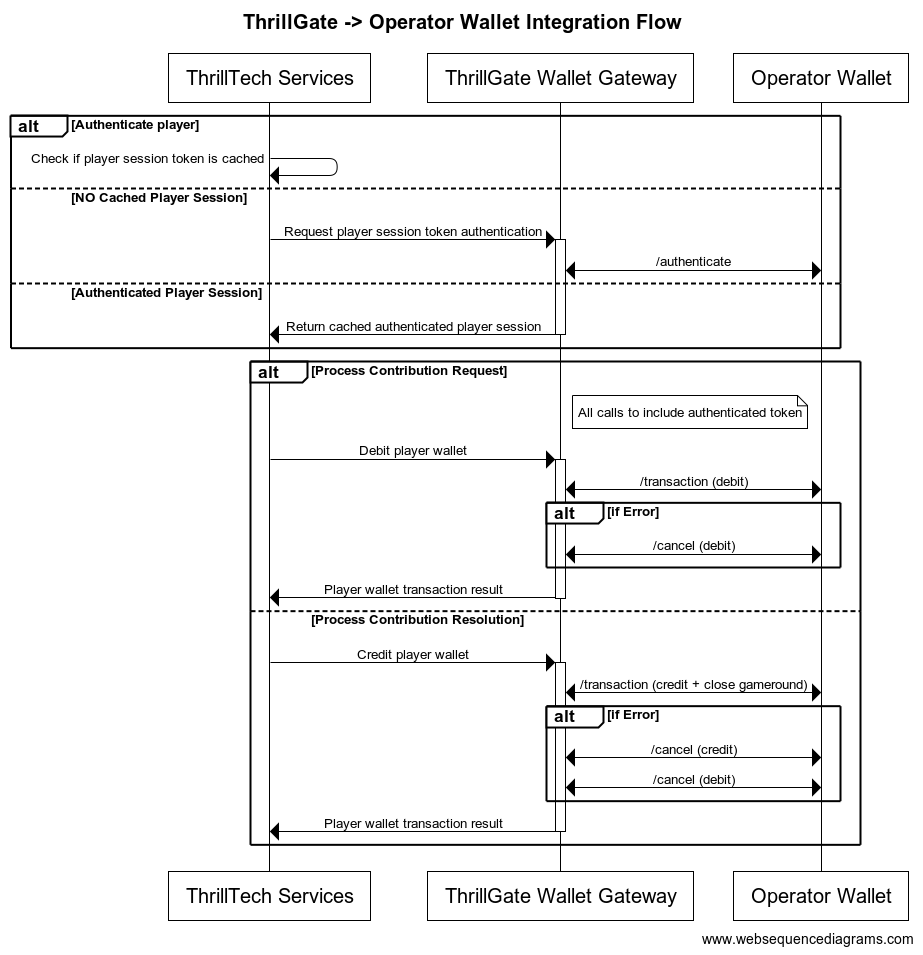
Configuring a Standard Wallet Integration in ThrillGate
To configure the ThrillGate Service to connect to your Standard Wallet API compliant service, you need to configure a Wallet resource.
To configure a wallet:
- URL:
POST http://localhost:8100/admin/wallets - Headers:
Authorization: Thrill ID Bearer token
- Body:
{
"id": "Brand1Wallet",
"operator_id": "thrilltech",
"brand_id": "brand1",
"wallet_type": "StandardWallet",
"connection_details": {
"protocol": "http",
"host": "host.docker.internal",
"port": 8201
},
"endpoints": {
"auth": {
"POST": "/wallet/authenticate"
},
"balance": {
"GET": "/wallet/balance"
},
"cancel_bet": {
"DELETE": "/wallet/cancel"
},
"transaction": {
"POST": "/wallet/transaction"
},
"transaction_batch": {
"POST": "/wallet/transaction/batch"
},
"cancel_batch": {
"DELETE": "/wallet/transaction/batch"
}
},
"config": {
"secret_key": "12345",
"accept_zero_value_credits": true,
"must_close_gamerounds": false
}
}
| Property | Description |
|---|---|
id | The ID you want to assign to the wallet. This is a unique identifier |
operator_id | The operator ID that this wallet is for |
brand_id | The brand ID that this wallet is for |
wallet_type | This must be set to StandardWallet |
connection_details.protocol | The protocol of the url. Usually http or https depending on your setup |
connection_details.host | The hostname for your server. While using the AIO container, it is recommended you keep this set to host.docker.internal |
connection_details.port | The port that your server is listening on |
endpoints | This is an object that describes the required endpoints for the Standard Wallet API |
endpoints.auth | This describes the endpoint that ThrillGate will make player authentication calls to |
endpoints.balance | This describes the endpoint that ThrillGate will make player balance requests to |
endpoints.transaction | This describes the endpoint that ThrillGate will call to perform transactions |
endpoints.cancel_bet | This describes the endpoint that ThrillGate will make to cancel transactions |
endpoints.transaction_batch | This describes the endpoint that ThrillGate will make for transaction batch calls |
endpoints.cancel_batch | This describes the endpoint that ThrillGate will make to cancel transaction batches |
config | An object that contains specific configuration elements for the Standard Wallet |
config.secret_key | This is the key that will be used to generate the HMAC value that is sent on each wallet request in the x-server-authorization header |
config.accept_zero_value_credits | This defines whether the external wallet supports Credit transactions which have a value of zero (0) |
config.must_close_gamerounds | This defines whether the external wallet requires gamerounds to be closed |
NOTE: If you need to change the definition of the endpoints, feel free to do so. Make sure that you use the correct HTTP verb and specify the endpoints as needed by your system.
Next Steps
Once you have understood the purpose of each of the Standard Wallet API calls as well as the flows around transaction and transaction batch handling, you are ready to start integrating the Standard Wallet API into your system. Refer to the provided API reference documentation and OpenAPI specs that have been provided to you.
Standard Wallet API: Player Authentication
In order for the ThrillPots system to take wagers (debit the player's wallet) and payout winnings (credit the player's wallet), it needs to be able to authenticate the player with the operator wallet.
This is done by calling the Standard Wallet's auth endpoint, passing in the provided player token and game code to the operator wallet and receiving the required player details (including the token that should be used for transaction calls)
This is done by ThrillGate calling the endpoint defined in endpoints.auth of the Standard Wallet's configuration. An example call's payload would look as follows:
{
"operator_id": "your_operator_id",
"brand_id": "your_brand_id",
"source_id": "token_00001",
"source_id": "AwesomeJackpotGameCode",
"currency": "EUR"
}
If successful, the operator wallet must respond with a valid session token and player details that can be used for future transaction calls for this player.
Response example:
{
"id": "player_00001",
"token": "session_token_00001",
"currency": "EUR",
"balance": 100001927.79,
"operator_id": "thrilltech",
"brand_id": "brand1",
"nickname": null,
"gender": "?",
"country": "MT",
"jurisdiction": null,
"segments": null
}
Standard Wallet API: Transactions
Transactions
Once the player token has been authenticated, the ThrillPots system can start making transaction calls through ThrillGate.
In standard operation, the first transaction call will be a Debit transaction request to fetch funds from a player's wallet for the Jackpot Contribution bet. This call is also intended to open the game round for the jackpot contribution.
If successful, ThrillPots will process the jackpot contribution and determine if a win occurred.
The next transaction call that will be made will be a Credit transaction request. This call is intended to pay any winnings to the player account and to close the game round that was opened with the Debit transaction.
Transaction Errors
If an error occurs while executing transactions with the operator wallet, ThrillGate and ThrillPots cooperate to ensure that the transaction error is handled correctly.
When an error occurs, ThrillGate will attempt to retry the transaction request a set number of times. If all retries fail, the error will be sent to ThrillPots for further handling.
If there are certain wallet errors that you do not wish ThrillGate to perform its retry logic, you can configure that as part of the wallet configuration in ThrillGate.
Please see the ThrillGate section on Configuring Wallet Error Behaviour for more information on how to configure ThrillGate's wallet error handling.
Once an error has been sent back to ThrillPots, ThrillPots will decide whether a transaction needs to be cancelled or not. Transaction cancellation is discussed next.
#@ Transaction Cancellation
In certain situations (as described in the errors section above), it is necessary for transactions to be cancelled. In general, ThrillPots handles transaction cancellation logic as follows:
If the Debit transaction failed
ThrillPots will send a cancellation request for the Debit transaction using the Debit transaction ID.
If the Credit transaction failed
ThrillPots will first send a cancellation request for the Credit transaction and then a separate cancellation request for the Debit transaction. Both requests will be sent with the respective transaction IDs.
Transaction Batches (Credit only)
ThrillPots uses Transaction Batch requests to communicate payouts to multiple players.
These types of payouts are only relevant to jackpots that are either:
- Multi-player payouts (community payouts)
- Raffle jackpot payouts
In both situations, since multiple players are considered winners from a single jackpot win, ThrillPots needs a way to credit wins to multiple players. Since these players are not guaranteed to be online at the time of the win, ThrillPots will not have access to any session token information for all the winners.
Transaction Batches are used in these special situations to communicate a set of credit operations that need to be applied to multiple players accounts.
Although unlikely, it is possible that not all the specified player accounts will be able to be credited with the winnings. Such a situation may arise if, for example, the player account has been banned/blocked or is self-excluded at the time of the jackpot win.
In these cases, the operator wallet is expected to flag the player account as an exception and continue to pay the remaining players in the transaction batch.
It is not considered an error if a player account in a transaction batch cannot be paid. The operator wallet should simply indicate this exception in the response and attempt to pay all other players.

Transaction Batch Cancellation
We have discussed what Transaction Batch exceptions are and how they are handled.
There is another limited set of errors that require Transaction Batches to be cancelled.
These errors are typically (but not limited to) errors such as network errors and timeouts. When an error occurs that leads ThrillGate to not be sure whether the operator's wallet has handled the transaction batch request, the request will first be retried, but after failing a specific number of times, the transaction batch will be cancelled.
Each transaction batch request has a unique identifier, and this identifier will be sent as part of the transaction batch cancellation request.
Frontend Integration
The final piece of the ThrillPots integration puzzle is the frontend integration. The frontend is responsible for displaying the Jackpot Ticker widget, showing players what the value of the various pots within the Jackpot are, the opt-in widget, allowing players to opt-in or opt-out of participation in the jackpot and so on.
The ThrillConnect Service has been specifically developed to provide an API and event stream over WebSockets to frontend clients to be able to interact with the ThrillPots system.
Sequence Diagram for the frontend to ThrillConnect integration
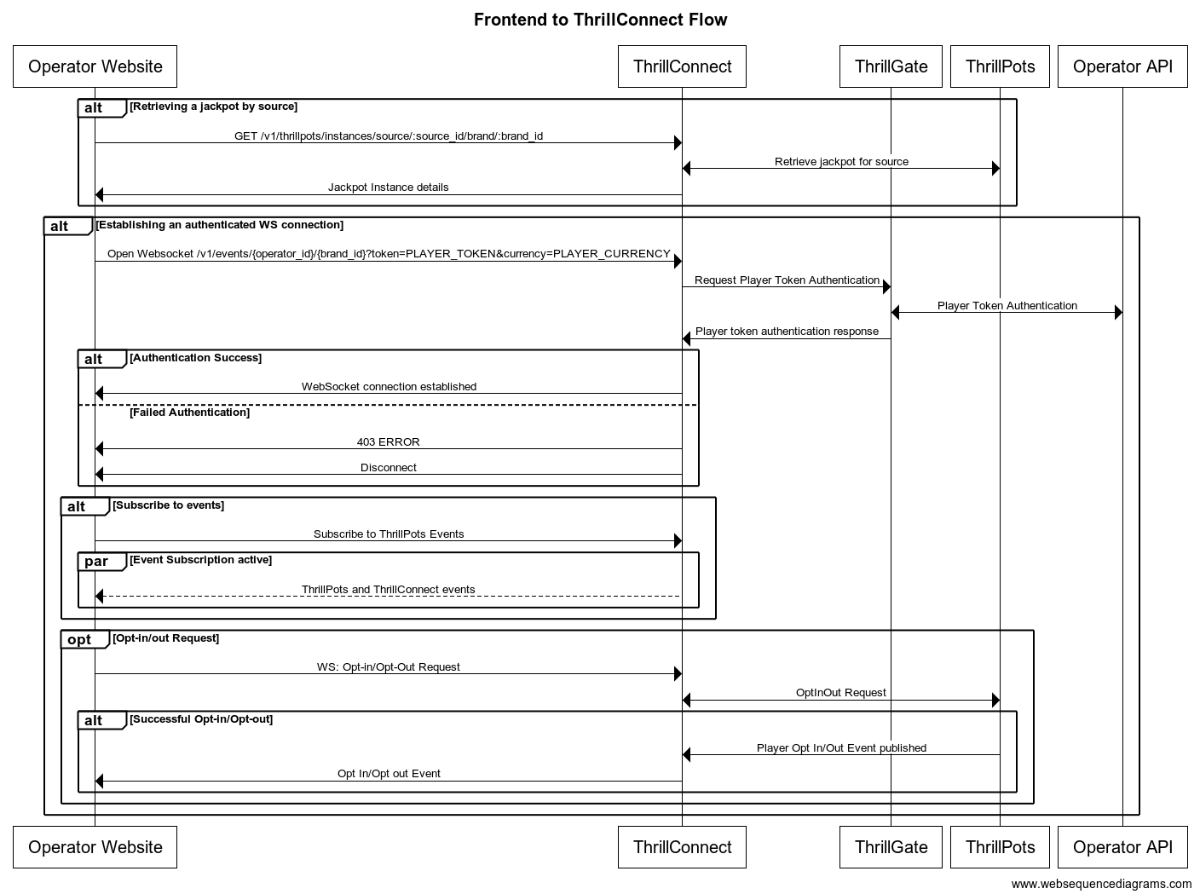
Integration Flow in detail
Fetching a Jackpot's details
One of the first things your frontend will most likely need to do is to retrieve jackpot details for your jackpot widget to display.
If you have followed the section on settings up the AIO container, you would have created a
Sourcecalledsitewide-casino.If you haven't gone through the process of setting up a source, we suggest that you review and understand sources and how they are used before continuing
To retrieve the jackpot for the sitewide-casino source, you will need to call:
GET /v1/thrillpots/instances/source/:source_id/brand/:brand_id?player_id=:player_id
replacing the :source_id and :brand_id values with the appropriate values that have been configured. If you used the default values from the Postman collection, you can use sitewide-casino for the source_id and thrilltech:brand1 for the brand_id.
If the player is already logged in, you can also pass the ID of the player via the query parameter player_id. Doing so will ensure that the player's opt-in status is returned in the jackpot instance information.
Establishing a WebSocket connection
In order to receive ThrillPots events and be able to opt players in or out of the jackpot, you will need to establish a websocket connection.
Once a player is logged into an operator's site, you can establish a WebSocket connection with ThrillConnect, passing in the player's session token.
NOTE
WebSocket connections are protected and can only be established by logged in players to prevent unauthorized and potentially dangerous abuse by attackers. Requiring a player a valid player session token in order to establish a WebSocket connection is a security-driven decision
To establish a WebSocket connection with ThrillConnect, open a WebSocket to:
/v1/events/{operator_id}/{brand_id}?token=PLAYER_TOKEN¤cy=PLAYER_CURRENCY
ThrillConnect will authenticate the token (the Player session token) from the query parameters with the operator's platform via ThrillGate. If the token is valid, the websocket connection will be established. If the token is invalid, the connection will receive a 403 FORBIDDEN error.
Subscribing to ThrillPots events
Once you have successfully established a WebSocket connection, you can now subscribe to ThrillPots events. This is done by sending a subscription request via the WebSocket to ThrillConnect. See below for the SubscribeRequest message that should be sent to subscribe to all ThrillPots events:
{
"SubscribeRequest": {
"events": [{
"source": "thrillpots",
"event_type": "*"
}]
}
}
If you would like to subscribe to only certain events, you can do so by explicitly specifying the events by source one-by-one.
ThrillPots currently publishes the folliowing event types:
- JackpotUpdateEvent
- WinEvent
- RaffleWinEvent
- OptInEvent
For more information about the structure of each of these events, see ThrillPots Event Structures
Player Opt-in / Opt-out
To opt a player in or out of a jackpot, you must send a PlayerOptInRequest message via the WebSocket connection.
Below are a few examples of opting a player in and out of a jackpot instance (please note, you will need to have the jackpot instance ID):
Opting in
{
"PlayerOptInRequest": {
"instance_id": "8dcc9f5a-f1c5-466f-83e9-928277d8bfb7",
"player_id": "player_00001",
"brand_id": "thrilltech:brand1",
"player_country": "MT",
"opt_in": true
}
}
Opting in with a preferred contribution value of 0.20
{
"PlayerOptInRequest": {
"instance_id": "8dcc9f5a-f1c5-466f-83e9-928277d8bfb7",
"player_id": "player_00001",
"brand_id": "thrilltech:brand1",
"player_country": "MT",
"opt_in": true,
"contribution_value": 0.2
}
}
Opting out of a Jackpot
{
"PlayerOptInRequest": {
"instance_id": "8dcc9f5a-f1c5-466f-83e9-928277d8bfb7",
"player_id": "player_00001",
"brand_id": "thrilltech:brand1",
"player_country": "MT",
"opt_in": false
}
}
Retrieving Exchange Rates
You may need to convert the values of a jackpot instance from the Jackpot currency to a player's currency. To help facilitate this, ThrillConnect exposes a currency endpoint which allows you to fetch the exchange rates used by ThrillPots.
To retrieve the 202408-1 exchange rates, you can call:
GET /v1/currencies
Retrieving a player's raffle ticket count
If player's are contributing to a Raffle jackpot, you may want to show the player how many tickets they have earned so far in the raffle. You can retrieve the player's current ticket count by requesting it via the WebSocket connection:
To retrieve a player's ticket count, send a PlayerRaffleTicketsRequest message:
{
"player_id": String,
"instance_id": String,
"brand_id": String
}
The instance_id is the instance ID of the Raffle jackpot, and the brand_id is in the format operator_id:brand_id.
If the request can be serviced, you should received a PlayerRaffleTicketsResponse message back:
{
"msg_type": "Message",
"source": "thrillpots",
"msg_name": "PlayerRaffleTicketResponse",
"operator_id": "OPERATOR_ID",
"brand_id": "BRAND_ID",
"player_id": "PLAYER_ID",
"data": {
"ticket_count": 4
},
"timestamp": 1711452762485
}
If there was an error processing the request, you will receive an Error message in response which will contain the message name that errored, as well as any relevant error details. For example:
{
"msg_type": "Error",
"source": "thrillpots",
"msg_name": "PlayerRaffleTicketRequest",
"operator_id": "OPERATOR_ID",
"brand_id": "BRAND_ID",
"player_id": "PLAYER_ID",
"data": {
"status_code": 404,
"code": "",
"message": "Error 404 Not Found from http://localhost:8084/instances/raffle/e0dee1ae-6231-458a-ad6d-4dc0c941e5c3/tickets/player_00001/brand/thrilltech:brand1"
},
"timestamp": 1711452757807
}
In this case, the request Jackpot instance ID could not be found.
Metrics
The ThrillPots system exposes Prometheus metrics per service via the /metrics endpoint.
Below is the list of metrics exposed per service:
ThrillPots Gateway
| Metric name | Metric Type | Description |
|---|---|---|
| contrib_req_sync_recv | Counter | Syncronous Contribution Requests Received |
| contrib_req_async_recv | Counter | Asyncronous Contribution Requests Received |
| contrib_req_queued | Gauge | Contribution Requests currently queued |
| contrib_req_processed | Counter | Contribution requests processed |
| contrib_avg_queue_time | Counter | Average Contribution Request Queue Time |
| contribution_webhook_calls | Counter | Contribution Webhook calls made |
| http_requests_avg_time | Family: Counter | HTTP Request Average Time |
ThrillPots Service
| Metric name | Metric Type | Description |
|---|---|---|
| contrib_req_recv | Counter | Contribution Requests Received |
| contrib_req_processed | Counter | Contribution requests processed |
| contrib_req_rejected | Counter | Contribution Requests rejected |
| http_requests_avg_time | Family: Counter | HTTP Request Average Time |
| preflight_avg_time | Counter | Average time spent validating contribution requests |
| jackpot_opts | Family: Counter | Opt-In/Out related metrics |
Thrillpots Gateway
ThrillPots Service
ThrillGate
ThrillConnect
Thrill-ID
BitBridge
ThrillPots Event Structures
This section provides the data definitions (in JSON) for each of the ThrillPots events.
Event: JackpotUpdateEvent
{
"id": String,
"currency": String,
"pots": [PotTicker],
"allowed_brands": [String],
"allowed_sources": [String],
"status": String,
"last_updated": Number
}
References:
Event: WinEvent
{
"brand_id": String,
"player_id": String,
"source_id": String,
"instance_id": String,
"jackpot_name": String,
"jackpot_currency": String,
"timestamp": Number,
"win_pot_id": String,
"win_amounts": [CurrencyValue],
"win_withheld": bool,
"community_winners": [PayoutRecord],
"games_in_jackpot": [String],
"seed": Number
}
References:
Event: RaffleWinEvent
{
"brand_id": String,
"instance_id": String,
"jackpot_name": String,
"jackpot_currency": String,
"currency_multipliers": {
"brand_id": String,
"base_currency": String,
"multipliers": {
"EUR": Number,
"GBP": Number,
"ZAR": Number,
...
"NZD": Number,
"SEK": Number
}
}
"timestamp": Number,
"winners": [
{
"player_id": String,
"brand_id": String,
"currency": String,
"win_amount": Number
}
],
"win_withheld": bool
}
References:
The winners field contains an array of tuples. The structure of each tuples is (String, CurrencyValue).
The first element in the tuple contains the ID of a winning player and the second element contains the amount that the player won.
Event: OptInEvent
{
"instance_id": String,
"player_id": String,
"ext_player_id": String,
"player_brand_id": String,
"preferred_contribution_value": Number,
"contribution_count": Number,
"contribution_value": Number,
"opted_in": Boolean,
"last_updated": Number,
}
Structure References
PotTicker
{
"id": String,
"is_progressive": Boolean,
"current_value": Number
}
CurrencyValue
{
"currency": String,
"value": Number
}
PayoutRecord
{
"player_id": String,
"brand_id": String,
"currency": String,
"win_amount": Number
}
NOTE: This is early documentation for the scheduling system and the documentation will be further extended over time with additional examples and more details
Advanced Scheduling
The ThrillPots system provides a relatively sophisticated sub-system which allows you to create schedules for your jackpot products.
It is important to understand what a schedule is in the context of ThrillPots.
At its core, a schedule is always bound to a Jackpot Instance. A schedule can be as simple as defining the date and time that a jackpot starts at, or defining an end date and time for jackpot.
Here are some interesting use cases that can be solved with schedules as well:
- Happy Hour Jackpot: Creating a jackpot that only accepts contributions during 17:00 and 18:00
- Promotional Jackpots: Creating a jackpot that only accepts contributions at peak times of site activity or to encourage players during low activity times
- Weekend Jackpots: Creating a jackpot that is only available on weekends
Schedules become even more powerful when used together with Raffle Jackpots. Raffle Jackpots are jackpots that resolve at the end of a predefined period of time. While players participate in the Raffle Jackpot by way of contribution (as with any other jackpot), raffle jackpots issue tickets to players based on either their Contribution or the base wager that they make into games.
Recurrence Rulesets
All the rules for the scheduling system revolve around "recurrence rules". Currently, recurrence rules are implemented for "Daily" and "Weekly" rulesets.
Daily rules
Daily rules define a set of hours within which the jackpot is available in. Traditionally, jackpot contributions are allowed during all hours of the day, but lets imagine that you wanted to create a jackpot that was only available during your site's "Happy Hour" which was between the hours of 7pm to 9pm UTC.
For such a rule to exist, you would only need to define a Daily recurrence rule which stipulated that the hours of 19:00 to 21:00 UTC were valid.
Weekly rules
Taking the example from above, lets imagine that we wanted to further constrain the available days of the raffle to be from Monday to Friday (no weekend contributions allowed!). In this case, we would create a "Weekly" ruleset which define the following days as being valid: Monday through to Friday.
As a last minute change, business might want to allow contributions to happen on a Saturday, but only between 08:00 UTC to 20:00 UTC. To allow this specificity of ruleset, we can apply an additional override for Saturday for those specific hours at the Weekly schedule level.
Technical Example
For a technical example of what a complete schedule as described above would look like, the following JSON structure accurately describes the ruleset. For arguments sake, we will define the schedule to start on the 1st of January 2024 UTC, with no end to the schedule.
To summarise, we will be creating a schedule that:
- Allows contributions to occur Monday, Tuesday, Wednesday, Thursday, Friday and Saturday
- From Monday to Friday, contributions will be allowed between 19:00:00 UTC and 21:00:00 UTC
- On Saturdays, contributions will be allowed between 08:00:00 UTC and 20:00:00 UTC
{
"timestamp_start": 1704067200000,
// No `timestamp_end` is specified since the schedule has no end
"recurrence_rules": [
{
"frequency": {
"Daily": {
"hours": [
[
{ "hour": 19, "minute": 0, "sec": 0 }.
{ "hour": 21, "minute": 0, "sec": 0 }
]
]
}
},
"interval": 1, // 1 means "every day". 2 would mean "every second day"
},
{
"frequency": {
"Weekly": {
"days": [
["Mon", null].
["Tue", null],
["Wed", null],
["Thu", null],
["Fri", null],
["Sat", {
"Daily": {
"hours": [
[
{ "hour": 8, "minute": 0, "sec": 0 },
{ "hour": 20, "minute": 0, "sec": 0 }
]
]
}
}]
]
}
}
}
]
}
As can be seen from this example, when defining the Weekly rule, each day of validity needs to be specified, along with any overrides to the underlying Daily rules that may exist.
Order of Precendence
It is important to note that any hourly overrides present in the Weekly ruleset will take precedence over those specified in the Daily rules.
How Scheduled Jackpots work
When a schedule is applied to a normal Jackpot Instance, the system performs some rudimentary initial checks (making sure that when the jackpot is created with a schedule in the future, that the status is correctly set to Pending).
Once the Jackpot Instance is Active, the applied schedule defines the periods of time during which contributions will be accepted by the Jackpot Instance. When the schedule is not accepting contributions, the Jackpot Instance will continue to be Active (this behaviour may change in the future).
How Scheduled Raffles work
When instantiating Raffle Jackpots, a schedule must be provided during instantiation time
The reason for this is due to the fact that raffles are fundamentally time-based entities with at least a start time and duration-per-raffle.
Raffles have an explicit duration which is defined as part of the Raffle Rules. Durations can be defined in units of Seconds, Minutes, Hours, Days or Weeks.
Raffles that have a schedule that is longer than a raffles duration are considered "recurring raffles" while raffles that have a schedule equal to their duration are considered "once-off raffles".
Lets examime a few examples to explore this concept:
Once off Raffles
Lets imagine a scenario where an operator wants to run a once-off raffle for the Festive season (Xmas) period which start from 00:00:00 UTC on the 1st of December 2024 and the raffle resolves (pays out) at 09:00:00 UTC on the 25th of December 2024.
Additional requirements for the raffle are that the raffle should only accept contributions between the hours of 8am CET until the end of each day.
In order to create a schedule for this type of raffle, we need to create rules that specify the hourly restrictions as well as the start and end of the raffle.
Example
{
// Sunday, 1 December 2024 00:00:00
"timestamp_start": 1733011200000,
// Wednesday, 25 December 2024 09:00:00
"timestamp_end": 1735117200000
"recurrence_rules": [
{
"frequency": {
"Daily": {
"hours": [
[
{ "hour": 8, "minute": 0, "sec": 0 }.
{ "hour": 23, "minute": 59, "sec": 59 }
]
]
}
},
"interval": 1,
}
]
}
As can be seen in the example, the timestamp_start and timestamp_end have been set to the period of the Festive Season (December 1st, 2024 to December 25th 2024 respectively) and the hours of availability are set from 08:00:00 UTC to 23:59:59 UTC.
Since the jackpot is available on all days through the period, there is no need to define the Weekly ruleset.
In addition to the schedule, the raffle will also need to be configured to run for the duration of the schedule. In this case, the duration will be 24 days and 9 hours.
NOTE In general, you as an operator do not need to worry about the duration configuration as this is configured as part of the Jackpot template by the ThrillTech Jackpot Model design team and not something you as an operator need to worry about.
Daily Raffles
In this example, we will be configuring a Raffle jackpot that is available on all days of the week and will resolve (pay prizes to players) at 10pm UTC (22:00:00 UTC) each day. The raffle will start at 00:00:00 of each day and end when it resolves daily.
Example:
In this example, the raffle started on August 1st, 2024 at 00:00:00 UTC:
{
// Thursday, 1 August 2024 00:00:00
"timestamp_start": 1722470400000,
"recurrence_rules": [
{
"frequency": {
"Daily": {
"hours": [
[
{ "hour": 0, "minute": 0, "sec": 0 }.
{ "hour": 22, "minute": 0, "sec": 0 }
]
]
}
},
"interval": 1,
}
]
}
In addition to the schedule, the raffle's duration will be defined to last 22 hours.
ThrillPots: Common Tasks / SOPs
** IMPORTANT NOTE **
This section only applies to Self-Hosted clients. SaaS customers will need to speak to their technical point-of-contact or customer success representative to request configuration changes to their service
This section will provide some Standard Operator Procedures for how to achieving various common tasks (both basic and advanced) within the ThrillPots system.
Basic Tasks
This section outlines various basic tasks that will be useful to you during the operation of the ThrillPots System.
Add a brand to the System
This process requires you to have a valid Thrill-ID token which can retrieved by authenticating with Thrill-ID. For more information, see the Thrill-ID section.
Overview
- Add the new brand to the relevant organisation in Thrill-ID
- Authenticate to retrieve a new token
- Add the new brand to ThrillPots
- Add the new brand to the relevant jackpot instance(s)
- Add the new brand to ThrillGate
Example Data
- New brand ID:
my-new-brand - Existing brand IDs:
["brand1", "brand2"] - Organisation ID:
my-organisation - Existing Jackpot Instance ID:
321e9e1b-8e7f-4329-bace-b8ec20b7543a
Steps
We need to add the brand to the relevant Organisation in Thrill-ID so that accounts associated with that organisation become aware of the new brand.
1. Add the new brand to the relevant organisation in Thrill-ID
- Service:
Thrill-ID - Method:
PUT - Path:
/admin/organisations/my-organisation - Content-Type:
application/json - Body:
{
"units": [
"brand1",
"brand2",
"my-new-brand"
]
}
2. Authenticate to retrieve a new token
- Service:
Thrill-ID - Method:
POST - Path:
https://thrillid.yourorg.com/accounts/auth - Content-Type:
application/json - Body:
{
"username": "example-account@yourorg.com",
"password": "some_really_random_password"
}
Upon successful authentication, the response will look as follows (although the value of the tokens and access entities will be probably be different) and will contain the new brand that you added:
{
"token": "eyJhbGciOiJIUzI1NiJ9...KydTfNYUSZFDEVNrQnWtKXNX_QYJ46RHn9tLu9qu5n",
"refresh_token": "eyJhbGciOiJUzI1NiJ9...4lsmg2MWa3TGh6J_g51Q",
"access_to": {
"org_id": "my-organisation",
"unit_ids": [
"brand1",
"brand2",
"my-new-brand"
]
}
}
3. Add the new brand to ThrillPots
- Service:
ThrillPots Service - Method:
POST - Path:
/config/operators/:operator_id/brands - Content-Type:
application/json - Body:
[
{
"id": "my-new-brand",
"name": "My New Brand"
}
]
NOTE: You can add multiple brands using this call. Simply add more elements to the body's array.
4. Add the new brand to the relevant jackpot instance(s)
- Service:
ThrillPots Service - Method:
POST - Path:
/instances/allowed_brand - Content-Type:
application/json - Body:
{
"instance_id": "321e9e1b-8e7f-4329-bace-b8ec20b7543a",
"brand_id": "my-organisation:my-new-brand"
}
5. Add the new brand to ThrillGate
INFO Currently you need to update the complete
Operatorin ThrillGate. In the future, more convenient APIs will be provided.You can retrieve an
Operatorobject using theGET /admin/operators?id={operator_id}method (for example, in this case we would useGET /admin/operators?id=my-operator)
- Service:
ThrillGate Service - Method:
PUT - Path:
/admin/operators - Content-Type:
application/json - Body:
{
"id": "my-operator",
"name": "My Operator",
"wallet_id": "",
"enabled": true,
"currency": "EUR",
"brands": [
{
"id": "brand1",
"name": "Brand 1",
"wallet_id": null,
"enabled": true,
"currency": "EUR"
},
{
"id": "brand2",
"name": "Brand 2",
"wallet_id": null,
"enabled": true,
"currency": "EUR"
},
{
"id": "my-new-brand",
"name": "My New Brand",
"wallet_id": null,
"enabled": true,
"currency": "EUR"
}
]
}
Create a new Jackpot Template and Jackpot Instance
This process requires you to have a valid Thrill-ID token which can retrieved by authenticating with Thrill-ID. For more information, see the Thrill-ID section.
Overview
- Create a new Jackpot Template
- Publish the Jackpot Template
- Instantiate a Jackpot Instance from the Jackpot Template
Example Data
- Operator ID:
my-operator - Brand ID:
my-brand
Steps
NOTE: The Operator and Brand must already exist in the system
1. Create a new Jackpot Template
- Service:
ThrillPots Service - Method:
POST - Path:
/templates - Content-Type:
application/json - Body:
{
"name": "Quick Hit Template for Developers",
"owner_id": "my-operator:my-brand",
"currency": "EUR",
"contribution_rules": {
"opt_in_required": true,
"contribution_type": {
"Fixed": 0.1
},
"operator_contribution_percentage": 0
},
"house_hold_contribution": {
"Percentage": 0.3
},
"win_selector_strategy": "Highest",
"pots": [
{
"id": "minor",
"contribution": {
"Percentage": 0.25
},
"seed_contribution": {
"Percentage": 0.85
},
"seed_strategy": {
"initial_seed_value": 10,
"min_reseed_value": 10,
"fund_strategy": "CollectToMinReseed",
"reseed_strategy": "Full"
},
"max_instantiation_count": null,
"is_progressive": true,
"supports_external_trigger": false,
"pot_types": [{
"HitRate": {
"max_magic_number": 5,
"cost_per_attempt": 0.1
}
}],
"criteria": null,
"max_pot_value": null
},
{
"id": "major",
"contribution": {
"Percentage": 0.25
},
"seed_contribution": {
"Percentage": 0.85
},
"seed_strategy": {
"initial_seed_value": 100,
"min_reseed_value": 100,
"fund_strategy": "CollectToMinReseed",
"reseed_strategy": "Full"
},
"max_instantiation_count": null,
"is_progressive": true,
"supports_external_trigger": false,
"pot_types": [{
"HitRate": {
"max_magic_number": 25,
"cost_per_attempt": 0.1
}
}],
"criteria": null,
"max_pot_value": null
},
{
"id": "mega",
"contribution": {
"Percentage": 0.2
},
"seed_contribution": {
"Percentage": 0.85
},
"seed_strategy": {
"initial_seed_value": 1000,
"min_reseed_value": 1000,
"fund_strategy": "CollectToMinReseed",
"reseed_strategy": "Full"
},
"max_instantiation_count": null,
"reseed_amount": null,
"is_progressive": true,
"supports_external_trigger": false,
"pot_types": [{
"HitRate": {
"max_magic_number": 50,
"cost_per_attempt": 0.1
}
}],
"criteria": null,
"max_pot_value": null
}
]
}
The response to this request, if successful, will contain the newly created template. Take a note of the id field for the next steps (We will refer to this as template-id)
NOTE If you want to control the ID assigned to the Jackpot Template, you can specify it by adding an
idfield to the root of the JSON object and giving it a custom identifier.
2. Publish the Jackpot Template
- Service:
ThrillPots Service - Method:
POST - Path:
/templates/publish - Content-Type:
application/json - Body:
{
"owner_id": "my-operator",
"template_id": "template-id",
"publish": true
}
3. Instantiate a Jackpot Instance from the Jackpot Template
- Service:
ThrillPots Service - Method:
POST - Path:
/templates/instantiate - Content-Type:
application/json - Body:
{
"template_owner_id": "my-operator",
"template_id": "template-id",
"instance_owner_id": "my-operator",
"instance_name": "New Jackpot Instance"
}
The response to this call will contain the details of the newly created Jackpot Instance. Take a note of the id field as this is the Jackpot Instance ID and is used in other calls like Adding a new Contribution Source
Add a new Contribution Source
This process requires you to have a valid Thrill-ID token which can retrieved by authenticating with Thrill-ID. For more information, see the Thrill-ID section.
Overview
- Create a
Contribution Source - Assign a
Jackpot Instanceto theContribution Source
Example Data
- Operator ID:
my-operator - Brand ID:
my-brand - New source ID:
my-new-source - Existing Jackpot Instance ID:
321e9e1b-8e7f-4329-bace-b8ec20b7543a
Steps
NOTE: The Jackpot Instance, Operator and Brand must already exist in the system
1. Create a Contribution Source
- Service:
ThrillPots Service - Method:
POST - Path:
/config/sources - Content-Type:
application/json - Body:
[
{
"owner_id": "my-operator:my-brand",
"source_name": "My New Source",
"source_id": "my-new-source"
}
]
2. Assign a Jackpot Instance to the Contribution Source
- Service:
ThrillPots Service - Method:
POST - Path:
/config/sources/assignjackpot - Content-Type:
application/json - Body:
{
"owner_id": "my-operator:my-brand",
"source_id": ["my-new-source"],
"instance_id": "321e9e1b-8e7f-4329-bace-b8ec20b7543a"
}
General Services
Thrill-ID
Thrill-ID is a centralised authentication and authorization rights used by the entire ThrillTech technology ecosystem. It manages authentication and authorisation for both User and Service accounts.
There are 3 main sub-systems within the Thrill-ID service:
- Systems
- Organisations
- Accounts
Systems describe the ThrillTech systems which comprise the ThrillTech technology platform (for example ThrillPots, Thrill-ID, ThrillPots Gateway, ThrillGate are all "systems"). Each system exposes its own unique set of Resources which are defined as part of the system.
Organisations define the organisations and units to which Accounts are related. Within the iGaming realm, an Organisation describes the operator and its underlying brands. Accounts can then be bound to either the Organisation as a whole, or a brand/organisational unit.
For example, lets take an example of an Operator called MegaBet which has 2 brands, namely MegaSportsBet and MegaCasinoBet. This organisation structure is defined as follows:
{
"id": "megabet",
"units": [
"megasportsbet",
"megacasinobet"
],
"enabled": true
}
Finally, an Account describes either a User or Service account which can access and interact with the ThrillTech platform. Accounts can be restricted to specific System interactions, or have broad permissions across a number of System types. Accounts can be restricted not only to specific systems, but also to a subset of each system's exposed Resources.
IMPORTANT For the next sections, assume that all calls need to be authenticated. Authentication is done by passing your issued JWT token as a
Bearertoken in theAuthorizationheader.
Creating a new Organisation in Thrill-ID
To create a new organisation in Thrill-ID, we use the POST /admin/organisations endpoint on Thrill-ID.
Example:
Request: POST http://localhost:9000/admin/organisations
Body:
{
"id": "new_org_id",
"enabled": true,
"units": [
"org_unit1",
"org_unit2"
]
}
Once your new organisation is created, you are able to create user accounts for that organisation. It is important to note that if the organisation does not exist, attempts at creating accounts for the organisation will fail
Example: Backoffice User Account
A backoffice user account for user jackpot-manager@megabet.com which has access to both brands would most like have Write access to the ThrillPots system.
An example of such an account could look as follows:
Request: POST http://localhost:9000/admin/accounts
Body:
{
"account_type": "User",
"username": "jackpot-manager@megabet.com",
"password": "password of your choosing",
"org_unit": {
"org_id": "megabet"
},
"permissions": [
{
"system_id": "thrillpots",
"permissions": [
{
"resource_id": "Instances",
"permission": "Write"
},
{
"resource_id": "Reports",
"permission": "Read"
}
]
}
],
"enabled": true
}
Example: ThrillPots Integration Service Account
Now lets have a look at what a service account would look like if the service was intended to integrate with the ThrillPots Gateway service. This account will need Write access to jackpot Instances as well as Config access for the defined sources.
Request: POST http://localhost:9000/admin/accounts
Body:
{
"account_type": "Service",
"username": "thrillpots-integration-service@megabet.com",
"password": "password of your choosing",
"org_unit": {
"org_id": "megabet"
},
"permissions": [
{
"system_id": "thrillpots",
"permissions": [
{
"resource_id": "Instances",
"permission": "Write"
},
{
"resource_id": "Config",
"permission": "Read"
}
]
}
],
"enabled": true
}
Thrill-ID: Authenticating
In order to communicate with most APIs within the ThrillTech system you will need an authenticated token issued by Thrill-ID.
This section assumes that you have either been provided an account or have created an account as shown in the previous section.
Once you have the username and password for a valid account created in Thrill-ID, you will need the authenticate that account with Thrill-ID to retrieve a Bearer token for future use.
Example: Authenticating
In this example, we will assume that you have created an account with the following credentials:
username: "example-account@yourorg.com"
password: "some_really_random_password"
In order to authenticate with Thrill-ID and retrieve the account's token for use with other APIs, you need to make a call to POST /accounts/auth. For example, if the Thrill-ID service is hosted at https://thrillid.yourorg.com, the call would look like this:
- Request:
POST https://thrillid.yourorg.com/accounts/auth - Content-Type:
application/json - Body:
{
"username": "example-account@yourorg.com",
"password": "some_really_random_password"
}
Upon successful authentication, the response will look as follows (although the value of the tokens and access entities will be probably be different):
{
"token": "eyJhbGciOiJIUzI1NiJ9...KydTfNYUSZFDEVNrQnWtKXNX_QYJ46RHn9tLu9qu5n",
"refresh_token": "eyJhbGciOiJUzI1NiJ9...4lsmg2MWa3TGh6J_g51Q",
"access_to": {
"org_id": "thrilltech",
"unit_ids": [
"brand1",
"brand2",
]
}
}
Response Details
| Field name | Description |
|---|---|
| token | The Bearer token that should be used on all API calls. This must be passed in the Authorization header |
| refresh_token | Each token for a User account has a default lifetime of 1800s (30 minutes). If the token expires, you can refresh it using this refresh_token |
| access_to.org_id | The organisation that this account has access to |
| access_to.unit_ids | The organisational units (or brands) that this account has access to |
Using the Bearer Token
Once you have authenticated with Thrill-ID, you can pass the received token to future API calls within the ThrillTech system by setting the Authorization header to contain the token as a Bearer token, for example:
Authorization: Bearer eyJhbGciOiJIUzI1NiJ9...KydTfNYUSZFDEVNrQnWtKXNX_QYJ46RHn9tLu9qu5n
Refreshing tokens
To refresh a token for a User account, you can use the POST /accounts/refresh endpoint. Simply pass in the current token and refresh_token that you received from the initial authentication call and you will receive updated, valid tokens:
Example
- Request:
POST https://thrillid.yourorg.com/accounts/refresh - Content-Type:
application/json - Body:
{
"token": "eyJhbGciOiJIUzI1NiJ9...KydTfNYUSZFDEVNrQnWtKXNX_QYJ46RHn9tLu9qu5n",
"refresh_token": "eyJhbGciOiJUzI1NiJ9...4lsmg2MWa3TGh6J_g51Q"
}
If successful, the response will be the same as when you authenticated (just with new tokens):
{
"token": "eyJhbGciOiJIUzI1NiJ9...KydTfNYUSZFDEVNrQnWtKXNX_QYJ46RHn9tLu9qu5n",
"refresh_token": "eyJhbGciOiJUzI1NiJ9...4lsmg2MWa3TGh6J_g51Q",
"access_to": {
"org_id": "thrilltech",
"unit_ids": [
"brand1",
"brand2",
]
}
}
ThrillConnect Service
The ThrillConnect Service is designed to be an "edge" service, meaning that it can be deployed to the edge of your hosting environment and service requests from your frontend(s) as well as other services (both internal or 3rd party).
ThrillConnect provides the following API interfaces for your frontend to use:
- REST API (for information retrieval purposes)
- Authenticate WebSocket interface (for authenticated requests and ad-hoc event delivery)
ThrillConnect: ThrillPots REST API
ThrillConnect provides a REST API for your applications (frontend or otherwise) to safely retrieve information about jackpots that are running in the environment.
Retrieving a Jackpot for a particular Source
If you want to retrieve a jackpot for a specific source_id, you can call the following endpoint:
GET /v1/thrillpots/instances/source/:source_id/brand/:brand_id
| Parameter | Type | Required | Description |
|---|---|---|---|
source_id | Path | Yes | The source ID for the request |
brand_id | Path | Yes | The brand ID for the request |
player_id | Query | No | The player ID that the request should be specific for |
country_code | Query | No | The country code for the request |
This request will use the provided parameters to retrieve the most appropriate jackpot for the source_id, brand_id, player_id and country_code combination.
If you specific the player_id, you will also receive the opt-in status for that player in the response.
HINT: Once you have retrieved the Jackpot for a source, you can use the
idof the Jackpot instance for when you need to opt a player in or out
Retrieving Currency Exchange Rates
If you need to retrieve the active exchange rates in use by the ThrillPots system, you can call the currencies endpoint:
GET /v1/currencies
This will retrieve the current exchange rates from the base currency of the system, for example:
{
"last_updated": 1715126401000,
"base_currency": "EUR",
"multipliers": {
"EUR": 1.0,
"USD": 1.0762,
"GBP": 0.8592,
"CAD": 1.4753,
"PLN": 4.311,
...
"NZD": 1.7921,
"AUD": 1.6303,
"RON": 4.9753,
"SGD": 1.4567,
"SEK": 11.6761,
}
}
Retrieving ThrillPots Sources
You can retrieve all configured sources for a specific brand by using:
GET /v1/thrillpots/sources?owner_id=XXX
The response to this query, if any sources have been configured for the owner_id will look something like this:
[
{
"owner_id": "thrilltech:brand1",
"source_name": "site-wide",
"source_id": "site-wide-source",
"jackpots": [
{
"priority": 0,
"owner_id": "thrilltech",
"instance_id": "209cc142-ccb2-4e28-a763-0a031b560d74"
}
]
},
{
"owner_id": "thrilltech:brand1",
"source_name": "Deposit jackpot",
"source_id": "deposit-source",
"jackpots": [
{
"priority": 0,
"owner_id": "thrilltech",
"instance_id": "0a031b56-4e28-a763-ccb2-2090d74cc142"
}
]
}
]
ThrillConnect: WebSocket API
ThrillConnect exposes an authenticated WebSocket API for use by your frontend or service applications.
Connecting to the WebSocket endpoint
In order to connect to the ThrillConnect WebSocket endpoint, create a WebSocket client and connect to:
ws://thrillconnect_service_host/v1/events/:operator_id/:brand_id
| Parameter | Type | Required | Description |
|---|---|---|---|
operator_id | Path | Yes | The operator ID of the casino |
brand_id | Path | Yes | The brand ID of the casino |
token | Query | Yes | The session token for the player that is connecting |
currency | Query | Yes | The currency of the player that connecting |
Example
ws://thrillconnect_service_host/v1/events/casino-group/awesome-brand?token=session_token_00001¤cy=USD
Once a connection is established, ThrillConnect will attempt to authenticate the player using the token provided with your wallet/account system. This authentication will take place using the Authentication endpoint via ThrillGate.
If authentication is successful, the connection will remain open. If authentication fails, the connection will be closed with a 401 error.
WS Message Structure
All messages that you receive from the ThrillConnect WebSocket connection have the following structure:
{
"msg_type": String, ("Event" | "Message" | "Error"),
"source": String,
"msg_name": String,
"operator_id": String,
"brand_id": String,
"player_id": String,
"data": Object,
"timestamp: Number
}
| Field | Description |
|---|---|
msg_type | This can contain one of the following values: - Event - Message - Error |
source | This indicates the source system that sent the message. In the case of ThrillPots, the value will be thrillpots |
msg_name | The name of the message. Refer to the events and requests sections for more information |
operator_id | The operator ID that this message is targetted for |
brand_id | The brand ID that this message is targetted for |
player_id | If not null, the player_id that the message is targetted for |
data | The message payload (structure is dependent on the msg_type) |
timestamp | The timestamp (UNIX epoch) that the message was sent at |
ThrillConnect: Event Subscription
Subscribing for events
Once you have a connection established, you will usually want to subscribe for events. The ThrillTech event system allows you to specify which systems, and which events from those systems, you wish to subscribe to.
To subscribe for events from the ThrillPots system, you must send a SubscribeRequest message via the websocket connection. For example, to subscribe to all events from the thrillpots system, you can send the following message:
{
"SubscribeRequest": {
"events": [{
"source": "thrillpots",
"event_type": "*"
}]
}
}
If you want to subscribe to specific events only, for example if you only want to subscribe to JackpotUpdateEvents, you could send the following request:
{
"SubscribeRequest": {
"events": [{
"source": "thrillpots",
"event_type": "JackpotUpdate"
}]
}
}
Event Types
The following events are available to be subscribe to for ThrillPots:
| Event | Description |
|---|---|
| JackpotUpdate | These events provide periodic updates for all active jackpots |
| OptInEvent | These events provide updates on the connected player's opt-in status |
| WinEvent | These events provide win notifications (not specifically for the connected player) |
| RaffleWinEvent | These events provide win notifications for raffle jackpot wins |
JackpotUpdate
JackpotUpdate events are sent periodically to keep your application informed of the latest jackpot values.
An example JackpotUpdate event could look like this:
{
"msg_type": "Event",
"source": "thrillpots",
"msg_name": "JackpotUpdate",
"operator_id": "thrilltech",
"brand_id": "brand1",
"player_id": null,
"data": {
"id": "f689317d-81c8-4395-b689-10ce6f88089e",
"currency": "EUR",
"pots": [
{
"id": "minor",
"is_progressive": true,
"current_value": 10.0
},
{
"id": "major",
"is_progressive": true,
"current_value": 100.21749999999994
},
{
"id": "mega",
"is_progressive": true,
"current_value": 1000.045
}
],
"allowed_brands": [
"thrilltech:brand1",
"thrilltech:brand2",
],
"allowed_sources": [],
"status": "Active",
"last_updated": 1715154276442
},
"timestamp": 1715191298453
}
OptInEvent
When a player opts-in or opts-out of a jackpot, an event will be sent to that player's WebSocket connection. An structure of the data for an OptInEvent looks like this:
{
"instance_id": String,
"player_id": String,
"player_brand_id": String,
"preferred_contribution_value": Number,
"opted_in": Boolean,
"last_updated": Number,
}
WinEvent
When a Jackpot is won, the ThrillPots system publishes a WinEvent which contains the details of the win. This message is sent to all connections that are subscribed to the receive the event. The structure of the data portion of the Event message looks like this:
{
"brand_id": String,
"player_id": String,
"source_id": Option<String>,
"instance_id": String,
"jackpot_name": String,
"jackpot_currency": String,
"timestamp": u64,
"win_pot_id": String,
"win_amount": Number,
"currency_multipliers": {
"brand_id": String,
"base_currency": String,
"multipliers": {
"EUR": Number,
"GBP": Number,
"ZAR": Number,
...
"NZD": Number,
"SEK": Number
}
}
"win_withheld": bool,
"community_winners": null | [
{
"player_id": String,
"brand_id": String,
"currency": String,
"win_amount": Number
}
],
"games_in_jackpot": Vec<String>,
"seed": Decimal
}
RaffleWinEvent
When a Raffle Jackpot resolves and winners are determines, a RaffleWinEvent which contains the details of the wins will be sent. The message is sent to all connections that are subscribed to receive the event. The structure of the data portion of the Event message looks like this:
{
"brand_id": String,
"instance_id": String,
"jackpot_name": String,
"jackpot_currency": String,
"currency_multipliers": {
"brand_id": String,
"base_currency": String,
"multipliers": {
"EUR": Number,
"GBP": Number,
"ZAR": Number,
...
"NZD": Number,
"SEK": Number
}
}
"timestamp": Number,
"winners": [
{
"player_id": String,
"brand_id": String,
"currency": String,
"win_amount": Number
}
],
"win_withheld": bool
}
ThrillConnect: ThrillPots Requests
You can use the authenticated WebSocket connection to send requests that are relevant to the authenticated player.
Opt-In/Out Request
In order to opt a player into or out of a jackpot, you use the PlayerOptInRequest message. This allows you to send not only standard opt-in / opt-out requests, but also to specify the contribution value that the player wishes to opt-in with.
Example: Opting a player in with the default contribution value
{
"PlayerOptInRequest": {
"instance_id": "209cc142-ccb2-4e28-a763-0a031b560d74",
"player_id": "player_id_token_00001",
"brand_id": "thrilltech:brand1",
"player_country": "MT",
"opt_in": true
}
}
Example: Opting a player in with a specific contribution value (0.30)
{
"PlayerOptInRequest": {
"instance_id": "209cc142-ccb2-4e28-a763-0a031b560d74",
"player_id": "player_id_token_00001",
"brand_id": "thrilltech:brand1",
"player_country": "MT",
"opt_in": true,
"contribution_value": 0.3
}
}
Example: Opting a player out of a jackpot
{
"PlayerOptInRequest": {
"instance_id": "209cc142-ccb2-4e28-a763-0a031b560d74",
"player_id": "player_id_token_00001",
"brand_id": "thrilltech:brand1",
"player_country": "MT",
"opt_in": false
}
}
If the opt-in or opt-out request was successful, you will receive an OptInEvent
Retrieving a player's raffle tickets for a specific instance
To retrieve a player's raffle ticket count for a specific Raffle Jackpot, send the PlayerRaffleTicketsRequest message:
{
"PlayerRaffleTicketsRequest": {
"player_id": "player_00001",
"instance_id": "f0dee1ae-6231-458a-ad6d-4dc0c941e5c3",
"brand_id": "thrilltech:brand1"
}
}
If the request was valid, you will receive a PlayerRaffleTicketResponse message:
{
"msg_type": "Message",
"source": "thrillpots",
"msg_name": "PlayerRaffleTicketResponse",
"operator_id": "thrilltech",
"brand_id": "brand1",
"player_id": "player_00001",
"data": {
"instance_id": "f0dee1ae-6231-458a-ad6d-4dc0c941e5c3",
"ticket_count": 8
"timestamp_start": 134857982371,
"timestamp_end": 14384723487,
},
"timestamp": 1715191298453
}
Retrieving all of a player's raffle tickets for active raffles
To retrieve all the raffle tickets for all active raffles for a player (in other words, not specific to a particular raffle), you can use a modified version of the above PlayerRaffleTicketsRequest request (omitting the instance_id on the request):
{
"PlayerRaffleTicketsRequest": {
"player_id": "player_00001",
"brand_id": "thrilltech:brand1"
}
}
If the player has earned any raffle tickets on any active raffles, the response will be a PlayerRaffleTicketListResponse and will look something like this:
{
"msg_type": "Message",
"source": "thrillpots",
"msg_name": "PlayerRaffleTicketListResponse",
"operator_id": "thrilltech",
"brand_id": "brand1",
"player_id": "player_00001",
"data": {
"instance_tickets": [
{
"instance_id": "raffle_instance_a_id",
"ticket_count": 8
"timestamp_start": 134857982371,
"timestamp_end": 14384723487,
},
{
"instance_id": "raffle_instance_b_id",
"ticket_count": 3
"timestamp_start": 134857982371,
"timestamp_end": 14384723487,
},
]
},
"timestamp": 1715191298453
}
In the case that a player has not earned any raffle tickets for active raffles, the list will be empty. For example:
{
"msg_type": "Message",
"source": "thrillpots",
"msg_name": "PlayerRaffleTicketListResponse",
"operator_id": "thrilltech",
"brand_id": "brand1",
"player_id": "player_01010",
"data": {
"instance_tickets": []
},
"timestamp": 1715191298453
}
Service Configuration
By default, ThrillConnect will create default configurations for its dependencies and you will usually need to change these.
NOTE You will need to have an authenticated
Bearertoken in order to use the APIs described in this section
Authenticating
Authenticate using an administrative account via Thrill-ID. You can refer to the Thrill-ID documentation for more information, but below is an example:
- Request:
POST https://thrill-id.hostname/accounts/auth - Body (JSON):
{
"username": "admin@thrilltech.io",
"password": "password"
}
Once you have your token, you can proceed with updating the service configuration.
Updating Service Configuration
There are currently 2 service dependencies that can be configured for ThrillConnect:
- ThrillPots
- BitBridge
Updating the configuration for either of these services follows the same process as outlined below.
Example: Updating ThrillPots service host
In this example, we will update the host for the ThrillPots service which allows ThrillConnect to successfully communicate with ThrillPots. Let us imagine that we wish to change the host to host.docker.internal:8084, we would send the following message to ThrillConnect:
- Request:
POST https://thrillconnect.host-name/v1/admin/service - Headers:
Authorization: Bearer [TOKEN]
- Body (JSON):
{
"id": "thrillpots",
"host": "http://host.docker.internal:8084",
}
ThrillGate Service
ThrillGate is the service used to integrate with an operator's wallet and bonus APIs. It supports both Provider-to-Operator and Operator-to-Provider integration models, meaning that either ThrillTech can integrate to an operator's APIs or the operator can integrate to ThrillTech's "Standard" integration API.
At its core, ThrillGate provides a standard approach to authenticating player session tokens, performing transactions (both single and batches of transaction) as well as transaction cancellation mechanics.
Standard Wallet API
When doing an Operator-to-Provider integration, ThrillGate provides a definition of an API that should be exposed by the operator wallet. This definition is called the "Standard Wallet API" and supports all the functionality that ThrillTech services require from an integration with the operator platform.
Security
The Standard Wallet API uses HMAC to secure its payloads and allow the operator system to verify that the request has been sent from the expected ThrillGate source service.
Integrating
Refer to the product specific section(s) on integrating ThrillGate's Standard Wallet API with your platform.
Configuring Wallet Error Behaviour
NOTE: Self-Hosted customers have the ability to define these conditions themselves within ThrillGate. If you are a SaaS customer, you will need to request any specific rules that you wish you to have via your Account Manager
It is possible to configure the way ThrillGate reacts to specific wallet errors.
The standard wallet error structure is defined as:
{
"code": String,
"message": String
}
Therefore, if your wallet need to respond with a 403 error (for example), the response would be:
HTTP Error Code: 403
Body:
{
"code": "FORBIDDEN",
"message": "",
}
Now, if you wanted to configure ThrillGate to never retry when your wallet returns a 403 error, you could add the following sub-document to your wallet's config field:
{
...
"config": {
"error_response_rules": {
"403:FORBIDDEN": {
"must_retry": false
}
}
}
}
From this example, you can see that you can also specialise specific errors based on their code value in the error response.
In other words, you could create different rules for handling a 400 error with code set to INVALID_STRUCTURE and separate rules for 400 with code set to INVALID_PROPERTY_VALUE.
This type of control can be useful if your wallet has specific requirements for retry or cancellation handling from ThrillGate.
The error_response_rules object structure is defined as:
{
"HTTP_ERROR_CODE:ERROR_CODE_VALUE": {
"must_retry": Boolean,
"must_cancel": Boolean,
}
}
Both must_retry and must_cancel are optional values and default to true if not set.
BitBridge
BitBridge is a service that connects external data sources to the ThrillTech platform. Currently, it is primarily used for fetching (or receiving) updated exchange rates from either an operator's platform or an external feed provider and synchronising all services with these rates.
The default external provide we use as www.exchangerate-api.com. In order to make use of this exchange rate feed, you will need to create an API key with the provider and with that, BitBridge can be configured to use the provider.
If BitBridge is configured to retrieve exchange rates, it will do so hourly.
Configuring BitBridge for ExchangeRate-API.com
You will need to visit www.exchangerate-api.com and create a new API key for your organisation or environment. Once you have the key, go through these steps to configure BitBridge correctly. In this example, we are using MongoDB Compass:
- Connect to your MongoDB database and open the
bitbridge.configcollection - Click the ADD DATA button (assuming that you're using Compass)
- Select Insert Document
- Paste the following document into the dialog that opens up:
{
"doc_type": "job-config",
"job_type": "ExchangeRateAPI",
"config": {
"host": "https://v6.exchangerate-api.com",
"path": {
"GET": "/v6/:key/latest/:base_currency"
},
"response": "exchange",
"parameters": [
{
"location": "Path",
"key": "key",
"value": "YOUR_API_KEY_GOES_HERE"
},
{
"location": "Path",
"key": "base_currency",
"value": "EUR"
}
]
},
"active": true
}
- In the first element of
parameters, change thevaluefield to be your API KEY that you created on exchangerate-api.com - Save the document and restart bitbridge
Other Exchange Rate Providers
If you need BitBridge to be integrated with another internal or 3rd party exchange rate provider, please speak to your ThrillTech contact person or account manager about doing the integration.
Pushing Exchange Rates
If you would like to push exchange rates periodically to BitBridge from your own source of exchange rates, this is possible using the POST /currencies API endpoint available on BitBridge.
Each time you push new exchange rates to BitBridge, the rest of the ThrillTech services will be synchronised with the new exchange rates.
Example
In this example, we will be pushing currency exchange rates for the EUR base currency:
POST /currencies
{
"base_currency": "EUR",
"rates": {
"HNL": 26.6701,
"DJF": 192.0955,
"SCR": 15.3367,
"KHR": 4372.5658,
"GMD": 72.8486,
"BWP": 14.8547,
"GBP": 0.8578,
"BYN": 3.5272
}
}
As soon as the call is successfully complete, BitBridge will ensure that all other ThrillTech services are updated with the new exchange rates.
Retrieving latest exchange rates
If you would like to retrieve the latest exchange rates that BitBridge has, you can do so by calling the following endpoint:
GET /currencies/:base_currency
base_currency defines the base currency of the exchnage rate table that you want to retrieve. In a typical setup, BitBridge is only configured to fetch exchange rates for one base currency (eg base currency EUR). In this case, to retrieve the exchange rates for the EUR base currency, you would make the following call:
GET /currencies/EUR
If the exchange rates for the EUR base currency exist, you should receive a response that looks like this:
{
"last_updated": 1711396353136000,
"base_currency": "EUR",
"multipliers": {
"GYD": 226.0646,
"SBD": 8.9604,
"XAF": 655.957,
"MAD": 10.9099,
...
"KID": 1.6587,
"SLE": 24.4312,
"ARS": 923.8843,
"SAR": 4.0533,
"AFN": 77.2238
}
}
Release Notes - August 2024 - Patch 1
This is a PATCH release for the August 2024 #1 Release.
General
- Improvements to the OpenAPI Documentation continue to be made and this release has focused on documentation accuracy on the Standard Wallet API protocol, ThrillConnect and ThrillPots Gateway. This is an ongoing effort.
Changes/Improvements
- Further improvements to the Postman and OAS documentation
ThrillPots
-
Rejected Contribution Log Changes (to summaries) - DATA MIGRATION
- The migration process that was delivered in the initial August 2024 release has been improved upon to further avoid edge case data collissions.
- The new migration process not creates a new collection called
thrillpots.log_rejected_contribution_summariesand when the migration is complete, will drop the oldthrillpots.log_rejected_contributionscollection. - The same advisory notes still apply with regards to the migration potentially taking a number of minutes and that options outlined in the main release notes are still applicable.
-
Raffles no longer perform "lazy status" updates. This means that raffles in a
Pendingstate will automatically be changed toActiveonce their start time condition has been met.
Final Images
Release Notes - August 2024 - Patch 1
This is a PATCH release for the August 2024 #1 Release.
General
- Improvements to the OpenAPI Documentation continue to be made and this release has focused on documentation accuracy on the Standard Wallet API protocol, ThrillConnect and ThrillPots Gateway. This is an ongoing effort.
Changes/Improvements
- Further improvements to the Postman and OAS documentation
ThrillPots
-
Rejected Contribution Log Changes (to summaries) - DATA MIGRATION
- The migration process that was delivered in the initial August 2024 release has been improved upon to further avoid edge case data collissions.
- The new migration process not creates a new collection called
thrillpots.log_rejected_contribution_summariesand when the migration is complete, will drop the oldthrillpots.log_rejected_contributionscollection. - The same advisory notes still apply with regards to the migration potentially taking a number of minutes and that options outlined in the main release notes are still applicable.
-
Raffles no longer perform "lazy status" updates. This means that raffles in a
Pendingstate will automatically be changed toActiveonce their start time condition has been met.
Final Images
ThrillPots Overview
Welcome to the ThrillPots Integration Guide.
ThrillPots is an advanced standalone Jackpot Platform that allows casinos to offer their players jackpots over "everything". Be it offering a sitewide jackpot across games from various providers, to a seasonal Raffle jackpot for the 12 days of Christmas or even a Bad Beat jackpot for your poker players, ThrillPots can do it all (and more).
The goal of this guide is to make integrating with ThrillPots as painless as possible by providing you, the technical reader, with all the information you need and taking you step by step through a standard integration process.
Release Notes - August 2024
General
- Improvements to the OpenAPI Documentation continue to be made and this release has focused on documentation accuracy on the Standard Wallet API protocol, ThrillConnect and ThrillPots Gateway. This is an ongoing effort.
New Features
ThrillPots
-
Recurring Raffles
- In previous releases, raffles were limited to being once-off scheduled jackpots. In this release, we have extended the scheduling capabilities of the system to allow granular control of jackpot and raffle schedules.
- Recurring Raffles require a schedule to be defined when the raffle is instantiated. To enable this, the
POST /templates/instantiateAPI has been enhanced to accept a schedule as part of the payload. - Raffles can now be configured to run for durations of time defined in:
- Seconds
- Minutes
- Hours
- Days
- Weeks
- EXAMPLE: Instantiate a recurring raffle jackpot is scheduled for the full month of January 2025 that is only available from 12:00:00CET to 23:59:59CET each day:
POST http://thrillpots-service/templates/instantiate- Payload (Json)
{ "template_owner_id": "thrilltech", "template_id": "recurring-raffle", "instance_owner_id": "thrilltech", "instance_name": "recurring-raffle", "linked_instance": "ca93978e-6997-4e7a-a438-376783864849", "schedule": { // Wednesday, 1 January 2025 00:00:00 "timestamp_start": 1735689600000, // Friday, 31 January 2025 23:59:59 "timestamp_end": 1738367999000, "recurrence_rules": [ { "frequency": { "Daily": { "hours": [ [ // 12:00:00 CET -> 23:59:59 CET {"hour": 10, "minute": 0, "sec": 0}, {"hour": 21, "minute": 59, "sec": 59} ] ] } }, "interval": 1 } ] } }- More information about scheduling can be found here
-
Raffle Ticket Enhancements
- As of this release, raffle tickets can be configured based on a player's
base_wagerorcontribution. Previous releases only supported ticket costs based oncontribution. - It is now possible to retrieve all of a player's raffle tickets for all active raffles (instead of retrieving them one raffle instance at a time).
- ThrillPots Service:
GET /instances/raffle/tickets/brand/:brand_id/:player_id
- ThrillPots Gateway:
GET /jackpots/instances/raffle/tickets/brand/:brand_id/:player_id
- ThrillPots Service:
- As of this release, raffle tickets can be configured based on a player's
-
Advanced Scheduling
- As mentioned in the Recurring Raffles feature above, we have introduced a more advanced scheduling subsystem to the platform.
- In ThrillPots, schedules are bound to a Jackpot Instance and a brand
- Schedules are stored in a new MongoDB collection:
thrillpots.instance_schedules - New APIs have been made available on ThrillPots Service to manage Instance Schedules:
GET /config/schedule- Retrieves schedules- Optional Query Parameters:
instance_id- filter the results by a specific instancebrand_id- filter the results by a specific brand
- Optional Query Parameters:
POST /config/schedule- Create a new schedule- This will create a new schedule for a specific Jackpot Instance and operator:brand.
- If a schedule for this instance and brand already exists, this call will fail.
- The body of the call has the following structure:
{ "instance_id": String, "brand_id": String, "schedule": { "timestamp_start": Integer, // unix timestamp "timestamp_end": Integer, // optional unix timestamp "recurrence_rules": [RecurrenceRuleItem] // 0..n element of recurrence rules } }- More information about Schedule definitions can be found here
PUT /config/schedule- Update an existing schedule- The body of the payload is similar to the one user for the
POSTcall:
{ "instance_id": String, "brand_id": String, "schedule": { // optional "timestamp_start": Integer, // unix timestamp "timestamp_end": Integer, // optional unix timestamp "recurrence_rules": [RecurrenceRuleItem] // 0..n element of recurrence rules }, "enabled": Boolean // optional }scheduleandenabledare optional values. You only need to specify the field you wish to change.- To disable a schedule, set
enabledtofalse.- NOTE: Be careful when disabling schedules for recurring raffles as it will cause the raffle to end during its next resolution period.
- The body of the payload is similar to the one user for the
-
Seed Boosts
- The seed boosts feature allows operators to add additional funds to a Jackpot which will act as additional seed buffers when a jackpot is won.
- Seed Boosts can be applied to specific pots within a Jackpot. For example, if you wished to add a Seed Boost to your top tier only, you could do so.
- In order to use Seed Boosts, you simply need to add "surplus seed" to the pot of your choosing by calling a new
POST /instances/adjustsurplusendpoint. - Example:
POST http://localhost:8084/instances/adjustsurplus- Header:
Authorization - Value:
Bearer AUTH_TOKEN_FOR_ADMIN@THRILLTECH.IO - Body:
{ "instance_id": "5afac8be-fdf9-40dd-adf5-1b590a265b9f", "pot_id": "mega", "adjustment": { "AdjustBy": 5000 }, "reason": "Adding €5000 seed boost to the mega pot" }
Changes/Improvements
ThrillPots
-
Rejected Contribution Log Changes (to summaries) - DATA MIGRATION
- PLEASE NOTE: This is an important change and will require system admins to be aware that the initial startup of the new ThrillPots Service could take a number minutes to succesfully complete the migration process.
- The
thrillpots.log_rejected_contributionscollection is one of the busiest (and largest) collections in the system, but its use cases are limited. - In this release we have changed the structure of the storage for rejected contributions and moved to a summarised document per player.
- Possible actions to be taken as part of the deployment:
- If you do not use the
log_rejected_contributionscollection for any data analysis at the moment, you can choose to delete/drop the collection prior to launching the new services. This will reduce the time needed to perform the migration to mere seconds - If you do wish to retain the data in
log_rejected_contributionsand have it reflected in the new summaries, please make sure that your Container Management System does not restart the pod while the migration is running. This can either be done by increasing the number of allowed health check failures to provide up to 5-10 minutes for the migration, or increasing the period between health checks. - In general, we recommend allocating approximately 60s of time per 10m documents in the collection. Therefore, if you have a collection of 50m documents, we would recommend allocating at least 5-6 minutes for the migration to execute.
- If you do not use the
-
Async Contribution Errors now carry metadata
- For integrations that make use of asynchronous contributions, you may have noticed that the
metadatasupplied on the contribution call was not propogated on errors reported to the webhook. - This issue has now been addressed and the webhook will receive the original metadata on all errors under the
metadatafield.
- For integrations that make use of asynchronous contributions, you may have noticed that the
-
JackpotEventUpdateevent changes- Added the following new fields to the event:
jackpot_type- Indicates where the instance is aJackpotor aRaffle(these are the two valid values for this field)timestamp_start- If the instance has a schedule, this field will contain the UTC timestamp for the starting time of the active jackpot instancetimestamp_end- If the instance has a schedule and an end time for the instance, this field will contain the UTC timestamp for the end
- An example of the new structure looks like this:
{ "event_type": "JackpotUpdateEvent", "data": { "id": "ab775921-0743-47d4-8ad2-cd60aae27b39", "jackpot_type": "Raffle", "currency": "EUR", "pots": [ { "id": "main", "is_progressive": false, "current_value": 100.0 } ], "allowed_brands": [ "thrilltech:brand1", "thrilltech:brand2", "thrilltech:my-new-brand" ], "allowed_sources": [ "raffle-test" ], "status": "Active", "timestamp_start": 1728604800000, "timestamp_end": 1728691199000, "last_updated": 1728604800000 } }- Resolve Raffles not actively updating to Active state based on scheduling
- Added the following new fields to the event:
-
Deprecated
JP_REDIS_EVENT_CHANNELandGW_REDIS_EVENT_CHANNELenvironment variables- Previously, these environment variables contained the event channel that ThrillPots would send its events on internally (default was
jackpot_events). This has now been deprecated. - ThrillPots now defaults to using an aligned channel name with the rest of the event channels in the system called
thrillpots.events.
- Previously, these environment variables contained the event channel that ThrillPots would send its events on internally (default was
-
Sources can now be queried by their ID
- The
GET /config/sourcesendpoint has been extended to accept asource_idquery parameter - If supplied, this will filter the results by the provided
source_id.
- The
-
Zero value contributions are allowed
- Up until now, Jackpot Templates did not allow contribution values to be specified as ZERO.
- As of this release, this restriction as been lifted (with certain caveats - explained below)
- Reasons to allow zero-value contributions:
- Promotional Jackpots: Promotional jackpots should allow zero value contributions if they are non-progressive and/or do not have value based tipping points
- Caveats:
- Zero value contributions can only be made to jackpots that are fully operator funded AND have all their pots defined as probability or time based tipping points.
- For zero value contributions, there is no RTP to be calculated for wins
-
WinEvent changes
- In previous versions, the
WinEventwas only broadcast to players of the brand on which the win occurred. In this release, theWinEventis also broadcast to all brands that are participating in the jackpot.
- In previous versions, the
-
Improved Handling for Limited Jackpot Tiers
- We have improved the handling of limited jackpot tiers. Limited Jackpot Tiers are tiers that are configured to only drop a certain amount of times. With this release, if the last available tier of a jackpot is a limited tier and the drop limit has been reached, the jackpot itself will automatically end (
status==Ended) and the frontend will stop receivingJackpotUpdateEventsfor the jackpot.
- We have improved the handling of limited jackpot tiers. Limited Jackpot Tiers are tiers that are configured to only drop a certain amount of times. With this release, if the last available tier of a jackpot is a limited tier and the drop limit has been reached, the jackpot itself will automatically end (
ThrillGate
-
New Index on
thrillgate.players:- Added a new compound index on
thrillgate.players: ["operator_id", "brand_id", "provider_id", "source_id"]
- Added a new compound index on
-
Standard Wallet Protocol
TransactionBatchcontains thetransactionsproperty.- This is a list of the individual player transactions within the batch. The content of the
TransactionBatch.transactions[].transaction_idfield has been changed to contain a UUID in place of a concatenated string made up of transaction and player attribute data.
- This is a list of the individual player transactions within the batch. The content of the
- A Version 5 UUID has been used allowing for idempotent creation of this unique identifier. Version 5 UUID's consist of a namespace UUID and a name string. Together, they are unique within the system.
- namespace:
TransactionBatch.transaction_batch_id - name:
TransactionBatch.transactions[].player_id
- namespace:
ThrillConnect
- Updated payload for Get Instance By Source endpoint
- Affected endpoint:
GET /v1/thrillpots/instances/source/:source_id/brand/:brand_id
- The response now contains three additional fields:
status- The status of the instancetimestamp_start- The UTC timestamp containing when the jackpot starts/startedtimestamp_end- The UTC timestamp containing when the jackpot will end
- These additions allow frontends to:
- determine whether a jackpot is active for contributions
- if
status==Active, the jackpot is active within the schedule - if
status==Pending, the jackpot is scheduled to start at a future time
- if
- determine if a raffle is currently active or not
- if
status==Active, the raffle is active and accepting contributions - if
status==Pending, the raffle is scheduled to start at a future time (timestamp_start).
- if
- determine whether a jackpot is active for contributions
- Affected endpoint:
Thrill-ID
-
Added improve Administration APIs for managing Organisational Units
- Enable/Disable organisation:
PUT /admin/organisations/{org_id}/enable/{enable_flag}- No payload required
- Add Organisational Units to an Organisation
PUT /admin/organisations/{org_id}/units- Payload:
[ "Org unit A", "Org unit B", "Org unit C" ] - Remove Organisational Units from an Organisation
DELETE /admin/organisations/{org_id}/units- Payload:
[ "Org unit A", "Org unit B", "Org unit C" ]
- Enable/Disable organisation:
-
Added DEBUG level logging for API requests
Bug Fixes
ThrillPots
- Missing template during Jackpot re-instantiation
- If the source Jackpot Template which was used for instantiating a jackpot instance was missing when a Jackpot Instance had a win and needed to re-instantiate, the pot that was won would not actually reset correctly.
- This situation can only occur through manual tampering in the ThrillPots database, but since it is a possibility, the issue needed to be resolved.
- In a situation like this, the win itself will not be processed and error will be logged.
- Resolve Raffles not actively updating to Active state based on scheduling
- It is possible to retrieve all raffle tickets for all active Raffles for a specific player by omitting the
instance_idon thePlayerRaffleTicketsRequest. For an example, please see here
Final Images
Release Notes - August 2024 - Patch 1
This is a PATCH release for the August 2024 #1 Release.
General
- Improvements to the OpenAPI Documentation continue to be made and this release has focused on documentation accuracy on the Standard Wallet API protocol, ThrillConnect and ThrillPots Gateway. This is an ongoing effort.
Changes/Improvements
- Further improvements to the Postman and OAS documentation
ThrillPots
-
Rejected Contribution Log Changes (to summaries) - DATA MIGRATION
- The migration process that was delivered in the initial August 2024 release has been improved upon to further avoid edge case data collissions.
- The new migration process not creates a new collection called
thrillpots.log_rejected_contribution_summariesand when the migration is complete, will drop the oldthrillpots.log_rejected_contributionscollection. - The same advisory notes still apply with regards to the migration potentially taking a number of minutes and that options outlined in the main release notes are still applicable.
-
Raffles no longer perform "lazy status" updates. This means that raffles in a
Pendingstate will automatically be changed toActiveonce their start time condition has been met.
Final Images
ThrillPots Terminology
Before you start integrating, it would helpful to understand the terminology that is used in the context of ThrillPots.
| Term | Definition |
|---|---|
| Source | A 'source' refers to any user interaction that can occur on your site. For example, a 'source' may be a game, a sports bet, a successful deposit and so forth. It is common to think of sources as games (and more specifically, their corresponding game codes) but there is no reason that the definition needs to be limited to games. |
| Bearer Token | A Bearer token is a security token that is sent using the Authorization header of an HTTP request. Typically, a Bearer token looks as follows: Authorization: Bearer token_goes_here |
| Jackpot Template | A 'jackpot template' contains the ruleset that is used to create one or more Jackpot Instances |
| Jackpot Instance | A 'jackpot instance' refers to a live jackpot that can be in one of many Jackpot States |
| Jackpot State | A jackpot instance can be in one of the following Jackpot States: Pending A pending jackpot is a scheduled jackpot that has not started to accept contributions or opt-ins from players Active An active jackpot is a jackpot that is accepting contributions and opt-ins, and can be won Paused A paused jackpot does not accept contributions but can be "unpaused" by setting its state back to Active Terminated A terminated jackpot is one that has ended due to either operator decision and manual intervention, or a scheduled jackpot that has reached the end of its lifetime. Terminated jackpots do not accept contributions or opt-ins and can not be re-activated. |
| Contribution | A jackpot bet made on behalf of a player |
| Owner ID | An owner_id specifies the organisation or organisational unit that created and owns the resource. The structure of an owner ID is: operator_id:brand_id, where the brand_id portion is optional. For example, it is valid to have an owner id only be the operator_id on its own, which means that the resource is owned by the organisation, and not a specific brand. |
| Operator ID | An operator ID defines the identifier for a specific operator within the system. An operator can be considered an 'organisation' which has one or more brands |
| Brand ID | A brand ID defines the identifier for a specific brand that an operator owns |
System Architecture
The ThrillPots system has 3 primary integration points:
- Betting integration: Event-Processor >> ThrillPots Gateway
- Wallet integration: ThrillGate >> Wallet
- Frontend integration: Frontend << >> ThrillConnect
At a high level, the diagram below provides a visual representation of the ThrillPots System Architecture:
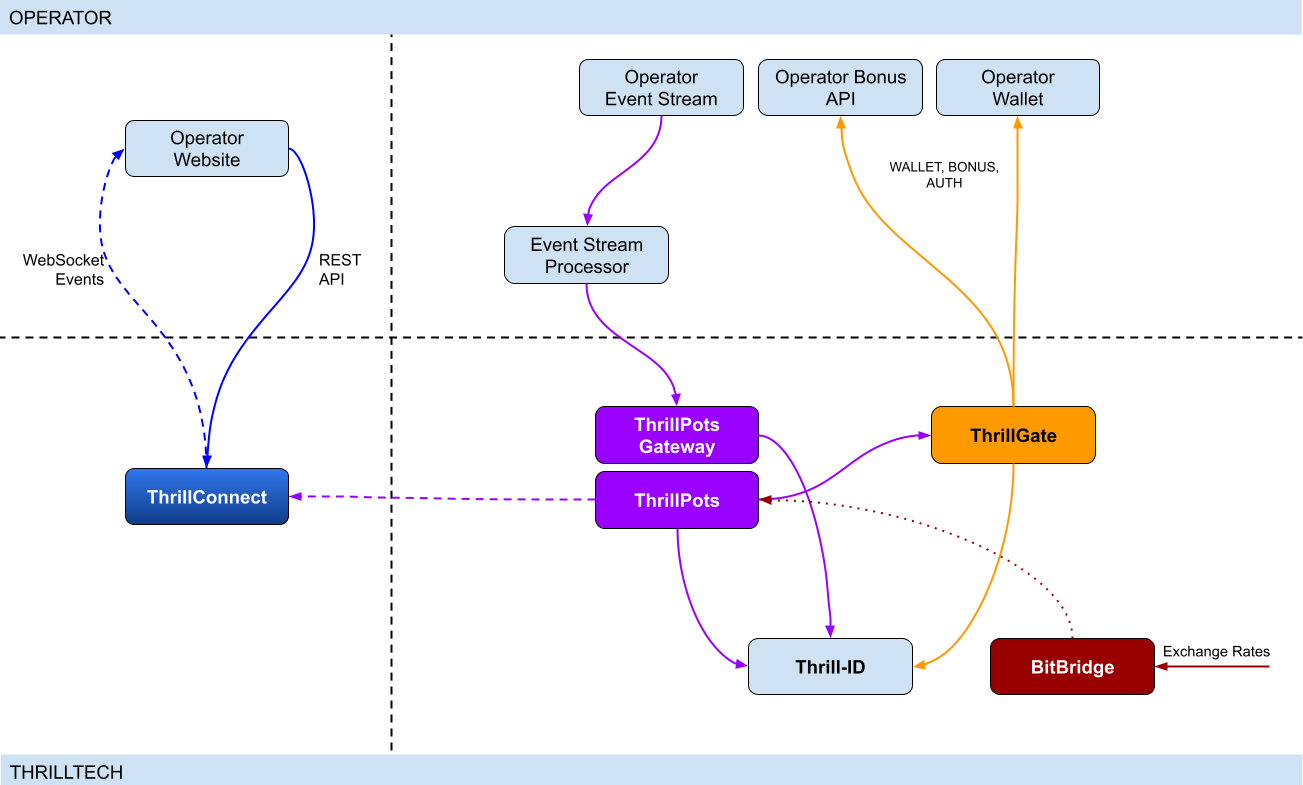
Integration points
ThrillPots has 3 primary integration points. This section will discuss each integration point and explain the purpose for each.
Betting integration
When it comes to Jackpot contributions, unlike normal games, player's do not make direct bets to jackpots. Rather, bets (contributions) are made on behalf of players via the operator's backend system.
Let's imagine a hypothetical casino where the operator has deployed a sitewide jackpot which is available to all players and is active across all casino content available on the site. The jackpot will receive a contribution bet each time a player makes a bet on any of the games on the site.
In order for these contributions to be made on behalf of the player, a simple event processor needs to be deployed that receives player game play / bet events and for each event makes a contribution request to the ThrillPots system.
In most platforms, this can be achieved by building a Kafka, RabbitMQ (or similar) event/stream processor which subscribes to the relevant topic/channel and makes REST API calls for each relevant event received. For platforms that do not have a message or event bus available, these events could be dispatched to the event processor via an alternative RPC mechanism such as REST, gRPC etc. This decision is all up to you, the integrating platform.
To learn more about this part of the integration, go to Event Stream Integration
Wallet Integration
When it comes to the wallet integration for ThrillPots, this integration is almost the same as any game provider integration. The wallet integration covers the following flows:
- Player token authentication
- Single Transactions (Debit & Credit)
- Batch Credit transaction (Multi-player payouts)
- Transaction cancellation
Integration is done against the ThrillGate service and can be performed in either direction (operator-to-provider or provider-to-operator).
To learn more about this part of the integration, go to Wallet Integration
Operator-to-Provider
If you decide to do an operator-to-provider integration, you will need to expose the endpoints required by the ThrillGate Standard Wallet Interface. All documentation can be found in the ThrillGate Standard Wallet Integration API documentation.
If you prefer for ThrillTech to integrate to your wallet API (provider-to-operator integration), you will need to provide the APIs and an integration environment for ThrillTech to develop the integration.
Frontend Integration
The ThrillConnect service is designed to support all frontend integrations. It exposes both a REST API (for end-user functionality like opt-in) as well as a WebSocket event stream for ad-hoc messaging and event broadcasts.
It is suggested to make use of the ThrillConnect JS API middleware layer which can easily be included in your site's code, freeing you up from the integration details and allowing you to focus on the visual and UX of the presentation layer.
To learn more about this part of the integration, go to Frontend Integration
Integrating ThrillPots Overview
The ThrillPots integration is best described as a 3-step process which is comprised of:
We suggest that before you dig into any of the three sections above, that you take the time to read this overview as it contains important information and pre-requisites that are needed for a smooth integration process.
PRE-REQUISITES
The rest of this guide assumes the following:
- You have the ThrillPots AIO Development container running and available. See this section for information on how to do this.
- You have a way to communicate with the services in the AIO Container (for example
curlorPostmanor similar tool)
Authentication and Authorization
Prior to making any calls to the ThrillPots service APIs, you need to authenticate with the ThrillTech platform using credentials that have been provisioned for you.
The ThrillTech platform uses a centralised authentication technology called Thrill-ID which provides governance over both User and Service accounts.
For integration purposes, you will need to provision a Service account (if one has not been provisioned for you yet). To learn more about provisioning accounts, please refer to the Thrill-ID documentation.
For an example of a Service account that would be suitable for the event stream integration service, see here
Setting up the AIO Container
The ThrillPots AIO Container is comprised of all the services necessary to run the ThrillPots platform from a single docker container.
The services made available are:
- ThrillPots Gateway (integrate your event/stream processor here)
- ThrillPots Service (the heart of the jackpot platform)
- ThrillGate (used to integrate with or to wallet APIs)
- ThrillConnect (integrate your frontend with this service)
- BitBridge (used for external data source integrations like exchange rates providers)
- ThrillTech Backoffice
- MongoDB
- Redis
The AIO container was designed to enable developers to deploy the entire ThrillPots stack on their local development machines on in a development environment quickly and easily.
In-Service Swagger UI
Each service provides access to a Swagger-UI for its API. Apart from ThrillConnect, which is an edge service, Swagger-UI support is compiled in to all the services and accessible via the /swagger-ui path.
ThrillConnect Swagger UI
Since ThrillConnect is an edge service and generally made available to the public internet, swagger-ui needs to be enabled via an environment variable.
In order to enable the /swagger-ui endpoint for the ThrillConnect service, you must set the TCS_ENABLE_SWAGGER environment variable to true.
Setting up the AIO Container: Pre-requisites
This short section explains the pre-requisites you will need in order to be able to setup the AIO container.
Pre-requisites
You will need the following software on your development machine:
Mandatory:
- Docker (or alternatively Docker Desktop)
- Postman
Optional:
Some type of MongoDB UI. We recommend you use MongoDB Compass
GitHub Access
You will need to have a GitHub account that has been granted access to the ThrillTech GitHub Organisation. This step is usually done as part of the initial technical kick off. As part of this access, you are granted access to repositories and packages that are needed.
Once you have provided ThrillTech with your Github account and we have added you as a collaborator, you need to have a Github Personal Access Token (classic) with permissions to read packages.
Go to your account's Settings -> Developer Settings -> Personal Access Tokens -> Tokens (classic) and create one.
(Click your avatar circle on the top right part of Github, click "Settings" and then "Developer Settings" is located at the bottom on the right of the menu of your account)
The only right it needs to have is to read packages.
Log in to our package repo and give your github username and the token your just created as password when prompted
docker login ghcr.io/thrilltech-io
Setting up the AIO Container: Initial Setup
Setting Up
Once you have provided ThrillTech with your Github account and we have added you as a collaborator, you need to have a Github Personal Access Token (classic) with permissions to read packages.
Go to your account's Settings -> Developer Settings -> Personal Access Tokens -> Tokens (classic)nd create one.
(Click your avatar circle on the top right part of Github, click "Settings" and then "Developer Settings" is located at the bottom on the right of the menu of your account)
The only right it needs to have is to read packages.
Log in to our package repo and give your github username and the token your just created as password when prompted:
docker login ghcr.io/thrilltech-io
Once you have successfully authenticated with the repository, you are ready to continue with the steps to getting the ThrillPots Dev Container running:
- Clone the https://github.com/thrilltech-io/dev-containers repository
- Go to the
/thrillpotsfolder in the repository and execute:docker compose up -d
NOTE: If you are running on MacOS on Apple Silicon, you may need to enable x86_64/amd64 emulation. Do this by going to Docker Desktop's settings -> General and finding the option called "Use Rosetta for x86_64/amd64 emulation on Apple Silicon" and enable it.
This will download all the necessary packages and run them via
Docker Compose. This process may take a few minutes to complete
- Import the provided Postman collection (
ThrillPots AIO Setup.postman_collection.json) which can be found in the repository into your Postman application - You will notice that it contains a number of endpoints, all numbered. The numbering indicates the sequence in which you must execute the calls.

- Execute all the steps in order
Once complete, you will have a ThrillPots system running and configured in 'standalone mode'. This means that you can make contributions and interact with the system, but there will be no external wallet calls made for player authentication or transactions.
In this mode, valid player IDs are in a range:
[player_00000 ... player_00999]
As part of the steps, you will also have created a Jackpot Template, and from this template you created a Jackpot instance. Jackpot Instances are the "running jackpots" that players contribute to. You also made a contribution directly to the jackpot.
You would also have created a Source and mapped the Jackpot Instance to the source and successfully made a contribution to the jackpot via the Source
The final step in the setup was the creation of an Internal mock wallet in ThrillGate. In a later section, where wallet integration is discussed, you will change this configuration to allow connectivity to your own wallet service, but for now, this mock wallet implementation is enough to get started with.
ThrillPots Wallet Configuration
IMPORTANT
Please note that when you change the wallet configuration for the ThrillPots service, you MUST restart the ThrillPots service for the changes to take effect.
Setting up the AIO Container: Admin Accounts
By default, the system is configured with an admin account called admin@thrilltech.io. This account has the ability to control all resources for the thrilltech oorganisation. You will have noticed that in all of the setup steps above, the owner_id or brand_id values were either thrilltech or thrilltech:brand1.
The ThrillPots system implements a "resource ownership" model which ensures that jackpot objects are not modifiable by unauthorized accounts.
Have a look at thrilltech:brand1. The first part before the : is the "organisation" or "operator id". The second part after the : is the "organisational unit" or "brand".
Creating a new ThrillPots admin account for a different organisation
If you want to create and manage ThrillPots resources for a different organisation/operator, you will first need to create a new orgnisation and admin account for that organisation. All of these actions are done through Thrill-ID.
The next steps assume that you are authenticated as
admin@thrilltech.io(as per Step 0 in the setup steps)
1. Create a new organisation
We first need to register a new organisation in Thrill-ID. For the purposes of this example, lets create a new organisation called "new-operator" which has 2 casino brands: new-mega-casino and new-mega-sportsbook.
To do this, make the following call to Thrill-ID:
POST http://localhost:9000/admin/organisations
Header: Authorization Value: Bearer AUTH_TOKEN_FOR_ADMIN@THRILLTECH.IO
Body:
{
"id": "new-operator",
"units": [
"new-mega-casino",
"new-mega-sportsbook"
],
"enabled": true,
}
You should receive a 200 OK.
Now we can create the new admin account for the new organisation
2. Create a new admin account
To create a new administrator account for the new-operator organisation we just created, we need to make another call to Thrill-ID, this time to create the actual account:
POST http://localhost:9000/admin/accounts
- Header:
Authorization - Value:
Bearer AUTH_TOKEN_FOR_ADMIN@THRILLTECH.IO
Body:
{
"account_type": "User",
"username": "admin@new-operator.com",
"password": "password",
"org_unit": {
"org_id": "new-operator"
},
"permissions": [
{
"system_id": "thrillpots",
"permissions": [{
"resource_id": "*",
"permission": "Admin"
}]
}
]
}
You should receive a 200 OK along with a response body showing you the newly created account.
3. Test the new admin account
Go back to Step 0 in the setup instructions and change the username and password to the new accounts username and password and try to authenticate. If everything went right, you should receive a new token for the account and can now proceed with managing ThrillPots resources for the new-operator organisation.
Once you are authenticated with the admin account for the new-operator organisation, you will be able to create Jackpot templates, instances, sources etc for the new-operator organisation.
4. Create the Operator and Brands in ThrillPots
We now need to create the operator and associated brands in ThrillPots. To do this we make the following calls:
Add Operator
POST http://localhost:8084/config/operators
- Header:
Authorization - Value:
Bearer AUTH_TOKEN_FOR_ADMIN@THRILLTECH.IO
Body:
[
{
"id": "new-operator",
"name": "New Operator"
}
]
Add Brands to Operator
POST http://localhost:8084/config/operators/new-operator/brands
- Header:
Authorization - Value:
Bearer AUTH_TOKEN_FOR_ADMIN@THRILLTECH.IO
Body:
[
[
"new-mega-casino",
"new-mega-sportsbook@"
]
{
"id": "new-mega-casino",
"name": "Mega Casino"
},
{
"id": "new-mega-sportsbook",
"name": "Mega Sportsbook"
}
]
Event Processor Integration
In this section, we will discuss the Event Processor integration component that is required in order to enable the ability to make contributions to jackpots.
In general, this integration component needs to be able to receive the events that will drive jackpot contributions on behalf of users/players.
In a standard ThrillPots-powered system, it is usually gameplay that causes jackpot contributions to be made on behalf of players, but you are not limited to just this single use case.
From a simplistic perspective, the general logic should look something like this:
Authenticate your integration service with ThrillPots Gateway
Subscribe to gameplay/bet events from your event stream
When an event is received from your event stream:
- Read the properties of the event for game code, player ID and bet amount
- Make a contribution call to ThrillPots using these (and other values)
From here, it is relatively easy to see how you could expand the use case to create a Deposit jackpot. Lets imagine that the deposit flow was identified by source DEPOSIT. Lets also assume that when a successful deposit has been made by a player, that an event is published by the operator's platform. For argument's sake, lets call this event DEPOSIT_SUCCESS.
If we wanted to create a deposit jackpot, the logic could look as follows:
Subscribe to DEPOSIT_SUCCESS event
When an event is received:
- Read the properties of the event for the player ID and deposit amount
- Make a contribution call to ThrillPots using the DEPOSIT source_id and other properties
Sequence Diagram for the Event Processor integration

Authenticating via ThrillPots Gateway
The ThrillPots Gateway service exposes a REST endpoint which your event stream process can authenticate itself with Thrill-ID.
The endpoint is POST /authenticate/service and accepts a payload which contains the connecting service's username and password.
If authentication is successful, you will receive a response which contains token which must be used as a Bearer token in subsequent API requests to the ThrillPots Gateway service. Service tokens do not expire and therefore you do not need to be concerned with refreshing your token once it has been received.
See here for a Service account that you can provision for your Event Processor integration service.
Additional Information
If your event processor service is processing gameplay bet events, you should remember to filter out any and all events related to Jackpot Contributions as this could create loop of contributions on behalf of players
Contributing to Jackpots
Now that you are processing events from your platform, you want to be able to make Contributions on behalf of players to the jackpot. The process of contributing is quite straight forward and does not require your service to be aware of player opt-in status. You will however need to decide which jackpot to contribute to and this can be done in one of two ways:
- Contribute by source
- Contribute direct to jackpot
Sources
A Source can be thought of as an operator-defined identifier for a user journey, a group of games, or even a single game.
Example: Sitewide Jackpot
If you wanted to create a site-wide jackpot for your casino vertical, you could create a Source named casino-sitewide, map a jackpot to the source and then send all contributions to that specific Source.
{
"token": "token_00001",
"brand_id": "thrilltech:brand1",
"player_id": "player_00001",
"player_country": "UK",
"source_id": "casino-sitewide",
"gameround_id": "1",
"currency": "EUR",
"base_wager": 1
}
Example: Deposit Jackpot
If you wanted to create a deposit jackpot, you can create a source called deposit, map the relevant jackpot to the source and then send all deposit-based contributions ot that source
{
"token": "token_00001",
"brand_id": "thrilltech:brand1",
"player_id": "player_00001",
"player_country": "UK",
"source_id": "deposit",
"gameround_id": "DEPOSIT_TX_ID",
"currency": "EUR",
"base_wager": 1
}
Example: Game Group Jackpot
If you wanted to create a jackpot for a specific set of games, for example, a jackpot for all egyptian themed games, you can create a source called egyptian-games and use that for contributions each time a player bets into a game that is egyption themed. This would naturally require your integration service to know which games are matched to which Game Group source.
{
"token": "token_00001",
"brand_id": "thrilltech:brand1",
"player_id": "player_00001",
"player_country": "UK",
"source_id": "egyptian-games",
"gameround_id": "1",
"currency": "EUR",
"base_wager": 1
}
Example: Game Specific Jackpots
If you want to split your liquidity by game title, you can create sources that correspond to the game codes of games in your system. Each source would need a jackpot mapped to it, but once that is done, you are able to make contributions to the source based on the game code of the base game bet.
{
"token": "token_00001",
"brand_id": "thrilltech:brand1",
"player_id": "player_00001",
"player_country": "UK",
"source_id": "provider-game-code",
"gameround_id": "1",
"currency": "EUR",
"base_wager": 1
}
Direct to Jackpot Contribution
An alternative to using sources is to make contributions directly to Jackpot Instances by their ID. For example, if you have created a Jackpot instance, you will have its ID available to you. This ID will not change over the lifetime of the jackpot. Making contributions directly to a Jackpot ID incurs less processing cost, but may also reduce the flexibility you may have in changing which jackpot players contribute to based on the content or user flows.
The only difference in the contribution payload is that the source_id is replaced with an instance_id field as seen below:
{
"instance_id": "0a1cfeea-5b07-4f2b-b2f1-2e4cd2aa991d",
"token": "token_00001",
"brand_id": "thrilltech:brand1",
"player_id": "player_00001",
"player_country": "MT",
"gameround_id": "1000",
"base_wager": 2,
"currency": "EUR"
}
Synchronous vs Asynchronous contribution
The default contribution mechanism is synchronous. However, depending on your system architecture (and system load), you may prefer to make use of asynchronous contribution mechanics. In order to make asynchronous contributions, you need to provide a webhook that the ThrillPots system can call once the result of a contribution has been determined.
In order to make a contribution asynchronously, you simple need to add a callback property to either of the contribution payloads above to specify the webhook to call and which results you are interested in receiving.
The structure of the callback property is as follows:
{
"web_hook": "https://your.host/webhook",
"win_result_only": false
}
The web_hook field indicates the fully qualified HTTP path to your webhook and the win_result_only property indicates whether the webhook should only receive win results or all contribution results.
Therefore, an asynchronous contribution for a sitewide casino jackpot would look like this:
{
"token": "token_00001",
"brand_id": "thrilltech:brand1",
"player_id": "player_00001",
"player_country": "UK",
"source_id": "casino-sitewide",
"gameround_id": "1",
"currency": "EUR",
"base_wager": 1,
"callback": {
"web_hook": "https://your.host/webhook",
"win_result_only": false
}
}
When making an asynchronous contribution, the ThrillPots system will either return 200 OK with a JSON payload that contains a trace_id for the request when it has successfully accepted the contribution request for processing, or you will receive an error due to the request being malformed.
Any contribution request errors will be send to the webhook. The structure of the webhook payload is defined as follows:
{
"payload_type": "data" | "error",
"data": Object
}
The data portion will either be a ContributionResult structure or an Error structure. You can find more information on these structures in the API documentation.
Examples of payloads sent to the web hook
Contribution Result
{
"type": "data",
"contribution_amount": 0.1,
"contribution_currency": "EUR",
"gameround_id": "cc83c1cc-6260-44fc-822b-d3c03acf2d89",
"instance_id": "a49ff35f-6ecd-491f-b373-85e6caabacf1",
"metadata": null,
"tickets_awarded": null,
"timestamp": 1715714218408,
"win_amount": 0,
"win_pot_id": null,
"win_withheld": false
}
Error Result
{
"type": "error",
"status_code": 404,
"code": "GAME_NOT_FOUND",
"message": "sitewide-casino2",
}
Contribution Request Errors
A contribution request may result in a direct or a downstream error. A direct error is an error that is the result of the ThrillPots system return an error to the contribution request itself. A downstream error is an error that is propogated to the contribution request caller from a downstream system, such as ThrillGate or the operator wallet itself.
List of Direct Errors
For Direct Errors, you can expect:
| Error Code | Description |
|---|---|
CONTRIBUTION_REJECTED | The contribution was rejected due to a contribution rule failing, The rule in question will be contained within the CONTRIBUTION_REJECTED message |
GAME_NOT_FOUND | this occurs when making a contribution to source and the source does not exist |
CURRENCY_MULTIPLIERS_NOT_FOUND | self explanatory |
SYSTEM_ERROR | This is what you get with 500 http responses from ThrillPots |
OPTIN_ERROR | This occurs if the player;s optin record could not be updated |
SOURCE_JACKPOT_NOT_FOUND | This occurs if the jackpot mapped to the source could not be found |
SOURCE_JACKPOTS_NOT_ALLOWED | This occurs if the jackpot mapped to the source does not allow a contribution from this player (either country or brand not allowed) |
DB_ERROR | An internal DB ERROR |
UNSUPPORTED_BRAND | This is returned when the brand of the player (specified in contribution) is not supported by the jackpot or system |
Passing Metadata
If you need to pass contextual metadata from your event processor to your wallet, you can do so by adding a metadata field to the Contribution Request. This data will be passed through the system and attached to transaction requests to your wallet.
The metadata field can be any valid JSON value, for example:
Metadata containing an Object:
{
"token": "token_00001",
"brand_id": "thrilltech:brand1",
"player_id": "player_00001",
"player_country": "UK",
"source_id": "casino-sitewide",
"gameround_id": "1",
"currency": "EUR",
"base_wager": 1,
"metadata": {
"value1": "some value",
"value2": 1234
}
}
Metadata containing a String:
{
"token": "token_00001",
"brand_id": "thrilltech:brand1",
"player_id": "player_00001",
"player_country": "UK",
"source_id": "casino-sitewide",
"gameround_id": "1",
"currency": "EUR",
"base_wager": 1,
"metadata": "This is an arbitrary string value"
}
ThrillPots Events
ThrillPots publishes a number of events which your integration service can subscribe to. There are a number of reasons you may want to consume these events, for example:
- Synthesizing related Kafka/RabbitMQ events
- Storing the events for BI / Analysis purposes
The following events are currently published by ThrillPots Gateway:
JackpotUpdateEvent- contains the latest jackpot values for the specified Jackpot Instance- Reference
{
"event_type": "JackpotUpdateEvent",
"data": {
"id": "jackpot instance ID",
"status": String,
"currency": String,
"allowed_brands": [String],
"allowed_sources": [String],
"pots": [
{
"id": String,
"is_progressive": Boolean,
"current_value": Number
}
],
"last_updated": Number
}
}
JackpotWinEvent- contains the details of a jackpot win- Reference
{
"event_type": "JackpotWinEvent",
"data": {
"brand_id": String,
"player_id": String,
"source_id": String | null,
"instance_id": String,
"jackpot_name": String,
"timestamp": Number,
"win_pot_id": String,
"win_amount": Number,
"currency_multipliers": {
"brand_id": String,
"base_currency": String,
"multipliers": {
"EUR": Number,
"GBP": Number,
"ZAR": Number,
...
"NZD": Number,
"SEK": Number
}
}
"games_in_jackpot": [String],
"seed": Number,
"win_withheld": Boolean,
"seed_deficit": Number,
"community_winners": null | [{
"player_id": String,
"brand_id": String,
"currency": String,
"win_amount": Number
}]
}
}
RaffleWinEvent- contains the details of a Raffle Win- Reference
{
"brand_id": String,
"instance_id": String,
"jackpot_name": String,
"jackpot_currency": String,
"currency_multipliers": {
"brand_id": String,
"base_currency": String,
"multipliers": {
"EUR": Number,
"GBP": Number,
"ZAR": Number,
...
"NZD": Number,
"SEK": Number
}
}
"timestamp": Number,
"winners": [
{
"player_id": String,
"brand_id": String,
"currency": String,
"win_amount": Number
}
],
"win_withheld": bool
}
OptInEvent- contains the details of a player opt-in or opt-out into a Jackpot Instance Reference
{
"event_type": "OptInEvent",
"data": {
"instance_id": String,
"player_id": String,
"ext_player_id": String,
"player_brand_id": String,
"preferred_contribution_value": [Number],
"contribution_count": Integer,
"contribution_value": Number,
"opted_in": Boolean,
"last_updated": Integer
}
}
The ThrillPots events are published via the WebSocket endpoint /events.
Authenticating the Websocket connection to receive events
Once you have established a WebSocket connection from your event processor service to ThrillPots Gateway, you will need to send an Authenticate message which contains your Thrill-ID JWT token to authenticate your service to receive events.
{
"action": {
"Authenticate": {
"auth_token": "{{thrill-id-jwt}}"
}
}
}
If the authentication fails, the connection will be closed. Once you have authenticated, you should start receiving the events from the ThrillPots service.
Wallet Integration
Introduction
When integrating ThrillPots to your wallet, you will need to implement what is known as the "Standard Wallet API". This API has been defined by ThrillTech and is what our ThrillGate services uses to communicate with your backend to process:
- Player Authentication
- Transactions
- Transaction cancellations
- Batch transactions# Wallet Integration
ThrillPots Wallet Configuration
IMPORTANT
Please note that when you change the wallet configuration for the ThrillPots service, you MUST restart the ThrillPots service for the changes to take effect. In this section, we will discuss how ThrillPots performs player authentication and jackpot contribution transactions.
When running in a non-development environment (such as staging or production), ThrillPots uses the ThrillGate Service as an integration layer to an operator's wallet API.
NOTE:
ThrillPots also supports an internal, in-memory wallet for development or isolated testing purposes. This wallet is enabled by default in the AIO development container
Types of Wallet Integrations
There are two types of wallet integrations that can be developed:
- Provider-to-Operator integration
- Operator-to-Provider integration (Standard Wallet Integration)
This section is been written for operators that have chosen to do an Operator-to-Provider integration. For a Provider-to-Operator integration, ThrillTech are responsible for implementing the integration to your wallet API and that topic is out of scope for this book.
- Batch transaction cancellations
All communications from ThrillGate are conducted over secure SSL REST calls to your system.
As part of all calls to your system, ThrillGate sends an HMAC in the X-Server-Authorization header which is calculated from the body of the request only. You can use this HMAC value to verify that the request is coming from the expected ThrillGate server.
NOTE: During integration you will receive the secret key that you can use to verify the HMAC value with.
Enabling Wallet Integration Mode in the AIO Container
In order to configure the container to support external wallet integration mode, some additional API calls need to be made.
In the provided Postman collection, you will find a folder called Wallet Integration Mode. In this folder you will find additional API calls that you need to make in order to configure the container to run in this mode.

The first API call (1. Create Wallet Configuration) makes a call to the ThrillGate service and sets up the "Standard Wallet API" connnector.
It is very important that you do NOT change the details in Step 2a or 2b as these are specific for the AIO container.
PLEASE NOTE:
When building your wallet integration, the ThrillGate service will attempt to connect to your wallet service on your localhost:8201. This is configured via Docker networking as:
Host: "host.docker.internal"
Port: 8201You can change the port, but we would recommend not changing the host unless you are absolutely sure you know what you are doing.
Once you have executed step 1, you can Enable or Disable the external wallet mode using steps 2a or 2b respectively.
Once you have completed the configuration, you will need to restart the ThrillPots service in the AIO container.
IMPORTANT
Each time you change the wallet configuration of ThrillPots, you must restart the ThrillPots Service for the configuration changes to take effect
Standard Wallet Integration
What is the Standard Wallet?
The Standard Wallet is a REST API definition (designed by ThrillTech) which an operator needs to implement support for. The ThrillGate service uses the Standard Wallet API (as a client) to communicate with the operator's wallet to perform the following actions:
- Player token authentication
- Debit / Credit transactions (single)
- Credit transaction batches
- Transaction cancellation
Standard Wallet Sequence flows
Below is a sequence diagram of the expected data flow between ThrillGate and the operator wallet API:
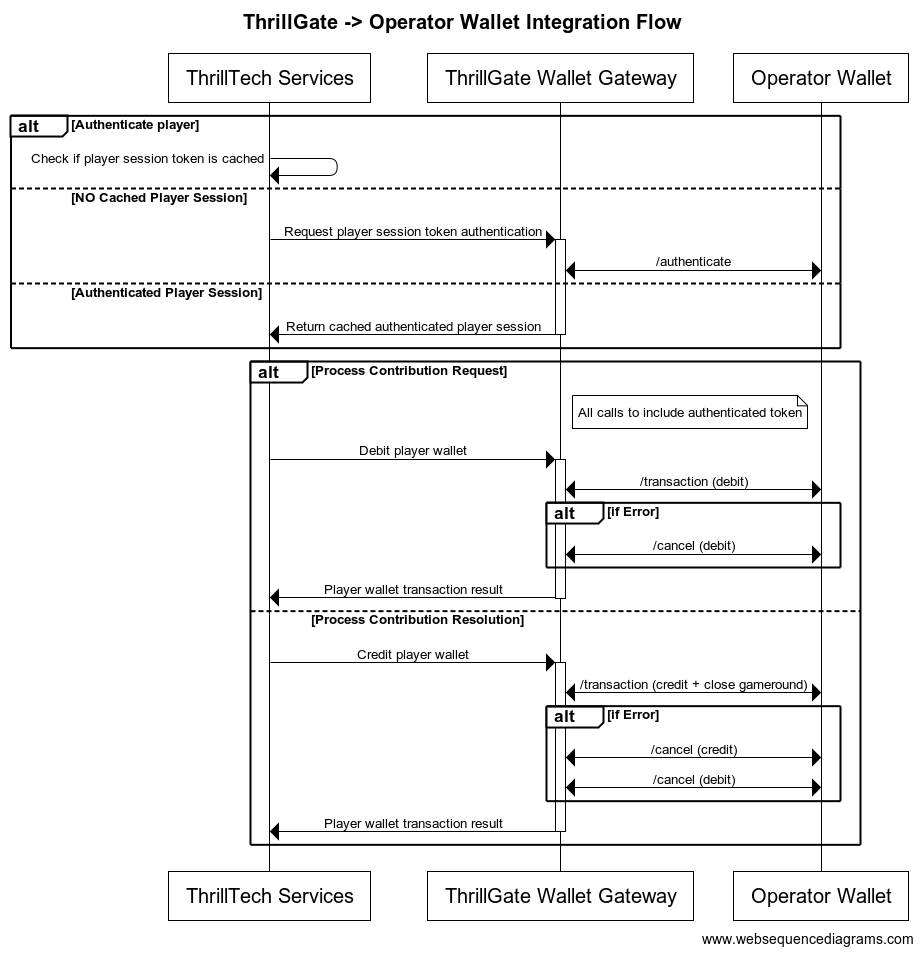
Configuring a Standard Wallet Integration in ThrillGate
To configure the ThrillGate Service to connect to your Standard Wallet API compliant service, you need to configure a Wallet resource.
To configure a wallet:
- URL:
POST http://localhost:8100/admin/wallets - Headers:
Authorization: Thrill ID Bearer token
- Body:
{
"id": "Brand1Wallet",
"operator_id": "thrilltech",
"brand_id": "brand1",
"wallet_type": "StandardWallet",
"connection_details": {
"protocol": "http",
"host": "host.docker.internal",
"port": 8201
},
"endpoints": {
"auth": {
"POST": "/wallet/authenticate"
},
"balance": {
"GET": "/wallet/balance"
},
"cancel_bet": {
"DELETE": "/wallet/cancel"
},
"transaction": {
"POST": "/wallet/transaction"
},
"transaction_batch": {
"POST": "/wallet/transaction/batch"
},
"cancel_batch": {
"DELETE": "/wallet/transaction/batch"
}
},
"config": {
"secret_key": "12345",
"accept_zero_value_credits": true,
"must_close_gamerounds": false
}
}
| Property | Description |
|---|---|
id | The ID you want to assign to the wallet. This is a unique identifier |
operator_id | The operator ID that this wallet is for |
brand_id | The brand ID that this wallet is for |
wallet_type | This must be set to StandardWallet |
connection_details.protocol | The protocol of the url. Usually http or https depending on your setup |
connection_details.host | The hostname for your server. While using the AIO container, it is recommended you keep this set to host.docker.internal |
connection_details.port | The port that your server is listening on |
endpoints | This is an object that describes the required endpoints for the Standard Wallet API |
endpoints.auth | This describes the endpoint that ThrillGate will make player authentication calls to |
endpoints.balance | This describes the endpoint that ThrillGate will make player balance requests to |
endpoints.transaction | This describes the endpoint that ThrillGate will call to perform transactions |
endpoints.cancel_bet | This describes the endpoint that ThrillGate will make to cancel transactions |
endpoints.transaction_batch | This describes the endpoint that ThrillGate will make for transaction batch calls |
endpoints.cancel_batch | This describes the endpoint that ThrillGate will make to cancel transaction batches |
config | An object that contains specific configuration elements for the Standard Wallet |
config.secret_key | This is the key that will be used to generate the HMAC value that is sent on each wallet request in the x-server-authorization header |
config.accept_zero_value_credits | This defines whether the external wallet supports Credit transactions which have a value of zero (0) |
config.must_close_gamerounds | This defines whether the external wallet requires gamerounds to be closed |
NOTE: If you need to change the definition of the endpoints, feel free to do so. Make sure that you use the correct HTTP verb and specify the endpoints as needed by your system.
Next Steps
Once you have understood the purpose of each of the Standard Wallet API calls as well as the flows around transaction and transaction batch handling, you are ready to start integrating the Standard Wallet API into your system. Refer to the provided API reference documentation and OpenAPI specs that have been provided to you.
Standard Wallet API: Player Authentication
In order for the ThrillPots system to take wagers (debit the player's wallet) and payout winnings (credit the player's wallet), it needs to be able to authenticate the player with the operator wallet.
This is done by calling the Standard Wallet's auth endpoint, passing in the provided player token and game code to the operator wallet and receiving the required player details (including the token that should be used for transaction calls)
This is done by ThrillGate calling the endpoint defined in endpoints.auth of the Standard Wallet's configuration. An example call's payload would look as follows:
{
"operator_id": "your_operator_id",
"brand_id": "your_brand_id",
"player_token": "token_00001",
"source_id": "AwesomeJackpotGameCode",
"currency": "EUR"
}
If successful, the operator wallet must respond with a valid session token and player details that can be used for future transaction calls for this player.
Response example:
{
"id": "player_00001",
"token": "session_token_00001",
"currency": "EUR",
"balance": 100001927.79,
"operator_id": "thrilltech",
"brand_id": "brand1",
"nickname": null,
"gender": "?",
"country": "MT",
"jurisdiction": null,
"segments": null
}
Standard Wallet API: Transactions
Transactions
Once the player token has been authenticated, the ThrillPots system can start making transaction calls through ThrillGate.
In standard operation, the first transaction call will be a Debit transaction request to fetch funds from a player's wallet for the Jackpot Contribution bet. This call is also intended to open the game round for the jackpot contribution.
If successful, ThrillPots will process the jackpot contribution and determine if a win occurred.
The next transaction call that will be made will be a Credit transaction request. This call is intended to pay any winnings to the player account and to close the game round that was opened with the Debit transaction.
Transaction Errors
If an error occurs while executing transactions with the operator wallet, ThrillGate and ThrillPots cooperate to ensure that the transaction error is handled correctly.
When an error occurs, ThrillGate will attempt to retry the transaction request a set number of times. If all retries fail, the error will be sent to ThrillPots for further handling.
If there are certain wallet errors that you do not wish ThrillGate to perform its retry logic, you can configure that as part of the wallet configuration in ThrillGate.
Please see the ThrillGate section on Configuring Wallet Error Behaviour for more information on how to configure ThrillGate's wallet error handling.
Once an error has been sent back to ThrillPots, ThrillPots will decide whether a transaction needs to be cancelled or not. Transaction cancellation is discussed next.
#@ Transaction Cancellation
In certain situations (as described in the errors section above), it is necessary for transactions to be cancelled. In general, ThrillPots handles transaction cancellation logic as follows:
If the Debit transaction failed
ThrillPots will send a cancellation request for the Debit transaction using the Debit transaction ID.
If the Credit transaction failed
ThrillPots will first send a cancellation request for the Credit transaction and then a separate cancellation request for the Debit transaction. Both requests will be sent with the respective transaction IDs.
Transaction Batches (Credit only)
ThrillPots uses Transaction Batch requests to communicate payouts to multiple players.
These types of payouts are only relevant to jackpots that are either:
- Multi-player payouts (community payouts)
- Raffle jackpot payouts
In both situations, since multiple players are considered winners from a single jackpot win, ThrillPots needs a way to credit wins to multiple players. Since these players are not guaranteed to be online at the time of the win, ThrillPots will not have access to any session token information for all the winners.
Transaction Batches are used in these special situations to communicate a set of credit operations that need to be applied to multiple players accounts.
Although unlikely, it is possible that not all the specified player accounts will be able to be credited with the winnings. Such a situation may arise if, for example, the player account has been banned/blocked or is self-excluded at the time of the jackpot win.
In these cases, the operator wallet is expected to flag the player account as an exception and continue to pay the remaining players in the transaction batch.
It is not considered an error if a player account in a transaction batch cannot be paid. The operator wallet should simply indicate this exception in the response and attempt to pay all other players.

Transaction Batch Cancellation
We have discussed what Transaction Batch exceptions are and how they are handled.
There is another limited set of errors that require Transaction Batches to be cancelled.
These errors are typically (but not limited to) errors such as network errors and timeouts. When an error occurs that leads ThrillGate to not be sure whether the operator's wallet has handled the transaction batch request, the request will first be retried, but after failing a specific number of times, the transaction batch will be cancelled.
Each transaction batch request has a unique identifier, and this identifier will be sent as part of the transaction batch cancellation request.
Frontend Integration
The final piece of the ThrillPots integration puzzle is the frontend integration. The frontend is responsible for displaying the Jackpot Ticker widget, showing players what the value of the various pots within the Jackpot are, the opt-in widget, allowing players to opt-in or opt-out of participation in the jackpot and so on.
The ThrillConnect Service has been specifically developed to provide an API and event stream over WebSockets to frontend clients to be able to interact with the ThrillPots system.
Sequence Diagram for the frontend to ThrillConnect integration
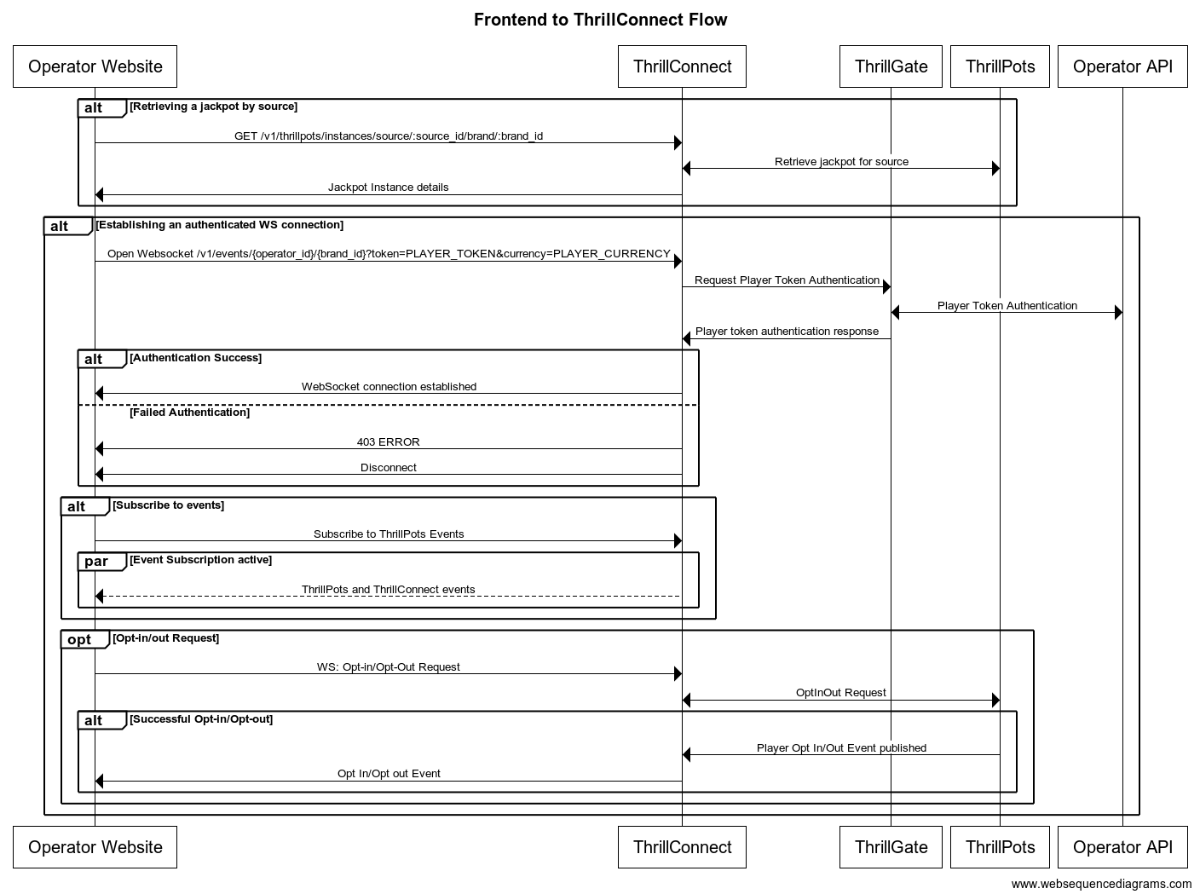
Integration Flow in detail
Fetching a Jackpot's details
One of the first things your frontend will most likely need to do is to retrieve jackpot details for your jackpot widget to display.
If you have followed the section on settings up the AIO container, you would have created a
Sourcecalledsitewide-casino.If you haven't gone through the process of setting up a source, we suggest that you review and understand sources and how they are used before continuing
To retrieve the jackpot for the sitewide-casino source, you will need to call:
GET /v1/thrillpots/instances/source/:source_id/brand/:brand_id?player_id=:player_id
replacing the :source_id and :brand_id values with the appropriate values that have been configured. If you used the default values from the Postman collection, you can use sitewide-casino for the source_id and thrilltech:brand1 for the brand_id.
If the player is already logged in, you can also pass the ID of the player via the query parameter player_id. Doing so will ensure that the player's opt-in status is returned in the jackpot instance information.
Establishing a WebSocket connection
In order to receive ThrillPots events and be able to opt players in or out of the jackpot, you will need to establish a websocket connection.
Once a player is logged into an operator's site, you can establish a WebSocket connection with ThrillConnect, passing in the player's session token.
NOTE
WebSocket connections are protected and can only be established by logged in players to prevent unauthorized and potentially dangerous abuse by attackers. Requiring a player a valid player session token in order to establish a WebSocket connection is a security-driven decision
To establish a WebSocket connection with ThrillConnect, open a WebSocket to:
/v1/events/{operator_id}/{brand_id}?token=PLAYER_TOKEN¤cy=PLAYER_CURRENCY
ThrillConnect will authenticate the token (the Player session token) from the query parameters with the operator's platform via ThrillGate. If the token is valid, the websocket connection will be established. If the token is invalid, the connection will receive a 403 FORBIDDEN error.
Subscribing to ThrillPots events
Once you have successfully established a WebSocket connection, you can now subscribe to ThrillPots events. This is done by sending a subscription request via the WebSocket to ThrillConnect. See below for the SubscribeRequest message that should be sent to subscribe to all ThrillPots events:
{
"SubscribeRequest": {
"events": [{
"source": "thrillpots",
"event_type": "*"
}]
}
}
If you would like to subscribe to only certain events, you can do so by explicitly specifying the events by source one-by-one.
ThrillPots currently publishes the folliowing event types:
- JackpotUpdateEvent
- WinEvent
- RaffleWinEvent
- OptInEvent
For more information about the structure of each of these events, see ThrillPots Event Structures
Player Opt-in / Opt-out
To opt a player in or out of a jackpot, you must send a PlayerOptInRequest message via the WebSocket connection.
Below are a few examples of opting a player in and out of a jackpot instance (please note, you will need to have the jackpot instance ID):
Opting in
{
"PlayerOptInRequest": {
"instance_id": "8dcc9f5a-f1c5-466f-83e9-928277d8bfb7",
"player_id": "player_00001",
"brand_id": "thrilltech:brand1",
"player_country": "MT",
"opt_in": true
}
}
Opting in with a preferred contribution value of 0.20
{
"PlayerOptInRequest": {
"instance_id": "8dcc9f5a-f1c5-466f-83e9-928277d8bfb7",
"player_id": "player_00001",
"brand_id": "thrilltech:brand1",
"player_country": "MT",
"opt_in": true,
"contribution_value": 0.2
}
}
Opting out of a Jackpot
{
"PlayerOptInRequest": {
"instance_id": "8dcc9f5a-f1c5-466f-83e9-928277d8bfb7",
"player_id": "player_00001",
"brand_id": "thrilltech:brand1",
"player_country": "MT",
"opt_in": false
}
}
Retrieving Exchange Rates
You may need to convert the values of a jackpot instance from the Jackpot currency to a player's currency. To help facilitate this, ThrillConnect exposes a currency endpoint which allows you to fetch the exchange rates used by ThrillPots.
To retrieve the 202408-1 exchange rates, you can call:
GET /v1/currencies
Retrieving a player's raffle ticket count
If player's are contributing to a Raffle jackpot, you may want to show the player how many tickets they have earned so far in the raffle. You can retrieve the player's current ticket count by requesting it via the WebSocket connection:
To retrieve a player's ticket count, send a PlayerRaffleTicketsRequest message:
{
"player_id": String,
"instance_id": String,
"brand_id": String
}
The instance_id is the instance ID of the Raffle jackpot, and the brand_id is in the format operator_id:brand_id.
If the request can be serviced, you should received a PlayerRaffleTicketsResponse message back:
{
"msg_type": "Message",
"source": "thrillpots",
"msg_name": "PlayerRaffleTicketResponse",
"operator_id": "OPERATOR_ID",
"brand_id": "BRAND_ID",
"player_id": "PLAYER_ID",
"data": {
"ticket_count": 4
},
"timestamp": 1711452762485
}
If there was an error processing the request, you will receive an Error message in response which will contain the message name that errored, as well as any relevant error details. For example:
{
"msg_type": "Error",
"source": "thrillpots",
"msg_name": "PlayerRaffleTicketRequest",
"operator_id": "OPERATOR_ID",
"brand_id": "BRAND_ID",
"player_id": "PLAYER_ID",
"data": {
"status_code": 404,
"code": "",
"message": "Error 404 Not Found from http://localhost:8084/instances/raffle/e0dee1ae-6231-458a-ad6d-4dc0c941e5c3/tickets/player_00001/brand/thrilltech:brand1"
},
"timestamp": 1711452757807
}
In this case, the request Jackpot instance ID could not be found.
Metrics
The ThrillPots system exposes Prometheus metrics per service via the /metrics endpoint.
Below is the list of metrics exposed per service:
ThrillPots Gateway
| Metric name | Metric Type | Description |
|---|---|---|
| contrib_req_sync_recv | Counter | Syncronous Contribution Requests Received |
| contrib_req_async_recv | Counter | Asyncronous Contribution Requests Received |
| contrib_req_queued | Gauge | Contribution Requests currently queued |
| contrib_req_processed | Counter | Contribution requests processed |
| contrib_avg_queue_time | Counter | Average Contribution Request Queue Time |
| contribution_webhook_calls | Counter | Contribution Webhook calls made |
| http_requests_avg_time | Family: Counter | HTTP Request Average Time |
ThrillPots Service
| Metric name | Metric Type | Description |
|---|---|---|
| contrib_req_recv | Counter | Contribution Requests Received |
| contrib_req_processed | Counter | Contribution requests processed |
| contrib_req_rejected | Counter | Contribution Requests rejected |
| http_requests_avg_time | Family: Counter | HTTP Request Average Time |
| preflight_avg_time | Counter | Average time spent validating contribution requests |
| jackpot_opts | Family: Counter | Opt-In/Out related metrics |
Thrillpots Gateway
ThrillPots Service
ThrillGate
ThrillConnect
Thrill-ID
BitBridge
ThrillPots Event Structures
This section provides the data definitions (in JSON) for each of the ThrillPots events.
Event: JackpotUpdateEvent
{
"id": String,
"currency": String,
"pots": [PotTicker],
"allowed_brands": [String],
"allowed_sources": [String],
"status": String,
"last_updated": Number
}
References:
Event: WinEvent
{
"brand_id": String,
"player_id": String,
"source_id": String,
"instance_id": String,
"jackpot_name": String,
"jackpot_currency": String,
"timestamp": Number,
"win_pot_id": String,
"win_amounts": [CurrencyValue],
"win_withheld": bool,
"community_winners": [PayoutRecord],
"games_in_jackpot": [String],
"seed": Number
}
References:
Event: RaffleWinEvent
{
"brand_id": String,
"instance_id": String,
"jackpot_name": String,
"jackpot_currency": String,
"currency_multipliers": {
"brand_id": String,
"base_currency": String,
"multipliers": {
"EUR": Number,
"GBP": Number,
"ZAR": Number,
...
"NZD": Number,
"SEK": Number
}
}
"timestamp": Number,
"winners": [
{
"player_id": String,
"brand_id": String,
"currency": String,
"win_amount": Number
}
],
"win_withheld": bool
}
References:
The winners field contains an array of tuples. The structure of each tuples is (String, CurrencyValue).
The first element in the tuple contains the ID of a winning player and the second element contains the amount that the player won.
Event: OptInEvent
{
"instance_id": String,
"player_id": String,
"ext_player_id": String,
"player_brand_id": String,
"preferred_contribution_value": Number,
"contribution_count": Number,
"contribution_value": Number,
"opted_in": Boolean,
"last_updated": Number,
}
Structure References
PotTicker
{
"id": String,
"is_progressive": Boolean,
"current_value": Number
}
CurrencyValue
{
"currency": String,
"value": Number
}
PayoutRecord
{
"player_id": String,
"brand_id": String,
"currency": String,
"win_amount": Number
}
NOTE: This is early documentation for the scheduling system and the documentation will be further extended over time with additional examples and more details
Advanced Scheduling
The ThrillPots system provides a relatively sophisticated sub-system which allows you to create schedules for your jackpot products.
It is important to understand what a schedule is in the context of ThrillPots.
At its core, a schedule is always bound to a Jackpot Instance. A schedule can be as simple as defining the date and time that a jackpot starts at, or defining an end date and time for jackpot.
Here are some interesting use cases that can be solved with schedules as well:
- Happy Hour Jackpot: Creating a jackpot that only accepts contributions during 17:00 and 18:00
- Promotional Jackpots: Creating a jackpot that only accepts contributions at peak times of site activity or to encourage players during low activity times
- Weekend Jackpots: Creating a jackpot that is only available on weekends
Schedules become even more powerful when used together with Raffle Jackpots. Raffle Jackpots are jackpots that resolve at the end of a predefined period of time. While players participate in the Raffle Jackpot by way of contribution (as with any other jackpot), raffle jackpots issue tickets to players based on either their Contribution or the base wager that they make into games.
Recurrence Rulesets
All the rules for the scheduling system revolve around "recurrence rules". Currently, recurrence rules are implemented for "Daily" and "Weekly" rulesets.
Daily rules
Daily rules define a set of hours within which the jackpot is available in. Traditionally, jackpot contributions are allowed during all hours of the day, but lets imagine that you wanted to create a jackpot that was only available during your site's "Happy Hour" which was between the hours of 7pm to 9pm UTC.
For such a rule to exist, you would only need to define a Daily recurrence rule which stipulated that the hours of 19:00 to 21:00 UTC were valid.
Weekly rules
Taking the example from above, lets imagine that we wanted to further constrain the available days of the raffle to be from Monday to Friday (no weekend contributions allowed!). In this case, we would create a "Weekly" ruleset which define the following days as being valid: Monday through to Friday.
As a last minute change, business might want to allow contributions to happen on a Saturday, but only between 08:00 UTC to 20:00 UTC. To allow this specificity of ruleset, we can apply an additional override for Saturday for those specific hours at the Weekly schedule level.
Technical Example
For a technical example of what a complete schedule as described above would look like, the following JSON structure accurately describes the ruleset. For arguments sake, we will define the schedule to start on the 1st of January 2024 UTC, with no end to the schedule.
To summarise, we will be creating a schedule that:
- Allows contributions to occur Monday, Tuesday, Wednesday, Thursday, Friday and Saturday
- From Monday to Friday, contributions will be allowed between 19:00:00 UTC and 21:00:00 UTC
- On Saturdays, contributions will be allowed between 08:00:00 UTC and 20:00:00 UTC
{
"timestamp_start": 1704067200000,
// No `timestamp_end` is specified since the schedule has no end
"recurrence_rules": [
{
"frequency": {
"Daily": {
"hours": [
[
{ "hour": 19, "minute": 0, "sec": 0 }.
{ "hour": 21, "minute": 0, "sec": 0 }
]
]
}
},
"interval": 1, // 1 means "every day". 2 would mean "every second day"
},
{
"frequency": {
"Weekly": {
"days": [
["Mon", null].
["Tue", null],
["Wed", null],
["Thu", null],
["Fri", null],
["Sat", {
"Daily": {
"hours": [
[
{ "hour": 8, "minute": 0, "sec": 0 },
{ "hour": 20, "minute": 0, "sec": 0 }
]
]
}
}]
]
}
}
}
]
}
As can be seen from this example, when defining the Weekly rule, each day of validity needs to be specified, along with any overrides to the underlying Daily rules that may exist.
Order of Precendence
It is important to note that any hourly overrides present in the Weekly ruleset will take precedence over those specified in the Daily rules.
How Scheduled Jackpots work
When a schedule is applied to a normal Jackpot Instance, the system performs some rudimentary initial checks (making sure that when the jackpot is created with a schedule in the future, that the status is correctly set to Pending).
Once the Jackpot Instance is Active, the applied schedule defines the periods of time during which contributions will be accepted by the Jackpot Instance. When the schedule is not accepting contributions, the Jackpot Instance will continue to be Active (this behaviour may change in the future).
How Scheduled Raffles work
When instantiating Raffle Jackpots, a schedule must be provided during instantiation time
The reason for this is due to the fact that raffles are fundamentally time-based entities with at least a start time and duration-per-raffle.
Raffles have an explicit duration which is defined as part of the Raffle Rules. Durations can be defined in units of Seconds, Minutes, Hours, Days or Weeks.
Raffles that have a schedule that is longer than a raffles duration are considered "recurring raffles" while raffles that have a schedule equal to their duration are considered "once-off raffles".
Lets examime a few examples to explore this concept:
Once off Raffles
Lets imagine a scenario where an operator wants to run a once-off raffle for the Festive season (Xmas) period which start from 00:00:00 UTC on the 1st of December 2024 and the raffle resolves (pays out) at 09:00:00 UTC on the 25th of December 2024.
Additional requirements for the raffle are that the raffle should only accept contributions between the hours of 8am CET until the end of each day.
In order to create a schedule for this type of raffle, we need to create rules that specify the hourly restrictions as well as the start and end of the raffle.
Example
{
// Sunday, 1 December 2024 00:00:00
"timestamp_start": 1733011200000,
// Wednesday, 25 December 2024 09:00:00
"timestamp_end": 1735117200000
"recurrence_rules": [
{
"frequency": {
"Daily": {
"hours": [
[
{ "hour": 8, "minute": 0, "sec": 0 }.
{ "hour": 23, "minute": 59, "sec": 59 }
]
]
}
},
"interval": 1,
}
]
}
As can be seen in the example, the timestamp_start and timestamp_end have been set to the period of the Festive Season (December 1st, 2024 to December 25th 2024 respectively) and the hours of availability are set from 08:00:00 UTC to 23:59:59 UTC.
Since the jackpot is available on all days through the period, there is no need to define the Weekly ruleset.
In addition to the schedule, the raffle will also need to be configured to run for the duration of the schedule. In this case, the duration will be 24 days and 9 hours.
NOTE In general, you as an operator do not need to worry about the duration configuration as this is configured as part of the Jackpot template by the ThrillTech Jackpot Model design team and not something you as an operator need to worry about.
Daily Raffles
In this example, we will be configuring a Raffle jackpot that is available on all days of the week and will resolve (pay prizes to players) at 10pm UTC (22:00:00 UTC) each day. The raffle will start at 00:00:00 of each day and end when it resolves daily.
Example:
In this example, the raffle started on August 1st, 2024 at 00:00:00 UTC:
{
// Thursday, 1 August 2024 00:00:00
"timestamp_start": 1722470400000,
"recurrence_rules": [
{
"frequency": {
"Daily": {
"hours": [
[
{ "hour": 0, "minute": 0, "sec": 0 }.
{ "hour": 22, "minute": 0, "sec": 0 }
]
]
}
},
"interval": 1,
}
]
}
In addition to the schedule, the raffle's duration will be defined to last 22 hours.
ThrillPots: Common Tasks / SOPs
** IMPORTANT NOTE **
This section only applies to Self-Hosted clients. SaaS customers will need to speak to their technical point-of-contact or customer success representative to request configuration changes to their service
This section will provide some Standard Operator Procedures for how to achieving various common tasks (both basic and advanced) within the ThrillPots system.
Basic Tasks
This section outlines various basic tasks that will be useful to you during the operation of the ThrillPots System.
Add a brand to the System
This process requires you to have a valid Thrill-ID token which can retrieved by authenticating with Thrill-ID. For more information, see the Thrill-ID section.
Overview
- Add the new brand to the relevant organisation in Thrill-ID
- Authenticate to retrieve a new token
- Add the new brand to ThrillPots
- Add the new brand to the relevant jackpot instance(s)
- Add the new brand to ThrillGate
Example Data
- New brand ID:
my-new-brand - Existing brand IDs:
["brand1", "brand2"] - Organisation ID:
my-organisation - Existing Jackpot Instance ID:
321e9e1b-8e7f-4329-bace-b8ec20b7543a
Steps
We need to add the brand to the relevant Organisation in Thrill-ID so that accounts associated with that organisation become aware of the new brand.
1. Add the new brand to the relevant organisation in Thrill-ID
- Service:
Thrill-ID - Method:
PUT - Path:
/admin/organisations/my-organisation - Content-Type:
application/json - Body:
{
"units": [
"brand1",
"brand2",
"my-new-brand"
]
}
2. Authenticate to retrieve a new token
- Service:
Thrill-ID - Method:
POST - Path:
https://thrillid.yourorg.com/accounts/auth - Content-Type:
application/json - Body:
{
"username": "example-account@yourorg.com",
"password": "some_really_random_password"
}
Upon successful authentication, the response will look as follows (although the value of the tokens and access entities will be probably be different) and will contain the new brand that you added:
{
"token": "eyJhbGciOiJIUzI1NiJ9...KydTfNYUSZFDEVNrQnWtKXNX_QYJ46RHn9tLu9qu5n",
"refresh_token": "eyJhbGciOiJUzI1NiJ9...4lsmg2MWa3TGh6J_g51Q",
"access_to": {
"org_id": "my-organisation",
"unit_ids": [
"brand1",
"brand2",
"my-new-brand"
]
}
}
3. Add the new brand to ThrillPots
- Service:
ThrillPots Service - Method:
POST - Path:
/config/operators/:operator_id/brands - Content-Type:
application/json - Body:
[
{
"id": "my-new-brand",
"name": "My New Brand"
}
]
NOTE: You can add multiple brands using this call. Simply add more elements to the body's array.
4. Add the new brand to the relevant jackpot instance(s)
- Service:
ThrillPots Service - Method:
POST - Path:
/instances/allowed_brand - Content-Type:
application/json - Body:
{
"instance_id": "321e9e1b-8e7f-4329-bace-b8ec20b7543a",
"brand_id": "my-organisation:my-new-brand"
}
5. Add the new brand to ThrillGate
INFO Currently you need to update the complete
Operatorin ThrillGate. In the future, more convenient APIs will be provided.You can retrieve an
Operatorobject using theGET /admin/operators?id={operator_id}method (for example, in this case we would useGET /admin/operators?id=my-operator)
- Service:
ThrillGate Service - Method:
PUT - Path:
/admin/operators - Content-Type:
application/json - Body:
{
"id": "my-operator",
"name": "My Operator",
"wallet_id": "",
"enabled": true,
"currency": "EUR",
"brands": [
{
"id": "brand1",
"name": "Brand 1",
"wallet_id": null,
"enabled": true,
"currency": "EUR"
},
{
"id": "brand2",
"name": "Brand 2",
"wallet_id": null,
"enabled": true,
"currency": "EUR"
},
{
"id": "my-new-brand",
"name": "My New Brand",
"wallet_id": null,
"enabled": true,
"currency": "EUR"
}
]
}
Create a new Jackpot Template and Jackpot Instance
This process requires you to have a valid Thrill-ID token which can retrieved by authenticating with Thrill-ID. For more information, see the Thrill-ID section.
Overview
- Create a new Jackpot Template
- Publish the Jackpot Template
- Instantiate a Jackpot Instance from the Jackpot Template
Example Data
- Operator ID:
my-operator - Brand ID:
my-brand
Steps
NOTE: The Operator and Brand must already exist in the system
1. Create a new Jackpot Template
- Service:
ThrillPots Service - Method:
POST - Path:
/templates - Content-Type:
application/json - Body:
{
"name": "Quick Hit Template for Developers",
"owner_id": "my-operator:my-brand",
"currency": "EUR",
"contribution_rules": {
"opt_in_required": true,
"contribution_type": {
"Fixed": 0.1
},
"operator_contribution_percentage": 0
},
"house_hold_contribution": {
"Percentage": 0.3
},
"win_selector_strategy": "Highest",
"pots": [
{
"id": "minor",
"contribution": {
"Percentage": 0.25
},
"seed_contribution": {
"Percentage": 0.85
},
"seed_strategy": {
"initial_seed_value": 10,
"min_reseed_value": 10,
"fund_strategy": "CollectToMinReseed",
"reseed_strategy": "Full"
},
"max_instantiation_count": null,
"is_progressive": true,
"supports_external_trigger": false,
"pot_types": [{
"HitRate": {
"max_magic_number": 5,
"cost_per_attempt": 0.1
}
}],
"criteria": null,
"max_pot_value": null
},
{
"id": "major",
"contribution": {
"Percentage": 0.25
},
"seed_contribution": {
"Percentage": 0.85
},
"seed_strategy": {
"initial_seed_value": 100,
"min_reseed_value": 100,
"fund_strategy": "CollectToMinReseed",
"reseed_strategy": "Full"
},
"max_instantiation_count": null,
"is_progressive": true,
"supports_external_trigger": false,
"pot_types": [{
"HitRate": {
"max_magic_number": 25,
"cost_per_attempt": 0.1
}
}],
"criteria": null,
"max_pot_value": null
},
{
"id": "mega",
"contribution": {
"Percentage": 0.2
},
"seed_contribution": {
"Percentage": 0.85
},
"seed_strategy": {
"initial_seed_value": 1000,
"min_reseed_value": 1000,
"fund_strategy": "CollectToMinReseed",
"reseed_strategy": "Full"
},
"max_instantiation_count": null,
"reseed_amount": null,
"is_progressive": true,
"supports_external_trigger": false,
"pot_types": [{
"HitRate": {
"max_magic_number": 50,
"cost_per_attempt": 0.1
}
}],
"criteria": null,
"max_pot_value": null
}
]
}
The response to this request, if successful, will contain the newly created template. Take a note of the id field for the next steps (We will refer to this as template-id)
NOTE If you want to control the ID assigned to the Jackpot Template, you can specify it by adding an
idfield to the root of the JSON object and giving it a custom identifier.
2. Publish the Jackpot Template
- Service:
ThrillPots Service - Method:
POST - Path:
/templates/publish - Content-Type:
application/json - Body:
{
"owner_id": "my-operator",
"template_id": "template-id",
"publish": true
}
3. Instantiate a Jackpot Instance from the Jackpot Template
- Service:
ThrillPots Service - Method:
POST - Path:
/templates/instantiate - Content-Type:
application/json - Body:
{
"template_owner_id": "my-operator",
"template_id": "template-id",
"instance_owner_id": "my-operator",
"instance_name": "New Jackpot Instance"
}
The response to this call will contain the details of the newly created Jackpot Instance. Take a note of the id field as this is the Jackpot Instance ID and is used in other calls like Adding a new Contribution Source
Add a new Contribution Source
This process requires you to have a valid Thrill-ID token which can retrieved by authenticating with Thrill-ID. For more information, see the Thrill-ID section.
Overview
- Create a
Contribution Source - Assign a
Jackpot Instanceto theContribution Source
Example Data
- Operator ID:
my-operator - Brand ID:
my-brand - New source ID:
my-new-source - Existing Jackpot Instance ID:
321e9e1b-8e7f-4329-bace-b8ec20b7543a
Steps
NOTE: The Jackpot Instance, Operator and Brand must already exist in the system
1. Create a Contribution Source
- Service:
ThrillPots Service - Method:
POST - Path:
/config/sources - Content-Type:
application/json - Body:
[
{
"owner_id": "my-operator:my-brand",
"source_name": "My New Source",
"source_id": "my-new-source"
}
]
2. Assign a Jackpot Instance to the Contribution Source
- Service:
ThrillPots Service - Method:
POST - Path:
/config/sources/assignjackpot - Content-Type:
application/json - Body:
{
"owner_id": "my-operator:my-brand",
"source_id": ["my-new-source"],
"instance_id": "321e9e1b-8e7f-4329-bace-b8ec20b7543a"
}
General Services
Thrill-ID
Thrill-ID is a centralised authentication and authorization rights used by the entire ThrillTech technology ecosystem. It manages authentication and authorisation for both User and Service accounts.
There are 3 main sub-systems within the Thrill-ID service:
- Systems
- Organisations
- Accounts
Systems describe the ThrillTech systems which comprise the ThrillTech technology platform (for example ThrillPots, Thrill-ID, ThrillPots Gateway, ThrillGate are all "systems"). Each system exposes its own unique set of Resources which are defined as part of the system.
Organisations define the organisations and units to which Accounts are related. Within the iGaming realm, an Organisation describes the operator and its underlying brands. Accounts can then be bound to either the Organisation as a whole, or a brand/organisational unit.
For example, lets take an example of an Operator called MegaBet which has 2 brands, namely MegaSportsBet and MegaCasinoBet. This organisation structure is defined as follows:
{
"id": "megabet",
"units": [
"megasportsbet",
"megacasinobet"
],
"enabled": true
}
Finally, an Account describes either a User or Service account which can access and interact with the ThrillTech platform. Accounts can be restricted to specific System interactions, or have broad permissions across a number of System types. Accounts can be restricted not only to specific systems, but also to a subset of each system's exposed Resources.
IMPORTANT For the next sections, assume that all calls need to be authenticated. Authentication is done by passing your issued JWT token as a
Bearertoken in theAuthorizationheader.
Creating a new Organisation in Thrill-ID
To create a new organisation in Thrill-ID, we use the POST /admin/organisations endpoint on Thrill-ID.
Example:
Request: POST http://localhost:9000/admin/organisations
Body:
{
"id": "new_org_id",
"enabled": true,
"units": [
"org_unit1",
"org_unit2"
]
}
Once your new organisation is created, you are able to create user accounts for that organisation. It is important to note that if the organisation does not exist, attempts at creating accounts for the organisation will fail
Example: Backoffice User Account
A backoffice user account for user jackpot-manager@megabet.com which has access to both brands would most like have Write access to the ThrillPots system.
An example of such an account could look as follows:
Request: POST http://localhost:9000/admin/accounts
Body:
{
"account_type": "User",
"username": "jackpot-manager@megabet.com",
"password": "password of your choosing",
"org_unit": {
"org_id": "megabet"
},
"permissions": [
{
"system_id": "thrillpots",
"permissions": [
{
"resource_id": "Instances",
"permission": "Write"
},
{
"resource_id": "Reports",
"permission": "Read"
}
]
}
],
"enabled": true
}
Example: ThrillPots Integration Service Account
Now lets have a look at what a service account would look like if the service was intended to integrate with the ThrillPots Gateway service. This account will need Write access to jackpot Instances as well as Config access for the defined sources.
Request: POST http://localhost:9000/admin/accounts
Body:
{
"account_type": "Service",
"username": "thrillpots-integration-service@megabet.com",
"password": "password of your choosing",
"org_unit": {
"org_id": "megabet"
},
"permissions": [
{
"system_id": "thrillpots",
"permissions": [
{
"resource_id": "Instances",
"permission": "Write"
},
{
"resource_id": "Config",
"permission": "Read"
}
]
}
],
"enabled": true
}
Thrill-ID: Authenticating
In order to communicate with most APIs within the ThrillTech system you will need an authenticated token issued by Thrill-ID.
This section assumes that you have either been provided an account or have created an account as shown in the previous section.
Once you have the username and password for a valid account created in Thrill-ID, you will need the authenticate that account with Thrill-ID to retrieve a Bearer token for future use.
Example: Authenticating
In this example, we will assume that you have created an account with the following credentials:
username: "example-account@yourorg.com"
password: "some_really_random_password"
In order to authenticate with Thrill-ID and retrieve the account's token for use with other APIs, you need to make a call to POST /accounts/auth. For example, if the Thrill-ID service is hosted at https://thrillid.yourorg.com, the call would look like this:
- Request:
POST https://thrillid.yourorg.com/accounts/auth - Content-Type:
application/json - Body:
{
"username": "example-account@yourorg.com",
"password": "some_really_random_password"
}
Upon successful authentication, the response will look as follows (although the value of the tokens and access entities will be probably be different):
{
"token": "eyJhbGciOiJIUzI1NiJ9...KydTfNYUSZFDEVNrQnWtKXNX_QYJ46RHn9tLu9qu5n",
"refresh_token": "eyJhbGciOiJUzI1NiJ9...4lsmg2MWa3TGh6J_g51Q",
"access_to": {
"org_id": "thrilltech",
"unit_ids": [
"brand1",
"brand2",
]
}
}
Response Details
| Field name | Description |
|---|---|
| token | The Bearer token that should be used on all API calls. This must be passed in the Authorization header |
| refresh_token | Each token for a User account has a default lifetime of 1800s (30 minutes). If the token expires, you can refresh it using this refresh_token |
| access_to.org_id | The organisation that this account has access to |
| access_to.unit_ids | The organisational units (or brands) that this account has access to |
Using the Bearer Token
Once you have authenticated with Thrill-ID, you can pass the received token to future API calls within the ThrillTech system by setting the Authorization header to contain the token as a Bearer token, for example:
Authorization: Bearer eyJhbGciOiJIUzI1NiJ9...KydTfNYUSZFDEVNrQnWtKXNX_QYJ46RHn9tLu9qu5n
Refreshing tokens
To refresh a token for a User account, you can use the POST /accounts/refresh endpoint. Simply pass in the current token and refresh_token that you received from the initial authentication call and you will receive updated, valid tokens:
Example
- Request:
POST https://thrillid.yourorg.com/accounts/refresh - Content-Type:
application/json - Body:
{
"token": "eyJhbGciOiJIUzI1NiJ9...KydTfNYUSZFDEVNrQnWtKXNX_QYJ46RHn9tLu9qu5n",
"refresh_token": "eyJhbGciOiJUzI1NiJ9...4lsmg2MWa3TGh6J_g51Q"
}
If successful, the response will be the same as when you authenticated (just with new tokens):
{
"token": "eyJhbGciOiJIUzI1NiJ9...KydTfNYUSZFDEVNrQnWtKXNX_QYJ46RHn9tLu9qu5n",
"refresh_token": "eyJhbGciOiJUzI1NiJ9...4lsmg2MWa3TGh6J_g51Q",
"access_to": {
"org_id": "thrilltech",
"unit_ids": [
"brand1",
"brand2",
]
}
}
ThrillConnect Service
The ThrillConnect Service is designed to be an "edge" service, meaning that it can be deployed to the edge of your hosting environment and service requests from your frontend(s) as well as other services (both internal or 3rd party).
ThrillConnect provides the following API interfaces for your frontend to use:
- REST API (for information retrieval purposes)
- Authenticate WebSocket interface (for authenticated requests and ad-hoc event delivery)
ThrillConnect: ThrillPots REST API
ThrillConnect provides a REST API for your applications (frontend or otherwise) to safely retrieve information about jackpots that are running in the environment.
Retrieving a Jackpot for a particular Source
If you want to retrieve a jackpot for a specific source_id, you can call the following endpoint:
GET /v1/thrillpots/instances/source/:source_id/brand/:brand_id
| Parameter | Type | Required | Description |
|---|---|---|---|
source_id | Path | Yes | The source ID for the request |
brand_id | Path | Yes | The brand ID for the request |
player_id | Query | No | The player ID that the request should be specific for |
country_code | Query | No | The country code for the request |
This request will use the provided parameters to retrieve the most appropriate jackpot for the source_id, brand_id, player_id and country_code combination.
If you specific the player_id, you will also receive the opt-in status for that player in the response.
HINT: Once you have retrieved the Jackpot for a source, you can use the
idof the Jackpot instance for when you need to opt a player in or out
Retrieving Currency Exchange Rates
If you need to retrieve the active exchange rates in use by the ThrillPots system, you can call the currencies endpoint:
GET /v1/currencies
This will retrieve the current exchange rates from the base currency of the system, for example:
{
"last_updated": 1715126401000,
"base_currency": "EUR",
"multipliers": {
"EUR": 1.0,
"USD": 1.0762,
"GBP": 0.8592,
"CAD": 1.4753,
"PLN": 4.311,
...
"NZD": 1.7921,
"AUD": 1.6303,
"RON": 4.9753,
"SGD": 1.4567,
"SEK": 11.6761,
}
}
Retrieving ThrillPots Sources
You can retrieve all configured sources for a specific brand by using:
GET /v1/thrillpots/sources?owner_id=XXX
The response to this query, if any sources have been configured for the owner_id will look something like this:
[
{
"owner_id": "thrilltech:brand1",
"source_name": "site-wide",
"source_id": "site-wide-source",
"jackpots": [
{
"priority": 0,
"owner_id": "thrilltech",
"instance_id": "209cc142-ccb2-4e28-a763-0a031b560d74"
}
]
},
{
"owner_id": "thrilltech:brand1",
"source_name": "Deposit jackpot",
"source_id": "deposit-source",
"jackpots": [
{
"priority": 0,
"owner_id": "thrilltech",
"instance_id": "0a031b56-4e28-a763-ccb2-2090d74cc142"
}
]
}
]
ThrillConnect: WebSocket API
ThrillConnect exposes an authenticated WebSocket API for use by your frontend or service applications.
Connecting to the WebSocket endpoint
In order to connect to the ThrillConnect WebSocket endpoint, create a WebSocket client and connect to:
ws://thrillconnect_service_host/v1/events/:operator_id/:brand_id
| Parameter | Type | Required | Description |
|---|---|---|---|
operator_id | Path | Yes | The operator ID of the casino |
brand_id | Path | Yes | The brand ID of the casino |
token | Query | Yes | The session token for the player that is connecting |
currency | Query | Yes | The currency of the player that connecting |
Example
ws://thrillconnect_service_host/v1/events/casino-group/awesome-brand?token=session_token_00001¤cy=USD
Once a connection is established, ThrillConnect will attempt to authenticate the player using the token provided with your wallet/account system. This authentication will take place using the Authentication endpoint via ThrillGate.
If authentication is successful, the connection will remain open. If authentication fails, the connection will be closed with a 401 error.
WS Message Structure
All messages that you receive from the ThrillConnect WebSocket connection have the following structure:
{
"msg_type": String, ("Event" | "Message" | "Error"),
"source": String,
"msg_name": String,
"operator_id": String,
"brand_id": String,
"player_id": String,
"data": Object,
"timestamp: Number
}
| Field | Description |
|---|---|
msg_type | This can contain one of the following values: - Event - Message - Error |
source | This indicates the source system that sent the message. In the case of ThrillPots, the value will be thrillpots |
msg_name | The name of the message. Refer to the events and requests sections for more information |
operator_id | The operator ID that this message is targetted for |
brand_id | The brand ID that this message is targetted for |
player_id | If not null, the player_id that the message is targetted for |
data | The message payload (structure is dependent on the msg_type) |
timestamp | The timestamp (UNIX epoch) that the message was sent at |
ThrillConnect: Event Subscription
Subscribing for events
Once you have a connection established, you will usually want to subscribe for events. The ThrillTech event system allows you to specify which systems, and which events from those systems, you wish to subscribe to.
To subscribe for events from the ThrillPots system, you must send a SubscribeRequest message via the websocket connection. For example, to subscribe to all events from the thrillpots system, you can send the following message:
{
"SubscribeRequest": {
"events": [{
"source": "thrillpots",
"event_type": "*"
}]
}
}
If you want to subscribe to specific events only, for example if you only want to subscribe to JackpotUpdateEvents, you could send the following request:
{
"SubscribeRequest": {
"events": [{
"source": "thrillpots",
"event_type": "JackpotUpdate"
}]
}
}
Event Types
The following events are available to be subscribe to for ThrillPots:
| Event | Description |
|---|---|
| JackpotUpdate | These events provide periodic updates for all active jackpots |
| OptInEvent | These events provide updates on the connected player's opt-in status |
| WinEvent | These events provide win notifications (not specifically for the connected player) |
| RaffleWinEvent | These events provide win notifications for raffle jackpot wins |
JackpotUpdate
JackpotUpdate events are sent periodically to keep your application informed of the latest jackpot values.
An example JackpotUpdate event could look like this:
{
"msg_type": "Event",
"source": "thrillpots",
"msg_name": "JackpotUpdate",
"operator_id": "thrilltech",
"brand_id": "brand1",
"player_id": null,
"data": {
"id": "f689317d-81c8-4395-b689-10ce6f88089e",
"currency": "EUR",
"pots": [
{
"id": "minor",
"is_progressive": true,
"current_value": 10.0
},
{
"id": "major",
"is_progressive": true,
"current_value": 100.21749999999994
},
{
"id": "mega",
"is_progressive": true,
"current_value": 1000.045
}
],
"allowed_brands": [
"thrilltech:brand1",
"thrilltech:brand2",
],
"allowed_sources": [],
"status": "Active",
"last_updated": 1715154276442
},
"timestamp": 1715191298453
}
OptInEvent
When a player opts-in or opts-out of a jackpot, an event will be sent to that player's WebSocket connection. An structure of the data for an OptInEvent looks like this:
{
"instance_id": String,
"player_id": String,
"player_brand_id": String,
"preferred_contribution_value": Number,
"opted_in": Boolean,
"last_updated": Number,
}
WinEvent
When a Jackpot is won, the ThrillPots system publishes a WinEvent which contains the details of the win. This message is sent to all connections that are subscribed to the receive the event. The structure of the data portion of the Event message looks like this:
{
"brand_id": String,
"player_id": String,
"source_id": Option<String>,
"instance_id": String,
"jackpot_name": String,
"jackpot_currency": String,
"timestamp": u64,
"win_pot_id": String,
"win_amount": Number,
"currency_multipliers": {
"brand_id": String,
"base_currency": String,
"multipliers": {
"EUR": Number,
"GBP": Number,
"ZAR": Number,
...
"NZD": Number,
"SEK": Number
}
}
"win_withheld": bool,
"community_winners": null | [
{
"player_id": String,
"brand_id": String,
"currency": String,
"win_amount": Number
}
],
"games_in_jackpot": Vec<String>,
"seed": Decimal
}
RaffleWinEvent
When a Raffle Jackpot resolves and winners are determines, a RaffleWinEvent which contains the details of the wins will be sent. The message is sent to all connections that are subscribed to receive the event. The structure of the data portion of the Event message looks like this:
{
"brand_id": String,
"instance_id": String,
"jackpot_name": String,
"jackpot_currency": String,
"currency_multipliers": {
"brand_id": String,
"base_currency": String,
"multipliers": {
"EUR": Number,
"GBP": Number,
"ZAR": Number,
...
"NZD": Number,
"SEK": Number
}
}
"timestamp": Number,
"winners": [
{
"player_id": String,
"brand_id": String,
"currency": String,
"win_amount": Number
}
],
"win_withheld": bool
}
ThrillConnect: ThrillPots Requests
You can use the authenticated WebSocket connection to send requests that are relevant to the authenticated player.
Opt-In/Out Request
In order to opt a player into or out of a jackpot, you use the PlayerOptInRequest message. This allows you to send not only standard opt-in / opt-out requests, but also to specify the contribution value that the player wishes to opt-in with.
Example: Opting a player in with the default contribution value
{
"PlayerOptInRequest": {
"instance_id": "209cc142-ccb2-4e28-a763-0a031b560d74",
"player_id": "player_id_token_00001",
"brand_id": "thrilltech:brand1",
"player_country": "MT",
"opt_in": true
}
}
Example: Opting a player in with a specific contribution value (0.30)
{
"PlayerOptInRequest": {
"instance_id": "209cc142-ccb2-4e28-a763-0a031b560d74",
"player_id": "player_id_token_00001",
"brand_id": "thrilltech:brand1",
"player_country": "MT",
"opt_in": true,
"contribution_value": 0.3
}
}
Example: Opting a player out of a jackpot
{
"PlayerOptInRequest": {
"instance_id": "209cc142-ccb2-4e28-a763-0a031b560d74",
"player_id": "player_id_token_00001",
"brand_id": "thrilltech:brand1",
"player_country": "MT",
"opt_in": false
}
}
If the opt-in or opt-out request was successful, you will receive an OptInEvent
Retrieving a player's raffle tickets for a specific instance
To retrieve a player's raffle ticket count for a specific Raffle Jackpot, send the PlayerRaffleTicketsRequest message:
{
"PlayerRaffleTicketsRequest": {
"player_id": "player_00001",
"instance_id": "f0dee1ae-6231-458a-ad6d-4dc0c941e5c3",
"brand_id": "thrilltech:brand1"
}
}
If the request was valid, you will receive a PlayerRaffleTicketResponse message:
{
"msg_type": "Message",
"source": "thrillpots",
"msg_name": "PlayerRaffleTicketResponse",
"operator_id": "thrilltech",
"brand_id": "brand1",
"player_id": "player_00001",
"data": {
"instance_id": "f0dee1ae-6231-458a-ad6d-4dc0c941e5c3",
"ticket_count": 8
"timestamp_start": 134857982371,
"timestamp_end": 14384723487,
},
"timestamp": 1715191298453
}
Retrieving all of a player's raffle tickets for active raffles
To retrieve all the raffle tickets for all active raffles for a player (in other words, not specific to a particular raffle), you can use a modified version of the above PlayerRaffleTicketsRequest request (omitting the instance_id on the request):
{
"PlayerRaffleTicketsRequest": {
"player_id": "player_00001",
"brand_id": "thrilltech:brand1"
}
}
If the player has earned any raffle tickets on any active raffles, the response will be a PlayerRaffleTicketListResponse and will look something like this:
{
"msg_type": "Message",
"source": "thrillpots",
"msg_name": "PlayerRaffleTicketListResponse",
"operator_id": "thrilltech",
"brand_id": "brand1",
"player_id": "player_00001",
"data": {
"instance_tickets": [
{
"instance_id": "raffle_instance_a_id",
"ticket_count": 8
"timestamp_start": 134857982371,
"timestamp_end": 14384723487,
},
{
"instance_id": "raffle_instance_b_id",
"ticket_count": 3
"timestamp_start": 134857982371,
"timestamp_end": 14384723487,
},
]
},
"timestamp": 1715191298453
}
In the case that a player has not earned any raffle tickets for active raffles, the list will be empty. For example:
{
"msg_type": "Message",
"source": "thrillpots",
"msg_name": "PlayerRaffleTicketListResponse",
"operator_id": "thrilltech",
"brand_id": "brand1",
"player_id": "player_01010",
"data": {
"instance_tickets": []
},
"timestamp": 1715191298453
}
Service Configuration
By default, ThrillConnect will create default configurations for its dependencies and you will usually need to change these.
NOTE You will need to have an authenticated
Bearertoken in order to use the APIs described in this section
Authenticating
Authenticate using an administrative account via Thrill-ID. You can refer to the Thrill-ID documentation for more information, but below is an example:
- Request:
POST https://thrill-id.hostname/accounts/auth - Body (JSON):
{
"username": "admin@thrilltech.io",
"password": "password"
}
Once you have your token, you can proceed with updating the service configuration.
Updating Service Configuration
There are currently 2 service dependencies that can be configured for ThrillConnect:
- ThrillPots
- BitBridge
Updating the configuration for either of these services follows the same process as outlined below.
Example: Updating ThrillPots service host
In this example, we will update the host for the ThrillPots service which allows ThrillConnect to successfully communicate with ThrillPots. Let us imagine that we wish to change the host to host.docker.internal:8084, we would send the following message to ThrillConnect:
- Request:
POST https://thrillconnect.host-name/v1/admin/service - Headers:
Authorization: Bearer [TOKEN]
- Body (JSON):
{
"id": "thrillpots",
"host": "http://host.docker.internal:8084",
}
ThrillGate Service
ThrillGate is the service used to integrate with an operator's wallet and bonus APIs. It supports both Provider-to-Operator and Operator-to-Provider integration models, meaning that either ThrillTech can integrate to an operator's APIs or the operator can integrate to ThrillTech's "Standard" integration API.
At its core, ThrillGate provides a standard approach to authenticating player session tokens, performing transactions (both single and batches of transaction) as well as transaction cancellation mechanics.
Standard Wallet API
When doing an Operator-to-Provider integration, ThrillGate provides a definition of an API that should be exposed by the operator wallet. This definition is called the "Standard Wallet API" and supports all the functionality that ThrillTech services require from an integration with the operator platform.
Security
The Standard Wallet API uses HMAC to secure its payloads and allow the operator system to verify that the request has been sent from the expected ThrillGate source service.
Integrating
Refer to the product specific section(s) on integrating ThrillGate's Standard Wallet API with your platform.
Configuring Wallet Error Behaviour
NOTE: Self-Hosted customers have the ability to define these conditions themselves within ThrillGate. If you are a SaaS customer, you will need to request any specific rules that you wish you to have via your Account Manager
It is possible to configure the way ThrillGate reacts to specific wallet errors.
The standard wallet error structure is defined as:
{
"code": String,
"message": String
}
Therefore, if your wallet need to respond with a 403 error (for example), the response would be:
HTTP Error Code: 403
Body:
{
"code": "FORBIDDEN",
"message": "",
}
Now, if you wanted to configure ThrillGate to never retry when your wallet returns a 403 error, you could add the following sub-document to your wallet's config field:
{
...
"config": {
"error_response_rules": {
"403:FORBIDDEN": {
"must_retry": false
}
}
}
}
From this example, you can see that you can also specialise specific errors based on their code value in the error response.
In other words, you could create different rules for handling a 400 error with code set to INVALID_STRUCTURE and separate rules for 400 with code set to INVALID_PROPERTY_VALUE.
This type of control can be useful if your wallet has specific requirements for retry or cancellation handling from ThrillGate.
The error_response_rules object structure is defined as:
{
"HTTP_ERROR_CODE:ERROR_CODE_VALUE": {
"must_retry": Boolean,
"must_cancel": Boolean,
}
}
Both must_retry and must_cancel are optional values and default to true if not set.
BitBridge
BitBridge is a service that connects external data sources to the ThrillTech platform. Currently, it is primarily used for fetching (or receiving) updated exchange rates from either an operator's platform or an external feed provider and synchronising all services with these rates.
The default external provide we use as www.exchangerate-api.com. In order to make use of this exchange rate feed, you will need to create an API key with the provider and with that, BitBridge can be configured to use the provider.
If BitBridge is configured to retrieve exchange rates, it will do so hourly.
Configuring BitBridge for ExchangeRate-API.com
You will need to visit www.exchangerate-api.com and create a new API key for your organisation or environment. Once you have the key, go through these steps to configure BitBridge correctly. In this example, we are using MongoDB Compass:
- Connect to your MongoDB database and open the
bitbridge.configcollection - Click the ADD DATA button (assuming that you're using Compass)
- Select Insert Document
- Paste the following document into the dialog that opens up:
{
"doc_type": "job-config",
"job_type": "ExchangeRateAPI",
"config": {
"host": "https://v6.exchangerate-api.com",
"path": {
"GET": "/v6/:key/latest/:base_currency"
},
"response": "exchange",
"parameters": [
{
"location": "Path",
"key": "key",
"value": "YOUR_API_KEY_GOES_HERE"
},
{
"location": "Path",
"key": "base_currency",
"value": "EUR"
}
]
},
"active": true
}
- In the first element of
parameters, change thevaluefield to be your API KEY that you created on exchangerate-api.com - Save the document and restart bitbridge
Other Exchange Rate Providers
If you need BitBridge to be integrated with another internal or 3rd party exchange rate provider, please speak to your ThrillTech contact person or account manager about doing the integration.
Pushing Exchange Rates
If you would like to push exchange rates periodically to BitBridge from your own source of exchange rates, this is possible using the POST /currencies API endpoint available on BitBridge.
Each time you push new exchange rates to BitBridge, the rest of the ThrillTech services will be synchronised with the new exchange rates.
Example
In this example, we will be pushing currency exchange rates for the EUR base currency:
POST /currencies
{
"base_currency": "EUR",
"rates": {
"HNL": 26.6701,
"DJF": 192.0955,
"SCR": 15.3367,
"KHR": 4372.5658,
"GMD": 72.8486,
"BWP": 14.8547,
"GBP": 0.8578,
"BYN": 3.5272
}
}
As soon as the call is successfully complete, BitBridge will ensure that all other ThrillTech services are updated with the new exchange rates.
Retrieving latest exchange rates
If you would like to retrieve the latest exchange rates that BitBridge has, you can do so by calling the following endpoint:
GET /currencies/:base_currency
base_currency defines the base currency of the exchnage rate table that you want to retrieve. In a typical setup, BitBridge is only configured to fetch exchange rates for one base currency (eg base currency EUR). In this case, to retrieve the exchange rates for the EUR base currency, you would make the following call:
GET /currencies/EUR
If the exchange rates for the EUR base currency exist, you should receive a response that looks like this:
{
"last_updated": 1711396353136000,
"base_currency": "EUR",
"multipliers": {
"GYD": 226.0646,
"SBD": 8.9604,
"XAF": 655.957,
"MAD": 10.9099,
...
"KID": 1.6587,
"SLE": 24.4312,
"ARS": 923.8843,
"SAR": 4.0533,
"AFN": 77.2238
}
}
ThrillDrops
ThrillDrops is a jackpot-first CRM and retention module designed to increase jackpot engagement for its core product, ThrillPots™, through behaviour-driven mystery cash rewards.
ThrillDrops is an add-on to ThrillTech’s core jackpot offering, ThrillPots and allows operators to reward players automatically based on real behavioural metrics. The product can evaluate overall casino play or focus exclusively on jackpot-related behaviour, enabling operators to tailor rewards to the activity most relevant to their objectives.
Unlike traditional CRM and loyalty tools, which are typically built as generalised marketing stack, ThrillDrops was built specifically around jackpot mechanics and player psychology. By linking rewards directly to jackpot participation and engagement patterns, it creates a tighter feedback loop between play, anticipation, and reward.
ThrillDrops Release Notes - January 2026
IMPORTANT: As with most of our releases, the intent is that all packages are deployed to their latest versions (stipulated in Docker Images (beta images)).
General
This is the first release of the ThrillDrops system
BREAKING CHANGES
INFRA + DATABASE CHANGES
New Features
ThrillDrops
ThrillOffice
Changes/Improvements
ThrillConnect
ThrillOffice
BitBridge
Bug Fixes
ThrillGate
Docker Images
| Component | Container Image Link |
|---|---|
| ThrillDrops Service | https://ghcr.io/thrilltech-io/thrilldrops-service-beta:thrilldrops-0.1.4-beta |
| ThrillDrops Processor | https://ghcr.io/thrilltech-io/ghcr.io/thrilltech-io/thrilldrops-processor-beta:thrilldrops-0.1.4-beta |
ThrillDrops Integration
The ThrillDrops Integration is designed to be an extension of your existing ThrillPots integration.
ThrillDrops adds the following services to the existing ThrillTech service ecosystem:
- ThrillDrops Processor
- ThrillDrops Service
How ThrillDrops works
ThrillDrops receives various events (described later in the Event Processor section) from your platform and uses these to track and monitor player experience and behaviour.
Events can be delivered to ThrillDrops either by extending your existing event processor or building a ThrillDrops-specific event processor which processes the events you are interested in using from your platform.
ThrillDrops is integrated to ThrillGate for its reward payouts with no additional changes required (if you have a complete ThrillGate integration).
Due to the nature of ThrillDrops rewards being able to be granted even when players are offline, ThrillDrops makes exclusive use of the Batch Transaction API in ThrillGate for its reward payouts.
NOTE: If you have not implemented support for the Batch Transaction API, you will need to do so in order for your organisation to use ThrillDrops.
ThrillDrops Event Processor
ThrillDrops is an event-driven system that is able to consume and react to your platform events in real-time. The Event Processor for ThrillDrops behaves in a similar manner to the Event Processor for ThrillPots.
The key differences in ThrillDrops are:
- ThrillDrops can process multiple types of events (see Input Events)
- There is no need to filter events since all information is relevant for monitoring player experience and behaviour
The event processor is responsible for receiving events from the source platform and converting them to their respective ThrillDrops event structures and sending them over to ThrillDrops using the /event route on the ThrillDrops Processor service.
Inbound Event Flow
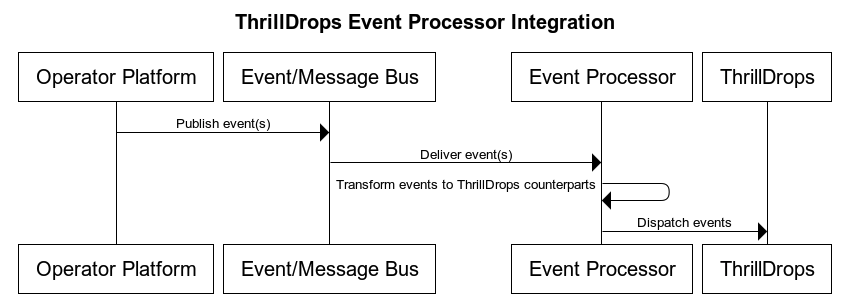
As can be seen in the diagram above, the data-flow is simple and straight forward and follows a standard path from event source to ThrillDrops.
- HTTP
POST /event: Primary ingestion path
Events are scoped by operator, brand and player, and only campaigns in Published, Running, or Paused states for that brand path are considered.
POST /event
Below is an example of a transaction event being sent from an operator platform's Event Processor to ThrillDrops:
- Request body (
application/json):
{
"operator_id": "thrilltech",
"brand_id": "brand1",
"player_id": "player_00001",
"timestamp": 1777852800,
"event_type": {
"Transaction": {
"provider_id": "game_provider",
"game_id": "a_game",
"gameround_id": "gameround_00001",
"bet_transaction_id": "bet_00001",
"currency": "EUR",
"game_bet": "10.00",
"bonus_bet": "0",
"real_bet": "10.00",
"jackpot_bet": "0",
"win_transaction_id": null,
"game_win": "0.00",
"jackpot_win": "0.00",
"is_free_spin": false,
"round_finished": true
}
}
}
Event Types
- PlayerLogin
- PlayerLogout
- Transaction
- Deposit
- Withdrawal
- ThrillPotsWinEvent
- ThrillPotsRaffleWinEvent
- ThrillPotsOptInEvent
Since each operating platform (PAM) is unique, ThrillDrops provides specific data structures that are expected on a per-event basis.
- Behavior:
EventType::PlayerLoginadditionally dispatches aPlayerAuthorizationEventfor ThrillGate validation.- Monetary events are converted into the campaign currency using the latest exchange rates before metric evaluation.
- ThrillPots jackpto contributions are identified by provider_id == "thrilltech" and game_bet == jackpot_bet
Operational Notes
- RNG probability is applied per trigger; the first trigger that passes probability wins for the event.
- Campaign status drives behavior:
Publishedevents can start campaigns;Pausedonly evaluates end triggers;Runningcan award drops and end campaigns. - Monetary conversions depend on the latest BitBridge multipliers;
Input Events
ThrillDrops supports multiple platform events that can be used to design simple (or sophisticated) ThrillDrops campaigns:
- External events
- Player Login Events
- Player Logout Events
- Transaction Events
- Deposit Events
- Withdrawal Events
- Internal Events
- ThrillPots Win Events
- ThrillPots Raffle Win Events
- ThrillPots Opt-In Events
Below you will find the required data schemas of each event:
External Events
Player Login Event
{
// Channel in which the player is logged in. Only these values are supported!
channel_type: "DesktopWeb" | "DesktopNative" | "MobileWeb" | "MobileNative",
// player's currency
currency: String,
// player's country
country: String | null,
// player's jurisdiction
jurisdiction: String | null,
// player's session token
session_token: String | null
}
Player Logout Event
{
channel_type: "DesktopWeb" | "DesktopNative" | "MobileWeb" | "MobileNative"
}
Transaction Event
{
provider_id: String,
game_id: String,
gameround_id: String,
bet_transaction_id: String | null,
currency: String,
game_bet: Number,
bonus_bet: Number,
real_bet: Number,
jackpot_bet: Number,
win_transaction_id: String | null,
game_win: Number,
jackpot_win: Number,
is_free_spin: Boolean,
round_finished: Boolean
}
Deposit Event
{
method_id: String,
currency: String,
amount: Number,
balance_after: Number | null
}
Withdrawal Event
{
method_id: String,
currency: String,
amount: Number,
balance_after: Number | null
}
Internal Events
The following events are consumed via redis event stream internally
ThrillPotsWinEvent
{
jackpot_id: String,
instance_id: String,
pot_id: String,
player_brand_id: String,
player_id: String,
currency: String,
amount: Number,
game_id: String | null,
contribution: Number | null,
contribution_currency: String | null,
payout_type: String | null
}
ThrillPotsRaffleWinEvent
{
raffle_id: String,
instance_id: String,
prize_id: String,
player_brand_id: String,
player_id: String,
currency: String,
amount: Number
}
ThrillPotsOptInEvent
player_brand_id: String,
player_id: String,
jackpot_id: String,
currency: String,
contribution: Number | null
ThrillDrops Wallet Integration
ThrillDrops makes use of the Standard Wallet API integration, specifically the Batch Transaction API.
For any client that has integrated the ThrillPots platform using the Standard API, if you have already provided support for Batch Transactions, you have no further work to do.
For those integrations that do not support the Batch Transactions API, you will need to provide an endpoint that supports the Batch Transaction protocol for CREDIT transactions.
More information can be found here and the API can be found here
Frontend Integration
ThrillConnect
Connecting and Subscribing
- Player socket:
wss://<thrillconnect>/v1/events/{operator_id}/{brand_id}?token=<player_token>¤cy=<player_ccy>(player token is validated with ThrillGate). - After the socket is open, subscribe to ThrillDrops by sending:
{
"SubscribeRequest": {
"events": [
{ "source": "thrilldrops", "event_type": "*" }
]
}
}
event_type can be one of the individual names below or * to receive all ThrillDrops events.
Message Envelope
All ThrillDrops events are sent with msg_type: "Event" and source: "thrilldrops":
{
"msg_type": "Event",
"source": "thrilldrops",
"msg_name": "CampaignDropWin",
"operator_id": "thrilltech",
"brand_id": "brand1",
"player_id": "player_00001",
"data": { /* event-specific payload */ },
"timestamp": 1715355347345
}
- Player sockets receive messages matching their operator/brand. Service sockets receive all ThrillDrops messages.
timestampcomes from the originating ThrillDrops message header.
Event Catalogue
CampaignDropWin
- When: A player wins a reward in a ThrillDrops campaign.
- Recipients: Targeted to the winning player’s operator/brand (and any subscribed service sockets).
- msg_name:
CampaignDropWin - data:
reward_id: Unique reward identifier within ThrillTech.reward_valid_from: UNIX timestamp (ms) when the reward becomes valid.reward_valid_to: Optional UNIX timestamp (ms) when the reward expires.name: Reward name.currency: Currency code for the reward value.value: Reward amount (decimal).image: Optional URI to an image for the reward.animation: Optional animation name for the reward.- Note: The source event includes a
campaign_id, but it is not forwarded in the websocket payload.
- Example:
{
"msg_type": "Event",
"source": "thrilldrops",
"msg_name": "CampaignDropWin",
"operator_id": "thrilltech",
"brand_id": "brand1",
"player_id": "player_00001",
"data": {
"reward_id": "reward-abc",
"reward_valid_from": 1715355000000,
"reward_valid_to": 1715441400000,
"name": "First Deposit Award",
"currency": "EUR",
"value": "20.00",
"image": "https://cdn.example.com/rewards/deposit-reward.png",
"animation": "realMoney"
},
"timestamp": 1715355347345
}
CampaignStarted
- When: A ThrillDrops campaign moves into the started state.
- Recipients: Broadcast to every brand listed in the campaign’s
allowed_brands. - msg_name:
CampaignStarted - data:
campaign_id: Identifier of the campaign that started.
- Example:
{
"msg_type": "Event",
"source": "thrilldrops",
"msg_name": "CampaignStarted",
"operator_id": "thrilltech",
"brand_id": "brand1",
"player_id": null,
"data": { "campaign_id": "cmp_2024_05" },
"timestamp": 1715355347345
}
CampaignEnded
- When: A ThrillDrops campaign ends.
- Recipients: Broadcast to every brand listed in the campaign’s
allowed_brands. - msg_name:
CampaignEnded - data:
campaign_id: Identifier of the campaign that ended.
- Example:
{
"msg_type": "Event",
"source": "thrilldrops",
"msg_name": "CampaignEnded",
"operator_id": "thrilltech",
"brand_id": "brand1",
"player_id": null,
"data": { "campaign_id": "cmp_2024_05" },
"timestamp": 1715355347345
}
Animation Driver
ThrillTech supplies a default Drops win animation to enrich the player experience during a Drop win. The animations driver is a JS library that takes care of win animations loading and playback. Animations are easily customizable and the driver allows for flexible cusomizations of the playback.
Source
Source code is avaiable for review & fork for all ThrilTech customers. You can find the driver at https://github.com/thrilltech-io/drops-animations-driver.
Overview
The JS driver exposes two functions:
preload(config, tier, muted)- loads the required assets per pased configuration object. when muted, sounds will not be loaded.run(config, tier, imgUrl, muted)- starts the animation sequence defined in the configuration. run will do load if assets are not already loaded.
The preload function is intended to provide separation of the loading phase, so that in case of unreasonably slow connection, stale loading can be detected and acted upon (for example using a fallback alert / win message if assets load didnt complete in a certain period).
Mute state cannot be controlled after the animation is run. The current sound preference should be passed to the run ( and optionally preload ) and based on that the defined in configuration sfx are either loaded or not.
Usage
import { preload, run } from "./main.js"
const config = "/configs/example.json"
const tier = "realMoney"
const imgUrl = "https://cdn.example.com/rewards/deposit-reward.png"
const muted = false
preload(config, tier, muted).then(()=>{
run(config, tier, imgUrl, amount)
})
Configuration
See example configurations in ./public/configs
Following is a full possible configuration with all settings commented inline.
{
"dom": {
// optional - skip "top" section if no header is required
"top": {
// id of top container
"id": "top-container",
// messages to display during presentation phase
"message": {
"id":"top-message",
"loading": "Loading...",
"starting": "Mystery Drop",
"looping": "Congratulations"
}
},
// optional - skip "bottom" section if no footer is required
"bottom": {
// id of bottom container
"id": "bottom-container",
// action button
"button": {
// id of the action button
"id": "action-button",
// actions after tickup
"end": {
"close": "CLOSE"
}
}
},
// enable touch controls during phase
"touch": {
// touch during tickup acts as skip
"close": true
},
// drop animation skin -
// skin provided and customised by thrilltech
"drops": {
"realMoney":{
// path of the spine export containing the mini tier animation
"source": "/drops/realMoney/realMoney.json",
// prefix of the animation for this tier
"prefix": ""
}
}
}
}
SFX
Sfx playback is triggered on animation events. Events are defined in the animation sources. Config contains top-level sfx section that defines all the available sounds. All sounds are optional.
Sound sources are defined as an array. All elements of the array refer to the same sfx. The intention is to provide multiple sfx formats and the runtime will automatically pick the one supported on the client system. Recommended formats to use are webm, wav and mp3. wav has the widest support accross devices, but is not as optimal as webm and mp3 in terms of filesize.
"sfx": {
"intro": ["/sfx/base/epic/intro.webm", "/sfx/base/epic/intro.wav"],
"outro": ["/sfx/base/epic/outro.webm", "/sfx/base/epic/outro.wav"]
}